
Quick verdict
- What it is
- Store information collected; an Apoku editorial summary is not yet published.
- At a glance
-
- Free to download
- In-app purchases
Categories and search queries
Official categories
- Weather
- Travel
Apoku categories
Key functions
| Function | Availability | Access | Scope | Evidence |
|---|---|---|---|---|
| Free app | Yes | Free | Context-specific | Store published |
| In-app purchases | Yes | Limited free | Context-specific | Store published |
Screens
App Store
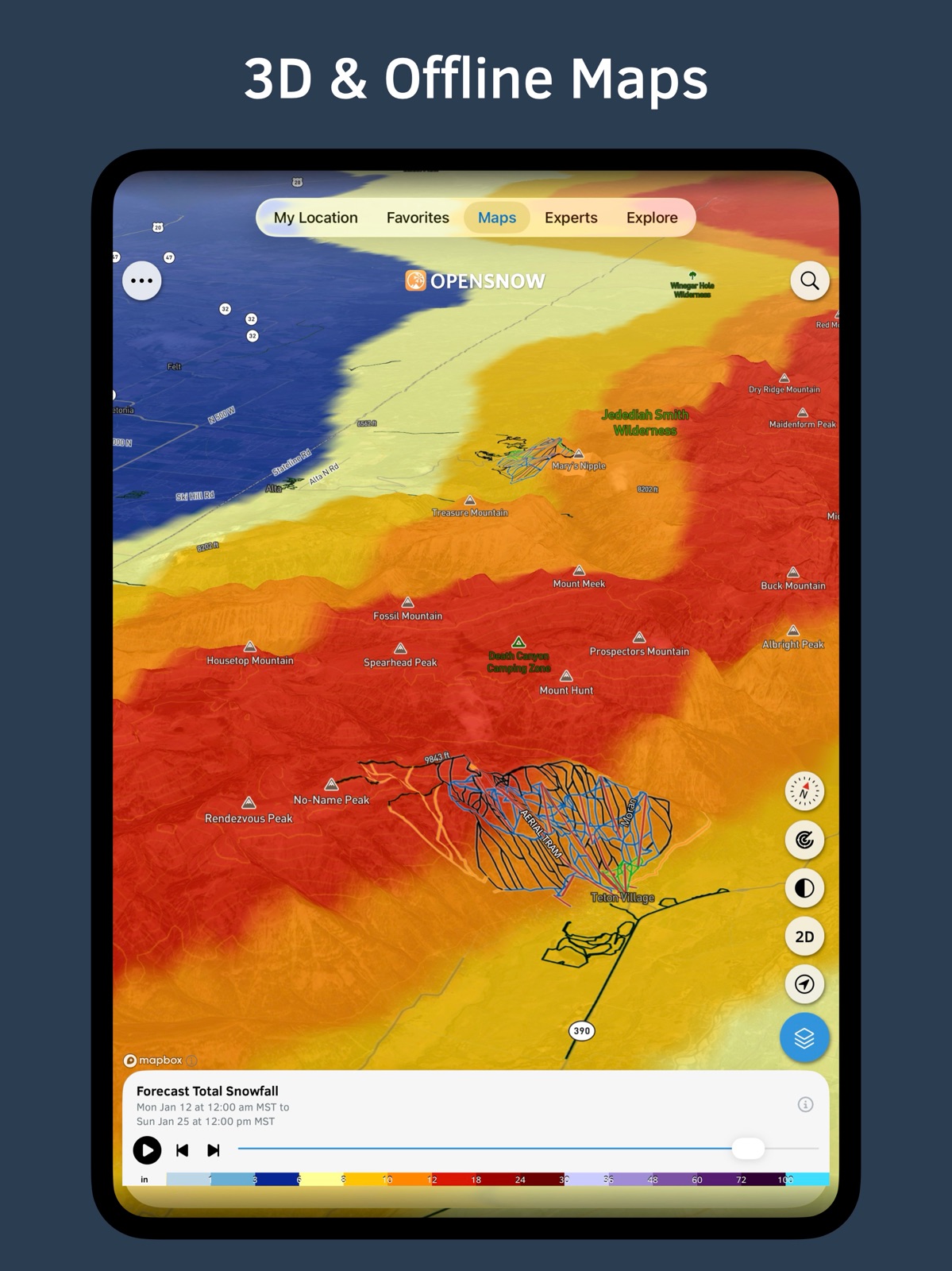
15 store screenshots



Pricing & paywalls
App Store
Shown for US
- Free to download
- In-app purchases
Ratings & reviews
App Store
Shown for US
-
5/5Best Weather App for Skiing
I love OpenSnow, and I’ve been using it as my main weather app for the last four years. Whether I’m going backcountry skiing or in-bounds, I always use OpenSnow. I’m also a weather nerd, so I’m constantly checking radar and snowfall predictions, keeping up to date with everything that’s going on — chasing powder is always the top priority! As a ski patroller, weather is also a super important thing to take into account when planning out our day. I’ve been almost always able to rely on OpenSnow for these last four years. While everything has tons of positives, there’s always the negatives — nothing can be perfect. I find myself (mostly this year / ski season with the implementation of the PEAKS AI Model), seeing a concerning fluctuation in the forecasted snowfall counts. Now, I’ve seen in other reviews that with the new PEAKS model, this very rapid fluctuation of the forecasted snow accumulation counts is viewed as a positive thing. However, when I’m planning out my ski days in the future, I can’t rely on the snow forecasts as much as I would like — it’s just changing too often; I will have to wait until my planned ski day is 2-3 days out before I can truly confirm that there’s going to be that much snow on that day or not. Overall, OpenSnow is dope, but there are some things that still could use some work. Thank you, OpenSnow team, for everything!
Carson Schildt · 31 Jul 2026
-
5/5The best of the best!
I used to ski a lot before I suffered a knee injury in early 2009 while on a trip to Mammoth Mountain. Although my skiing days are now few and far-between, I follow OpenSnow daily (multiple times a day in the Fall/Winter/Spring), particularly because of the unique understanding of the microclimates around the Tahoe Basin, where I live. Bryan Allegretto is an incredible Meteorologist! He may not know the exact number of people who look forward to and (no pressure!) depend on his forecasting prowess, but out of all of the available weather and climate forecasts/predictions for our area, I definitely look forward to and enjoy his amazingly-dynamic posts the most. The detailed descriptions along with pictures and maps that he provides with every post are engaging, knowledgeable, and fun! I know that he spends a lot of time preparing these posts, and they are appreciated and enjoyed beyond belief! Of course there are many other features of the App that are invaluable, and I use them all frequently. Thank you for all of the never-ending determination and hard work to keep OpenSnow as the very best of Weather Apps available to all of us “weather freaks!” Whether we ski, snowboard, or just love and look forward to those days that the sun isn’t “shining bright,” you guys are the best! Thank you!
Foxer Briefs · 31 Jul 2026
-
5/5THE Best Ski/Snowboard Weather App
I have used several winter sports forecasting apps over the years, and OpenSnow is the standout product in this space. Its forecasts are specific to the ski location you’re interested in (both at resorts and backcountry), and you can grab a forecast from any location on the globe. The forecasts are “no overhype/straight meteorological science” which I find differs from other sites which get overexuberant in their snow forecasts. Additionally, there are tons of added features including a wonderful array of maps and predictive models they share. For weather nerds, there are regular posts from their meteorologists that elaborate on weather patterns and weather forecasting. And, the product has evolved to be an all-season weather forecasting tool. I use it year round for my non-snow forecasts as well. They have multiple tiers of offerings, from free to paid to a new “premium” tier, so there’s a level for every user. The product continues to evolve wonderfully, so I’m a happy supporter of this new premium tier. If you’re in the market for a great weather app that is terrific for winter sports forecasting, but also can support your general weather forecasting needs, look no further.
PMTSDoc · 31 Jul 2026
-
5/5If you want details, this app is for you
This is truly the best weather app. I live in Steamboat Springs and am outside a lot. I need to know what to expect hour to hour and day to day so I can get on with my activities. This app tells me everything I need to know. I use it as much in the summer months as in winter. Lots of data at your finger tips like when it’s going to rain or snow, cloud cover, lightning, hourly temps, wind speed. Plus you can toggle from winter to summer mode. There are also some helpful overlay maps for smoke, wildfires and snowfall (powder days!). They have news and weekly weather predictions and all sorts of other deep dive weather stuff if you want to geek out. They EXPLAIN the weather. Love that the developers really are passionate about weather accuracy. I also like to keep tabs on other ski areas, towns where my family live and places I’m heading on vacation so I line up my favorites accordingly. It’s astonishing the amount of info in one place. One of my favorite apps. Not one single complaint. Kudos to the Open Snow team!
QueendeColleen · 31 Jul 2026
-
2/5Inconsistent, not worth price
I’ve used this app religiously the last 4-5 years and this app has managed to go downhill from the start. First and foremost the most consistent and detailed forecaster on this site is Evan Thayer. They frequently have one forecaster for large areas (Bob Ambrose AB/MT) and in turn lose out massively on consistency of forecasts, in addition to quality. Open Snow introduced a semi paywall 2 years ago which has led to its demise. First, they capped the quantity of forecasts you could read at 7 per week. This was announced pre-season and I was disappointed; yet understanding as they had brought on Evan and his forecasts are awesome! Several weeks later (I believe) they were lowering the quantity of forecasts you could read to 5 (which I think was further reduced to just 4) on the basis that their customers were reducing consumption of forecasts to stay under their premium pay wall. Now, I wake up today to find that Open Snow has decided to eliminate access to all forecasts other than a 3 sentence “summary” which they’ve instructed their forecasters to leave void of any useful information. This company has certainly fallen in line with the rest of the snow sports industry to gauge their supporters for as much $$$ as they can. Right on OS!
ARadDad4 · 31 Jul 2026
Privacy & accessibility
App Store
Privacy
- Data Not Linked to You — App Functionality — Contact Info — Email Address Developer declared
- Data Not Linked to You — App Functionality — Location — Precise Location Developer declared
- Data Not Linked to You — App Functionality — Usage Data — Product Interaction Developer declared
- Data Not Linked to You — Contact Info Developer declared
- Data Not Linked to You — Location Developer declared
- Data Not Linked to You — Usage Data Developer declared
Accessibility
No accessibility labels collected yet.
Versions
App Store
-
6.8.2
Thanks for using OpenSnow! This update includes: iOS 26 & Liquid Glass OpenSnow now uses Apple's Liquid Glass design guidelines throughout the app, along with additional updates to optimize for iOS 26. Severe Weather Alerts (Preview) Receive alerts from OpenSnow when severe weather is likely or occurring at your current location. These alerts come directly from Super-Res Radar + StormNet, our new AI-powered severe weather forecast system. Open the iOS app, tap the “My Location” tab, and turn “Alerts On” to get started. Please note that Severe Weather Alerts will move to a new “Premium” subscription tier later this fall. 15-Day Forecasts (Preview) Get unlimited access to detailed 15-day forecasts for any location on Earth. Go to the Favorites screen and/or any individual location screen to view the OpenSnow forecast for the next 15 days. Please note that 15-day forecasts will move to a new “Premium” subscription tier later this fall. Super-Res Radar + StormNet (Preview) Try our new AI-powered severe weather forecast system and super-res radar from 159 stations to help predict the risk of lightning, hail, tornadoes, and damaging winds for the continental United States. Go to the “Maps” tab and select the “Super-Res Radar + StormNet” overlay to get started. Please note that Super-Res Radar + StormNet will move to a new “Premium” subscription tier later this fall. Also, if you enjoy the app, please rate it and write a review. Thank you!
-
6.8.3
Thanks for using OpenSnow! This update includes: iOS 26 & Liquid Glass OpenSnow now uses Apple's Liquid Glass design guidelines throughout the app, along with additional updates to optimize for iOS 26. Severe Weather Alerts (Preview) Receive alerts from OpenSnow when severe weather is likely or occurring at your current location. These alerts come directly from Super-Res Radar + StormNet, our new AI-powered severe weather forecast system. Open the iOS app, tap the “My Location” tab, and turn “Alerts On” to get started. Please note that Severe Weather Alerts will move to a new “Premium” subscription tier later this fall. 11-15 Day Forecasts (Preview) Get unlimited access to detailed 15-day forecasts for any location on Earth. Go to the Favorites screen and/or any individual location screen to view the OpenSnow forecast for the next 15 days. Please note that 15-day forecasts will move to a new “Premium” subscription tier later this fall. Super-Res Radar + StormNet (Preview) Try our new AI-powered severe weather forecast system and super-res radar from 159 stations to help predict the risk of lightning, hail, tornadoes, and damaging winds for the continental United States. Go to the “Maps” tab and select the “Super-Res Radar + StormNet” overlay to get started. Please note that Super-Res Radar + StormNet will move to a new “Premium” subscription tier later this fall. Also, if you enjoy the app, please rate it and write a review. Thank you!
-
6.8.4
Thanks for using OpenSnow! This update includes: 11-15 Day Forecasts View multi-model 15-day forecasts for any location on Earth. Go to the Favorites screen and/or any individual location screen to view the OpenSnow forecast for the next 15 days. Please note that this will move to a new “Premium” subscription tier later this fall. Snowmaking (Wet Bulb Temp) Forecast View the snowmaking (wet bulb temp) forecast in OpenSnow using our forecast range charts for any ski resort location. Go to any ski resort screen, scroll down to the “Forecast Range” section, and select the “Snowmaking” chip to get started. Please note that this will move to a new “Premium” subscription tier later this fall. Severe Weather Alerts Receive alerts from OpenSnow when severe weather is likely or occurring at your current location. These alerts come directly from Super-Res Radar + StormNet, our new AI-powered severe weather forecast system. Open the app, tap the “My Location” tab, and turn “Alerts On” to get started. Please note that this will move to a new “Premium” subscription tier later this fall. Also, if you enjoy the app, please rate it and write a review. Thank you!
-
6.8.5
Thanks for using OpenSnow! This update includes: PEAKS Model PEAKS is our new in-house forecast model that is up to 50% more accurate in mountain terrain. PEAKS learns from past storms and transforms normal weather models (used by other apps) into sharper, more location-specific forecasts. Every precipitation, temperature, and wind forecast in OpenSnow will be powered by PEAKS for the 2025-2026 winter season. Available for Base and Premium subscribers. 11-15 Day Forecasts View multi-model forecasts for the next 15 days for any location on Earth. Go to the Favorites screen and/or any individual location screen to view the OpenSnow forecast for the next 15 days. Please note that this will move to our new Premium subscription in mid-November. Also, if you enjoy the app, please rate it and write a review. Thank you!
-
6.8.6
Thanks for using OpenSnow! This update includes: PEAKS Model PEAKS is our new in-house forecast model that is up to 50% more accurate in mountain terrain. PEAKS learns from past storms and transforms normal weather models (used by other apps) into sharper, more location-specific forecasts. Every precipitation, temperature, and wind forecast in OpenSnow will be powered by PEAKS for the 2025-2026 winter season. Available for Base and Premium subscribers. 11-15 Day Forecasts View multi-model forecasts for the next 15 days for any location on Earth. Go to the Favorites screen and/or any individual location screen to view the OpenSnow forecast for the next 15 days. Please note that this will move to our new Premium subscription in mid-November. Also, if you enjoy the app, please rate it and write a review. Thank you!
-
7.0.0
Thanks for using OpenSnow! This update includes: Premium Features The following features are now exclusively available to Premium subscribers: 11-15 Day Forecasts, Forecast Range (multi-model comparison), Global Storm Forecast, AI Overviews, Super-Res Radar + StormNet, and Severe Weather Alerts. Thank you so much for your continued support! AI Overviews Get a quick description of the weather and snow conditions at popular ski resorts around the world. The human forecasters at OpenSnow can’t cover all places at all times, so we created AI-written predictions using our internal forecast data to provide an in-depth summary of what skiers or riders will likely experience on the mountain. Go to any ski resort screen and scroll down to the “AI Overview” section under the “Snow Summary” tab to get started. PEAKS Model PEAKS is our new in-house forecast model that is up to 50% more accurate in mountain terrain. PEAKS learns from past storms and transforms normal weather models (used by other apps) into sharper, more location-specific forecasts. Every precipitation, temperature, and wind forecast in OpenSnow will be powered by PEAKS for the 2025-2026 winter season. Available for Base and Premium subscribers. Also, if you enjoy the app, please rate it and write a review. Thank you!
-
7.0.1
Thanks for using OpenSnow! This update includes: Premium Features The following features are now exclusively available to Premium subscribers: 11-15 Day Forecasts, Forecast Range (multi-model comparison), Global Storm Forecast Map, Super-Res Radar + StormNet, and Severe Weather Alerts. Thank you so much for your continued support! PEAKS Model PEAKS is our new in-house forecast model that is up to 50% more accurate in mountain terrain. PEAKS learns from past storms and transforms normal weather models (used by other apps) into sharper, more location-specific forecasts. Every precipitation, temperature, and wind forecast in OpenSnow will be powered by PEAKS for the 2025-2026 winter season. Available for Base and Premium subscribers. Al Overviews Get a quick description of the weather and snow conditions at popular ski resorts around the world. The human forecasters at OpenSnow can’t cover all places at all times, so we created AI-written predictions using our internal forecast data to provide an in-depth summary of what skiers or riders will likely experience on the mountain. Go to any ski resort screen and scroll down to the “Al Overview” section under the “Snow Summary” tab to get started. Also, if you enjoy the app, please rate it and write a review. Thank you!
-
7.1.0
Thanks for using OpenSnow! This update includes: PEAKS Model Following 18 months of development, our new PEAKS model is now live and creating every snow and precipitation forecast in OpenSnow. What is PEAKS? PEAKS is an AI (machine learning) model that is up to 50% more accurate in mountain terrain. PEAKS learns from past storms and transforms normal weather models (used by other apps) into sharper, more location-specific forecasts. This should provide you with higher confidence when searching for your favorite conditions. Included with Base and Premium accounts. Al Overviews Get a quick description of the weather and snow conditions at popular ski resorts around the world. The human forecasters at OpenSnow can’t cover all places at all times, so we created AI-written predictions using our internal forecast data to provide an in-depth summary of what skiers or riders will likely experience on the mountain. Go to any ski resort screen and scroll down to the “Al Overview” section under the “Snow Summary” tab to get started. Included with Base and Premium accounts. Bug Fixes & Settings Redesign We’ve fixed a bunch of new and old bugs in the app. Please send an email to [email protected] to alert us of anything that looks incorrect or broken, and we’ll get it fixed ASAP. We’ve also redesigned the Settings screen to help better manage your subscription, favorites, notifications, and preferences. Thank you so much for your continued support! Also, if you enjoy the app, please rate it and write a review. Thank you!
-
7.2.0
Thanks for using OpenSnow! This update includes: Maps Redesign With our "Maps" tab quickly becoming one of our most popular screens in the app, we spent the past few weeks updating the Overlays, Basemap, and Locations selection drawer. You can now more easily switch between your favorite Weather, Snow, Land Details, Air Quality, and Wildfire map overlays with our new pre-defined chips for each section. Go to the "Maps" tab and tap the blue overlays button in the bottom-right to get started. PEAKS Model Following 18 months of development, our new PEAKS model is now live and creating every snow and precipitation forecast in OpenSnow. What is PEAKS? PEAKS is an AI (machine learning) model that is up to 50% more accurate in mountain terrain. PEAKS learns from past storms and transforms normal weather models (used by other apps) into sharper, more location-specific forecasts. This should provide you with higher confidence when searching for your favorite conditions. Included with Base and Premium accounts. Bug Fixes We continue to squash new and old bugs in the app. Please send an email to [email protected] to alert us of anything that looks incorrect or broken, and we’ll get it fixed ASAP. Thank you so much for your continued support! Also, if you enjoy the app, please leave a 5-star review in the App Store. It helps a ton!
-
7.3.0
Thanks for using OpenSnow! This update includes: Powder Quality Optimize your schedule and plan trips around the best snow with our new Powder Quality forecast for the next 15 days. Go to any ski resort screen and view the new "Powder Quality" section under the "Snow Summary" tab to get started. Available for Base and Premium accounts. Maps Redesign With our "Maps" tab quickly becoming one of our most popular screens in the app, we spent the past few weeks updating the Overlays, Basemap, and Locations selection drawer. You can now more easily switch between your favorite Weather, Snow, Land Details, Air Quality, and Wildfire map overlays with our new pre-defined chips for each section. Go to the "Maps" tab and tap the blue overlays button in the bottom-right to get started. Bug Fixes We continue to squash new and old bugs in the app. Please send an email to [email protected] to alert us of anything that looks incorrect or broken, and we’ll get it fixed ASAP. Thank you so much for your continued support! Also, if you enjoy the app, please leave a 5-star review in the App Store. It helps a ton!
-
7.3.1
Thanks for using OpenSnow! This update includes: Radar + Precip-Type The Current and Forecast Radar overlays now include precipitation type to help you track rain and snow during and ahead of storms. Go to the “Maps” tab, tap the blue overlays button in the bottom-right, and select any Radar overlay to get started. Powder Quality Optimize your schedule and plan trips around the best snow with our new Powder Quality forecast. Go to any ski resort screen and view the new “Powder Quality” section under the “Snow Summary” tab to get started. Available for Base and Premium accounts. Maps Redesign With our “Maps” tab quickly becoming one of our most popular screens in the app, we spent the past few weeks updating the Overlays, Basemap, and Locations selection drawer. You can now more easily switch between your favorite Weather, Snow, Land Details, Air Quality, and Wildfire map overlays with our new pre-defined chips for each section. Go to the “Maps” tab and tap the blue overlays button in the bottom-right to get started. Bug Fixes We continue to squash new and old bugs in the app. Please send an email to [email protected] to alert us of anything that looks incorrect or broken, and we’ll get it fixed ASAP. Thank you so much for your continued support! Also, if you enjoy the app, please leave a 5-star review in the App Store. It helps a ton!
-
7.4.0
Thanks for using OpenSnow! This update includes: Conditions Summary Get a quick description of the weather and snow conditions at popular ski resorts around the world. We created written summaries with our PEAKS model to provide an easy-to-digest overview of what you will likely experience on the mountain. Go to any ski resort screen and scroll down under the "Snow Summary" tab to view the "Conditions Summary" section. Available for Base and Premium accounts. Precipitation by Model In addition to the multi-model Forecast Range graphs, you can now also view the snowfall and precipitation forecast for every model over the last three individual model runs in 12-hour and total storm timeframes. The more the models agree for each timeframe in the chart, the higher the confidence in the forecast, and vice versa. Go to any location screen and scroll down to the "Precipitation by Model" section to get started. Exclusively available for Premium accounts. Radar + Precip-Type The Current and Forecast Radar overlays now include precipitation type to help you track rain and snow during and ahead of storms. Go to the “Maps” tab, tap the blue overlays button in the bottom-right, and select any Radar overlay to get started. Available for Base and Premium accounts. Powder Quality Optimize your schedule and plan trips around the best snow with our new Powder Quality forecast. Go to any ski resort screen and view the new “Powder Quality” section under the “Snow Summary” tab to get started. Available for Base and Premium accounts. Bug Fixes We continue to squash new and old bugs in the app. Please send an email to [email protected] to alert us of anything that looks incorrect or broken, and we’ll get it fixed ASAP. Thank you so much for your continued support! Also, if you enjoy the app, please leave a 5-star review in the App Store. It helps a ton!
-
7.4.1
Thanks for using OpenSnow! This update includes: Radar + Precip Type The radar maps in OpenSnow now include precipitation type to help you track rain, snow, and mixed precip ahead of and during storms. Go to the “Maps” tab, tap the blue overlays button in the bottom-right, and select any Radar overlay to get started. Available for Base and Premium accounts. Conditions Summary Get a quick description of the weather and snow conditions at popular ski resorts around the world. We created written summaries with our PEAKS model to provide an easy-to-digest overview of what you will likely experience on the mountain. Go to any ski resort screen and scroll down under the “Snow Summary” tab to view the “Conditions Summary” section. Available for Base and Premium accounts. Powder Quality Optimize your schedule and plan trips around the best snow with our new Powder Quality forecast. Go to any ski resort screen and view the new “Powder Quality” section under the “Snow Summary” tab to get started. Available for Base and Premium accounts. Precipitation by Model In addition to the Forecast Range graphs, view the snowfall and precipitation forecast for every model over the last three individual model runs in 12-hour and total storm timeframes. The more the models agree for each timeframe in the chart, the higher the confidence in the forecast, and vice versa. Go to any location screen and scroll down to the “Precipitation by Model” section to get started. Exclusively available for Premium accounts. Bug Fixes We continue to squash new and old bugs in the app. Please send an email to [email protected] to alert us of anything that looks incorrect or broken, and we’ll get it fixed ASAP. Thank you so much for your continued support! Also, if you enjoy the app, please leave a 5-star review in the App Store. It helps a ton!
-
7.4.2
Thanks for using OpenSnow! This update includes: Radar + Precip Type The radar maps in OpenSnow now include precipitation type to help you track rain, snow, and mixed precip ahead of and during storms. Go to the “Maps” tab, tap the blue overlays button in the bottom-right, and select any Radar overlay to get started. Available for Base and Premium accounts. Precipitation by Model In addition to the Forecast Range graphs, view the snowfall and precipitation forecast for every model over the last three individual model runs in 12-hour and total storm timeframes. The more the models agree for each timeframe in the chart, the higher the confidence in the forecast, and vice versa. Go to any location screen and scroll down to the “Precipitation by Model” section to get started. Exclusively available for Premium accounts. StormNet App StormNet, our severe weather forecast model, is now available as a free standalone app. Go to the App Store and search for “StormNet” to get started. You can also always view StormNet in the OpenSnow app under the “Maps” tab. Bug Fixes We continue to squash new and old bugs in the app. Please send an email to [email protected] to alert us of anything that looks incorrect or broken, and we’ll get it fixed ASAP. Thank you so much for your continued support! Also, if you enjoy the app, please leave a 5-star review in the App Store. It helps a ton!
-
7.5.0
Thanks for using OpenSnow! This update includes: Recent Satellite Maps Get a near-real-time view of the land to help better understand current conditions. See if there is snow on a certain trail or mountain area, and how the landscape actually looks like within the last few days. The satellite data is available globally and is updated approximately every 3-5 days. Go to the “Maps” tab, tap the blue overlays button in the bottom-right, tap the “Land Details” tab, and select any “Recent Satellite” overlay to get started. Exclusively available for Premium accounts. Forecast Precipitation Maps Visualize the precipitation forecast in 2D or 3D for 6-hour, 12-hour, 24-hour, and 48-hour accumulation ranges, along with total precipitation. Go to the “Maps” tab, tap the blue overlays button in the bottom-right, and select any “Forecast Precipitation” overlay to get started. Base accounts can view the forecast for the next 10 days. Upgrade to Premium to view days 11-15. StormNet App StormNet, our severe weather forecast model, is now available as a free standalone app. Go to the App Store and search for “StormNet” to get started. You can also always view StormNet in the OpenSnow app under the “Maps” tab. Bug Fixes We continue to squash new and old bugs in the app. Please send an email to [email protected] to alert us of anything that looks incorrect or broken, and we’ll get it fixed ASAP. Thank you so much for your continued support! Also, if you enjoy the app, please leave a 5-star review in the App Store. It helps a ton!
-
7.5.1
Thanks for using OpenSnow! This update includes: Recent Satellite Maps Get a near-real-time view of the land to help better understand current conditions. See if there is snow on a certain trail or mountain area, and how the landscape actually looks like within the last few days. The satellite data is available globally and is updated approximately every 3-5 days. Go to the “Maps” tab, tap the blue overlays button in the bottom-right, tap the “Land Details” tab, and select any “Recent Satellite” overlay to get started. Exclusively available for Premium accounts. Forecast Precipitation Maps Visualize the precipitation forecast in 2D or 3D for 6-hour, 12-hour, 24-hour, and 48-hour accumulation ranges, along with total precipitation. Go to the “Maps” tab, tap the blue overlays button in the bottom-right, and select any “Forecast Precipitation” overlay to get started. Base accounts can view the forecast for the next 10 days. Upgrade to Premium to view days 11-15. StormNet App StormNet, our severe weather forecast model, is now available as a free standalone app. Go to the App Store and search for “StormNet” to get started. You can also always view StormNet in the OpenSnow app under the “Maps” tab. Bug Fixes We continue to squash new and old bugs in the app. Please send an email to [email protected] to alert us of anything that looks incorrect or broken, and we’ll get it fixed ASAP. Thank you so much for your continued support! Also, if you enjoy the app, please leave a 5-star review in the App Store. It helps a ton!
-
7.6.0
Thanks for using OpenSnow! This update includes: Custom Favorite Lists Create up to 10 custom favorite lists with up to 100 locations in each list. This is ideal for saving separate lists for your local mountains, upcoming trips, last-minute powder chases, favorite camping spots, and other locations that you just want to keep an eye on. Go to the Favorites screen and tap the list name in the upper left to get started. Recent Satellite Maps Get a near-real-time view of the land to help better understand current conditions. See if there is snow on a certain trail or mountain area, and how the landscape actually looks like within the last few days. The satellite data is available globally and is updated approximately every 3-5 days. Go to the “Maps” tab, tap the blue overlays button in the bottom-right, tap the “Land Details” tab, and select any “Recent Satellite” overlay to get started. Exclusively available for Premium accounts. Forecast Precipitation Maps Visualize the precipitation forecast in 2D or 3D for 6-hour, 12-hour, 24-hour, and 48-hour accumulation ranges, along with total precipitation. Go to the “Maps” tab, tap the blue overlays button in the bottom-right, and select any “Forecast Precipitation” overlay to get started. Base accounts can view the forecast for the next 10 days. Upgrade to Premium to view days 11-15. Bug Fixes We continue to squash new and old bugs in the app. Please send an email to [email protected] to alert us of anything that looks incorrect or broken, and we’ll get it fixed ASAP. Thank you so much for your continued support! Also, if you enjoy the app, please leave a 5-star review in the App Store. It helps a ton!
-
7.6.1
Thanks for using OpenSnow! This update includes: Custom Favorite Lists Create up to 10 custom favorite lists with up to 100 locations in each list. This is ideal for saving separate lists for your local mountains, upcoming trips, last-minute powder chases, favorite camping spots, and other locations that you just want to keep an eye on. Go to the Favorites screen and tap the list name in the upper left to get started. Recent Satellite Maps Get a near-real-time view of the land to help better understand current conditions. See if there is snow on a certain trail or mountain area, and how the landscape actually looks like within the last few days. The satellite data is available globally and is updated approximately every 3-5 days. Go to the “Maps” tab, tap the blue overlays button in the bottom-right, tap the “Land Details” tab, and select any “Recent Satellite” overlay to get started. Exclusively available for Premium accounts. Forecast Precipitation Maps Visualize the precipitation forecast in 2D or 3D for 6-hour, 12-hour, 24-hour, and 48-hour accumulation ranges, along with total precipitation. Go to the “Maps” tab, tap the blue overlays button in the bottom-right, and select any “Forecast Precipitation” overlay to get started. Base accounts can view the forecast for the next 10 days. Upgrade to Premium to view days 11-15. Bug Fixes We continue to squash new and old bugs in the app. Please send an email to [email protected] to alert us of anything that looks incorrect or broken, and we’ll get it fixed ASAP. Thank you so much for your continued support! Also, if you enjoy the app, please leave a 5-star review in the App Store. It helps a ton!
-
7.6.2
Thanks for using OpenSnow! This update includes: Custom Favorite Lists Create up to 10 custom favorite lists with up to 100 locations in each list. This is ideal for saving separate lists for your local mountains, upcoming trips, last-minute powder chases, favorite camping spots, and other locations that you just want to keep an eye on. Go to the Favorites screen and tap the list name in the upper left to get started. StormNet Lightning Overlay Upgraded the Lightning Map overlay to the enhanced StormNet Lightning Overlay, delivering improved lightning detection and more reliable storm tracking. Recent Satellite Maps Get a near-real-time view of the land to help better understand current conditions. See if there is snow on a certain trail or mountain area, and how the landscape actually looks like within the last few days. The satellite data is available globally and is updated approximately every 3-5 days. Go to the “Maps” tab, tap the blue overlays button in the bottom-right, tap the “Land Details” tab, and select any “Recent Satellite” overlay to get started. Exclusively available for Premium accounts. Forecast Precipitation Maps Visualize the precipitation forecast in 2D or 3D for 6-hour, 12-hour, 24-hour, and 48-hour accumulation ranges, along with total precipitation. Go to the “Maps” tab, tap the blue overlays button in the bottom-right, and select any “Forecast Precipitation” overlay to get started. Base accounts can view the forecast for the next 10 days. Upgrade to Premium to view days 11-15. Bug Fixes We continue to squash new and old bugs in the app, including fixing a crash related to land ownership overlays in high-density metro areas. Please send an email to [email protected] to alert us of anything that looks incorrect or broken, and we’ll get it fixed ASAP. Thank you so much for your continued support! Also, if you enjoy the app, please leave a 5-star review in the App Store. It helps a ton!
-
7.7.0
Thanks for using OpenSnow! This update includes: Forecast Anywhere Details We now display a full preview card with the Weather, Snow, and Forecast Range details when any location is tapped on the Maps screen. Go to the “Maps” tab and tap anywhere (on land) to get started. Custom Favorite Lists Create up to 10 custom favorite lists with up to 100 locations in each list. This is ideal for saving separate lists for your local mountains, upcoming trips, last-minute powder chases, favorite camping spots, and other locations that you just want to keep an eye on. Go to the Favorites screen and tap the list name in the upper left to get started. Also, if you enjoy the app, please leave a 5-star review in the App Store. It helps a ton!
-
7.7.1
Thanks for using OpenSnow! This update includes: Forecast Anywhere Details We now display a full preview card with the Weather, Snow, and Forecast Range details when any location is tapped on the Maps screen. Go to the “Maps” tab and tap anywhere (on land) to get started. Custom Favorite Lists Create up to 10 custom favorite lists with up to 100 locations in each list. This is ideal for saving separate lists for your local mountains, upcoming trips, last-minute powder chases, favorite camping spots, and other locations that you just want to keep an eye on. Go to the Favorites screen and tap the list name in the upper left to get started. Also, if you enjoy the app, please leave a 5-star review in the App Store. It helps a ton!
-
7.7.2
Thanks for using OpenSnow! This update includes: Forecast Anywhere Details We now display a full preview card with the Weather, Snow, and Forecast Range details when any location is tapped on the Maps screen. Go to the “Maps” tab and tap anywhere (on land) to get started. Custom Favorite Lists Create up to 10 custom favorite lists with up to 100 locations in each list. This is ideal for saving separate lists for your local mountains, upcoming trips, last-minute powder chases, favorite camping spots, and other locations that you just want to keep an eye on. Go to the Favorites screen and tap the list name in the upper left to get started. Performance Improvements This update includes bug fixes for severe weather alerts and improves the my location zoom responsiveness on the Maps screens. Please send an email to [email protected] with any bug reports, and we’ll work to get them fixed ASAP. Also, if you enjoy the app, please leave a 5-star review in the App Store. It helps a ton!
-
7.7.3
Thanks for using OpenSnow! This update includes: Forecast Anywhere Details We now display a full preview card with the Weather, Snow, and Forecast Range details when any location is tapped on the Maps screen. Go to the “Maps” tab and tap anywhere (on land) to get started. Custom Favorite Lists Create up to 10 custom favorite lists with up to 100 locations in each list. This is ideal for saving separate lists for your local mountains, upcoming trips, last-minute powder chases, favorite camping spots, and other locations that you just want to keep an eye on. Go to the Favorites screen and tap the list name in the upper left to get started. Performance Improvements This update includes bug fixes for severe weather alerts and improves the my location zoom responsiveness on the Maps screens. Please send an email to [email protected] with any bug reports, and we’ll work to get them fixed ASAP. Also, if you enjoy the app, please leave a 5-star review in the App Store. It helps a ton!
-
7.8.0
Thanks for using OpenSnow! This update includes: Air Quality Sensor Details Tap an air quality station on the map to view detailed charts and historical data for that sensor. Go to the "Maps" tab, select the "Air Quality" category, tap the "Air Quality Real Time" layer, and tap any station to get started. Precipitation Weather Stations View precipitation measurements directly on the map. When a precipitation variable is selected, station markers fade according to the amount measured, making it easier to distinguish areas with measurable precipitation from zero readings. Bug Fixes We continue to squash new and old bugs in the app. Please send an email to [email protected] with any bug reports, and we’ll work to get them fixed ASAP. Also, if you enjoy the app, please leave a 5-star review in the App Store. It helps a ton!
-
7.9.0
· 30 Jul 2026
Thanks for using OpenSnow! This update includes: Powder Finder on Maps The Powder Finder is now within our Maps tab. Search the world for the deepest snow forecasts, snowfall history, and snow reports. Find this by going to Maps > Overlays > Snow, tap "Powder Finder", then choose your options at the top of the screen. Bug Fixes This update also improves map legends and fixes visual issues affecting map overlays and horizontal weather rows. Please send an email to [email protected] with any bug reports, and we'll work to get them fixed ASAP. Also, if you enjoy the app, please leave a 5-star review in the App Store. It helps a ton!
Alternatives
- WeatherLink — Same category + similar ratings
- SpaceWeatherLive — Same category + similar ratings
Availability by market
- US
Data quality & evidence
- Page completeness
- Live store listing
- Last verified
- 31 Jul 2026
- Sources
- App Store
- Apoku editorial summary has not been published yet.