
Quick verdict
- What it is
- Store information collected; an Apoku editorial summary is not yet published.
- At a glance
-
- Free to download
Categories and search queries
Official categories
- Lifestyle
Apoku categories
Key functions
| Function | Availability | Access | Scope | Evidence |
|---|---|---|---|---|
| Free app | Yes | Free | Context-specific | Store published |
Screens
App Store
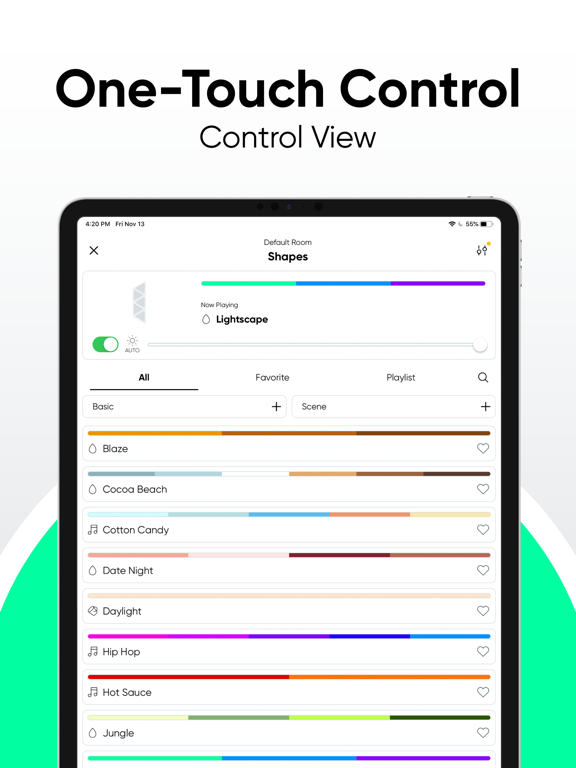
27 store screenshots


Pricing & paywalls
App Store
- Free to download
Ratings & reviews
App Store
-
1/5Great Lights, HORRIBLE APP
This, without a doubt, the most rage inducing app on my devices. Want to shave 4-5 years off your life? Try to update your Nanoleaf lights. The update process is only for the most masochistic among us. Think all you have to do is hit the update button? No…you’ll need to do it over and over because this WILL NEVER work on the first try. I’ve got several Nanoleaf devices from strips to bulbs, and they all have the same issues updating. Updates will outright fail immediately forcing you to hit retry over and over. An update might get all the way to 80-90% after 7-8min and then fail, forcing you to restart from square one. Then, the worst, is that you’ll think the update completed just fine. You’ll think this because it shows completed and shows the current firmware version. If feels like you threw the ring in the lava and it’s job done, now back to the shire…what a trek. Now open the app again and you’ve got a significant chance of the light being back to the version it was previously which means you get to try and update it again, and again, and again… I want to point out this isn’t a one off, isn’t tied to one version of the app, this has been my experience for several years now. Nanoleaf seems to be capable of making quality bulbs, but they seem to be completely incapable of making a functional update process for those bulbs.
fdefunct · 30 Sep 2026
-
1/5Technology that doesn’t work right or remember settings
Nanoleaf firmware updates still has same issues. I have three Nanoleaf Matter lights. Even when WIFi is in same room, lights randomly work / don’t work, delayed in taking commands, and eventually don’t take commands after turning lights off/on daily after a month or weeks (again and again). Requires re-adding to Apple Home then Nanoleaf again! Not worth it. My off brand outside lights that are Bluetooth always work reliably even when I’m in my home (mesh / not Nanoleaf / off brand). My off brand outside Wi-Fi lights will work all of the time (Google Assistant). However, the Nanoleaf Matter lights are the most unreliable where one or two fail, delay or don’t take a command even in the same room (status is Thread if I wait and sometimes Wi-Fi) in the same room, then eventually doesn’t remember settings requiring resetup. It’s super annoying how unresponsive these lights are for the amount of money I spent on them (so giving it one star for untested technology and can not retain settings). I have plenty of border routers Apple TV (previous), Google Home 2nd Gen and Echo Dot (5th). Annoyingly the lights don’t appear to work with Alexa or share out to Alexa (tried various ways of paring with codes). Garbage right now. Maybe I’ll try next year if I remember.
oo20 · 30 Sep 2026
-
1/5Devices Constantly go Unresponsive
I’m absolutely tired of how bad the software for this lights is. All the nanoleaf lights are great but the app is complete garbage. Every other month I get an unresponsive device notification that I have to waste hours troubleshooting because is never as easy as power cycling. I always have to do hard resets to get the thing going again. The most annoying part is that every time I hard reset I have to set time aside to manually update all my smart light switches so they can control again whichever light stopped working for no reason at all. Not just that, I have shortcuts for different lighting settings that I also have to manually update. As of a couple months ago I began to get a newer issue which now prevents me from adding the device I was forced to remove and hard reset because for some dumb reason the app won’t allow it to connect to the network even when the credentials are correct and the network is in the 2.4 frequency. I had it with this dumb app. I have owned Nanoleaf products since 2019 and it has always been the same nonsense of a device stopping to respond. Typically after updates. Its a light, why do I need to constantly update the lights to produce photons? Most people that have issues is because of the updates. Everyone I know that owns nanoleaf products experience the same issue, after every update at least one light decides to stop working. I’m done and I will be looking for other alternatives. People, don’t waste your money with this company unless you don’t mind wasting around an hour minimum troubleshooting your lights every other month.
Aldextrem · 30 Sep 2026
-
3/5I want to start with: I love the lights...but...
...why must the app be so dang confusing!? I’ve got other smart lights and devices and none come across as befuddling as this app does. I’ve updated to the latest app. I’ve checked and triple checked all of the menus. I’ve swiped, tapped, double tapped, multiple finger tapped, heck I’ve even deleted and re-downloaded the app and it’s still problematic. For starters I can’t for the life of me figure out how to delete rooms I’d previously created. I can’t drag lights to the trash. I can move them from room to room but that’s kinda pointless when I’ve moved twice since owning these lights and no longer have most of those rooms. It’s generally a very plain app that attempts to be simplistic but overly complicated the process of renaming, moving, or creating and deleting rooms and lights. It’s also very inconsistent when it comes to hitting some of the menus as they will sometimes refuse to do anything. That leaves you second guessing as if to if there really is or isn’t an option to access there. Please. Simplify this app but keep the necessities obvious. I’m on team nanoleaf. I want you guys to succeed.
PANdaRUZ · 30 Sep 2026
-
1/5Nonintuitive app / bad support
I spent a couple of hours with tech support via chatting to try to find out simple items such as how to create and save a custom color for lighting (a19 bulbs). The app is not intuitive for such simple tasks. Except using the app occasionally to update the firmware, I will delete it and use the iOS Home app / HomeKit alone to run the nice Nanoleaf lights. The tech support experience for this app left me beyond frustrated - the worst tech support I can remember. When I asked for written or video instructions on setting up a light scene and also on how to save a color, he sent me a link to a video for which he stated “Here is a video although it is a bit outdated”. First, it was not relevant to the current version of the app. It was so outdated that a year ago, a commenter stated the video should be deleted due to it being outdated. I am incredulous that there are no written instructions for the app/product. Yes there are current videos for this app, but they lack some important details and are unclear in areas such as using a threading device other than Google’s (the video seemed to imply that the HomePod mini would not work, which I don’t believe is correct). I recommend using only iOS Home app for the a19 Nanoleaf lights.
ja@mac · 30 Sep 2026
Privacy & accessibility
App Store
Privacy
- Data Linked to You — App Functionality — Contact Info — Email Address Developer declared
- Data Linked to You — App Functionality — Contact Info — Name Developer declared
- Data Linked to You — App Functionality — Identifiers — User ID Developer declared
- Data Linked to You — Contact Info Developer declared
- Data Linked to You — Identifiers Developer declared
- Data Not Linked to You — Analytics — Diagnostics — Crash Data Developer declared
- Data Not Linked to You — Analytics — Diagnostics — Other Diagnostic Data Developer declared
- Data Not Linked to You — Analytics — Diagnostics — Performance Data Developer declared
- Data Not Linked to You — Analytics — Search History Developer declared
- Data Not Linked to You — Analytics — Usage Data — Product Interaction Developer declared
- Data Not Linked to You — App Functionality — Diagnostics — Crash Data Developer declared
- Data Not Linked to You — App Functionality — Diagnostics — Other Diagnostic Data Developer declared
- Data Not Linked to You — App Functionality — Diagnostics — Performance Data Developer declared
- Data Not Linked to You — App Functionality — Location — Coarse Location Developer declared
- Data Not Linked to You — Diagnostics Developer declared
- Data Not Linked to You — Location Developer declared
- Data Not Linked to You — Search History Developer declared
- Data Not Linked to You — Usage Data Developer declared
Accessibility
No accessibility labels collected yet.
Versions
App Store
-
11.10.0
· 17 Aug 2026
- Improved performance for Matter Essentials over Thread - Minor bug fixes
-
11.4.3
- Bug fixes
-
11.4.4
- Bug fixes.
-
11.4.5
- Fixed an issue with WeChat sign-in - Fixed Sync+ configuration for Light Panel devices - Fixed device disappearing right after pairing - Minor bug fixes and UX improvements
-
11.4.6
- Crash fixes.
-
11.4.7
- Fixes Homekit Essentials and Matter devices disappearing after pairing. - Fix 4D calibration when lightstrip is not attached. - Fix NFC pairing for 1D devices. - Fix LightPanel control over the cloud. - Crash fixes.
-
11.5.0
- Added a brand new Routine feature for managing schedules with Light Panels - Introduced a new Paint Scene Creator for Wi-Fi light strips - Improved the Palette Creator - Fixed bugs related to Touch Actions - Fixed app crashes - Minor UI/UX improvements
-
11.5.1
- Minor bug fix
-
11.6.0
- Added support for new Routines on Matter Wi-Fi products. - Added support for Rope Light layout capture. - Improved Matter Wi-Fi products connectivity (Firmware update required). - UI/UX improvements across scenes, routines, group settings, pairing flows, and motion handling. - Improved cloud backup & sync - Minor bug fixes
-
11.6.1
- 4D supports Sense+. - Bug fixes. - connectivity improvements.
-
11.7.0
- New Paint Scene Creator for Light Panels - Support Mix layout for Layout Assistant (Shapes & Lines) - Improved WiFi Products connectivity - Improved WiFi provisioning UX performance - Minor Bug Fixes and UI/UX improvements
-
11.7.1
- Support Pain feature for SecretLab Light Strip. - Support Fantaqi Altar Monitor Stand Product. - Minor Bug Fixes and UI/UX improvements.
-
11.7.2
- Support Paint feature for SecretLab Light Strip. - Support Fantaqi Altar Monitor Stand Product. - Minor Bug Fixes and UI/UX improvements.
-
11.7.3
- iOS 26 compatibility support. - Bug fixes.
-
11.7.4
- Minor bug fixes.
-
11.8.0
- Newly designed Device Control View - Download and discover new scenes from within the Control View
-
11.8.1
- Crash fixes
-
11.8.2
- Minor bug fixes
-
11.9.0
- Improved connection stability for Matter over WiFi products
-
11.9.1
- Minor bug fixes
-
11.9.2
- Minor bug fixes
-
11.9.3
- Minor bug fixes
-
11.9.4
- Minor bug fixes
-
11.9.5
- Minor bug fixes
-
11.9.6
- Minor bug fixes
-
11.9.7
· 2 Jul 2026
- Minor bug fixes
Alternatives
- Meross — Same category + similar ratings
- Home Assistant — Same category + similar ratings
Availability by market
- US
Data quality & evidence
- Page completeness
- Live store listing
- Last verified
- 30 Sep 2026
- Sources
- App Store
- Apoku editorial summary has not been published yet.