
Quick verdict
- What it is
- Store information collected; independent summary not yet available.
- At a glance
-
- Free to download
Categories and search queries
Official categories
- Education
- Productivity
AppCorpus categories
Key functions
| Function | Availability | Access | Scope | Evidence |
|---|---|---|---|---|
| Free app | Yes | Free | — | Store published |
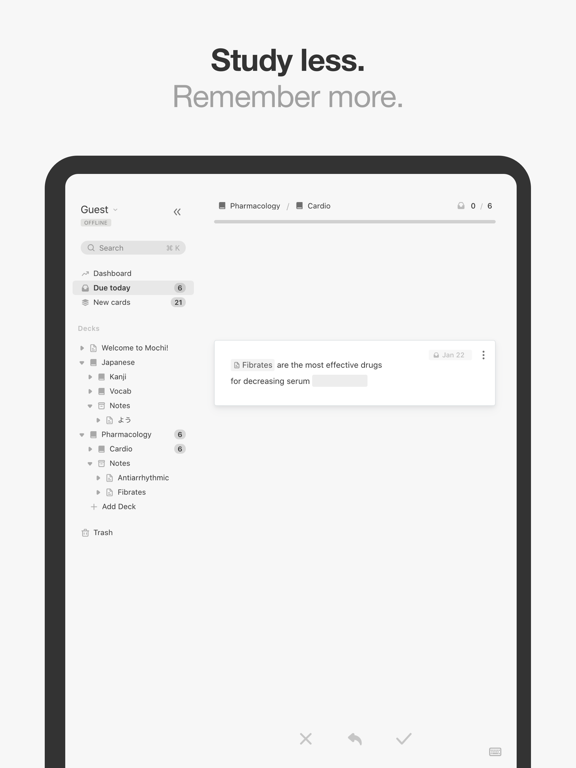
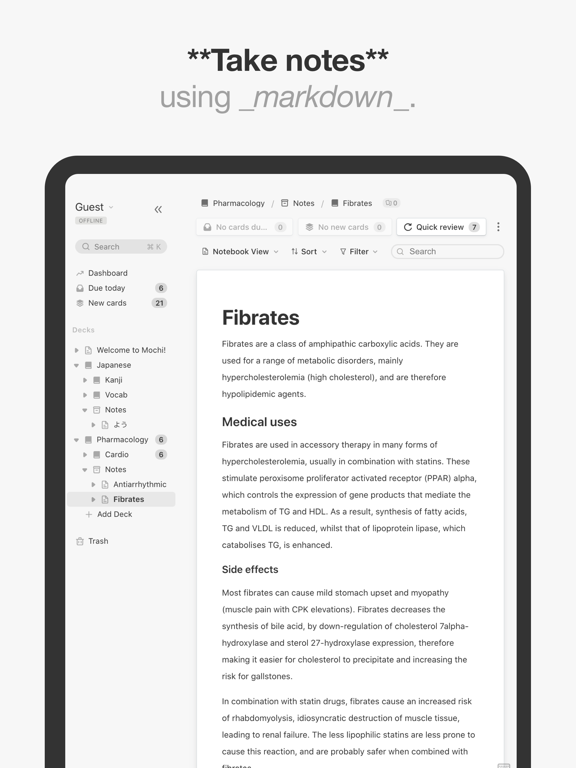
Screens
App Store
18 store screenshots


Pricing & paywalls
App Store
- Free
Ratings & reviews
App Store
-
5/5A College Student's Review
I have been using Mochi for about a year now, and this is what I think of it. I used the Free Plan on my laptop for an entire semester of college, and it was phenomenal. No more flipping through 200 notecards per class. The best part of this app, I think, is spaced repetition. I was able to add new cards with every new class, but because Mochi waits longer to show you a card again after you review it successfully, the amount of cards I had to go through each day to stay on track barely increased. Additionally, multi-sided cards and hidden text features helped me organize a lot of complex topics into single cards (memorizing facts about Costa Rica, I was able to block out its capital, medium of exchange, and location on separate sides of the same card). This semester, I subscribed to the Pro plan - half to actually synch the data with my phone, and half to say thank-you to the developer, Matthew Steedman. With the Pro plan, I can now review cards with my phone while waiting in line, or in a shady location i wouldn't bring my laptop to. I also added a bunch of nested decks to further organize. Overall I love the app. If i could change a few things, I would include minigames like Quizlet Match to help make reviewing the cards more fun, and maybe work on some bugs on different-sized screens. when I shrink the window to certain sizes, the app *does* freak out a little bit, but I just close it and open again, resizing the window. Thank you Matthew Steedman for a great tool.
TAC15803 · 6 Aug 2026
-
5/5The Best Anki Alternative
I don’t like Anki. I know that people swear by it, but the terrible UI makes it unusable to me. I’ve tried multiple Anki alternatives, but none of them had functioning spaced repetition. All I wanted was for an app to tell me I have a set number of cards due for review, and this is it and more! This app perfectly balances a pleasant UI with user customization. I love being able to hide text so I can make cards for verb conjugations. None of the other alternatives I tried allowed that. The best part is that it’s free! Please allow us to donate within the app, because I would love to give you money <3 (Edit: I would like to add that I figured out how to give him money. You can pay for a premium membership through the website and get additional features. I think this could’ve been made clearer in the app, but that’s okay! The subscription is so inexpensive, and this app does everything. It has saved me so much money I was spending on apps that do less!)
SmartWater Drinker · 6 Aug 2026
-
4/5Zoomable attachments, manual review, ability to sort?
I like the clean interface and aesthetics, but some counterintuitive behaviors keep it from being ideal. I use it primarily for notecards with attachments, often screenshots of printed materials with photos and graphics; along with text-based flashcards (with some attachments). Double-tapping on a card with an attachment brings up an identically sized ‘preview,’ and the option to “Remove Attachment,” which is counterintuitive and makes the app feel less secure as a repository. (I’m afraid I’ll delete it.) As a workaround, I’m copying text from already printed materials, pasting it into the card, and formatting it so that it is readable. Some useful information from the original is lost, along with being time consuming. (Ideally, I want to append my text notes/summary to a readable source.) When I select a flashcard, I’m looking to manually review. The full preview prevents me from using the app in this way. Safer attachments, image resizing, sorting of decks and the ability to manually review would be appreciated. Beautiful app, these issues aside!
kurt_s · 6 Aug 2026
-
5/5Finally, an Anki alternative 🙏🏻
Anki users are very dedicated to Anki. I studied Japanese for about four years with it and always hated it but there were no other options. As a UI designer, the entire interface and UX made my reviews feel more like a chore. I was actually looking for a cleanup add-on for Anki when Mochi came up on my Google Search and I absolutely loved playing with it. While my four-years-deep decks on Anki will stay there for now, I'm just starting to learn Korean and love how easy it is to make cards. I really wish I had this app when I started learning Japanese. I love seeing that it's continuously updated as well. My only wishlist item right now is ability to change the template on reverse cards. If this is possible, I haven't figured out how to do it. Thanks for such a great app! Makes me excited to learn a new language.
timelessworld · 6 Aug 2026
-
5/5Best flashcard app (seriously)
I was nervous about this one at first because it had fewer reviews than a lot of other card apps, but the reviews were all good, so I gave it a shot. I MEANT to try 1 or 2 other apps after trying this one, but… I don’t need any others!! This is exactly what I was looking for in a flashcard app. Cards are simple, clean, and easy to make. Spaced repetition reviews work wonderfully, as always, and I love being able to change the repetition interval and customize how many new cards I learn each day. I also like the dashboard letting me check my numbers (feels great to see retention go up!). Making custom card templates is AMAZING, and not hard, too! I was able to make a template that works perfectly for my attempts at learning kanji, and all the kanji cards I add take that template automatically! The whole app is amazingly smooth and easy to use. It works wonderfully and manages to have all the features I need in a flashcard app, FOR FREE. When I finish college and have more money I might get a subscription just to support the app creator (thank you!!), and for some of the perks too, but it’s amazing how much you get from Mochi for free. (And no ads! 💙) My ONLY complaint is that sometimes I swipe “yes ✅” on a card by accident instead of tapping to see the next side of the card, but that’s me being clumsy, not necessarily the app’s fault (though it could be helpful to have a feature preventing you from swiping until you’ve tapped at least once 🤔). Enough rambling: if you are looking for a flashcard app for any purpose (especially Japanese, this app feels almost tailored to Japanese learners, but still any subject will work), give this one a try. It has earned its place on my homescreen, outside of all my folders (a rare honor on my phone). ⭐️⭐️⭐️⭐️⭐️‼️
Nicknamethatsnottakenyet1234 · 6 Aug 2026
Privacy & accessibility
App Store
Privacy
- Data Not Collected Developer declared
Accessibility
No accessibility labels collected yet.
Versions
App Store
-
1.17.10
A new experimental option was added to improve bulk attachment syncing. Various bug fixes and improvements.
-
1.17.12
Fixed an issue with global latex macros not working correctly.
-
1.17.13
- Fixed a regression in the template field editing input box. - Fixed an issue where parent tags were not collapsible in the sidebar. - Fixed an issue where child tags were not sorted properly. - Fixed a regression where card metadata was not formatted properly.
-
1.17.14
You can now add attachments directly to templates.
-
1.17.9
Various bug fixes and improvements.
-
1.18.0
- Added a preview / confirmation window for importing mochi and anki files. - Added sort option in cram mode. - Various tweaks and improvements.
-
1.18.10
- The official Mochi forums have been released - Release table view beta preview. - Improved CSV file parsing. - Various bugfixes and improvements.
-
1.18.11
Added the ability to create daily study reminders in the form of push notifications.
-
1.18.12
- Previous period graphs have been added to the dashboard. - The export function has been rewritten to use less memory.
-
1.18.3
- Updates to the dashboard. - Various bug fixes and improvements.
-
1.18.4
Added an option for templates to display each side independently. Added an option when reviewing cards from notebooks to reveal additional context around the card. You can now click on image attachments in a card modal to view their natural size. When switching cards to a new template, the app will now attempt to migrate fields from the old template to the new template based on the field names. Various fixes and improvements.
-
1.18.7
- Improve search performance and accuracy. - Fix parent tags in sidebar not collapsing in some cases. - Fix an issue with the dashboard freezing in certain cases. - Fix card sides not showing separately.
-
1.18.9
Various bug fixes and improvements.
-
1.19.0
Added a beta version of the FSRS algorithm.
-
1.19.1
- Sort decks by name in the deck picker dropdown on the dashboard page. - Set a max retention rate of 1 for FSRS review settings. - Fix account settings modal. - Expose reset review history action for cards. - Fixed external links not opening.
-
1.19.2
- Added a review heatmap to the dashboard. - Added a button to reveal all answers for a multi-answer input components. - Improved performance / accuracy of referencing cards using @ and [[ auto-complete menus. - You can now reference cards without including the ID. It will match a card with the same title or primary field value. - Cards in nested decks will now be sorted by deck first, then card position. - Fixed an issue where clicking an item in the auto-complete menu did not work properly. - Fixed an issue with multi-line input in dynamic fields not rendering properly. - Fixed an issue with checkbox fields on templates erroneously triggering a "Discard changes?" dialog when no changes were made to a card using the template. - The translation component no longer strips markdown and new lines from input text. - Fixed an issue with the autocomplete functionality with [[ - Improved performance of the \"Jump to\" global search. - Improved the display of chinese-to-chinese dictionary results.
-
1.20.8
New Settings window. Various performance improvements and bug fixes.
-
1.21.11
Updated the English to Korean dictionary to use the National Institute of Korean Language dictionary.
-
1.21.14
- The origin (hanja) is not included in Korean dictionary results. - Improved performance in several areas. - Fixed an issue where stacked inputs made it difficult to focus them. - Added back the "Show card title" setting.
-
1.21.15
Fixed a regression with undo-ing reviews + improved undo performance overall. Fixed an issue with pinned cards not appearing on the side nav.
-
1.21.16
- Added a setting to display a dedicated "Show next side" button on the review page. - Smoother latex rendering. - Fixed some issues with attachments in cloned decks. - Updates to the Japanese locale.
-
1.21.17
· 29 Jun 2026
- Added a new output field to dictionary fields that lets you extract parts of the dictionary results. - Added the ability to delete individual reviews from the review history. - Various bug fixes and improvements.
-
1.21.4
Various performance and stability improvements.
-
1.21.5
Fixed an issue where the app was crashing on iOS version less than 18.
-
1.21.8
- Reduce pending writes banner - Use natural sorting when sorting by card title - Fix undo not working after moving card to trash - Fix swiping to dismiss card while editing
Alternatives
- Plain Flashcards: AI & Study — Same category + similar ratings
- RemNote - Notes & Flashcards — Same category + similar ratings
- Amazing Flash Cards — Same category + similar ratings
- Flashcards Maker — Same category + similar ratings
- Flash Cards - Flashcards Maker — Same category + similar ratings
- Flashcards World - AI Cards — Same category + similar ratings
Availability by market
- US
Data quality & evidence
- Page completeness
- Live store listing
- Last verified
- 6 Aug 2026
- Sources
- App Store
- Independent summary has not been published yet.