
Quick verdict
- What it is
- Store information collected; independent summary not yet available.
- At a glance
-
- Free to download
Categories and search queries
Official categories
- Productivity
AppCorpus categories
Key functions
| Function | Availability | Access | Scope | Evidence |
|---|---|---|---|---|
| Free app | Yes | Free | — | Store published |
Screens
App Store
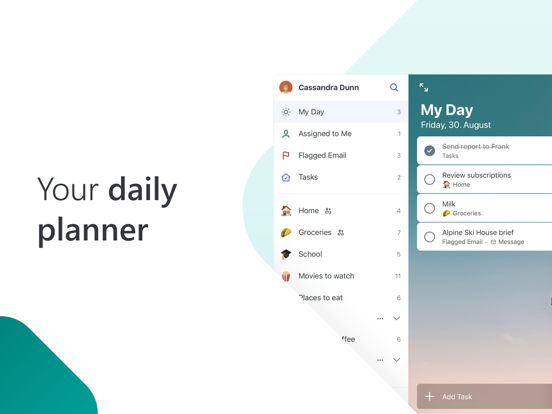
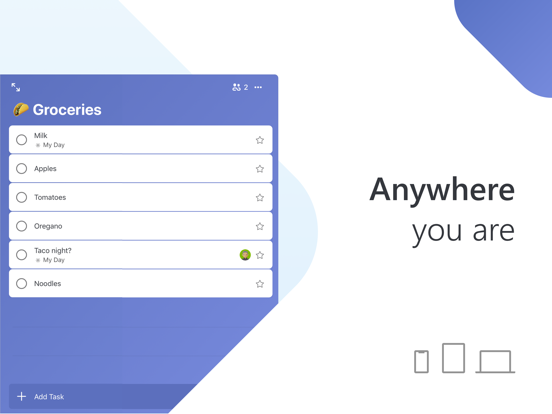
16 store screenshots


Pricing & paywalls
App Store
- Free
Ratings & reviews
App Store
-
5/5A perfect digital brain
This is BY FAR my absolute FAVORITE app ever. This app is a direct extension of my brain. It keeps all my thoughts organized. It is a perfect holding place for all the crazy ideas and things I need to get done that pop up in my brain. I can easily dump them here and then focus on what I need to. I’ve been using this for years back when it was Wunderlist. I can’t say enough good things about it. Best app ever. This keeps my personal to do list, my business to do list, my wish list, shopping list, books I want to read (but won’t ever get around to actually reading), business ideas, writing ideas, silly crazy ideas, movies I want to see, my vehicle maintenance schedules, my goals, my dreams and everything in between. As a side note I also use a simple but crazy-effective emoji system. I put an emoji in front of each to-do item. For example the hammer emoji means fix, a tree means outdoor project, a squid emoji means organization project, thread=sewing, car=car, computer=computer, etc. after that I put a number emoji which means how long I think that project will take. The app allows you to sort alphabetically so all the emojis are all grouped. When I have time, all I do is look at my to-do list and decide what kind of project I’m going to tackle and how much time I have. Then I get things done. Yes I was that really productive friend when the pandemic hit and we all got laid off. I was crushing it, getting things done, building stuff, starting side businesses. All with the help of Microsoft To-Do.
R.C.W. · 30 Aug 2026
-
5/5Best To-Do List App I have Found
I would have to say that overall Microsoft To-Do is a fantastic app and definitely the best to-do list app I have used. They make it very easy for someone with an ever growing and changing list of things that need to be done to organize everything in their life. For example: I have my main tasks listed in the default list but I also have a list for each of the jobs I work, and a group with lists for all of my college classes and their assignments. And the best part is you can view everything that needs to be done today, tomorrow, next week, and later from all of those lists all on one page in the “Planned” tab. This app also works really well across multiple platforms by instantly syncing changes. I use it on my iPhone, iPad, and Windows PC. A main feature I would really love to see added for the versions on iOS and iPadOS is the ability to add Microsoft To-Do to your widgets this way you can see and check things off your list all right from your home screen. My biggest complaint is that whenever you add a task from the “Planned” tab it defaults to being due yesterday??? But overall it’s a to-do list app and I think you would have a really difficult time finding a better one out there.
TheZZman2000 · 30 Aug 2026
-
3/5(Update) Still not as good as Wunderlist was and here’s why…
Update from review a few months ago: So another plug - Please add more sort options to the Important list (right under My Day on my screen). It would be absolutely PERFECT if I could sort the Important list by specific lists and in alphabetical order since the grocery lists are set up by store layout. Alternatively, allow users to sort each list with sub-sorts such as: in my TJ’s list, sort by importance, then alphabetically. It should automatically do this, though, IMO. It is simply not functional if trying to use it as a grocery list. If I’ve designed the list by store layout, then I want all the dairy that I’ve starred to be together. Why are so many requests being ignored (for years) by Microsoft? I’m about to move on from this app and try another one specifically for groceries, but boy what a headache that would be. To Do could be an excellent, simple app if Microsoft would take care of some key requests (and apparently bugs). Partial review a few months ago: The “Important” list brings in all the starred tasks, however there still is no option to sort by the different lists each of these starred tasks live in. I have grocery stores as lists and I used to be able to go to the Important list and it would show me all the starred items I needed to purchase, separating it by each grocery store “list”. Worked perfectly! If this sort feature can be added to To Do, I’d seriously consider giving it 5 stars, but not until then.
DILNDAL · 30 Aug 2026
-
4/5FINALLY Matches & Surpasses Wunderlist!
This morning, the creators of “Microsoft To Do” FINALLY fixed enough of the features on this app to meet my former expectations of “Wunderlist!” “Microsoft To Do” (at first) had a lot of fun new features like colorful backgrounds for lists, and a few more sorting options, but was still missing some of the BASICS I enjoyed in “Wunderlist:” Here are my favorite two: 1) Being able to quickly recover a RECENTLY checked-off item at the TOP of the completed items, within a given list. Example: In “To Do” completed items were initially only alphabetized. I have an ongoing (reusable) grocery list including HUNDREDS of products. I even number them, by aisle, to ensure I see them “in order.” (Even if I’m in a different store, it still, at least, “categorizes” them together). But an “accidentally checked off” item, while shopping, was virtually GONE (until I got home & realized what was missing). This was fixed! Now I can just look at the TOP of the completed list. And, 2) Now I can see upcoming tasks separated out BY DAYS. In the past, anything beyond tomorrow was lumped together. Now, just like in Wunderlist, I can quickly find an upcoming day to which a task can be quickly moved/reassigned. And one of my favorite NEWER features of “To Do:” if you want certain tasks to recur/repeat in the future, say, only Mondays Wednesdays & Fridays (as opposed to once a week, or once a day) it can do this! Very cool. Keep up the great work!
LYAppleUser · 30 Aug 2026
-
3/5Not Terrible but There’s Issues
So I’m trying to wean myself off Wunderlist to the To Do app and while it’s not terrible there are issues. For one I’m not crazy about the Planned section at all. If anything it feels cluttered and unorganized. The earlier tab brings up tasks I’ve not set dates for and ironically haven’t used recently but the only way I can remove them is by marking them as complete and 100% eliminating them. So unless I want to continuously create a new shopping task rather than edit the preexisting one in my earlier tab I guess they’ll have to hang around uselessly in Planned. The other issue I have with Planned is how jumbled up the rest of the week looks when you’re trying to see what tasks are coming up. In Wunderlist your week was sectioned into days and your tasks were allotted to those days. Now the tasks are all piled together under one tab that accounts for most of the week and it just seems like unnecessary clutter. The other issues I came across was that “My Day” doesn’t auto populate which seems rather redundant and I preferred when the important tasks moved to the top of the lists. It would also be really awesome to move the tasks assigned to each day in an order of importance if that became available. I know To Do is still an app in progress but I do rely upon my planners a lot and hope it eventually becomes as successful as the beloved Wunderlist.
nyx74 · 30 Aug 2026
Privacy & accessibility
App Store
Privacy
- Data Linked to You — Analytics — Identifiers — Device ID Developer declared
- Data Linked to You — Analytics — Identifiers — User ID Developer declared
- Data Linked to You — Analytics — Location — Coarse Location Developer declared
- Data Linked to You — Analytics — Usage Data — Product Interaction Developer declared
- Data Linked to You — App Functionality — Contact Info — Email Address Developer declared
- Data Linked to You — App Functionality — Contact Info — Name Developer declared
- Data Linked to You — App Functionality — Contact Info — Phone Number Developer declared
- Data Linked to You — App Functionality — Diagnostics — Crash Data Developer declared
- Data Linked to You — App Functionality — Diagnostics — Performance Data Developer declared
- Data Linked to You — App Functionality — Identifiers — Device ID Developer declared
- Data Linked to You — App Functionality — Identifiers — User ID Developer declared
- Data Linked to You — App Functionality — Usage Data — Product Interaction Developer declared
- Data Linked to You — App Functionality — User Content — Customer Support Developer declared
- Data Linked to You — App Functionality — User Content — Other User Content Developer declared
- Data Linked to You — Contact Info Developer declared
- Data Linked to You — Diagnostics Developer declared
- Data Linked to You — Identifiers Developer declared
- Data Linked to You — Location Developer declared
- Data Linked to You — Usage Data Developer declared
- Data Linked to You — User Content Developer declared
Accessibility
No accessibility labels collected yet.
Versions
App Store
-
2.106
We fixed some bugs to improve the app experience.
-
2.110
We fixed some bugs to improve the app experience.
-
2.112
We fixed some bugs to improve the app experience.
-
2.114
We have fixed an accessibility bug in adding notes with keyboard focus and fixed some issues in sync across clients.
-
2.116
We fixed some bugs to improve the app experience.
-
2.120
We fixed some bugs to improve the app experience.
-
2.125
We fixed some bugs to improve the app experience.
-
2.128
We fixed some bugs to improve the app experience.
-
2.130
We fixed some bugs to improve the app experience.
-
2.134
We fixed some bugs to improve the app experience.
-
2.134.1
We fixed some bugs to improve the app experience.
-
2.137
We fixed some bugs to improve the app experience.
-
2.137.1
We fixed some bugs to improve the app experience.
-
2.140
We fixed some bugs to improve the app experience.
-
2.142
We fixed some bugs to improve the app experience.
-
2.142.1
We fixed some bugs to improve the app experience.
-
2.147
We fixed some bugs to improve the app experience.
-
2.151
We fixed some bugs to improve the app experience.
-
2.155
We fixed some bugs to improve the app experience.
-
2.156
We fixed some bugs to improve the app experience.
-
2.159
We fixed some bugs to improve the app experience.
-
2.159.1
We fixed some bugs to improve the app experience.
-
2.161
We fixed some bugs to improve the app experience.
-
2.169
We fixed some bugs to improve the app experience.
-
2.177
· 6 Jul 2026
We fixed some bugs to improve the app experience.
Alternatives
- Do! - Simple To Do List — Same category + similar ratings
- Todoist: To Do List & Calendar — Same category + similar ratings
- To Do List MinimaList & Widget — Same category + similar ratings
- Todo List & Reminder - Todoery — Same category + similar ratings
- Google Tasks: Get Things Done — Same category + similar ratings
- Any.do: To do list & Planner — Same category + similar ratings
Availability by market
- US
Data quality & evidence
- Page completeness
- Live store listing
- Last verified
- 30 Aug 2026
- Sources
- App Store
- Independent summary has not been published yet.