
Quick verdict
- What it is
- Store information collected; an Apoku editorial summary is not yet published.
- At a glance
-
- Free to download
Categories and search queries
Official categories
- Productivity
Apoku categories
Key functions
| Function | Availability | Access | Scope | Evidence |
|---|---|---|---|---|
| Free app | Yes | Free | Context-specific | Store published |
Screens
App Store
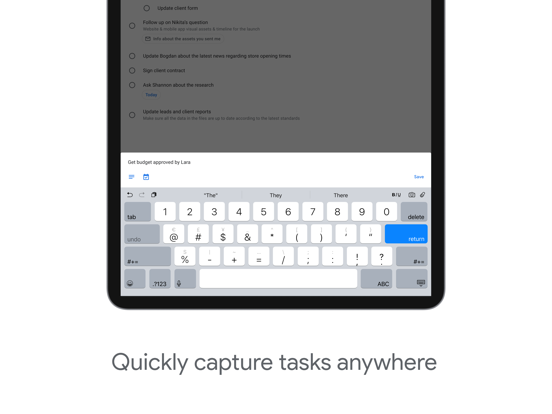
15 store screenshots



Pricing & paywalls
App Store
- Free to download
Ratings & reviews
App Store
-
5/5Excellent App
As a person with an organizing personality, I love this app! I have been using it for years and I love that I can make a list for whatever I need, arrange list items however I like, add dates and times each task needs to be completed, put items on repeat (for those weekly or monthly chores 😉), add a description to the item if I want to, and the many other features. The only thing that I dislike is that you can’t rearrange the actual list order. Unfortunately, once the lists are made, they are static. If you want to rearrange your lists, you have to delete them and re-create them in the order you now want them in, which can be a bit frustrating. Over allthough, excellent app that I definitely recommend.
Language Settings · 29 Sep 2026
-
4/5Like everything but can’t create subtasks and repeat a task at same time
Hi Developers, I am a fellow ADHD chick and I like breaking down tasks that are daily and I try to do that here and create subtasks like for looking after animals or cleaning kitchen but can’t seem to repeat daily and create subtasks at same time is there a way you can do that and make it where we can repeat reoccurring tasks it helps me with reminders here just wish the events could be checked off and not be a actual event if you were wanting to time block and beable to check the task off without creating a actual event. Not sure if yall can do that to where I can put them as tasks for period of time almost like an event but able to be checked off and have color coding as well like events. All in all this is a great task app and love google calendar just want to make the tasks sometimes in a time frame for time blocking and have different colors along with reoccurring tasks flair subtasks together like I mentioned above I’d appreciate it so much and it would make google calendar even more valuable to me than it is now for simple reminders and tasks and events. There’s no other calendar like google calendar. I like it more than the iPhone calendar honestly.
tmclifton95$ · 29 Sep 2026
-
4/5Better than others
I tried two competing programs before this one, and neither could successfully do recurring tasks the way I needed them to. This program accomplishes this mostly without incident; occasionally a task appears in Google calendar twice for the same day. The solution is to open the task, change to a different day then back again, save changes, and presto issue is solved. I hope they fix that glitch soon. I would appreciate the ability to select different colors for different groups of tasks to make it easier to differentiate them in Google calendar; right now I need to identify the group in the task description which feels like a chore, but it’s workable. Performing complicated recurrence patterns requires jumping through some hoops but it is possible. I appreciate that all tasks can have a start and end date. The tasks app attempts to show which tasks are for today, which honestly it shouldn’t even bother to do, as it doesn’t successfully convey that you have only completed one instance of a recurring task. Really this app and Google calendar should come bundled together into one product. I’m sure Google realizes this too. Hopefully they will combine them in the future.
. . . . . , . · 29 Sep 2026
-
3/5Good but still has room for improvement
I have tried many calendars and tasks apps. None of them are nearly as easy to use as Googles Tasks. It allows me to schedule tasks on my calendar (separate app) which is exactly what I needed. Things it could improve on. There is no way to control how things are seen on the calendar so scheduled events get buried in the tasks for the day and I nearly missed work. Personalization would be amazing even if it was just a couple of choices. Third, it would be really helpful if I could change the font in tasks in someway. Being able to bolden or italic certain words would help. Maybe some color coding. It would be also amazing if Calendar, Tasks and Notes were all one app but I happy with this. All and all I was very happy with it and the fact it is completely free is an added bonus but had to find something else because scheduled events don’t take priority in the app and I desperately need them too. Seriously super easy to use if you need something simple and easy this is it.
Jackilynn30 · 29 Sep 2026
-
4/5Mostly Great!
I use this app pretty much everyday and I have for pretty much this whole year. Maybe a little more. It’s nice and simple. But as happens with any software that is good enough to get well acquainted with, you learn it’s quirks, plus I like to develop apps, so I’m extra aware. Like I make a list for every day of the week, there’s not really a built in day feature. I have to move tasks between lists one at a time, both on the google calendars web panel version and the app version. And there’s this weird thing where when you want to delete your completed tasks, there’s no way to clear all deleted, you have to delete them one at a time, and each time you delete one, it shows a snack bar that covers the bottom one. So you have to wait for the snackbar to go away in order to delete the last one because it’s covered up. That’s on the google calendars tasks web panel and the app. You also can’t shrink tasks in the list to hide the sub tasks. It’s nice that you can have sub tasks, I use that all the time, but I don’t want to see all the sub tasks when I’m looking at a list of tasks. At least not all the time. And finally, you can assign a time to a task so that it will show on your google calendar, only problem is you can’t set a duration like you can with any other thing on your google calendar, it always just shows as the same height. It’s hitting me now that I didn’t really research any of the small complaints before writing this so hopefully I’m not speaking out of turn, but hopefully one of you developers sees this and takes the suggestions. Or y’all just hire me and I’ll work on them ;)
Eli Hermann · 29 Sep 2026
Privacy & accessibility
App Store
Privacy
- Data Linked to You — Analytics — Contact Info — Email Address Developer declared
- Data Linked to You — Analytics — Diagnostics — Crash Data Developer declared
- Data Linked to You — Analytics — Diagnostics — Other Diagnostic Data Developer declared
- Data Linked to You — Analytics — Diagnostics — Performance Data Developer declared
- Data Linked to You — Analytics — Identifiers — Device ID Developer declared
- Data Linked to You — Analytics — Identifiers — User ID Developer declared
- Data Linked to You — Analytics — Location — Coarse Location Developer declared
- Data Linked to You — Analytics — Other Data — Other Data Types Developer declared
- Data Linked to You — Analytics — Usage Data — Product Interaction Developer declared
- Data Linked to You — Analytics — User Content — Customer Support Developer declared
- Data Linked to You — App Functionality — Contact Info — Email Address Developer declared
- Data Linked to You — App Functionality — Contact Info — Name Developer declared
- Data Linked to You — App Functionality — Contact Info — Phone Number Developer declared
- Data Linked to You — App Functionality — Contact Info — Physical Address Developer declared
- Data Linked to You — App Functionality — Contacts Developer declared
- Data Linked to You — App Functionality — Diagnostics — Crash Data Developer declared
- Data Linked to You — App Functionality — Diagnostics — Other Diagnostic Data Developer declared
- Data Linked to You — App Functionality — Diagnostics — Performance Data Developer declared
- Data Linked to You — App Functionality — Identifiers — Device ID Developer declared
- Data Linked to You — App Functionality — Identifiers — User ID Developer declared
- Data Linked to You — App Functionality — Location — Coarse Location Developer declared
- Data Linked to You — App Functionality — Other Data — Other Data Types Developer declared
- Data Linked to You — App Functionality — Usage Data — Product Interaction Developer declared
- Data Linked to You — App Functionality — User Content — Customer Support Developer declared
- Data Linked to You — App Functionality — User Content — Other User Content Developer declared
- Data Linked to You — App Functionality — User Content — Photos or Videos Developer declared
- Data Linked to You — Product Personalization — Identifiers — Device ID Developer declared
- Data Linked to You — Product Personalization — Identifiers — User ID Developer declared
- Data Linked to You — Product Personalization — Usage Data — Product Interaction Developer declared
- Data Linked to You — Contact Info Developer declared
- Data Linked to You — Contacts Developer declared
- Data Linked to You — Diagnostics Developer declared
- Data Linked to You — Identifiers Developer declared
- Data Linked to You — Location Developer declared
- Data Linked to You — Other Data Developer declared
- Data Linked to You — Usage Data Developer declared
- Data Linked to You — User Content Developer declared
- Data Not Linked to You — Analytics — Diagnostics — Crash Data Developer declared
- Data Not Linked to You — App Functionality — Diagnostics — Crash Data Developer declared
- Data Not Linked to You — Diagnostics Developer declared
Accessibility
No accessibility labels collected yet.
Versions
App Store
-
26.10.0
• Bug fixes and performance improvements.
-
26.11.0
• Bug fixes and performance improvements.
-
26.12.1
• Bug fixes and performance improvements.
-
26.13.0
• Bug fixes and performance improvements.
-
26.14.0
• Bug fixes and performance improvements.
-
26.15.0
• Bug fixes and performance improvements.
-
26.17.0
• Bug fixes and performance improvements.
-
26.18.0
• Bug fixes and performance improvements.
-
26.18.2
• Bug fixes and performance improvements.
-
26.19.0
• Bug fixes and performance improvements.
-
26.20.0
• Bug fixes and performance improvements.
-
26.21.0
• Bug fixes and performance improvements.
-
26.22.0
• Bug fixes and performance improvements.
-
26.23.0
• Bug fixes and performance improvements.
-
26.24.0
• Bug fixes and performance improvements.
-
26.25.3
• Bug fixes and performance improvements.
-
26.26.0
• Bug fixes and performance improvements.
-
26.27.0
• Bug fixes and performance improvements.
-
26.28.0
• Bug fixes and performance improvements.
-
26.29.0
• Bug fixes and performance improvements.
-
26.30.0
· 30 Jul 2026
• Bug fixes and performance improvements.
-
26.31.0
• Bug fixes and performance improvements.
-
26.32.0
• Bug fixes and performance improvements.
-
26.33.0
• Bug fixes and performance improvements.
-
26.34.0
· 26 Aug 2026
• Bug fixes and performance improvements.
-
26.35.0
• Bug fixes and performance improvements.
-
26.36.0
• Bug fixes and performance improvements.
-
26.37.0
• Bug fixes and performance improvements.
-
26.38.0
· 23 Sep 2026
• Bug fixes and performance improvements.
-
26.6.0
• Bug fixes and performance improvements.
-
26.7.0
• Bug fixes and performance improvements.
-
26.8.0
• Bug fixes and performance improvements.
-
26.9.0
• Bug fixes and performance improvements.
Alternatives
- Todoist: To Do List & Calendar — Same category + similar ratings
- Microsoft To Do — Same category + similar ratings
- Any.do: To do list & Planner — Same category + similar ratings
- Todo List & Reminder - Todoery — Same category + similar ratings
- Notion Calendar — Same category + similar ratings
- TickTick:To-Do List & Calendar — Same category + similar ratings
Availability by market
- US
Data quality & evidence
- Page completeness
- Live store listing
- Last verified
- 29 Sep 2026
- Sources
- App Store
- Apoku editorial summary has not been published yet.