
Quick verdict
- What it is
- Access and analyze business data from anywhere, annotate and share reports, and get real-time notifications.
- Best for
-
- someone who needs to access business data on the go
- business analysts
- data scientists
- At a glance
-
- Free to download
Categories and search queries
Official categories
- Business
- Productivity
AppCorpus categories
Key functions
| Function | Availability | Access | Scope | Evidence |
|---|---|---|---|---|
| Free app | Yes | Free | — | Store published |
Screens
App Store
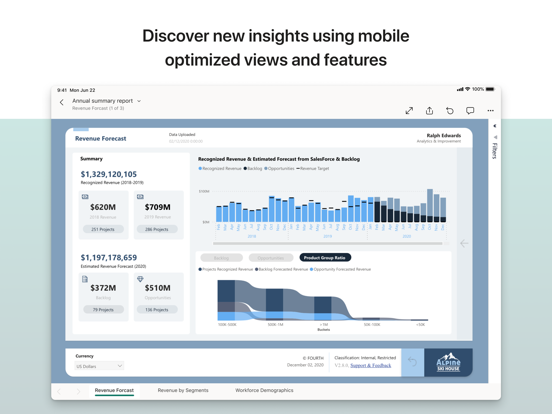
18 store screenshots


Pricing & paywalls
App Store
- Free
Ratings & reviews
App Store
-
5/5Handy for report developers, with some room for improvement
As someone who develops Power BI reports, I appreciate the ability to pull up a report on my phone and refresh a dataset (sorry, “semantic model”) from my phone. When a refresh fails due to a random transient error, refreshing from the iOS app allows me to fix the issue when I’m not near my work laptop. My only suggestion: My team relies heavily on Power Platform Dataflows, so it would be a huge quality of life improvement if we could also refresh dataflows through the app.
clsaura · 30 Aug 2026
-
4/5Almost there...
The concept behind this app, and the functionality it provides in connecting to big data is invaluable. The problem is that there are many (many!) minor things that don’t work correctly or were not thought out, that they add up to this not being all that it should be. One immediate example - there is a navigation bar at the top of report pages that obscures the report below it. It would be a simple thing for MS to fix this by moving the report down slightly on the page, but as-is, makes it very difficult to use, especially if in your mobile report layout there are slicers or other navigation elements at the top of the page. I could go on (no freeze-pane functionality for tables, no long press to bring up tooltips, poor use of font shrinking, etc), but hope MS puts polishing this app high on the priority list!
joecefis · 30 Aug 2026
-
3/5I do like this app/program overall!
Hello! My company recently ended a contract with a company offering similar services. I do like this program! It seems to be very versatile. I look forward to working with IT to fine tune it to best suit our needs. Question though - would it be possible enlarge the icons at the top of the window (Sales and Profit window)? That is, to the left, the arrow pointing up/2 down, surrounding icons, and on opposite side of window filter symbol/arrow/maximize icons as well as the icons to the far top right. I actually created a picture for descriptive purposes. Unfortunately, no way to upload here. We have 40 sales reps in the field who will be using this exclusively on iPads and phones. Enlarging the icons for better maneuverability when drilling down on analysis - I can already tell from some feedback - will make a huge difference. Thanks and looking forward to further development of this app!
mahz · 30 Aug 2026
-
2/5Navigation and card issue
It’s very easy to view reports in the app and the performance speed is much faster, however it’s difficult to navigate. If I open a report and manipulate the filters multiple times, I have to keep pressing on the arrow in top left corner to go back to the list of my reports - is there a faster way? If there is, it’s not easy to find - not user friendly. Also, when looking at the report in horizontal way I cannot exit the app easily by swiping up from the bottom of my screen (I have an iPhone 11 and I exit all of my apps this way). What happens when I swipe from the bottom up is that the screen saver shows up positioned horizontally. There is no way to exit that - unless I turn off my phone. Also, one of my measures has spacing between values (using “ “&), the spacing is preserved when I first open the report but it’s not when I go back to that page from a different page.
Kinga3736362736 · 30 Aug 2026
-
5/5App doesn’t capture data
I’m unsure why the iPad app doesn’t reflect the settings or data I load into the desktop version of Power BI and subsequently uploaded to the web. For example, the iPad app doesn’t capture the filter settings I have (single select vs. multi select) and omits items in that filter. The desktop version behaves/responds as intended. This is a disappointment.
GBH50 · 30 Aug 2026
Privacy & accessibility
App Store
Privacy
- Data Linked to You — Analytics — Identifiers — Device ID Developer declared
- Data Linked to You — Analytics — Identifiers — User ID Developer declared
- Data Linked to You — Analytics — Usage Data — Other Usage Data Developer declared
- Data Linked to You — Analytics — Usage Data — Product Interaction Developer declared
- Data Linked to You — App Functionality — Contact Info — Email Address Developer declared
- Data Linked to You — App Functionality — Diagnostics — Crash Data Developer declared
- Data Linked to You — App Functionality — Diagnostics — Other Diagnostic Data Developer declared
- Data Linked to You — App Functionality — Diagnostics — Performance Data Developer declared
- Data Linked to You — App Functionality — Identifiers — Device ID Developer declared
- Data Linked to You — App Functionality — Identifiers — User ID Developer declared
- Data Linked to You — App Functionality — Usage Data — Other Usage Data Developer declared
- Data Linked to You — App Functionality — Usage Data — Product Interaction Developer declared
- Data Linked to You — Product Personalization — Identifiers — User ID Developer declared
- Data Linked to You — Contact Info Developer declared
- Data Linked to You — Diagnostics Developer declared
- Data Linked to You — Identifiers Developer declared
- Data Linked to You — Usage Data Developer declared
Accessibility
No accessibility labels collected yet.
Versions
App Store
-
35.6
- Improved stability and fixed various bugs.
-
35.7
- Improved stability and fixed various bugs.
-
35.8
- Start a conversation with Copilot to find content, and get the answers you need on the go. Get AI-driven insights on your data, anytime, anywhere.
-
35.9
- Start a conversation with Copilot to find content, and get the answers you need on the go. Get AI-driven insights on your data, anytime, anywhere.
-
36.0
- Improved stability and fixed various bugs.
-
36.1
- Add a Power BI report or semantic model to your chat and ask Copilot questions based on this item to get insights you need. To add a reference, tap the + icon or type “/” to search and select an item.
-
36.2
- Add a Power BI report or semantic model to your chat and ask Copilot questions based on this item to get insights you need. To add a reference, tap the + icon or type “/” to search and select an item.
-
36.3
- Tap the ‘Read aloud’ icon to listen to your responses from Copilot while you’re working on other tasks or on the go. Use the on-screen controls to pause, resume, or stop the audio.
-
36.4
- Tap the ‘Read aloud’ icon to listen to your responses from Copilot while you’re working on other tasks or on the go. Use the on-screen controls to pause, resume, or stop the audio.
-
36.5
- Tap the ‘Read aloud’ icon to listen to your responses from Copilot while you’re working on other tasks or on the go. Use the on-screen controls to pause, resume, or stop the audio.
-
36.6
- Improved stability and fixed various bugs.
-
36.7
- We’ve added a new button to the report 'header menu' that lets you change the report orientation on your phone, even if orientation is locked on your device. Tap 'Rotate view' to change the layout. - Use Copilot to chat with data from an external organization for faster insights. To start chatting as a guest on an external organization’s site, open the navigation tree or go to the bottom navigation menu and select the Copilot icon.
-
36.8
- We’ve added a new button to the report 'header menu' that lets you change the report orientation on your phone, even if orientation is locked on your device. Tap 'Rotate view' to change the layout. - Use Copilot to chat with data from an external organization for faster insights. To start chatting as a guest on an external organization’s site, open the navigation tree or go to the bottom navigation menu and select the Copilot icon.
-
36.9
- Improved stability and fixed various bugs.
-
37.0
- Improved stability and fixed various bugs.
-
37.1
- Improved stability and fixed various bugs.
-
37.2
- Now you can ask Copilot questions inside your reports to gain deeper insights into your data.
-
37.3
- Improved stability and fixed various bugs.
-
37.4
- Improved stability and fixed various bugs.
-
37.5
- Improved stability and fixed various bugs.
-
37.6
- Improved stability and fixed various bugs.
-
37.7
- Improved stability and fixed various bugs.
-
37.8
- Improved stability and fixed various bugs.
-
37.9
- Content in your org Apps is now organized by the app creator, so you find what's relevant faster.
-
38.0
· 19 Jul 2026
- Improved stability and fixed various bugs.
-
38.1
- Get data from Power BI report visuals to share or analyze in Excel.
-
38.2
- Improved stability and fixed various bugs.
-
38.3
· 30 Aug 2026
- Tap 'Rotate view' in the footer to switch report layouts for larger visuals or a broader view of the data.
Alternatives
- Tableau Mobile — Same category + similar ratings
- Wheels Mobile Assistant — Same category + similar ratings
- Salesforce — Same category + similar ratings
- SAP Concur — Same category + similar ratings
- Tunnel (new) - Workspace ONE — Same category + similar ratings
- Now Mobile — Same category + similar ratings
Availability by market
- US
Data quality & evidence
- Page completeness
- Independent summary published
- Last verified
- 30 Aug 2026
- Sources
- App Store