
Quick verdict
- What it is
- Store information collected; an Apoku editorial summary is not yet published.
- At a glance
-
- Free to download
- In-app purchases
Categories and search queries
Official categories
- Graphics & Design
- Education
Apoku categories
Key functions
| Function | Availability | Access | Scope | Evidence |
|---|---|---|---|---|
| Free app | Yes | Free | Context-specific | Store published |
| In-app purchases | Yes | Limited free | Context-specific | Store published |
| Family Sharing | Unknown | Unknown | Scope unknown | Store published |
Screens
App Store
18 store screenshots

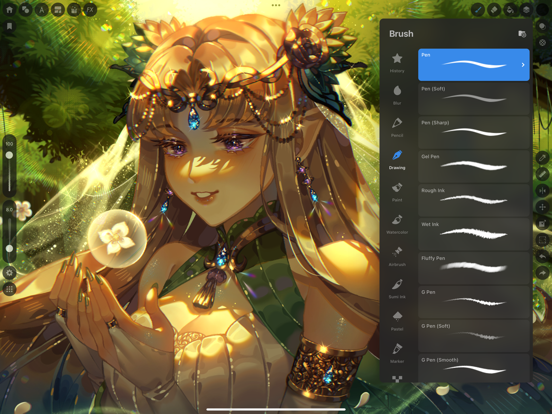

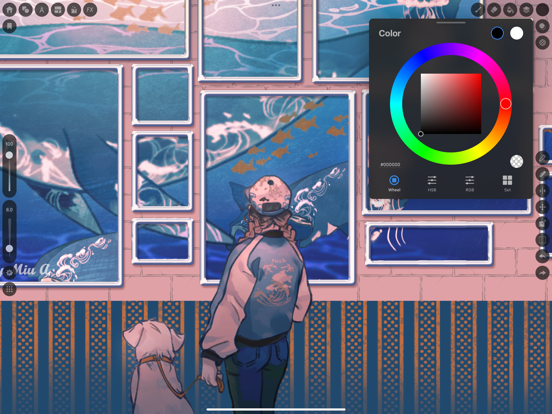
Pricing & paywalls
App Store
- Paletta: Perpetual License — $6.99
Ratings & reviews
App Store
-
5/5Easy to explore
I’ve never heard of Mediabang but for some reason it popped up when I searched for the excellent camera app Hydra. I’m not sure I want to learn another drawing app but this has a big thing going for it- a recognizable user interface (UI). I’ve been re-trying photo editing apps lately so I can clean out the garbage and, I gotta say, some of the UIs I reencountered were absurd. I’ve used all of them before so I shouldn’t have been struggling but sometimes doing what everyone else is doing is a good thing. Why labor over reinventing something just because you can, especially when the point is to just look diffferent? Don’t think lousy UIs is just a drawing and editing problem- I’ve been struggling for over a year to find a workable notes app. I love the native Apple notes with a very simple, straightforward, and clean look but it’s been crashing whenever I try to retrieve anything from my notes. There are dozens, if not hundreds of notes apps available and so many have their own charming look that then fails utterly in practice.
PhelineCat · 6 Aug 2026
-
5/5I switched from Procreate
First I’d be patient I think they are still trying to figure out how to make the app better. I’ll tell you why I choose this. I can’t efficiently illustrate without a fill brush. It’s a very convenient tool for shadows .I do huge illustrations. I need that feature to work in a timely way. Love the multi layer feature on the bucket tool and! The expand feature is perfect. I Love this app. I’m a traditional Sumi artist so nice to see some sumi brushes. I hope they allow more customization with brushes soon. Seems like they are working to make it better. So it’s a buy for me. Thank you for creating this. Oh! The print manuscript guide is most helpful.🙇🏻
SamuraiJackx · 6 Aug 2026
-
3/5Huge Letdown
Purchased this thinking that the UI is less cluttered than Medibang Paint ipad. However, despite the unlimited offering medibang's extensive brush libraries that are usually paywalled in the Paint and Pro subscription, it excluded the feature of allowing the creation of custom brushes and brush scripts, as well as syncing the custom brushes i had stored in the PC version of Medibang. It is because of this that I think Paletta's features didn't have much impact in improving user experience and ergonomics apart from shrinking the UI for better view. I stuck to Medibang among all other drawing apps since this is the only cross platform digital drawing app that allows me to sync custom brushes which is the closest thing to taking PC version workspace configs with me on the go. The the exclusion of the features i had mentioned above made it feel like the pc version still offers the best convenience and comfort in reducing keystrokes. Maybe i would be more inclined to use Paletta more if it allows creation, import and syncing of custom brushes like the ipad Paint version does.
Vixenine · 6 Aug 2026
-
4/5its cool, but lacks originality a bit
i’ve been a long time medibang user and i was so pumped to see that they were making a new app! (i preordered it at lightning speed) its actually pretty good for what its worth. im writing this the day they release it so it’s not perfect.. a few bugs and its a bit laggy but still pretty decent. the only thing i personally have a grudge against is that they weren’t very original with the layout of the app.. first few seconds into it and i realized it looked A LOT like that big popular drawing app… same thing with brushes, gestures, etc. i understand why they made it look similar to that other app..but there’s hardly any originality and sort of jumped on the bandwagon. again- ive used medibang ever since i was a teen and i like medibang pro so far, but personally i was kind of disappointed that they sort of sold themselves out.
fart.hur · 6 Aug 2026
-
4/5Why the usage notification???
I don’t get why there’s a usage thing on this app. It doesn’t make any sense for a drawing up to even have it and it’s kind of stupid to be honest. The fact of the drawing app is so you can draw at least four hours no I would understand if there was some explanation which I’ve checked and there is no explanation to it. It’s just there so it’s a stupid reason to be therethough the app is very much way better than the other one. I do like this one very much it’s a lot smoother and it’s better to dry in, but I want to know why is there a usage notification on a drawing app? 🤦🏻♀️🧐 who ever in your dev team added or had that idea , needs to reevaluate their minds because that usage notification thing is so stupid like .why??
Adamai267 · 6 Aug 2026
Privacy & accessibility
App Store
Privacy
- Data Not Linked to You — Analytics — Diagnostics — Crash Data Developer declared
- Data Not Linked to You — Analytics — Diagnostics — Other Diagnostic Data Developer declared
- Data Not Linked to You — Analytics — Diagnostics — Performance Data Developer declared
- Data Not Linked to You — Analytics — Usage Data — Product Interaction Developer declared
- Data Not Linked to You — App Functionality — Diagnostics — Crash Data Developer declared
- Data Not Linked to You — App Functionality — Diagnostics — Other Diagnostic Data Developer declared
- Data Not Linked to You — App Functionality — Diagnostics — Performance Data Developer declared
- Data Not Linked to You — App Functionality — Usage Data — Product Interaction Developer declared
- Data Not Linked to You — Third-Party Advertising — Usage Data — Product Interaction Developer declared
- Data Not Linked to You — Diagnostics Developer declared
- Data Not Linked to You — Usage Data Developer declared
- Data Used to Track You — Usage Data — Product Interaction Developer declared
- Data Used to Track You — Usage Data Developer declared
Accessibility
No accessibility labels collected yet.
Versions
App Store
-
3.4
- Changed the display position of the Paint Bucket tool menu. - Added the ability to retain ruler settings. - Added the ability to select "Halftone" from the layer type menu. - Changed the color size of color sets to make them easier to tap. - Changed the contents of the default "Basic Set" color sets. - Improved the transition to edit mode immediately after creating a new frame. - Fixed an issue where the tool selection state would not be canceled when repeatedly tapping the frame layout icon.
-
3.5
- Added shortcut icons to the Layer window - Adjusted the color palette layout - Improved the ability to scroll the layer type popup
-
3.5.1
Fixed a rare crash issue on iOS 26 devices.
-
4.0
- The app name has been changed from "MediBang Pro" to "MediBang Paletta". - A navigator window has been added (you can switch between views using the Navigation/Documents button). - The settings button has been integrated into the home button. - A decorative menu button has been added (for managing shapes, materials, text, and frame layouts all at once). - The default icon layout upon initial installation has been changed. - Rules regarding the free trial period have been changed.
-
4.0.1
- Minor fixes and tuning
-
4.1
- Added a basic eraser set, including the Lasso Eraser. - Improved layer display in landscape mode on the iPhone. - Fixed the color of the invert icon in the Document window. - Fixed the behavior of the decorative material panel when scrolling. - Fixed display issues with the brush and eraser lists.
-
4.10
- Added symmetry ruler - Added new presets for paper size - Changed the maximum canvas size for iPhone to 7084px - Improved the display of notifications when the canvas size is exceeded during canvas creation or resizing - Fixed an issue where the canvas being drawn would not remain as a backup file when the app was closed in the Stage Manager on iOS 26 - Fixed an issue where the "Lock Tone Intensity" switch would overlap in the Halftone Layer Details panel on iPhone landscape mode - Fixed an issue where the floating window position would change when resuming from the background on iPad - Fixed the display when changing the spine width in a double-page spread - Fixed the behavior when adjusting the "Scale" selection tool - Fixed an issue where the camera would launch in portrait mode when taking and adding photos in iPhone landscape mode
-
4.1.1
- Fixed a rare crash that occurred in the brush/eraser list
-
4.11
- Added a preset function to canvas customization (allows selection, saving, switching, and deletion of presets). - Added tolerance setting to the bucket tool. - Changed the position adjustment panel of the transform tool to the shortcut area. - Fixed a bug where the eraser's normal view would sometimes not close during drawing. - Fixed a bug where shortening the setting time for the long-press eyedropper would make it difficult to move the reference window. - Fixed a bug where the previous color would be displayed when reopening the color settings after changing the text color (font/border). - Fixed a bug where the settings window would appear in the upper left corner of the screen after creating a panel layout on iPad.
-
4.12
[New Features] - Added gradient maps [Improvements] - Improved the ability to repeatedly apply gradients [Bug Fixes] - Fixed a bug where the behavior of the selected brush would break after switching tools in the Selected Brush Tool [Delete Mode] - Fixed a bug where the dropdown menu would not close after selecting a layer type - Fixed a bug where text in some languages was cut off in the settings screen - Fixed a bug where the communication error dialog was not displayed correctly in some languages
-
4.12.1
- Reduce app size (clean out unnecessary ad SDKs)
-
4.13
[New Features] - Added a function to remember the display state of the reference window for each file. - Added a function to return to the previous display magnification, angle, and position when you tap [Rotation Clear] twice. - Improved UI to follow window size changes for Split View / Stage Manager, etc. [Improvements] - Redesigned the text tool's options panel with tabs (Text/Style/Border/Placement). - Adjusted the text tool's specifications to add text to the location tapped on the canvas while the text tool is selected. - Adjusted the display position of the magnification and movement values when using the transform tool. - Changed the options bar to always be displayed when the bucket tool is selected. - Improved the display color of the color window to follow when using the eyedropper tool. - Improved the blend mode dropdown in the layer list to be closed by tapping again. [Bug Fixes] - Fixed an issue where the application could crash when displaying the brush size preview. - Fixed an issue where the application could crash when changing the preset name of the tool slot. - Fixed an issue where the application could crash after operating the filter window. - Fixed an issue where some brush category names were fixed in Japanese. - Fixed an issue where some brushes were not displayed in search results when the device was set to English. - Fixed the display of the payment screen button when there was remaining time in the free trial period. - Fixed an issue where floating layers moved to the top left after applying filters in iPhone portrait mode. - Fixed an issue where gaps appeared in gradients. - Fixed the display position of the customization settings panel in iPad portrait mode.
-
4.14
[Improvements] - Reduced app size by removing unused assets - Improved the smooth display of size previews when operating the brush slider on iOS 26 iPads [Bug Fixes] - Fixed an issue where the system UI would remain displayed when swiping from the edge of the screen on iOS 26 iPads - Fixed a bug that could cause a crash when editing the vertices of a shape brush - Fixed a bug that could cause a crash when generating a blur background for floating windows on devices with low memory - Fixed a bug that could cause a crash when modal screens were displayed twice on the home screen - Fixed a bug where colors acquired with the gesture eyedropper were added to the color history - Fixed a bug where previews overlapped when operating the brush slider on small screen sizes such as Split View or iPhones
-
4.15
· 6 Aug 2026
[New Features] - Added a function to switch the eyedropper's reference target (canvas/layer) - Improved the resolution of MDP file thumbnails [Improvements] - Significantly improved the response speed of layer selection, scrolling, and sorting in files with many layers - Modified so that the dropdown menu does not close when selecting a layer's blend mode - Improved the display of folder locks to include child layers - Changed the behavior when tapping the canvas margin during text editing from "Create New" to "Deselect" - Increased the display width of slot names on the customization screen - Changed the default preset content for smartphone portrait mode [Bug Fixes] - Fixed a bug where MDP files in the Google Drive folder within the Files app could not be imported in some cases - Fixed a bug where the brush preview thickness did not synchronize when changing canvas size or zooming in/out with two fingers - Fixed a bug where the order of files in a folder changed each time it was operated or redisplayed - Fixed a bug where the curve ruler could be confirmed with fewer than 2 control points - Fixed a bug where the tool icon would not become active after canceling the save confirmation dialog - - Fixed an issue where the brush opacity slider color did not change when using the eyedropper tool. - Fixed an issue where the font list for the text tool was cut off outside the screen on iPads. - Fixed an issue where the popup would not close even after deleting a layer from the layer details popup. - Fixed an issue where the brush size slider was not displayed in portrait mode when newly installed on an iPad (iOS 26). - Fixed an issue where the icon display when switching brush categories did not reflect the UI opacity setting. - Fixed an issue where the app would sometimes crash immediately after closing the photo selection screen.
-
4.2
- Added a ""hand tool"" that lets you move the canvas. - Added a badge display function to home screen notifications. - Fixed reset behavior and device rotation behavior when customizing. - Fixed device rotation behavior in the print manuscript settings and filter screens. - Fixed behavior related to the display and movement range of the document window. - Fixed a rare crash that occurred when deleting or switching erasers.
-
4.3
- Changed the design of the reset button on the customization screen. - Improved the HSV slider values in the Color panel to display in 360 degrees. - Optimized the options menu. - Corrected some translations in the Layer menu for Simplified and Traditional Chinese.
-
4.3.1
- Changed the design of the reset button on the customization screen. - Improved the HSV slider values in the Color panel to display in 360 degrees. - Optimized the options menu. - Fixed some translations in the Layer menu for Simplified and Traditional Chinese. - Fixed minor bugs.
-
4.4
- Added a "Palette Button" to the Canvas Customization menu. - Added a brush parameter reset function. - Added a preview display before finalizing the frame layout. - Unified the colors of the Brush and Reference windows. - Fixed an issue where the "Don't Preserve Edges" setting in the Edge Pen was being canceled. - Improved the display of all options in the Options window on the iPhone version. - Fixed an issue where the ruler setting function was canceled when rotating the device. - Fixed an issue where the display of the selected mode and tab was reset when rotating the device while using the Transform tool.
-
4.5
- Supports Apple Pencil tilt detection - Implemented ruler angle snapping - Added a toggle switch to the "Clipping" setting in the Layer Details panel - Fixed an issue where "Constrain aspect ratio" and "Draw from center" did not work in "Outline only" mode for rectangles and ellipses - Fixed an issue where color history only updates when using the Brush, Bucket, Shape tool, or Transparent Color - Fixed an issue where material selection was possible while a text layer was selected - Fixed an issue where two-finger gestures were possible in the Customization screen - Fixed the settings UI for the Shape and Selection tool polygon mode - Fixed an issue where the New Creation list would appear white in Dark Mode - Fixed the margin design between panels in Layer Floating
-
4.5.1
- Disabled the inertia that occurs when using the slider on iOS26 devices.
-
4.6
- Added font favorites and history features. - Expanded the size of the + and - buttons on the brush size and transparency bars. - Unified the color of text in the options panel. - Fixed a bug that allowed text editing while creating panel layouts. - Fixed a bug that caused the color slider tab to not display when the language setting was English and the iPhone was in landscape mode.
-
4.7
- Implemented a layer floating resizing function. - Added an anti-aliasing slot button. - Integrated the anti-aliasing switch into preferences. - Fixed an issue where the currently used color was not reflected when customizing the palette function. - Adjusted the minimum long-press time for multi-touch gesture settings to 0.1 seconds. - Fixed a bug where the 3-dot button overlapped with the home and close buttons in iPad OS 26 Stage Manager. - Fixed a bug where drawing would break when zooming in while using the polygon shape tool. - Fixed a bug where the ruler setting preview was sometimes not visible depending on the selected tool. - Standardized the spacing between panels and shortcut areas in each tool window.
-
4.8
- Added brush size/opacity adjustment slot - Display color history in palette function - Improved visibility of each vertex in the shape tool "Polygon" - Changed to retain name when duplicating brushes - Fixed the issue where the font list panel would not close when selecting a font - Fixed the issue where the filter function could not be applied to halftone layers - Fixed the issue where drawing with white or gray on mask/stencil layers would not be reflected - Unified the behavior of undo/redo slots and gestures - Fixed the issue where the currently used tool would remain active after selecting a color - Optimized the behavior of file operations in home screen folders - Changed the color panel to be displayed by double-tapping the palette slot - Removed the display of tool names when brush/eraser floating windows are open - Fixed a bug where existing files could not be opened - Fixed a bug that would occasionally crash on the customization screen
-
4.8.1
-Expanded the daily free usage limit to "2 hours". -Added an unlimited extension feature by watching ads.
-
4.9
- Added brush search function - Changed preview display when using brush size slider - Standardized specifications on brush window and slot slider when adjusting brush size - Changed default value of bucket tool to 2 on first launch - Display warning message when clipping transparent folders - Fixed bug where brush cursor would unintentionally turn off - Fixed bug where border thickness was not maintained for ellipse and rounded rectangle selection tools - Fixed bug where straight line correction was applied during stroke with long-press multi-touch gesture - Fixed bug where the font list popup was duplicated when rotating the screen while using the text tool - Fixed bug where text in the added font "Zapfino" was cut off - Modified so that the drawing tool button being used remains active even after selecting a layer - Fixed bug where the bucket reference destination would unintentionally change - Adjusted the color tone of the customization settings screen
Alternatives
- Artstudio Pro: Draw, Paint — Same category + similar ratings
- HiPaint- Sketch & Paint — Same category + similar ratings
- Pastela — Same category + similar ratings
- VRoid Studio — Same category + similar ratings
- Clip Studio Paint — Same category + similar ratings
- ToonSquid — Same category + similar ratings
Availability by market
- US
Data quality & evidence
- Page completeness
- Live store listing
- Last verified
- 6 Aug 2026
- Sources
- App Store
- Apoku editorial summary has not been published yet.