
Quick verdict
- What it is
- Keeper is a password manager that generates strong passwords, autofills them, and stores sensitive information. It also offers two-factor authentication, password sharing, and secure storage.
- Best for
-
- someone who needs to manage multiple passwords
- individuals who want to secure their online accounts
- At a glance
-
- Free download · core features require a paid plan
- In-app purchases
- Subscription
Categories and search queries
Official categories
- Productivity
- Business
AppCorpus categories
Key functions
| Function | Availability | Access | Scope | Evidence |
|---|---|---|---|---|
| Free app | Yes | Free | — | Store published |
| In-app purchases | Yes | Limited free | — | Store published |
| Subscription | Yes | Paid | — | Store published |
| Cross-device sync | Unknown | Unknown | — |
From listing
|
Screens
App Store
37 store screenshots


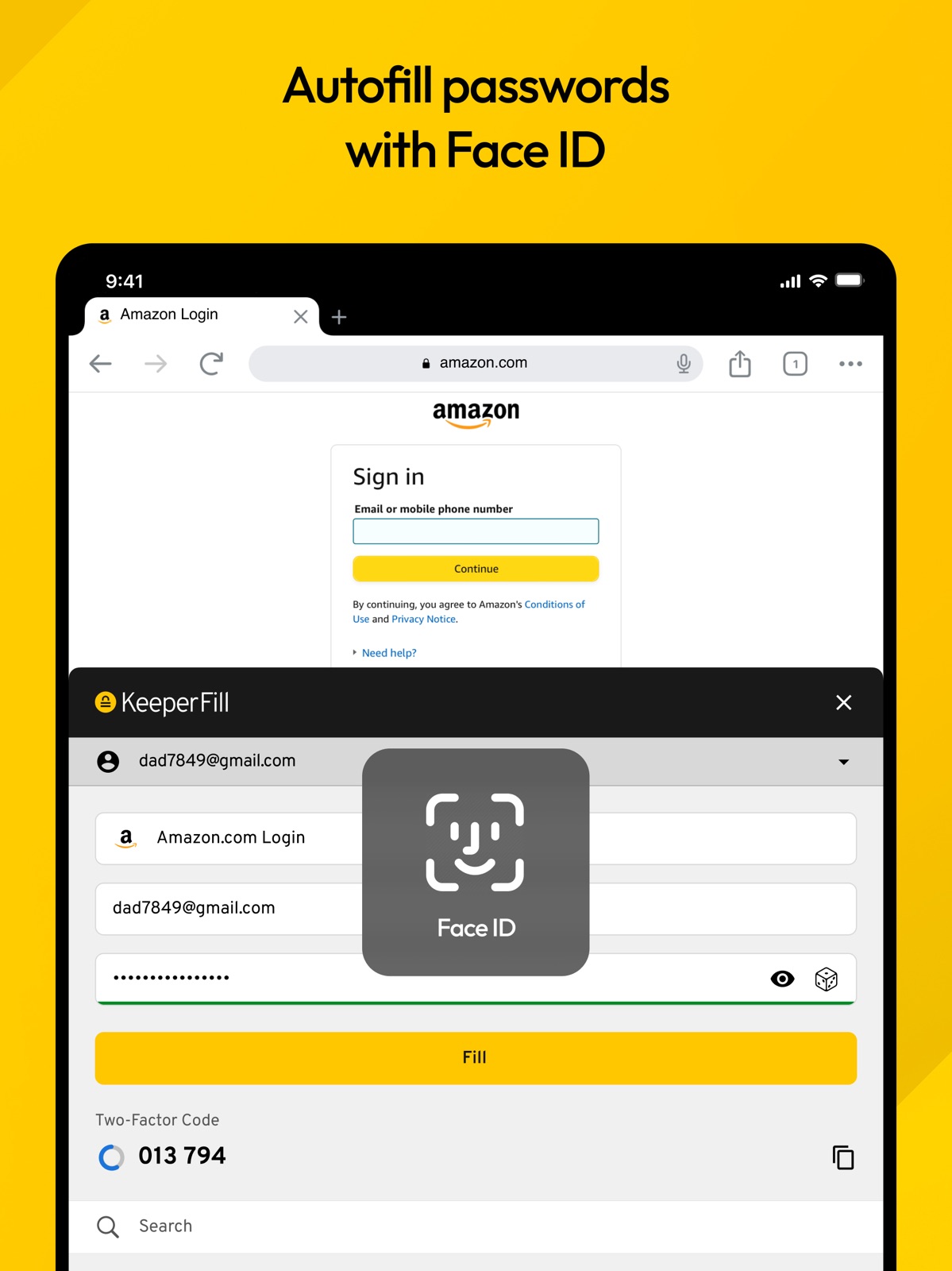
Pricing & paywalls
App Store
- Family Password Manager — $91.99
- Password Manager + BreachWatch — $69.99
- Unlimited Password Manager — $42.99
Ratings & reviews
App Store
-
5/5Great App
I have been using Keeper for all my passwords & important documents, account log-ins etc for well over 5 years now. Hoesntly i havent tried any other password apps, & i do pay for the unlimited version, but I have a lifetime discount of 50% off,(offered to me way back when i started) & its worth it for me. Their auto fill option works seamlessly with IOS, & gives you the option to use it or the icloud/password saver. It auto fills login as well as password which prevents me from having to remember all the different passwords needed across multiple applications. It works on both iphone, & ipad, & i can even store pictures as well. It provides you the option to categorize your entries, or you can have all of them under the default “passwords”. You can add notes, websight address to each password entry you create, and if you have a family you can share subscription, & then share passwords, or notes etc. It allows you to use face id for auto logging in, as well as finger print recognitiion. You can even set up a default of 5 wrong attempts to log into the app, & it will auto destruct. Just be careful with that option, bc if you forget your log in password and attempt it 5 times & fail, everything you have created is gone. Nice option if you loose your phone, no one can try to guess a master password, but for those of us who just plain forget sometimes, BE CAREFUL. BY far I find this one of the best app’s, very simple & easy to use. Its a must have if you create lots of passwords, & don’t want to have to remember all the “rules” associated with different sights. Gets 5 stars from this subscriber.
Bigeeeh28 · 30 Aug 2026
-
5/5Excellent app for password management!
Before Keeper I had a little book of passwords (pws) I recorded them in but of course I didn’t have my little book when I had to change a pw or create a new one. I would write the new pw on a post it or scrap of paper and TRY to keep them in one place for transfer to my little book. Over time the little pw book got old and scraps of paper stacked up. If we had to travel, I would pack the papers and little book. That didn’t help because I would spend more time shuffling those scraps to find a particular pw. ENOUGH!!! I went on a determined search in the App Store and found KEEPER. Hummm, it costs a yearly payment, not out range of what I was willing to pay. I was just didn’t want to pay anything. But I looked over at the stack of scraps of paper and the now tattered little book and decided it was definitely time for a change. Long story short, this is the best app regardless of yearly subscription!!!! It’s been money well spent I spent a couple of hours plugging in the pws, web sites and key words and HURRAY the pws are now in alphabetical order and easy to get to. I would highly recommend this app. I recently had trouble with my ID for my phone, pad and computer that was fixed after 2 hours on the phone with support. As a result I got a notice from KEEPER that changes had been made and I had to go through the changes with them. Thankfully that only took a few minutes! And all was reset without any loss of passwords. So this app and the people who run it are VERY responsive! WELL DONE KEEPER!! Yes, I am shouting happily! This is a terrific app!!!
Walgene · 30 Aug 2026
-
5/511/10 would recommend
Only one small complaint, although it might not be on them. For some reason the app store doesn’t show when the app needs to be updated. Whenever the list pops up for apps that need to be updated keeper is never on that list. I have to look it up in the app store to check if an update is available. When I search for it, it always says open as if it is updated. Only after I click it and go to the info page does it give the option to update, when it’s available. This is different than every other app for some reason. Been like that for over a year, and it happened 4 -5 times. Although it has no effect on the quality of the app so not that big of a deal. Other than that great app. The customer service is OUTSTANDING. There must be someone monitoring emails 24/7. I had trouble figuring something out late late at night and got a response within an hour. Couple other times I had questions and had responses and answers within 1 - 8 hours. AND it was an actual person every time. That alone to me is worth keeping that app long term. App always works too never any glitches, freezes or bugs. The ratings speak for themselves, worth every penny
Space Panda69 · 30 Aug 2026
-
5/5I really appreciate this app
I’ve never had any problems with this app until I bought a new device, an iPad, and face recognition didn’t work on it. Everything was set up to do so, but the screen would just flash and not go anywhere. I contacted Keeper support and they gave me a solution that worked immediately. I really appreciate the timely response and the helpful tech person. And I really like how you can just open the app with a face recognition, tap on your password to copy, and then go to the website you are opening and paste. It’s so quick and easy, and I really like having all these passwords, my library card number, my credit card numbers, pin numbers, and everything all in one place on my phone that I have with me at all times. The last password app I had just suddenly stopped opening one day, and I couldn’t find a contact for the company until one day I found out they were no longer in business. I had suddenly lost all access to all my passwords. That was a horrible experience, and I hope that never happens again. But I have a feeling this company will not treat us that way.
Celia-1 · 30 Aug 2026
-
1/5Unethical; bad business practices
I was using the free version of the service and then I tried to access my files one day and when I logged in I was met with a screen that said “Alert! Not backed up!” And it said that my trial of Keeper Unlimited has ended. I couldn’t access my files (vault). I realize that I am using the free version but I have been for years with no problems and now it seems like I’m being forced to upgrade. I emailed support and sent screenshots and got a response from someone telling to log out and back in. Whatever she did she fixed it but the next day it started again. I emailed support again and they started taking extremely long to respond to my request. I explained that I couldn’t access my files and someone replied and asked me what I was doing when my files got erased. I didn’t say they got erased, I said I couldn't access them because they barred my access to force me to upgrade my membership! The responses were not appropriate for the issue. They were dancing around my concern and not addressing it directly, saying I had the free version and could only access my account from one device. I know that!!!! Even trying to access my vault from my one device isn’t working!!!! So then he offered me a discount to upgrade my membership. I don’t understand how this became a business practice but this behavior is disgusting and unethical. To lock someone out of their files and deny them the free service in an attempt to force them to upgrade is really low.
beautiijunkii · 30 Aug 2026
Privacy & accessibility
App Store
Privacy
- Data Linked to You — App Functionality — Contact Info — Email Address Developer declared
- Data Linked to You — App Functionality — Identifiers — User ID Developer declared
- Data Linked to You — Contact Info Developer declared
- Data Linked to You — Identifiers Developer declared
Accessibility
No accessibility labels collected yet.
Versions
App Store
-
16.10.7
Passkey management: Save and fill passkeys on websites and apps. Check our user guides for instructions. Seamless sharing of your login session between the main app and KeeperFill. Extended logout timer options. Finnish & Swedish language support. Various bug fixes.
-
16.11.0
iOS 18 Support Enhanced Autofill Capabilities: Seamlessly fill verification codes directly from Keeper to streamline your login process. Utilize a long-tap on any text field to select which information from a Keeper record to autofill, giving you more control and flexibility. Various bug fixes
-
16.11.1
iOS 18 Support Enhanced Autofill Capabilities: Seamlessly fill verification codes directly from Keeper to streamline your login process. Utilize a long-tap on any text field to select which information from a Keeper record to autofill, giving you more control and flexibility. Various bug fixes
-
16.12.0
Expanded Hardware Key Support: In addition to Yubikeys, we are now compatible with a wider variety of hardware keys, including USB-C types. Improved 2FA Control: Manage your two-factor authentication (2FA) frequency anytime from the settings menu. Various bug fixes.
-
16.12.1
Expanded Hardware Key Support: In addition to Yubikeys, we are now compatible with a wider variety of hardware keys, including USB-C types. Improved 2FA Control: Manage your two-factor authentication (2FA) frequency anytime from the settings menu. Various bug fixes.
-
17.0.0
Expanded Hardware Key Support: In addition to Yubikeys, we are now compatible with a wider variety of hardware keys, including USB-C types. Improved 2FA Control: Manage your two-factor authentication (2FA) frequency anytime from the settings menu. Various bug fixes.
-
17.0.1
Expanded Hardware Key Support: In addition to Yubikeys, we are now compatible with a wider variety of hardware keys, including USB-C types. Improved 2FA Control: Manage your two-factor authentication (2FA) frequency anytime from the settings menu. Various bug fixes.
-
17.0.2
Expanded Hardware Key Support: In addition to Yubikeys, we are now compatible with a wider variety of hardware keys, including USB-C types. Improved 2FA Control: Manage your two-factor authentication (2FA) frequency anytime from the settings menu. Various bug fixes.
-
17.0.3
Expanded Hardware Key Support: In addition to Yubikeys, we are now compatible with a wider variety of hardware keys, including USB-C types. Improved 2FA Control: Manage your two-factor authentication (2FA) frequency anytime from the settings menu. Various bug fixes.
-
17.1.0
Passphrase Capabilities: Secure, customizable passphrases up to 20 words for added protection. PAM Record Enhancements: Optimized display of PAM record types for clarity. UI Improvements: Updated font styling, streamlined onboarding, autofill adjustments. Various bug fixes.
-
17.2.0
Passphrase Capabilities: Secure, customizable passphrases up to 20 words for added protection. PAM Record Enhancements: Optimized display of PAM record types for clarity. UI Improvements: Updated font styling, streamlined onboarding, autofill adjustments. Various bug fixes.
-
17.3.0
Offline Vault Access: Access your vault offline, now supported regardless of your 2FA settings. Autofill Enhancements: Improved autofill activation with support for equivalent domains. Refreshed Onboarding & UI: Updated design and guided setup help you start strong with Keeper. Various bug fixes.
-
17.3.1
Offline Vault Access: Access your vault offline, now supported regardless of your 2FA settings. Autofill Enhancements: Improved autofill activation with support for equivalent domains. Refreshed Onboarding & UI: Updated design and guided setup help you start strong with Keeper. Various bug fixes.
-
17.4.0
Streamlined Device Access: Expedite logins with the ability to auto-approve trusted devices from recognized IP addresses. Updated Apple Watch Experience: Keeper for Apple Watch now features a modern and unified design. Enterprise Enforcement Compliance: Support for granular sharing policies set by your enterprise administrator. Various bug fixes.
-
17.5.0
Editable One-Time Sharing: Grant recipients permission to edit record fields and upload files when creating a share link. Core Technology Upgrade: The app's core technology has been upgraded for improved performance and stability. Various bug fixes.
-
17.5.1
Editable One-Time Sharing: Grant recipients permission to edit record fields and upload files when creating a share link. Core Technology Upgrade: The app's core technology has been upgraded for improved performance and stability. Various bug fixes.
-
17.6.0
A New Way to Import: You can now securely import passwords, passkeys, and two-factor codes directly from other apps on iOS 26. When exporting from a supported source, simply select Keeper from the list to have your records securely transferred.
-
17.6.1
A New Way to Import: You can now securely import passwords, passkeys, and two-factor codes directly from other apps on iOS 26. When exporting from a supported source, simply select Keeper from the list to have your records securely transferred.
-
17.6.2
A New Way to Import: You can now securely import passwords, passkeys, and two-factor codes directly from other apps on iOS 26. When exporting from a supported source, simply select Keeper from the list to have your records securely transferred.
-
17.7.0
Account Switching: Seamlessly switch between your accounts without needing to log out and back in. Autofill Upgrades: Keeper can now automatically create and save passkeys for you during Autofill. The extension also syncs each time it's launched, ensuring your new records are available immediately. Quick Access: The search screen in the app and Autofill extension now displays your most recently viewed items, helping you find logins faster. Various bug fixes.
-
17.7.1
Account Switching: Seamlessly switch between your accounts without needing to log out and back in. Autofill Upgrades: Keeper can now automatically create and save passkeys for you during Autofill. The extension also syncs each time it's launched, ensuring your new records are available immediately. Quick Access: The search screen in the app and Autofill extension now displays your most recently viewed items, helping you find logins faster. Various bug fixes.
-
17.8.0
Notification Center: Manage vault activity and access requests in one place. View unread indicators and approve or deny requests directly to stay on top of time-sensitive tasks. Quantum Resistant Cryptography: Future-proof your data with advanced encryption (QRC) on devices running iOS 26. This update protects your session data against the evolving threat of quantum computing. Redesigned Security Audit: View your overall security health at a glance with an updated Security Score screen. Use actionable cards to quickly identify and fix weak or reused passwords. Various bug fixes.
-
17.9.0
Session Management: Secure your vault by viewing and managing all connected sessions. You can now see device details, remotely lock active sessions, or remove old devices directly from the app. On-Demand Credential Rotation: KeeperPAM users can now manually trigger password rotations for PAM User records and monitor rotation status in real time from their mobile device. Streamlined Access Approvals: Approvers can now review and action Just-In-Time access requests directly from the Notification Center. This allows for faster responses to vaulted resource and record access requests. Various bug fixes.
-
17.9.1
Session Management: Secure your vault by viewing and managing all connected sessions. You can now see device details, remotely lock active sessions, or remove old devices directly from the app. On-Demand Credential Rotation: KeeperPAM users can now manually trigger password rotations for PAM User records and monitor rotation status in real time from their mobile device. Streamlined Access Approvals: Approvers can now review and action Just-In-Time access requests directly from the Notification Center. This allows for faster responses to vaulted resource and record access requests. Various bug fixes.
-
17.9.2
· 10 Jun 2026
Session Management: Secure your vault by viewing and managing all connected sessions. You can now see device details, remotely lock active sessions, or remove old devices directly from the app. On-Demand Credential Rotation: KeeperPAM users can now manually trigger password rotations for PAM User records and monitor rotation status in real time from their mobile device. Streamlined Access Approvals: Approvers can now review and action Just-In-Time access requests directly from the Notification Center. This allows for faster responses to vaulted resource and record access requests. Various bug fixes.
-
18.0.0
· 3 Aug 2026
Notification Center Improvements: The notification bell icon now pulses when a new approval request needs your attention, so you never miss a time-sensitive item. PAM Cloud Records: View your organization's privileged access details for cloud providers and SaaS applications directly from your vault. Various bug fixes and performance improvements.
Alternatives
- Dashlane Password Manager — Same category + similar ratings
- mSecure: Password Manager — Same category + similar ratings
- Bitwarden Password Manager — Same category + similar ratings
- 1Password: Password Manager — Same category + similar ratings
- LastPass Password Manager — Same category + similar ratings
- RoboForm Password Manager — Same category + similar ratings
Availability by market
- US
Data quality & evidence
- Page completeness
- Independent summary published
- Last verified
- 30 Aug 2026
- Sources
- App Store