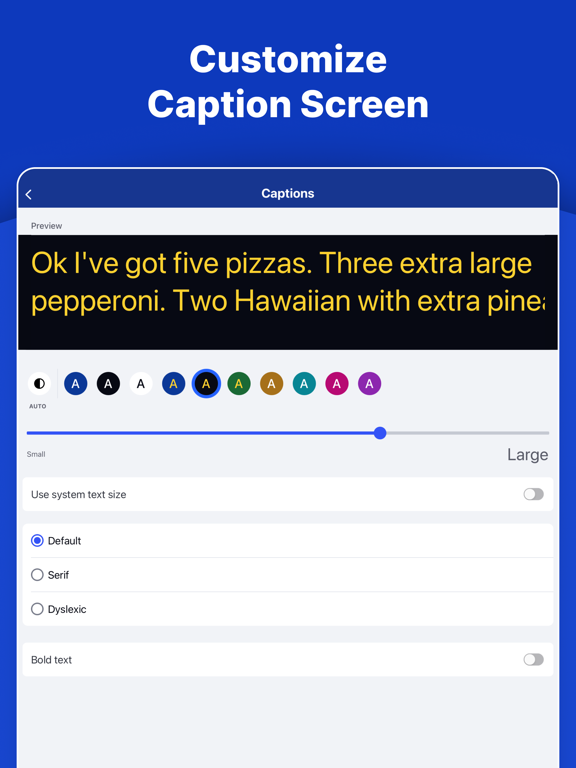
AppCorpus MCP gives your agent current app data, prices, screens, features and sources.
View JSON
GET /api/v3/apps/1333988644
{
  "app_id": 1333988644,
  "canonical_url": "https://appcorpus.com/apps/innocaption-call-captioning-1333988644",
  "identity": {
    "name": "InnoCaption: Call Captioning",
    "slug": "innocaption-call-captioning",
    "developer": {
      "name": "Mezmo Corporation",
      "url": "https://appcorpus.com/developers/mezmo-corporation-developer_f8323fc32fab8c4c4b07b94175dd3d14"
    },
    "icon_url": "https://is1-ssl.mzstatic.com/image/thumb/Purple211/v4/8e/16/ca/8e16ca53-ba60-bcf3-f3bc-4c68d03849b8/AppIcon-0-1x_U007epad-0-1-85-220-0.png/512x512bb.jpg",
    "stores": [
      "apple"
    ],
    "platforms": [
      "iphone",
      "ipad"
    ],
    "status": {
      "state": "active",
      "label": "Active",
      "last_checked": "2026-09-05",
      "last_checked_label": "5 Sep 2026",
      "banner": null,
      "region_note": null
    }
  },
  "listings": [
    {
      "store": "apple",
      "status": "ACTIVE",
      "url": "https://apps.apple.com/us/app/innocaption-call-captioning/id1333988644?uo=4",
      "rating": 4.7,
      "rating_count": 11737,
      "formatted_price": "Free",
      "is_free": true,
      "has_iap": false,
      "has_subscription": false,
      "version": "4.5.2",
      "updated": "2026-09-02",
      "currency": "USD"
    }
  ],
  "summary": {
    "one_liner": null,
    "summary": null,
    "best_for": [],
    "not_for": [],
    "status": "fallback",
    "at_a_glance": [
      "Free to download"
    ]
  },
  "categories": {
    "official": [
      "Utilities",
      "Productivity"
    ],
    "appcorpus": [
      {
        "category_id": "utilities",
        "label": "Utilities",
        "url": "https://appcorpus.com/categories/utilities"
      },
      {
        "category_id": "productivity",
        "label": "Productivity",
        "url": "https://appcorpus.com/categories/productivity"
      }
    ]
  },
  "use_cases": [],
  "features": [
    {
      "capability_id": "free_app",
      "label": "Free app",
      "availability": "yes",
      "access_level": "free",
      "scope": null,
      "evidence": "Store published"
    },
    {
      "capability_id": "siri_shortcuts",
      "label": "Siri Shortcuts",
      "availability": "yes",
      "access_level": "free",
      "scope": "App Store",
      "evidence": "Store published"
    }
  ],
  "pricing": [
    {
      "store": "apple",
      "formatted_price": "Free",
      "is_free": true,
      "has_iap": false,
      "has_subscription": false,
      "currency": "USD",
      "market": "de",
      "last_verified": "2026-09-05",
      "rows": [
        "Free"
      ]
    }
  ],
  "screens": [
    {
      "url": "https://is1-ssl.mzstatic.com/image/thumb/PurpleSource211/v4/e7/e2/b3/e7e2b3bc-1f2d-fedb-461a-e12adf1e7711/1._Live_Captions__U00281_U0029.png/1600x1600bb.jpg",
      "store": "apple",
      "platform": "ipad",
      "alt": "InnoCaption: Call Captioning ipad screenshot 1"
    },
    {
      "url": "https://is1-ssl.mzstatic.com/image/thumb/PurpleSource211/v4/00/d4/c5/00d4c596-c09b-12dc-8b38-af34c1dda0d7/1._Live_Captions__U00281_U0029.png/576x768bb.png",
      "store": "apple",
      "platform": "ipad",
      "alt": "InnoCaption: Call Captioning ipad screenshot 2"
    },
    {
      "url": "https://is1-ssl.mzstatic.com/image/thumb/PurpleSource221/v4/7d/70/84/7d7084e9-62a1-6be0-3e16-a9f569d8281d/2._Customize_Captions.png/1600x1600bb.jpg",
      "store": "apple",
      "platform": "ipad",
      "alt": "InnoCaption: Call Captioning ipad screenshot 3"
    },
    {
      "url": "https://is1-ssl.mzstatic.com/image/thumb/PurpleSource221/v4/a2/aa/13/a2aa1398-3111-742b-9b4b-cdc434573ce1/2._Customize_Captions.png/576x768bb.png",
      "store": "apple",
      "platform": "ipad",
      "alt": "InnoCaption: Call Captioning ipad screenshot 4"
    },
    {
      "url": "https://is1-ssl.mzstatic.com/image/thumb/PurpleSource221/v4/e4/c0/55/e4c05562-619d-85e1-9ddf-6f8d23be8afc/3._Multi_Language__U00287_U0029.png/1600x1600bb.jpg",
      "store": "apple",
      "platform": "ipad",
      "alt": "InnoCaption: Call Captioning ipad screenshot 5"
    },
    {
      "url": "https://is1-ssl.mzstatic.com/image/thumb/PurpleSource211/v4/8d/43/01/8d4301eb-0e61-c2d6-a092-168a39e51107/3._Multi_Language__U00287_U0029.png/576x768bb.png",
      "store": "apple",
      "platform": "ipad",
      "alt": "InnoCaption: Call Captioning ipad screenshot 6"
    },
    {
      "url": "https://is1-ssl.mzstatic.com/image/thumb/PurpleSource211/v4/0a/00/4e/0a004ea8-dce7-e02d-1542-efb80887f0d2/4._Caption_Mode.png/1600x1600bb.jpg",
      "store": "apple",
      "platform": "ipad",
      "alt": "InnoCaption: Call Captioning ipad screenshot 7"
    },
    {
      "url": "https://is1-ssl.mzstatic.com/image/thumb/PurpleSource221/v4/49/c5/65/49c5656f-933d-e3e6-bab9-4b3ec06edf5d/4._Caption_Mode.png/576x768bb.png",
      "store": "apple",
      "platform": "ipad",
      "alt": "InnoCaption: Call Captioning ipad screenshot 8"
    },
    {
      "url": "https://is1-ssl.mzstatic.com/image/thumb/PurpleSource211/v4/74/56/28/74562884-2f5c-65e1-73e4-9711aee67be0/5._No_Cost.png/1600x1600bb.jpg",
      "store": "apple",
      "platform": "ipad",
      "alt": "InnoCaption: Call Captioning ipad screenshot 9"
    },
    {
      "url": "https://is1-ssl.mzstatic.com/image/thumb/PurpleSource211/v4/c3/bc/eb/c3bceb67-ddfb-e527-4870-92df75ed8614/5._No_Cost.png/576x768bb.png",
      "store": "apple",
      "platform": "ipad",
      "alt": "InnoCaption: Call Captioning ipad screenshot 10"
    },
    {
      "url": "https://is1-ssl.mzstatic.com/image/thumb/PurpleSource211/v4/fc/b4/8c/fcb48cbd-6006-aa63-2f46-9d3784b9fd47/6._Keep_Number.png/1600x1600bb.jpg",
      "store": "apple",
      "platform": "ipad",
      "alt": "InnoCaption: Call Captioning ipad screenshot 11"
    },
    {
      "url": "https://is1-ssl.mzstatic.com/image/thumb/PurpleSource211/v4/7a/e6/35/7ae63530-0262-813b-051d-6945f6497564/6._Keep_Number.png/576x768bb.png",
      "store": "apple",
      "platform": "ipad",
      "alt": "InnoCaption: Call Captioning ipad screenshot 12"
    },
    {
      "url": "https://is1-ssl.mzstatic.com/image/thumb/PurpleSource221/v4/cc/41/94/cc419405-f90d-197e-6e33-2673d85ee5e6/7._Review_Transcripts.png/1600x1600bb.jpg",
      "store": "apple",
      "platform": "ipad",
      "alt": "InnoCaption: Call Captioning ipad screenshot 13"
    },
    {
      "url": "https://is1-ssl.mzstatic.com/image/thumb/PurpleSource211/v4/5e/f4/01/5ef401f9-38a3-0629-3602-682dd2a67db8/7._Review_Transcripts.png/576x768bb.png",
      "store": "apple",
      "platform": "ipad",
      "alt": "InnoCaption: Call Captioning ipad screenshot 14"
    },
    {
      "url": "https://is1-ssl.mzstatic.com/image/thumb/PurpleSource221/v4/32/a8/c0/32a8c016-0354-fae2-d06d-a0b8433642c0/12.9_-_8._TTS__U00281_U0029.png/1600x1600bb.jpg",
      "store": "apple",
      "platform": "ipad",
      "alt": "InnoCaption: Call Captioning ipad screenshot 15"
    },
    {
      "url": "https://is1-ssl.mzstatic.com/image/thumb/PurpleSource211/v4/65/0e/80/650e8094-0fb8-844d-8d15-63eb9f97b7d7/12.9_-_8._TTS__U00281_U0029.png/576x768bb.png",
      "store": "apple",
      "platform": "ipad",
      "alt": "InnoCaption: Call Captioning ipad screenshot 16"
    },
    {
      "url": "https://is1-ssl.mzstatic.com/image/thumb/PurpleSource211/v4/c5/0e/7c/c50e7c59-96fd-e952-7be9-444726551fda/12.9_-_9._AI_Refine.png/1600x1600bb.jpg",
      "store": "apple",
      "platform": "ipad",
      "alt": "InnoCaption: Call Captioning ipad screenshot 17"
    },
    {
      "url": "https://is1-ssl.mzstatic.com/image/thumb/PurpleSource221/v4/ae/21/4f/ae214f27-db49-d26d-59ab-46c7a46206be/12.9_-_9._AI_Refine.png/576x768bb.png",
      "store": "apple",
      "platform": "ipad",
      "alt": "InnoCaption: Call Captioning ipad screenshot 18"
    },
    {
      "url": "https://is1-ssl.mzstatic.com/image/thumb/PurpleSource221/v4/5b/d2/06/5bd20643-a2da-a579-cd0f-9124b61f5609/10._Customer_Support__U00281_U0029.png/1600x1600bb.jpg",
      "store": "apple",
      "platform": "ipad",
      "alt": "InnoCaption: Call Captioning ipad screenshot 19"
    },
    {
      "url": "https://is1-ssl.mzstatic.com/image/thumb/PurpleSource221/v4/cd/b6/1d/cdb61db5-de58-4685-f832-1cea40f8329b/10._Customer_Support__U00281_U0029.png/576x768bb.png",
      "store": "apple",
      "platform": "ipad",
      "alt": "InnoCaption: Call Captioning ipad screenshot 20"
    },
    {
      "url": "https://is1-ssl.mzstatic.com/image/thumb/PurpleSource211/v4/2d/04/56/2d0456bb-81b0-54a1-5ff1-6cb7dd50063f/1._Free.png/1320x1600bb.jpg",
      "store": "apple",
      "platform": "iphone",
      "alt": "InnoCaption: Call Captioning iphone screenshot 21"
    },
    {
      "url": "https://is1-ssl.mzstatic.com/image/thumb/PurpleSource221/v4/1f/a2/1b/1fa21b94-80c4-dc65-2423-a9103bf64831/2._Customize_Caption.png/1320x1600bb.jpg",
      "store": "apple",
      "platform": "iphone",
      "alt": "InnoCaption: Call Captioning iphone screenshot 22"
    },
    {
      "url": "https://is1-ssl.mzstatic.com/image/thumb/PurpleSource221/v4/eb/fe/e7/ebfee722-9750-5d8a-2d1a-91ba87d33e3d/3._Multi_Language.png/1320x1600bb.jpg",
      "store": "apple",
      "platform": "iphone",
      "alt": "InnoCaption: Call Captioning iphone screenshot 23"
    },
    {
      "url": "https://is1-ssl.mzstatic.com/image/thumb/PurpleSource221/v4/cd/29/c8/cd29c8bc-4b9f-f526-9a6a-399da543f406/4._Caption_Mode_6.9__U00282_U0029.png/1320x1600bb.jpg",
      "store": "apple",
      "platform": "iphone",
      "alt": "InnoCaption: Call Captioning iphone screenshot 24"
    },
    {
      "url": "https://is1-ssl.mzstatic.com/image/thumb/PurpleSource221/v4/15/a0/05/15a00543-e731-148a-f729-0d8afdf8646b/6.9_U0022_5._Backup_Never_miss_v2.png/1320x1600bb.jpg",
      "store": "apple",
      "platform": "iphone",
      "alt": "InnoCaption: Call Captioning iphone screenshot 25"
    },
    {
      "url": "https://is1-ssl.mzstatic.com/image/thumb/PurpleSource211/v4/20/70/e8/2070e8c4-9088-986d-dd6d-e467c921d467/6._Keep._Number.png/1320x1600bb.jpg",
      "store": "apple",
      "platform": "iphone",
      "alt": "InnoCaption: Call Captioning iphone screenshot 26"
    },
    {
      "url": "https://is1-ssl.mzstatic.com/image/thumb/PurpleSource221/v4/2f/3e/d8/2f3ed8b0-8a4b-5ff0-12ce-b094f79301a5/7._Review_Transcripts.png/1320x1600bb.jpg",
      "store": "apple",
      "platform": "iphone",
      "alt": "InnoCaption: Call Captioning iphone screenshot 27"
    },
    {
      "url": "https://is1-ssl.mzstatic.com/image/thumb/PurpleSource211/v4/57/91/82/5791826a-c7b7-b13e-76e0-f07561365548/6.9_-_8._TTS.png/1320x1600bb.jpg",
      "store": "apple",
      "platform": "iphone",
      "alt": "InnoCaption: Call Captioning iphone screenshot 28"
    },
    {
      "url": "https://is1-ssl.mzstatic.com/image/thumb/PurpleSource211/v4/df/6c/df/df6cdf17-c11c-d72e-20fa-73dd994b7a5a/6.9_-_9._AI_Refine.png/1320x1600bb.jpg",
      "store": "apple",
      "platform": "iphone",
      "alt": "InnoCaption: Call Captioning iphone screenshot 29"
    },
    {
      "url": "https://is1-ssl.mzstatic.com/image/thumb/PurpleSource211/v4/9f/07/03/9f070312-5ad0-0736-473a-37501ebca8cb/10._Customer_Support.png/1320x1600bb.jpg",
      "store": "apple",
      "platform": "iphone",
      "alt": "InnoCaption: Call Captioning iphone screenshot 30"
    },
    {
      "url": "https://is1-ssl.mzstatic.com/image/thumb/PurpleSource221/v4/ab/76/c4/ab76c4b7-abdb-3b13-66a4-a1b65b4867cc/46mm-Frame_5.png/416x496bb.jpg",
      "store": "apple",
      "platform": "watch",
      "alt": "InnoCaption: Call Captioning watch screenshot 31"
    },
    {
      "url": "https://is1-ssl.mzstatic.com/image/thumb/PurpleSource211/v4/af/0e/47/af0e470b-8f8c-ff51-08c8-7276abacadca/46mm-Frame_7.png/416x496bb.jpg",
      "store": "apple",
      "platform": "watch",
      "alt": "InnoCaption: Call Captioning watch screenshot 32"
    },
    {
      "url": "https://is1-ssl.mzstatic.com/image/thumb/PurpleSource211/v4/46/d1/cd/46d1cd05-9679-887e-f937-8f75d5ba9677/46mm-Frame_1.png/416x496bb.jpg",
      "store": "apple",
      "platform": "watch",
      "alt": "InnoCaption: Call Captioning watch screenshot 33"
    },
    {
      "url": "https://is1-ssl.mzstatic.com/image/thumb/PurpleSource211/v4/de/8a/14/de8a140f-8fc4-8c4a-ea3a-5d233870c5c4/46mm-Frame_3.png/416x496bb.jpg",
      "store": "apple",
      "platform": "watch",
      "alt": "InnoCaption: Call Captioning watch screenshot 34"
    },
    {
      "url": "https://is1-ssl.mzstatic.com/image/thumb/PurpleSource211/v4/fb/ae/83/fbae833b-1a89-8262-e28d-1375153ed725/46mm-Frame_8.png/416x496bb.jpg",
      "store": "apple",
      "platform": "watch",
      "alt": "InnoCaption: Call Captioning watch screenshot 35"
    },
    {
      "url": "https://is1-ssl.mzstatic.com/image/thumb/PurpleSource211/v4/b8/f0/ef/b8f0efde-e47b-0822-2705-232eb4b05d7e/46mm-Frame_2.png/416x496bb.jpg",
      "store": "apple",
      "platform": "watch",
      "alt": "InnoCaption: Call Captioning watch screenshot 36"
    },
    {
      "url": "https://is1-ssl.mzstatic.com/image/thumb/PurpleSource211/v4/ae/bd/da/aebddae5-55c9-82f8-b5e3-4c2531eec6a3/46mm-Frame_6.png/416x496bb.jpg",
      "store": "apple",
      "platform": "watch",
      "alt": "InnoCaption: Call Captioning watch screenshot 37"
    },
    {
      "url": "https://is1-ssl.mzstatic.com/image/thumb/PurpleSource221/v4/25/3f/ef/253fefbc-bfac-3ccf-455c-2f66f3993a3e/46mm-Frame_4.png/416x496bb.jpg",
      "store": "apple",
      "platform": "watch",
      "alt": "InnoCaption: Call Captioning watch screenshot 38"
    }
  ],
  "ratings": [
    {
      "store": "apple",
      "average": 4.7,
      "count": 11737,
      "market": "de",
      "observed_at": "2026-09-05",
      "reviews": [
        {
          "rating": 5,
          "title": "Best App ever with no monthly fees!",
          "body": "I used to need someone else to make phone calls for me. I am hard of hearing and it is progressive. On my daughters birthday, five of us went out to a restaurant. I could not hear any the conversations. I could read lips but sentences and content were indecipherable. I was isolated the whole nite - smiling when everyone else was amd trying to nod when it seemed fitting. INNOCAPTION has amazingly opened the door to the hearing world! I used you avoid using the phone, and now I am so empowered that I enjoy even talking to Medicare! You can select a live operator or a technology driven computer program. InnoCaption has enabled me to read exactly what’s being said with 99% accuracy. No more asking my husband or family member to help me use the telephone. It’s not a welcome request to ask someone to call the DMV or your insurance company for you. Now I can do it myself with crystal clear accuracy. The I ocaption features were well thought out and leave you with more than a hearing person using the phone would. For example, you can retain a copy of a conversation. That helps you with recording old phone numbers, remembering dates and ID numbers, and remembering names. For anyone who struggles with hearing loss and subsequently using the phone, get this app. You will wonder how do you survived without it I give it 100+ percent satisfaction.",
          "author": "Beeeeb brain",
          "date": "5 Sep 2026"
        },
        {
          "rating": 5,
          "title": "Great App",
          "body": "I never leave reviews, but InnoCaption has been such a game changer for me, I felt compelled to do so. This is the third caption app I have tried and it has been so much better than the others. It gives you the option of using an individual to transcribe or automated assistance. The option of a human to transcribe is supposedly more accurate and the automated option is faster. I started using it with a human transcriber and then switched to the automated option. I found both to be accurate. The automated is very accurate and the only time I have any real problems is with numbers. It can get a bit confused with phone numbers and such but it is usually so fast and accurate that it is the only option I have ever used and was able to have a normal conversation without asking people to hold on while I waited for the captions. It is the first time in 20 years that I have not dreaded making a phone call. Also, the voice mail is so much easier than my last app. My last app required using a tree menu. Push 1 for this, 2 for that, etc. Transcribers have a hard time with those trees. InnoCaption lists the calls and you just pick the one you want to hear. No need to push a bunch of options trying to find the call you want. This has been a GREAT APP for me. I hope they keep it up. I would really hate to lose it.",
          "author": "onetwobutnotthree",
          "date": "5 Sep 2026"
        },
        {
          "rating": 5,
          "title": "Love this app!",
          "body": "I had gotten a different TTY home phone and app before this one. When I was ready to start using it, the home phone couldn’t be connected to WiFi so I found its app. I worked many hours daily for around a week, each time I thought it was set up, discovered new issues not to be found in the tutorial. Now THIS app?! Beautiful! It was super easy to set up plus instead of having to call customer support for any issues needing addressed, waiting for long time, you can get on a chat with them immediately. Customer service is excellent, I found this app accidentally when I found I had to use Zoom for a video appointment and was searching for help because I didn’t have anyone to come over to help me understand the doctor. That’s when I found out that this app not only works beautifully with iPhone and iPad, it has a desktop version to enable us to use closed captioning when in a Zoom appointment. I haven’t got to use this with Zoom yet but I foresee no problems with using the desktop version of this with it. I was just so happy after being able to make a few phone calls and also receiving phone calls on this after having my iPhone number forwarded to ring here, I want everyone to know this is by far, the most amazing app for the deaf! ♥️",
          "author": "JoellynRose",
          "date": "5 Sep 2026"
        },
        {
          "rating": 5,
          "title": "Unbelievable App",
          "body": "As a person that due to hearing loss has many problems understanding spoken words even in an everyday environment. Add that problem with cell phone communications and it really goes downhill. Especially when talking with people that have high pitch voices. This product is like closed caption for TV except it is extremely fast and accurate with translation of spoken word to text right on your phone screen. It is a game changer for hearing challenged people like myself. I can even talk with people when I can’t hear a word they are saying. It will also optionally, via a setting, translate English speaking people to provide the text in Spanish. I never know there was anything form an app perspective that could help me with phone conversations and on top of that with no charge for the app or usage charges when it is being used. As a retired IT veteran of 45 years, I’m pretty tough in handing out reviews. This is the first app I’ve ever given a 5+ rating. If you or any of your friends have hearing problems, whether they use hearing aids (that really don’t do a lot for pitch) or not, this is a must have app. 5+++++++",
          "author": "BBSA001",
          "date": "5 Sep 2026"
        },
        {
          "rating": 4,
          "title": "Innocaption App lifesaver",
          "body": "I started using Innocaption about a month before Hurricane Delta 75 mph winds split a cedar tree in half which continued to slowly lean towards my house and a busy street as well as knocked down several large limbs and branches from other trees. It became urgent to remove the cedar tree asap. With no electricity to use my CapTel home phone, the Innocaption app service was a lifesaver in being able to contact tree companies. Thankfully, the tree was removed 1 1/2 days later. Without Innocaption, I would have had to wait 3 days when I finally got power to use my phone!! It is now a few years later and now I’m using the Deskview on my computer as well. I needed help to get it installed. Susie and their engineers worked with me every step of the way until the problem on my computer was resolved. The FREEDOM the Innocaption app gives me, as I run around town when family, Medical appts, etc. call, helps me not worry that I will miss a call when I leave the house where I use my Captel phone which I love at home. If I have no electricity, I have access to my cell phone to make calls through Innocaption. When I was in the hospital for a month, I was able to continue to talk to family snd friends. So I encourage everyone to give Innocaption a try by signing in the app to see if it works as well for you as it has me!!",
          "author": "Texas Hoh",
          "date": "5 Sep 2026"
        }
      ]
    }
  ],
  "privacy": [
    {
      "store": "apple",
      "declarations": [
        {
          "title": "Data Linked to You",
          "detail": "App Functionality — Contact Info — Email Address",
          "source": "Developer declared"
        },
        {
          "title": "Data Linked to You",
          "detail": "App Functionality — Contact Info — Name",
          "source": "Developer declared"
        },
        {
          "title": "Data Linked to You",
          "detail": "App Functionality — Contact Info — Phone Number",
          "source": "Developer declared"
        },
        {
          "title": "Data Linked to You",
          "detail": "App Functionality — Contact Info — Physical Address",
          "source": "Developer declared"
        },
        {
          "title": "Data Linked to You",
          "detail": "App Functionality — Identifiers — User ID",
          "source": "Developer declared"
        },
        {
          "title": "Data Linked to You",
          "detail": "App Functionality — Location — Precise Location",
          "source": "Developer declared"
        },
        {
          "title": "Data Linked to You",
          "detail": "App Functionality — Usage Data — Other Usage Data",
          "source": "Developer declared"
        },
        {
          "title": "Data Linked to You",
          "detail": "Contact Info",
          "source": "Developer declared"
        },
        {
          "title": "Data Linked to You",
          "detail": "Identifiers",
          "source": "Developer declared"
        },
        {
          "title": "Data Linked to You",
          "detail": "Location",
          "source": "Developer declared"
        },
        {
          "title": "Data Linked to You",
          "detail": "Usage Data",
          "source": "Developer declared"
        },
        {
          "title": "Data Not Linked to You",
          "detail": "App Functionality — Identifiers — Device ID",
          "source": "Developer declared"
        },
        {
          "title": "Data Not Linked to You",
          "detail": "Developer’s Advertising or Marketing — Identifiers — Device ID",
          "source": "Developer declared"
        },
        {
          "title": "Data Not Linked to You",
          "detail": "Developer’s Advertising or Marketing — Usage Data — Product Interaction",
          "source": "Developer declared"
        },
        {
          "title": "Data Not Linked to You",
          "detail": "Identifiers",
          "source": "Developer declared"
        },
        {
          "title": "Data Not Linked to You",
          "detail": "Usage Data",
          "source": "Developer declared"
        },
        {
          "title": "Data Used to Track You",
          "detail": "Identifiers — Device ID",
          "source": "Developer declared"
        },
        {
          "title": "Data Used to Track You",
          "detail": "Identifiers",
          "source": "Developer declared"
        },
        {
          "title": "Data Used to Track You",
          "detail": "Usage Data — Product Interaction",
          "source": "Developer declared"
        },
        {
          "title": "Data Used to Track You",
          "detail": "Usage Data",
          "source": "Developer declared"
        }
      ],
      "accessibility": []
    }
  ],
  "changes": [
    {
      "store": "apple",
      "version": "4.2.10",
      "released_at": null,
      "notes": "- Favorite Contacts can now be easily removed or re-ordered from the Contacts tab - Minor bug fixes and performance improvements"
    },
    {
      "store": "apple",
      "version": "4.2.11",
      "released_at": null,
      "notes": "- New Feature: Text-to-speech is now even faster with AI Refine! Type a few words, tap the Refine button, and our AI will help you create a natural conversational sentence - New Feature: Make a test call feature now gives the option to choose an AI agent for a simulated phone call to test out all our features in a low stress environment - Minor bug fixes and performance improvements"
    },
    {
      "store": "apple",
      "version": "4.2.12",
      "released_at": null,
      "notes": "- Minor bug fixes and performance improvements"
    },
    {
      "store": "apple",
      "version": "4.2.9",
      "released_at": null,
      "notes": "- New Feature: Text-to-speech Shortcuts allows you to quickly speak pre-written custom phrases during calls - Minor bug fixes and performance improvements"
    },
    {
      "store": "apple",
      "version": "4.3.0",
      "released_at": null,
      "notes": "- New \"Compact\" mode in Settings: Personalize your experience by choosing between compact, default or larger system text size throughout the app - Minor bug fixes and performance improvements"
    },
    {
      "store": "apple",
      "version": "4.3.1",
      "released_at": null,
      "notes": "- New \"Compact\" mode in Settings: Personalize your experience by choosing between compact, default or larger system text size throughout the app - Minor bug fixes and performance improvements"
    },
    {
      "store": "apple",
      "version": "4.3.10",
      "released_at": null,
      "notes": "- New Feature: Move data to a new device, securely transfer your account data when switching to a new device - New Feature: Picture-in-picture mode will now show captions during calls, even if you need to navigate to another app temporarily - Minor bug fixes and performance improvements"
    },
    {
      "store": "apple",
      "version": "4.3.11",
      "released_at": null,
      "notes": "- New Feature: Custom Word List lets you add custom words to improve caption accuracy for names, places, and commonly used terms - Minor bug fixes and performance improvements"
    },
    {
      "store": "apple",
      "version": "4.3.12",
      "released_at": null,
      "notes": "- Minor bug fixes and performance improvements"
    },
    {
      "store": "apple",
      "version": "4.3.13",
      "released_at": null,
      "notes": "- Minor bug fixes and performance improvements"
    },
    {
      "store": "apple",
      "version": "4.3.14",
      "released_at": null,
      "notes": "- Minor bug fixes and performance improvements"
    },
    {
      "store": "apple",
      "version": "4.3.2",
      "released_at": null,
      "notes": "- Minor bug fixes and performance improvements"
    },
    {
      "store": "apple",
      "version": "4.3.4",
      "released_at": null,
      "notes": "- Minor bug fixes and performance improvements"
    },
    {
      "store": "apple",
      "version": "4.3.5",
      "released_at": null,
      "notes": "- Minor bug fixes and performance improvements"
    },
    {
      "store": "apple",
      "version": "4.3.7",
      "released_at": null,
      "notes": "- Minor bug fixes and performance improvements"
    },
    {
      "store": "apple",
      "version": "4.3.8",
      "released_at": null,
      "notes": "- Minor bug fixes and performance improvements"
    },
    {
      "store": "apple",
      "version": "4.3.9",
      "released_at": null,
      "notes": "- Minor bug fixes and performance improvements"
    },
    {
      "store": "apple",
      "version": "4.4.0",
      "released_at": null,
      "notes": "- New feature: Added a Lock Voicemail option to help protect important voicemails from accidental deletion - Minor bug fixes and performance improvements"
    },
    {
      "store": "apple",
      "version": "4.4.1",
      "released_at": null,
      "notes": "- Minor bug fixes and performance improvements"
    },
    {
      "store": "apple",
      "version": "4.4.2",
      "released_at": null,
      "notes": "- Minor bug fixes and performance improvements"
    }
  ],
  "alternatives": [
    {
      "app_id": 1514154600,
      "name": "Rylo: Live Call Captioning",
      "url": "https://appcorpus.com/apps/rylo-live-call-captioning-1514154600",
      "reason": "Same category + similar ratings"
    },
    {
      "app_id": 1471473738,
      "name": "Live Transcribe",
      "url": "https://appcorpus.com/apps/live-transcribe-1471473738",
      "reason": "Same category + similar ratings"
    },
    {
      "app_id": 1529823668,
      "name": "CaptionCall",
      "url": "https://appcorpus.com/apps/captioncall-1529823668",
      "reason": "Same category + similar ratings"
    },
    {
      "app_id": 6740202306,
      "name": "MonoBoost Cancel Subscriptions",
      "url": "https://appcorpus.com/apps/monoboost-cancel-subscriptions-6740202306",
      "reason": "Same category + similar ratings"
    },
    {
      "app_id": 6738374645,
      "name": "Family Tracker - GPS Locator",
      "url": "https://appcorpus.com/apps/family-tracker-gps-locator-6738374645",
      "reason": "Same category + similar ratings"
    },
    {
      "app_id": 1640981560,
      "name": "Guardio - Mobile Security",
      "url": "https://appcorpus.com/apps/guardio-mobile-security-1640981560",
      "reason": "Same category + similar ratings"
    }
  ],
  "evidence_summary": {
    "index_state": "S1",
    "evidence_level": 1,
    "level_label": "Live store listing",
    "indexable": true,
    "last_verified_at": "2026-09-05",
    "unknown_fields": [
      "Independent summary has not been published yet."
    ],
    "sources": [
      "App Store"
    ]
  },
  "availability_markets": {
    "live": [
      "us"
    ],
    "selected": "de",
    "note": "No LIVE observation for DE yet."
  },
  "feature_events": {
    "events": []
  },
  "features_slice": {
    "plans": [
      {
        "code": "free",
        "label": "Free",
        "kind": "free",
        "status": "inferred",
        "prices": [],
        "trial": null
      }
    ],
    "features": [],
    "unknown_features": [],
    "data_cutoff": "5 Sep 2026"
  }
}