
Quick verdict
- What it is
- Store information collected; independent summary not yet available.
- At a glance
-
- From $3.99/mo
- Free to download
- In-app purchases
Categories and search queries
Official categories
- Productivity
- Shopping
AppCorpus categories
Key functions
| Function | Availability | Access | Scope | Evidence |
|---|---|---|---|---|
| Family Sharing | Yes | Unknown | App Store | Store published |
| Free app | Yes | Free | — | Store published |
| In-app purchases | Yes | Limited free | — | Store published |
Screens
App Store
32 store screenshots


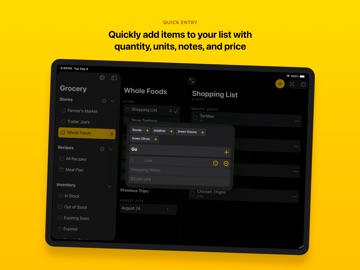
Pricing & paywalls
App Store
- Grocery Premium - Monthly — $3.99/month
- Grocery Premium - Monthly — $9.99
- Grocery Premium - Forever — $29.99
Ratings & reviews
App Store
-
4/5Great App, BUT
Love this app and my husband and I use it whenever we shop. It’s so nice that he can see what I’ve added to the list and check things off if he’s the one that grabs them. I’ve tried multiple grocery apps over the years and this is my favorite. I have tried for a very long time to find a way to contact the developer though, and I can’t, so that’s my reason for removing a star. I wish there was some type of customer service email. It just sends me to Twitter. The app needs another feature. We should be able to subdivide the grocery lists for each store. When I am getting low on something but not out yet, I like to add it to my list and make a note that I don’t need it unless it’s on sale, so in general just items that I add to a specific store’s list because I might want them at some point, but don’t necessarily need them now. I am praying for an update where I can have a list for a specific store where I can divide it in two, one subdivision for things I absolutely need to get at the store on the next trip, and one for things that aren’t “must haves” for whatever reason. Please, please allow this! I will have to search for a new app soon if I can’t get that because my full lists are getting too hard to navigate while at the store now. I pay for the app and would love this feature. Thank you!
CalinCeleste · 6 Aug 2026
-
5/5So much potential...
I have tried over 40+ grocery/shopping apps, and this app has SO MUCH POTENTIAL. It’s feature rich and has some great functionality. However, like most app developers, use-case and actual usability seem to be an afterthought—which is paramount for any successful app. Features mean absolutely nothing without that! The sync function fails consistently and is poorly planned. I’m required to manually force a sync to iCloud and pull data from iCloud to update shared data on other devices. As a result... we have abandoned use for family and sync function. I have tested this with multiple devices and new data and all problems are easily reproducible. I have also uninstalled and reinstalled to confirm the short list of issues. There is a definitely learning curve, which could be easily remedied. Emails to developer confirm that you are likely to not get a response, another failed use-case example. It’s easy to open a free support & ticket tracking system to receive the list of issues to be prioritized and worked on, establish a roadmap for features, and get this back on track. I hope that the developer takes this app seriously for future updates, enhancements, and builds up its potential. Again, because it truly has SO MUCH POTENTIAL.
Tim6868 · 6 Aug 2026
-
5/5Learning Curve, Huge Gains
A fantastic app, yet you need to learn how to use it. The only thing that this app is missing during its planning is friendly UI but I don’t expect it to happen for quite some time as this will require for the app to go through an overhaul and perhaps it will be the third version of the app. With that said this app is amazing once you fiddle around and learn how the features work. You can actually set up what you need from each individual store (especially if you are price shopping or can only find certain items at a certain store). I must add that having the ability to set reminders on when things expire is a must have feature because if you aren’t like me having the time to clean out the fridge and pantry every week then this will make it easier to know what needs to be replaced or thrown away. These are just to name a few but two that I found to be lacking in most other “shopping” apps. Give the app a try and you will find something a feature that will benefit you. To the the developers, it will be great if there was a section to add a link of the weekly ad at the grocery store someone is shopping at.
E.M_ · 6 Aug 2026
-
3/5Set up is confusing
I’ll preface by saying I’ve just downloaded the app and am working through setup, so some more noodling on my part may make things clear. But initial impression is that Store setup is confusing AF. Instructions are minimal and written from the perspective of someone already intimate with the workings of the app. Somehow I wound up with two iCal DAV entries (or maybe two Reminders entries... It’s, like I said, confusing AF). Trying to do a grocery list and it appears as though the second store I set up has become a kind of master store, underneath which the first store I set up is like a sub-store. Like I said, it’s confusing AF. Better instructions are needed, or perhaps, better presentation of stores. Good rules of thumb for instructions: 1) Assume the user does not have a high-level conceptual understanding of your app. The user didn’t design it, so won’t be intimate with the consequences of choosing setup options. 2) Include a how-to guide, with step-by-step instructions, rather than a 10,000-ft level overview of the process. Update: cancelled subscription, deleted app. The interface with Reminders makes zero sense. I deleted the two stores I had initially set up so I could start over to understand the set up process. To my surprise, a whole other category of Reminders (all geo-fenced reminders with names of fav servers/bartenders at my favorite establishments) showed up as a Store/List. What the fuuu...??
xhat1964 · 6 Aug 2026
-
1/5Great concepts, but very difficult to use
Admirable concepts: - using reminders, rather than a proprietary silo, to store and share the data of the app - treating entries on a shopping list as references to permanent items - keeping shopping lists per store, and optimize the ordering - normalizing to a canonical set of shopping items with well defined structure All this I likes so much just from reading it I immediately paid for the premium version. In practice: - i could not figure out how to keep a list of items I need, without also deciding which shop to buy them from - i found it impossible to keep both fresh garlic and fermented garlic separately on the shopping list. They would be lumped together as just garlic, with attributes fresh, fermented - when switching stores, the store name at the top of the list is not immediatley updated. especially annoying in light of the difficulty to understand the list concept to begin with Great concepts, but implementation needs more time to pan out, I think. Update on latest update: The bug that the store name is not updated is gone! Great! Creating a household is difficult to get to work. Inviting someone who uses the app the first time doesn't actually add them to the household, but just sets up the app. After first invitation to the household, second invitation was not possible immediately, the dialog would just close immediately. Next day it did work. Household sharing shares only grocery items but not the stores. Difficult to understand whether that's a bug or intended.
Another app store user · 6 Aug 2026
Privacy & accessibility
App Store
Privacy
- Data Not Collected Developer declared
Accessibility
- Dark Interface — SUPPORTED Store published
- Differentiate Without Color Alone — SUPPORTED Store published
- Larger Text — SUPPORTED Store published
- Reduced Motion — SUPPORTED Store published
- Sufficient Contrast — SUPPORTED Store published
- Voice Control — SUPPORTED Store published
- VoiceOver — SUPPORTED Store published
Versions
App Store
-
2.3.2
** Grocery 2.3.0 continues to focus on reliability and performance, and includes several bug fixes based on user feedback! ** - Improves reliability of manually sorting list contents - Adds visibility to connection status on Apple Watch - Includes a newly redesigned action sheet that works better with themes, supports iOS 13 modals, and looks better on iPad - Checked items are now immediately added to purchase history and inventory - We've added several new requested settings for list, cooking, and item behavior - Grocery Premium now supports compact mode for seeing more items at once on screen, and now includes monthly and forever purchase options ** Grocery 2.2.1 introduces expiration notifications for inventory tracking items. ** Grocery 2.2.0 adds support for iOS 13 alongside a new premium feature called Inventory Tracking! iOS 13 - Dark Mode: Set which Grocery themes you want to use in Light and Dark appearance - Context Menus - Multiple Windows on iPad - New Modal Card Navigation Inventory Tracking - Track the in stock status of items - Automatic expiration settings - Automatic replenishment of expired items - Inventory status syncs with iCloud Shopping History - View items from your last shopping trip - View most frequently shopped for items - View the last time you purchased an item - View which stores you've purchased an item at - Set the default list for an item These improvements make using Grocery on iOS 13 a whole lot nicer and help keep track of what’s in your pantry. Thank you for using Grocery! If you enjoy the app, please tell a friend or leave a review.
-
2.4.0
** Grocery 2.4.0 introduces a new Household sharing feature, and addresses many other user requested issues ** Households: - Share your stores, meal plans, and inventory with other household members - Households require Grocery Premium to create, but every household member gets access to premium features (only one person per-household needs to subscribe) - Household sharing uses iCloud for syncing, so all of your devices share in the fun Other Changes: - Fixed a long-standing issue with some items forgetting their sorted order - Autocomplete suggestions have been improved to surface more relevant results faster - Fixed a crash related to autocomplete suggestions - Addressed an issue causing some items to appear at the top or bottom of a manually sorted list - Improved CleanUp to properly recognize common items entered from the keyboard - Fixed an issue that caused some note text to be duplicated Thank you for using Grocery! If you enjoy the app, please tell a friend or leave a review.
-
2.4.1
** Grocery 2.4.0 introduces a new Household sharing feature, and addresses many other user requested issues ** Households: - Share your stores, meal plans, and inventory with other household members - Households require Grocery Premium to create, but every household member gets access to premium features (only one person per-household needs to subscribe) - Household sharing uses iCloud for syncing, so all of your devices share in the fun Other Changes: - Fixed a long-standing issue with some items forgetting their sorted order - Autocomplete suggestions have been improved to surface more relevant results faster - Fixed a crash related to autocomplete suggestions - Addressed an issue causing some items to appear at the top or bottom of a manually sorted list - Improved CleanUp to properly recognize common items entered from the keyboard - Fixed an issue that caused some note text to be duplicated Thank you for using Grocery! If you enjoy the app, please tell a friend or leave a review.
-
2.4.2
** Grocery 2.4.0 introduces a new Household sharing feature, and addresses many other user requested issues ** Households: - Share your stores, meal plans, and inventory with other household members - Households require Grocery Premium to create, but every household member gets access to premium features (only one person per-household needs to subscribe) - Household sharing uses iCloud for syncing, so all of your devices share in the fun Other Changes: - Fixed a long-standing issue with some items forgetting their sorted order - Autocomplete suggestions have been improved to surface more relevant results faster - Fixed a crash related to autocomplete suggestions - Addressed an issue causing some items to appear at the top or bottom of a manually sorted list - Improved CleanUp to properly recognize common items entered from the keyboard - Fixed an issue that caused some note text to be duplicated Thank you for using Grocery! If you enjoy the app, please tell a friend or leave a review.
-
2.5.0
** Grocery 2.5.0 introduces an updated design with optimizations for iPad and organizational improvements for shopping history, inventory, and all of our app's settings ** iPad - Sidebar navigation for all of our main features - Readable width layout improves legibility Context Menus - Added additional menu options and updated icons Appearance - Updated the visual design for consistency across every screen in the app - Themes and App Icon switchers have a new design that’s easier to use Accessibility - Improved support for Voiceover across shopping list, inventory, history, and settings - Fixed an issue where the status of some settings wasn’t spoken in Voiceover Inventory Tracking - Improved the functionality of this Grocery Premium feature to interact more naturally with the meal plan process - Inventory and History are now separate screens with more intuitive behavior - Inventory and History now include a search bar Stores - Brand new stores and lists screen organizes stores together with the lists they are paired with - Unified interface for switching between different stores Performance - Dramatically improved the performance of iCloud syncing - pushing items to iCloud should be much faster - Dramatically improved performance of checking items off in large shopping lists - Improved performance of adding items to the list from shopping history Other Changes: - Fixed an issue with iCloud syncing that could affect Household performance - Fixed an issue with Reminders that could result in duplicated titles and notes Thank you for using Grocery! If you enjoy the app, please tell a friend or leave a review.
-
2.6.0
** Widgets! This update includes support for new iOS 14 widgets on iPhone and iPad, and further optimizations for three column layout on iPadOS 14. ** Widgets - Grocery list widget for showing a specific store - Overview of all stores - Overview of the current meal plan - Cooking widget that shows the status of current recipes, including current timers and upcoming steps iPad - Three column layout - Improved context menu support for buttons and actions - Scribble to add items to the grocery list from the text field at the bottom of the screen Performance - Several interactions with inventory and history should feel faster Bug Fixes - Fixed a crash that may have affected a few users - Fixed an issue with ingredients not being added to the list - Fixed an issue blocking the bottom recipe from being tapped on Thank you for using Grocery! If you enjoy the app, please tell a friend or leave a review.
-
2.6.1
** Widgets! Themed Widgets! This update includes support for new iOS 14 widgets on iPhone and iPad, and further optimizations for three column layout on iPadOS 14. ** 2.6.1 - Now you can assign specific themes to each Widget - New theme options available - Assign dates to your meal plans - Add a recipe to your meal plan directly from the Meal Plans screen - Several bug fixes and performance improvements Widgets - Grocery list widget for showing a specific store - Overview of all stores - Overview of the current meal plan - Cooking widget that shows the status of current recipes, including current timers and upcoming steps iPad - Three column layout - Improved context menu support for buttons and actions - Scribble to add items to the grocery list from the text field at the bottom of the screen Performance - Several interactions with inventory and history should feel faster Bug Fixes - Fixed a crash that may have affected a few users - Fixed an issue with ingredients not being added to the list - Fixed an issue blocking the bottom recipe from being tapped on Thank you for using Grocery! If you enjoy the app, please tell a friend or leave a review.
-
2.7.0
** Recipe Import! iCloud Folder Sharing! This update includes a new Safari Sharing Extension for importing recipes into Grocery from the web. Use iCloud Folder Sharing to share a folder of recipes with friends or family. ** 2.7.0 - Import Recipes from Safari - Share an iCloud Folder of Recipes - iPad improvements for Keyboards and Toolbars Recipe Import - Includes the recipe title, description, image, ingredients, and steps - Saved in the Markdown file format just like other Grocery recipes - Works on iPhone and iPad - Fastest way to enter recipes into Grocery iCloud Folder Sharing - Share your recipe folder with friends or family - Select any folder you want to use for viewing recipes in Grocery (including Dropbox or other file providers) iPad - Lots of improvements to iPad including full toolbar support and a new modal input dialog - Complete overhaul of keyboard shortcuts so that more actions have shortcuts and shortcuts work more reliably across all screens of the app - iPad now supports meal plan notes (which iPhone gained in the last release) What's New - Check out the new What's New feature list in the settings menu to keep track of other new features Bug Fixes - Fixed a crash that may have affected a few users - Fixed several issues that were reported by users - Fixed a few typos in some of the settings screens Thank you for using Grocery! If you enjoy the app, please tell a friend or leave a review.
-
2.8.0
** Grocery for Mac! Online Item Search! Household and iCloud Syncing Performance Improvements! ** 2.8.0 - Compatible with Grocery for Mac on the Mac App Store - Configure a URL to search for items online at your store's website - Massive performance improvements for iCloud syncing Grocery for Mac - Includes all of the same features from Grocery for iOS - Syncing provided via iCloud (Enable in Grocery Settings) Online Item Search - Configure a URL in your store's settings screen - Search for an item online to add it to an online grocery store order iCloud Syncing - Lots of performance improvements to the initial sync process and household creation process - If you've ever had the creation of a Household fail before - try it again with this version History - Importing and exporting shopping item history from the clipboard Bug Fixes - Fixed several issues that were reported by users - Updated the FAQ Thank you for using Grocery! If you enjoy the app, please tell a friend or leave a review.
-
2.8.1
** Suggested Recipes and Bug Fixes ** 2.8.1 - Suggested Recipes based on in stock ingredients from Inventory - Overhauled Store Settings screen with Reminders list sharing status Suggested Recipes - Grocery will suggest recipes you can make with the ingredients you have in stock - Available from the Recipes more menu - Requires Grocery Premium for Inventory Tracking Bug Fixes - Fixed an issue where some recipe files would fail to open - Fixed an layout issue with the add items bar in some layout environments - Improved the reliability of adding photos to a recipe - Fixed a crash when opening some recipe files - Fixed a small layout issue with the recipe sharing extension - Fixed an issue with the increased contrast accessibility option ** Grocery for Mac! Online Item Search! Household and iCloud Syncing Performance Improvements! ** 2.8.0 - Grocery for Mac is now available on the Mac App Store - Configure a URL to search for items online at your store's website - Massive performance improvements for iCloud syncing Grocery for Mac - Includes all of the same features from Grocery for iOS - Syncing provided via iCloud (Enable in Grocery Settings) Online Item Search - Configure a URL in your store's settings screen - Search for an item online to add it to an online grocery store order iCloud Syncing - Lots of performance improvements to the initial sync process and household creation process - If you've ever had the creation of a Household fail before - try it again with this version History - Importing and exporting shopping item history from the clipboard Bug Fixes - Fixed several issues that were reported by users - Updated the FAQ Thank you for using Grocery! If you enjoy the app, please tell a friend or leave a review.
-
2.8.2
This update from Apple will improve the functionality of this app. No new features are included. ** Grocery 2.8.2 adds a new Recipes widget optimized for iPad ** Recipe Widget - Updates throughout the day with photos from your most-used recipes for inspiration on what to make Recipe Bug Fixes - The recipes feature has received numerous bug fixes to the editing, meal planning, and photo picking flow Appearance Bug Fixes - An issue with the navigation bar changing color has been fixed - Widgets update correctly with the system appearance User Improvements - You can start the meal planning calendar on a Monday! - There are a few new settings you can try out - The close button for adding items to the list has been renamed Crash Fixes - A background crash has been resolved - A recipe importing crash has been resolved Thank you for using Grocery! If you enjoy the app, please tell a friend or leave a review.
-
3.0.0
This is a huge update for Grocery! The app is getting a modern redesign with support for many of the latest platform design features. Toolbars and navigation bars now feature a nice blur effect and seamless background colors. Context menus are available on almost every control in the app for super quick interactions and extra options. Scaling to larger and smaller device sizes has been improved as well. ** Grocery 3.0.0 introduces a modern redesign, price & quantity tracking, toolbar customization, and much more! ** Modern Redesign - Improved toolbars, icons, quick action menus, colors, and typography for the whole app - Every screen of the app has been overhauled to improve consistency and performance across the app - Super-fast store switching Light Mode is Free - By popular request, an improved light mode is free and available to everyone Price & Quantity - Quickly add price and quantity to list items - Track changes between shopping trips Inventory Tracking Improvements - In-stock quantity tracking - Default shopping notes and units - Item descriptions - Move an item to the next trip Customize Toolbar - Change which actions appear in the toolbar, more menu, and item context menu Recipe Text Scanning - Use the scan text feature with a camera to quickly add text to a recipe Smart Sort Improvements - SmartSort should be a lot smarter at ordering items that were shopped for on different trips User Guide - A completely re-written user guide offers help with everything from setting up stores to creating recipes Paste Bug is Fixed - Finally fixed an issue preventing Paste from working reliably throughout the app Other Changes: - Fixed an issue with iCloud syncing that would break syncing if iCloud data was reset for the app - Fixed an issue with opening the app via URL Schemes - Fixed several issues changing between color themes - Fixed an issue where the store title didn’t update after switching between stores Thank you for using Grocery! If you enjoy the app, please tell a friend or leave a review.
-
3.0.1
This is a huge update for Grocery! The app is getting a modern redesign with support for many of the latest platform design features. Toolbars and navigation bars now feature a nice blur effect and seamless background colors. Context menus are available on almost every control in the app for super quick interactions and extra options. Scaling to larger and smaller device sizes has been improved as well. ** Grocery 3.0.0 introduces a modern redesign, price & quantity tracking, toolbar customization, and much more! ** Modern Redesign - Improved toolbars, icons, quick action menus, colors, and typography for the whole app - Every screen of the app has been overhauled to improve consistency and performance across the app - Super-fast store switching Light Mode is Free - By popular request, an improved light mode is free and available to everyone Price & Quantity - Quickly add price and quantity to list items - Track changes between shopping trips Inventory Tracking Improvements - In-stock quantity tracking - Default shopping notes and units - Item descriptions - Move an item to the next trip Customize Toolbar - Change which actions appear in the toolbar, more menu, and item context menu Recipe Text Scanning - Use the scan text feature with a camera to quickly add text to a recipe Smart Sort Improvements - SmartSort should be a lot smarter at ordering items that were shopped for on different trips User Guide - A completely re-written user guide offers help with everything from setting up stores to creating recipes Paste Bug is Fixed - Finally fixed an issue preventing Paste from working reliably throughout the app Other Changes: - Fixed an issue with iCloud syncing that would break syncing if iCloud data was reset for the app - Fixed an issue with opening the app via URL Schemes - Fixed several issues changing between color themes - Fixed an issue where the store title didn’t update after switching between stores Thank you for using Grocery! If you enjoy the app, please tell a friend or leave a review.
-
3.1.0
** Grocery 3.1.0 introduces several new features including barcode scanning for quickly adding items to the list ** Barcode Scanning - Associate any number of barcodes or NFC tags with an item. - Scanning the barcode adds the item to the list. - Scanning the tag opens the item in inventory. New Widgets - Added support for several new widget types and made refinements to widget designs. Universal Links - You can now share a grocery list link with other Grocery users to quickly add items to the list without copy and pasting. Paste Confirmation - Grocery presents a paste confirmation screen to edit and confirm the text before pasting into a shopping list. New App Icons - Check out the new Neon Lemon and Pixel Lemon! Bug Fixes - A crash when using Drag and Drop should be fixed. - An intermittent crash during syncing should be fixed.
-
3.1.1
** Grocery 3.1.1 introduces several new features including live activities for shopping sessions and cooking timers ** Live Activities - Start a live activity while grocery shopping or while cooking to keep track of your list at the store and the progress of your recipe timers. Barcode Scanning - Associate any number of barcodes or NFC tags with an item. - Scanning the barcode adds the item to the list. - Scanning the tag opens the item in inventory. New Widgets - Added support for several new widget types and made refinements to widget designs. Universal Links - You can now share a grocery list link with other Grocery users to quickly add items to the list without copy and pasting. Paste Confirmation - Grocery presents a paste confirmation screen to edit and confirm the text before pasting into a shopping list. New App Icons - Check out the new Neon Lemon and Pixel Lemon! Bug Fixes - A crash when using Drag and Drop should be fixed. - An intermittent crash during syncing should be fixed.
-
3.1.2
** Grocery 3.1.2 introduces aisle sorting for shopping lists and other new features! ** Sort by Aisle - Group shopping list items together by aisle. - Create a custom aisle suggestions model based on your own items and aisles. - Sort the aisles for each store you shop at. Multi-Item Drag and Drop - Select multiple items to re-arrange via drag and drop on the shopping list. Recipe URLs - Add app URLS to recipes, e.g. "joule://" to open the Joule app Cooking History - Look up your meal plan history to see recipes you've made in the past. - Easily add recipes back to your meal plan. Dashboard - Brand new support dashboard to help diagnose and fix most issues people experience in the app. Bug Fixes - Fixes several issues with live activities and toolbar items. - Improves performance on startup and backgrounding the app. - Fixes an issue with the recipe importing share extension. - Many other small bug fixes that were reported by users.
-
3.1.3
** Grocery 3.1.3 improves overall compatibility for Widgets and other features with iOS! ** Sort by Aisle - Fixed an issue where the no items header was duplicated. Widgets - Compatibility with new widget styles and appearances. ** Grocery 3.1.2 introduces aisle sorting for shopping lists and other new features! ** Sort by Aisle - Group shopping list items together by aisle. - Create a custom aisle suggestions model based on your own items and aisles. - Sort the aisles for each store you shop at. Multi-Item Drag and Drop - Select multiple items to re-arrange via drag and drop on the shopping list. Recipe URLs - Add app URLS to recipes, e.g. "joule://" to open the Joule app Cooking History - Look up your meal plan history to see recipes you've made in the past. - Easily add recipes back to your meal plan. Dashboard - Brand new support dashboard to help diagnose and fix most issues people experience in the app. Bug Fixes - Fixes several issues with live activities and toolbar items. - Improves performance on startup and backgrounding the app. - Fixes an issue with the recipe importing share extension. - Many other small bug fixes that were reported by users.
-
3.1.4
** Grocery 3.1.3 improves overall compatibility for Widgets and other features with iOS! ** Sort by Aisle - Fixed an issue where the no items header was duplicated. Widgets - Compatibility with new widget styles and appearances. ** Grocery 3.1.2 introduces aisle sorting for shopping lists and other new features! ** Sort by Aisle - Group shopping list items together by aisle. - Create a custom aisle suggestions model based on your own items and aisles. - Sort the aisles for each store you shop at. Multi-Item Drag and Drop - Select multiple items to re-arrange via drag and drop on the shopping list. Recipe URLs - Add app URLS to recipes, e.g. "joule://" to open the Joule app Cooking History - Look up your meal plan history to see recipes you've made in the past. - Easily add recipes back to your meal plan. Dashboard - Brand new support dashboard to help diagnose and fix most issues people experience in the app. Bug Fixes - Fixes several issues with live activities and toolbar items. - Improves performance on startup and backgrounding the app. - Fixes an issue with the recipe importing share extension. - Many other small bug fixes that were reported by users.
-
3.1.5
Fixed - A crash that could occur on app launch after restarting an iPhone.
-
3.2.0
Grocery 3.2 introduces freshly made widgets for iOS and watchOS using the latest features from SwiftUI. - Complications and widgets now include full support for all Apple Watch models and sizes. - Supports live activities for shopping and cooking timers. - Widgets have received a thorough update for VoiceOver compatibility. - Start adding items to your list from the lock screen or control center on iOS. The update also fixes a few bugs, and improves reliability of the Apple Watch app. - The Apple Watch app will now show items in Aisle order for stores with that setting enabled. - The Apple Watch app will receive updates from the iPhone a little faster and more reliably. - Fixed an issue where the shopping live activity might not end after a shopping trip.
-
3.2.1
Grocery 3.2 introduces freshly made widgets for iOS and watchOS using the latest features from SwiftUI. - Complications and widgets now include full support for all Apple Watch models and sizes. - Supports live activities for shopping and cooking timers. - Widgets have received a thorough update for VoiceOver compatibility. - Start adding items to your list from the lock screen or control center on iOS. The update also fixes a few bugs, and improves reliability of the Apple Watch app. - The Apple Watch app will now show items in Aisle order for stores with that setting enabled. - The Apple Watch app will receive updates from the iPhone a little faster and more reliably. - Fixed an issue where the shopping live activity might not end after a shopping trip. - Fixed an issue with the recipe sharing extension preventing it from saving recipes.
-
3.2.2
Grocery 3.2 introduces freshly made widgets for iOS and watchOS using the latest features from SwiftUI. - Complications and widgets now include full support for all Apple Watch models and sizes. - Supports live activities for shopping and cooking timers. - Widgets have received a thorough update for VoiceOver compatibility. - Start adding items to your list from the lock screen or control center on iOS. Store Geofences - Introducing a new mapping UI for adding and editing store geofences The update also fixes a few bugs, and improves reliability of the Apple Watch app. - The Apple Watch app will now show items in Aisle order for stores with that setting enabled. - The Apple Watch app will receive updates from the iPhone a little faster and more reliably. - Fixed an issue where the shopping live activity might not end after a shopping trip. - Fixed an issue with the recipe sharing extension preventing it from saving recipes. - Fixes an inventory-related syncing issue when setting up a new device on a fresh sync.
-
3.2.3
Grocery 3.2.3 introduces Recipe Hashtags and Meal Plan All! - All new interface for filtering and searching for recipes based on hashtag. - Select a recipe hashtag and meal plan all of the recipes at the same time. Perfect for weekly cooking. - The meal planning ingredients list will now be sorted by aisle if your store uses aisle sorting. Fixed - An issue with establishing the connection to the Grocery Apple Watch app that could cause a delay in launching the iOS app. Grocery 3.2 introduces freshly made widgets for iOS and watchOS using the latest features from SwiftUI. - Complications and widgets now include full support for all Apple Watch models and sizes. - Supports live activities for shopping and cooking timers. - Widgets have received a thorough update for VoiceOver compatibility. - Start adding items to your list from the lock screen or control center on iOS. Store Geofences - Introducing a new mapping UI for adding and editing store geofences The update also fixes a few bugs, and improves reliability of the Apple Watch app. - The Apple Watch app will now show items in Aisle order for stores with that setting enabled. - The Apple Watch app will receive updates from the iPhone a little faster and more reliably. - Fixed an issue where the shopping live activity might not end after a shopping trip. - Fixed an issue with the recipe sharing extension preventing it from saving recipes. - Fixes an inventory-related syncing issue when setting up a new device on a fresh sync.
-
3.3.0
Grocery 3.3.0 introduces support for Liquid Glass and AlarmKit! - Refreshed user interface with support for the latest design language. - Start built in timers with AlarmKit when starting cooking timers. Never miss an alert while making a recipe. - Includes several new app icons that support the latest home screen effects and styles. Updated: - The search and recipe tagging features that were introduced in 3.2.3 have been further refined to work even better with the Liquid Glass user interface style.
-
3.3.1
· 19 Jul 2026
Grocery 3.3.1 introduces additional bug fixes and a more modern grocery list add item screen that can be optionally enabled via the List Behavior settings. Grocery 3.3.0 introduces support for Liquid Glass and AlarmKit! - Refreshed user interface with support for the latest design language. - Start built in timers with AlarmKit when starting cooking timers. Never miss an alert while making a recipe. - Includes several new app icons that support the latest home screen effects and styles. Updated: - The search and recipe tagging features that were introduced in 3.2.3 have been further refined to work even better with the Liquid Glass user interface style.
Alternatives
- Grocery List: Out of Milk — Same category + similar ratings
- Actions: To Do List Organizer — Same category + similar ratings
- NoteCircle: To-Do List — Same category + similar ratings
- GoodTask - To Do List, Tasks — Same category + similar ratings
- Sofa: Downtime Organizer — Same category + similar ratings
- List Maker ◎ — Same category + similar ratings
Availability by market
- US
Data quality & evidence
- Page completeness
- Live store listing
- Last verified
- 6 Aug 2026
- Sources
- App Store
- Independent summary has not been published yet.