
Quick verdict
- What it is
- Store information collected; independent summary not yet available.
- At a glance
-
- Free to download
Categories and search queries
Official categories
- Weather
- News
AppCorpus categories
Key functions
| Function | Availability | Access | Scope | Evidence |
|---|---|---|---|---|
| Free app | Yes | Free | — | Store published |
Screens
App Store
9 store screenshots

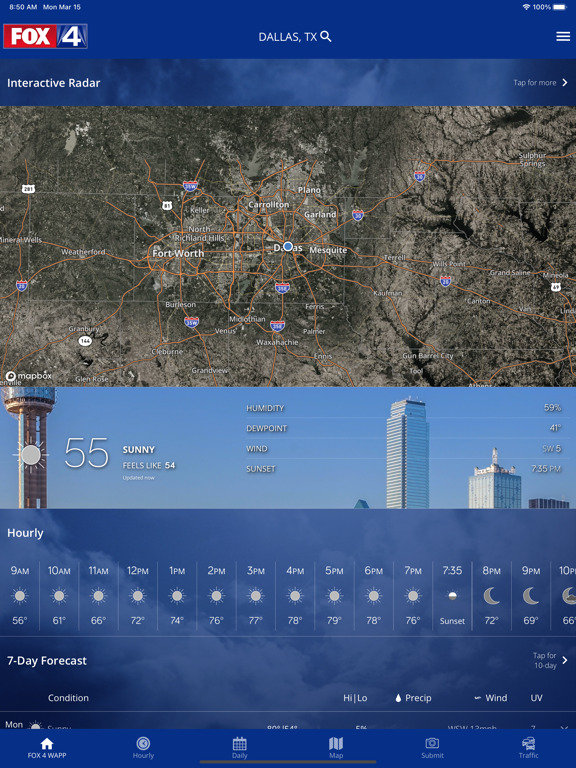

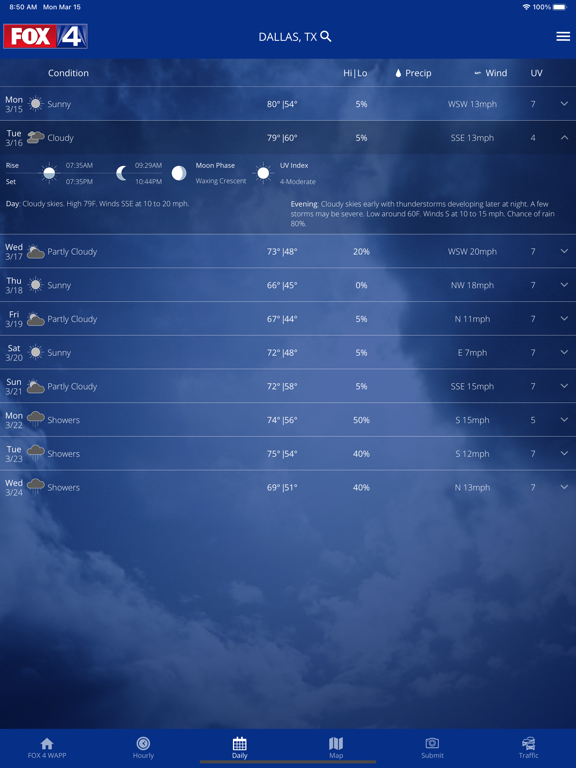
Pricing & paywalls
App Store
- Free
Ratings & reviews
App Store
-
3/5Don’t like change is app look
Not a fan of the latest update to the app interface. I miss the daily forecast at the bottom of the app when it loads. Thanks for the reply, but that’s not the daily forecast I was referring to. Plus, I don’t want to have to scroll down to find it. I want to see it quickly when I first open the app. I’m referring to the small bar that was at the bottom of the main screen (without having to scroll down) that had the highs & lows of each day & you could scroll to the right to see the days that didn’t fit on the screen. That was nice & convenient to be able to see a forecast summary.
mir1315 · 7 Aug 2026
-
4/5Just frustrating
Okay so I just got this app thinking...I am tired of just the weather with out a map! So I figured this app was going to be great!! So I get the app and I am trying to pin my location but this thing keeps popping up that says something about unable to pin your location and that you need to check your network and so on. Then it says cancel or retry I press retry. The same thing keeps popping up over and over and over again. I don’t know if it is my WiFi or something but it might be. So it is just really hard to pin your location well it is to me at least. Also I just pinned a random location and looked at all the stuff I really don’t like how you have to scroll down it just is kinda weird. But other than all of that I think this app is really good!!
Taylor2756 E · 7 Aug 2026
-
5/5Love this !!
As a former Financial Systems Analyst for Xerox, and living in Upstate NY , I love this app. I’ve gone from IPhones to Androids and used my Galaxy S23, and now my IPhone 15 Pro, and love everything about it. I can see the weather where my sons are living, I can see the incoming winds to just get candles and a generator out for downed trees, and even better, I can screen shot what I see to warn someone else who doesn’t look at weather. Everything seems just really simple and even has a great display ! And yes, I know it’s from Texas, but when you surf the App Store for something great, even paying for some weather apps, this one was the best for me … search # 123 (Kidding!)
Legénd · 7 Aug 2026
-
2/5Frustrating
I’ve used this app for years, without issues up until a couple weeks ago. All of a sudden, If you are on the home page and want a quick look at what to expect for the next few hours, don’t bother, because as soon as you touch the hourly section it launches you to that page! Same with the daily section on homepage. This is soooo frustrating. Why even have it on the home page if it kicks you off? And don’t even bother trying to scroll down the home page to see what’s at the bottom because as soon as you touch the hourly or daily section it kicks you off the homepage! Terrible! I thought the last update might fix it…nope! If it doesn’t get fixed soon then I will delete app and get my weather info elsewhere!
Loosefoot · 7 Aug 2026
-
2/524hr Disappointment
This used to be my go to most trusted weather app. If anyone needed a weather app this was my recommendation. Then the option to see the 24hr radar was added. The addition of the 24hr radar has undermined confidence in this app. If I select the radar with the normal setting of 6 hrs I see what appears to be an accurate radar for a “now” setting. If I then select the 24hr aspect I see completely different radar information for the “now” setting. A current radar display should be a current radar display with the 24hr aspect selected or not. It should still display what is currently going on “now” but it doesn’t. Given the discrepancies I no longer trust the accuracy of the radar with any setting. Very disappointing.
Sharon-NETX · 7 Aug 2026
Privacy & accessibility
App Store
Privacy
- Data Linked to You — App Functionality — Identifiers — Device ID Developer declared
- Data Linked to You — Third-Party Advertising — Identifiers — Device ID Developer declared
- Data Linked to You — Identifiers Developer declared
- Data Not Linked to You — Analytics — Diagnostics — Crash Data Developer declared
- Data Not Linked to You — Analytics — Diagnostics — Other Diagnostic Data Developer declared
- Data Not Linked to You — Analytics — Diagnostics — Performance Data Developer declared
- Data Not Linked to You — Analytics — Usage Data — Product Interaction Developer declared
- Data Not Linked to You — App Functionality — Location — Precise Location Developer declared
- Data Not Linked to You — Diagnostics Developer declared
- Data Not Linked to You — Location Developer declared
- Data Not Linked to You — Usage Data Developer declared
- Data Used to Track You — Identifiers — Device ID Developer declared
- Data Used to Track You — Identifiers Developer declared
Accessibility
No accessibility labels collected yet.
Versions
App Store
-
5.11.501
Performance Improvements
-
5.12.700
Performance Improvements
-
5.13.804
Performance Improvements
-
5.14.700
Performance Improvements
-
5.15.402
Bug fixes and performance improvements
-
5.1.604
Data API Updates
-
5.16.1703
Bug fixes and performance improvements
-
5.17.508
Bug fixes and performance improvements
-
5.17.705
Bug fixes and performance improvements
-
5.2.302
Stability and data enhancements.
-
5.3.400
* Added numerous ADA improvements, including text scaling, voice overs, and improved contrast. * Implemented non-precise location radius. * Numerous stability enhancements & bug fixes
-
5.3.907
Performance improvements
-
5.4.902
Implemented support for active links within video descriptions Fixed an issue on iOS 15 where searching for certain locations would close the app. A bug caused TV Station notifications to be turned off in the previous version of the app. As such we will be turning them back on for any user with alerts enabled. If you do not want the station alerts on, you can turn them off within the settings menu. Numerous bug fixes and stability improvements Removed app store support for iOS 12, users on older operating systems will need to update their operating system to update their apps.
-
5.4.910
Performance improvements
-
5.4.944
Performance improvements
-
5.5.702
Resolved bug which sometimes led to map presets getting overridden Added detailed view when clicking on Daily item in the home screen Reduced Application Download size Stability & Performance Improvements
-
5.7.112
Performance Improvements
-
5.7.203
Performance Improvements
-
5.7.301
Performance Improvements
-
5.8.411
Performance Improvements
-
5.8.501
Performance Improvements
-
6.1.101
Bug fixes and performance improvements
-
6.1.301
Bug fixes and performance improvements
-
6.1.601
Bug fixes and performance improvements
-
6.2.502
· 5 May 2026
Bug fixes and performance improvements
Alternatives
- Texas Storm Chasers — Same category + similar ratings
- FOX Weather: Daily Forecasts — Same category + similar ratings
- StormTrack 5 — Same category + similar ratings
- POW Ponder on Weather — Same category + similar ratings
- Hail Recon — Same category + similar ratings
- Perry Weather — Same category + similar ratings
Availability by market
- US
Data quality & evidence
- Page completeness
- Live store listing
- Last verified
- 7 Aug 2026
- Sources
- App Store
- Independent summary has not been published yet.