
Quick verdict
- What it is
- Store information collected; independent summary not yet available.
- At a glance
-
- Free to download
- In-app purchases
Categories and search queries
Official categories
- Productivity
- Business
AppCorpus categories
Key functions
| Function | Availability | Access | Scope | Evidence |
|---|---|---|---|---|
| Free app | Yes | Free | — | Store published |
| In-app purchases | Yes | Limited free | — | Store published |
Screens
App Store
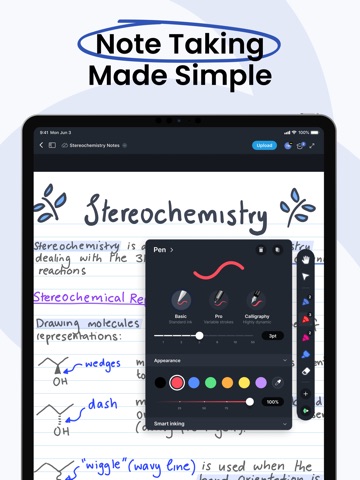
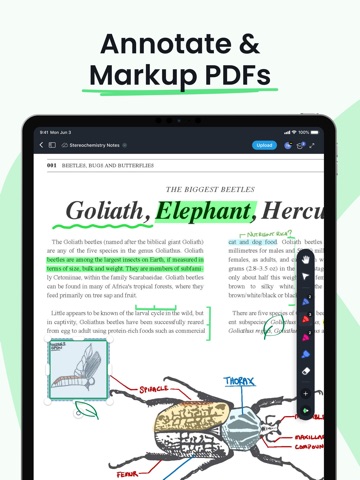
28 store screenshots


Pricing & paywalls
App Store
- Pro Lite — $5.99
- Pro Lite — $49.99
- Pro Plus — $9.99
- Pro Plus — $10.00
- Pro Plus — $83.90
- Pro Unlimited — $18.99
- Pro Unlimited — $20.00
- Pro Unlimited — $159.99
Ratings & reviews
App Store
-
5/5Always Getting Worse
I started using this app around 2022. It started off great. I don’t need a lot of features, and it still has the right amount. I open PDF sheet music to mark up for my students, and it does this job. Now let me get into how it has increasingly got worse… When I first got the app, it remembered I liked it snapped to the left of my screen. It also let me exit books without relaunching the window. This was soon changed in an update. It always goes center screen at an undesired resolution. I have to constantly put it back to where I went it, and resize it. Later they also had an update that kept the app crashing. I ended up briefly switching to a different app. I came back when another update fixed the crashing, but now it can’t remember my pages 50% of the time. Which is super frustrating when I have 50 students per week, working on books with hundreds of pages. Luckily I write down the pages for each student, but I still have to scroll to them. This app used to make my workflow better, but lately it hasn’t been holding up. I wouldn’t be upset if this is how it always was, but I’m not sure how they are continuously making the app worse. I wish I could go back and use the first version I had, it was perfect. Alas, I’m stuck with the newest lemon they’ve produced.
mraustinmusic · 6 Aug 2026
-
3/5Mac Version Needs Work
I’ve used the Pro Plus edition of Drawboard now on two separate projects, involving marking-up a check set of Architectural drawings. I’ve used BlueBeam in the past but they no longer support Mac is I no longer support them. Drawboard feels very clunky to me. There is no marquee zoom tool (a fatal flaw) so you have to keep hitting the +/- buttons along with panning to move around a drawing. There also should be a single click to “fit page” like almost every other pdf editor I’ve used. The various tools are selected from microscopic icons that lack intuitive graphics to describe their function. Using call-out notes has also been problematic as the positioning of the notes and leader lines can change when you close and re-open the file, causing you to reformat your notes. The responsiveness of trying to drag an object to a different location is poor. I have yet to figure out how to drag a copy of graphics or notes. Copying and pasting a note from one page to another changes the position of the note instead of allowing you to paste “in-place”. These are all very basic features of any graphics editing program and the fact that they are missing indicates to me that Drawboard isn’t prioritizing improvements.
big shooter · 6 Aug 2026
-
5/5A Solid, Precise App
I cannot notice any pixellation in brush strokes when drawing or while zooming. And, I think Drawboard achieves this without using the native apple pencilkit, as I’m able to freely configure the brush size to any degree, and the default brush has a unique pen pressure weight response that I really quite like. I also really like that there’s a fullscreen view that hides the rest of the screen. I haven’t experienced any lagging while writing or scrolling, even on scanned pdfs with hundreds of pages. The only small issue I’ve noticed is that when initially zooming while pinching, there’s just a slight pause. But it’s a very minor thing and not noticeable most of the time. It also does heat up the bottom edge of my particular iPad a tad. But for how amazing it performs and looks, and how stable it is — and most of that for free… it’s absolutely amazing. Thank you devs.
Andy Li~ · 6 Aug 2026
-
2/5Good for notes often with weird issues
For the majority of the time, the app works great, I used it on my Laptop before getting an iPad and had some issues but were minimal here and there. However, when there are issues, it either doesn’t make sense or its significantly frustrating. For the first part, there is absolutely no good reason to upload to the Drawboard cloud. For whatever reason, they decided to limit many functionalities for files that are uploaded. The two biggest ones I remember before removing them all from the cloud were you cannot add new pages and you cannot rearrange pages. DO NOT UPLOAD TO THEIR CLOUD as of now. Use OneDrive or Google Drive. The second part is more frustrating. Every now and again, all of my work won’t be saved, I go back to a document and will find that everything I did in my last session completely gone. This is really annoying because I use Drawboard to take notes in class. Finally, it seems to be a coin-toss on which tools you can use and which you cannot use. I have the Pro-Lite version I believe and its enough but for whatever reason, moving something to the background or foreground requires the next version. Why are there so many different subscriptions? Why is one thing included but a similar thing not? TL;DR its good but there’s some quirks you need to be prepared for and don’t upload to their Cloud unless you want to lose some functionalities.
Sharky591 · 6 Aug 2026
-
2/5Reliable on PC, but iOS Version Falls Short with Persistent Bugs
Having been a satisfied user of Drawboard PDF's PC version for the past five years, I must express my disappointment with the iOS version. While the PC version has provided a reliable experience, the iOS counterpart has proven to be extremely buggy, hindering its overall functionality. As an avid user of PDF editing tools, I was excited to try out Drawboard PDF on my iPAD iOS device. However, my enthusiasm quickly turned into frustration due to the persistent issues I encountered. Most of the issues I experience revolve around opening and saving Google Drive files. The software frequently freezes when opening files, and does not display my google drive files, making it a struggle to accomplish even basic tasks. Furthermore, the syncing functionality between devices is not as reliable as I had hoped. While I appreciate the convenience of accessing my documents across multiple devices, the iOS version frequently fails to sync changes properly. This inconsistency creates confusion and can lead to version control issues, which is particularly frustrating when collaborating with others or when relying on up-to-date information. Overall, while the PC version of Drawboard PDF has been a reliable tool for me over the years, the iOS version falls short in terms of performance and reliability. The persistent bugs, and file issues significantly hamper the user experience. As a long-time user, I hope that the developers address these issues promptly and bring the iOS version up to par with its PC counterpart.
Archy2020 · 6 Aug 2026
Privacy & accessibility
App Store
Privacy
- Data Not Linked to You — Analytics — Diagnostics — Other Diagnostic Data Developer declared
- Data Not Linked to You — Analytics — Diagnostics — Performance Data Developer declared
- Data Not Linked to You — Analytics — Identifiers — User ID Developer declared
- Data Not Linked to You — Analytics — Usage Data — Product Interaction Developer declared
- Data Not Linked to You — App Functionality — Contact Info — Email Address Developer declared
- Data Not Linked to You — App Functionality — Contact Info — Name Developer declared
- Data Not Linked to You — App Functionality — Diagnostics — Crash Data Developer declared
- Data Not Linked to You — App Functionality — Diagnostics — Other Diagnostic Data Developer declared
- Data Not Linked to You — App Functionality — Diagnostics — Performance Data Developer declared
- Data Not Linked to You — App Functionality — Identifiers — User ID Developer declared
- Data Not Linked to You — App Functionality — User Content — Other User Content Developer declared
- Data Not Linked to You — Developer’s Advertising or Marketing — Contact Info — Email Address Developer declared
- Data Not Linked to You — Developer’s Advertising or Marketing — Contact Info — Name Developer declared
- Data Not Linked to You — Developer’s Advertising or Marketing — Usage Data — Product Interaction Developer declared
- Data Not Linked to You — Contact Info Developer declared
- Data Not Linked to You — Diagnostics Developer declared
- Data Not Linked to You — Identifiers Developer declared
- Data Not Linked to You — Usage Data Developer declared
- Data Not Linked to You — User Content Developer declared
Accessibility
No accessibility labels collected yet.
Versions
App Store
-
4.10.0
• Context menu on vertexes allows inserting and deleting vertexes for polygons and polylines • Page labels (aka logical page numbers) are now shown when available • New "Billing" tab in Settings to manage subscriptions • Improved annotation syncing performance for cloud documents • Tape tool supports snap to line
-
4.10.1
• Fixed a problem where the "Manage" button didn't appear on the "Billing" tab
-
4.10.2
• Fixed issues with rotated annotations that could cause them to be drawn offscreen • Fixed a crash when opening or saving specific documents
-
4.11.0
• Added rendering of stamp annotations
-
4.11.1
• Fixed a crash when opening documents with zero sized stamp annotations
-
4.11.2
• Fixed 'English' not appearing in list of supported languages on App Store
-
4.2.0
New features: • Quickly add pages to new files by pulling past the last page • Easily convert Microsoft Word files to PDF • Create documents in the cloud and access them across all of your devices: no need to manually upload • Use the Markup Toolbar to switch between whole and partial erasing, and change the eraser size
-
4.3.0
New features: • Organise your documents with tags, now available for both local and cloud files • Convert PDFs to Microsoft Word files for easy editing and sharing Bug fixes: • Fixed an issue where text annotations couldn’t be created
-
4.4.0
• Add borders to text annotations • Create pages that match the size of others in the document • Hide other cursors while presenting
-
4.4.1
Improvements to annotation syncing in cloud documents.
-
4.4.2
• Fixed quick copy/paste of annotations pasting images at the wrong size • Fixed adding images as pages to existing documents • Fixed conflict between measurement scale and pull-to-add-new-page gesture • Fixed some problems with cloud annotation sync
-
4.5.0
• Visual updates to support Liquid Glass and iOS 26 • Updated calibration tool including preset scales • Fixed a bug where saving to shared volumes could cause conflicts with repeated save actions
-
4.6.0
Features: • Separate border color property for callout annotations • Support for image annotations in the markup library Fixes: • Fixes for ruler rotation • Fixed a situation where annotations could appear duplicated in non-continuous layouts
-
4.7.0
• Added a new tape tool for covering and revealing answers • Updated onboarding flow will now help you configure your favorites and signature on first login • Improved annotation syncing reliability during offline → online transitions • Fixed ruler labels being covered during use
-
4.7.1
• Addressed multiple layout and color issues affecting callout annotations • Improved the display of imperial units in measurement scales
-
4.8.0
• Localization into French, German, Japanese • Applying a measurement scale to all pages will now apply it to subsequently added pages, too • Display and editing fixes for form text fields
-
4.9.0
• Added support for drop-down menus in forms • Fixed a bug where inserting a page at the beginning would cause the page to appear at the end • Fixed a problem opening files with a colon character in the path
-
5.0.0
• Added 'Snapshot' annotation for copying and pasting document content. • Added 'Lock' option to prevent accidentally changing annotations. • Simplified Subscriptions and Billing screens for easier viewing of your current plan status.
-
5.1.0
• Create and switch between multiple 'Favorite' toolbars • 'Favorite' toolbars to the cloud so they can be shared between clients
-
5.2.0
New features: • Measurement Overhaul: a completely refreshed measurement experience, including a new Perimeter tool and a unified Area tool • Customizable Measurement Captions: show or hide the label, length, perimeter, and area independently. Drag captions to reposition them, rotate them, and connect them back to the annotation with a leader line • Custom Measurement Labels: add your own text label above any measurement • Annotation Subjects: every annotation now has a subject field that you can edit, then use to filter and group in the annotations list • Measurement Totals: the advanced annotation list now shows measurement totals for each group Bug fixes: • Fixed an issue with importing images from the photos app via the share sheet • Fixed an issue where some PDF files incorrectly required a password
-
5.2.1
New features: • Measurement Overhaul: a completely refreshed measurement experience, including a new Perimeter tool and a unified Area tool • Customizable Measurement Captions: show or hide the label, length, perimeter, and area independently. Drag captions to reposition them, rotate them, and connect them back to the annotation with a leader line • Custom Measurement Labels: add your own text label above any measurement • Annotation Subjects: every annotation now has a subject field that you can edit, then use to filter and group in the annotations list • Measurement Totals: the advanced annotation list now shows measurement totals for each group Bug fixes: • Fixed a crash that could occur when opening some documents • Fixed an issue with importing images from the photos app via the share sheet • Fixed an issue where some PDF files incorrectly required a password
-
5.3.0
New features: • Layers: organize your markup into layers — show or hide them and fade the underlying PDF with a content-opacity slider so your work stands out. Turn on Focus Mode to dim every layer except the one you’re working on, and adjust how much the others fade. Bug fixes: • Fixed an issue where password protected files could fail to open • Fixed an issue where the entire list of cloud files could fail to load • Fixed an issue where the selected tool was reset when toggling hide annotations • Fixed an issue where the documents could overlap each other on the dashboard
-
5.4.0
New features: • Volume tool: add a depth to area measurements to take off volumes and wall areas • Snapshot in cloud files: the Snapshot tool now works in cloud documents and syncs across your devices Bug fixes: • Fixed annotation snapping indicators not showing while inserting an annotation • Fixed some issues with measurement page scales
-
5.4.1
New features: • Volume tool: add a depth to area measurements to take off volumes and wall areas • Snapshot in cloud files: the Snapshot tool now works in cloud documents and syncs across your devices Bug fixes: • Fixed a crash that can occur when using the snapshot tool • Fixed annotation snapping indicators not showing while inserting an annotation • Fixed some issues with measurement page scales
-
5.4.2
· 30 Jul 2026
New features: • Volume tool: add a depth to area measurements to take off volumes and wall areas • Snapshot in cloud files: the Snapshot tool now works in cloud documents and syncs across your devices Bug fixes: • Fixed a crash that can occur when using the snapshot tool • Fixed annotation snapping indicators not showing while inserting an annotation • Fixed some issues with measurement page scales • Fixed a compatibility problem with iOS 17
Alternatives
- Bluebeam — Same category + similar ratings
- Notes Writer: PDF, Voice, AI — Same category + similar ratings
- PDF Viewer by Nutrient — Same category + similar ratings
- MarginNote 3 — Same category + similar ratings
- QuickNotes X: Notes, AI & PDF — Same category + similar ratings
- UPDF - AI-Powered PDF Editor — Same category + similar ratings
Availability by market
- US
Data quality & evidence
- Page completeness
- Live store listing
- Last verified
- 6 Aug 2026
- Sources
- App Store
- Independent summary has not been published yet.