
Quick verdict
- What it is
- Store information collected; independent summary not yet available.
- At a glance
-
- Free download · core features require a paid plan
- In-app purchases
- From $0.79/mo
Categories and search queries
Official categories
- Productivity
- Education
AppCorpus categories
Key functions
| Function | Availability | Access | Scope | Evidence |
|---|---|---|---|---|
| Family Sharing | Yes | Unknown | App Store | Store published |
| Free app | Yes | Free | — | Store published |
| In-app purchases | Yes | Limited free | — | Store published |
| Subscription | Yes | Paid | — | Store published |
Screens
App Store
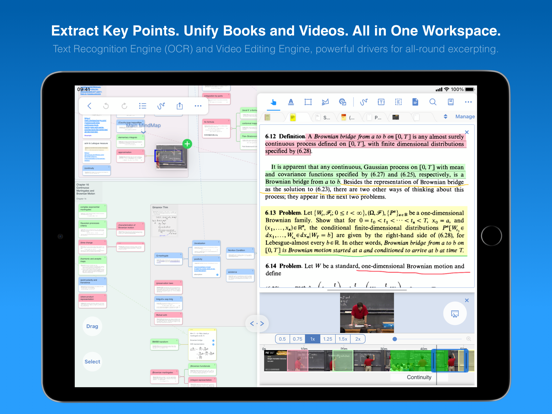
22 store screenshots



Pricing & paywalls
App Store
- OCR Pro ( ) — $9.49/year ($0.79/mo) (derived from the IAP title)
- Unlock Full — $12.99
Ratings & reviews
App Store
-
5/5A great app that could still get better
I’ve used 3 versions of MarginNote over the years, both on my iPads and Macs. A lot has changed, but a lot hasn’t. Each time a new version comes out, I wonder if I want to spend the money and research what else is out there. Maybe I find something interesting and try it, or maybe I don’t, but I always come back. There’s just nothing else that does what MN does. A lot of the other reviews cover why I look elsewhere from time to time... the app can be inexplicably weird or counter-intuitive or just a little bit off sometimes. I can often get it to do what I need, but not without frustration. Often times, where it fails are in standard UX practices that almost every other app follows, but MN chooses to ignore those and do things its own way. I’m not a student, so I’m not making flash cards or anything like that, but I do a lot of research. I really like the ability to add multiple documents to one project. I have one with at least a couple of dozen PDFs and epubs, not small ones either, and MN doesn’t complain. There are occasional sync issues, but I’ve gotten good at backing up and—knock on wood—haven’t lost anything yet. I think if you’re only using it one system, that won’t be a factor.
Therealironhulk · 6 Aug 2026
-
5/5The best out there
Ok, so this isn’t a perfect system but it’s incredibly useful. Navigation could use work when using the mindmap area. It’s still a little clunky and I only accidentally figured out if you hold the left click down it will turn into a hand and you can move it around. Would be great if there was a shortcut key (there may be?), but the developer deserves 5 stars for a stellarly useful and functional app. For the most part, it works wonderfully. I would love to incorporate OCR into the selection areas. There are a number of texts I’ve used that text selection doesn’t work (particularly titles) and I have to select it as an image, but then I can’t search for it later because it’s an image. I’ve resorted to just typing it out as a header, but then to create your own header and assign it to a section of a document isn’t simple (nor obvious how to do … I haven’t figured it out yet). But for it’s functionality it’s great and the developer keeps improving things. Finding the right video to watch for a tutorial is time consuming. Would recommend they improve that.
bradam · 6 Aug 2026
-
1/5Expensive; not functional without multiple purchases; no customer support.
MarginNote app is one of the highest priced note-taking apps on the market, yet it restricts use to a single device. If you try to use it on a second device (as one does with these types of apps), it prompts you to pay another $50. Despite the features it boasts, it is absolutely not worth purchasing because cannot utilize said features effectively on an iPad/tablet alone (not appropriate for making use of mapping and flashcards, uploading docs/PDFs, etc); nor can you use it effectively on laptop/desktop alone (no point to a reader interface with Apple Pencil there). The purchase should be synced, but it’s not. This should have been made transparent prior to purchase. I would not have started with MarginNote had I known it would require me to spend at least $100 to properly use. No other note taking apps I’ve used has required multiple purchases like this. Additionally, I have contacted the developer multiple times about this issue to see if there was a chance I was missing something, and they have refused to respond. Given the fact that you are probably considering this app for work that is valuable to you, I would keep in mind that you could find yourself left with no technical support should something go wrong with it.
louise237 · 6 Aug 2026
-
5/5Hands down the best reader ever
There is only one competitor app to be MarginNote's alternative and that's the Liquid Text. While their UI is much prettier and cleaner. They have just a really poor mind map experience. What I like about MarginNote in contrast with LiquidText is just how much more organized it is. In LiquidText almost any accidental touch on the mindmap ruins it. Also it's a web of what you put where ever you wish to. In MarginNote however, you have an app that organizes the mindmap into a chart with direct branches that you do not decide how to be put. It organizes the look and keeps it which is just so amazing. It just makes me more and more relaxed to be in the app vs LiquidText. And also in the LiquidText you cannot have book-free studies to just have bookmarks. But the research tool is horribly made. There is no link to the OS dictionary. Or any good offline dictionary. The UI seems horrible and has so many problems. It is just the worst part of any app I've seen. Hope that gets fixed someday. And as far as the price comes, I think it's much cheaper than LiquidText which is awesome.
pouyakary · 6 Aug 2026
-
5/5My go-to app now for research, organizing content, summaries
I had used another app ‘fluid’ for reading research articles, underlining and extracting text for summary and study until they crippled this in the free version and increased price for the paid. This app is far beyond that with a superb design for reading, study, organizing spaces, excellent pdf to text extraction and linear or mind mapping ways to relate to the text extractions and your notes both within and between documents. There is a learning curve for use but much is accessible playing around as well. I will be watching videos to learn better use. I have a lot of PDFs stored in Evernote and this app can access and load from within the app. I have used on my my iPhone when my iPad was not available and it’s workable but it is much more useful on a bigger screen. I like it so much that purchased the paid version and might even cough up the larger additional fee for the MacBook version. One of the few apps that is worth the purchase price and more. Excellent!
JimK · 6 Aug 2026
Privacy & accessibility
App Store
Privacy
- Data Not Linked to You — Analytics — Diagnostics — Crash Data Developer declared
- Data Not Linked to You — Analytics — Diagnostics — Other Diagnostic Data Developer declared
- Data Not Linked to You — Analytics — Identifiers — Device ID Developer declared
- Data Not Linked to You — Analytics — Usage Data — Other Usage Data Developer declared
- Data Not Linked to You — Analytics — Usage Data — Product Interaction Developer declared
- Data Not Linked to You — Diagnostics Developer declared
- Data Not Linked to You — Identifiers Developer declared
- Data Not Linked to You — Usage Data Developer declared
Accessibility
No accessibility labels collected yet.
Versions
App Store
-
3.7.10
Feature update: Adding/Removing pdf page implemented by virtualization technology can add book pages from pictures and other PDFs more quickly and safely. Add a review setting: the entire card as the front of the card by default. Add a handwriting setting: Allow focus handwriting to be displayed globally. Fix the bug.
-
3.7.11
Fix the problem that when a data conflict occurs during notebook synchronization, the wrong data may be reversely synchronized to the cloud. Solve some problems caused by the last version update Fix some other bugs.
-
3.7.12
Fixed some bugs in the previous versions.
-
3.7.13
Fix the problem that handwriting of documents may cause App to crash.
-
3.7.14
Improvements and bug fixes
-
3.7.15
Improvements and bug fixes.
-
3.7.16
Improvements and bug fixes.
-
3.7.17
Solve the issue of OCR online correction error. Solve the issue of crashing on constantly creating new windows. Solve the issue of PDF page drift caused by entering and exiting the editing state under the Bluetooth keyboard. Solve the issue where eraser could not take effect when switching focus.
-
3.7.18
Automatic historical archive to prevent handwriting loss is added (it will be triggered automatically when a large number of handwriting loss is detected in mindmap / document, and the notes before loss will be saved as history archive). Modify the reference mechanism to provide a safe reference mechanism. (deleting a node will not affect other nodes that reference it, and other reference nodes will automatically become clone nodes). Fix bug: Fix the problem that some title links in card comments are not displayed; Fix crashing on open specific PDF; Fix the problem of abnormal mindmap caused by merging the summary into the parent node; Fix the display effect of dragging frame structure cards in the floating window and the problem of multiple selection of cards; Fix the problem that frequently opening the card Editor could cause the Pencil Kit to crash.
-
3.7.19
* Update the OCR engine, greatly improve the offline Chinese recognition rate, and achieve high recognition rate without online correction. * Fix the issue that the picture colors is reversed in dark mode. * Added Russian language recognition to OCR Pro. * Fix bugs.
-
3.7.20
Temporarily roll back the OCR engine to fix the crash issue after the previous version update.
-
3.7.21
The offline OCR Pro engine is replaced with the Baidu engine, which greatly improves the Chinese recognition rate without online correction.
-
3.7.22
Support 2 new pen ink types under iPadOS 16.1. Fix the bug of the pop-up menu under M2 iPad Pro. Fix the bug of copying text under OCR Pro. Fix the bug of iOS 12 startup crashes. Fix other bugs.
-
3.7.23
Fixed the issue of text input crashes under iPadOS State Manager.
-
3.7.24
Fixes an issue that could cause handwriting to be lost. Fixes an issue that could cause purchases to be restored.
-
3.7.25
Updated to fix issues such as iOS 17 adaptation.
-
3.7.26
MarginNote 4 is now online, including many major upgrades and updates! Limited-Time Offer for All 3.0 Users: - iPad/iPhone Pro redeem 4.0 Pro for free. - Mac Pro can get a discount on 4.0 Max.
-
3.7.27
MarginNote 4 is now online. This version mainly fixes the problem that when upgrading MarginNote 3 to MarginNote 4, users who upgraded from MarginNote 2 cannot use the discount to upgrade.
-
3.7.28
MarginNote 4 is now available. This update fixes some issues and provides support for OCR Pro's transition to MN4.
-
3.7.29
Added a reminder that the MN4 free upgrade offer is about to expire. Handwriting support for perfect shapes (straight lines, arrows, arcs, continuous polylines, squares, circles, rectangles, triangles, etc.).
-
3.7.30
Added the ability to get a PIN code in settings for specific customer support. Once again, MarginNote 4 is now available with many cool new features.
-
3.7.31
Fixed a bug in the research function related to Baidu Translate.
-
3.7.32
· 29 Nov 2025
Fixed the issue with promotional upgrade to MN4
-
3.7.8
Fix the BUG of the previous version. ------------------------------------------- Support for backing up and restoring all data through iTunes (previously only documents were supported, now documents + all note data are supported). Support the reorder of child minmaps. Support adding child mindmaps directly on the card. A new screen casting method that supports full-screen mode. The mindmap handwriting in the focus mode will be hidden by default outside the mind map. Fix bugs and performance optimization.
-
3.7.9
Fixed some bugs. ------------------------------------------- Support for backing up and restoring all data through iTunes (previously only documents were supported, now documents + all note data are supported). Support the reorder of child minmaps. Support adding child mindmaps directly on the card. A new screen casting method that supports full-screen mode. The mindmap handwriting in the focus mode will be hidden by default outside the mind map. Fix bugs and performance optimization.
Alternatives
- Prodrafts - Infinite Notes — Same category + similar ratings
- Notes Writer: PDF, Voice, AI — Same category + similar ratings
Availability by market
- US
Data quality & evidence
- Page completeness
- Live store listing
- Last verified
- 6 Aug 2026
- Sources
- App Store
- Independent summary has not been published yet.