
Quick verdict
- What it is
- Store information collected; independent summary not yet available.
- At a glance
-
- Free to download
Categories and search queries
Official categories
- Business
- Productivity
AppCorpus categories
Key functions
| Function | Availability | Access | Scope | Evidence |
|---|---|---|---|---|
| Free app | Yes | Free | — | Store published |
Screens
App Store
5 store screenshots
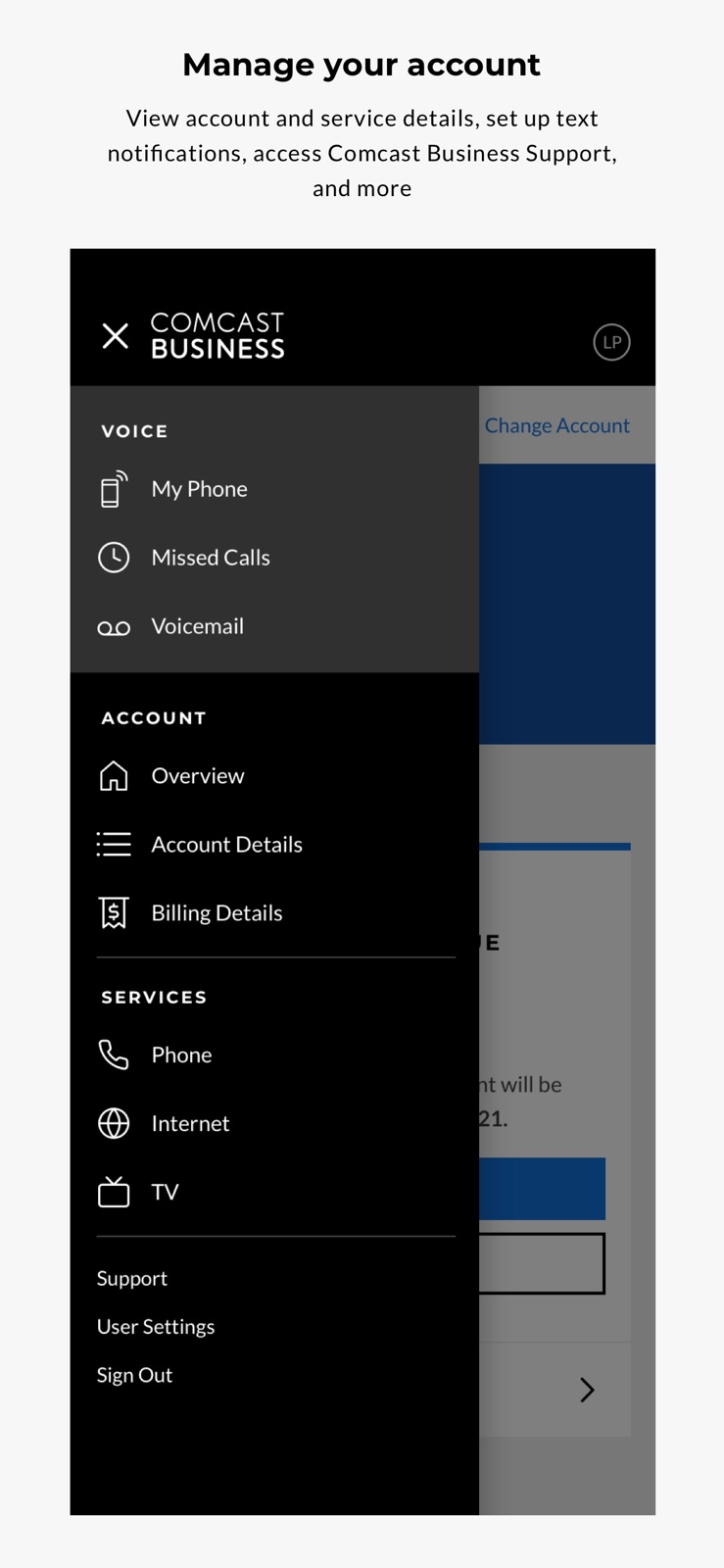
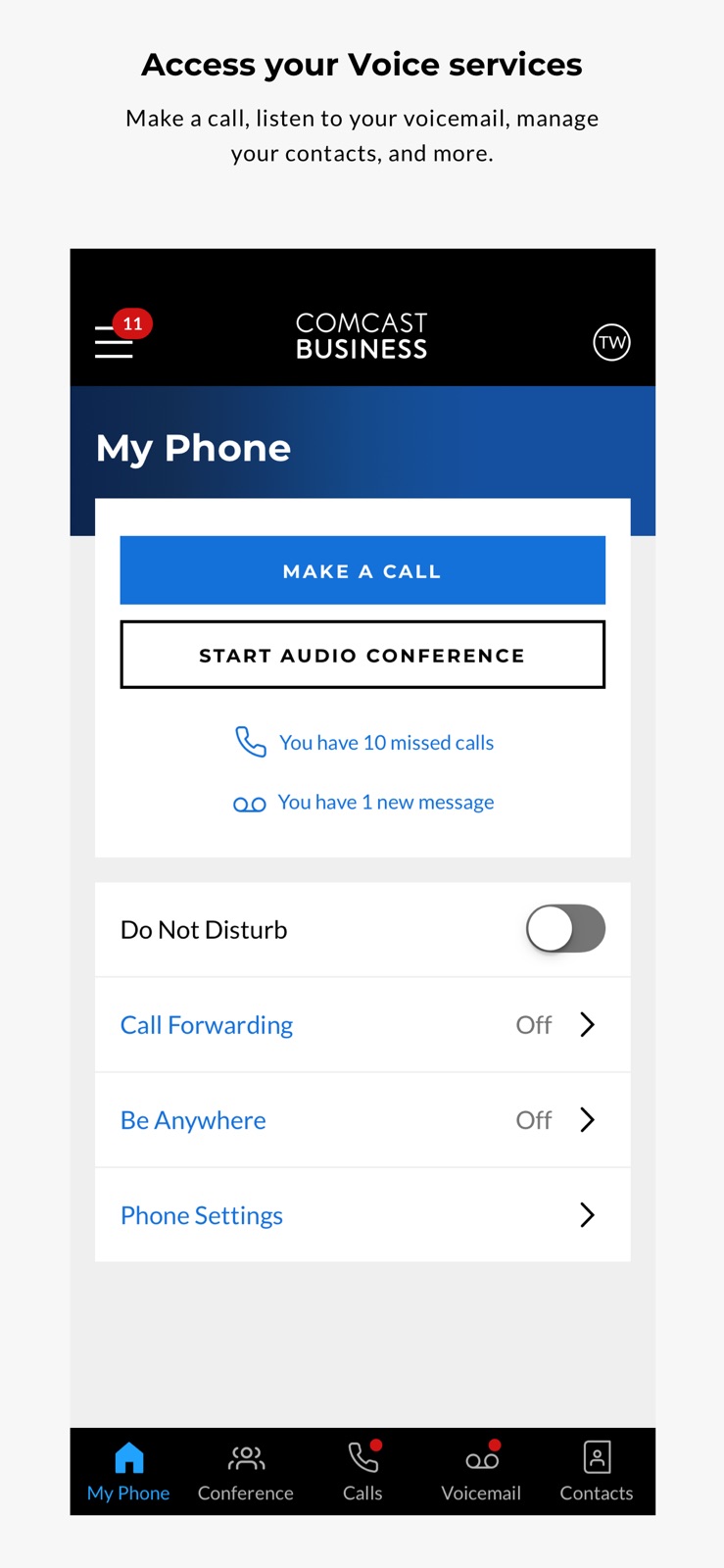
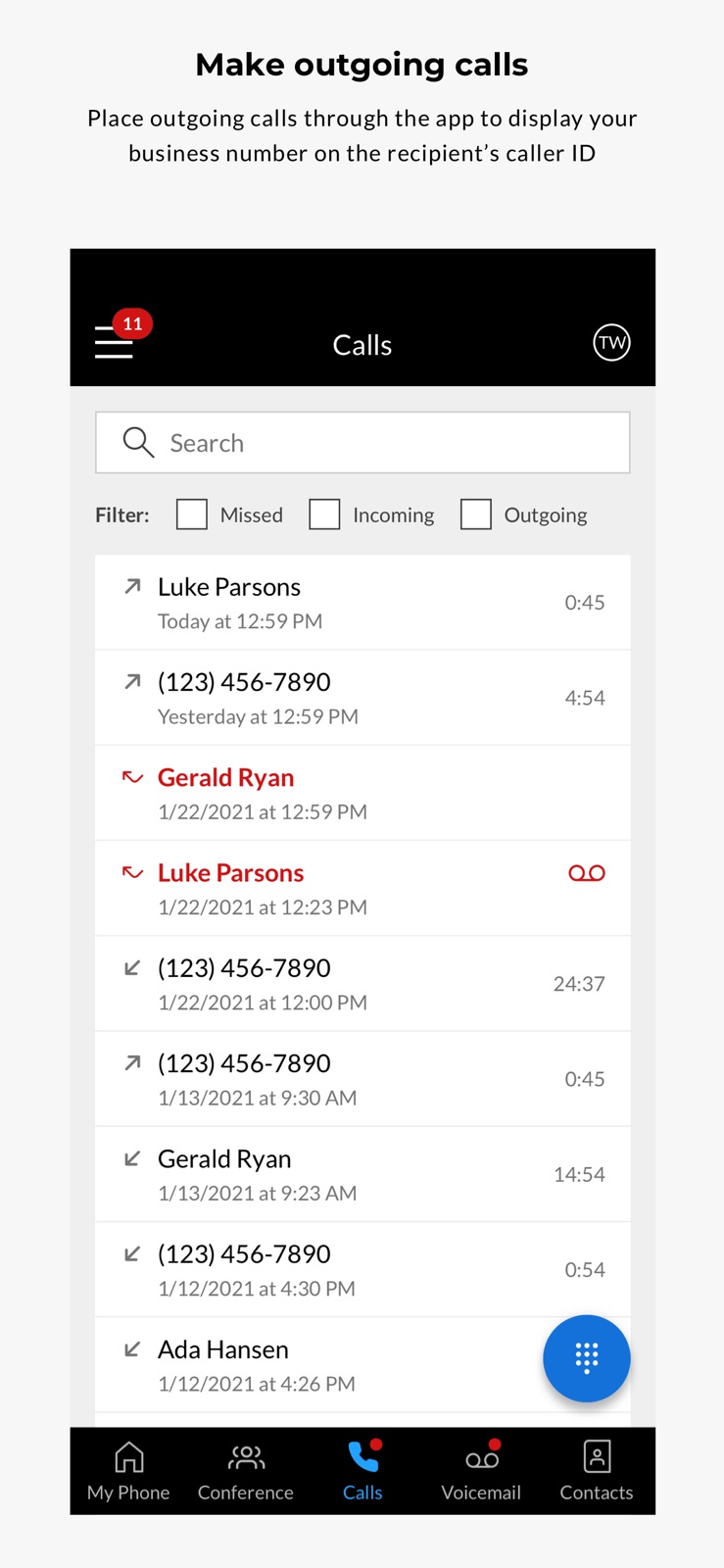

Pricing & paywalls
App Store
- Free
Ratings & reviews
App Store
-
5/5App Issues
This app has been great for me and being on the go! With the latest update, I can no longer get notifications. Now I never know when I have new voice mail?! I have to go in the app and see if I have voicemail. This is taking up my time to stop what doing every 20 to 30 minutes to check. When before I would simply get a notification pop on my phone. PLEASE fix this.... *Thank you for responding to my review! That goes along away and Comcast spent a lot of time trying to help me resolve my issue. I did end up getting a new phone and spent a great deal of time at Apple. With all that had been done. I still can’t get notifications? It is only seems to be an issue with my phone?! Maybe something happened to it when I did the update. It works fine on others who have the same phone as me. Hopefully your next update will be soon and this issue will go away for me.
Maillet97 · 30 Aug 2026
-
1/5The utmost deceitful app and company I have ever seen
The app here is a fraud because you cannot make and receive calls from the application the feature just simply does not exist and Comcast and the advertisements in the pictures in this App Store show that you are able to make and receive phone calls and manage your phone features from the application which is all of fraud and a lie and it this point is false advertisement don’t get me started on Comcast other issues but for this particular issue this is going to be the reason why we cancel the phone portion I am so disgusted with this app at this time we’ve been fighting with customer service all day. While they sit there and tell us you can answer calls and make calls from the app you can do all of these things from the app just like it says I find that to be an extreme lie because you simply cannot the section of the application to do that does not exist. You think I’m ignorant to you I’m not ignorant you people are extremely ignorant to think that all of this is legal cell people of service and tell them they have features that they don’t have the app simply does not offer the developer up to be ashamed of them self for putting together an application with such lies and deceit and fake reviews stating that they can make and receive calls and how intuitive it is that’s all a farce and it’s all a giant lie.
Lucy11218 · 30 Aug 2026
-
3/5Doesn’t ring on mobile phone, can’t call as if at the office
Issue #1: Installed the app because I’m the “after hours” and “emergency” tech for my company. I have the app running in the background of my phone. When I get a call and my phone is in standby mode I only get a txt notification “ding” and a pop up showing the incoming call ID; exactly like how a new text message comes to my phone then my phone goes back to standby (screen off). The incoming call isn’t actually ringing my phone. Not a good setup for an after hours / emergency contact. Better off simply using “forward always”. Issue #2: Making an outbound call to a client using “Main Line” (to make the call look like it originated from my office) results in the app trying, trying then failing. It simply stops and dumps me back at the main screen. No outbound call is made. : this part may have been resolved by enabling Work Remote / Be Anywhere and enabling my mobile device in the icon or by enabling Click to Dial (not really sure what that feature is yet).
awsic06 · 30 Aug 2026
-
3/5I switched to
I switched to comcast business after years of using our residential line to run our business. I switched over thinking the business app would be similar to xfinity connect app. Where the phone calls come in through the app as well as to your phone for example when I set the connect app to forward to my phone the connect app rings first and then my phone rings so I know where and how to answer. I dont like that I do not know if it is a personal call or a business call coming through to my phone. And the fact that when it is set on call forward the phone in the office stops working. One last thing I dont like is that people who call in and it is set to call forward and an answer is not made voice mail is left on my personal phone. I loved the xfinity connect app where the voicemail would stay there and not only that it would transcribe the voicemail to txt for times when playing the voicemail was not an option.
atquetzal · 30 Aug 2026
-
1/5New App is HORRIBLE!
This app used to work perfectly for me working remote. Since Comcast has done its switch with getting rid of the original voice-edge services (online access and app access) it now makes me login constantly!! it won’t recognize my fingerprint on my device like it’s supposed to and doesn’t even matter that I click the remember me/don’t log me out button. I have to manually enter my password MULTIPLE times throughout the day to make outgoing calls. This is BEYOND frustrating as I work from home and need to access it for every call I make. I don’t care for all the bill payment crud it pulls up now either since I work for a company that pays all that - They force us as admins on the program to have access to this? It’s ridiculous. That’s why it’s a “business” account... why even have that as part of the phone app? It should be a separate app for businesses that choose to use bill pay that way. This whole voice-edge service has gone completely down hill since the switch and our company will be looking into other options due to the inconvenience this has all caused.
PSherm151 · 30 Aug 2026
Privacy & accessibility
App Store
Privacy
- Data Linked to You — Analytics — Identifiers — User ID Developer declared
- Data Linked to You — App Functionality — Contact Info — Name Developer declared
- Data Linked to You — App Functionality — Contact Info — Physical Address Developer declared
- Data Linked to You — App Functionality — Financial Info — Payment Info Developer declared
- Data Linked to You — App Functionality — Identifiers — User ID Developer declared
- Data Linked to You — Other Purposes — Identifiers — User ID Developer declared
- Data Linked to You — Product Personalization — Identifiers — User ID Developer declared
- Data Linked to You — Contact Info Developer declared
- Data Linked to You — Financial Info Developer declared
- Data Linked to You — Identifiers Developer declared
- Data Not Linked to You — Analytics — Diagnostics — Crash Data Developer declared
- Data Not Linked to You — Analytics — Diagnostics — Performance Data Developer declared
- Data Not Linked to You — App Functionality — Contacts Developer declared
- Data Not Linked to You — Contacts Developer declared
- Data Not Linked to You — Diagnostics Developer declared
Accessibility
No accessibility labels collected yet.
Versions
App Store
-
5.10.0
In this latest update, we’ve made some enhancements and minor bug fixes to improve your overall app experience.
-
5.10.1
In this latest update, we’ve made some enhancements and minor bug fixes to improve your overall app experience.
-
5.11.0
In this latest update, we’ve made some enhancements and minor bug fixes to improve your overall app experience.
-
5.11.1
In this latest update, we’ve made some enhancements and minor bug fixes to improve your overall app experience.
-
5.12.0
In this latest update, we’ve made some enhancements and minor bug fixes to improve your overall app experience.
-
5.13.0
In this latest update, we’ve made some enhancements and minor bug fixes to improve your overall app experience.
-
5.14.0
Business VoiceEdge customers can connect with people seamlessly by making and receiving calls over WiFi in the Comcast Business App. With this new feature, you can distinguish between calls made to your Comcast Business number and personal number, as well as send calls to your Comcast Business voicemail. Other improvements include the ability to merge callers into a three-way call and a simpler experience for placing outbound calls.
-
5.15.0
In this latest update, we’ve made some enhancements and minor bug fixes to improve your overall app experience.
-
5.15.1
In this latest update, we’ve made some enhancements and minor bug fixes to improve your overall app experience.
-
5.15.2
In this latest update, we’ve made some enhancements and minor bug fixes to improve your overall app experience.
-
5.16.0
Customers who have WiFi Extenders can now set up and manage the devices with ease. Once you receive your Extender, open the app to start activation. After the Extender is up and running, return to the app any time to view the connection status and device details, rename the device, or troubleshoot issues.
-
5.16.10
In this latest update, we’ve made some enhancements and minor bug fixes to improve your overall app experience.
-
5.16.11
· 20 Jul 2026
In this latest update, we’ve made some enhancements and minor bug fixes to improve your overall app experience.
-
5.16.2
In this latest update, we’ve made some enhancements and minor bug fixes to improve your overall app experience.
-
5.16.3
In this latest update, we’ve made some enhancements and minor bug fixes to improve your overall app experience.
-
5.16.4
In this latest update, we’ve made some enhancements and minor bug fixes to improve your overall app experience.
-
5.16.5
In this latest update, we’ve made some enhancements and minor bug fixes to improve your overall app experience.
-
5.16.6
In this latest update, we’ve made some enhancements and minor bug fixes to improve your overall app experience.
-
5.16.7
In this latest update, we’ve made some enhancements and minor bug fixes to improve your overall app experience.
-
5.16.8
In this latest update, we’ve made some enhancements and minor bug fixes to improve your overall app experience.
-
5.16.9
In this latest update, we’ve made some enhancements and minor bug fixes to improve your overall app experience.
-
5.6.0
In this latest update, we’ve made some enhancements and minor bug fixes to improve your overall app experience.
-
5.7.0
Searching for nearby Xfinity WiFi hotspots is now even easier with the Comcast Business App. Business Internet customers can access the Xfinity WiFi hotspots map by navigating to their internet page and selecting the “Find a Hotspot” link.
-
5.8.0
Internet customers in the Comcast Business App can now automatically connect to secure Xfinity WiFi Hotspots when nearby. Simply navigate to the Hotspots page from the side menu or Internet section of the app and select “Connect to Hotspots Automatically” to download your Xfinity WiFi hotspot profile.
-
5.9.0
Staying connected is even easier with the Comcast Business App. Business Internet users can now view the real-time status of their Internet connection and devices, including a notification if your eligible Comcast-issued modem has gone offline or is experiencing connection issues, plus actions to troubleshoot. Connection Pro subscribers will also see an alert when LTE backup is in use.
Alternatives
- ADP RUN — Same category + similar ratings
- Clover Go - Dashboard & POS — Same category + similar ratings
- My Verizon For Business — Same category + similar ratings
- myCoke — Same category + similar ratings
- Amazon Business: B2B Shopping — Same category + similar ratings
- Verizon One Talk — Same category + similar ratings
Availability by market
- US
Data quality & evidence
- Page completeness
- Live store listing
- Last verified
- 30 Aug 2026
- Sources
- App Store
- Independent summary has not been published yet.