
Quick verdict
- What it is
- Store information collected; independent summary not yet available.
- At a glance
-
- Free to download
Categories and search queries
Official categories
- Utilities
- Productivity
AppCorpus categories
Key functions
| Function | Availability | Access | Scope | Evidence |
|---|---|---|---|---|
| Free app | Yes | Free | — | Store published |
Screens
App Store
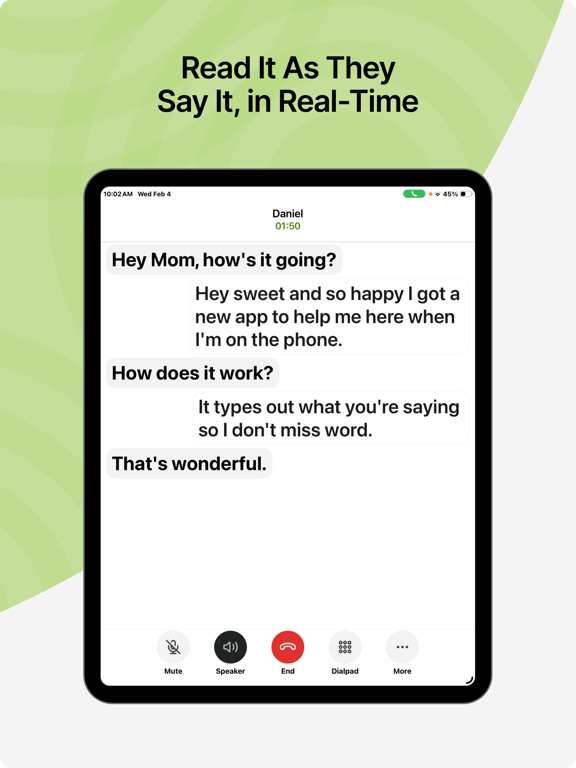
27 store screenshots


Pricing & paywalls
App Store
Shown for US
- Free
Ratings & reviews
App Store
Shown for US
-
5/595% deaf without hearing aids and I can now converse with fam and friends!
I am a long time user of relay calls for the deaf via sprint and then T-Mobile. The only problem was I had to use my desktop and who wants to sit at a desktop waiting for calls to come in? Not me! For a while the sprint relay app would let you dictate what you wanted to say, but then they got rid of that feature, forcing us to type in what we wanted to say. Many times people (of course the people I didn't know, not my friends) would hang up on me because I took too long to type! Olelo cleared up all the issues and I can now SPEAK to the person I want to communicate with and I can READ what they are saying! It's miraculous! 100% accurate and very fast in real time transcribing to me what is being said. I love this app! It's a game changer and a life changer For anyone who is hearing impaired or deaf, this is the app to use! I'd give it 10 stars if there were 10. Thank you very much to the developers of Olelo and congratulations on being acquired (or partnered with) by Sorensen!
iApplePie · 6 Aug 2026
-
3/5Good App - Needs One Thing
This is a great caption app I always love the captioning of both ends for historical purposes and recall. Very handy. I didn’t find any way to quickly adjust the tone of the speakers voice from within the app. My hearing impairment make it difficult to hear deeper male voices. So some method of tone manipulation to increase the clarity for those that need it or either end of the spectrum of sound and impairment. That is the one thing I can think of at this first testing that would be a great improvement. Might I suggest something easy like Tone: High, Mid, Low to start. Then as development progresses you could add in the settings a way to input your own audio gram to that the tone is lost customized. But start with the easy and work out the other later. I’ve used every method of captioning and apps. I’m always willing to help in development and testing of possible betas for your profound hearing impaired users as someone with an IT background and Great understanding of the current technologies available for the hearing impaired and captioning. Much appreciated feel free to reach me. - David /. If I missed the current way to do the tone manipulation, just let me know. Thanks.
ddatchi · 6 Aug 2026
-
5/5Bad for interview calls
This app is very frustrating. They often don’t let you enable the sounds to come out like they assume that every user is Deaf without a cochlear implant or hearing aids. Both captions and sounds should be provided as one of the options because you don’t know if it’s not working or the person isn’t saying anything if the captions take too long to get typed. You might accidentally interrupt the person or they might think you stopped answering them while waiting for them to say something. It can cause a lot of miscommunication. This app isn’t helpful when you need to make important phone calls for someone that wants to interview you for a job. Update: People who work for this app are very helpful, great, and caring. They will reach out to you when you bring up a problem in the reviews. If the speaker and louder sounds don’t work, you can turn off the speaker and reclick it to make it work. People are working on improving this.
Mike4628 · 6 Aug 2026
-
5/5Once a struggle, now after some updates it is amazing…
As I was tapping out a reply to the chat help person, I received my first Olelo call and the captioning and speed was ah-may-zing. Perfect. Both speed and accuracy. I even asked the caller if he could give me his impression of the delay in conversation while the speech-to-text was occurring and he said “there wasn’t any delay, I wouldn’t have even known…” That, is incredible. I’m late deafened (profoundly) and was a SpEd Technologist responsible for Accommodations and Adaptations for students and have looked at and used so many options as I am not proficient at ASL. Hamilton, InnoCaption, Ava, none of these were even close to the accuracy and speed of my first Olelo use. It was a pleasure talking on that call. Like I am still smiling. Thank you so much. Once the personalized voicemail greeting issue is figured out this app will blow away the other options.
Mistanik · 6 Aug 2026
-
5/5Very happy camper!
I used other closed captioning apps for my iPhone and found them completely unreliable and unusable. I almost gave up until I found Olelo. I was extremely surprised and happy to discover the effectiveness, timeliness, and reliability of Olelo captioning. Before, I used to let calls rollover to voicemail in hopes I could figure out the message after repeated playbacks…but not any more! Because of Olelo, I now answer my live phone calls with far more confidence and found greater success in engaging with callers. Thank you Olelo! I can now call the world!
Tjdigit · 6 Aug 2026
Privacy & accessibility
App Store
Privacy
- Data Linked to You — Analytics — Usage Data — Product Interaction Developer declared
- Data Linked to You — App Functionality — Contact Info — Email Address Developer declared
- Data Linked to You — App Functionality — Contact Info — Name Developer declared
- Data Linked to You — App Functionality — Contact Info — Phone Number Developer declared
- Data Linked to You — App Functionality — Contact Info — Physical Address Developer declared
- Data Linked to You — App Functionality — Diagnostics — Other Diagnostic Data Developer declared
- Data Linked to You — App Functionality — Identifiers — User ID Developer declared
- Data Linked to You — App Functionality — Location — Precise Location Developer declared
- Data Linked to You — App Functionality — Other Data — Other Data Types Developer declared
- Data Linked to You — Contact Info Developer declared
- Data Linked to You — Diagnostics Developer declared
- Data Linked to You — Identifiers Developer declared
- Data Linked to You — Location Developer declared
- Data Linked to You — Other Data Developer declared
- Data Linked to You — Usage Data Developer declared
- Data Not Linked to You — Analytics — Identifiers — Device ID Developer declared
- Data Not Linked to You — App Functionality — Diagnostics — Crash Data Developer declared
- Data Not Linked to You — App Functionality — Diagnostics — Performance Data Developer declared
- Data Not Linked to You — Developer’s Advertising or Marketing — Identifiers — Device ID Developer declared
- Data Not Linked to You — Diagnostics Developer declared
- Data Not Linked to You — Identifiers Developer declared
- Data Used to Track You — Identifiers — Device ID Developer declared
- Data Used to Track You — Identifiers Developer declared
Accessibility
No accessibility labels collected yet.
Versions
App Store
-
23.1
We're always working to make CaptionCall Mobile better for you so we've made some improvements and squashed a few bugs for a greater overall experience
-
24.0
Introducing App Health: our new feature will detect any issues that might affect CaptionCall's performance and your experience with the app. Whether it's a network hiccup or a system setting, App Health helps you identify them fast. We're committed to giving you the best experience possible and App Health is another step in making sure CaptionCall runs smoothly every time you use it.
-
24.1
Constantly improving your call experience. We’ve squashed some bugs and made some adjustments to ensure a smoother and more reliable overall interaction with CaptionCall
-
24.2
We're always working to make CaptionCall Mobile better for you so we've made some improvements and squashed a few bugs for a greater overall experience
-
25.0
We're continuously working to improve your experience with CaptionCall Mobile. This update includes general performance enhancements and bug fixes to make the app faster, more reliable and easier to use.
-
25.2
We've made some small updates to help CaptionCall Mobile run more smoothly. We've crushed some bugs and now the app should feel a little faster and more reliable.
-
25.3
Minor adjustments, crushed some bugs in order to further improve your CaptionCall experience
-
26.0
Enjoy a smoother onboarding experience with a more intuitive design while creating an account. We’re always working to make the app better for you so we have also squashed some bugs and added a few improvements. Stay tuned for more updates!
-
27.0
We have fine-tuned the app for full iOS 26 compatibility so everything runs smoothly on the latest devices. Stay tuned for more updates!
-
27.1
We're continuously working to improve your experience with CaptionCall Mobile so we've squashed some bugs and added some general performance enhancements to make the app more reliable and easier to use.
-
28.0
Experience a redesigned in-call view for improved usability and a more streamlined call experience. Also starting from this version you can choose CaptionCall Mobile as your default app for outgoing calls. As usual, we've made some under-the-hood improvements to keep things running smoothly
-
29.0
We've been working hard to make your Caption Call Mobile navigation even better. Squashed some pesky bugs & cleaned up a few things behind the scenes to make everything run smoother
-
29.1
We've been working hard to make your Caption Call Mobile navigation even better. Squashed some bugs & cleaned up a few things behind the scenes to make your experience even better
-
29.2
Minor fixes & improvements. We're working continuously to improve your Caption Call Mobile experience.
-
30.0
Minor fixes & improvements. We're working continuously to improve your Caption Call Mobile experience.
-
31.0
Minor fixes & improvements. We're working continuously to improve your Caption Call Mobile experience.
-
32.1
Minor fixes & improvements. We're working continuously to improve your Caption Call Mobile experience.
-
33.1
Minor fixes & improvements. We're working continuously to improve your Caption Call Mobile experience.
-
34.0
This update enhances our existing E911 functionality by enabling user location detection to improve accuracy during emergency situations.
-
34.1
This update improves stability and fixes a few issues for a smoother experience. Update now for a more reliable app.
-
35.0
This update improves stability and fixes a few issues for a smoother experience. Update now for a more reliable app.
-
35.1
This update improves stability and fixes a few issues for a smoother experience. Update now for a more reliable app.
-
36.0
This update improves stability and fixes a few issues for a smoother experience. Update now for a more reliable app.
-
37.0
This update improves stability and fixes a few issues for a smoother experience. Update now for a more reliable app.
-
38.0
· 30 Jul 2026
This update improves stability and fixes a few issues for a smoother experience. Update now for a more reliable app.
Alternatives
- Rylo: Live Call Captioning — Same category + similar ratings
- InnoCaption: Call Captioning — Same category + similar ratings
- Live Transcribe — Same category + similar ratings
- Scan QR Code Now — Same category + similar ratings
- Family Tracker - GPS Locator — Same category + similar ratings
- Smart Cleaner - Pro Security — Same category + similar ratings
Availability by market
- US
Data quality & evidence
- Page completeness
- Live store listing
- Last verified
- 6 Aug 2026
- Sources
- App Store
- Independent summary has not been published yet.