AppCorpus MCP gives your agent current app data, prices, screens, features and sources.
View JSON
GET /api/v3/apps/1641510005
{
  "app_id": 1641510005,
  "canonical_url": "https://appcorpus.com/apps/bast-battery-status-1641510005",
  "identity": {
    "name": "BAST: Battery Status",
    "slug": "bast-battery-status",
    "developer": {
      "name": "Patrick Fezer",
      "url": "https://appcorpus.com/developers/patrick-fezer-developer_adcd71c4b4b12aa55f33543097ccb1ed"
    },
    "icon_url": "https://is1-ssl.mzstatic.com/image/thumb/Purple211/v4/78/49/30/7849304d-45c3-17b5-fdb4-d4260eba54f6/BAST_ICON-0-0-1x_U007epad-0-1-P3-85-220.png/512x512bb.jpg",
    "stores": [
      "apple"
    ],
    "platforms": [
      "iphone",
      "ipad"
    ],
    "status": {
      "state": "active",
      "label": "Active",
      "last_checked": "2026-08-06",
      "last_checked_label": "6 Aug 2026",
      "banner": null,
      "region_note": null
    }
  },
  "listings": [
    {
      "store": "apple",
      "status": "ACTIVE",
      "url": "https://apps.apple.com/us/app/bast-battery-status/id1641510005?uo=4",
      "rating": 4.6,
      "rating_count": 295,
      "formatted_price": "Free",
      "is_free": true,
      "has_iap": false,
      "has_subscription": false,
      "version": "2.1.6",
      "updated": "2026-04-19",
      "currency": "USD"
    }
  ],
  "summary": {
    "one_liner": null,
    "summary": null,
    "best_for": [],
    "not_for": [],
    "status": "fallback",
    "at_a_glance": [
      "Free to download"
    ]
  },
  "categories": {
    "official": [
      "Utilities"
    ],
    "appcorpus": [
      {
        "category_id": "utilities",
        "label": "Utilities",
        "url": "https://appcorpus.com/categories/utilities"
      }
    ]
  },
  "use_cases": [],
  "features": [
    {
      "capability_id": "free_app",
      "label": "Free app",
      "availability": "yes",
      "access_level": "free",
      "scope": null,
      "evidence": "Store published"
    }
  ],
  "pricing": [
    {
      "store": "apple",
      "formatted_price": "Free",
      "is_free": true,
      "has_iap": false,
      "has_subscription": false,
      "currency": "USD",
      "market": "us",
      "last_verified": "2026-08-06",
      "rows": [
        "Free"
      ]
    }
  ],
  "screens": [
    {
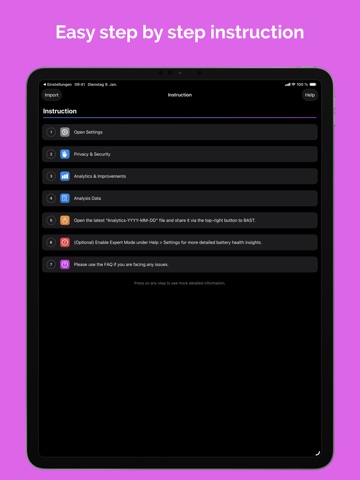
      "url": "https://is1-ssl.mzstatic.com/image/thumb/PurpleSource211/v4/df/cb/a0/dfcba0a6-6144-40e7-ba64-491dd3c53cdc/image1.png/1600x1600bb.jpg",
      "store": "apple",
      "platform": "ipad",
      "alt": "BAST: Battery Status ipad screenshot 1"
    },
    {
      "url": "https://is1-ssl.mzstatic.com/image/thumb/PurpleSource211/v4/df/cb/a0/dfcba0a6-6144-40e7-ba64-491dd3c53cdc/image1.png/360x480bb.jpg",
      "store": "apple",
      "platform": "ipad",
      "alt": "BAST: Battery Status ipad screenshot 2"
    },
    {
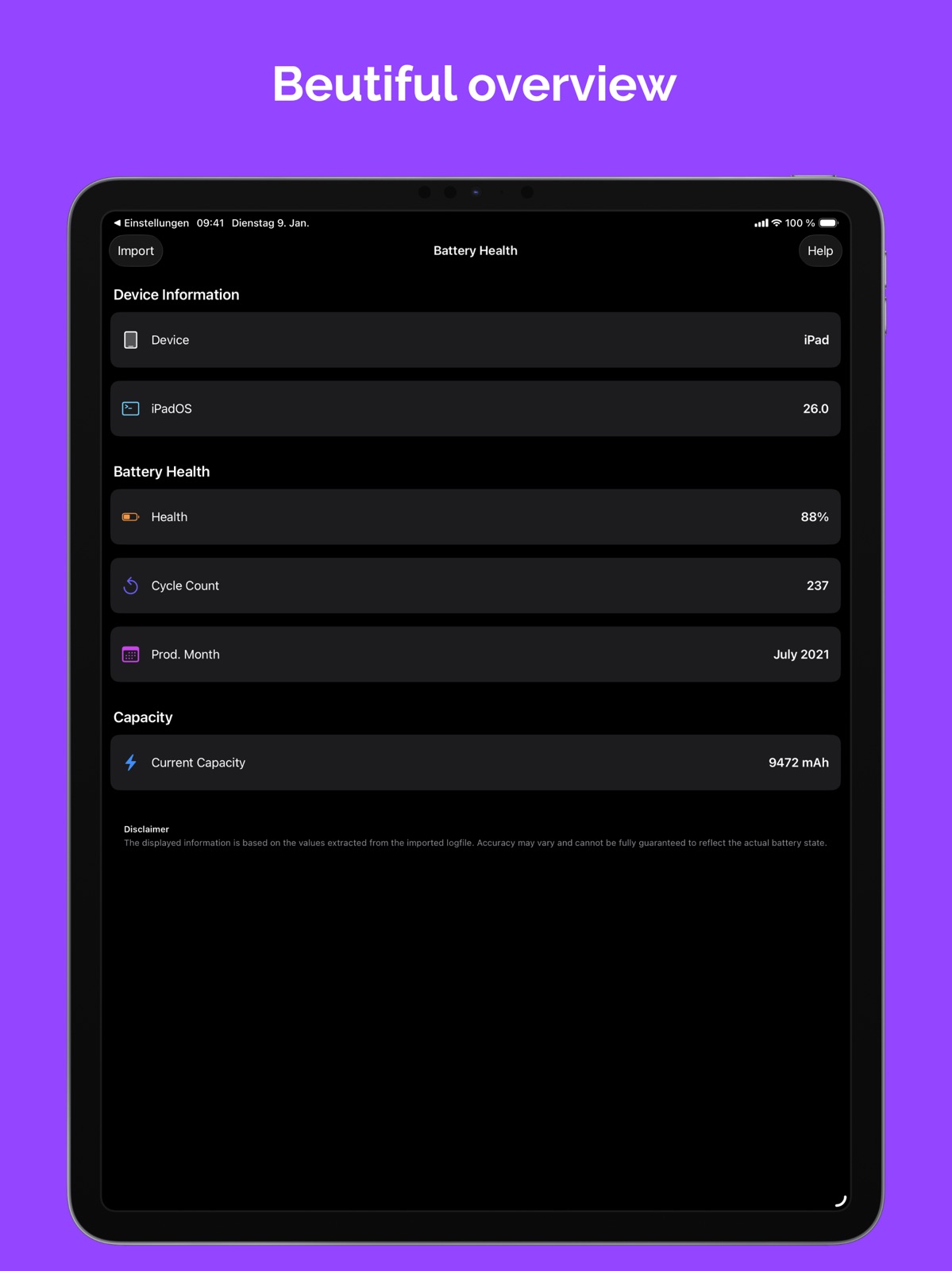
      "url": "https://is1-ssl.mzstatic.com/image/thumb/PurpleSource221/v4/a4/b6/be/a4b6be6d-27db-fd17-0c19-6bd78622ba13/image2.png/1600x1600bb.jpg",
      "store": "apple",
      "platform": "ipad",
      "alt": "BAST: Battery Status ipad screenshot 3"
    },
    {
      "url": "https://is1-ssl.mzstatic.com/image/thumb/PurpleSource211/v4/28/46/2b/28462bdc-557e-36a3-8add-fec6106c2dc4/image3.png/1600x1600bb.jpg",
      "store": "apple",
      "platform": "ipad",
      "alt": "BAST: Battery Status ipad screenshot 4"
    },
    {
      "url": "https://is1-ssl.mzstatic.com/image/thumb/PurpleSource221/v4/a4/b6/be/a4b6be6d-27db-fd17-0c19-6bd78622ba13/image2.png/360x480bb.jpg",
      "store": "apple",
      "platform": "ipad",
      "alt": "BAST: Battery Status ipad screenshot 5"
    },
    {
      "url": "https://is1-ssl.mzstatic.com/image/thumb/PurpleSource211/v4/28/46/2b/28462bdc-557e-36a3-8add-fec6106c2dc4/image3.png/360x480bb.jpg",
      "store": "apple",
      "platform": "ipad",
      "alt": "BAST: Battery Status ipad screenshot 6"
    },
    {
      "url": "https://is1-ssl.mzstatic.com/image/thumb/PurpleSource221/v4/20/9f/09/209f09f6-1842-7846-c733-ebefdbb70f69/image1.png/1284x1600bb.jpg",
      "store": "apple",
      "platform": "iphone",
      "alt": "BAST: Battery Status iphone screenshot 7"
    },
    {
      "url": "https://is1-ssl.mzstatic.com/image/thumb/PurpleSource221/v4/6a/ee/91/6aee91d2-0c67-b838-1fbc-4fde4ba4fdb5/image2.png/1284x1600bb.jpg",
      "store": "apple",
      "platform": "iphone",
      "alt": "BAST: Battery Status iphone screenshot 8"
    },
    {
      "url": "https://is1-ssl.mzstatic.com/image/thumb/PurpleSource221/v4/6a/e3/41/6ae341ab-674c-6683-3d05-b94049c47425/image3.png/1284x1600bb.jpg",
      "store": "apple",
      "platform": "iphone",
      "alt": "BAST: Battery Status iphone screenshot 9"
    }
  ],
  "ratings": [
    {
      "store": "apple",
      "average": 4.6,
      "count": 295,
      "market": "us",
      "observed_at": "2026-08-06",
      "reviews": [
        {
          "rating": 5,
          "title": "I found my cycle count",
          "body": "I didn’t know my cycle count was accessible to me until today. I read about how you can copy the text from the log file into a note and search for it, but it’s a huge file to try selecting all the text. This, on the other hand, was super easy to use, and it showed me my battery cycle count instantly. Thanks for an ad-free app and thank you for not collecting any info!",
          "author": "mdonald66",
          "date": "6 Aug 2026"
        },
        {
          "rating": 5,
          "title": "It works",
          "body": "This app gives me the battery health and cycle count of my M1 iPad Pro. Just launch the app and follow the simple directions. Works flawlessly. Simple and easy.",
          "author": "Rambo8649",
          "date": "6 Aug 2026"
        },
        {
          "rating": 5,
          "title": "Exactly What I Was Looking For",
          "body": "This app saved me hours of headache trying to read through the log file on a new-to-me 2018 iPad Pro! All I wanted to know was my current battery health and how many charge cycles were on the device. This app provided those answers beautifully and with no ads/hassles. Whoever developed this: Thank you!",
          "author": "SamTheTechNerd15",
          "date": "6 Aug 2026"
        },
        {
          "rating": 5,
          "title": "Best",
          "body": "What are the best apps I tried it on my iPad and then I tried it on my iPhone just to make sure if the app was telling me correct and I tried it for two consecutive days. The app tells you correct battery life and it’s super simple to use no ads no sign up and the major thing is it’s free",
          "author": "inder9111",
          "date": "6 Aug 2026"
        },
        {
          "rating": 5,
          "title": "Best battery checker",
          "body": "Works great and is easy to use. I use it to check every new battery install and older questionable battery life. This app is a must if you install an aftermarket battery to make sure you have a good battery.",
          "author": "Teaffns",
          "date": "6 Aug 2026"
        }
      ]
    }
  ],
  "privacy": [
    {
      "store": "apple",
      "declarations": [
        {
          "title": "Data Not Collected",
          "detail": "",
          "source": "Developer declared"
        }
      ],
      "accessibility": [
        {
          "title": "Dark Interface",
          "detail": "SUPPORTED",
          "source": "Store published"
        }
      ]
    }
  ],
  "changes": [
    {
      "store": "apple",
      "version": "1.0.3",
      "released_at": null,
      "notes": "- Added Alert when user tries to import a wrong file format. - bug fixes and improvements"
    },
    {
      "store": "apple",
      "version": "1.1",
      "released_at": null,
      "notes": "- FAQ added. - Bug fixes and improvements."
    },
    {
      "store": "apple",
      "version": "1.1.1",
      "released_at": null,
      "notes": "- Fixes a bug that prevented some users from importing the logfile. - Added further FAQs"
    },
    {
      "store": "apple",
      "version": "1.1.2",
      "released_at": null,
      "notes": "- bug fixes and improvements."
    },
    {
      "store": "apple",
      "version": "1.2",
      "released_at": null,
      "notes": "- Improvements for iOS 16 Please Note: - BAST now requires iOS 16.0 or later"
    },
    {
      "store": "apple",
      "version": "1.2.1",
      "released_at": null,
      "notes": "Updated FAQ."
    },
    {
      "store": "apple",
      "version": "1.2.2",
      "released_at": null,
      "notes": "- Updated FAQ"
    },
    {
      "store": "apple",
      "version": "1.2.3",
      "released_at": null,
      "notes": "- bug fixes and improvements"
    },
    {
      "store": "apple",
      "version": "1.3",
      "released_at": null,
      "notes": "- Updated FAQ - Fixed UI"
    },
    {
      "store": "apple",
      "version": "1.3.1",
      "released_at": null,
      "notes": "- Battery Health displays no longer values over 100% - Performance improvements"
    },
    {
      "store": "apple",
      "version": "1.4",
      "released_at": null,
      "notes": "- Introducing Expert Mode: Elevate your battery insights with a simple activation in the app settings. - Performance and Layout improvements."
    },
    {
      "store": "apple",
      "version": "1.4.1",
      "released_at": null,
      "notes": "- Fixed UI"
    },
    {
      "store": "apple",
      "version": "1.5",
      "released_at": null,
      "notes": "- Files can now be shared directly into the app."
    },
    {
      "store": "apple",
      "version": "1.5.1",
      "released_at": null,
      "notes": "- bug fixes"
    },
    {
      "store": "apple",
      "version": "1.5.2",
      "released_at": null,
      "notes": "- Bug fixes and improvements"
    },
    {
      "store": "apple",
      "version": "2.0",
      "released_at": null,
      "notes": "What’s New in BAST 2.0: - Completely redesigned interface for a more intuitive and user-friendly experience - Significantly faster data processing and improved file handling Enjoy a smoother and clearer view of your battery diagnostics — with a fresh look and better performance."
    },
    {
      "store": "apple",
      "version": "2.0.1",
      "released_at": null,
      "notes": "- Fixed app review notification"
    },
    {
      "store": "apple",
      "version": "2.0.2",
      "released_at": null,
      "notes": "- Fixed UI - Bug fixes and improvements"
    },
    {
      "store": "apple",
      "version": "2.1",
      "released_at": null,
      "notes": "- BAST now displays the estimated production month of your battery (Expert Mode). - UI polished for a smoother experience."
    },
    {
      "store": "apple",
      "version": "2.1.1",
      "released_at": null,
      "notes": "- Bug fixes and improvements"
    }
  ],
  "alternatives": [
    {
      "app_id": 887730232,
      "name": "Battery Testing",
      "url": "https://appcorpus.com/apps/battery-testing-887730232",
      "reason": "Same category + similar ratings"
    },
    {
      "app_id": 407752428,
      "name": "System Status: hw monitor",
      "url": "https://appcorpus.com/apps/system-status-hw-monitor-407752428",
      "reason": "Same category + similar ratings"
    },
    {
      "app_id": 1080930585,
      "name": "Battery Life - check runtimes",
      "url": "https://appcorpus.com/apps/battery-life-check-runtimes-1080930585",
      "reason": "Same category + similar ratings"
    },
    {
      "app_id": 1180887748,
      "name": "Battery Life Health Doctor Pro",
      "url": "https://appcorpus.com/apps/battery-life-health-doctor-pro-1180887748",
      "reason": "Same category + similar ratings"
    },
    {
      "app_id": 331453283,
      "name": "Battery HD+",
      "url": "https://appcorpus.com/apps/battery-hd-331453283",
      "reason": "Same category + similar ratings"
    },
    {
      "app_id": 1482503198,
      "name": "Battery Charge Alarm",
      "url": "https://appcorpus.com/apps/battery-charge-alarm-1482503198",
      "reason": "Same category + similar ratings"
    }
  ],
  "evidence_summary": {
    "index_state": "S1",
    "evidence_level": 1,
    "level_label": "Live store listing",
    "indexable": true,
    "last_verified_at": "2026-08-06",
    "unknown_fields": [
      "Independent summary has not been published yet."
    ],
    "sources": [
      "App Store"
    ]
  },
  "availability_markets": {
    "live": [
      "us"
    ],
    "selected": "us",
    "note": null
  },
  "feature_events": {
    "events": []
  },
  "features_slice": {
    "plans": [
      {
        "code": "free",
        "label": "Free",
        "kind": "free",
        "status": "inferred",
        "prices": [],
        "trial": null
      }
    ],
    "features": [],
    "unknown_features": [],
    "data_cutoff": "6 Aug 2026"
  }
}