
Quick verdict
- What it is
- Store information collected; an Apoku editorial summary is not yet published.
- At a glance
-
- Free to download
- In-app purchases
Categories and search queries
Official categories
- Utilities
Apoku categories
Key functions
| Function | Availability | Access | Scope | Evidence |
|---|---|---|---|---|
| Free app | Yes | Free | Context-specific | Store published |
| In-app purchases | Yes | Limited free | Context-specific | Store published |
Screens
App Store
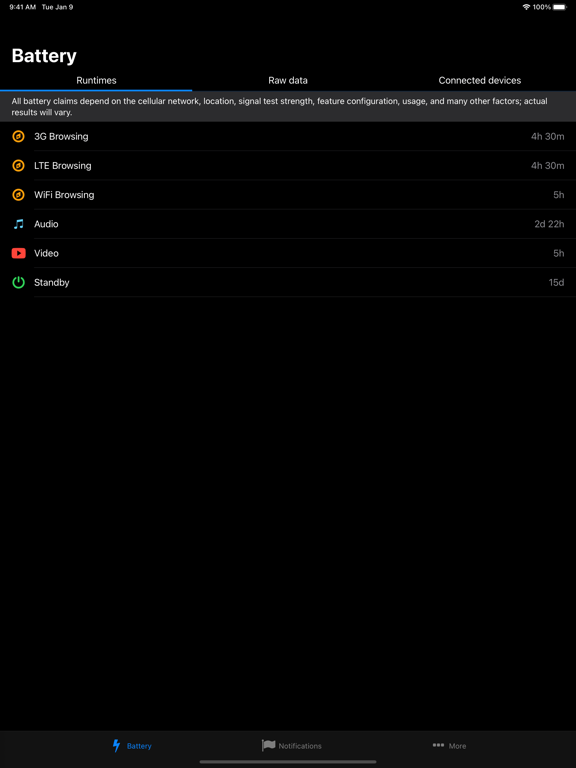
20 store screenshots



Pricing & paywalls
App Store
- Pro Features — $1.99
Ratings & reviews
App Store
-
5/5Works great
All these people saying it's inconsistent have zero knowledge of how battery capacity is measured. Yes, the readings will fluctuate, but it doesn't take a genius to know you can just take the average of the readings, which is made easy by the chart and history features of the app. For a true capacity test, you'd have to charge the battery full and discharge until it's empty while watching the current draw over time. iPhones can't really do this very accurately, so inconsistent readings are not the fault of the app. The app is just reporting what the phone is learning about its battery. Under high draw (such as an increased brightness) the voltage sags and the phone has to guess whether it's the battery's internal resistance or it's actually used up it capacity and lowered the voltage. Apple never meant for the user to see these readings, so they fluctuate and aren't really user-friendly. This app just reveals these measurements to give an estimate on remaining capacity. It's a simple, easy to use app that does exactly what it's supposed to do to the best of its ability.
Deven98 · 29 Sep 2026
-
5/5Custom name for the AirPods Pro case is a bonus
I have used similar apps on macOS to help monitor the values of my connected devices, but they seem to use some other technique that drains the battery quicker than they should. This app seems to only update when you requested to, by turning off, background app updates, but also you’re able to make custom names for your devices so that you can figure out which is which. I own two pairs of AirPods Pro Gen 2 and I regularly switched between them, but I’m only able to name them on as a group, but the case itself remains unnamed on many of my devices. Quickly being able to take a glance at it here on the iPad I can tell what battery status they all are and which one. Apple‘s battery tool just shows two cases with the same name. Even though I’ve renamed the AirPods to different names. I purchased the no ad version as ads are just against my philosophy, I need none of the premium features at the moment. I appreciate the one time purchase option over any subscription.
Aaronsgeek · 29 Sep 2026
-
4/5Great app, only too many ads
This is a very accurate application, i always use it to check the battery on my airpods since sometimes when opening the case it doesn’t always display it on my screen. The only issue I have with it is after i view one different tab and go back an ad is played, like every new action, an ad is played. I dont have a problem with free aps displaying ads, considering it is a free ap and it is most likely the only way they earn some sort of profit. I just dont like how many times it is showed while using it. Other than that, it is a great tool, it updates constantly so it gives you a very accurate read on percentage, theres more to it inside that i havent exactly explored, but so far i think it is a great app and i definitely recommend.
xbbeeaarr · 29 Sep 2026
-
1/5Not accurate!
I downloaded this app a bit ago and found out that there was discrepancies. I have a fairly recent Refurbished iPhones 6S. I was getting several different readings in the battery wear level every time I opened the app. So I started to test this. I got readings of 7% Wear level (Which matched my iPhone measurement), 13% Wear level and 18% Wear level. I left the app open to see if the reading would change back to the previous reading and sometimes it would and sometimes it would not. I tested this in a three hour window. I also tested it for several days and got the same results...Very inconsistent readings. So at that point I figured the app was pretty much worthless to me and I deleted it. I just installed it the other day again to see if maybe things had gotten better with the app. I got the same results as previously. So I’m going to delete this app again and just use the reading I get in my iPhone settings. I was sure hoping it would work better.
IrishCharmer11111 · 29 Sep 2026
-
3/5App appears to be inconsistent.
The main reason I got this app is I wanted to check the health of my battery. It’s showing that I’ve only lost 3% and the iPhone 6 is almost 2 years old. So it proves that Apple should not be throttling my phone down with iOS 11.2, can’t wait for the 11.3 update. Now five days later I just ran it again and it said there is 0% wear on my battery I then installed it on my wife’s iPhone 6 because she’s had battery issues for the past year. It is showing that 20% of her battery life is shot and her phone is 2 1/2 years old. She was having issues yesterday and I ran it again last night and now it says the battery is 37% shot. Because of these inconsistencies a knock this down to a three star rating. Best thing to do is probably run it over to the Apple Store have both of our phones checked.
Macdaddybill · 29 Sep 2026
Privacy & accessibility
App Store
Privacy
- Data Linked to You — App Functionality — Contact Info — Email Address Developer declared
- Data Linked to You — App Functionality — Contact Info — Name Developer declared
- Data Linked to You — App Functionality — User Content — Customer Support Developer declared
- Data Linked to You — Contact Info Developer declared
- Data Linked to You — User Content Developer declared
- Data Not Linked to You — Analytics — Diagnostics — Crash Data Developer declared
- Data Not Linked to You — Analytics — Diagnostics — Other Diagnostic Data Developer declared
- Data Not Linked to You — Analytics — Diagnostics — Performance Data Developer declared
- Data Not Linked to You — Analytics — Identifiers — Device ID Developer declared
- Data Not Linked to You — Analytics — Purchases — Purchase History Developer declared
- Data Not Linked to You — Analytics — Usage Data — Advertising Data Developer declared
- Data Not Linked to You — Analytics — Usage Data — Other Usage Data Developer declared
- Data Not Linked to You — Analytics — Usage Data — Product Interaction Developer declared
- Data Not Linked to You — App Functionality — Diagnostics — Crash Data Developer declared
- Data Not Linked to You — App Functionality — Diagnostics — Other Diagnostic Data Developer declared
- Data Not Linked to You — App Functionality — Diagnostics — Performance Data Developer declared
- Data Not Linked to You — Developer’s Advertising or Marketing — Identifiers — Device ID Developer declared
- Data Not Linked to You — Developer’s Advertising or Marketing — Usage Data — Advertising Data Developer declared
- Data Not Linked to You — Developer’s Advertising or Marketing — Usage Data — Other Usage Data Developer declared
- Data Not Linked to You — Developer’s Advertising or Marketing — Usage Data — Product Interaction Developer declared
- Data Not Linked to You — Third-Party Advertising — Identifiers — Device ID Developer declared
- Data Not Linked to You — Third-Party Advertising — Usage Data — Advertising Data Developer declared
- Data Not Linked to You — Third-Party Advertising — Usage Data — Other Usage Data Developer declared
- Data Not Linked to You — Third-Party Advertising — Usage Data — Product Interaction Developer declared
- Data Not Linked to You — Diagnostics Developer declared
- Data Not Linked to You — Identifiers Developer declared
- Data Not Linked to You — Purchases Developer declared
- Data Not Linked to You — Usage Data Developer declared
- Data Used to Track You — Identifiers — Device ID Developer declared
- Data Used to Track You — Identifiers Developer declared
- Data Not Linked to You — Analytics — User Content — Customer Support Developer declared
- Data Not Linked to You — User Content Developer declared
- Data Not Linked to You — Analytics — Location — Coarse Location Developer declared
- Data Not Linked to You — Developer’s Advertising or Marketing — Location — Coarse Location Developer declared
- Data Not Linked to You — Developer’s Advertising or Marketing — User Content — Customer Support Developer declared
- Data Not Linked to You — Third-Party Advertising — Location — Coarse Location Developer declared
- Data Not Linked to You — Location Developer declared
Accessibility
No accessibility labels collected yet.
Versions
App Store
-
21.10.1
• General bugfixes • UI improvements
-
21.1.1
• Updated localizations • General bugfixes • UI improvements
-
21.12.1
• General bugfixes • UI improvements
-
21.3.1
• Updated localizations • General bugfixes • UI improvements
-
21.3.2
• Updated localizations • General bugfixes • UI improvements
-
21.6.1
• Updated localizations • General bugfixes • UI improvements
-
21.7.1
• Updated localizations • General bugfixes • UI improvements
-
21.9.1
• Update of device database • General bugfixes • UI improvements
-
22.10.1
• Update of device database • General bugfixes • UI improvements
-
22.6.1
• Update of device database • General bugfixes • UI improvements
-
23.1.1
• General bugfixes • UI improvements • Added option to delete all inactive/unmonitored devices
-
23.1.2
• General bugfixes • UI improvements • Added option to delete all inactive/unmonitored devices
-
23.1.3
• General bugfixes • UI improvements • Added option to delete all inactive/unmonitored devices
-
23.1.4
• General bugfixes • UI improvements • Added option to delete all inactive/unmonitored devices
-
23.9.1
• General bugfixes • UI improvements
-
24.8.1
• General bugfixes • UI improvements
-
25.10.1
• General bugfixes • UI improvements • Update of device database
-
25.10.2
· 6 Oct 2025
• General bugfixes • UI improvements • Update of device database
-
26.8.1
• Updated Apple Watch complications • General bugfixes • UI improvements • Update of device database
-
26.8.2
· 30 Aug 2026
• Updated Apple Watch complications • General bugfixes • UI improvements • Update of device database
-
26.8.3
• New welcome screen for first-time users • Redesigned step-by-step guides • Clearer help texts in most supported languages • General bugfixes and improvements
-
26.9.1
• The complication on the watch face updates more often • Improved reminder telling you when Battery Life has been force quit, which interrupts battery monitoring and complication updates • The Watch page shows your iPhone's battery charge again • The "Sync Now" button now waits for your Apple Watch • No more repeated notifications when the charge hovers around your threshold • Fixed several crashes • General bugfixes and improvements
-
26.9.2
• Update of device database • Fixed several crashes • General bugfixes and improvements • Fixed the missing Back button on iPad • New In-App Purchase screen, and a purchase is now picked up automatically on a new device – no restore needed • Fixed a restore that could get stuck at "Please wait"
-
26.9.3
· 25 Sep 2026
• New Home Screen and Lock Screen widgets: Battery, Runtimes and Devices (iOS 17 or later) • Connected devices such as AirPods no longer appear several times. Your custom names and hidden devices are kept • UI changes to the Battery, Watch, Notifications and More tabs • New readings: thermal state and Low Power Mode • Runtimes updated from Apple's published figures for every model, with Apple's test descriptions • Help (FAQ) and the version history now open inside the app • More reliable background updates and notifications • The reminder that the app was force quit no longer appears when you did not force quit it • In landscape, the banner no longer blocks taps on the list beside it • Updated Privacy Policy and End-User License Agreement • Fixed several crashes, general bug fixes and improvements
-
4.3.2
• General bugfixes • UI improvements
-
4.3.3
• Add a custom name for your connected device • General bugfixes • UI improvements
-
4.3.4
• General bugfixes • UI improvements
-
4.3.5
• General bugfixes • UI improvements
-
4.4.0
• You can now customize Watch complications • General bugfixes • UI improvements
-
4.4.1
• You can now customize Watch complications • General bugfixes • UI improvements
-
4.4.2
• You can now customize Watch complications • Updated localizations (Arabic, Chinese, English, German, Portuguese, Russian, Turkish, Vietnamese) • General bugfixes • UI improvements
Alternatives
- Battery Testing — Same category + similar ratings
- Battery Life Health Doctor Pro — Same category + similar ratings
- Battery HD+ — Same category + similar ratings
- Amperes Battery Charging Lite — Same category + similar ratings
- Ampere Battery Charging Check — Same category + similar ratings
- AllMyBatteries — Same category + similar ratings
Availability by market
- US
Data quality & evidence
- Page completeness
- Live store listing
- Last verified
- 29 Sep 2026
- Sources
- App Store
- Apoku editorial summary has not been published yet.