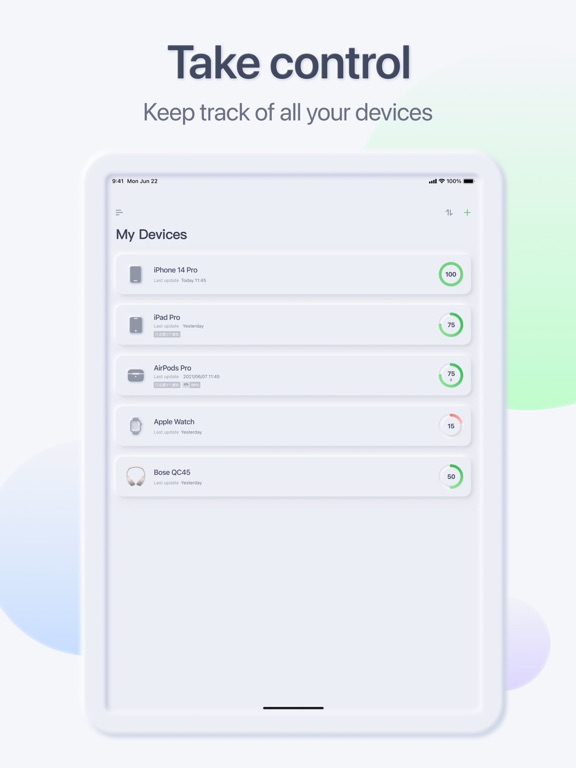
Apoku MCP provides app discovery, detailed cards, evidence, sources and screenshots where available. Unknown or conflicting prices stay explicit.
View JSON
GET /api/v3/apps/1621263412
{
  "app_id": 1621263412,
  "canonical_url": "https://appcorpus.com/apps/allmybatteries-1621263412",
  "identity": {
    "name": "AllMyBatteries",
    "slug": "allmybatteries",
    "developer": {
      "name": "嘉银 李",
      "url": "https://appcorpus.com/developers/developer-603-developer_0034b2076d262e62337342db9f5415a4"
    },
    "icon_url": "https://is1-ssl.mzstatic.com/image/thumb/Purple221/v4/14/63/34/1463342b-aebb-8d5c-f626-ede61168f090/AppIcon-0-0-1x_U007epad-0-1-0-85-220-0.png/512x512bb.jpg",
    "stores": [
      "apple"
    ],
    "platforms": [
      "iphone",
      "ipad"
    ],
    "status": {
      "state": "active",
      "label": "Active",
      "last_checked": "2026-08-06",
      "last_checked_label": "6 Aug 2026",
      "banner": null,
      "region_note": null,
      "data_state": "stale",
      "data_state_label": "Some store data may be out of date"
    }
  },
  "listings": [
    {
      "store": "apple",
      "status": "ACTIVE",
      "url": "https://apps.apple.com/us/app/allmybatteries/id1621263412?uo=4",
      "rating": 4.5,
      "rating_count": 2320,
      "formatted_price": "Free",
      "is_free": true,
      "has_iap": true,
      "has_subscription": null,
      "version": "2.6.8",
      "updated": "2026-08-06",
      "currency": "USD"
    }
  ],
  "summary": {
    "one_liner": null,
    "summary": null,
    "best_for": [],
    "not_for": [],
    "status": "fallback",
    "at_a_glance": [
      "Free to download",
      "In-app purchases"
    ]
  },
  "categories": {
    "official": [
      "Utilities"
    ],
    "appcorpus": [
      {
        "category_id": "utilities",
        "label": "Utilities",
        "url": "https://appcorpus.com/categories/utilities"
      }
    ]
  },
  "use_cases": [],
  "features": [
    {
      "capability_id": "free_app",
      "label": "Free app",
      "availability": "yes",
      "access_level": "free",
      "scope": null,
      "evidence": "Store published"
    },
    {
      "capability_id": "in_app_purchases",
      "label": "In-app purchases",
      "availability": "yes",
      "access_level": "free_limited",
      "scope": null,
      "evidence": "Store published"
    },
    {
      "capability_id": "family_sharing",
      "label": "Family Sharing",
      "availability": "unknown",
      "access_level": "unknown",
      "scope": null,
      "evidence": "Store published"
    }
  ],
  "pricing": [
    {
      "store": "apple",
      "formatted_price": "Free",
      "is_free": true,
      "has_iap": true,
      "has_subscription": null,
      "currency": "USD",
      "market": "us",
      "last_verified": "2026-08-06",
      "rows": [
        "AllMyBatteries Ultimate — $6.99",
        "AllMyBatteries Ultimate Family — $12.99",
        "Upgrade to family plan — $5.99"
      ],
      "state": "current"
    }
  ],
  "screens": [
    {
      "url": "https://is1-ssl.mzstatic.com/image/thumb/Purple126/v4/17/0b/80/170b806b-7a24-103d-6b4a-652376d59d2e/4f96863e-b25f-40e8-9e26-0e0158d116fb_iPad_Pro_12.9__-__U5c0f_U7ec4_U4ef6-_U82f1_U6587.jpg/1600x1600bb.jpg",
      "store": "apple",
      "platform": "ipad",
      "alt": "AllMyBatteries ipad screenshot 1"
    },
    {
      "url": "https://is1-ssl.mzstatic.com/image/thumb/Purple126/v4/56/80/26/56802619-53f8-0ad4-8c5a-38478cbf77d0/ea1cd02e-5119-487d-b8b6-9c0f9b712b13_iPad_Pro_12.9__-__U5c0f_U7ec4_U4ef6-_U82f1_U6587.jpg/576x768bb.jpg",
      "store": "apple",
      "platform": "ipad",
      "alt": "AllMyBatteries ipad screenshot 2"
    },
    {
      "url": "https://is1-ssl.mzstatic.com/image/thumb/PurpleSource126/v4/a7/0a/e8/a70ae8f8-68d3-ea72-ee20-55efc167e97b/c3e77854-14c1-4b2c-bded-e14ef2212a08_1.jpg/1600x1600bb.jpg",
      "store": "apple",
      "platform": "ipad",
      "alt": "AllMyBatteries ipad screenshot 3"
    },
    {
      "url": "https://is1-ssl.mzstatic.com/image/thumb/PurpleSource126/v4/1d/be/5c/1dbe5cba-c4f4-4bd8-73b2-5d4440171a55/659ca0e2-0a44-4ae3-9c3b-fda1be5d1f5b_1.jpg/576x768bb.jpg",
      "store": "apple",
      "platform": "ipad",
      "alt": "AllMyBatteries ipad screenshot 4"
    },
    {
      "url": "https://is1-ssl.mzstatic.com/image/thumb/PurpleSource116/v4/a8/3b/bf/a83bbf54-9a28-81ba-c1f2-d8c88996bae5/43561a83-05af-4a07-8fe7-8b3aa2132aab_2.jpg/1600x1600bb.jpg",
      "store": "apple",
      "platform": "ipad",
      "alt": "AllMyBatteries ipad screenshot 5"
    },
    {
      "url": "https://is1-ssl.mzstatic.com/image/thumb/PurpleSource116/v4/94/ab/b0/94abb002-8d66-dd81-f4b8-93dc28237425/7f360ce5-6571-4c70-a72c-4b9c49dfe4e9_2.jpg/576x768bb.jpg",
      "store": "apple",
      "platform": "ipad",
      "alt": "AllMyBatteries ipad screenshot 6"
    },
    {
      "url": "https://is1-ssl.mzstatic.com/image/thumb/PurpleSource126/v4/29/94/3e/29943ed4-2180-6c54-4766-4c4798b7a406/8d2bde51-7dde-4783-b23e-670025b1dab3_3.jpg/1600x1600bb.jpg",
      "store": "apple",
      "platform": "ipad",
      "alt": "AllMyBatteries ipad screenshot 7"
    },
    {
      "url": "https://is1-ssl.mzstatic.com/image/thumb/PurpleSource126/v4/11/e0/c3/11e0c325-c4cc-b2cf-e519-cb571073662d/afcf5d7a-43f5-4299-8510-99dae6ee372b_3.jpg/576x768bb.jpg",
      "store": "apple",
      "platform": "ipad",
      "alt": "AllMyBatteries ipad screenshot 8"
    },
    {
      "url": "https://is1-ssl.mzstatic.com/image/thumb/PurpleSource126/v4/1b/57/dd/1b57ddbe-ff1e-53ed-6f4b-f3b99f15f53a/93c3ed91-4721-48f0-9de5-7a1a69de39c0_4.jpg/1600x1600bb.jpg",
      "store": "apple",
      "platform": "ipad",
      "alt": "AllMyBatteries ipad screenshot 9"
    },
    {
      "url": "https://is1-ssl.mzstatic.com/image/thumb/PurpleSource126/v4/aa/97/6a/aa976a3a-08c1-0a3c-035c-53f614aabdb3/1f99e2a5-845a-4bce-a6e6-c920cef8b23f_4.jpg/576x768bb.jpg",
      "store": "apple",
      "platform": "ipad",
      "alt": "AllMyBatteries ipad screenshot 10"
    },
    {
      "url": "https://is1-ssl.mzstatic.com/image/thumb/Purple126/v4/9d/59/41/9d594153-8ef8-ba75-d18f-d2cad269e429/89ff9347-8fdb-41e2-896d-882fffd68d08_6.5-_U5c0f_U7ec4_U4ef6_1__U82f1_U6587.jpg/1284x1600bb.jpg",
      "store": "apple",
      "platform": "iphone",
      "alt": "AllMyBatteries iphone screenshot 11"
    },
    {
      "url": "https://is1-ssl.mzstatic.com/image/thumb/Purple126/v4/e1/b1/f4/e1b1f4d9-6a96-6933-1dc8-93be5554d713/3d40ce99-4d26-44e3-89f1-e39d6e66403f_6.5-_U5c0f_U7ec4_U4ef6_2__U82f1_U6587.jpg/1284x1600bb.jpg",
      "store": "apple",
      "platform": "iphone",
      "alt": "AllMyBatteries iphone screenshot 12"
    },
    {
      "url": "https://is1-ssl.mzstatic.com/image/thumb/PurpleSource116/v4/5c/61/8b/5c618b90-d97a-f36c-a6fe-5b89bc0a2380/0ec1296d-3dd9-4b06-b86b-8956b73a4d76_6.5-1-_U82f1_U6587.jpg/1284x1600bb.jpg",
      "store": "apple",
      "platform": "iphone",
      "alt": "AllMyBatteries iphone screenshot 13"
    },
    {
      "url": "https://is1-ssl.mzstatic.com/image/thumb/PurpleSource126/v4/25/40/1c/25401cbc-effc-6b32-0320-7b15add9da0d/9da8131b-cba5-43a9-8917-1b18245ec1de_6.5-2-_U82f1_U6587.jpg/1284x1600bb.jpg",
      "store": "apple",
      "platform": "iphone",
      "alt": "AllMyBatteries iphone screenshot 14"
    },
    {
      "url": "https://is1-ssl.mzstatic.com/image/thumb/PurpleSource126/v4/d5/33/d6/d533d673-b278-ff87-f461-21f2da38c9b0/9c1ed799-39d6-4204-8cfb-641abc60a5a6_6.5-3-_U82f1_U6587.jpg/1284x1600bb.jpg",
      "store": "apple",
      "platform": "iphone",
      "alt": "AllMyBatteries iphone screenshot 15"
    },
    {
      "url": "https://is1-ssl.mzstatic.com/image/thumb/PurpleSource126/v4/5c/62/ea/5c62eadb-5387-721e-e3f6-8fc18c3bc501/47ea5777-4e80-479e-bedf-71ec81635f70_6.5-4-_U82f1_U6587.jpg/1284x1600bb.jpg",
      "store": "apple",
      "platform": "iphone",
      "alt": "AllMyBatteries iphone screenshot 16"
    },
    {
      "url": "https://is1-ssl.mzstatic.com/image/thumb/Purple126/v4/e2/7f/50/e27f5073-d3b0-3518-2258-f8d6f0b4da4e/48b97e16-94aa-4af3-9f7c-7d0c85b0458f_Mac__U5c0f_U7ec4_U4ef6__U82f1_U6587.png/1280x800bb.jpg",
      "store": "apple",
      "platform": "mac",
      "alt": "AllMyBatteries mac screenshot 17"
    },
    {
      "url": "https://is1-ssl.mzstatic.com/image/thumb/PurpleSource116/v4/e4/6b/b1/e46bb1e4-87f4-1cef-3b9c-fdc0af0c3d08/6d1d9680-a579-4af3-b78b-bbb26314e362_mac1_U82f1_U6587.png/1280x800bb.jpg",
      "store": "apple",
      "platform": "mac",
      "alt": "AllMyBatteries mac screenshot 18"
    },
    {
      "url": "https://is1-ssl.mzstatic.com/image/thumb/PurpleSource116/v4/73/72/b3/7372b322-d516-6714-7ae2-b866f52deeed/e6be6de2-bd31-49bb-b3f3-11658dc3eb20_Mac_2__U82f1_U6587.png/1280x800bb.jpg",
      "store": "apple",
      "platform": "mac",
      "alt": "AllMyBatteries mac screenshot 19"
    },
    {
      "url": "https://is1-ssl.mzstatic.com/image/thumb/PurpleSource116/v4/89/6d/56/896d5688-588f-47d2-3287-6da180b94c67/be1bc9dd-cf59-4b95-aa84-51958511cf0f_Mac_3__U82f1_U6587.png/1280x800bb.jpg",
      "store": "apple",
      "platform": "mac",
      "alt": "AllMyBatteries mac screenshot 20"
    },
    {
      "url": "https://is1-ssl.mzstatic.com/image/thumb/PurpleSource126/v4/b5/00/b6/b500b6d0-31db-c842-c6ed-e2d83089b183/b65ecb5f-2fc7-4e1a-81eb-af26c6fd05e4_Mac_4__U82f1_U6587.png/1280x800bb.jpg",
      "store": "apple",
      "platform": "mac",
      "alt": "AllMyBatteries mac screenshot 21"
    },
    {
      "url": "https://is1-ssl.mzstatic.com/image/thumb/PurpleSource116/v4/69/51/d4/6951d4ec-5bfa-9a22-85b5-a62c60cce313/4a8844e4-605d-43f4-9f0b-f2948ea95c09_Mac_5__U82f1_U6587.png/1280x800bb.jpg",
      "store": "apple",
      "platform": "mac",
      "alt": "AllMyBatteries mac screenshot 22"
    },
    {
      "url": "https://is1-ssl.mzstatic.com/image/thumb/PurpleSource126/v4/c7/24/a7/c724a768-1592-a497-2255-63e13f5df89e/129d94f6-29e5-4cc3-9a8b-a09bdcd3e9ba_Apple_Watch_44mm_-_1.png/396x484bb.jpg",
      "store": "apple",
      "platform": "watch",
      "alt": "AllMyBatteries watch screenshot 23"
    }
  ],
  "data_states": {
    "screens": "current"
  },
  "ratings": [
    {
      "store": "apple",
      "average": 4.5,
      "count": 2320,
      "market": "us",
      "observed_at": "2026-08-06",
      "state": "current",
      "reviews": [
        {
          "rating": 5,
          "title": "Excellent App with great Shortcuts functions",
          "body": "V2.3.3 is now working! No longer having Force Sync errors in my Shortcuts on iPadOS 18.7.1! So at some point the app was fixed or Apple iOS updates fixed the Shortcuts issue!! It’s also working on iPhone, which I have also updated! Excellent App!! V2.3.1 is still failing with Force Sync errors in my Shortcuts on iPadOS 18.3.2! When running from Automation at the scheduled times, it produces: “…encounter an error: The operation couldn’t be completed (INCExtensionErrorDomain error 1307.)” When running within Shortcuts app: After long pause: “Could not run Force Sync. The operation took too long to complete. Please try again.” On my iPhone 18.3.2 running v2.1.1, Force Sync works with no issues as I haven’t updated for these 9 months! This problem started with v2.1.2, so I’ve been testing on my iPad as automations are more critical on my iPhone! Please look into this & restore functionality back in v2.1.1 I look forward to seeing this working in current versions. Thanks!! ——— Old Reviews ——- Been using this app for sometime & have used it in so many of my Shortcuts to monitor my many devices! It was great! v2.1.5 is still producing Force Sync timeout error when running in Shortcuts on iPadOS 17.6.1 v2.1.3 is still producing Force Sync error when running Shortcuts However, the last update (v2.1.2), is now causing Shortcuts to error out every time Force Sync is used! “Could not run Force Sync: The operation took too long to complete. Please try again” I needed to disable many Automations using this, please fix as soon as possible! Thanks!!",
          "author": "D-T-L",
          "date": "6 Aug 2026"
        },
        {
          "rating": 5,
          "title": "Best battery app I tried, for 5 of my devices",
          "body": "I tried 2 other apps, thought about paying but they just didn't impress me. This one does. There are a few small bugs to work out, I will report that to the developer, hopefully seeing a fix and making this app perfect! You can setup many portable devices and then on a desktop (like iMac) see the information for all the portable devices. I setup 2 Macbooks, 2 iPhones, apple watch and a desktop mouse. I have 1 spot on any device to see the state of all the devices. The interface looks great, very nicely done!! My Issues: 1. Lock screen iPhone Widgets should extended to allow more than 4 devices in side by side. A list already lets you show all, but the side by side is more compact. I have 5 devices, but 8 would cover just about everyone. 2. It should be documented that the free version only supports 3 devices, so you will never see more, making it look like your setup is wrong. No problem, just pay and get as many devices as you want to. But even then your old device won't show, unless you go and manually add \"this device\" from the app. 3. If you pick a new icon for my Macbook, that does not save properly, while changing the iphone icon does get saved after exiting and between devices. 4. After setting up my apple watch in the app, then changing the name through iPhone, that new name never makes it into the app. You end up with a stale device which will never update in the app, and you will have to manually remove the old name and add the new name. 5. For my Apple Mouse, I can add it but the system does not pickup it's name, it just calls it Magic Mouse 2, instead of the name I see on my iMac.",
          "author": "RobertBody",
          "date": "6 Aug 2026"
        },
        {
          "rating": 5,
          "title": "SO HELPFUL!!",
          "body": "In an effort to make my devices hopefully last as long as they can, I have been trying to monitor when my iPad, Mac, iPhone and Watch have either reached 80% or dropped below 40%. This app is the best one for the job. I switched from CloudBattery and this app gives much more consistent notifications when my device reaches a specific percentage. I like the ability to use complications on Watch faces and that automation is easy to set up with a little guide even included in the app. Although not always the most accurate, I do still find it nice that we can add any bluetooth device and it’s usually decent at guesstimating the charge. The widgets for this app also give a handful of options for customization and they look very “Apple” on the Home Screen.",
          "author": "Brandowizard",
          "date": "6 Aug 2026"
        },
        {
          "rating": 5,
          "title": "Best battery app of all",
          "body": "I have tried several battery apps, even paid for a couple, but none worked well across all my Apple devices. AllMyBatteries works perfectly across all my devices, M3 MacBook, iMac 2020, iPad Mini 6, iPad Pro Max 12.9, iPhone 14 Pro Max, Apple Watch series 9, and my iPod Pro Max headphones. Each and everyone of them appears in the application, and in the allmybatteries complication on my Apple Watch. The updates to the percentages are frequent and accurate. Notifications are super simple to set up. Click a couple of choices are you are done. You can set both notifications for low battery at whatever percentage desired, and for high battery notification at whatever percentage desired. I just wish all were are good as this one.",
          "author": "Unitic",
          "date": "6 Aug 2026"
        },
        {
          "rating": 5,
          "title": "Fantastic with some help from the developer",
          "body": "I couldn’t make this app work at first for the lock screen widget everything else worked perfectly and is absolutely amazing. I would’ve paid three bucks for just that but I emailed three times back-and-forth with the developer and threw a little broken English. He absolutely fix my problem and took the time to do it. I cannot recommend it highly enough. I appreciate it and wanted to leave a review for him because he was such a help, my problem was making the lock screen widget display my particular devices you have to tap on the widget during the editing process to add your devices. I did not do it automatically from the widget that you will have on your regular home screen",
          "author": "boogieleg",
          "date": "6 Aug 2026"
        }
      ]
    }
  ],
  "privacy": [
    {
      "store": "apple",
      "declarations": [
        {
          "title": "Data Not Linked to You",
          "detail": "Analytics — Diagnostics — Performance Data",
          "source": "Developer declared"
        },
        {
          "title": "Data Not Linked to You",
          "detail": "Analytics — Usage Data — Product Interaction",
          "source": "Developer declared"
        },
        {
          "title": "Data Not Linked to You",
          "detail": "Diagnostics",
          "source": "Developer declared"
        },
        {
          "title": "Data Not Linked to You",
          "detail": "Usage Data",
          "source": "Developer declared"
        }
      ],
      "accessibility": [
        {
          "title": "Audio Descriptions",
          "detail": "SUPPORTED",
          "source": "Store published"
        },
        {
          "title": "Dark Interface",
          "detail": "SUPPORTED",
          "source": "Store published"
        },
        {
          "title": "Reduced Motion",
          "detail": "SUPPORTED",
          "source": "Store published"
        },
        {
          "title": "Voice Control",
          "detail": "SUPPORTED",
          "source": "Store published"
        },
        {
          "title": "VoiceOver",
          "detail": "SUPPORTED",
          "source": "Store published"
        }
      ]
    }
  ],
  "changes": [
    {
      "store": "apple",
      "version": "2.1.7",
      "released_at": null,
      "notes": "- Bug fixes and stability improvements"
    },
    {
      "store": "apple",
      "version": "2.1.8",
      "released_at": null,
      "notes": "* Bug fixes and stability improvements"
    },
    {
      "store": "apple",
      "version": "2.1.9",
      "released_at": null,
      "notes": "* Bug fixes and stability improvements"
    },
    {
      "store": "apple",
      "version": "2.2.0",
      "released_at": null,
      "notes": "* Experimental feature: tracking devices in other operating systems * Bug fixes and stability improvements"
    },
    {
      "store": "apple",
      "version": "2.2.1",
      "released_at": null,
      "notes": "- Bug fixes and stability improvements"
    },
    {
      "store": "apple",
      "version": "2.2.2",
      "released_at": null,
      "notes": "- Bug fixes and stability improvements"
    },
    {
      "store": "apple",
      "version": "2.2.3",
      "released_at": null,
      "notes": "- Bug fixes and stability improvements"
    },
    {
      "store": "apple",
      "version": "2.3.0",
      "released_at": null,
      "notes": "- Bug fixes and stability improvements"
    },
    {
      "store": "apple",
      "version": "2.3.1",
      "released_at": null,
      "notes": "- Bug fixes and stability improvements"
    },
    {
      "store": "apple",
      "version": "2.3.2",
      "released_at": null,
      "notes": "- Bug fixes and stability improvements"
    },
    {
      "store": "apple",
      "version": "2.3.3",
      "released_at": null,
      "notes": "- Bug fixes and stability improvements"
    },
    {
      "store": "apple",
      "version": "2.4.0",
      "released_at": null,
      "notes": "- X Track: your iPhone and iPad can report each other's battery levels - Bug fixes and stability improvements"
    },
    {
      "store": "apple",
      "version": "2.4.1",
      "released_at": null,
      "notes": "- Bug fixes and stability improvements"
    },
    {
      "store": "apple",
      "version": "2.4.2",
      "released_at": null,
      "notes": "- Bug fixes and stability improvements"
    },
    {
      "store": "apple",
      "version": "2.5.0",
      "released_at": null,
      "notes": "- Some UI customization options - Bug fixes and stability improvements"
    },
    {
      "store": "apple",
      "version": "2.5.1",
      "released_at": null,
      "notes": "- Bug fixes and stability improvements"
    },
    {
      "store": "apple",
      "version": "2.6.0",
      "released_at": null,
      "notes": "- Added onboarding flow - Added some FAQs - Bug fixes and stability improvements"
    },
    {
      "store": "apple",
      "version": "2.6.1",
      "released_at": null,
      "notes": "- Added a new home page style - Optimized the experience of viewing battery history - Bug fixes and stability improvements"
    },
    {
      "store": "apple",
      "version": "2.6.2",
      "released_at": null,
      "notes": "- Bug fixes and stability improvements"
    },
    {
      "store": "apple",
      "version": "2.6.3",
      "released_at": null,
      "notes": "- Bug fixes and stability improvements"
    }
  ],
  "alternatives": [
    {
      "app_id": 1480648069,
      "name": "Cloud Battery",
      "url": "https://appcorpus.com/apps/cloud-battery-1480648069",
      "reason": "Same category + similar ratings"
    },
    {
      "app_id": 1571029388,
      "name": "Battery Widget: CPU x Monitor",
      "url": "https://appcorpus.com/apps/battery-widget-cpu-x-monitor-1571029388",
      "reason": "Same category + similar ratings"
    },
    {
      "app_id": 1080930585,
      "name": "Battery Life - check runtimes",
      "url": "https://appcorpus.com/apps/battery-life-check-runtimes-1080930585",
      "reason": "Same category + similar ratings"
    },
    {
      "app_id": 1191334332,
      "name": "BatteryPhone",
      "url": "https://appcorpus.com/apps/batteryphone-1191334332",
      "reason": "Same category + similar ratings"
    },
    {
      "app_id": 1482503198,
      "name": "Battery Charge Alarm",
      "url": "https://appcorpus.com/apps/battery-charge-alarm-1482503198",
      "reason": "Same category + similar ratings"
    },
    {
      "app_id": 331453283,
      "name": "Battery HD+",
      "url": "https://appcorpus.com/apps/battery-hd-331453283",
      "reason": "Same category + similar ratings"
    }
  ],
  "evidence_summary": {
    "index_state": "S1",
    "evidence_level": 1,
    "level_label": "Live store listing",
    "indexable": true,
    "last_verified_at": "2026-08-06",
    "unknown_fields": [
      "Apoku editorial summary has not been published yet."
    ],
    "sources": [
      "App Store"
    ]
  },
  "availability_markets": {
    "live": [
      "us"
    ],
    "selected": "us",
    "note": null
  },
  "feature_events": {
    "events": []
  },
  "features_slice": {
    "plans": [
      {
        "code": "ultimate",
        "label": "AllMyBatteries Ultimate",
        "kind": "unknown",
        "status": "store_listed",
        "prices": [
          {
            "storefront": "us",
            "formatted": "$6.99",
            "billing_period": null,
            "scope_status": "scoped",
            "market_mismatch": false,
            "source_market": "us",
            "observed_at": "2026-08-06 21:54:59.712780+00:00"
          }
        ],
        "trial": null
      },
      {
        "code": "ultimate-family",
        "label": "AllMyBatteries Ultimate Family",
        "kind": "unknown",
        "status": "store_listed",
        "prices": [
          {
            "storefront": "us",
            "formatted": "$12.99",
            "billing_period": null,
            "scope_status": "scoped",
            "market_mismatch": false,
            "source_market": "us",
            "observed_at": "2026-08-06 21:54:59.712780+00:00"
          }
        ],
        "trial": null
      },
      {
        "code": "upgrade-to-family-plan",
        "label": "Upgrade to family plan",
        "kind": "unknown",
        "status": "store_listed",
        "prices": [
          {
            "storefront": "us",
            "formatted": "$5.99",
            "billing_period": null,
            "scope_status": "scoped",
            "market_mismatch": false,
            "source_market": "us",
            "observed_at": "2026-08-06 21:54:59.712780+00:00"
          }
        ],
        "trial": null
      }
    ],
    "features": [],
    "unknown_features": [],
    "data_cutoff": "6 Aug 2026"
  }
}