
Autodesk Forma
Construction management app for tracking daily reports and reviewing 3D models.
iPhone · iPad
Quick verdict
- What it is
- Autodesk Forma is a construction management app that allows users to capture punch list items, log daily reports, and review 3D models from the jobsite.
- Best for
-
- construction teams
- project managers
- At a glance
-
- Free to download
- In-app purchases
Categories and search queries
Official categories
- Business
- Productivity
Apoku categories
Key functions
| Function | Availability | Access | Scope | Evidence |
|---|---|---|---|---|
| Free app | Yes | Free | Context-specific | Store published |
| In-app purchases | Yes | Limited free | Context-specific | Store published |
Screens
App Store
26 store screenshots


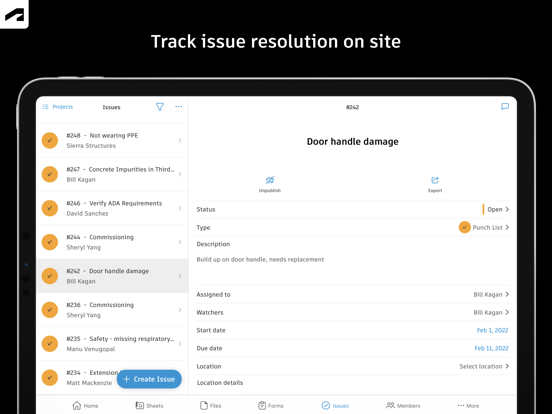

Pricing & paywalls
App Store
Shown for US
- Autodesk Build Unlimited
- Crane
- Dozer
- Forma Build Essentials
- Nailgun
Ratings & reviews
App Store
Shown for US
-
5/5Great communications toolbox.
I find the use of this in the projects we do to be essential after the free trail period. We are a mechanical company traveling in several directions remodeling major retailers, so imagine all the blueprints I would have to carry. Maintaining the paper work is a breeze with several ways to implement. The instantaneous communication is one of the best thins about this. Documentation is simple with this cloud based system. The only problems I encountered were user error. The support staff at PlanGrid is really committed to helping me in any way possible. Took the time to make sure I knew how to successfully succeed at using this tool. Very Pleasant experience. If thinking about how to speed up the production and planning of a project, I highly recommend this application system. Good job guys.
Plumbcr8zy · 29 Sep 2026
-
2/5Great option if team is fully committed, not for everyone
I am an HVAC contractor. I was was talked into using this by a builder I worked with in order to “play ball”. Initially, I was stoked about this. We took the training, and I thought this was the best thing I had seen! Then we started using it, and I quickly realized it’s only a timesaver if everyone on the team (builder side & fellow subs) use it, otherwise it is a management headache for the few dedicated people that are committed. I burned out after a couple projects, and now use something else that fits why I do at a lot lower cost, and is not tied into a closed ecosystem. This only works well if the entire team uses it, otherwise you are back to static PDF’s & chasing plan revisions. Some of the tools are great like the measuring tools. Others that are basic drawing tools for highlighting/markups are very outdated, limited & clunky to use. The worst part of this is the contract. If you decide you don’t want this anymore, make sure you give the required 30 day notice. When I inquired to how to cancel, I was told that I was stuck with it because I didn’t give the required notice, and was referred to the contract. Nice. Of course we are stuck with the contract, but when the response I receive is a “gotcha” it didn’t improve my outlook on their customer service
T Jace · 29 Sep 2026
-
2/5App Battery Usage is beyond unnecessary
I’ve used PlanGrid for a while, I am a Project Engineer along with a good understanding of computer programming, scripting, etc etc. I will have to say this App is just absolutely absurd with the amount of background activity it’s performing or whatever it’s doing, to the point where I’m convinced this is a farming app. It’s done nothing but gotten worse. I have background app refresh off, I use the iPad Air M1, that is fairly new as I had it replaced 2-3 months ago. Just today, I get into work, open the app view my surveys. It claims the app was on screen for 5 hours, which is not true at all, if anything, maybe 2 hours on screen, with 18 minutes in the background, using 69% of my battery. The reason I know the screen time is incorrect, is because my iPad auto locks after 1 minute, along with how my day went today. I notice often that this simple app, simply makes my iPad fairly warm also, even with it locked. If I close the app, my iPad can just sit in my bag on 100% all day with no use, even opening up my iPad the next day and seeing 99%. If I leave the app open, my iPad will be dead in around 8 hours times. Again App refresh is fully disabled. There is obviously some issue, and it needs to be fixed.
Acsblue · 29 Sep 2026
-
2/5Good for plans … not much for anything else
Where to start.. The positive: great markup tool for plans and reliable distribution to the field personnel … The negative: The administration of this tool is horrible if you have anymore than a handful of users and projects. We have over 100 and 70 users … need to add a new user to each project ? Go to every project and add their email … type their email in wrong ? oh too bad there are no checks to see if that email exists within your org. File uploading has no granularity of settings … no hyper links to external files sources … no way to see any cross user metrics except who is modifying project data … no way to see if client apps need to be upgraded … just to start. Some of these things could be fixed via api scripting or the workato automation … so i’m paying for an app i need to script ? Project management tools are worthless at scale. So if you buy this to distribute and collaborate plans … fine.. but it does not scale, and there are cheaper products without the worthless project management part.
iree75 · 29 Sep 2026
-
4/5Great app but need other download options
I got into using this app as it’s one used by one of our clients on many different projects. App is great when it comes to access documents and drawings for the project. My only complain is that when accessing a project, it only will allow you to download the whole set of documents related, and when you have many projects as well as using other apps, it is a problem with data download and memory storage. I also use Procore with a different client which allows me to download only the documents I need instead of a whole package worth multiple GBs of data, it’s easier when you’re not on WiFi. Just saying this in here as a suggestion of what could be improved here.
H.V.2 · 29 Sep 2026
Privacy & accessibility
App Store
Privacy
- Data Linked to You — Analytics — Contact Info — Email Address Developer declared
- Data Linked to You — Analytics — Contact Info — Name Developer declared
- Data Linked to You — Analytics — Contact Info — Phone Number Developer declared
- Data Linked to You — Analytics — Identifiers — Device ID Developer declared
- Data Linked to You — Analytics — Identifiers — User ID Developer declared
- Data Linked to You — Analytics — Usage Data — Product Interaction Developer declared
- Data Linked to You — App Functionality — Contact Info — Email Address Developer declared
- Data Linked to You — App Functionality — Contact Info — Name Developer declared
- Data Linked to You — App Functionality — Contact Info — Phone Number Developer declared
- Data Linked to You — App Functionality — Diagnostics — Crash Data Developer declared
- Data Linked to You — App Functionality — Diagnostics — Other Diagnostic Data Developer declared
- Data Linked to You — App Functionality — Diagnostics — Performance Data Developer declared
- Data Linked to You — App Functionality — Identifiers — Device ID Developer declared
- Data Linked to You — App Functionality — Identifiers — User ID Developer declared
- Data Linked to You — App Functionality — Location — Coarse Location Developer declared
- Data Linked to You — App Functionality — Location — Precise Location Developer declared
- Data Linked to You — App Functionality — User Content — Audio Data Developer declared
- Data Linked to You — App Functionality — User Content — Customer Support Developer declared
- Data Linked to You — App Functionality — User Content — Other User Content Developer declared
- Data Linked to You — App Functionality — User Content — Photos or Videos Developer declared
- Data Linked to You — Contact Info Developer declared
- Data Linked to You — Diagnostics Developer declared
- Data Linked to You — Identifiers Developer declared
- Data Linked to You — Location Developer declared
- Data Linked to You — Usage Data Developer declared
- Data Linked to You — User Content Developer declared
Accessibility
No accessibility labels collected yet.
Versions
App Store
-
7.64.1
What's New: - Hammering out bugs - Reinforcing code stability - Clearing debris for improved performance The Autodesk Construction Cloud mobile app provides field and on-the-go access to Autodesk Build, Autodesk Docs, Autodesk BIM Collaborate, Autodesk BIM Collaborate Pro, and PlanGrid. We’re continuously releasing updates to improve Autodesk Construction Cloud for iOS! To stay updated with the latest improvements, turn on automatic app updates (Device Settings > App Stores > App Updates). Your input helps improve Autodesk Construction Cloud, and we’d love to hear from you: - If you enjoy using Autodesk Construction Cloud, please take a minute to leave a kind review in the App Store. - If you need assistance with your application, you can submit a ticket by selecting “Send feedback” from your profile on the home screen, adding a description, and checking “This is a problem.”
-
7.65.0
What's New: - Hammering out bugs - Reinforcing code stability - Clearing debris for improved performance The Autodesk Construction Cloud mobile app provides field and on-the-go access to Autodesk Build, Autodesk Docs, Autodesk BIM Collaborate, Autodesk BIM Collaborate Pro, and PlanGrid. We’re continuously releasing updates to improve Autodesk Construction Cloud for iOS! To stay updated with the latest improvements, turn on automatic app updates (Device Settings > App Stores > App Updates). Your input helps improve Autodesk Construction Cloud, and we’d love to hear from you: - If you enjoy using Autodesk Construction Cloud, please take a minute to leave a kind review in the App Store. - If you need assistance with your application, you can submit a ticket by selecting “Send feedback” from your profile on the home screen, adding a description, and checking “This is a problem.”
-
7.65.1
What's New: - Hammering out bugs - Reinforcing code stability - Clearing debris for improved performance The Autodesk Construction Cloud mobile app provides field and on-the-go access to Autodesk Build, Autodesk Docs, Autodesk BIM Collaborate, Autodesk BIM Collaborate Pro, and PlanGrid. We’re continuously releasing updates to improve Autodesk Construction Cloud for iOS! To stay updated with the latest improvements, turn on automatic app updates (Device Settings > App Stores > App Updates). Your input helps improve Autodesk Construction Cloud, and we’d love to hear from you: - If you enjoy using Autodesk Construction Cloud, please take a minute to leave a kind review in the App Store. - If you need assistance with your application, you can submit a ticket by selecting “Send feedback” from your profile on the home screen, adding a description, and checking “This is a problem.”
-
7.66.0
What's New: - Hammering out bugs - Reinforcing code stability - Clearing debris for improved performance The Autodesk Construction Cloud mobile app provides field and on-the-go access to Autodesk Build, Autodesk Docs, Autodesk BIM Collaborate, Autodesk BIM Collaborate Pro, and PlanGrid. We’re continuously releasing updates to improve Autodesk Construction Cloud for iOS! To stay updated with the latest improvements, turn on automatic app updates (Device Settings > App Stores > App Updates). Your input helps improve Autodesk Construction Cloud, and we’d love to hear from you: - If you enjoy using Autodesk Construction Cloud, please take a minute to leave a kind review in the App Store. - If you need assistance with your application, you can submit a ticket by selecting “Send feedback” from your profile on the home screen, adding a description, and checking “This is a problem.”
-
7.67.0
What's New: - Hammering out bugs - Reinforcing code stability - Clearing debris for improved performance The Autodesk Construction Cloud mobile app provides field and on-the-go access to Autodesk Build, Autodesk Docs, Autodesk BIM Collaborate, Autodesk BIM Collaborate Pro, and PlanGrid. We’re continuously releasing updates to improve Autodesk Construction Cloud for iOS! To stay updated with the latest improvements, turn on automatic app updates (Device Settings > App Stores > App Updates). Your input helps improve Autodesk Construction Cloud, and we’d love to hear from you: - If you enjoy using Autodesk Construction Cloud, please take a minute to leave a kind review in the App Store. - If you need assistance with your application, you can submit a ticket by selecting “Send feedback” from your profile on the home screen, adding a description, and checking “This is a problem.”
-
7.68.0
What's New: - Hammering out bugs - Reinforcing code stability - Clearing debris for improved performance The Autodesk Construction Cloud mobile app provides field and on-the-go access to Autodesk Build, Autodesk Docs, Autodesk BIM Collaborate, Autodesk BIM Collaborate Pro, and PlanGrid. We’re continuously releasing updates to improve Autodesk Construction Cloud for iOS! To stay updated with the latest improvements, turn on automatic app updates (Device Settings > App Stores > App Updates). Your input helps improve Autodesk Construction Cloud, and we’d love to hear from you: - If you enjoy using Autodesk Construction Cloud, please take a minute to leave a kind review in the App Store. - If you need assistance with your application, you can submit a ticket by selecting “Send feedback” from your profile on the home screen, adding a description, and checking “This is a problem.”
-
7.68.1
What's New: - Hammering out bugs - Reinforcing code stability - Clearing debris for improved performance The Autodesk Construction Cloud mobile app provides field and on-the-go access to Autodesk Build, Autodesk Docs, Autodesk BIM Collaborate, Autodesk BIM Collaborate Pro, and PlanGrid. We’re continuously releasing updates to improve Autodesk Construction Cloud for iOS! To stay updated with the latest improvements, turn on automatic app updates (Device Settings > App Stores > App Updates). Your input helps improve Autodesk Construction Cloud, and we’d love to hear from you: - If you enjoy using Autodesk Construction Cloud, please take a minute to leave a kind review in the App Store. - If you need assistance with your application, you can submit a ticket by selecting “Send feedback” from your profile on the home screen, adding a description, and checking “This is a problem.”
-
7.69.0
What's New: - Hammering out bugs - Reinforcing code stability - Clearing debris for improved performance The Autodesk Construction Cloud mobile app provides field and on-the-go access to Autodesk Build, Autodesk Docs, Autodesk BIM Collaborate, Autodesk BIM Collaborate Pro, and PlanGrid. We’re continuously releasing updates to improve Autodesk Construction Cloud for iOS! To stay updated with the latest improvements, turn on automatic app updates (Device Settings > App Stores > App Updates). Your input helps improve Autodesk Construction Cloud, and we’d love to hear from you: - If you enjoy using Autodesk Construction Cloud, please take a minute to leave a kind review in the App Store. - If you need assistance with your application, you can submit a ticket by selecting “Send feedback” from your profile on the home screen, adding a description, and checking “This is a problem.”
-
7.70.0
What's New: - Hammering out bugs - Reinforcing code stability - Clearing debris for improved performance The Autodesk Construction Cloud mobile app provides field and on-the-go access to Autodesk Build, Autodesk Docs, Autodesk BIM Collaborate, Autodesk BIM Collaborate Pro, and PlanGrid. We’re continuously releasing updates to improve Autodesk Construction Cloud for iOS! To stay updated with the latest improvements, turn on automatic app updates (Device Settings > App Stores > App Updates). Your input helps improve Autodesk Construction Cloud, and we’d love to hear from you: - If you enjoy using Autodesk Construction Cloud, please take a minute to leave a kind review in the App Store. - If you need assistance with your application, you can submit a ticket by selecting “Send feedback” from your profile on the home screen, adding a description, and checking “This is a problem.”
-
7.71.0
What's New: - Hammering out bugs - Reinforcing code stability - Clearing debris for improved performance The Autodesk Construction Cloud mobile app provides field and on-the-go access to Autodesk Build, Autodesk Docs, Autodesk BIM Collaborate, Autodesk BIM Collaborate Pro, and PlanGrid. We’re continuously releasing updates to improve Autodesk Construction Cloud for iOS! To stay updated with the latest improvements, turn on automatic app updates (Device Settings > App Stores > App Updates). Your input helps improve Autodesk Construction Cloud, and we’d love to hear from you: - If you enjoy using Autodesk Construction Cloud, please take a minute to leave a kind review in the App Store. - If you need assistance with your application, you can submit a ticket by selecting “Send feedback” from your profile on the home screen, adding a description, and checking “This is a problem.”
-
7.72.0
What's New: - Hammering out bugs - Reinforcing code stability - Clearing debris for improved performance The Autodesk Construction Cloud mobile app provides field and on-the-go access to Autodesk Build, Autodesk Docs, Autodesk BIM Collaborate, Autodesk BIM Collaborate Pro, and PlanGrid. We’re continuously releasing updates to improve Autodesk Construction Cloud for iOS! To stay updated with the latest improvements, turn on automatic app updates (Device Settings > App Stores > App Updates). Your input helps improve Autodesk Construction Cloud, and we’d love to hear from you: - If you enjoy using Autodesk Construction Cloud, please take a minute to leave a kind review in the App Store. - If you need assistance with your application, you can submit a ticket by selecting “Send feedback” from your profile on the home screen, adding a description, and checking “This is a problem.”
-
7.73.0
What's New: - Hammering out bugs - Reinforcing code stability - Clearing debris for improved performance The Autodesk Construction Cloud mobile app provides field and on-the-go access to Autodesk Build, Autodesk Docs, Autodesk BIM Collaborate, Autodesk BIM Collaborate Pro, and PlanGrid. We’re continuously releasing updates to improve Autodesk Construction Cloud for iOS! To stay updated with the latest improvements, turn on automatic app updates (Device Settings > App Stores > App Updates). Your input helps improve Autodesk Construction Cloud, and we’d love to hear from you: - If you enjoy using Autodesk Construction Cloud, please take a minute to leave a kind review in the App Store. - If you need assistance with your application, you can submit a ticket by selecting “Send feedback” from your profile on the home screen, adding a description, and checking “This is a problem.”
-
7.74.0
What's New: - Hammering out bugs - Reinforcing code stability - Clearing debris for improved performance The Autodesk Construction Cloud mobile app provides field and on-the-go access to Autodesk Build, Autodesk Docs, Autodesk BIM Collaborate, Autodesk BIM Collaborate Pro, and PlanGrid. We’re continuously releasing updates to improve Autodesk Construction Cloud for iOS! To stay updated with the latest improvements, turn on automatic app updates (Device Settings > App Stores > App Updates). Your input helps improve Autodesk Construction Cloud, and we’d love to hear from you: - If you enjoy using Autodesk Construction Cloud, please take a minute to leave a kind review in the App Store. - If you need assistance with your application, you can submit a ticket by selecting “Send feedback” from your profile on the home screen, adding a description, and checking “This is a problem.”
-
8.0.0
What's New: Autodesk Construction Cloud mobile is now the Forma mobile app. The tools teams rely on every day continue to deliver the same trusted capabilities and performance, with no data migration and no disruption to existing workflows, licensing, integrations, or project data. The tools now operate in a more connected industry cloud that strengthens continuity across the project lifecycle. In this release: • Introducing Forma Build Essentials, bringing together core jobsite tools in one efficient and focused workspace. Teams can capture punch list items and issues with photos and locations, view the latest files and models, mark up drawings, and log daily reports on web or mobile. • New projects now have access to an enhanced photos experience with albums, permission controls. • Mobile updates include faster project entry, improved photo sync, native sharing with deep links, and faster issue creation with quick create and copy and paste support. • Additional bug fixes and performance improvements are also included in this release.
-
8.0.1
What's New: Autodesk Construction Cloud mobile is now the Forma mobile app. The tools teams rely on every day continue to deliver the same trusted capabilities and performance, with no data migration and no disruption to existing workflows, licensing, integrations, or project data. The tools now operate in a more connected industry cloud that strengthens continuity across the project lifecycle. In this release: • Introducing Forma Build Essentials, bringing together core jobsite tools in one efficient and focused workspace. Teams can capture punch list items and issues with photos and locations, view the latest files and models, mark up drawings, and log daily reports on web or mobile. • New projects now have access to an enhanced photos experience with albums, permission controls. • Mobile updates include faster project entry, improved photo sync, native sharing with deep links, and faster issue creation with quick create and copy and paste support. • Additional bug fixes and performance improvements are also included in this release.
-
8.1.0
What's New: Autodesk Construction Cloud mobile is now the Forma mobile app. The tools teams rely on every day continue to deliver the same trusted capabilities and performance, with no data migration and no disruption to existing workflows, licensing, integrations, or project data. The tools now operate in a more connected industry cloud that strengthens continuity across the project lifecycle. In this release: • Introducing Forma Build Essentials, bringing together core jobsite tools in one efficient and focused workspace. Teams can capture punch list items and issues with photos and locations, view the latest files and models, mark up drawings, and log daily reports on web or mobile. • New projects now have access to an enhanced photos experience with albums, permission controls. • Mobile updates include faster project entry, improved photo sync, native sharing with deep links, and faster issue creation with quick create and copy and paste support. • Additional bug fixes and performance improvements are also included in this release.
-
8.10.0
What's New: Autodesk Construction Cloud mobile is now the Forma mobile app. The tools teams rely on every day continue to deliver the same trusted capabilities and performance, with no data migration and no disruption to existing workflows, licensing, integrations, or project data. The tools now operate in a more connected industry cloud that strengthens continuity across the project lifecycle. In this release: • Introducing Forma Build Essentials, bringing together core jobsite tools in one efficient and focused workspace. Teams can capture punch list items and issues with photos and locations, view the latest files and models, mark up drawings, and log daily reports on web or mobile. • New projects now have access to an enhanced photos experience with albums, permission controls. • Mobile updates include faster project entry, improved photo sync, native sharing with deep links, and faster issue creation with quick create and copy and paste support. • Additional bug fixes and performance improvements are also included in this release.
-
8.10.1
What's New: Autodesk Construction Cloud mobile is now the Forma mobile app. The tools teams rely on every day continue to deliver the same trusted capabilities and performance, with no data migration and no disruption to existing workflows, licensing, integrations, or project data. The tools now operate in a more connected industry cloud that strengthens continuity across the project lifecycle. In this release: • Introducing Forma Build Essentials, bringing together core jobsite tools in one efficient and focused workspace. Teams can capture punch list items and issues with photos and locations, view the latest files and models, mark up drawings, and log daily reports on web or mobile. • New projects now have access to an enhanced photos experience with albums, permission controls. • Mobile updates include faster project entry, improved photo sync, native sharing with deep links, and faster issue creation with quick create and copy and paste support. • Additional bug fixes and performance improvements are also included in this release.
-
8.1.1
What's New: Autodesk Construction Cloud mobile is now the Forma mobile app. The tools teams rely on every day continue to deliver the same trusted capabilities and performance, with no data migration and no disruption to existing workflows, licensing, integrations, or project data. The tools now operate in a more connected industry cloud that strengthens continuity across the project lifecycle. In this release: • Introducing Forma Build Essentials, bringing together core jobsite tools in one efficient and focused workspace. Teams can capture punch list items and issues with photos and locations, view the latest files and models, mark up drawings, and log daily reports on web or mobile. • New projects now have access to an enhanced photos experience with albums, permission controls. • Mobile updates include faster project entry, improved photo sync, native sharing with deep links, and faster issue creation with quick create and copy and paste support. • Additional bug fixes and performance improvements are also included in this release.
-
8.11.0
· 27 Aug 2026
What's New: Autodesk Construction Cloud mobile is now the Forma mobile app. The tools teams rely on every day continue to deliver the same trusted capabilities and performance, with no data migration and no disruption to existing workflows, licensing, integrations, or project data. The tools now operate in a more connected industry cloud that strengthens continuity across the project lifecycle. In this release: • Introducing Forma Build Essentials, bringing together core jobsite tools in one efficient and focused workspace. Teams can capture punch list items and issues with photos and locations, view the latest files and models, mark up drawings, and log daily reports on web or mobile. • New projects now have access to an enhanced photos experience with albums, permission controls. • Mobile updates include faster project entry, improved photo sync, native sharing with deep links, and faster issue creation with quick create and copy and paste support. • Additional bug fixes and performance improvements are also included in this release.
-
8.11.1
What's New: Autodesk Construction Cloud mobile is now the Forma mobile app. The tools teams rely on every day continue to deliver the same trusted capabilities and performance, with no data migration and no disruption to existing workflows, licensing, integrations, or project data. The tools now operate in a more connected industry cloud that strengthens continuity across the project lifecycle. In this release: • Introducing Forma Build Essentials, bringing together core jobsite tools in one efficient and focused workspace. Teams can capture punch list items and issues with photos and locations, view the latest files and models, mark up drawings, and log daily reports on web or mobile. • New projects now have access to an enhanced photos experience with albums, permission controls. • Mobile updates include faster project entry, improved photo sync, native sharing with deep links, and faster issue creation with quick create and copy and paste support. • Additional bug fixes and performance improvements are also included in this release.
-
8.12.0
What's New: Autodesk Construction Cloud mobile is now the Forma mobile app. The tools teams rely on every day continue to deliver the same trusted capabilities and performance, with no data migration and no disruption to existing workflows, licensing, integrations, or project data. The tools now operate in a more connected industry cloud that strengthens continuity across the project lifecycle. In this release: • Introducing Forma Build Essentials, bringing together core jobsite tools in one efficient and focused workspace. Teams can capture punch list items and issues with photos and locations, view the latest files and models, mark up drawings, and log daily reports on web or mobile. • New projects now have access to an enhanced photos experience with albums, permission controls. • Mobile updates include faster project entry, improved photo sync, native sharing with deep links, and faster issue creation with quick create and copy and paste support. • Additional bug fixes and performance improvements are also included in this release.
-
8.13.0
· 23 Sep 2026
What's New: Autodesk Construction Cloud mobile is now the Forma mobile app. The tools teams rely on every day continue to deliver the same trusted capabilities and performance, with no data migration and no disruption to existing workflows, licensing, integrations, or project data. The tools now operate in a more connected industry cloud that strengthens continuity across the project lifecycle. In this release: • Introducing Forma Build Essentials, bringing together core jobsite tools in one efficient and focused workspace. Teams can capture punch list items and issues with photos and locations, view the latest files and models, mark up drawings, and log daily reports on web or mobile. • New projects now have access to an enhanced photos experience with albums, permission controls. • Mobile updates include faster project entry, improved photo sync, native sharing with deep links, and faster issue creation with quick create and copy and paste support. • Additional bug fixes and performance improvements are also included in this release.
-
8.2.0
What's New: Autodesk Construction Cloud mobile is now the Forma mobile app. The tools teams rely on every day continue to deliver the same trusted capabilities and performance, with no data migration and no disruption to existing workflows, licensing, integrations, or project data. The tools now operate in a more connected industry cloud that strengthens continuity across the project lifecycle. In this release: • Introducing Forma Build Essentials, bringing together core jobsite tools in one efficient and focused workspace. Teams can capture punch list items and issues with photos and locations, view the latest files and models, mark up drawings, and log daily reports on web or mobile. • New projects now have access to an enhanced photos experience with albums, permission controls. • Mobile updates include faster project entry, improved photo sync, native sharing with deep links, and faster issue creation with quick create and copy and paste support. • Additional bug fixes and performance improvements are also included in this release.
-
8.2.1
What's New: Autodesk Construction Cloud mobile is now the Forma mobile app. The tools teams rely on every day continue to deliver the same trusted capabilities and performance, with no data migration and no disruption to existing workflows, licensing, integrations, or project data. The tools now operate in a more connected industry cloud that strengthens continuity across the project lifecycle. In this release: • Introducing Forma Build Essentials, bringing together core jobsite tools in one efficient and focused workspace. Teams can capture punch list items and issues with photos and locations, view the latest files and models, mark up drawings, and log daily reports on web or mobile. • New projects now have access to an enhanced photos experience with albums, permission controls. • Mobile updates include faster project entry, improved photo sync, native sharing with deep links, and faster issue creation with quick create and copy and paste support. • Additional bug fixes and performance improvements are also included in this release.
-
8.3.0
What's New: Autodesk Construction Cloud mobile is now the Forma mobile app. The tools teams rely on every day continue to deliver the same trusted capabilities and performance, with no data migration and no disruption to existing workflows, licensing, integrations, or project data. The tools now operate in a more connected industry cloud that strengthens continuity across the project lifecycle. In this release: • Introducing Forma Build Essentials, bringing together core jobsite tools in one efficient and focused workspace. Teams can capture punch list items and issues with photos and locations, view the latest files and models, mark up drawings, and log daily reports on web or mobile. • New projects now have access to an enhanced photos experience with albums, permission controls. • Mobile updates include faster project entry, improved photo sync, native sharing with deep links, and faster issue creation with quick create and copy and paste support. • Additional bug fixes and performance improvements are also included in this release.
-
8.4.0
What's New: Autodesk Construction Cloud mobile is now the Forma mobile app. The tools teams rely on every day continue to deliver the same trusted capabilities and performance, with no data migration and no disruption to existing workflows, licensing, integrations, or project data. The tools now operate in a more connected industry cloud that strengthens continuity across the project lifecycle. In this release: • Introducing Forma Build Essentials, bringing together core jobsite tools in one efficient and focused workspace. Teams can capture punch list items and issues with photos and locations, view the latest files and models, mark up drawings, and log daily reports on web or mobile. • New projects now have access to an enhanced photos experience with albums, permission controls. • Mobile updates include faster project entry, improved photo sync, native sharing with deep links, and faster issue creation with quick create and copy and paste support. • Additional bug fixes and performance improvements are also included in this release.
-
8.5.0
What's New: Autodesk Construction Cloud mobile is now the Forma mobile app. The tools teams rely on every day continue to deliver the same trusted capabilities and performance, with no data migration and no disruption to existing workflows, licensing, integrations, or project data. The tools now operate in a more connected industry cloud that strengthens continuity across the project lifecycle. In this release: • Introducing Forma Build Essentials, bringing together core jobsite tools in one efficient and focused workspace. Teams can capture punch list items and issues with photos and locations, view the latest files and models, mark up drawings, and log daily reports on web or mobile. • New projects now have access to an enhanced photos experience with albums, permission controls. • Mobile updates include faster project entry, improved photo sync, native sharing with deep links, and faster issue creation with quick create and copy and paste support. • Additional bug fixes and performance improvements are also included in this release.
-
8.6.0
What's New: Autodesk Construction Cloud mobile is now the Forma mobile app. The tools teams rely on every day continue to deliver the same trusted capabilities and performance, with no data migration and no disruption to existing workflows, licensing, integrations, or project data. The tools now operate in a more connected industry cloud that strengthens continuity across the project lifecycle. In this release: • Introducing Forma Build Essentials, bringing together core jobsite tools in one efficient and focused workspace. Teams can capture punch list items and issues with photos and locations, view the latest files and models, mark up drawings, and log daily reports on web or mobile. • New projects now have access to an enhanced photos experience with albums, permission controls. • Mobile updates include faster project entry, improved photo sync, native sharing with deep links, and faster issue creation with quick create and copy and paste support. • Additional bug fixes and performance improvements are also included in this release.
-
8.7.0
What's New: Autodesk Construction Cloud mobile is now the Forma mobile app. The tools teams rely on every day continue to deliver the same trusted capabilities and performance, with no data migration and no disruption to existing workflows, licensing, integrations, or project data. The tools now operate in a more connected industry cloud that strengthens continuity across the project lifecycle. In this release: • Introducing Forma Build Essentials, bringing together core jobsite tools in one efficient and focused workspace. Teams can capture punch list items and issues with photos and locations, view the latest files and models, mark up drawings, and log daily reports on web or mobile. • New projects now have access to an enhanced photos experience with albums, permission controls. • Mobile updates include faster project entry, improved photo sync, native sharing with deep links, and faster issue creation with quick create and copy and paste support. • Additional bug fixes and performance improvements are also included in this release.
-
8.8.0
· 23 Jul 2026
What's New: Autodesk Construction Cloud mobile is now the Forma mobile app. The tools teams rely on every day continue to deliver the same trusted capabilities and performance, with no data migration and no disruption to existing workflows, licensing, integrations, or project data. The tools now operate in a more connected industry cloud that strengthens continuity across the project lifecycle. In this release: • Introducing Forma Build Essentials, bringing together core jobsite tools in one efficient and focused workspace. Teams can capture punch list items and issues with photos and locations, view the latest files and models, mark up drawings, and log daily reports on web or mobile. • New projects now have access to an enhanced photos experience with albums, permission controls. • Mobile updates include faster project entry, improved photo sync, native sharing with deep links, and faster issue creation with quick create and copy and paste support. • Additional bug fixes and performance improvements are also included in this release.
-
8.9.0
What's New: Autodesk Construction Cloud mobile is now the Forma mobile app. The tools teams rely on every day continue to deliver the same trusted capabilities and performance, with no data migration and no disruption to existing workflows, licensing, integrations, or project data. The tools now operate in a more connected industry cloud that strengthens continuity across the project lifecycle. In this release: • Introducing Forma Build Essentials, bringing together core jobsite tools in one efficient and focused workspace. Teams can capture punch list items and issues with photos and locations, view the latest files and models, mark up drawings, and log daily reports on web or mobile. • New projects now have access to an enhanced photos experience with albums, permission controls. • Mobile updates include faster project entry, improved photo sync, native sharing with deep links, and faster issue creation with quick create and copy and paste support. • Additional bug fixes and performance improvements are also included in this release.
-
8.9.1
What's New: Autodesk Construction Cloud mobile is now the Forma mobile app. The tools teams rely on every day continue to deliver the same trusted capabilities and performance, with no data migration and no disruption to existing workflows, licensing, integrations, or project data. The tools now operate in a more connected industry cloud that strengthens continuity across the project lifecycle. In this release: • Introducing Forma Build Essentials, bringing together core jobsite tools in one efficient and focused workspace. Teams can capture punch list items and issues with photos and locations, view the latest files and models, mark up drawings, and log daily reports on web or mobile. • New projects now have access to an enhanced photos experience with albums, permission controls. • Mobile updates include faster project entry, improved photo sync, native sharing with deep links, and faster issue creation with quick create and copy and paste support. • Additional bug fixes and performance improvements are also included in this release.
-
8.9.2
What's New: Autodesk Construction Cloud mobile is now the Forma mobile app. The tools teams rely on every day continue to deliver the same trusted capabilities and performance, with no data migration and no disruption to existing workflows, licensing, integrations, or project data. The tools now operate in a more connected industry cloud that strengthens continuity across the project lifecycle. In this release: • Introducing Forma Build Essentials, bringing together core jobsite tools in one efficient and focused workspace. Teams can capture punch list items and issues with photos and locations, view the latest files and models, mark up drawings, and log daily reports on web or mobile. • New projects now have access to an enhanced photos experience with albums, permission controls. • Mobile updates include faster project entry, improved photo sync, native sharing with deep links, and faster issue creation with quick create and copy and paste support. • Additional bug fixes and performance improvements are also included in this release.
Alternatives
- Procore — Same category + similar ratings
- Bluebeam — Same category + similar ratings
- Fieldwire - Construction App — Same category + similar ratings
- OpenSpace.ai Construction App — Same category + similar ratings
- Raken Construction Management — Same category + similar ratings
- DroneDeploy Ground App — Same category + similar ratings
Availability by market
- US
Data quality & evidence
- Page completeness
- Apoku summary published
- Last verified
- 29 Sep 2026
- Sources
- App Store