
Quick verdict
- What it is
- Store information collected; an Apoku editorial summary is not yet published.
- At a glance
-
- Free to download
Categories and search queries
Official categories
- Business
- Photo & Video
Apoku categories
Key functions
| Function | Availability | Access | Scope | Evidence |
|---|---|---|---|---|
| Free app | Yes | Free | Context-specific | Store published |
Screens
App Store
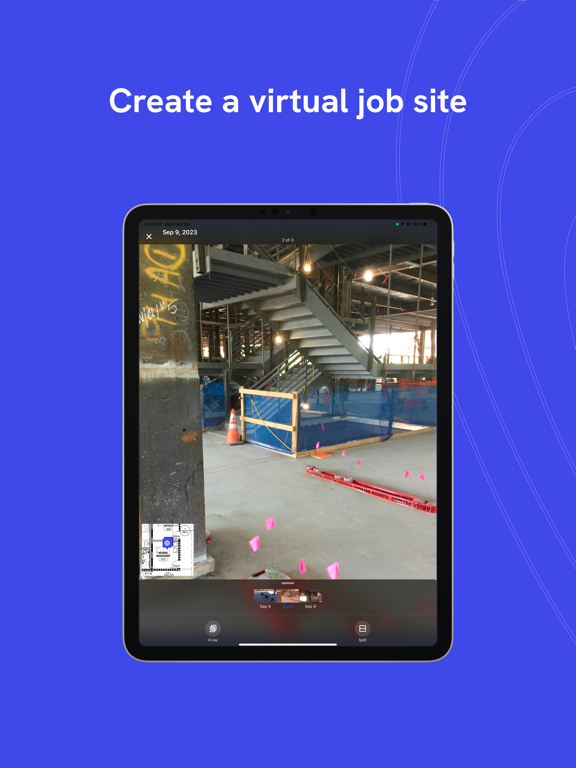
15 store screenshots



Pricing & paywalls
App Store
- Free to download
Ratings & reviews
App Store
-
5/5Senior Superintendent
Pre- drywall sign off by all trades,Architectural and MEP’s engineering design teams as well as the owner representatives can sometimes be seen as difficult or challenging getting every single team player on site to sign off the work in place. Drone deploy captures can be emailed to the team and reviewed on OAC meetings to smoothly identify issues and provide feedback prior to closing the walls. Drone deploy saves the entire team the cost from having to remove drywall and provide a smooth transition to the finish stages.
Drone RR · 7 Aug 2026
-
5/5Smooth capture process
I have an older Insta X2 camera, but connection to camera is very smooth and I’m able to get to capturing panos quickly. I went out and did about 70 panos within a few minutes on a few levels and the upload worked without issues. Overall the app is responsive and snappy.
Stargazer8008 · 7 Aug 2026
-
5/5PM
Overall I like this app for capturing pictures and documenting my project. Easy to use and works how it should. I would recommend this tool to other project teams.
T-Dawg2024 · 7 Aug 2026
-
5/5Great tool
Makes documenting large sites easy!
Briewilliams · 7 Aug 2026
-
5/5Efficiency
Amazing app, makes life easy.
cca4141 · 7 Aug 2026
Privacy & accessibility
App Store
Privacy
- Data Linked to You — Analytics — Contact Info — Email Address Developer declared
- Data Linked to You — Analytics — Diagnostics — Crash Data Developer declared
- Data Linked to You — Analytics — Identifiers — User ID Developer declared
- Data Linked to You — Analytics — Usage Data — Product Interaction Developer declared
- Data Linked to You — App Functionality — Contact Info — Email Address Developer declared
- Data Linked to You — App Functionality — Identifiers — User ID Developer declared
- Data Linked to You — App Functionality — Location — Coarse Location Developer declared
- Data Linked to You — App Functionality — Location — Precise Location Developer declared
- Data Linked to You — App Functionality — Usage Data — Product Interaction Developer declared
- Data Linked to You — App Functionality — User Content — Customer Support Developer declared
- Data Linked to You — Product Personalization — Identifiers — User ID Developer declared
- Data Linked to You — Product Personalization — Location — Coarse Location Developer declared
- Data Linked to You — Product Personalization — Location — Precise Location Developer declared
- Data Linked to You — Product Personalization — Usage Data — Product Interaction Developer declared
- Data Linked to You — Product Personalization — User Content — Customer Support Developer declared
- Data Linked to You — Contact Info Developer declared
- Data Linked to You — Diagnostics Developer declared
- Data Linked to You — Identifiers Developer declared
- Data Linked to You — Location Developer declared
- Data Linked to You — Usage Data Developer declared
- Data Linked to You — User Content Developer declared
Accessibility
No accessibility labels collected yet.
Versions
App Store
-
2.224.2
- New Upload screen with additional updates to this new user experience, including clear error messages. - Various bug fixes and improvements
-
2.228.0
- Added an Upload History tab to the new Upload Management screen, displaying all uploads from the past 7 days along with the processing status of your Walks and 3D scans. - Fixed an issue where the X5 camera was not correctly set for Walks. - Enhanced data consistency in local storage to prevent information loss. - Improved overall app performance and synchronization reliability.
-
2.229.0
- Improved reliability by preventing Walks from starting if the SD card is out of space - Fixed resolution settings specifically for X5 cameras - Improved internal diagnostics - Introduced a unique device ID to help with troubleshooting and support
-
2.230.0
- Improved upload reliability with enhanced session tracking and diagnostics - Expanded map stability monitoring to better identify and prevent crashes - Optimized background event processing for better app performance
-
2.230.1
- Fixed a crash that occurred during the Walk recovery flow
-
2.237.0
- Enhanced the Uploads screen with faster loading, improved mobile data handling, and tap-throttling to prevent duplicates - Improved Bluetooth reliability with smarter camera reconnection, power detection, and faster time-to-capture - Resolved several crashes and race conditions related to the walk recovery, resume, and deletion flows - Optimized pano capture by automating camera settings and resolving issues with silent capture failures - Fixed a bug where the search bar would disappear and resolved upload banner interference during active walks - Improved accuracy of camera SD card storage readings and replaced raw error codes with helpful descriptions - Increased overall app smoothness by optimizing how the device handles background data transfers
-
2.239.0
- Improved the accuracy of the 360 camera connection status during active sessions - Resolved an issue where app audio could interfere with other sounds during walks - Added a loading spinner to the project screen to provide better visual feedback during data retrieval - Fixed a file management bug to ensure 3D scan frames are handled and removed correctly - Enhanced overall app reliability through unified camera data handling and background optimizations
-
2.247.0
- Added clear feedback when Capture Media is disabled, introducing a "Ask to Edit" feature, allowing users to request project access directly within the app - Fixed bug that showed media preview when leaving the map screen - Pre-capture checks for SD card, firmware, storage, and battery before you start capturing - Low battery warning now shows once instead of blocking every capture at 15% - Project permissions persist offline and stay correct after role changes - Clearer upload and error messages that tell you what to do next - Improved camera connection and first-time connection with fewer redundant notifications - Improved resume walk flow when returning to the app from the background - Fixed with pin preview and photos loading, allowing for faster loading - Fixed overlay download crash when multiple overlays load at once - Deleted overlays and pins from the web now sync correctly to the app - Upload delay after tapping upload is fixed, and upload stops correctly when cancelled - Sync is more reliable after cancel or retry - Sign-in is disabled when offline, so you get clear offline behavior - Ricoh Theta X now gets extended time limits for Walks - Fixed a bug that causes issues with pano capture
-
2.247.3
- Fixed a bug where the upload button could appear disabled even when you had a network connection
-
2.254.0
- Projects now load faster with cached data and smooth placeholder loading animations - Fixed an issue where capturing a photo wouldn't work right after deleting a photo - Updated pre-capture check. Warning now displays correctly on devices with limited storage - Various UI fixes, including filter button state and media carousel thumbnails
-
2.254.2
- Fixed an issue where some 3D scans would appear to upload successfully but arrive incomplete - Fixed multiple crashes related to camera connection and background threading - Fixed a crash that could occur during VideoWalk capture
-
2.261.1
- Redesigned camera connection experience with a unified UI and more reliable thread management - Project list now shows an offline empty state and refreshes automatically in the background - Renamed "Sync" to "Upload" across settings and the Wi-Fi preference for clearer labeling - RTK connections now automatically refresh NTRIP credentials when switching between projects - Project and floor plan downloads now prioritize based on what you are actively viewing for faster load times - Fixed multiple crashes related to camera threading and VideoWalk background operations - Fixed an issue where the tap-to-connect button appeared while already connected to an RTK device - Fixed firmware version check not correctly identifying outdated device firmware
-
2.263.0
- Skeleton loading state on the project list while your projects load - More accurate RTK offset calculation for 3D scan positioning
-
2.266.0
- Fixed a crash that could occur when uploading after disconnecting from the camera - 3D scan GPS coordinates are now more accurate at the start of a scan - Upload progress shows the correct percentage when uploading multiple items at once
-
2.267.0
- Added support for custom RTK offsets for scanning with Emlid RX without their scanning handle - Additional RTK fixes, including one where negative ellipsoid values were not being written correctly to photo EXIF data. - Sync completion notifications now appear reliably - Various other fixes
-
2.268.0
- 360 live preview is now on by default, so you can see exactly what the camera sees as you walk - The App now stays awake during uploads so large syncs finish without interruption - You'll now get a prompt to update firmware when connecting a Ricoh Theta camera - You can now discover nearby Ricoh Theta cameras - The app now checks for enough available storage before starting a 3D scan - More reliable 360 live preview, including restoring correctly after full screen, after a walk ends, and hiding when the camera disconnects - Fixed navigation issues with the back button and returning to Settings from camera connection - Improved the stability of the project search field and the sync banner so they no longer flicker or re-animate during updates
-
2.269.0
- Introducing Field Notes: add notes to standard photos right after capture using voice or text, and tagging by type and severity - Import photos from your camera roll directly into capture mode, with automatic placement based on each photo's GPS data - Fixed an issue where sync could hang indefinitely when a walk had no attachments - iOS notification permission prompts no longer appear during active walk capture - Exterior map opens at a slightly wider zoom by default, showing more of your site at a glance - Fixed an issue where tapping the map would dismiss an active prompt on screen
-
2.270.0
- Introduced updated media pin markers on the map with new icons for uploads and video walk endpoints - Fixed an issue where map pins stayed in their selected state after dismissing the pin preview - Upload now starts automatically after turning off a 360 camera, even if the phone briefly switches to cellular - Canceling an upload mid-transfer now properly stops in-progress work and leaves the capture ready to retry - Fixed 3D scan upload progress oscillating back to 0% during multi-file uploads - Refreshed the capture tooltip design
-
2.271.0
- New: Capture a photo during a walk and quickly add a Field Note right after - Fixed an empty overlay selector on large projects that were still loading - Fixed a crash that could occur when capturing photos
-
2.272.0
- Various bug fixes and architecture updates
-
2.273.0
- Backing out of an in-progress 3D scan now asks for confirmation before discarding it - Capturing a pano when the camera's SD card is full now shows a clear warning instead of creating a blank capture - Pano photo downloads now retry automatically on timeouts instead of failing the whole capture - Fixed an issue where walk transfers could be marked complete even when the upload failed - Fixed the "Walk in progress" indicator disappearing when switching to Photo mode during a walk
-
2.274.0
- Continue an interrupted 3D scan after closing and reopening the app - The 3D scan camera preview now resumes reliably after the app returns from the background instead of showing a frozen view - Camera connection now fails fast with clear help within a few seconds when it can't join the camera's Wi-Fi, instead of waiting the full ~30-second timeout - Levels opened offline with no cached content now show a clear empty state and load automatically once you're back online - Added Cancel and Done buttons when editing field notes for easier text entry
-
2.275.1
- Upgraded camera connection flow. Now, automatically detects your nearby camera for instant discovery and quicker connect time. - Smarter Walk end points: when you finish a Walk on-site, we now pre-position the end point near your current location instead of keeping it at the starting spot. You can still adjust it before confirming. - Location heads-up: if you're about to place media far from where you're actually standing, the app now lets you know, so captures land in the right place.
-
2.276.0
- Overlays list now shows file type and clearer labels - DXF overlays reload faster after the first time you view them - More reliable reconnecting to a camera you've used before - Proximity camera connect shows a clear success confirmation before closing - Fixed a crash when pausing, resuming, or canceling a 3D scan - Clearer error message when uploading to a project that no longer exists - Fixed an issue that could prevent starting a walk from certain project links
-
2.277.0
· 3 Aug 2026
- Pin visibility toggle now works in explore mode, not just capture mode - New Map and Overlay configurator for accessing your Maps and Overlays - Camera connection is now dramatically faster - Various crash fixes
Alternatives
- OpenSpace.ai Construction App — Same category + similar ratings
- Autodesk Forma — Same category + similar ratings
- Construct Project Management — Same category + similar ratings
- BIM 360 — Same category + similar ratings
Availability by market
- US
Data quality & evidence
- Page completeness
- Live store listing
- Last verified
- 7 Aug 2026
- Sources
- App Store
- Apoku editorial summary has not been published yet.