
Quick verdict
- What it is
- Store information collected; an Apoku editorial summary is not yet published.
- At a glance
-
- From $2.24/mo
- Free to download
- In-app purchases
Categories and search queries
Official categories
- Lifestyle
- Productivity
Apoku categories
Key functions
| Function | Availability | Access | Scope | Evidence |
|---|---|---|---|---|
| Free app | Yes | Free | Context-specific | Store published |
| In-app purchases | Yes | Limited free | Context-specific | Store published |
Screens
App Store
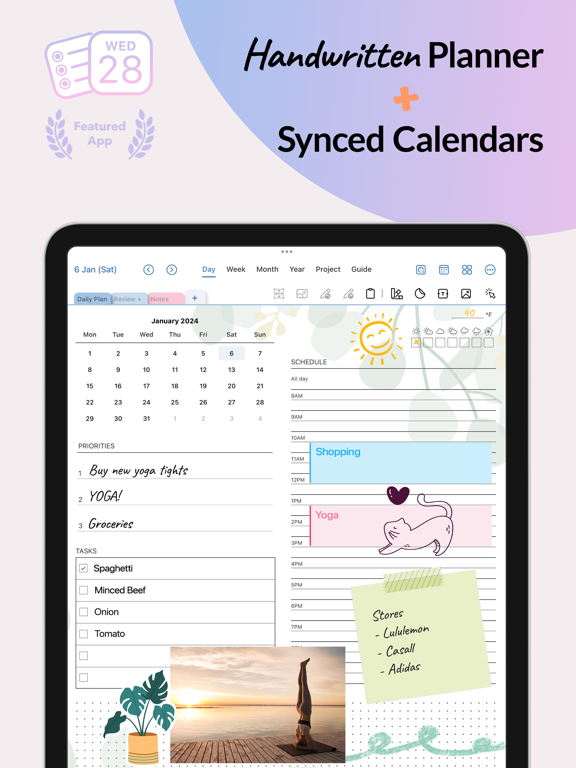
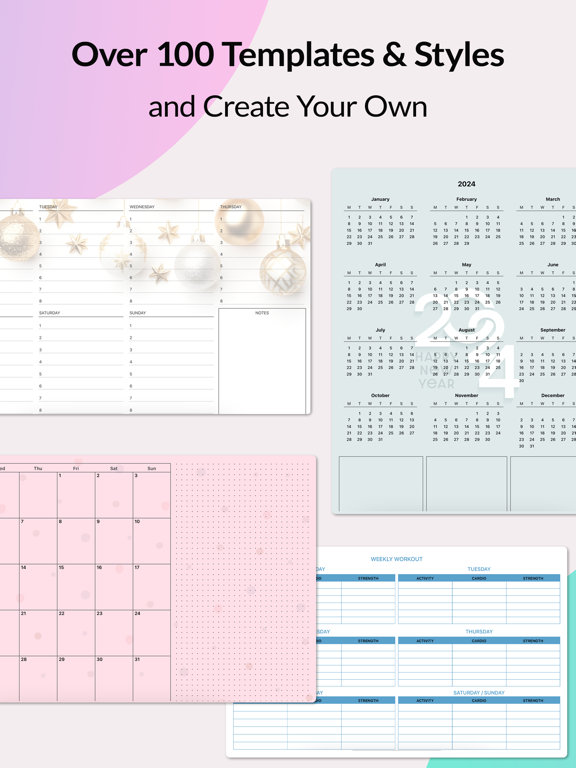
28 store screenshots


Pricing & paywalls
App Store
- Monthly subscription — $2.99/month
- Monthly subscription — $26.99/year ($2.24/mo)
Ratings & reviews
App Store
-
5/5Just like Franklin planner but digital
For people that worked in Fortune 500. You know you can’t get things done without a planner because of so many task you need to do and interface with cross functional teams. So they train you for 7 habits of highly effective people but gave you Franklin planner in the 90s. This is the same Franklin planner equivalent where you can use Apple Pencil to write your task on digital pad. Since you got no time to assign the task on your calendar all the time because you are pull from different directions by your co worker. When your not busy, then integrate this with gmail where you type the title of your task in digital form now you will be notified when it’s due to do this task. An absolute must have to also get the ATracker app option because it marks the current time on your gmail integrated calendar, so you can visualize what task you should be doing at a glance at that moment. Great way to keep you in track or focus with getting things done. It force you to act on your task because it is written down not memorized. It gives you worklife balance when you are not stress because you have the plan written down. You do what is on your plan. You check what you did if it worked. If it did not work you note a new plan on this planner. Plan-do-check-act. Life is balance when we act on our plans it doesn’t have to be perfect. This planner helps achieve that. I’m not affiliated with this app.I just see the value on pencil in task now then digital type it to gmail calendar you are good to go
Christy FP · 6 Aug 2026
-
5/5Definitely Keepiing This App
I’ve been purchasing and returning apps like this. I am just glad that apple store always refunded me. Most of the app they don’t work the way it is supposed to and they are even expensive. I am very satisfied with this app and definitely keeping it. The subscription price is very reasonable. The number of stickers are acceptable and cute too. I love the fact that I can adjust the size and place the stickers anywhere I want. I can even paste my photos, so cool. I can use the pencil to write things even on top of the photos and stickers. It can be confusing sometimes but I am kind of getting the process. I can write with my pen when it is in Ajournal page but when I make an appointment and if I want the reminder to work it needs to go to the integrated calendar which by then I cannot use the pen which is understandable if I wanted it to integrate to my calendar it needs to be typed. It has templates for task where I can use the pen, stickers and photos. I can always change the background color too. My only concern is whenever I open the app it goes to a different date. Although it is very easy to manage to go to the recent date it would have been better if it automatically open the today's date right away. I hope the developer would consider that. Anyway, Overall I love this app. ❤️
vikikai · 6 Aug 2026
-
5/5Love it but please hear this suggestion :)
I don’t usually leave reviews, but this app is great! Has everything I could want—the mix of being able to use pre-made customizable templates to journal with while all being in an intuitive calendar/planner stylized app all while being super easily synced to iCal. Oh my goodness, what a game-changer. I want to ask for one feature to be added to make this app perfect though. I know this probably isn’t an easy ask and will take a while, but I think having the ability to add user elements will be so good. I really want this feature because I want my calendar to be able to display reminders instead of calendar events on the monthly view. It’s just way easier for me to remember important dates when I see it on the monthly calendar. I know the customizable user element feature will allow this, along with a myriad of other helpful things for other users. Without this feature, I don’t feel comfortable subscribing to the subscription because the app doesn’t yet have everything I need to function as my primary planning app. Anyway, as a big fan of this app, I hope you’ll hear my review and seriously take this into consideration. I’m surprised this app isn’t bigger than it is right now. People should definitely be talking about this, I just stumbled upon it in the App Store and if literally fits almost all my needs. I hope it gets big! Maybe change the app into a more catchy name? lol every time I research about it google asks me Did You Mean: a journal? Idk just a suggestion. lol anyway, keep up the good work! Love to see that y’all are active in the community and still working to update/upgrade your app. Thanks guys!
Baileybooooooooo · 6 Aug 2026
-
5/5OMG this is it. I’ve found the Holy grail of planner app
Update to the “update”: The syncing makes all the difference! So happy now! Thank you! Update: need this to sync between devices without complicated steps. This is it guys! Everything you wanted in a planner app. I cant believe I found this especially it isn’t the first app suggested. I love that it used the Apple Pencil case because it has a pencil! Here are some things I am hoping will come: 1) be able to add your own stickers (but now you can use the clipboard to put in the ones you already have). 2)be able to drag and drop from procreate or any other app, like other art apps, and from files app I would be great (again, I can use clipboard now to copy and paste, but having it streamlined in drag and drop would be awesome. 3)a widget would be SO AWESOME That’s it! It’s a dream come true. I’ve made my own digital planner etc, but having to view all your calendar events and having to be able to insert and draw all over the lines is awesome. And being able to sketch with the Pencil tool in the Apple Pencil case is great. This is what I hoped Pencil planner would be but better since I can make my own layout that works for me. Again, thank you developers, I am sooooooo happy!
machitect · 6 Aug 2026
-
5/5I NEVER write reviews, but had to for this app!
I am very much a tech enthusiast and have many different tablets, including iPad Mini 7, iPad Pro M4 11”, Remarkable Paper Pro, Remarkable 2, and Kindle Scribe. I have been on a constant search for a way to customize functionality of these devices to fit the way that I prefer to work, and to be aesthetically pleasing as well. I have been building elaborate linked pdf files to work on the devices to create something similar to an “app” for my purposes. I stumbled across the AJournal app and decided to try it out. When I realized that is would integrate my actual calendar (instead of having to hand write in my old system), that I could customize templates to look any way I want, and that I could create my own work flow, I was sold! I immediately subscribed (price is very nominal for what you get). I would give this double the stars if I could. I have run across a few bugs that are not critical, but will be submitting to the developer. I HIGHLY recommend this app!
David Mulliner · 6 Aug 2026
Privacy & accessibility
App Store
Privacy
- Data Not Linked to You — Third-Party Advertising — Identifiers — Device ID Developer declared
- Data Not Linked to You — Identifiers Developer declared
- Data Used to Track You — Identifiers — Device ID Developer declared
- Data Used to Track You — Identifiers Developer declared
Accessibility
No accessibility labels collected yet.
Versions
App Store
-
10.00
Faster, smoother AJournal. - Faster app launch — start writing more quickly - Improved performance on older iPads - Reduced memory usage during long journaling sessions Thanks for using AJournal.
-
10.10
This is a big update with new features and many bug fixes! Draw Perfect Shapes - Sketch with Apple Pencil, hold at the end, and your stroke snaps into a perfect circle, oval, arc, triangle, rectangle, parallelogram, pentagon, or line — keeping your ink style. Tap Undo to get your freehand stroke back. Drawing Options Popup - Pencil case, finger drawing, and shape-snap toggle are now in one clean popup in Settings. Sharp at Any Zoom - Now supports up to 10x zoom (up from 6x). Drawings, text, and stickers render at full resolution — no more blurry strokes. Bug Fixes & Improvements - Updated canvas edit menu with paste options for drawings, images, and text boxes - Removed unwanted "Select All" and "Insert Space" system menu items from canvas - Faster photo library loading If you enjoy using AJournal, please take a moment to rate or review the app on the App Store. Your feedback helps us improve and means a lot to us. Thank you for your support!
-
10.11
This is a big update with new features and many bug fixes! Draw Perfect Shapes - Sketch with Apple Pencil, hold at the end, and your stroke snaps into a perfect circle, oval, arc, triangle, rectangle, parallelogram, pentagon, or line — keeping your ink style. Tap Undo to get your freehand stroke back. Drawing Options Popup - Pencil case, finger drawing, and shape-snap toggle are now in one clean popup in Settings. Sharp at Any Zoom - Now supports up to 10x zoom (up from 6x). Drawings, text, and stickers render at full resolution — no more blurry strokes. Bug Fixes & Improvements - Updated canvas edit menu with paste options for drawings, images, and text boxes - Removed unwanted "Select All" and "Insert Space" system menu items from canvas - Faster photo library loading If you enjoy using AJournal, please take a moment to rate or review the app on the App Store. Your feedback helps us improve and means a lot to us. Thank you for your support!
-
10.12
· 1 Jul 2026
- Fixed a rare issue where swipe navigation didn't work correctly with custom templates - Minor improvements
-
8.3
- New template with weekly schedule - Design your own templates with the new weekly Schedule element - New seasonal backgrounds and stickers - Bug fixes
-
8.4
-- Bug fix related to font name and size change in the text box.
-
8.5
-- Handwriting and drawings are now sharper when zoomed in -- Double-tap with two fingers to undo handwriting or drawing -- Style pages with seasonal-themed backgrounds -- Bug fixes
-
8.6
- iCloud-related bug fixes
-
8.7
-- Bug fix related to the iCloud sync.
-
8.8
-- Bug fix related to the iCloud sync.
-
8.9
- New pages are auto-created by default. Now you can choose manual or automatic set up in Settings. - If Auto Create Page is off, AJournal won’t add new pages automatically. You can create them manually using default templates or pick one from the template library. - Various bug fixes and minor improvements.
-
8.91
-- bug fixes
-
9.0
- The menu for image and text editing was redesigned. - You can now duplicate the image. - You can now change the order of images and text by sending them to the front or back. - To maintain the size and position of images and text, you can use the Lock function. - Minor improvements and bug fixes.
-
9.1
- The sticker feature has been enhanced to include user stickers, recent stickers, and an expanded search tool. - You can save your own images and stickers here for easier access. You can also add tags to make your stickers easier to find through search. - Various bug fixes and minor improvements.
-
9.2
-- UI improvements & compatibility -- Bug fixes
-
9.3
- Mark the current date in the weekly/monthly/yearly calendar elements. - Show the week number in the weekly and monthly calendar elements. - Various bug fixes.
-
9.4
- The page background feature has been improved to include both user-added and recently used backgrounds. (* The user backgrounds feature requires an active AJournal subscription.) - You can now save your own images from the photo library, or drag and drop an image from another app, to use as user backgrounds for easier access. - For user background, AJournal, you crop your image and adjust the background’s transparency level. - Image pasting and duplication now keep the original size and orientation. - Various bug fixes and improvements.
-
9.5
-- Improved stability and reliability when saving drawings, reducing potential conflicts. -- Fixed an issue with the video guide. -- Various bug fixes and minor improvements.
-
9.6
-- New localizations: Danish, Dutch, Indonesian, Norwegian, Thai, and Vietnamese. -- Various minor UI improvements and bug fixes.
-
9.7
-- Various minor bug fixes
-
9.8
-- Bug fixes and minor improvements
-
9.9
-- Minor bug fixes
-
9.91
-- Bug fixes and minor improvements
-
9.92
-- Bug fixes and minor improvements
-
9.93
–Bug fixes and minor improvements
Alternatives
- Planner & Journal - Zinnia — Same category + similar ratings
- My Diary - Journal with Lock — Same category + similar ratings
- DailyBean - simplest journal — Same category + similar ratings
- Adult Coloring Book - Pigment — Same category + similar ratings
- Prompted Journal - Shadow Work — Same category + similar ratings
- Mininote - Cute note and diary — Same category + similar ratings
Availability by market
- US
Data quality & evidence
- Page completeness
- Live store listing
- Last verified
- 6 Aug 2026
- Sources
- App Store
- Apoku editorial summary has not been published yet.