
Quick verdict
- What it is
- Store information collected; independent summary not yet available.
- At a glance
-
- $7.99
Categories and search queries
Official categories
- Productivity
- Education
AppCorpus categories
Key functions
| Function | Availability | Access | Scope | Evidence |
|---|---|---|---|---|
| Family Sharing | Yes | Unknown | App Store | Store published |
Screens
App Store
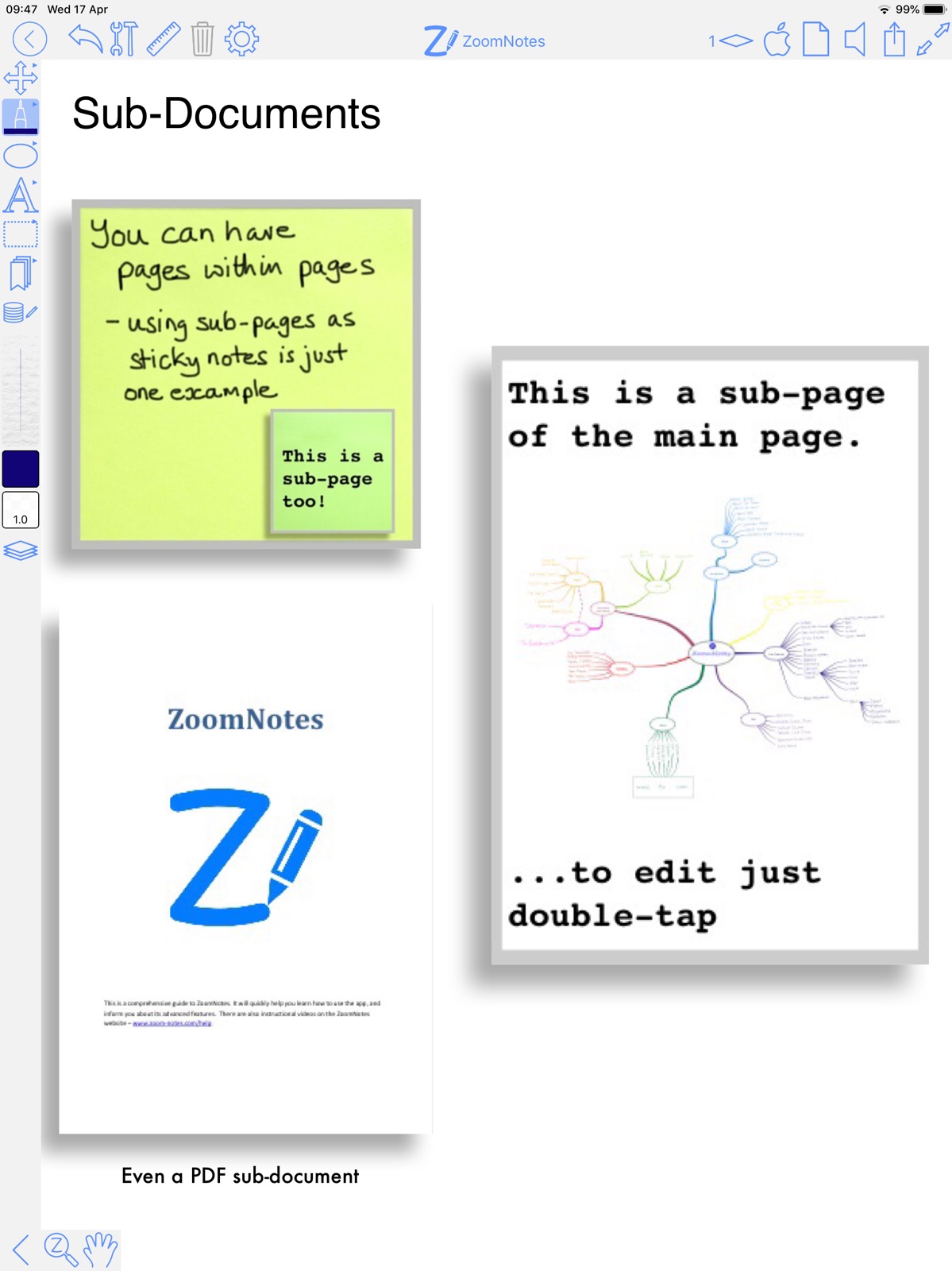
15 store screenshots



Pricing & paywalls
App Store
Shown for US
- Price: $7.99
Ratings & reviews
App Store
Shown for US
-
5/5Update to review written 3 YEARS AGO!
I thought I’d take time to update a previously written review given there have been so many updates to both ZoomNotes & iOS. I still rely on ZN 99.9% of the time. The *only* 2 ways I still use GN is 1) for exclusive GN file purchases & 2) for college digital textbooks (it’s easier for me to have both screens open during note-taking & highlighting things on the other app while taking my handwritten notes in ZN. I like many of the features that ZN has, from advanced image editing (opacity, precise sizing, etc) to the layers feature & page turning capabilities. I can create my own digital notebooks & planners without the standard practice of using Keynote to add links & such. Copying links, repeating text, & more can be done in literally just a few taps, without copy-pasting over & over…you just create a new layer for whatever you want to have the same on all pages (like page tab labels) & then select the option to copy current layer to all pages! Boom. Easy peasy. The customer service is fantastic. Join the Facebook group. Get tips, tricks, inspiration, & direct responses from the creator quickly. Have a suggestion? Tell Ed. Something acting wonky? Ed is so helpful. And here’s a great tidbit: IT’S NOT SUBSCRIPTION-BASED! You get all the features, all the customer support, & a great community all for one price! I wasted so much money on other apps that never quite worked the way I needed.
jjones0904 · 31 Jul 2026
-
5/5Phenomenal cosmic power
I've used a lot of iOS notetaking apps. Most of them do well with emulating a traditional paper notebook (Goodnotes, Notability, OneNote, NoteShelf). ZoomNotes is completely unique. There is really nothing else like it. Pros: - feature-rich hypertext, outline and cross-reference workflow for handwritten documents - You can link pages together with custom buttons, pictures, or text. These links export to PDF so you can make interactive documents. - Pages can have sub-pages, to any level of hierarchy. So you can use one document as a dashboard for a bunch of notes, or store a book and its notes together as one file. - You can open multiple views of the same file. - Make custom animated slideshows from your handwritten documents(!) - Export to many formats. Cons: - The learning curve is STEEP but the payoff is enormous. - Syncing across multiple devices can occasionally produce conflicts that have to be reconciled by the user. - The UI is less "Apple-like" and more like a full desktop app. The features in the UI can be cluttered and overwhelming. However, you can make your own custom workspace with fewer tools and options if you prefer. Verdict: - Make a pot of coffee, settle in with the ZoomNotes manual, and put in the time to learn all the features. If you want power and flexibility with your handwritten documents in iOS, nothing else comes close.
forums poster · 31 Jul 2026
-
5/5Most effective note taking app
This is the most versatile note taking app I have found. I use it for all my note taking. I really like the ability to insert handwritten notes with pdf files, including adding pages etc. It takes a bit to get used to all the features but it is well worth the effort. The ease of zooming in and out and writing in the margins of PDF files is also very handy. Still very happy with it. I love the infinite whiteboard option. It really feels like having a large whiteboard where you can write anywhere. It’s also great for annotating a pdf file when you need to write more than just minor comments. This continuous to be my favorite note taking app. One of the features of traditional writing and note taking is that you can spread out multiple sheets of paper in front of you. This allows you to keep a good overview of what you are working on. I really missed this aspect of physical notes when I switched to my iPad. However, the whiteboard mode with infinite zoom of ZoomNotes allows me to effectively have a virtual desk with many sheets of handwritten notes. (Tip: lay out a grid of letter size boundaries on your whiteboard before starting to take notes. You can easily fit 25 pages that way. Well, of course you could do millions but you want to mimic a physical desk.)
John25642 · 31 Jul 2026
-
5/5Digital Bullet Journal / Planning
Mar2021 - Still the best planner/note taking app. It is always being updated. Developer is quick to respond to questions, problem solve and is always making improvements. You can import multiple calendars and reminders. Doesn’t matter if you use the ZN planner, design your own or buy one from someone else and import the document in. Dec2019 update: ZN is still my favorite planner app. In 2019 I switched around a lot. Setup two different planners in ZN, looked at switching back to GoodNotes, and tried to switch to just an iCal + ToDo app. In the end I found myself back to ZN and a simplified iCal-reminders. With ZN I can use an existing PDF planner and modify it to suit my needs. Using layers and adding my own links are super powerful. Create background & layout layers to keep stickers or images separate from your background, add a master layer for tabs so you only need to label your planner tabs 1x instead of on every page. I keep links on a separate layer that is not a master layer this way I can have a common placement for a link (say top right corner of the page) that goes to a similar but different page such as the current monthly habit tracker. A layer for pen/text that acts as the place daily work happens. When everything is done for that day/week/month I can compress the layers all to background which helps keep file size down. I get all the flexibility of layers, long term history of a journal or planner. Original review: Great app for digital planning. Create layers, sub-documents. Several customizable pen options, create multiple color pallets, and so much more. The developer is quick to respond to questions, suggestion and problem solving.
Littlbyte · 31 Jul 2026
-
5/5incredible!!
i have tried many note-taking apps in the past, but always found myself frustrated by a lack of actually useful features, and a push towards adding more while ignoring what is still missing. on the other side of things, you get feature-rich apps but with unresponsive developers. zoomnotes is neither of these things. it has an amazingly wide berth of tools at your disposal, so it's useful for both planning or notetaking (personally, i'm a notetaker). this has some of the widest selection of tools and settings and has made notetaking a breeze, even if there's a bit of a learning curve to get over first. for example, i love to make diagrams but always wasted so much time trying to align everything with other apps; zoomnotes is the first app i've used with an alignment function and my notes look even better! that being said, with as many features as zoomnotes has, i really think that more keyboard shortcuts would be a phenomenal addition. even just text shortcuts like command+B would be greatly useful, but shortcuts to switch tools would be very powerful and make it much simpler. maybe even customizable shortcuts for your favorite tools?
rokons · 31 Jul 2026
Privacy & accessibility
App Store
Privacy
- Data Not Collected Developer declared
Accessibility
No accessibility labels collected yet.
Versions
App Store
-
9.1.1
Fix for reminder only pages (ones which are configured to only show reminders from iCal) If you are enjoying using ZoomNotes please leave a review - thanks.
-
9.1.10
Urgent fix for importing pages from another document If you are enjoying using ZoomNotes please leave a review - thanks.
-
9.1.11
New option in animated ink in bookmarks - for animated text to show cursor The search bar is now kept visible for documents and symbols Fix for symbol creation (Symbols were being created with a much bigger than they needed to be) Fix for dragging page to new position in pages manager Pasting formatted text now keeps the text formatting If you are enjoying using ZoomNotes please leave a review - thanks.
-
9.1.12
Added 3 'complementary colour' buttons to the colour wheel Various other fixes and improvements If you are enjoying using ZoomNotes please leave a review - thanks.
-
9.1.13
Support for SonarPen 2 Various fixes for iOS 26 compatibility Access to MS OneDrive is now through iCloudDrive. If you are enjoying using ZoomNotes please leave a review - thanks.
-
9.1.14
Added a 'Copy' button to the web image window to send the 'grab' image to the pasteboard Fix for spurious strokes when handwriting Fix for import pdf from iCloud Various other fixes and optimisations If you are enjoying using ZoomNotes please leave a review - thanks.
-
9.1.15
Fix for 'Split' documents view (folders on the left), to remember which folders are ‘Expanded' Fixes for Toolbars in iOS 26 not showing all the buttons especially on iPhone screens Fix for Text tool crashing when changing Line spacing If you are enjoying using ZoomNotes please leave a review - thanks.
-
9.1.16
Fix for illegible menus Fixes for changing settings using sliders crashing If you are enjoying using ZoomNotes please leave a review - thanks.
-
9.1.17
Fixes for changing settings using sliders crashing Fix for changing between Dark and Light UI modes If you are enjoying using ZoomNotes please leave a review - thanks.
-
9.1.18
‘Simple tabbed notebook’ style added to digital planner template Clearer page numbers on Pages toolbar If you are enjoying using ZoomNotes please leave a review - thanks.
-
9.1.19
New : Align as grid - takes selected items and asks for grid columns and rows and aligns the selected items in a grid formation Fix for external screen layers (adjusting their visibility) If you are enjoying using ZoomNotes please leave a review - thanks.
-
9.1.2
Fix for Magnification window (crash in some circumstances) Fixed autobackup folder issue (when setting to a subfolder e.g. ZNBackup/subFolder) If you are enjoying using ZoomNotes please leave a review - thanks.
-
9.1.20
New : Pointer ink now has a 2 colour mode Fix for 'Change image colour' arrow buttons not being visible If you are enjoying using ZoomNotes please leave a review - thanks.
-
9.1.21
Shape tool improvements including support for parallelograms and trapezoids and 4 new 'triangle styles’ Various text drawing improvements including 'Shadow' and ‘Outline’ option to Text double draw mode Added a 'Transparency' option to Change colour function (in image edit window) New import option for images - 'Resize images' (In the main app settings, Document editing section. Changed the image edit window to show transparency more clearly with a checkerboard background Reduced the flicker effect when you have used the pen tool then scroll or zoom Improvements to pressure sensitive ink capture and drawing (draft and felt tip) Various other improvements and optimisations If you are enjoying using ZoomNotes please leave a review - thanks.
-
9.1.22
New: Trim edges (of images with transparent borders around them) Improvements to 3d extrusion - now with ‘edges’ Fix for PDF Grids which have been copied between documents (via the cut/paste of pages mechanism) If you are enjoying using ZoomNotes please leave a review - thanks.
-
9.1.23
NEW: If you select something and choose Add event or Add reminder, a link to the event/reminder will be added too NEW: Create links to reminders and events Image edit fixes - images could lose their transparency Various other improvements and optimisations If you are enjoying using ZoomNotes please leave a review - thanks.
-
9.1.24
Dark mode improvement for PDF based documents Fix for exporting zip file to iCloud Drive Fix for 'Zoom into link' and sub-documents' 'Draw parent' option Various other usability improvements If you are enjoying using ZoomNotes please leave a review - thanks.
-
9.1.25
· 3 Jul 2026
Support for PDF annotation comments - long press and choose ‘Comment’. You can import pdf files with these comments in as well as export then to a PDF file. Fix for youtube previews Datable tag can now be used for calendar shapes on day pages Other enhancements and optimisations If you are enjoying using ZoomNotes please leave a review - thanks.
-
9.1.3
Added 'Translate' to Pdf text tool Fix for setting line width for Pointer tool If you are enjoying using ZoomNotes please leave a review - thanks.
-
9.1.4
New: 'Merge selected text' function added to selection tool menu Number table cells - ‘Setup for calendar page' makes it easier to add dates/times to a table on a calendar page Other optimisations and improvements If you are enjoying using ZoomNotes please leave a review - thanks.
-
9.1.5
NEW - Formula tool - support for mathematical formulas Auto-backup to PDF now has a 'Layer exclusions' settings which allows you to exclude certain layers from being included in the backup Other enhancements and optimisations If you are enjoying using ZoomNotes please leave a review - thanks.
-
9.1.6
Optimisation of Formula edit (which was slow for larger formula) If you are enjoying using ZoomNotes please leave a review - thanks.
-
9.1.7
9.1.7 Fix for PDF data being lost from a planner document Fix for rare crashes when closing a document Another optimisations and enhancements If you are enjoying using ZoomNotes please leave a review - thanks.
-
9.1.8
New: ‘Selected storage size’- tells you the storage size of selected items like images and movies. Various 'safety checks' surrounding saving documents to avoid data loss If you are enjoying using ZoomNotes please leave a review - thanks.
-
9.1.9
Drag drop into shape/table now adjusts size for line thickness Various other improvements and optimisations If you are enjoying using ZoomNotes please leave a review - thanks.
Alternatives
- Notebooks: Write and Organize — Same category + similar ratings
- Inclr: Mindmap Notes Organizer — Same category + similar ratings
Availability by market
- US
Data quality & evidence
- Page completeness
- Live store listing
- Last verified
- 31 Jul 2026
- Sources
- App Store
- Independent summary has not been published yet.