
Quick verdict
- What it is
- You Doodle is a photo editing and drawing app with various tools and features.
- Best for
-
- someone who wants to edit photos
- an artist
- At a glance
-
- Free to download
- In-app purchases
Categories and search queries
Official categories
- Photo & Video
- Graphics & Design
AppCorpus categories
Key functions
| Function | Availability | Access | Scope | Evidence |
|---|---|---|---|---|
| Free app | Yes | Free | — | Store published |
| In-app purchases | Yes | Limited free | — | Store published |
Screens
App Store
21 store screenshots


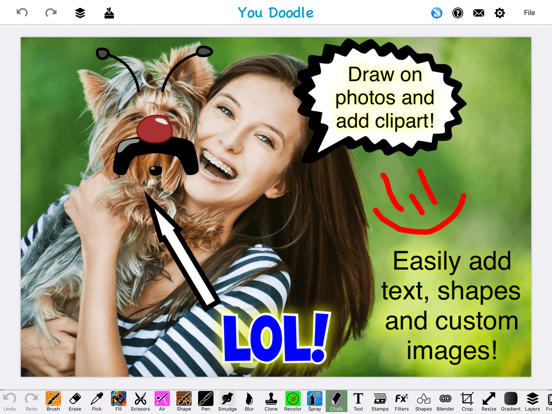

Pricing & paywalls
App Store
- Backgrounds and Textures Pack — $2.99
- Blender Pack - Combine Layers — $2.99
- Draw Tools Pack — $2.99
- Filter Pack — $2.99
- Font Pack — $2.99
- Picture Frame Pack — $2.99
- Pro Version - Amazing Savings! — $5.99
- Pro Version - Special Offer — $4.99
- Remove Ads — $2.99
- Stamp Pack — $2.99
Ratings & reviews
App Store
-
5/5Awesome All the way!! Please Add Highlighting capability!
UPDATE 5/4/19~Is there a way to Highlight screenshots of articles etc? If so, how? If not, Please Add! I’m not an artist of any kind and Highlighting print is something that would be very useful for me and I’m sure others as well. This app has been easy to use every time I've needed it! It does exactly what I want and I can save or share my work just about anywhere! Love it! I have the paid version and highly recommend it to anyone and everyone! Update: I’m not any kind of artist, and only use this app occasionally. Usually to crop a pic or add a greeting or whatever to a picture. In the past, I had no problem doing these things. I actually just a few minutes ago cropped a screenshot and it was easy. However, recently after several attempts to add Happy Birthday to a pic, I had to give up! I even tried to type it in a frame. Not sure what has changed, but it’s gotten too complicated for me, I guess. I have the paid version btw, don’t know if it makes any difference regarding my problem, just thought that I’d mention it. It’s a Great app! Especially for people who know what they are doing. 🤪
Gma loves vampires · 30 Aug 2026
-
5/5Amazing App with Effective Controls
It is rare to find an app that survive multiple phone upgrades, but this app has been on my home screen since October 2016. Having used this app for nearly ten years, I can confidently say it is the ultimate creative Swiss Army knife for anyone who treats their photo library like a canvas. Whether I’m performing a quick "surgical" edit by drawing on photos and adding precise text and shapes, or diving into a full-blown project using advanced layers and photo blending, the interface remains intuitive and snappy. The sheer depth of features—from the whimsical stamps and stickers to the professional-grade scrapbook construction with frames and collages—makes it just as useful for a five-minute meme as it is for a thoughtful digital keepsake. I appreciate how the developers have managed to keep the app consistently reliable and feature-packed without losing the user-friendly spark that hooked me a decade ago. If you need a versatile, all-in-one powerhouse for your images, this is the gold standard.
peachstatealpha · 30 Aug 2026
-
1/5Betrayed, now “onetime paid” Pro features gone! Greed over agreed.
I have had Doodle for 5-years or more and paid a onetime Pro feature. Updates and improvements all included. I don’t know another company doing that now. Well they can get hacked off that elite list. My app went completely haywire, nothing worked, I use this app for constant online updates or directions with an annotated screenshot. Have shared and taught this app to over two dozen friends, associates or employees. Relaying their one-pay Pro plan to finalize the coup de grace for my shared allegiance. Then nothing worked, restarted my iPhone, tried many, many ways to to fix. But my wife recommended deleting and reinstalling the app and restore the features(full Pro features). Nope bombarded with advertisements after every limited feature. Less than half work. Constant asking for more money. No restore, in any way, worked. This was not a design error, it’s holding hostage those that Paid, learned all the features by me, and actively use them for many needed changes or additions to projects. And the new blank page to work on would not go over 2000x2000. I’m so Posse and disappointed company I Pacheco promoted and praised. Tomorrow I will hear the complains. That’s, greed over agreed. 🙄🙄😖😖🤬
Lewisstructure · 30 Aug 2026
-
5/5First day and it does exactly what I have been searching for
I’m not an artist but I needed a tool that allows me to play being one on not tv. I tried another app but it’s help was organized by “here’s a tool and this is what it does”. Not helpful. This app’s help is organized by “here’s what I want to do” and provides simple easy to follow videos and most importantly doesn’t leave out the starting point for which tool to use. No frustration with this app. I was able to get done in about five minutes what I couldn’t figure out in a few hours on another app. About the only thing I would want is the ability to send a link for the help video to my phone so I don’t have to keep switching between the app, the video, and where I was in the video. Time to unsubscribe from that other app, another bonus for YouDoodle, you don’t have to sign up for a short “hope you’ll forget trial” just to see if it will work for you.
linlu · 30 Aug 2026
-
5/5Yessss! ⭐️⭐️⭐️⭐️⭐️
Finally, an app that actually offers more free content than one could ever expect, without bombarding me with ads and offers for a subscription, providing only one free choice of a feature while clearly showing me all the choices I can’t have, but geez, if you got a subscription to all the apps you use and love, you wouldn’t be able to afford the phone nor service to begin with. One final thank you to ‘You Doodle’ for not allowing me to work on a project for, sometimes, an hour only to get to the end and not be able to save it without a subscription, thanks irritates me so, that not only do I not want a subscription now or ever, I want to let everyone I know about it AND leave a bad review. That is my test now always, to make something simple and try to save it with no surprises first.
GingerSpa · 30 Aug 2026
Privacy & accessibility
App Store
Privacy
- Data Not Linked to You — Analytics — Diagnostics — Crash Data Developer declared
- Data Not Linked to You — App Functionality — User Content — Photos or Videos Developer declared
- Data Not Linked to You — Other Purposes — Location — Precise Location Developer declared
- Data Not Linked to You — Other Purposes — Other Data — Other Data Types Developer declared
- Data Not Linked to You — Third-Party Advertising — Identifiers — Device ID Developer declared
- Data Not Linked to You — Diagnostics Developer declared
- Data Not Linked to You — Identifiers Developer declared
- Data Not Linked to You — Location Developer declared
- Data Not Linked to You — Other Data Developer declared
- Data Not Linked to You — User Content Developer declared
- Data Used to Track You — Identifiers — Device ID Developer declared
- Data Used to Track You — Identifiers Developer declared
Accessibility
No accessibility labels collected yet.
Versions
App Store
-
10.0.0
- iOS 26 compatibility and shape color fixes
-
10.0.1
- Change circle text to honor the shape even if it's not square. - Remove weird label that appeared vertically on some devices. Happy doodling! - Jeff
-
10.0.2
· 4 Jun 2026
- Allow brush size less than 1 - Try to fix text crash issue
-
7.8.2
- Fix other text boxes with wrong colors - Fix theme changing unexpectedly on iOS 13 Have a most wonderful day! - Jeff
-
7.8.3
- Attempt to fix the issue saving more than one photo per day
-
7.8.4
- iOS 14 compatibility and general update Thanks for using You Doodle! - Jeff
-
7.8.5
- Switch to iOS font picker (iOS 13 or newer only) Happy doodling! - Jeff
-
7.8.6
I added a more fonts option for iOS 13 or newer to get back to the old font picker. - Jeff
-
7.8.7
- Fix for multipeer networking on iOS 14 for draw with friends feature. :) - Jeff
-
7.8.8
- If zoom bubble gets sticky, allow touches to pass-through it - Remove Amazon Ads - Jeff :)
-
7.9.0
- iOS 15 compatibility - Fix shapes on iOS 15 Happy doodling! - Jeff
-
7.9.3
- Fix sketchbook not saving properly in some cases - Fix an issue where shapes did not save properly if confirmation dialogs were turned off. - Fix issue with gradient tool "light source" single tap function. Happy 2022! - Jeff
-
8.0.0
I've tried to fix a number of things and improve iOS 16 compatibility. Here is the full list: - Fix iOS 16 photo editing extension. - Fix number selection view in photo editing extension. - Fix PNG images imported and losing transparency. - Fix "Save As" option not showing when saving to sketchbook. - Fix share extension appearance. - Fix share extension to sketchbook not showing up. You may have to swipe the full app up and out and re-open it for the sketchbook document to show up. I have some more enhancements coming in a future update. Thanks for using You Doodle! - Jeff
-
8.0.1
- Revert camera roll picker back to choosing edited photo. Unfortunately this means png will have white background again sometimes. To fix this, you must turn optimize storage to off then delete the png from local storage. - Jeff
-
8.0.2
- More important bug fixes, including removing the little circle that appeared when drawing Thanks for the feedback, more to come... - Jeff
-
8.0.3
- Grid mode can specify a custom width + height - Improve circular text, especially counter-clockwise - Theme/color label fixes More to come... - Jeff
-
8.0.5
- Full screen mode now has the current draw tool and eraser available Please have a safe and happy reset of the year everyone! - Jeff
-
8.1.0
- Export + clear options in sketchbook - Make more sketchbook entries show per page - Better performance viewing colors in favorites/recent colors - Double tap eye dropper to set hex color on pasteboard - Other misc bug fixes Thank you for using You Doodle! - Jeff
-
8.1.1
- Fix for some views in the app on iPad when physical keyboard is being used - Jeff
-
8.1.2
- Fix for landscape sketchbook display - Jeff
-
8.2.1
- Brand new image picker using the integrated iOS picker. Hoping this clears up a lot of the errors folks have been seeing. - Jeff
-
8.2.2
- Bug fixes for sketchbook, especially iPad - Fixes for image picker to be larger on iPad - Jeff
-
8.2.5
iOS 17 compatibility, including a fix for save not working after the first time. Happy doodling! - Jeff
-
8.3.0
I've updated the resize -> background tool to allow anchoring the image in a 3x3 grid. Just tap the location you want in the preview. Happy doodling! - Jeff
-
9.0.0
- Clearer text for delete all sketchbook button. This button clears the entire sketchbook, and this is clear by use of "Delete All" instead of "Delete." - iOS 18 compatibility updates. Thanks for using You Doodle! - Jeff
Alternatives
- Photo Splash photo editor app — Same category + similar ratings
- Color Pop : AI Photo Editor — Same category + similar ratings
- Picsee-Add text on photos — Same category + similar ratings
- BeCasso: Photo to Painting App — Same category + similar ratings
- Pencil Sketch Photo Editor + — Same category + similar ratings
Availability by market
- US
Data quality & evidence
- Page completeness
- Independent summary published
- Last verified
- 30 Aug 2026
- Sources
- App Store