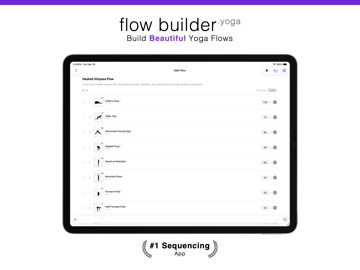
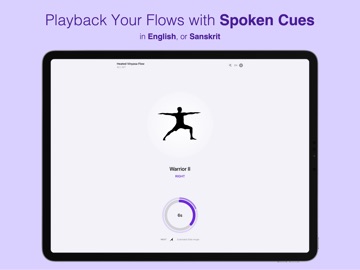
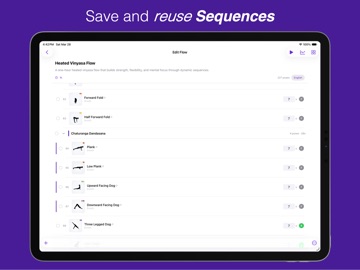
AppCorpus MCP gives your agent current app data, prices, screens, features and sources.
View JSON
GET /api/v3/apps/6758913355
{
  "app_id": 6758913355,
  "canonical_url": "https://appcorpus.com/apps/yoga-timer-flowbuilder-yoga-6758913355",
  "identity": {
    "name": "Yoga Timer - FlowBuilder.yoga",
    "slug": "yoga-timer-flowbuilder-yoga",
    "developer": {
      "name": "AJA Digital LLC",
      "url": "https://appcorpus.com/developers/aja-digital-llc-developer_badc63a52ea3fc99680cfd580afd9a95"
    },
    "icon_url": "https://is1-ssl.mzstatic.com/image/thumb/Purple221/v4/71/79/24/717924b5-ae3d-e8fe-e01f-b162b221b4d9/AppIcon-0-0-1x_U007emarketing-0-11-0-85-220.png/512x512bb.jpg",
    "stores": [
      "apple"
    ],
    "platforms": [
      "iphone",
      "ipad"
    ],
    "status": {
      "state": "active",
      "label": "Active",
      "last_checked": "2026-08-06",
      "last_checked_label": "6 Aug 2026",
      "banner": null,
      "region_note": null
    }
  },
  "listings": [
    {
      "store": "apple",
      "status": "ACTIVE",
      "url": "https://apps.apple.com/us/app/yoga-timer-flowbuilder-yoga/id6758913355?uo=4",
      "rating": 4.9,
      "rating_count": 8,
      "formatted_price": "Free",
      "is_free": true,
      "has_iap": true,
      "has_subscription": false,
      "version": "1.2.1",
      "updated": "2026-07-27",
      "currency": "USD"
    }
  ],
  "summary": {
    "one_liner": null,
    "summary": null,
    "best_for": [],
    "not_for": [],
    "status": "fallback",
    "at_a_glance": [
      "Free to download",
      "In-app purchases"
    ]
  },
  "categories": {
    "official": [
      "Lifestyle",
      "Health & Fitness"
    ],
    "appcorpus": [
      {
        "category_id": "lifestyle",
        "label": "Lifestyle",
        "url": "https://appcorpus.com/categories/lifestyle"
      },
      {
        "category_id": "health-fitness",
        "label": "Health & fitness",
        "url": "https://appcorpus.com/categories/health-fitness"
      }
    ]
  },
  "use_cases": [],
  "features": [
    {
      "capability_id": "free_app",
      "label": "Free app",
      "availability": "yes",
      "access_level": "free",
      "scope": null,
      "evidence": "Store published"
    },
    {
      "capability_id": "in_app_purchases",
      "label": "In-app purchases",
      "availability": "yes",
      "access_level": "free_limited",
      "scope": null,
      "evidence": "Store published"
    }
  ],
  "pricing": [
    {
      "store": "apple",
      "formatted_price": "Free",
      "is_free": true,
      "has_iap": true,
      "has_subscription": false,
      "currency": "USD",
      "market": "us",
      "last_verified": "2026-08-06",
      "rows": [
        "Analytics Pro — $2.99",
        "FlowBuilder.yoga Premium — $79.99",
        "FlowBuilder.yoga Premium Lifetime — $129.99",
        "iCloud Backup & Sync — $3.99",
        "iCould Storage Subscription — $0.99",
        "Premium — $12.99",
        "Unlimited — $9.99"
      ]
    }
  ],
  "screens": [
    {
      "url": "https://is1-ssl.mzstatic.com/image/thumb/PurpleSource221/v4/07/3d/74/073d746f-3193-e0aa-4633-c1cfa9b5e910/Slide1.png/360x480bb.jpg",
      "store": "apple",
      "platform": "ipad",
      "alt": "Yoga Timer - FlowBuilder.yoga ipad screenshot 1"
    },
    {
      "url": "https://is1-ssl.mzstatic.com/image/thumb/PurpleSource221/v4/78/5e/8a/785e8afc-fcd4-4d0f-f335-e6a9faf1bb1c/Slide2.png/360x480bb.jpg",
      "store": "apple",
      "platform": "ipad",
      "alt": "Yoga Timer - FlowBuilder.yoga ipad screenshot 2"
    },
    {
      "url": "https://is1-ssl.mzstatic.com/image/thumb/PurpleSource221/v4/66/08/ae/6608ae66-f233-94b7-eecb-f92985022732/Slide3.png/360x480bb.jpg",
      "store": "apple",
      "platform": "ipad",
      "alt": "Yoga Timer - FlowBuilder.yoga ipad screenshot 3"
    },
    {
      "url": "https://is1-ssl.mzstatic.com/image/thumb/PurpleSource211/v4/44/2e/1e/442e1e9e-4f54-3cad-91d9-5f4bdcf23425/Slide4.png/360x480bb.jpg",
      "store": "apple",
      "platform": "ipad",
      "alt": "Yoga Timer - FlowBuilder.yoga ipad screenshot 4"
    },
    {
      "url": "https://is1-ssl.mzstatic.com/image/thumb/PurpleSource221/v4/61/7f/14/617f1491-4319-65fd-a47b-f74aa227e310/Slide5.png/360x480bb.jpg",
      "store": "apple",
      "platform": "ipad",
      "alt": "Yoga Timer - FlowBuilder.yoga ipad screenshot 5"
    },
    {
      "url": "https://is1-ssl.mzstatic.com/image/thumb/PurpleSource211/v4/81/2f/95/812f95c7-e326-80d7-1b57-b65a1dd2dea2/Slide6.png/360x480bb.jpg",
      "store": "apple",
      "platform": "ipad",
      "alt": "Yoga Timer - FlowBuilder.yoga ipad screenshot 6"
    },
    {
      "url": "https://is1-ssl.mzstatic.com/image/thumb/PurpleSource211/v4/fa/f0/7f/faf07fca-52b8-408f-4f3d-9dc570e40e72/Slide7.png/360x480bb.jpg",
      "store": "apple",
      "platform": "ipad",
      "alt": "Yoga Timer - FlowBuilder.yoga ipad screenshot 7"
    },
    {
      "url": "https://is1-ssl.mzstatic.com/image/thumb/PurpleSource211/v4/bd/b7/22/bdb722a2-be22-50b6-82a7-a7d8cfad3ae0/Slide8.png/360x480bb.jpg",
      "store": "apple",
      "platform": "ipad",
      "alt": "Yoga Timer - FlowBuilder.yoga ipad screenshot 8"
    },
    {
      "url": "https://is1-ssl.mzstatic.com/image/thumb/PurpleSource221/v4/a1/7a/63/a17a632b-8dc8-fa5f-7399-0fc8902488ef/01-home.png/1600x1080bb.jpg",
      "store": "apple",
      "platform": "apple_tv",
      "alt": "Yoga Timer - FlowBuilder.yoga apple_tv screenshot 9"
    },
    {
      "url": "https://is1-ssl.mzstatic.com/image/thumb/PurpleSource221/v4/87/19/10/87191092-0d52-81e2-dc58-1b9c9199906f/01-home.png/1600x1600bb.jpg",
      "store": "apple",
      "platform": "apple_tv",
      "alt": "Yoga Timer - FlowBuilder.yoga apple_tv screenshot 10"
    },
    {
      "url": "https://is1-ssl.mzstatic.com/image/thumb/PurpleSource221/v4/df/fc/04/dffc04c5-5567-4a1b-3704-25baa92116b2/03-player.png/1600x1600bb.jpg",
      "store": "apple",
      "platform": "apple_tv",
      "alt": "Yoga Timer - FlowBuilder.yoga apple_tv screenshot 11"
    },
    {
      "url": "https://is1-ssl.mzstatic.com/image/thumb/PurpleSource221/v4/f2/91/92/f2919209-3364-ed95-7466-405028506159/02-player.png/1600x1080bb.jpg",
      "store": "apple",
      "platform": "apple_tv",
      "alt": "Yoga Timer - FlowBuilder.yoga apple_tv screenshot 12"
    },
    {
      "url": "https://is1-ssl.mzstatic.com/image/thumb/PurpleSource221/v4/ff/74/0b/ff740b3e-a643-9e60-bb56-64b0a37b421d/06-achievements.png/1600x1080bb.jpg",
      "store": "apple",
      "platform": "apple_tv",
      "alt": "Yoga Timer - FlowBuilder.yoga apple_tv screenshot 13"
    },
    {
      "url": "https://is1-ssl.mzstatic.com/image/thumb/PurpleSource221/v4/26/35/a9/2635a9bc-1704-ab4c-fd59-ab1891e1e973/04-meditate.png/1600x1080bb.jpg",
      "store": "apple",
      "platform": "apple_tv",
      "alt": "Yoga Timer - FlowBuilder.yoga apple_tv screenshot 14"
    },
    {
      "url": "https://is1-ssl.mzstatic.com/image/thumb/PurpleSource211/v4/5d/e5/46/5de5465f-b031-b0c2-da74-7354787ec5ff/05-stats.png/1600x1080bb.jpg",
      "store": "apple",
      "platform": "apple_tv",
      "alt": "Yoga Timer - FlowBuilder.yoga apple_tv screenshot 15"
    },
    {
      "url": "https://is1-ssl.mzstatic.com/image/thumb/PurpleSource221/v4/07/3d/74/073d746f-3193-e0aa-4633-c1cfa9b5e910/Slide1.png/1600x1600bb.jpg",
      "store": "apple",
      "platform": "ipad",
      "alt": "Yoga Timer - FlowBuilder.yoga ipad screenshot 16"
    },
    {
      "url": "https://is1-ssl.mzstatic.com/image/thumb/PurpleSource221/v4/78/5e/8a/785e8afc-fcd4-4d0f-f335-e6a9faf1bb1c/Slide2.png/1600x1600bb.jpg",
      "store": "apple",
      "platform": "ipad",
      "alt": "Yoga Timer - FlowBuilder.yoga ipad screenshot 17"
    },
    {
      "url": "https://is1-ssl.mzstatic.com/image/thumb/PurpleSource221/v4/66/08/ae/6608ae66-f233-94b7-eecb-f92985022732/Slide3.png/1600x1600bb.jpg",
      "store": "apple",
      "platform": "ipad",
      "alt": "Yoga Timer - FlowBuilder.yoga ipad screenshot 18"
    },
    {
      "url": "https://is1-ssl.mzstatic.com/image/thumb/PurpleSource211/v4/44/2e/1e/442e1e9e-4f54-3cad-91d9-5f4bdcf23425/Slide4.png/1600x1600bb.jpg",
      "store": "apple",
      "platform": "ipad",
      "alt": "Yoga Timer - FlowBuilder.yoga ipad screenshot 19"
    },
    {
      "url": "https://is1-ssl.mzstatic.com/image/thumb/PurpleSource221/v4/61/7f/14/617f1491-4319-65fd-a47b-f74aa227e310/Slide5.png/1600x1600bb.jpg",
      "store": "apple",
      "platform": "ipad",
      "alt": "Yoga Timer - FlowBuilder.yoga ipad screenshot 20"
    },
    {
      "url": "https://is1-ssl.mzstatic.com/image/thumb/PurpleSource211/v4/81/2f/95/812f95c7-e326-80d7-1b57-b65a1dd2dea2/Slide6.png/1600x1600bb.jpg",
      "store": "apple",
      "platform": "ipad",
      "alt": "Yoga Timer - FlowBuilder.yoga ipad screenshot 21"
    },
    {
      "url": "https://is1-ssl.mzstatic.com/image/thumb/PurpleSource211/v4/fa/f0/7f/faf07fca-52b8-408f-4f3d-9dc570e40e72/Slide7.png/1600x1600bb.jpg",
      "store": "apple",
      "platform": "ipad",
      "alt": "Yoga Timer - FlowBuilder.yoga ipad screenshot 22"
    },
    {
      "url": "https://is1-ssl.mzstatic.com/image/thumb/PurpleSource211/v4/bd/b7/22/bdb722a2-be22-50b6-82a7-a7d8cfad3ae0/Slide8.png/1600x1600bb.jpg",
      "store": "apple",
      "platform": "ipad",
      "alt": "Yoga Timer - FlowBuilder.yoga ipad screenshot 23"
    },
    {
      "url": "https://is1-ssl.mzstatic.com/image/thumb/PurpleSource211/v4/8b/44/30/8b4430b4-ba7c-f54d-ded9-05edfce816f9/1.jpeg/1242x1600bb.jpg",
      "store": "apple",
      "platform": "iphone",
      "alt": "Yoga Timer - FlowBuilder.yoga iphone screenshot 24"
    },
    {
      "url": "https://is1-ssl.mzstatic.com/image/thumb/PurpleSource211/v4/e2/56/88/e25688af-cf9f-9be4-8746-86fffda8dc0e/2.jpeg/1242x1600bb.jpg",
      "store": "apple",
      "platform": "iphone",
      "alt": "Yoga Timer - FlowBuilder.yoga iphone screenshot 25"
    },
    {
      "url": "https://is1-ssl.mzstatic.com/image/thumb/PurpleSource211/v4/c2/16/97/c216972c-3fcd-da1b-75f1-dc49deee80eb/Slide3.png/1242x1600bb.jpg",
      "store": "apple",
      "platform": "iphone",
      "alt": "Yoga Timer - FlowBuilder.yoga iphone screenshot 26"
    },
    {
      "url": "https://is1-ssl.mzstatic.com/image/thumb/PurpleSource221/v4/a8/a6/02/a8a602d1-1369-04e8-17e0-3803cd8b4976/iphone.png/1242x1600bb.jpg",
      "store": "apple",
      "platform": "iphone",
      "alt": "Yoga Timer - FlowBuilder.yoga iphone screenshot 27"
    },
    {
      "url": "https://is1-ssl.mzstatic.com/image/thumb/PurpleSource221/v4/32/42/95/3242952b-b8d7-b7ce-9992-d2ca746c47ee/Slide5.png/1242x1600bb.jpg",
      "store": "apple",
      "platform": "iphone",
      "alt": "Yoga Timer - FlowBuilder.yoga iphone screenshot 28"
    },
    {
      "url": "https://is1-ssl.mzstatic.com/image/thumb/PurpleSource221/v4/3c/c0/23/3cc023da-4a1d-8fd1-4c75-e63538db7a33/Slide6.png/1242x1600bb.jpg",
      "store": "apple",
      "platform": "iphone",
      "alt": "Yoga Timer - FlowBuilder.yoga iphone screenshot 29"
    },
    {
      "url": "https://is1-ssl.mzstatic.com/image/thumb/PurpleSource221/v4/d1/90/72/d190729b-133a-4d5a-687f-8808e3e6344f/Slide7.png/1242x1600bb.jpg",
      "store": "apple",
      "platform": "iphone",
      "alt": "Yoga Timer - FlowBuilder.yoga iphone screenshot 30"
    },
    {
      "url": "https://is1-ssl.mzstatic.com/image/thumb/PurpleSource221/v4/bd/2d/93/bd2d9391-aefd-4cb3-3d5a-4b6dff64065f/Slide8.png/1242x1600bb.jpg",
      "store": "apple",
      "platform": "iphone",
      "alt": "Yoga Timer - FlowBuilder.yoga iphone screenshot 31"
    },
    {
      "url": "https://is1-ssl.mzstatic.com/image/thumb/PurpleSource211/v4/86/68/aa/8668aad5-967b-c56b-dcdd-6c471be5276b/Slide9.png/1242x1600bb.jpg",
      "store": "apple",
      "platform": "iphone",
      "alt": "Yoga Timer - FlowBuilder.yoga iphone screenshot 32"
    },
    {
      "url": "https://is1-ssl.mzstatic.com/image/thumb/PurpleSource221/v4/a4/9e/ea/a49eea1e-921a-0608-5983-d7f80ef099b6/appstorScreeShot_flat.png/1242x1600bb.jpg",
      "store": "apple",
      "platform": "iphone",
      "alt": "Yoga Timer - FlowBuilder.yoga iphone screenshot 33"
    },
    {
      "url": "https://is1-ssl.mzstatic.com/image/thumb/PurpleSource221/v4/1b/64/9d/1b649ddc-b451-dda4-ac89-abcec90d6375/01-player.png/1600x1600bb.jpg",
      "store": "apple",
      "platform": "mac",
      "alt": "Yoga Timer - FlowBuilder.yoga mac screenshot 34"
    },
    {
      "url": "https://is1-ssl.mzstatic.com/image/thumb/PurpleSource221/v4/e7/42/f1/e742f15b-ac35-c913-84af-1c7af3584731/03-player.png/1600x1600bb.jpg",
      "store": "apple",
      "platform": "mac",
      "alt": "Yoga Timer - FlowBuilder.yoga mac screenshot 35"
    },
    {
      "url": "https://is1-ssl.mzstatic.com/image/thumb/PurpleSource211/v4/78/f0/39/78f03936-af42-ce53-a633-48a9ef7140df/04-complete.png/1600x1600bb.jpg",
      "store": "apple",
      "platform": "mac",
      "alt": "Yoga Timer - FlowBuilder.yoga mac screenshot 36"
    },
    {
      "url": "https://is1-ssl.mzstatic.com/image/thumb/PurpleSource211/v4/8f/9d/50/8f9d50a2-0780-8827-bed9-cad61e11a9dd/02-player.png/1600x1600bb.jpg",
      "store": "apple",
      "platform": "mac",
      "alt": "Yoga Timer - FlowBuilder.yoga mac screenshot 37"
    },
    {
      "url": "https://is1-ssl.mzstatic.com/image/thumb/PurpleSource221/v4/67/43/9e/67439e7a-7944-2194-37b0-1ada3fe57abb/01-home.png/1600x1600bb.jpg",
      "store": "apple",
      "platform": "vision",
      "alt": "Yoga Timer - FlowBuilder.yoga vision screenshot 38"
    },
    {
      "url": "https://is1-ssl.mzstatic.com/image/thumb/PurpleSource211/v4/cc/4d/00/cc4d0067-648a-b1a4-14ba-db13d1868658/03-player.png/1600x1600bb.jpg",
      "store": "apple",
      "platform": "vision",
      "alt": "Yoga Timer - FlowBuilder.yoga vision screenshot 39"
    },
    {
      "url": "https://is1-ssl.mzstatic.com/image/thumb/PurpleSource211/v4/c2/f5/d7/c2f5d73e-9332-1d93-f9b0-e829fc69cc25/01-home.png/1600x1600bb.jpg",
      "store": "apple",
      "platform": "vision",
      "alt": "Yoga Timer - FlowBuilder.yoga vision screenshot 40"
    },
    {
      "url": "https://is1-ssl.mzstatic.com/image/thumb/PurpleSource211/v4/0d/98/95/0d9895ba-4178-174e-c6b4-7e85d2abc5aa/02-player.png/1600x1600bb.jpg",
      "store": "apple",
      "platform": "vision",
      "alt": "Yoga Timer - FlowBuilder.yoga vision screenshot 41"
    },
    {
      "url": "https://is1-ssl.mzstatic.com/image/thumb/PurpleSource221/v4/a2/98/a3/a298a3be-0399-16dc-c0bd-ceda04f95fea/07-settings.png/1600x1600bb.jpg",
      "store": "apple",
      "platform": "vision",
      "alt": "Yoga Timer - FlowBuilder.yoga vision screenshot 42"
    },
    {
      "url": "https://is1-ssl.mzstatic.com/image/thumb/PurpleSource221/v4/98/d7/e6/98d7e6d3-8e42-7f18-6d8f-e378ee35f2d8/06-achievements.png/1600x1600bb.jpg",
      "store": "apple",
      "platform": "vision",
      "alt": "Yoga Timer - FlowBuilder.yoga vision screenshot 43"
    },
    {
      "url": "https://is1-ssl.mzstatic.com/image/thumb/PurpleSource221/v4/bd/98/6e/bd986ec9-7358-7f24-1b91-714b93c08aa9/04-meditate.png/1600x1600bb.jpg",
      "store": "apple",
      "platform": "vision",
      "alt": "Yoga Timer - FlowBuilder.yoga vision screenshot 44"
    },
    {
      "url": "https://is1-ssl.mzstatic.com/image/thumb/PurpleSource211/v4/92/cd/7d/92cd7dad-b72a-2d23-a17f-7cd6dc10a4f6/05-stats.png/1600x1600bb.jpg",
      "store": "apple",
      "platform": "vision",
      "alt": "Yoga Timer - FlowBuilder.yoga vision screenshot 45"
    },
    {
      "url": "https://is1-ssl.mzstatic.com/image/thumb/PurpleSource221/v4/ce/90/cc/ce90cc76-e761-978f-add8-5b2400540a92/02-player.png/1600x1600bb.jpg",
      "store": "apple",
      "platform": "vision",
      "alt": "Yoga Timer - FlowBuilder.yoga vision screenshot 46"
    },
    {
      "url": "https://is1-ssl.mzstatic.com/image/thumb/PurpleSource221/v4/17/e4/44/17e44443-e807-6ece-a5f3-16bf6673424f/01-home.png/422x514bb.jpg",
      "store": "apple",
      "platform": "watch",
      "alt": "Yoga Timer - FlowBuilder.yoga watch screenshot 47"
    },
    {
      "url": "https://is1-ssl.mzstatic.com/image/thumb/PurpleSource211/v4/ed/78/ee/ed78ee5c-3514-53d2-f6f6-63ac387b1b90/02-player.png/422x514bb.jpg",
      "store": "apple",
      "platform": "watch",
      "alt": "Yoga Timer - FlowBuilder.yoga watch screenshot 48"
    },
    {
      "url": "https://is1-ssl.mzstatic.com/image/thumb/PurpleSource211/v4/f3/ad/57/f3ad57b3-c074-624d-749a-e8af697ee8fd/03-player.png/422x514bb.jpg",
      "store": "apple",
      "platform": "watch",
      "alt": "Yoga Timer - FlowBuilder.yoga watch screenshot 49"
    },
    {
      "url": "https://is1-ssl.mzstatic.com/image/thumb/PurpleSource221/v4/9a/d0/bd/9ad0bd2b-ef8e-7c0d-def0-bdf0ad64f474/05-stats.png/410x502bb.jpg",
      "store": "apple",
      "platform": "watch",
      "alt": "Yoga Timer - FlowBuilder.yoga watch screenshot 50"
    },
    {
      "url": "https://is1-ssl.mzstatic.com/image/thumb/PurpleSource221/v4/8e/1e/53/8e1e5389-164e-c547-1e7e-4cf52dfb3495/01-home.png/410x502bb.jpg",
      "store": "apple",
      "platform": "watch",
      "alt": "Yoga Timer - FlowBuilder.yoga watch screenshot 51"
    },
    {
      "url": "https://is1-ssl.mzstatic.com/image/thumb/PurpleSource221/v4/2a/08/83/2a08836d-097d-b7fc-c228-4d2241b0f3e9/04-meditate.png/410x502bb.jpg",
      "store": "apple",
      "platform": "watch",
      "alt": "Yoga Timer - FlowBuilder.yoga watch screenshot 52"
    },
    {
      "url": "https://is1-ssl.mzstatic.com/image/thumb/PurpleSource211/v4/64/ff/f5/64fff5f1-8846-a52f-113d-de1998ee374b/07-settings.png/410x502bb.jpg",
      "store": "apple",
      "platform": "watch",
      "alt": "Yoga Timer - FlowBuilder.yoga watch screenshot 53"
    },
    {
      "url": "https://is1-ssl.mzstatic.com/image/thumb/PurpleSource221/v4/40/7a/b4/407ab4d0-9971-29f6-a762-589b03acaf28/03-breathe.png/410x502bb.jpg",
      "store": "apple",
      "platform": "watch",
      "alt": "Yoga Timer - FlowBuilder.yoga watch screenshot 54"
    },
    {
      "url": "https://is1-ssl.mzstatic.com/image/thumb/PurpleSource221/v4/93/4c/3f/934c3f2b-06c0-83bb-29d7-98fc0383f611/02-player.png/410x502bb.jpg",
      "store": "apple",
      "platform": "watch",
      "alt": "Yoga Timer - FlowBuilder.yoga watch screenshot 55"
    }
  ],
  "ratings": [
    {
      "store": "apple",
      "average": 4.9,
      "count": 8,
      "market": "us",
      "observed_at": "2026-08-06",
      "reviews": [
        {
          "rating": 5,
          "title": "Finally! A simple, clear, and comprehensive flow builder",
          "body": "I’ve had a regular yoga practice for years at a studio I love. But life changes over the last several months have made it difficult to go. It’s hard for me to do it on my own, I just really need someone or something guiding me. And I’ve tried soooo many apps to try to keep doing it at home but couldn’t find the right thing. Finding this app was such a relief. I love how customizable it is. I can build whatever flow I want, hold poses for however long I want, edit the names of the poses to ones that I’m more accustomed to, and choose from a much more comprehensive selection of poses. I will say: some of the poses have strange pronunciation. Like the inflection is on the wrong syllable or something. Seems like it’s something they’re working on though. That’s really the only issue I have. Big thanks to the developers, for real. I love this!",
          "author": "laughcrying_crylaughing",
          "date": "6 Aug 2026"
        },
        {
          "rating": 5,
          "title": "Best Yoga App",
          "body": "Perfect for yoga at home! I’m a complete beginner and the app has been great for me to get started with yoga Being able to generate flows for you keeps it simple, but if you really want to curate your yoga, the app allows for complete customization. Really thoughtfully made, best free yoga app.",
          "author": "B.Pahl.",
          "date": "6 Aug 2026"
        },
        {
          "rating": 5,
          "title": "Love the flexibility",
          "body": "I do yoga off and on and often feel behind when I attend classes. This app is great because I can choose the level of difficulty and length of my session!",
          "author": "Jlollila",
          "date": "6 Aug 2026"
        },
        {
          "rating": 5,
          "title": "User experience",
          "body": "The app is very intuitive and easy for beginners to start their yoga journey. 10/10 would recommend!",
          "author": "Christen Doe",
          "date": "6 Aug 2026"
        },
        {
          "rating": 5,
          "title": "Yoga!!!!!!!!",
          "body": "I love to do yoga!!!!!!!!!",
          "author": "sheI666y",
          "date": "6 Aug 2026"
        }
      ]
    }
  ],
  "privacy": [
    {
      "store": "apple",
      "declarations": [
        {
          "title": "Data Not Collected",
          "detail": "",
          "source": "Developer declared"
        }
      ],
      "accessibility": []
    }
  ],
  "changes": [
    {
      "store": "apple",
      "version": "1.0",
      "released_at": null,
      "notes": ""
    },
    {
      "store": "apple",
      "version": "1.0.1",
      "released_at": null,
      "notes": "Voice Selection — Choose from Premium, Enhanced, or standard voices for pose announcements. Find your perfect yoga instructor tone in Settings > Voice. Immersive Player — Controls now auto-hide after 7 seconds during your flow, giving you a distraction-free view of the current pose. Tap anywhere to bring them back. Share as .flow Files — Flows now export as shareable .flow files that work across iOS and the web app. Import flows from friends or the community with a tap. Bug Fixes & Polish: Fixed flow file import failing with \"invalid .flow\" error Fixed blank share screen Corrected 13 Sanskrit pose names across the catalog Updated feedback link to contact page"
    },
    {
      "store": "apple",
      "version": "1.0.2",
      "released_at": null,
      "notes": "Edit Saved Sequences — Tap any saved sequence to edit it. Rename, reorder poses, add or remove poses, and adjust duration, side, and breath cues for each pose. Search Sequences — The search bar now filters sequences by name or pose name when on the Sequences tab. iPad Layout Toggle — Switch between card view and list view on iPad with the new layout toggle in the flow editor toolbar. Sections & Grouping — Organize your flow with named sections. Collapse, rename, or delete sections. Group selected poses into a new section. Save as Sequence — Save selected poses or an entire section as a reusable sequence you can insert into any flow. Select, Copy & Paste — Select multiple poses for bulk duration changes, copying, pasting, or deletion. Create Custom Poses — Add your own poses with custom names, Sanskrit names, duration, difficulty, and tags. Cross-Platform .flow Files — Improved .flow file compatibility between iOS and web versions. iCloud Sync — Sync your flows, sequences, and custom poses across devices."
    },
    {
      "store": "apple",
      "version": "1.0.3",
      "released_at": null,
      "notes": "Practice Statistics - Track your yoga journey with detailed practice insights. View total sessions, practice time, current and longest streaks, completion rates, and more in a new Statistics dashboard. See your most practiced poses, practice trends by week or month, and breakdowns by category and difficulty. Export your stats as CSV anytime. Granular iCloud Sync - Choose exactly what to sync across your devices. Individual toggles for Flows, Sequences, and Statistics with a convenient Sync All option. Settings Improvements - New tracking toggle to enable or disable practice stats collection."
    },
    {
      "store": "apple",
      "version": "1.0.4",
      "released_at": null,
      "notes": "Practice Reminders Set daily reminders to get on your mat. Choose your time and which days of the week — the app will nudge you when it matters. Practice Statistics Track your sessions over time: poses practiced, minutes on the mat, streaks, and more. View trends by week or month, and export your data as a CSV from the Statistics dashboard in Settings. Suggested Poses The pose picker now surfaces smart suggestions based on the last pose added to your flow — tap one to keep the sequence flowing naturally. Flow Editor Improvements • Changes save automatically — no more tapping Save • Reverse the order of selected poses with one tap • Tap a group header to select or deselect all poses in it • Color-coded left stripe shows which group each pose belongs to • New setting: add poses to the top or bottom of the list • Pose sides now show Front, Back, Left, and Right • Suggested poses can be toggled on or off in Settings Bug Fixes & Polish General stability improvements and performance refinements."
    },
    {
      "store": "apple",
      "version": "1.0.5",
      "released_at": null,
      "notes": "Chakra Indicators — Each pose card now shows a small colored dot representing its associated chakra, so you can build energetically balanced classes at a glance."
    },
    {
      "store": "apple",
      "version": "1.1",
      "released_at": null,
      "notes": "Flow Analysis is here. Tap the chart icon on any flow to unlock a full breakdown of your practice: Body Heat Map — See exactly which muscle groups you're working, weighted by pose duration, rendered as a live heat map on a body silhouette Peak Pose — Automatically identifies the apex pose of your flow based on difficulty, duration, and positioning Dynamic Breakdown — A colour-coded sequence strip showing the full arc of your flow at a glance Chakra Distribution — Visualise the energy centre balance across your entire flow, with bar chart and radar chart views Side Balance — Track left/right/centre symmetry to keep your practice even Bug fixes and performance improvements."
    },
    {
      "store": "apple",
      "version": "1.1.1",
      "released_at": null,
      "notes": "iPad Card View Enhancements - Chakra color indicators on pose cards - Section group indicator with purple accent bar - Tap the side badge to quickly change pose side - Options menu on each card: add above/below, swap, duplicate, and delete Pose Management - Options menu now available in list view on iPhone and iPad - Purple highlight shows which pose will receive an inserted neighbor - Auto-scroll to newly added poses at the top or bottom of your flow - Multi-line pose names now fully visible and left-aligned Custom Poses - Fixed image picker requiring a double tap to set a photo - Form data no longer clears when selecting an image Pose Database - 193 poses with multi-chakra data, aliases, and teaching cues - Pose detail pages with descriptions and properties - Updated template flows to match the latest pose database Voice to Flow (beta) - Build flows hands-free with voice commands Stats & Analytics - Practice statistics dashboard - Flow analysis with body heat map"
    },
    {
      "store": "apple",
      "version": "1.1.10",
      "released_at": null,
      "notes": "What's New in Version 1.1.10 This update focuses on smoother, more reliable audio during your practice. Frequency tones now play through both earphones. Previously the healing frequencies could come through only one side on Bluetooth headphones. They are now centered and balanced in both ears. Spoken cues no longer cut out during long sessions. Audio stays reliable all the way through, even when music is playing in the background from another app. Your music now layers smoothly underneath the voice guidance. Pose names are spoken the instant each pose appears. We added smart pre loading so the voice keeps up with your flow, even during quick transitions. Skipping through poses is cleaner. When you move quickly through several poses, the app now announces only the pose you land on instead of every pose you pass. Custom pose names now speak in the natural guiding voice. Poses you name yourself are pronounced with the same warm voice as the built in poses, instead of switching to the robotic system voice. Improved pronunciation. Fixed the pose name pronunciation for Ragdoll Pose and many others. More natural flow transitions. We reviewed and refined how poses connect to one another for smoother, more sensible sequences. Thank you for practicing with us. Namaste."
    },
    {
      "store": "apple",
      "version": "1.1.11",
      "released_at": null,
      "notes": "What's New Meet Vision. A new way to unwind: full screen, slowly evolving patterns inspired by the imagery your mind drifts through at the edge of sleep. Pick a mood like Lull to Sleep, Calm Down, or Wonder, tune the intensity, tone, color, and pattern, set a timer or let it run, and let your eyes rest. Gentle by design, with no flashing. Vision has its own stats too. Spin the new mood wheel in your dashboard, where every petal is a session you have completed. Longer petals ran longer, colors match your mood, and it snaps to show the details of each one. A cleaner 3D guide. Flow playback now demonstrates every pose with a crisp stick figure that floats right on the screen, no box behind it. Spin it with a finger to see any angle, and it gently glides back upright on its own. Jump anywhere in a flow. Press and hold the next or previous button during playback to open a quick list of every pose, then tap the one you want to go straight there. Make the plus menu yours. The new Quick Menu page in Settings lets you choose exactly which shortcuts appear in the plus button on the home screen. Practice with your music. Flows paired with an Apple Music playlist now play it right inside your session. Open flow and pose pack files from anywhere. Files shared through Messages, Mail, AirDrop, or the Files app now open directly in FlowBuilder. Faster and smoother all around, with performance improvements across the whole app, plus iCloud sync and sharing on Mac."
    },
    {
      "store": "apple",
      "version": "1.1.2",
      "released_at": null,
      "notes": "- Duplicate flows - press and hold any flow to create a copy - Video to Flow - record or import video and convert it into a flow automatically - Text to Flow - describe your flow in words and let AI build it - Pose to Flow - use your camera to detect poses in real time - Voice to Flow - improved speech recognition, background recording, and Live Activity support - Guide mode - voice \"next pose\" command, Add to Flow button, and peak posture animation - Silhouette generation - turn camera captures into clean pose silhouettes - Flow analytics - intensity chart with pinch-to-zoom, scrubbing, radar chart, body heat map, and simple/advanced toggle - Subscriptions - 3-tier model (iCloud Storage, Analytics Pro, Premium) with granular feature gating - iCloud sync - migrated to iCloud Documents for reliability, automatic account detection, and graceful recovery - iPad - card grid layout, live analytics"
    },
    {
      "store": "apple",
      "version": "1.1.3",
      "released_at": null,
      "notes": "- Flow Analysis Subtitle — See the flow name right under the screen title so you always know which flow you're analyzing - Side Balance Drill-Down — Tap any side (Left, Right, Front, Back) in the Side Balance chart to see every pose on that side with difficulty, chakras, and duration - 3D Body Heat Map — Expanded to full width for a better view. Camera now smoothly resets to the default position, angle, and zoom when you release touch - Achievements Toggle — New setting to turn off achievement tracking and banners if you prefer a distraction-free experience - Posture Nudge Audio Fix — The posture check audio nudge now plays reliably during breathwork and meditation sessions - Meditation Timer Improvement — Timer now continues accurately even when your screen turns off or the app goes to the background"
    },
    {
      "store": "apple",
      "version": "1.1.4",
      "released_at": null,
      "notes": "New in 1.1.4: Achievements • Redesigned achievement system with proper feature tracking • Enhanced unlock animations with glow effects and haptics • iPad-optimized 4-column grid with tier summaries Breathwork • 8 new breathing patterns: Resonance, Energizing, Triangle, Physiological Sigh, Alternate Nostril, Ocean Breath, and more • Extended duration options: 20min, 30min, and 1hr Meditation • Added 1hr and 3hr duration options iPad Improvements • Optimized Session Detail with side-by-side layout • Full-screen PoseToFlow with larger controls"
    },
    {
      "store": "apple",
      "version": "1.1.5",
      "released_at": null,
      "notes": "Breathwork & Meditation Reminders Set independent daily reminders for breathwork and meditation. Never miss a session. Redesigned Ambient Sound The ambient sound picker is now a beautiful, toggle-gated card. Choose between White Noise, Rain, and Ocean with visual buttons and a precise volume slider. Screen Sleep Always On Meditation and breathwork sessions now keep running with the screen off"
    },
    {
      "store": "apple",
      "version": "1.1.6",
      "released_at": null,
      "notes": "- New Quick Practice Lock Screen widget - pick yoga, breathwork, meditation, or a frequency tone, then launch it with a single tap from the Lock Screen. Available in circular, rectangular, and inline styles, plus a Home Screen variant. - Custom poses now respond in Guide Mode. Any pose with a reference image - including ones you've added yourself - gets per-joint alignment feedback. - Pose to Flow full screen now shows the target pose in the corner alongside the live camera, so you can match the goal at a glance. - Music Sync: the pose list and song waveform now scroll in lock-step as one view, and the waveform updates the moment you change a pose's duration. - Haptics now fire on every Toggle across the app and respect the global Haptic Feedback setting in Settings. - Stability and polish changes"
    },
    {
      "store": "apple",
      "version": "1.1.7",
      "released_at": null,
      "notes": "- Redesigned Achievements: - Your achievements now live in a trophy room you can actually explore, tap any trophy to spin it in 3D and see how you earned it. - Smoother silhouette detection in Create Pose, plus draft recovery so a stray app switch never loses your work. - Cleaned up the share sheet, fixed the Peak Pose chevron, and polished the end-of-flow audio. - Music Sync settings now explain it's a planning tool to help you pick the right soundtrack. - Bug fixes and general improvements. Thanks for practicing with FlowBuilder. Feedback always welcome - tap Settings › Send Feedback."
    },
    {
      "store": "apple",
      "version": "1.1.8",
      "released_at": null,
      "notes": "New App Icon General bug fixes and improvement"
    },
    {
      "store": "apple",
      "version": "1.1.9",
      "released_at": null,
      "notes": "New App Icon General bug fixes and improvement"
    },
    {
      "store": "apple",
      "version": "1.2.0",
      "released_at": null,
      "notes": "Mandala flows - practice in the round. The flow generator can now build Mandala flows: your practice rotates through all four directions of the mat (front, right, back, left) and circles back to where you started. Turn on Reversed for the same journey flowing the opposite way. It's a beautiful way to break out of a front-of-mat routine. See any pose in 3D. Every pose detail screen now has a 2D/3D toggle. Switch to the 3D figure to understand the shape from any angle, then flip back to the illustration whenever you like. Found something off? Just shake. Give your phone a shake from any screen -or tap Report a Bug in Settings - to send feedback in seconds. Your notes go straight to us and genuinely shape where the app goes next. A calmer, clearer practice. - Keep pose guidance on screen for the whole hold with the new persistent guidance option. - Flows you start but don't finish no longer count against your stats. - Cleaner, more concise wording throughout Settings. - Faster, steadier launch. Thank you for practicing with us. ---"
    },
    {
      "store": "apple",
      "version": "1.2.1",
      "released_at": "2026-07-27",
      "notes": "Learn the app in a minute • An interactive tour now walks you through building and playing your first flow when you open the app for the first time. • Want it again later? Replay Tutorial lives in Settings. 14 new poses • Fourteen new asanas, each with its own 3D skeleton and illustration. A clearer 3D figure • The playback figure has been rebuilt around a clean stick figure. Better audio guidance • Pose names are pronounced properly, with Sanskrit-aware pronunciation for asana names. • A distinct chime marks every pose change, so you can flow with your eyes closed. • The Audio Cues toggle now takes effect immediately, even mid-flow. • On-screen guidance cues float and cycle, and stay up long enough to actually read. Faster to what you use • The quick menu has been reordered, with Analytics next to Settings. • Quick menu buttons now respond with a light spring. • Starting a flow zooms straight into the player. Stats you can trust • Sessions you abandon no longer count toward your practice statistics. • Peak-pose details are reliable again, and the vision wheel springs back into place. • The statistics dashboard loads noticeably faster. Sync and music fixes • iCloud sync reports accurate counts, clears out deleted items after 30 days, and the sync indicator now reflects what is actually happening. • Artwork displays correctly when a flow is synced to music. Polish throughout • Complete Reduce Motion coverage, and animated blurs are gone. • Premium features are marked with a sparkle rather than a padlock."
    }
  ],
  "alternatives": [
    {
      "app_id": 6503433847,
      "name": "Tantra Sadhana",
      "url": "https://appcorpus.com/apps/tantra-sadhana-6503433847",
      "reason": "Same category + similar ratings"
    },
    {
      "app_id": 6502403980,
      "name": "Astro Sadhana: Vedic Astrology",
      "url": "https://appcorpus.com/apps/astro-sadhana-vedic-astrology-6502403980",
      "reason": "Same category + similar ratings"
    },
    {
      "app_id": 6557054639,
      "name": "AstroKarma: Astrology & Kundli",
      "url": "https://appcorpus.com/apps/astrokarma-astrology-kundli-6557054639",
      "reason": "Same category + similar ratings"
    },
    {
      "app_id": 430270438,
      "name": "Astro Gold Astrology",
      "url": "https://appcorpus.com/apps/astro-gold-astrology-430270438",
      "reason": "Same category + similar ratings"
    },
    {
      "app_id": 1364184571,
      "name": "align27 Vedic Astrology Guide",
      "url": "https://appcorpus.com/apps/align27-vedic-astrology-guide-1364184571",
      "reason": "Same category + similar ratings"
    },
    {
      "app_id": 1533644988,
      "name": "Planetary Hours by Planetaro",
      "url": "https://appcorpus.com/apps/planetary-hours-by-planetaro-1533644988",
      "reason": "Same category + similar ratings"
    }
  ],
  "evidence_summary": {
    "index_state": "S1",
    "evidence_level": 1,
    "level_label": "Live store listing",
    "indexable": true,
    "last_verified_at": "2026-08-06",
    "unknown_fields": [
      "Independent summary has not been published yet."
    ],
    "sources": [
      "App Store"
    ]
  },
  "availability_markets": {
    "live": [
      "us"
    ],
    "selected": "us",
    "note": null
  },
  "feature_events": {
    "events": []
  },
  "features_slice": {
    "plans": [
      {
        "code": "analytics-pro",
        "label": "Analytics Pro",
        "kind": "unknown",
        "status": "store_listed",
        "prices": [
          {
            "storefront": "us",
            "formatted": "$2.99",
            "billing_period": null
          }
        ],
        "trial": null
      },
      {
        "code": "flowbuilder-yoga-premium",
        "label": "FlowBuilder.yoga Premium",
        "kind": "unknown",
        "status": "store_listed",
        "prices": [
          {
            "storefront": "us",
            "formatted": "$79.99",
            "billing_period": null
          }
        ],
        "trial": null
      },
      {
        "code": "flowbuilder-yoga-premium-lifetime",
        "label": "FlowBuilder.yoga Premium Lifetime",
        "kind": "unknown",
        "status": "store_listed",
        "prices": [
          {
            "storefront": "us",
            "formatted": "$129.99",
            "billing_period": "one_time"
          }
        ],
        "trial": null
      },
      {
        "code": "icloud-backup-sync",
        "label": "iCloud Backup & Sync",
        "kind": "unknown",
        "status": "store_listed",
        "prices": [
          {
            "storefront": "us",
            "formatted": "$3.99",
            "billing_period": null
          }
        ],
        "trial": null
      },
      {
        "code": "icould-storage-subscription",
        "label": "iCould Storage Subscription",
        "kind": "unknown",
        "status": "store_listed",
        "prices": [
          {
            "storefront": "us",
            "formatted": "$0.99",
            "billing_period": null
          }
        ],
        "trial": null
      },
      {
        "code": "premium",
        "label": "Premium",
        "kind": "unknown",
        "status": "store_listed",
        "prices": [
          {
            "storefront": "us",
            "formatted": "$12.99",
            "billing_period": null
          }
        ],
        "trial": null
      },
      {
        "code": "unlimited",
        "label": "Unlimited",
        "kind": "unknown",
        "status": "store_listed",
        "prices": [
          {
            "storefront": "us",
            "formatted": "$9.99",
            "billing_period": null
          }
        ],
        "trial": null
      }
    ],
    "features": [],
    "unknown_features": [],
    "data_cutoff": "6 Aug 2026"
  }
}