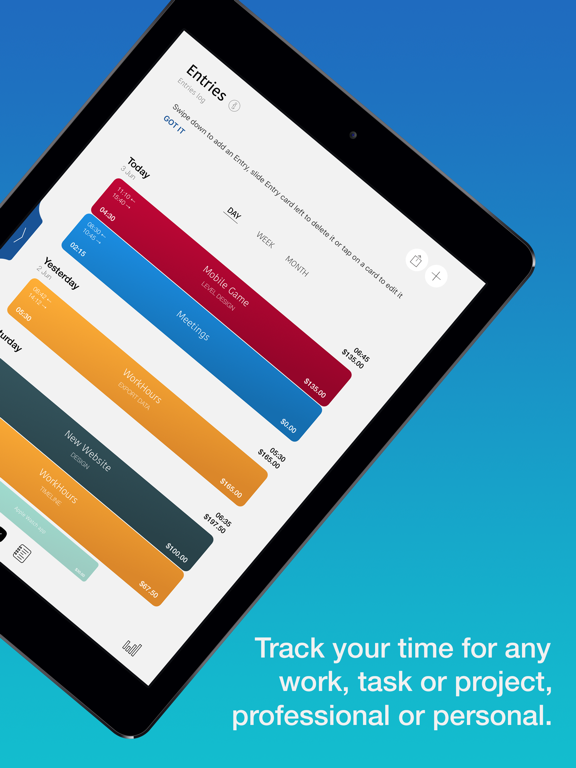
Apoku MCP provides app discovery, detailed cards, evidence, sources and screenshots where available. Unknown or conflicting prices stay explicit.
View JSON
GET /api/v3/apps/1435481677
{
  "app_id": 1435481677,
  "canonical_url": "https://appcorpus.com/apps/workhours-time-tracker-1435481677",
  "identity": {
    "name": "WorkHours: Time Tracker",
    "slug": "workhours-time-tracker",
    "developer": {
      "name": "DEVAPPS d.o.o.",
      "url": "https://appcorpus.com/developers/devapps-d-o-o-developer_261b922834fb79e5776ffd8703f83ff9"
    },
    "icon_url": "https://is1-ssl.mzstatic.com/image/thumb/Purple221/v4/08/ae/7c/08ae7ce7-7105-9bd0-5d6b-148b89ac2fc2/appIconBlue-0-0-1x_U007epad-0-1-0-sRGB-85-220.png/512x512bb.jpg",
    "stores": [
      "apple"
    ],
    "platforms": [
      "iphone",
      "ipad"
    ],
    "status": {
      "state": "active",
      "label": "Active",
      "last_checked": "2026-08-06",
      "last_checked_label": "6 Aug 2026",
      "banner": null,
      "region_note": null,
      "data_state": "stale",
      "data_state_label": "Some store data may be out of date"
    }
  },
  "listings": [
    {
      "store": "apple",
      "status": "ACTIVE",
      "url": "https://apps.apple.com/us/app/workhours-time-tracker/id1435481677?uo=4",
      "rating": 4.7,
      "rating_count": 1177,
      "formatted_price": "Free",
      "is_free": true,
      "has_iap": true,
      "has_subscription": null,
      "version": "1.49",
      "updated": "2026-08-06",
      "currency": "USD"
    }
  ],
  "summary": {
    "one_liner": null,
    "summary": null,
    "best_for": [],
    "not_for": [],
    "status": "fallback",
    "at_a_glance": [
      "Free to download",
      "In-app purchases"
    ]
  },
  "categories": {
    "official": [
      "Business",
      "Productivity"
    ],
    "appcorpus": [
      {
        "category_id": "business",
        "label": "Business",
        "url": "https://appcorpus.com/categories/business"
      },
      {
        "category_id": "productivity",
        "label": "Productivity",
        "url": "https://appcorpus.com/categories/productivity"
      }
    ]
  },
  "use_cases": [],
  "features": [
    {
      "capability_id": "free_app",
      "label": "Free app",
      "availability": "yes",
      "access_level": "free",
      "scope": null,
      "evidence": "Store published"
    },
    {
      "capability_id": "in_app_purchases",
      "label": "In-app purchases",
      "availability": "yes",
      "access_level": "free_limited",
      "scope": null,
      "evidence": "Store published"
    }
  ],
  "pricing": [
    {
      "store": "apple",
      "formatted_price": "Free",
      "is_free": true,
      "has_iap": true,
      "has_subscription": null,
      "currency": "USD",
      "market": "gb",
      "last_verified": "2026-08-06",
      "rows": [
        "1 Month subscription",
        "Upgrade Personal to Pro",
        "Upgrade to WorkHours Personal",
        "Upgrade to WorkHours Pro"
      ],
      "state": "current"
    }
  ],
  "screens": [
    {
      "url": "https://is1-ssl.mzstatic.com/image/thumb/Purple211/v4/18/35/0d/18350df3-126e-ee79-5578-4deea26ea60e/pr_source.png/1600x1600bb.jpg",
      "store": "apple",
      "platform": "ipad",
      "alt": "WorkHours: Time Tracker ipad screenshot 1"
    },
    {
      "url": "https://is1-ssl.mzstatic.com/image/thumb/Purple211/v4/1a/e4/2d/1ae42df3-5c8c-2258-ecd7-8b7469b00e1b/pr_source.png/576x768bb.png",
      "store": "apple",
      "platform": "ipad",
      "alt": "WorkHours: Time Tracker ipad screenshot 2"
    },
    {
      "url": "https://is1-ssl.mzstatic.com/image/thumb/PurpleSource211/v4/07/3c/97/073c9776-856a-68b6-99a0-5ae0c3963cb6/820aa0d1-9531-454a-9581-147cf6da33b4_Artboard_3.png/1600x1600bb.jpg",
      "store": "apple",
      "platform": "ipad",
      "alt": "WorkHours: Time Tracker ipad screenshot 3"
    },
    {
      "url": "https://is1-ssl.mzstatic.com/image/thumb/PurpleSource221/v4/19/16/8a/19168aee-094a-b8e7-7f40-eae091bedac2/2aa3a475-493c-4ce8-8914-539bddaa47b9_Artboard_3.png/576x768bb.png",
      "store": "apple",
      "platform": "ipad",
      "alt": "WorkHours: Time Tracker ipad screenshot 4"
    },
    {
      "url": "https://is1-ssl.mzstatic.com/image/thumb/PurpleSource221/v4/55/ac/1e/55ac1efb-4bb7-1f30-06be-2d42f8dc253d/70eb525f-42d0-4b0a-810e-76a053c6159a_Artboard_4.png/1600x1600bb.jpg",
      "store": "apple",
      "platform": "ipad",
      "alt": "WorkHours: Time Tracker ipad screenshot 5"
    },
    {
      "url": "https://is1-ssl.mzstatic.com/image/thumb/PurpleSource211/v4/93/f8/ee/93f8ee92-8784-22a2-9fc4-3642699e8e3f/4161a98d-23af-4755-a10e-98ed8bb3f7b6_Artboard_4.png/576x768bb.png",
      "store": "apple",
      "platform": "ipad",
      "alt": "WorkHours: Time Tracker ipad screenshot 6"
    },
    {
      "url": "https://is1-ssl.mzstatic.com/image/thumb/PurpleSource211/v4/5d/6b/21/5d6b21ce-d9b1-a313-bb4e-10482dabddc7/d9e0eec6-e147-471f-b7fd-a2718834932b_Artboard_7_copy.png/1600x1600bb.jpg",
      "store": "apple",
      "platform": "ipad",
      "alt": "WorkHours: Time Tracker ipad screenshot 7"
    },
    {
      "url": "https://is1-ssl.mzstatic.com/image/thumb/PurpleSource211/v4/c1/3e/4c/c13e4c2d-5543-0bb4-715f-dde33839ff06/9794bd3b-a818-48b2-a5aa-3916c972ca82_Artboard_7_copy.png/576x768bb.png",
      "store": "apple",
      "platform": "ipad",
      "alt": "WorkHours: Time Tracker ipad screenshot 8"
    },
    {
      "url": "https://is1-ssl.mzstatic.com/image/thumb/PurpleSource221/v4/7a/cc/48/7acc4840-cd8f-a075-ebcb-f5af3ad606a3/7d8a64be-a7d7-4295-b86e-85ea39802362_Artboard_5.png/1600x1600bb.jpg",
      "store": "apple",
      "platform": "ipad",
      "alt": "WorkHours: Time Tracker ipad screenshot 9"
    },
    {
      "url": "https://is1-ssl.mzstatic.com/image/thumb/PurpleSource211/v4/8b/f2/6d/8bf26d8c-12c5-8c1b-fe91-25766a95e9e7/4a2513fd-7331-4b4e-9699-7e6a1e2cca3d_Artboard_5.png/576x768bb.png",
      "store": "apple",
      "platform": "ipad",
      "alt": "WorkHours: Time Tracker ipad screenshot 10"
    },
    {
      "url": "https://is1-ssl.mzstatic.com/image/thumb/PurpleSource221/v4/d8/86/fb/d886fb86-4b25-94cc-9941-b177a4306a31/d84744e1-448e-4bbb-97b2-1b647b7c8dec_Artboard_6.png/1600x1600bb.jpg",
      "store": "apple",
      "platform": "ipad",
      "alt": "WorkHours: Time Tracker ipad screenshot 11"
    },
    {
      "url": "https://is1-ssl.mzstatic.com/image/thumb/PurpleSource211/v4/d3/a7/66/d3a766a8-88eb-191a-6b68-a5e85e2994e5/ca922c44-be8b-48c7-9d91-f30159c12b54_Artboard_6.png/576x768bb.png",
      "store": "apple",
      "platform": "ipad",
      "alt": "WorkHours: Time Tracker ipad screenshot 12"
    },
    {
      "url": "https://is1-ssl.mzstatic.com/image/thumb/PurpleSource221/v4/56/6b/53/566b5351-0e3c-f133-4ae1-a9e703a5340b/Artboard_8.png/1600x1600bb.jpg",
      "store": "apple",
      "platform": "ipad",
      "alt": "WorkHours: Time Tracker ipad screenshot 13"
    },
    {
      "url": "https://is1-ssl.mzstatic.com/image/thumb/PurpleSource211/v4/33/0e/14/330e149f-9592-ef29-af3b-3e278a53ef07/a570911d-200f-43ba-93e4-194ad8268ea9_Artboard_7.png/576x768bb.png",
      "store": "apple",
      "platform": "ipad",
      "alt": "WorkHours: Time Tracker ipad screenshot 14"
    },
    {
      "url": "https://is1-ssl.mzstatic.com/image/thumb/PurpleSource221/v4/13/e6/c3/13e6c338-3964-9683-3744-d76bf0b5bc07/Artboard_10.png/1600x1600bb.jpg",
      "store": "apple",
      "platform": "ipad",
      "alt": "WorkHours: Time Tracker ipad screenshot 15"
    },
    {
      "url": "https://is1-ssl.mzstatic.com/image/thumb/PurpleSource221/v4/4c/18/39/4c1839ad-e206-2933-e571-9e2eb3a39284/63903690-e19b-4c07-903a-f78717248cf3_Artboard_7.png/1600x1600bb.jpg",
      "store": "apple",
      "platform": "ipad",
      "alt": "WorkHours: Time Tracker ipad screenshot 16"
    },
    {
      "url": "https://is1-ssl.mzstatic.com/image/thumb/PurpleSource211/v4/88/da/20/88da2050-4652-5871-6dce-ef8106e2d2ea/Artboard_9.png/1600x1600bb.jpg",
      "store": "apple",
      "platform": "ipad",
      "alt": "WorkHours: Time Tracker ipad screenshot 17"
    },
    {
      "url": "https://is1-ssl.mzstatic.com/image/thumb/PurpleSource221/v4/54/2b/de/542bdee9-a818-3eb3-dd5b-122682bebb2b/a6ec6fde-b121-47e6-ba75-ad558f4f9fc5_Artboard_1.png/1242x1600bb.jpg",
      "store": "apple",
      "platform": "iphone",
      "alt": "WorkHours: Time Tracker iphone screenshot 18"
    },
    {
      "url": "https://is1-ssl.mzstatic.com/image/thumb/Purple211/v4/cd/d7/86/cdd786fc-191f-bdde-266e-15daabe7c8ab/pr_source.png/1242x1600bb.jpg",
      "store": "apple",
      "platform": "iphone",
      "alt": "WorkHours: Time Tracker iphone screenshot 19"
    },
    {
      "url": "https://is1-ssl.mzstatic.com/image/thumb/PurpleSource211/v4/d8/cb/02/d8cb023a-c40e-9cfb-06f2-4ea481dddeae/2a4dc2c0-a0d7-4201-9f92-0de19cffd9dd_Artboard_4.png/1242x1600bb.jpg",
      "store": "apple",
      "platform": "iphone",
      "alt": "WorkHours: Time Tracker iphone screenshot 20"
    },
    {
      "url": "https://is1-ssl.mzstatic.com/image/thumb/PurpleSource221/v4/69/f9/99/69f99998-f43a-61d9-9639-6958bbf430f0/6d7128d6-9a5c-4832-9083-7630dbde3fa6_Artboard_8.png/1242x1600bb.jpg",
      "store": "apple",
      "platform": "iphone",
      "alt": "WorkHours: Time Tracker iphone screenshot 21"
    },
    {
      "url": "https://is1-ssl.mzstatic.com/image/thumb/PurpleSource211/v4/df/60/6b/df606b2c-93fd-a172-c393-7d9b2087c862/5b96dd6a-618e-42bc-9250-e92586e51403_Artboard_3.png/1242x1600bb.jpg",
      "store": "apple",
      "platform": "iphone",
      "alt": "WorkHours: Time Tracker iphone screenshot 22"
    },
    {
      "url": "https://is1-ssl.mzstatic.com/image/thumb/PurpleSource221/v4/aa/6f/bc/aa6fbcfd-34ff-6d27-a7b3-6470c3384491/2efbda41-0eda-4671-b963-cd6bc21ec238_Artboard_11.png/1242x1600bb.jpg",
      "store": "apple",
      "platform": "iphone",
      "alt": "WorkHours: Time Tracker iphone screenshot 23"
    },
    {
      "url": "https://is1-ssl.mzstatic.com/image/thumb/PurpleSource221/v4/c1/a0/04/c1a004dd-12c0-2884-e5cb-9355b0da82a6/478ad502-0ea6-4a2c-9729-a26fe706d856_Artboard_12.png/1242x1600bb.jpg",
      "store": "apple",
      "platform": "iphone",
      "alt": "WorkHours: Time Tracker iphone screenshot 24"
    },
    {
      "url": "https://is1-ssl.mzstatic.com/image/thumb/PurpleSource221/v4/b3/73/c5/b373c53a-fb70-c1e9-56ac-d39752a8253b/ae46bee0-031a-4098-a342-5eaff74e61a6_Artboard_9.png/1242x1600bb.jpg",
      "store": "apple",
      "platform": "iphone",
      "alt": "WorkHours: Time Tracker iphone screenshot 25"
    },
    {
      "url": "https://is1-ssl.mzstatic.com/image/thumb/PurpleSource221/v4/8c/bc/63/8cbc63d0-8138-3f8c-3ecd-8299e51e7219/a99a6c71-cbbd-42c8-9416-924d7f4983ad_Artboard_5.png/1242x1600bb.jpg",
      "store": "apple",
      "platform": "iphone",
      "alt": "WorkHours: Time Tracker iphone screenshot 26"
    },
    {
      "url": "https://is1-ssl.mzstatic.com/image/thumb/PurpleSource221/v4/04/47/17/04471784-5851-70a7-eed7-0f26175ab332/1b4b7244-aa86-40d2-8b30-ce1b4c2a9bbd_Artboard_12-1.png/1242x1600bb.jpg",
      "store": "apple",
      "platform": "iphone",
      "alt": "WorkHours: Time Tracker iphone screenshot 27"
    },
    {
      "url": "https://is1-ssl.mzstatic.com/image/thumb/Purple211/v4/75/5f/2f/755f2f52-4754-66cc-58d3-ed1cc58b591f/pr_source.png/368x448bb.jpg",
      "store": "apple",
      "platform": "watch",
      "alt": "WorkHours: Time Tracker watch screenshot 28"
    },
    {
      "url": "https://is1-ssl.mzstatic.com/image/thumb/Purple221/v4/d0/a7/f8/d0a7f811-7292-5689-5699-12614369059b/pr_source.png/368x448bb.jpg",
      "store": "apple",
      "platform": "watch",
      "alt": "WorkHours: Time Tracker watch screenshot 29"
    },
    {
      "url": "https://is1-ssl.mzstatic.com/image/thumb/Purple211/v4/32/2a/2b/322a2b0f-a993-bd92-bb2b-63d27bc57c97/pr_source.png/368x448bb.jpg",
      "store": "apple",
      "platform": "watch",
      "alt": "WorkHours: Time Tracker watch screenshot 30"
    },
    {
      "url": "https://is1-ssl.mzstatic.com/image/thumb/Purple221/v4/92/9e/6f/929e6f11-2d95-e05a-2ec8-12c84eb283eb/pr_source.png/368x448bb.jpg",
      "store": "apple",
      "platform": "watch",
      "alt": "WorkHours: Time Tracker watch screenshot 31"
    },
    {
      "url": "https://is1-ssl.mzstatic.com/image/thumb/Purple211/v4/27/76/25/27762572-3344-c35a-97a7-8a15c5f23c12/pr_source.png/368x448bb.jpg",
      "store": "apple",
      "platform": "watch",
      "alt": "WorkHours: Time Tracker watch screenshot 32"
    },
    {
      "url": "https://is1-ssl.mzstatic.com/image/thumb/Purple221/v4/ea/50/d0/ea50d03f-6025-e4f4-3405-479a9a05114b/pr_source.png/368x448bb.jpg",
      "store": "apple",
      "platform": "watch",
      "alt": "WorkHours: Time Tracker watch screenshot 33"
    }
  ],
  "data_states": {
    "screens": "current"
  },
  "ratings": [
    {
      "store": "apple",
      "average": 4.7,
      "count": 1177,
      "market": "gb",
      "observed_at": "2026-08-06",
      "state": "current",
      "reviews": [
        {
          "rating": 5,
          "title": "Perfect blend of simplicity and functionality",
          "body": "I use this app almost every single day to manage my time across every facet of life, from my day job, to side jobs, to personal tasks. I’ve tried many time tracking apps and they’ve been OK but the biggest requirements for me in this kind of app is Reliability and Ease of Quick Use. It is very fast and easy for me to start tracking time on any job task, and that is essential. I’ve uninstalled so many apps where starting or stopping the timer takes a few seconds. That’s annoying especially when I need to hop back and forth between tasks. WorkHours solves this elegantly. Love this app!!",
          "author": "Premier Coding Solutions, Inc",
          "date": "6 Aug 2026"
        },
        {
          "rating": 5,
          "title": "Love it",
          "body": "The app has so many features to keep track of your jobs hours, the layout is beautiful and super easy to understand, handle and it looks super sophisticated, pretty solid, only downside….It only lets you track two weeks of work, after that, you have to pay a subscription if you wanna keep track of over two weeks, so you would have to be deleting your record of hours every two weeks if you don’t wanna pay.",
          "author": "Xpr1xer",
          "date": "6 Aug 2026"
        },
        {
          "rating": 4,
          "title": "Good app with room for small improvements",
          "body": "I really like the app, I switched from a different app because it is very modern and has a lot of capabilities. However, two things I wish the app had already is: The ability to start and en breaks without setting a specific time. I am self employed/work from home. I don’t know when my breaks will start or end. If you could just start a break and pause timing work hours and then stop break and start timing seamlessly that would be great. Second, sliding the wheel to set the start and end time looks very sophisticated but having the ability to just type it in would also be very nice. Other than those two things I think the app works great so far.",
          "author": "chela1394",
          "date": "6 Aug 2026"
        },
        {
          "rating": 1,
          "title": "Useless app",
          "body": "Once again, another app rendered utterly useless by a predatory subscription model, it’s genuinely pathetic. In an app designed for timing how many hours you’re clocked in who on earth thought it was a good idea to have a limited amount of entires? And don’t even get me started on the fact that you can’t even save a report of the amount of hours you worked onto your device or send that report to your employer/client without paying $5 a month. We’re in a cost of living crisis, not everyone can afford ANOTHER subscription service on top of the thousands already shilled to use every single day. And the fact that the free trial is only THREE DAYS? Are you seriously that greedy that you can’t even grant people a week? Not to repeat myself but that’s seriously pathetic.",
          "author": "angelfoodcakez",
          "date": "6 Aug 2026"
        },
        {
          "rating": 4,
          "title": "Great app (with one caveat)",
          "body": "Great app, well thought out. One thing to consider: I had a stroke, so it’s difficult to slide a card and spin to a specific task within the job when using one hand. There may be other users with medical conditions that may hinder the use of that feature. Not sure if there’s a way to address that or if there’s a another way to get to a task. I’ve only had the app a few hours, so I’m sure there are features I haven’t figured out yet. Otherwise, a great app for a freelancer to track hours and costs. Thank you!",
          "author": "Godspromised",
          "date": "6 Aug 2026"
        }
      ]
    }
  ],
  "privacy": [
    {
      "store": "apple",
      "declarations": [
        {
          "title": "Data Not Linked to You",
          "detail": "Analytics — Usage Data — Product Interaction",
          "source": "Developer declared"
        },
        {
          "title": "Data Not Linked to You",
          "detail": "App Functionality — Diagnostics — Crash Data",
          "source": "Developer declared"
        },
        {
          "title": "Data Not Linked to You",
          "detail": "Developer’s Advertising or Marketing — Identifiers — Device ID",
          "source": "Developer declared"
        },
        {
          "title": "Data Not Linked to You",
          "detail": "Diagnostics",
          "source": "Developer declared"
        },
        {
          "title": "Data Not Linked to You",
          "detail": "Identifiers",
          "source": "Developer declared"
        },
        {
          "title": "Data Not Linked to You",
          "detail": "Usage Data",
          "source": "Developer declared"
        },
        {
          "title": "Data Used to Track You",
          "detail": "Identifiers — Device ID",
          "source": "Developer declared"
        },
        {
          "title": "Data Used to Track You",
          "detail": "Identifiers",
          "source": "Developer declared"
        }
      ],
      "accessibility": []
    }
  ],
  "changes": [
    {
      "store": "apple",
      "version": "1.25",
      "released_at": null,
      "notes": "Fix for upgrade screen beeing shown after app was already upgraded. Minor fixes and improvements."
    },
    {
      "store": "apple",
      "version": "1.26",
      "released_at": null,
      "notes": "Ability to add Notes for time entry while clocked in. Expenses or additional amounts can be added for each time entry. Jobs can now be duplicated to quickly create a new one with similar properties."
    },
    {
      "store": "apple",
      "version": "1.27",
      "released_at": null,
      "notes": "Minor UI improvements v1.26 Ability to add Notes for time entry while clocked in. Expenses or additional amounts can be added for each time entry. Jobs can now be duplicated to quickly create a new one with similar properties."
    },
    {
      "store": "apple",
      "version": "1.28",
      "released_at": null,
      "notes": "Pause your work by starting a break, to resume work end the break. Round durations or start / end times to 1, 5, 10, 15, 30, or 60 minutes. Reorder tasks for a job."
    },
    {
      "store": "apple",
      "version": "1.29",
      "released_at": null,
      "notes": "Widgets to keep track of today's work, and currently active Jobs."
    },
    {
      "store": "apple",
      "version": "1.30",
      "released_at": null,
      "notes": "Fixes an issue with loading time entries some users experienced. v1.29: Widgets to keep track of today's work, and currently active Jobs."
    },
    {
      "store": "apple",
      "version": "1.31",
      "released_at": null,
      "notes": "Ongoing improvements to stability and performance."
    },
    {
      "store": "apple",
      "version": "1.32",
      "released_at": null,
      "notes": "Fixes an issue with creating new Jobs when using external keyboard."
    },
    {
      "store": "apple",
      "version": "1.33",
      "released_at": null,
      "notes": "When clocking in on Apple Watch you can now also select a task. Overtimes on PDF reports are now on separate rows."
    },
    {
      "store": "apple",
      "version": "1.34",
      "released_at": null,
      "notes": "Time entries with breaks now have an icon indicating there is a break. Fix for app sometimes freezing after report was generated."
    },
    {
      "store": "apple",
      "version": "1.35",
      "released_at": null,
      "notes": "Fix for overtimes being applied to wrong time entries. Optimized data loading on app startup."
    },
    {
      "store": "apple",
      "version": "1.36",
      "released_at": null,
      "notes": "Fixes an issue where hourly rate could be changed when creating a Time Entry."
    },
    {
      "store": "apple",
      "version": "1.37",
      "released_at": null,
      "notes": "Deleting a job is now changed to archiving. If a job is not needed anymore it can first be Archived and later permanently deleted."
    },
    {
      "store": "apple",
      "version": "1.38",
      "released_at": null,
      "notes": "Fixes an issue where widgets occasionally disappeared from the home screen."
    },
    {
      "store": "apple",
      "version": "1.39",
      "released_at": null,
      "notes": "Localized to Chinese"
    },
    {
      "store": "apple",
      "version": "1.40",
      "released_at": null,
      "notes": "We work every day to make the WorkHours app even better for you. This version includes bug fixes and improvements."
    },
    {
      "store": "apple",
      "version": "1.41",
      "released_at": null,
      "notes": "We work every day to make the WorkHours app even better for you. This version resolves a crash that occurred in certain time zones when selecting a date."
    },
    {
      "store": "apple",
      "version": "1.42",
      "released_at": null,
      "notes": "We work every day to make the WorkHours app even better for you. In this version, we’ve introduced the option to customize Job colors. You can now choose from predefined colors or set your own custom color to personalize your experience."
    },
    {
      "store": "apple",
      "version": "1.43",
      "released_at": null,
      "notes": "We work every day to make the WorkHours app even better for you. In this version, we’ve introduced the option to customize Job colors. You can now choose from predefined colors or set your own custom color to personalize your experience. Resolves an issue where data failed to load properly for some users on the first app launch after an update."
    },
    {
      "store": "apple",
      "version": "1.44",
      "released_at": null,
      "notes": "Minor stability improvements"
    }
  ],
  "alternatives": [
    {
      "app_id": 534278133,
      "name": "Clock In: Work Hours Tracker",
      "url": "https://appcorpus.com/apps/clock-in-work-hours-tracker-534278133",
      "reason": "Same category + similar ratings"
    },
    {
      "app_id": 1146576087,
      "name": "Clock in clock out: Flexishift",
      "url": "https://appcorpus.com/apps/clock-in-clock-out-flexishift-1146576087",
      "reason": "Same category + similar ratings"
    },
    {
      "app_id": 336456412,
      "name": "Hours Tracker: Time Tracking",
      "url": "https://appcorpus.com/apps/hours-tracker-time-tracking-336456412",
      "reason": "Same category + similar ratings"
    },
    {
      "app_id": 1468530190,
      "name": "Work Hours & Pay Calculator",
      "url": "https://appcorpus.com/apps/work-hours-pay-calculator-1468530190",
      "reason": "Same category + similar ratings"
    },
    {
      "app_id": 563155321,
      "name": "Hours Keeper: Time Tracker",
      "url": "https://appcorpus.com/apps/hours-keeper-time-tracker-563155321",
      "reason": "Same category + similar ratings"
    },
    {
      "app_id": 1400078107,
      "name": "Punch Time Clock",
      "url": "https://appcorpus.com/apps/punch-time-clock-1400078107",
      "reason": "Same category + similar ratings"
    }
  ],
  "evidence_summary": {
    "index_state": "S1",
    "evidence_level": 1,
    "level_label": "Live store listing",
    "indexable": true,
    "last_verified_at": "2026-08-06",
    "unknown_fields": [
      "Apoku editorial summary has not been published yet."
    ],
    "sources": [
      "App Store"
    ]
  },
  "availability_markets": {
    "live": [
      "us"
    ],
    "selected": "gb",
    "note": "No LIVE observation for GB yet."
  },
  "feature_events": {
    "events": []
  },
  "features_slice": {
    "plans": [
      {
        "code": "subscription",
        "label": "1 Month subscription",
        "kind": "subscription",
        "status": "store_listed",
        "prices": [],
        "trial": null
      },
      {
        "code": "upgrade-personal-to-pro",
        "label": "Upgrade Personal to Pro",
        "kind": "unknown",
        "status": "store_listed",
        "prices": [],
        "trial": null
      },
      {
        "code": "upgrade-to-workhours-personal",
        "label": "Upgrade to WorkHours Personal",
        "kind": "unknown",
        "status": "store_listed",
        "prices": [],
        "trial": null
      },
      {
        "code": "upgrade-to-workhours-pro",
        "label": "Upgrade to WorkHours Pro",
        "kind": "unknown",
        "status": "store_listed",
        "prices": [],
        "trial": null
      }
    ],
    "features": [],
    "unknown_features": [],
    "data_cutoff": "6 Aug 2026"
  }
}