
Quick verdict
- What it is
- Store information collected; an Apoku editorial summary is not yet published.
- At a glance
-
- From $3.33/mo
- Free to download
- In-app purchases
Categories and search queries
Official categories
- Photo & Video
- Graphics & Design
Apoku categories
Key functions
| Function | Availability | Access | Scope | Evidence |
|---|---|---|---|---|
| Free app | Yes | Free | Context-specific | Store published |
| In-app purchases | Yes | Limited free | Context-specific | Store published |
| Family Sharing | Unknown | Unknown | Scope unknown | Store published |
Screens
App Store
22 store screenshots


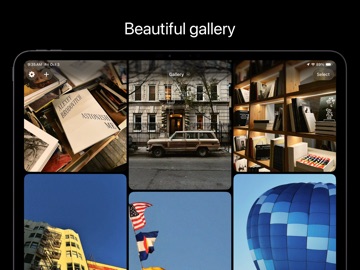
Pricing & paywalls
App Store
- West Pro Monthly — $6.99/month
- West Pro Monthly — $39.99/year ($3.33/mo)
- West Pro Lifetime — $79.99
Ratings & reviews
App Store
-
5/5Really great app- some improvements!
I love this app so much to the point where I immediately downloaded the pro version. If you’re a fan of VSCO, then you’ll be a fan of this and I promise this is so much better and has a LOT of potential. I really hope the creators do not make this a monthly subscription!!!! This is the only photo app I bought because it is a one time purchase, and every other app requires a monthly subscription which I hate. In terms of filters and affects, I think the creators have so much opportunity to allow for more editing, personalization, and other stuff and I think they’re on an amazing track with their app and I’m so impressed with it. It’s extremely user-friendly really easy to use and I love the options at already gives for example on things like light leaks. I think it would be great if you could move the leak around or make it less intense, small improvements like that are my suggestion. Overall, 10/10 you guys gained a diehard fan, and this will be the app I recommend to all my friends and everyone I meet. Please please do not turn this into a monthly subscription 🥺 I love this app so much
gayhoneypeach · 5 Oct 2026
-
5/5makes every picture look good and brings the fun and simplicity back to taking photos
I love this app because rather than spend tons of time editing all you have to do is point and shoot and it makes it so much more fun. I prefer that it doesn’t have a time stamp on it so I can post whenever without it being evident the time and date that i took photo. I take so many pictures on it now and I love it. It reminds me of our point-and-shoot days.
Diarra Anderson · 5 Oct 2026
-
1/5Concern Regarding Recent Subscription Changes
I believe it is disrespectful that after purchasing the premium version of the app, a new and more expensive version has been introduced under a subscription model. I made the decision to pay for the premium version with the understanding that it granted me full access to the app’s features. Changing the structure afterward and placing additional functionality behind a higher-priced subscription is extremely disappointing and feels unfair to loyal users who supported the app early on. I genuinely enjoyed using the application and trusted the value of my purchase, which makes this situation even more frustrating. I hope you can reconsider how existing premium users are treated or provide a clear solution that respects prior purchases.
Eli Santiago Correa · 5 Oct 2026
-
4/5was my favorite app
I absolutely loved this app and used it for most of my photos! I love the new update where you can now take videos in the app as well! However I cannot stand the new user interface. Much more difficult to use and such a downgrade from the last user interface. To the point where I have found to be using other apps or even the basic iPhone camera more and more, and rarely even open the west app anymore. Makes me so sad because it absolutely wasn’t favorite photo app and now I never use it anymore all because of this one little thing.
carrletta · 5 Oct 2026
-
1/5Lifetime? More like “Until the Next Update”
I paid some time ago for the Pro version with the “lifetime” option, which was supposed to be a one-time, permanent payment. However, after the latest update, the app removed my access and is charging me again, without offering any refund. If “lifetime” actually meant “until the next update, then we’ll charge you again,” that should have been stated from the beginning. It’s really disappointing and feels disrespectful to those of us who supported the app early on. Now I’m not even sure if paying again is worth it, because nothing guarantees this won’t happen once more in a few years. I could end up paying over and over for the same thing.
José prida · 5 Oct 2026
Privacy & accessibility
App Store
Privacy
- Data Not Linked to You — Analytics — Diagnostics — Crash Data Developer declared
- Data Not Linked to You — Analytics — Location — Coarse Location Developer declared
- Data Not Linked to You — Analytics — Purchases — Purchase History Developer declared
- Data Not Linked to You — Analytics — Usage Data — Product Interaction Developer declared
- Data Not Linked to You — App Functionality — Diagnostics — Crash Data Developer declared
- Data Not Linked to You — App Functionality — Diagnostics — Performance Data Developer declared
- Data Not Linked to You — App Functionality — Purchases — Purchase History Developer declared
- Data Not Linked to You — Diagnostics Developer declared
- Data Not Linked to You — Location Developer declared
- Data Not Linked to You — Purchases Developer declared
- Data Not Linked to You — Usage Data Developer declared
Accessibility
No accessibility labels collected yet.
Versions
App Store
-
10.0
- Introducing Natural Capture! When enabled, images are minimally processed. Among other benefits, this preserves the sensor’s natural grain and avoids the “watercolor” effect sometimes visible due to noise reduction. - New Halation filter! Simulates how light interacts with real film. - New button to randomize texture and grain. - Performance improvements. - Bug fix: Tap to focus/expose focused and exposed the wrong location. - Design: Added background behind video duration. - Haptic when tapping last photo button. - Other small changes & bug fixes.
-
11.0
- iPad support! - West Pro monthly subscription now includes a 1 week free trial. - "Grid Gallery" widget can now be extra small and extra large. - "Gallery" widget can now be extra large. - Upgrade to West Pro directly from West settings. - Other small bug fixes and improvements.
-
11.1
- Bug fix: "Grid Gallery" widget would sometimes have an incorrect layout. - Bug fix: When "Natural Capture" was on, it would incorrectly affect what zoom levels were available in video mode. - Other small bug fixes and improvements.
-
11.2
- Bug fix: Crash would occur at the end of onboarding on iPad.
-
12.0
- Layer editor now has a slightly different design that is easier to use. - Pixel filter can now shift in the opposite direction. - Bug fix: Sometimes older devices would crash when attempting to setup cameras. - Bug fix: Sometimes tapping an item in the gallery would present the wrong item in the editor.
-
12.1
- Bug fix: Sometimes older devices would crash when attempting to setup cameras.
-
13.0
- Importing from your photo library no longer requires West Pro. - Updated onboarding. - Updated West Pro upgrade screen. - Other small changes and improvements.
-
13.1
- Possible bug fix: Sometimes a crash would occur when presenting the editor. - Possible bug fix: Sometimes a crash would occur during the onboarding. - Bug fix: Layer kind picker now resets back to "Empty" when adding a new layer when the layer kind picker is already presented. - Bug fix: Fixed a layout issue visible when presenting and dismissing the layer kind picker. - When selecting a selected layer it will now always unselect it. It would previously navigate to the controls for that layer if you had just chosen a kind for the layer. - Other bug fixes & improvements.
-
13.2
- Bug fix: Crash occurring during the app onboarding on iOS 18. - Bug fix: Texture icon not showing during app onboarding on iOS 18.
-
14.0
- New "Unsharp Mask" filter to get the oversharpened effect that camcorders and some other older cameras have. - Faster time to launch. - Bug fix: exporting a video that doesn't have audio would result in a crash. - Bug fix: "Distortion Blur" filter would have some artifacts when exporting. - Small performance improvements. - Small interface changes. - Small bug fixes.
-
15.0
- New West 4000 color preset! - New vignette effect! - Exporting videos now includes all of the original metadata (lens information, etc.). - Add West Pro yearly subscription option. - Bug fix: Sometimes the front facing camera preview was zoomed in slightly. - Bug fix: Distortion blur now has improved quality. - Example images in the West Pro upgrade screen are randomly shuffled now.
-
16.0
- More controls for Pixel, Fisheye, & Distortion Blur. - Faster editing and exporting. - Bug fix: Exporting large images with some filter combinations would fail. - Bug fix: iPhone 17 front facing camera aspect ratio buttons would rotate when the device rotates which would make the symbols misleading. - Effect sliders now allow for more precise control. - Other small changes & improvements.
-
16.1
Small bug fixes and improvements.
-
17.0
- Introducing Presets: use one of the pre-installed presets or create your own to quickly apply edits. - Redesigned camera with support for browsing and previewing presets live before capturing. - Option to display a grid over the camera preview. - New tab bar design. - New "Pixel" filter that applies a pixel art style. The old "Pixel" filter has been renamed to "Scan Line". - New "Midtones" mode for "Texture" that applies grain primarily to the midtones. - Added new control to adjust the scale of "Texture". - The "Texture" amount control is now a slider to allow for more precise control. - "Texture" updates at 24 FPS when applied to videos. - The base scale of "Texture" applied to videos now matches photos. - Small changes to how "Texture" is applied. - West Pro is no longer required to adjust the amount or scale of “Texture”. - The "Light" layer kind no longer requires West Pro. - When some types of layers are selected (like "Texture"), media will zoom to fill the available space so details can be seen. - Images re-render when the image view changes size. - Smaller minimum blur radius with the "Blur" filter. - Improvements to the "Stretch" filter animation when applied to videos. - Added a "Remove All Layers" button in the editor for a quick reset. - Performance improvements for the gallery and editor. - Improved camera preview performance. - Improved camera capture performance. Faster consecutive captures. - Capture button updates to show when you can capture another photo. - New options in settings to control how much processing occurs when capturing a photo. - Image thumbnails take up less storage space. - Translations for many more languages. - Various other small changes and bug fixes.
-
18.0
- View and post feedback / feature requests within West. - Better camera permissions handling and UI. - Haptic feedback for selecting items when in edit mode in the gallery. - Fixed sharing photos directly to WhatsApp. - Other small changes & improvements
-
18.1
- Small bug fix.
-
19.0
- Media metadata sheet. - Fisheye filter allows distortion in the opposite direction. - Editing is faster and has better performance. - Slight changes to the halation filter. - Other bug fixes and improvements.
-
20.0.0
- Intensity slider for the "Color" layer. - New `E001` preset. - Bug fix: Widgets would sometimes crash. - Bug fix: Sometimes images would not appear immediately when opening the editor. - Other small changes and bug fixes.
-
21.0.0
- Sharable image that has your photo and capture info in a beautiful layout. - Optional evening golden hour notifications. - Camera support for iPad. - Copy & paste layers in the editor. - Capture sound plays at lower volume & does not play if connected to speaker or headphones. Settings switch to turn on or off interface sounds. - Better export sheet states and styling. - Other bug fixes, improvements, and changes.
-
22.0.0
- Shadow and highlight sliders within the "Light" filter. - Other bug fixes & improvements.
-
23.0.0
- Video playback and editing is much more responsive. - Vignette, bloom, and blur effects are included without West Pro. - Two additional presets are now included without West Pro. - Other improvements and bug fixes.
-
23.0.1
- Performance improvements.
-
24.0.0
· 26 May 2026
- New presets / layers mode toggle in editor. - Updated export experience. - Import progress sheet with warnings if something goes wrong. - Home Screen quick action for launching the camera. - App Shortcuts for launching the camera. - Accessory widgets for launching to the camera. - Quick review (long press camera to preview last photo captured) has been reworked to be faster and have better quality. - Performance improvements. - Small bug fixes & improvements.
-
25.0.0
- Redesigned root layout. - Redesigned editor. - New effects: Posterize, Chromatic Aberration, Color Shift, Mirror, Invert, & Channel Mixer. - Light effect now has black point, white point, white input maximum, and black input maximum controls. - Tap a slider title in the editor to present a "Reset to default" menu. - Long-press the presets button in the camera to quickly return to your default preset. - Enable / disable "Natural capture" and change photo resolution from the capture extra options button. - Faster video preview. - Setting for changing if the app opens to the camera or the gallery. - Bug fixes and small improvements.
-
25.0.1
- Bug fix for new installs.
-
25.1.0
· 21 Aug 2026
- This version removes home screen widgets. Continuing to support widgets requires maintenance and time that we'd rather spend on better effects and editing tools. If you really enjoyed West widgets, let us know and we'll consider adding them in a future release. - Small bug fixes and improvements.
-
25.2.0
- Bug fixes for the front camera on new devices.
-
25.3.0
· 1 Oct 2026
- Small bug fixes and improvements.
-
8.0
- New Solarize filter. - 24MP support for some devices. - Icons for buttons in West settings. - West watermark hides instantly after upgrading to West Pro rather than requiring the image to be re-edited. - Bug fix: Using the 2x camera in video mode would have the wrong resolution. - Bug fix: If "Preview Texture" & "Preview Color" were turned on, they we're applied in the wrong order. - Design: Increase the corner radius of the image controls container and its subviews. - Design: Add very thin border to layer cells. - If importing an image or video with an unsupported file type, the alert will mention the file type that could not be imported. - Localized some errors. - Other small bug fixes & improvements.
-
9.0
- iPhone 17 lineup support and bug fixes. - Performance improvements. - Bug fix: Tap to expose / focus didn't fully work during while recording a video. - Bug fix: Sometimes West would crash when changing the capture mode if a camera was not yet setup. - Bug fix: Sometimes West would crash when attempting to reload an item in the gallery. - Bug fix: 24MP images now have metadata (location, date, lens information, etc.) attached. - Bug fix: Solarize filter controls used an icon that is not available on older iOS versions. - Design: Lens / zoom level buttons are now circular. - Other small changes.
Alternatives
- Vintify: Vintage Photo Editor — Same category + similar ratings
- PRESETS: Filters for Pictures — Same category + similar ratings
- Liit - Photo & Video Editor — Same category + similar ratings
- DAZE CAM - Vintage Camera — Same category + similar ratings
- Tezza: Aesthetic Photo Editor — Same category + similar ratings
- Captiono: AI Subtitles — Same category + similar ratings
Availability by market
- US
Data quality & evidence
- Page completeness
- Live store listing
- Last verified
- 5 Oct 2026
- Sources
- App Store
- Apoku editorial summary has not been published yet.