
Quick verdict
- What it is
- Store information collected; an Apoku editorial summary is not yet published.
- At a glance
-
- Free to download
Categories and search queries
Official categories
- Weather
Apoku categories
Key functions
| Function | Availability | Access | Scope | Evidence |
|---|---|---|---|---|
| Free app | Yes | Free | Context-specific | Store published |
Screens
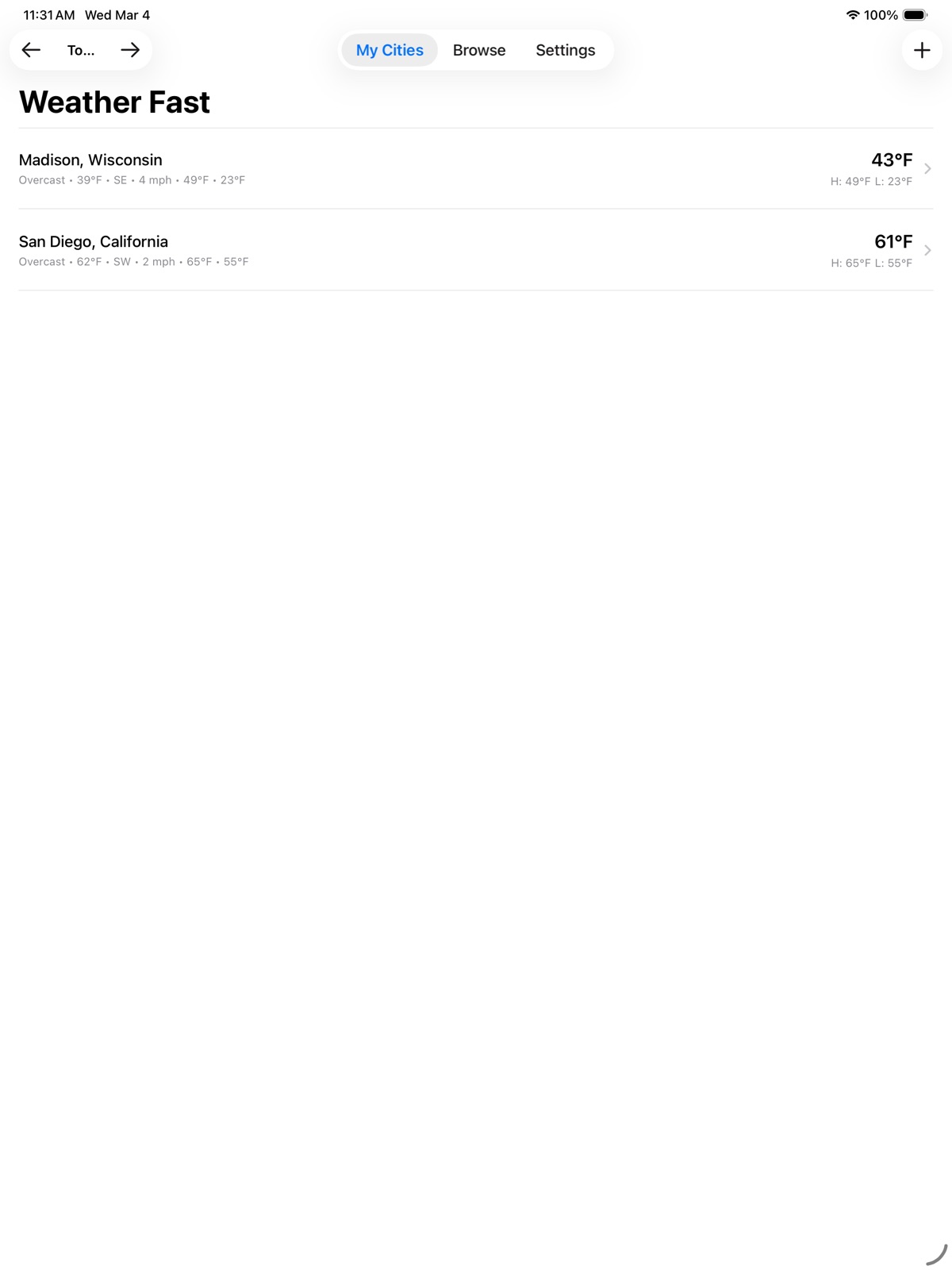
App Store
4 store screenshots
Pricing & paywalls
App Store
- Free to download
Ratings & reviews
App Store
-
5/5The power user's weather app!
This by far has to be the most extensive weather app I've used. Perfectly accessible with VO, nice and clean UI. Display the conditions and get as much detail as you wish. Tons of options for layout and ordering of information. The historical weather is a cool feature I've not seen before. Another nice touch is the Weather around me features. Great for traveling and planning, or just getting an idea of what conditions are like in cities around you. Not much else to say really. If you're a weather nerd who wants a simple yet powerful app, this is the ticket.
Icicle Salad · 7 Aug 2026
-
3/5nice weather app would like to see a few things added
hi, i didn't see a way to contact you. I would like to see a few things added 1 the ability to go by headings. through the days. 2 the ability to share the forecasts and alerts. thanks. once these things are added it will get 5 stars.
phoneman20201982 · 7 Aug 2026
Privacy & accessibility
App Store
Privacy
- Data Not Collected Developer declared
Accessibility
- Differentiate Without Color Alone — SUPPORTED Store published
- Voice Control — SUPPORTED Store published
- VoiceOver — SUPPORTED Store published
Versions
App Store
- 1.1
-
1.2
*Improved snow predictions by changing to Appel's WeatherKit for snow totals. Added a new table view for the weather city list display that may be of interest to VoiceOver users. To turn this on, go to Settings:Developer Settings: and turn on Table View. Then return go Settings and you'll have atable view along with list and flat for ways to show the weather on the home screen.
-
1.3.1
***New*** Glance Ahead is a new feature that gives you a quick glimpse into the next few hours for a city. Press and Hold on a city to bring up a menu for that city. The menu will now also show you an idea of what's coming in weather. Configure the Glance Ahead time from one to eight hours in settings. The default is four hours. VoiceOver users, you can use a VoiceOver action to have these short Glance Ahead messages read, triple tap with one finger to bring up the menu for a city or press and hold as well. ***Changed*** WeatherFast now uses an Apple setting/API to understand how to set default measurement units for your WeatherFast settings. Where metric is the default, this will now be set. Note, existing users will not have settings changed but new installs will get this updated experience.
-
1.4.3
***Fixed*** Loading weather issues have been corrected. ***New*** A new headings view for 16 day and 24 hour details is available. Turn this on in Settings. Browsing by state or country has been streamlined and states and countries can be marked as favorites for browsing. Favorites will show up on the browse page under a new Favorites heading.
-
1.5.1
***New*** Weather Around Me: The Weather Around Me feature has been enhanced to support more navigation options when exploring cities and additional details for each city. Explore modes are arc and corridor. Arc is what the system has used since the beginning and can be thought of as exploring a pie-shaped region from your starting point. You can now choose how wide the arc is with options of 10, 22.5, 45 and 90 degrees in the direction you are exploring. Corridor can be thought of as a straight line from your starting point with a width that you can choose. When moving through cities around you, WeatherFast can now tell you how far off a center line from your starting point to the end of your explore distance a city is as you explore. You can also configure several details about what is communicated. Settings for this functionality are in both the Weather Around Me Feature and the overall Settings page. VoiceOver users can also use action shortcuts on the Settings button within the feature to set explore mode and distances without opening the settings. The user guide, found within Settings, has more details on this functionality. The experience is still being refined and data validated so feedback is welcome. Expected Precipitation: When using the Expected Precipitation feature, if Apple's Weather Kit is supported, it will be used to provide the details about upcoming precipitation. Note that this is not available in all countries. You can also turn this change off in Settings:Developer Settings: Weather Kit Expected Precipitation. This is on by default and should lead to more accurate details about the next hour. ***Changed*** Behind the Scenes: Multiple improvements to API calls and more for Open Meteo have been made. This should be transparent to use of the app or speed things up and reduce situations where weather details are not available. If you notice something different and unexpected about your weather from the app, please let me know.
-
1.5.2
***New*** Widgets: WeatherFast now supports widgets on iOS. The app has three widget sizes. Small gives you the current temp, high and low for your first city or the city of your choosing. Medium adds precipitation chance for the current day. Large shows these details plus an abbreviated five-day forecast. The user guide has been updated with more details on the widgets as well. Icon Change: The icon indicating clear skies has been changed to reflect when it is night. A moon and stars are now used. VoiceOver wording remains unchanged. The user guide has been updated to reflect this as well with a description of the icon added to the section on icons and images used throughout the app. Temperature Sort: When using the browse feature to browse all cities in a state or country, two new temperature sorting options have been added. You can sort cities by temperature low to high or high to low. As a reminder, this is available on the Browse tab of the app where you pick a state or country to browse. Precipitation Time Prediction: The most likely time for precipitation has been added to Today's Forecast when browsing a city. It has also been added to the 24 hour details when you pick a day from the 16 day details and get a 24 hour view for that day.
-
1.5.3
***Fixed*** Historical Weather: A small fix so historical weather works again.
-
1.5.4
***New*** Sharing: A share button will now be present on the weather details for a city. Use that to share the current conditions and a brief three-day forecast along with a link to WeatherFast in the app store. Antarctica Added: Added multiple weather stations in Antarctica for browsing. Find these under the country browse list. ***Updated*** Northern Ireland Cities Added: In response to user feedback, I've added more cities to the browse list that includes Northern Ireland. If you want to see more city coverage for another location, drop me a note. Also, as a reminder, just because a city isn't in the browse list for a location does not mean it isn't available for adding. Use the search feature in the Add City experience. If your city isn't found at first, enter more of the city, state and country. ***Fixed*** Improved the way historical weather data is retrieved to try and eliminate cases where users find this feature is not working. Alerts: If a city in the city list had an active alert, moving that city's order could cause the alerts to be indicated for the wrong city. This has been corrected. Also, alerts were sometimes not being properly deleted from the city list when they were no longer active. If you went into a city detail, the alerts would not be present as expected. Overall, the reliability of weather alerts should be improved and accurate as far as matching what is reported from the National Weather Service or Apple. Please report any issues you find here.
-
1.5.4.4
***New*** Location Search: Searching for locations has been improved in WeatherFast. You can now search by street address as well as location names such as American Family Field or University of Wisconsin. When you add these locations to your city list, the location name will be used. In addition, if you search by zip code and add a city from a zip code search, that zip code will be shown in the city list. If you use a street address, the full street address will be used to obtain the location but only the street name and city will be used in the city list. Specific street addresses are not stored by WeatherFast. You can have multiple entries for the same city in your city list. Try two different zip codes or places to experience the different weather within a city for example. The VoiceOver name for Add City has been changed to Add location. This change also impacts the visual layout of the city list. Data coverage for place names varies by geography. If locations are not found, the app resorts to just city and the other default searches used previously. Finally, if you find something wrong with this change that is blocking your use of WeatherFast, the entire feature change can be turned off under Settings:Developer Settings:Specific Place Feature Names. **Meters per Second:** A new option for wind speed to be shown in meters per second has been added. In addition, for regions where this is the standard, WeatherFast will use this by default. This includes the Nordic countries (Norway, Sweden, Finland, and Iceland), Russia and much of the former Soviet states, the Baltic states, Japan, South Korea, China, and Israel. If you have iCloud Syncing turned on, make sure you update all versions of the app to this new version or your wind speed setting may revert back. If WeatherFast doesn't display wind speed in meters per second where you believe it should, you can go into Settings and adjust. **Return to Today:** VoiceOver actions for previous day and next day were already available on the city list screen for navigating weather by date. A new action, Return to Today, has been added alongside these. These actions correspond to the same UI buttons near the top of the city list screen. iCloud Sync: WeatherFast now supports iCloud Sync. Your city lists and settings will sync between various devices where you use the same Apple ID. Turn iCloud Sync on in Settings. Note it is a button near the end of Settings so if you use VoiceOver, activating the Settings tab and then swiping left might be a faster way to reach this option. When you turn on iCloud Sync, a dialog will alert you how many cities you have on the current device and how many are in iCloud. You can choose to use what's on your current device, what is in iCloud or not to sync. Choosing to use either city list will turn on iCloud syncing. Choosing not to sync, as you'd expect, does not turn the setting on.
-
1.5.5.3
***New*** My Location: A new feature called My Location has been added. WeatherFast will now detect your current location and show it as the first city in your city list. The app attempts to give you more than just a city, such as East Side Madison, Wisconsin or Midtown New York. If a specific location is not detected, the app will use a general city name. Although detected location appears in your city list, it will change based on your location. If you want to add the location to your list, use the press and hold menu and use Add to My Cities or from the location details screen, use the button to add to your cities. VoiceOver users can also use an action on the location name. You can also use options in the menu or VoiceOver actions to refresh your location. This can be handy when travelling for example. My Location has settings to turn the feature off temporarily and choose whether it is the first or last city in your city list. In developer settings, you can also completely turn the feature on or off. Find all of these on the Settings page in the app. When adding locations manually through the Add Location button, VoiceOver will also use the more specific place names when they can be found. Otherwise, it will default to just a city name as previously happened. If you have not given WeatherFast permission to use your location, the app will now prompt for this on first launch. ***Fixed*** iOS 27 Crash: Apple just released the first developer betas of iOS 27. A crash that could happen specific to iOS 27 on app launch has been fixed. If you find other issues when running on iOS 27, please report them.
-
1.5.8.5
***New*** Alert Browser: A new feature off the browse tab allows you to browse weather alerts from various government sources. You can choose the classification of alert (extreme, severe and more) and the type of weather (storm, flood and more). As an example, set the alerts to all and the type to storm and get an idea of where the severe weather is across a country. Note, this feature is currently available for the U.S., Canada and much of Europe with active work for feature refinement and additional data sources ongoing. Weather Attribution: A new Weather Attribution page has been added in Settings listing all the data providers used by WeatherFast. Alert Defaults: A new Save button has been added to the end of the recently added feature for browsing alerts. When you have selected an alert provider and the severity and category of alerts, you can use this to make it your default. Each time you visit the alerts going forward, the page will default to those settings. If you change settings and want to make those your new default, just use the Save button again. ***Changes*** Current Conditions Accuracy: The "right now" conditions for your cities are now powered by Apple WeatherKit's observation-based data instead of a forecast model where available. Before, a city could read "Thunderstorm" while it was actually dry. Current conditions now reflect what's really happening and stay consistent everywhere they appear — your city list, city details, Browse Cities, and Weather Around Me. Hourly and daily forecasts are unchanged. Alert Expirations: Fixed an issue where some weather alerts showed incorrect end dates.
-
1.5.9.3
· 1 Aug 2026
***New*** Air Quality (U.S. cities): City details now include an Air Quality section for U.S. locations. It leads with the current air quality index and category — Good, Moderate, Unhealthy and so on — from EPA AirNow ground monitors, followed by plain-language health guidance and a breakdown of the pollutants being measured. When an official air quality alert is active for that location, the section shows the alert and defers to it, so what you read reflects actual conditions such as wildfire smoke rather than a forecast model that can lag behind. The section is fully VoiceOver labeled, with the category word and the health guidance carrying the meaning rather than color, and you can reorder or hide it like any other detail section in Settings. Air quality is U.S. only for now, since both the observations and the alerts come from U.S. sources. International support will follow once it can use the correct regional index. Daylight Change: Under the daylight total in the forecast, WeatherFast now tells you how a day compares to the day before it — for example, "2 minutes less than yesterday." The wording follows you as you move between days, and the note is left off around the solstices when the change rounds to less than a minute. ***Changes*** Forecast Reliability: Fixed an issue where the 16-day forecast could show only a few days, or the 24-hour hourly forecast could go missing entirely. Weather requests now retry automatically after a dropped connection or a timeout, and large forecast requests are given more time to finish on slow cellular connections. If the full forecast still cannot be loaded, city details now say so and offer a Try Again button instead of quietly showing partial data. Data Sources: The Data Sources page in Settings now lists EPA AirNow and CAMS among the providers WeatherFast uses.
Alternatives
- Severe Weather Guardian — Same category + similar ratings
- Please Don't Rain — Same category + similar ratings
- NOAA Weather Radio — Same category + similar ratings
- Weatherology: Weather Together — Same category + similar ratings
- Acme Weather — Same category + similar ratings
- CNN Weather — Same category + similar ratings
Availability by market
- US
Data quality & evidence
- Page completeness
- Live store listing
- Last verified
- 7 Aug 2026
- Sources
- App Store
- Apoku editorial summary has not been published yet.