
Quick verdict
- What it is
- Store information collected; independent summary not yet available.
- At a glance
-
- $2.99
- In-app purchases
Categories and search queries
Official categories
- Lifestyle
- Utilities
AppCorpus categories
Key functions
| Function | Availability | Access | Scope | Evidence |
|---|---|---|---|---|
| In-app purchases | Yes | Limited free | — | Store published |
Screens
App Store
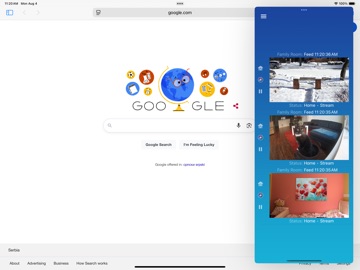
23 store screenshots


Pricing & paywalls
App Store
- Price: $2.99
- Big Tip — $2.99
- Generous Tip — $0.99
- Massive Tip — $4.99
Ratings & reviews
App Store
-
3/5♥️♥️♥️
iOS 18 update: Really hoping you’re able to update to the new style widgets, since iOS 18 doesn’t support the old style widgets! I’ve really come to rely on the camera views in my Today screen. —————- Original/years ago review, five stars: IT ACTUALLY DOES WHAT IT SAYS! Dropcam/Nest camera viewing on my (series two) Apple Watch. The camera widget for the phone is just a bonus - I’ve kept waiting for Nest to add camera support for the watch, and was thrilled to find a third party app filling that void. (And doing so well.)
sammy354364 · 6 Aug 2026
-
5/5Perfect Service!
This may only be my second app review ever? I’m not sure, but this one is worth it. This app is so convenient that I should have given it these five stars back when I first installed it. Being able to check my Nest camera feeds on my watch is very convenient and was the whole reason I downloaded it in the first place. What I did NOT anticipate was how useful the widget would be. Being able to simply swipe from my Home Screen and instantly see my four top cameras is legitimately a game changer. I used that function more than my watch or the Google Home app itself. Unfortunately sometime in the last few months something broke. I think it was most likely due to an iOS update, but I’m not sure. Whatever it was, the widget now fails to load the camera feeds and is depressingly empty. I’ve tried limiting it to a single feed, uninstalling/reinstalling, even adding and removing cameras but nothing has helped. Is this something that is fixable? Thank you for a great app! EDIT: The developer emailed me two days after my review with some suggestions regarding ways to possibly fix my issues. After multiple emails back and forth, he actually sent me a link to download and test some of his upcoming updates. The build I am using currently does not fully restore the old functionality (a problem I already suspected was on Apple’s end due to the timing of the feature breaking), but is a fantastic partial fix. I am very satisfied with this app and COMPLETELY happy with my interactions with the designer. Thank you Marko!
TuxedoKMax · 6 Aug 2026
-
5/5Extremely Helpful Developer
The app works just as I had hoped it would. I am able to see a live stream on my Apple Watch and the last event. When I purchased the the app the last event option would not display on my phone or watch. I contacted the developer and he worked with me for multiple days trying to get to the root cause. He never gave up and even offered me a refund. I declined his offer to refund because I knew his app worked due to a friend who has the app. He contacted Nest for me and I sent him some information that Nest asked for. The next day there’s a software update for my Nest app. And Nest had fixed the problem on there end. I do not leave many reviews but I really wanted to somehow thank the developer for being so diligent on getting this to work for me. I wish all developers were like the gentleman who created this app. I would not hesitate to purchase an app from this developer!
BobL1 · 6 Aug 2026
-
5/5GREAT watch app
I’ve long wanted the ability to quickly check the Nest Cam from my wrist (for example, when I wake up, to see if the baby has woken up, or to check in when I’m working out at the gym). This app works much better than I thought would be possible; it is fast, responsive, and refreshes the watch every few seconds, even if connected to your phone via Bluetooth. There’s also zoom, either by tapping or using the Digital Crown. You can switch between last activity and live stream by force pressing on the Watch. Fantastic! One feature request: improve the features on the phone/tablet app when you have time; it’s more useful than you think. For example, any chance the iPad could get Picture-in-Picture, which the Nest app doesn’t have? Thank you!
Janak Parekh · 6 Aug 2026
-
5/5Doesn’t Work Properly After Migration
Hi, when I migrated over to a Google account, your Watch Cam for Mac OS & Watch Cam for iOS both stopped displaying this, "Auto-Display Last Event Video Clip". I have logged out & back in, deleted & reinstalled & nothing will fix it. I have Nest Aware Plus and the clips still show perfectly on my Nest app. Please help because I seriously rely on that feature. I’ve emailed support numerous times, but nobody ever responded. Thank you. Thank you for responding. Changed rating to 5 Stars because other than this aspect, which is out of your control, the app is awesome! I’d make a suggestion that your app description also include what you’ll be losing if you migrate from Nest to Google. I might never have migrated had I known this. Thanks again!
Doren Sean Michael · 6 Aug 2026
Privacy & accessibility
App Store
Privacy
- Data Not Collected Developer declared
Accessibility
No accessibility labels collected yet.
Versions
App Store
-
7.0
Now with Siri voice control, Geofencing, and watch app Event Notifications when the watch is on its own on LTE network. 7.0 Update: * Geofencing support. The app will set your home into Away state (which can enable the Indoor Nest Cams) as soon as the phone exits the defined perimeter - and back into Home state when you get back in. You will receive notifications that confirm the Home/Away state has been successfully set, when these events happen. You can set the perimeter to be anything from very small, to several miles in radius. Use this feature if you are for any reason not happy with the similar functionality provided by the main Nest app. Note that if you already use this feature in Thermo Watch app, there's no need to set it up here as well - both perform the exact same function. * Each of your Nest homes can have one geofence. To set up fences, press the menu button in the top left, and select the option from the menu. Make sure to "Always Allow" location updates, as geofencing won't work otherwise. The app uses your location only to change the Home/Away state, and never sends your location anywhere. You will also be asked if you wish to receive notifications from the app. Notifications are sent to confirm that the Home/Away state has been successfully changed, after you cross the fence perimeter. * Watch app will now display latest recorded event notifications when watch is on its own on an LTE network. Watch Cam complication must be enabled on the watch face for this to work, and the notifications will be delayed a few minutes from when the event was actually recorded. It's also a good idea to start the app once, after the watch has gone onto LTE network, to ensure the notifications will be delivered. Due to these limitations, the watch app will send notifications only when the watch is on its own on an LTE (or a known WiFi) network. Once you're back in the proximity of the phone, you will continue receiving push notifications from the main Nest app. * Two new Siri shortcuts added: Start and Stop Camera Streaming. Thanks to Tom for suggesting this! * New setting added, which, when enabled, prevents the iOS device screen from turning off. Thanks to Erik for the idea! Previous updates: * Siri watch face platter added. It shows Camera status icon - which if green, indicates that all cameras are streaming; if yellow, it means that some cameras are off; and if gray, means that all cameras are off. It also shows the time since the last recorded event, and the camera from which the last event came from. Please note that to see continuous and timely updates of the Siri watch face platter, you should also enable the Watch Cam complication on the Siri watch face. * Using Siri voice shortcuts you can now set your home into Away or Home state, as well as display the live feeds and last events recorded by your cameras. All you have to do is say "Hey Siri, show me what's at the front door". * Shortcuts you've created can be used as part of the workflow in the Shortcuts app. * The Watch app supports all the new complications, with a special new one that actually shows you the snapshot from the camera of your choice. The snapshot updates every few minutes all on its own, so you'll have a recent view of your camera any time you look at the watch. Useful when waiting for that package to arrive. * Cameras can now be manually re-ordered in the iOS app, and the order will propagate to the iOS Widget, and the Watch app. Just pick and drag them up and down the list.
-
7.1
Now with Siri voice control, Geofencing, and watch app Event Notifications when the watch is on its own on LTE network. 7.1 Update: * Watch Event Notifications (when the watch is alone on LTE) now display the event snapshot. * If you were experiencing an issue with the initial startup of the app, after taking the watch from the charger, this update should resolve that. Previous updates: * Geofencing support. The app will set your home into Away state (which can enable the Indoor Nest Cams) as soon as the phone exits the defined perimeter - and back into Home state when you get back in. You will receive notifications that confirm the Home/Away state has been successfully set, when these events happen. You can set the perimeter to be anything from very small, to several miles in radius. Use this feature if you are for any reason not happy with the similar functionality provided by the main Nest app. Note that if you already use this feature in Thermo Watch app, there's no need to set it up here as well - both perform the exact same function. * Each of your Nest homes can have one geofence. To set up fences, press the menu button in the top left, and select the option from the menu. Make sure to "Always Allow" location updates, as geofencing won't work otherwise. The app uses your location only to change the Home/Away state, and never sends your location anywhere. You will also be asked if you wish to receive notifications from the app. Notifications are sent to confirm that the Home/Away state has been successfully changed, after you cross the fence perimeter. * Watch app will now display latest recorded event notifications when watch is on its own on an LTE network. Watch Cam complication must be enabled on the watch face for this to work, and the notifications will be delayed a few minutes from when the event was actually recorded. It's also a good idea to start the app once, after the watch has gone onto LTE network, to ensure the notifications will be delivered. Due to these limitations, the watch app will send notifications only when the watch is on its own on an LTE (or a known WiFi) network. Once you're back in the proximity of the phone, you will continue receiving push notifications from the main Nest app. * Siri watch face platter added. It shows Camera status icon - which if green, indicates that all cameras are streaming; if yellow, it means that some cameras are off; and if gray, means that all cameras are off. It also shows the time since the last recorded event, and the camera from which the last event came from. Please note that to see continuous and timely updates of the Siri watch face platter, you should also enable the Watch Cam complication on the Siri watch face. * Using Siri voice shortcuts you can now set your home into Away or Home state, Start/Stop streaming, as well as display the live feeds and last events recorded by your cameras. All you have to do is say "Hey Siri, show me what's at the front door". * Shortcuts you've created can be used as part of the workflow in the Shortcuts app. * The Watch app supports all the new complications, with a special new one that actually shows you the snapshot from the camera of your choice. The snapshot updates every few minutes all on its own, so you'll have a recent view of your camera any time you look at the watch. Useful when waiting for that package to arrive. * Cameras can now be manually re-ordered in the iOS app, and the order will propagate to the iOS Widget, and the Watch app. Just pick and drag them up and down the list.
-
7.2
Now with Siri voice control, Geofencing, and watch app Event Notifications when the watch is on its own on LTE network. 7.2 Update: * iOS app and the Widget now have a larger switch to turn the cameras on. * Cameras in the Widget can now be scrolled through by tapping on the status text above/below each of the camera views. This allows to have, for example, only one camera view in the widget, but up to 5 cameras can now be scrolled through that view (I couldn't add more than that, due to widget memory allocation constraints) * Fix for the bug where the home/away geofencing notification would show up twice in a row. Previous updates: * Geofencing support. The app will set your home into Away state (which can enable the Indoor Nest Cams) as soon as the phone exits the defined perimeter - and back into Home state when you get back in. You will receive notifications that confirm the Home/Away state has been successfully set, when these events happen. You can set the perimeter to be anything from very small, to several miles in radius. Use this feature if you are for any reason not happy with the similar functionality provided by the main Nest app. Note that if you already use this feature in Thermo Watch app, there's no need to set it up here as well - both perform the exact same function. * Each of your Nest homes can have one geofence. To set up fences, press the menu button in the top left, and select the option from the menu. Make sure to "Always Allow" location updates, as geofencing won't work otherwise. The app uses your location only to change the Home/Away state, and never sends your location anywhere. You will also be asked if you wish to receive notifications from the app. Notifications are sent to confirm that the Home/Away state has been successfully changed, after you cross the fence perimeter. * Watch app will now display latest recorded event notifications when watch is on its own on an LTE network. Watch Cam complication must be enabled on the watch face for this to work, and the notifications will be delayed a few minutes from when the event was actually recorded. It's also a good idea to start the app once, after the watch has gone onto LTE network, to ensure the notifications will be delivered. Due to these limitations, the watch app will send notifications only when the watch is on its own on an LTE (or a known WiFi) network. Once you're back in the proximity of the phone, you will continue receiving push notifications from the main Nest app. * Siri watch face platter added. It shows Camera status icon - which if green, indicates that all cameras are streaming; if yellow, it means that some cameras are off; and if gray, means that all cameras are off. It also shows the time since the last recorded event, and the camera from which the last event came from. Please note that to see continuous and timely updates of the Siri watch face platter, you should also enable the Watch Cam complication on the Siri watch face. * Using Siri voice shortcuts you can now set your home into Away or Home state, Start/Stop streaming, as well as display the live feeds and last events recorded by your cameras. All you have to do is say "Hey Siri, show me what's at the front door". * Shortcuts you've created can be used as part of the workflow in the Shortcuts app. * The Watch app supports all the new complications, with a special new one that actually shows you the snapshot from the camera of your choice. The snapshot updates every few minutes all on its own, so you'll have a recent view of your camera any time you look at the watch. Useful when waiting for that package to arrive. * Cameras can now be manually re-ordered in the iOS app, and the order will propagate to the iOS Widget, and the Watch app. Just pick and drag them up and down the list.
-
7.3
* Good news! On May 16, Google / Nest have announced that while the "Works With Nest" program will end on August 31, 2019, apps like this one will continue working indefinitely, as long as you do not migrate your Nest account onto a Google account. This is really a great news for all of the existing users, as there's now no danger of this app dying on you - and I will do my best to apply to Google's new security screening process, so that the app will also work for the new users, who join after the August 31. Previous major updates: * Geofencing support. The app will set your home into Away state (which can enable the Indoor Nest Cams) as soon as the phone exits the defined perimeter - and back into Home state when you get back in. You will receive notifications that confirm the Home/Away state has been successfully set, when these events happen. You can set the perimeter to be anything from very small, to several miles in radius. Use this feature if you are for any reason not happy with the similar functionality provided by the main Nest app. Note that if you already use this feature in Thermo Watch app, there's no need to set it up here as well - both perform the exact same function. * Each of your Nest homes can have one geofence. To set up fences, press the menu button in the top left, and select the option from the menu. Make sure to "Always Allow" location updates, as geofencing won't work otherwise. The app uses your location only to change the Home/Away state, and never sends your location anywhere. You will also be asked if you wish to receive notifications from the app. Notifications are sent to confirm that the Home/Away state has been successfully changed, after you cross the fence perimeter. * Watch app will now display latest recorded event notifications when watch is on its own on an LTE network. Watch Cam complication must be enabled on the watch face for this to work, and the notifications will be delayed a few minutes from when the event was actually recorded. It's also a good idea to start the app once, after the watch has gone onto LTE network, to ensure the notifications will be delivered. Due to these limitations, the watch app will send notifications only when the watch is on its own on an LTE (or a known WiFi) network. Once you're back in the proximity of the phone, you will continue receiving push notifications from the main Nest app. * Siri watch face platter added. It shows Camera status icon - which if green, indicates that all cameras are streaming; if yellow, it means that some cameras are off; and if gray, means that all cameras are off. It also shows the time since the last recorded event, and the camera from which the last event came from. Please note that to see continuous and timely updates of the Siri watch face platter, you should also enable the Watch Cam complication on the Siri watch face. * Using Siri voice shortcuts you can now set your home into Away or Home state, Start/Stop streaming, as well as display the live feeds and last events recorded by your cameras. All you have to do is say "Hey Siri, show me what's at the front door". * Shortcuts you've created can be used as part of the workflow in the Shortcuts app. * The Watch app supports all the new complications, with a special new one that actually shows you the snapshot from the camera of your choice. The snapshot updates every few minutes all on its own, so you'll have a recent view of your camera any time you look at the watch. Useful when waiting for that package to arrive. * Cameras can now be manually re-ordered in the iOS app, and the order will propagate to the iOS Widget, and the Watch app. Just pick and drag them up and down the list.
-
7.4
* Past August 31, 2019 this app may no longer work for new users. An update is coming that should hopefully rectify this. For the existing app users, and those who start using it before the August 31, the app will continue working indefinitely, as long as you do not migrate your Nest account onto a Google account. * An option called "Save Your Nest API Key" is added to the popup menu. This will copy your Nest API Key onto clipboard, so that you can then paste it into a password protected note, or some other secure location, to keep it safe. You may need this API Key to log into a Nest account on a new device, in a future version of this app. Please do this if you plan to keep using the app in the future. * When signing out of the Nest account, there are now two Sign out options. One of them will deauthorize your API Key, the other one will not. If you choose the deauthorize option after the August 31, you may not be able to log back into the app, even if you saved the API Key as described in the previous step. Deauthorizing will make that API key invalid. For any questions and clarifications of the above, please contact: [email protected]
-
7.5
* This version of the app restores the ability for new users to log in and see their Nest Cams - for as long as they are on a Nest account, and not on a Google account. For Nest account users, the app will be fully functional: Siri control of your cameras and home/away state, Watch App, iOS Widget, Geofencing. It all works. Google account support is coming soon.
-
7.6
* This app allows new users to log in and see their Nest Cams - for as long as they are on a Nest account, and not on a Google account. For Nest account users, the app will be fully functional: Siri control of your cameras and home/away state, Watch App, iOS Widget, Geofencing. It all works. Google account support is coming soon. Version 7.6: * Dark Mode support in iOS13, both in the app and the Widget. Siri Shortcuts and Geofence panels are presented in a nice looking popover card view under iOS13. * Fix for live feed not showing up for users in UK. Thanks to Umar for helping me solve this problem! If you are from another European country, and seeing this problem, please get in touch with me at [email protected]. I'll need your help to fix this problem for you and your fellow countrymen. * Fix for the login not working for users in UK who had their device's clock set to 12h mode. Thanks to Tom for figuring this out!
-
7.7
* This app allows new users to log in and see their Nest Cams - for as long as they are on a Nest account, and not on a Google account. For Nest account users, the app will be fully functional: Siri control of your cameras and home/away state, Watch App, iOS Widget, Geofencing. It all works. Google account support is coming soon. Version 7.7: * Better handling of the camera snapshot complication on Infograph watch faces. This complication should now appear immediately after first exiting the app, and update regularly from there. Version 7.6: * Dark Mode support in iOS13, both in the app and the Widget. Siri Shortcuts and Geofence panels are presented in a nice looking popover card view under iOS13. * Fix for live feed not showing up for users in UK. Thanks to Umar for helping me solve this problem! If you are from another European country, and seeing this problem, please get in touch with me at [email protected]. I'll need your help to fix this problem for you and your fellow countrymen. * Fix for the login not working for users in UK who had their device's clock set to 12h mode. Thanks to Tom for figuring this out!
-
7.8
* This app allows new users to log in and see their Nest Cams - as long as they are on a Nest account, and not on a Google account. For Nest account users, the app will be fully functional: Siri control of your cameras and home/away state, Watch App, iOS Widget, Geofencing. It all works. Google account support is coming soon. Version 7.8: * Fix for the live feed not working in some of European countries. Previous versions updates: * Dark Mode support in iOS13, both in the app and the Widget. Siri Shortcuts and Geofence panels are presented in a nice looking popover card view under iOS13.
-
7.8.1
* This app allows new users to log in and see their Nest Cams - as long as they are on a Nest account, and not on a Google account. For Nest account users, the app will be fully functional: Siri control of your cameras and home/away state, Watch App, iOS Widget, Geofencing. It all works. Google account support is coming soon. Version 7.8.1: * Recompiled with newest XCode to eliminate the Login screen crash when running on iOS less than 13.2. Version 7.8: * Fix for the live feed not working in some of European countries. Previous versions updates: * Dark Mode support in iOS13, both in the app and the Widget. Siri Shortcuts and Geofence panels are presented in a nice looking popover card view under iOS13. This field is required.
-
7.9
* This app allows users to log in and see their Nest Cams - as long as they are on a Nest account created before September 1, 2019, that has not been migrated to a Google account. Right now, it does not support login with a Google Nest account created after the September 1st. Support for Google accounts is coming in early 2020, once Google launches their new Device Access program. Anyone with a Google account who has already purchased the app - feel free to contact [email protected] for a refund. Version 7.9 * Added the ability to log in with the Nest API key. Please save your API Key using the menu option in the app. If the option is available to you, it will be in the menu that opens when you tap the menu button in the top/left corner. It could prove useful in future-proofing the app for users who wish to stay on the Nest account. * Bug fixes.
-
7.9.1
* This app allows users to log in and see their Nest Cams - as long as they are on a Nest account created before September 1, 2019, that has not been migrated to a Google account. Right now, it does not support login with a Google Nest account created after the September 1st. Support for Google accounts is coming in early 2020, once Google launches their new Device Access program. Anyone with a Google account who has already purchased the app - feel free to contact [email protected] for a refund. Version 7.9.1 * Added Contact Support buttons on the login page and in the app menu. * Fix for the Watch face complication not updating throughout the whole day. * Fix for the widget sometimes failing to load for users with 5 or more cameras. * Added the ability to log in with the Nest API key. Please save your API Key using the menu option in the app. If the option is available to you, it will be in the menu that opens when you tap the menu button in the top/left corner. It could prove useful in future-proofing the app for users who wish to stay on the Nest account.
-
7.9.2
* This app allows users to log in and see their Nest Cams - as long as they are on a Nest account created before September 1, 2019, that has not been migrated to a Google account. Right now, it does not support login with a Google Nest account created after the September 1st. Support for Google accounts is coming in early 2020, once Google launches their new Device Access program. Anyone with a Google account who has already purchased the app - feel free to contact [email protected] for a refund. Version 7.9.2 * Fixed a problem with the login. Version 7.9.1 * Added Contact Support buttons on the login page and in the app menu. * Fix for the Watch face complication not updating throughout the whole day. * Fix for the widget sometimes failing to load for users with 5 or more cameras. * Added the ability to log in with the Nest API key. Please save your API Key using the menu option in the app. If the option is available to you, it will be in the menu that opens when you tap the menu button in the top/left corner. It could prove useful in future-proofing the app for users who wish to stay on the Nest account.
-
7.9.5
* This app allows users to log in and see their Nest Cams - as long as they are on a Nest account created before September 1, 2019, that has not been migrated to a Google account. Right now, it does not support login with a Google Nest account created after the September 1st. Support for Google accounts is coming in early 2020, once Google launches their new Device Access program. Anyone with a Google account who has already purchased the app - feel free to contact [email protected] for a refund. Version 7.9.5 * Tip Jar added to the app menu. If Watch Cam has changed your home experience for the better, please consider giving a small tip. Version 7.9.1 * Added Contact Support buttons on the login page and in the app menu. * Fix for the Watch face complication not updating throughout the whole day. * Fix for the widget sometimes failing to load for users with 5 or more cameras. * Added the ability to log in with the Nest API key. Please save your API Key using the menu option in the app. If the option is available to you, it will be in the menu that opens when you tap the menu button in the top/left corner. It could prove useful in future-proofing the app for users who wish to stay on the Nest account.
-
8.0
*You can now sign in with a Google account. *You can save the Google API Key from the app menu. As usual, it's advisable to do this. * Tip Jar added to the app menu. If Watch Cam has changed your home experience for the better, please consider giving a small tip. Any problems with the app - feel free to contact [email protected] for support. This app and its developer are unaffiliated with Google Inc. or Google Nest.
-
8.1
*You can now sign in with a Google account. *You can save the Google API Key from the app menu. As usual, it's advisable to do this. *Camera names should now always appear correctly. *Tip Jar added to the app menu. If Watch Cam has changed your home experience for the better, please consider giving a small tip. Any problems with the app - feel free to contact [email protected] for support. This app and its developer are unaffiliated with Google Inc. or Google Nest.
-
8.2
*You can now sign in with a Google account. *You can save both the Google account and Nest account API Key from the app menu. As usual, it's advisable to do this. *Nest account users now won't have to sign back in every 30 days. *The app should now always have perfectly smooth, flicker-free launch transition on iOS. *Tip Jar added to the app menu. If Watch Cam has changed your home experience for the better, please consider giving a small tip. Any problems with the app - feel free to contact [email protected] for support. This app and its developer are unaffiliated with Google Inc. or Google Nest.
-
8.3
* Added support for iOS/iPadOS 14 and watchOS 7. Previous major updates: *You can now sign in with a Google account. *You can save both the Google account and Nest account API Key from the app menu. As usual, it's advisable to do this. *Tip Jar added to the app menu. If Watch Cam has changed your home experience for the better, please consider giving a small tip.
-
8.4
* Fix for the Watch app authorization problem that has affected some users. Previous major updates: *Added support for iOS/iPadOS 14 and watchOS 7. *You can sign in with a Google account or a Nest account. *You can save both the Google account and Nest account API Key from the app menu. As usual, it's advisable to do this. *Tip Jar added to the app menu. If Watch Cam has changed your home experience for the better, please consider giving a small tip.
-
8.5
* Faster watch app live feed startup. * Watch app can now be manually authorized from the iOS app. * Fix for a tricky problem where the watch app wouldn't always start the feed, when swiping from one camera to another. * Improved reliability of the Geofence functionality. Huge thanks to David for relentlessly testing this! * The app will now warn if the "Shortcuts" app is not found, when trying to add Siri Shortcuts. Previous major updates: * You can sign in with a Google account or a Nest account. * You can save both the Google account and Nest account API Key from the app menu. As usual, it's advisable to do this. * Tip Jar added to the app menu. If Watch Cam has changed your home experience for the better, please consider giving a small tip.
-
8.5.1
* Fix for the problem where the iOS widget could stop updating. 8.5 Update: * Faster watch app live feed startup. * Watch app can now be manually authorized from the iOS app. * Fix for a tricky problem where the watch app wouldn't always start the feed, when swiping from one camera to another. * Improved reliability of the Geofence functionality. Huge thanks to David for relentlessly testing this! * The app will now warn if the "Shortcuts" app is not found, when trying to add Siri Shortcuts. Previous major updates: * You can sign in with a Google account or a Nest account. * You can save both the Google account and Nest account API Key from the app menu. As usual, it's advisable to do this. * Tip Jar added to the app menu. If Watch Cam has changed your home experience for the better, please consider giving a small tip.
-
8.6
• Support for all new Nest Cameras. • Full screen support for the Series 7 watches. • Fix for the context menu sometimes not working. • Fix for the complication icon sometimes disappearing and only showing two dashes. • Proper app name will now appear when confirming the Siri shortcuts on the watch.
-
8.7
• Support for Gen 2 Doorbell. • Full screen support for Apple Watch Ultra.
-
8.7.1
• Support for Migrated Cameras. • Full screen support for Apple Watch Series 10.
-
8.7.2
· 17 May 2026
• Support for all the latest Cameras. • Full screen support for newest Apple Watch models. • Modernized visuals under iOS 26. Liquid Glass look added to some of the elements.
Alternatives
- HomeCam for HomeKit — Same category + similar ratings
- Home Alerts - Smart Security — Same category + similar ratings
- ZoomOn Home Security Camera — Same category + similar ratings
- Sentry Pro—For your Tesla — Same category + similar ratings
- Controller for HomeKit — Same category + similar ratings
- Hue Essentials — Same category + similar ratings
Availability by market
- US
Data quality & evidence
- Page completeness
- Live store listing
- Last verified
- 6 Aug 2026
- Sources
- App Store
- Independent summary has not been published yet.