
Quick verdict
- What it is
- Store information collected; an Apoku editorial summary is not yet published.
- At a glance
-
- Free to download
Categories and search queries
Official categories
- Photo & Video
- Video Players & Editors
Apoku categories
Key functions
| Function | Availability | Access | Scope | Evidence |
|---|---|---|---|---|
| Free app | Yes | Free | Context-specific | Store published |
Screens
21 store screenshots


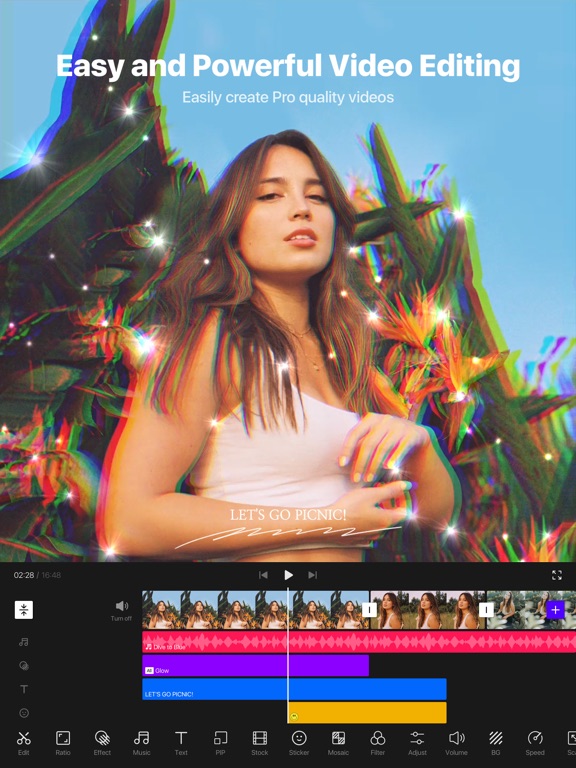

7 store screenshots


Pricing & paywalls
- Free to download
- Free to download
Ratings & reviews
-
5/5AMAZING 🤩
So I got this app not expecting much from it but when I got it I could do SO MUCH. I swear this app is amazing it edits almost everything by itself you don’t have to do any of the hard work, they didn’t have to make this app so good but they chose to make it the best app ever. This app allows edits from ever holiday I believe, this app is also able to be used to post on different stuff, or make cool edits of you with your best friend! I showed my friend this app and she LOVED it we both used the app so much, I showed my mom and dad the app because it’s just so cool and they got it, I know I said this already but the edits are so cool you could spend hours on a edit, but wouldn’t you rather just get this app? The app has so many choices of edits you can do, I haven’t tried yet but I don’t think there is a limit to photos though if there is that’s not a big deal. All that matters is this app is really good at editing, and that you can use all your saved memories and put it in here to make it look fantastic. This app isn’t just a app you can use to edit, you can also spend hours with any of your family members or friends just finding cool pictures and making it an edit, if there happens to be a limit (which there shouldn’t be) then you could make a whole movie sometimes I do gacha films and can’t find where to make it like a movie, now I found this app and it’s a big help. I always see only good reviews on this app and people have no reason to hate, so if you love to edits things and do cool stuff download this app it will really save your time and come out with the result of the coolest edits ever. Hope you agree that this app is just this cool!
person75628 · 29 Sep 2026
-
5/5It’s alright. (Please read!)
Hello, I’m really tired so you should be grateful I’m giving you this feedback. While I was trying to make a video, (I used blank screen, and pip,) I couldn’t add any transitions. Also, I couldn’t see the stickers. I’m not sure if this is just a glitch and it will clear up, but it’s annoying and if there are any other reviews about this problem, please look into them. Anyways, with the positive reviews (before the update and when everything was broken). It’s an amazing app and I love to use it for editing, also I use VITA for intros, also I’m going to interrupt the positive feedback for a bit, I’m not sure if this is a WiFi problem but.. nothing will load. It works for a little bit then literally stops working. Also, I mean the additions, stickers, and effects, not the app. Okay, back to the feedback. It’s the best app for intros, and it has a lot of styles. It’s really fun to edit on the VITA app, and I’m proud that you used Nutshell Animation’s video for the ad! I’m a big fan of him. Also, I’ve been using the app for 1 or 2 years, and, there has been a few glitches here and there, but nothing too serious to contact you about. And.. I’m sorry if this is too stressing or I’m being to stressing or.. whatever, I’m just sorry I had to write this much. Anyways, I’m giving it a 5 because it’s a good app to edit on. I’m taking 1 star off because it glitches. I’m taking 1 star off again, because I can’t make videos. I’m leaving 3 stars because it seems like the VITA crew reads the reviews and tries to fix the problem, VITA has some great editing effects, and it works properly and doesn’t shorten the song, it annoys me when an app just shortens a song. Thank you if your reading/if you read this, have a great day, VITA team.
kenzay wenzay · 29 Sep 2026
-
5/5BEST APP FOR EDITING!!! Download right now!
This app literally has saved me money and literally my life. I use this app to do presentations for my school and literally it’s so easy and it doesn’t make you stress. And everything is for free. If you need to put in a song you can either do you’re own music or record music and extract it from photos which is literally sooooooo nice one of my favorite features. Second thing if you need any gif, text, stickers or slide translations everything is for free and many chooses to chose from. There are many fonts and aesthetics to choose from and it’s literally so cute. They added a new future which you can choose the style. Another thing I love about this besides everything is free and easy to use is when you delete or leave the app everything that you worked on is safely saved in the app and all you have to do is open the app and pick the project either finish it or save it in you’re photos or post in you’re social media. LITERALLY it’s that easy. Everyone download rn you won’t regret it I swear. I love love love down to earth love this app
dhnAysjtsiydoudulrykdgvbvvvvv · 29 Sep 2026
-
4/5It’s amazing but..
So I love this app and all but I mean there’s a little problem with it. So one day when I was going to watch one of my videos and said my storage was full so I decided to get rid of some videos and photos then it said when I was trying to watch that video it said that those photos were deleted. and I don’t really like that. so like I’m thinking about trying CapCut sorry Vita but can you just fix that please I mean it’s a great app can’t really search for stickers can’t really find any of my favorite songs on the music thing so yeah this is an amazing app but it’s just it has a few problems and I would fix those if I were working there like to make this app. so can you make it so I don’t really have to have the videos in my photos because some of my favorite videos I still have to keep the videos and like my storage is getting really full and I can’t get any other apps so that just stinks. And, do you know what it’s fine I mean just like if you’re reading this can you just please try to do something about that because I don’t like it and I read some reviews where other people don’t like it so I mean all the crowds demand please bye also happy Halloween
mygamereveiw · 29 Sep 2026
-
4/5It’s pretty good, but it needs some work
This is a great app replacement for CapCut, but it definitely needs some improvements. My main grievances are that when you split part of a video (without editing it) it sorta has this weird “gap” or “jump” between the clips and that’s very annoying. It should still play smoothly as if you never split it, so I guess they automatically shorten it by a millisecond or 2 when you split a part of your video and I really don’t like that. When you split clips of a video without doing anything to it, it should still play smoothly as if you never split it, so I’d appreciate it if that could be fixed. My other issue is that when you’re trying to shorten or lengthen your video by dragging the little white ends, it doesn’t keep going when you’ve reached the edge of the screen. You have to drag it all the way to the edge of the screen, then swipe to get more footage to cut, then drag to the edge again and so on and so forth until you’ve reached where you want to stop cutting (I hope that made sense). That’s pretty annoying too, especially when you’re editing a video that’s longer than a couple minutes and there’s a lot of footage you want to cut in one piece. I will say that I love that it has a lot of similar tools and features that CapCut has (though, it certainly doesn’t have as many as CapCut, but I’m sure that can be improved over time and they can add more stuff) and my favorite part about this app is that it’s free! PLEASE don’t ever make a “pro” subscription feature! I swear every video editing app (and just every app in general because companies are so freaking greedy) has some sort of locked feature that you can only get with a subscription, so it’s SO refreshing to find in this day and age that you can get such a good quality app for free! Thank you for that!
PastelFangirl · 29 Sep 2026
-
1/5
My app glitched horribly after i tried reversing a short clip, Now it tells me my edit is -17 seconds long and I'm unable to export it or save it at all. Overall the app is Unresponsive, laggy and slow. Very frustrating to work with. I'm not sure if I'll be able to save my last five hours of work, if not, i hope you manage to fix the bug soon. i wanted to have my work done by tomorrow.
ToSomZabil · 1 Aug 2026
-
5/5
super result
Madhavan Madhavan · 1 Aug 2026
-
5/5
nice
pratim das · 1 Aug 2026
-
5/5
it is the amazing aap l love this aap ..
Jyoti Shinde · 1 Aug 2026
-
5/5
yah app bahut hi mahatvpurn app hai jismein free mein aap editing kar sakte hain youtuber ke liye yah apps sabse best app ha
Ram Yadav · 1 Aug 2026
Privacy & accessibility
Privacy
- Data Not Linked to You — Analytics — Diagnostics — Crash Data Developer declared
- Data Not Linked to You — Analytics — Diagnostics — Other Diagnostic Data Developer declared
- Data Not Linked to You — Analytics — Diagnostics — Performance Data Developer declared
- Data Not Linked to You — Analytics — Usage Data — Product Interaction Developer declared
- Data Not Linked to You — App Functionality — Diagnostics — Crash Data Developer declared
- Data Not Linked to You — App Functionality — Diagnostics — Other Diagnostic Data Developer declared
- Data Not Linked to You — App Functionality — Diagnostics — Performance Data Developer declared
- Data Not Linked to You — App Functionality — Usage Data — Product Interaction Developer declared
- Data Not Linked to You — Developer’s Advertising or Marketing — Identifiers — Device ID Developer declared
- Data Not Linked to You — Diagnostics Developer declared
- Data Not Linked to You — Identifiers Developer declared
- Data Not Linked to You — Usage Data Developer declared
- Data Used to Track You — Identifiers — Device ID Developer declared
- Data Used to Track You — Identifiers Developer declared
Accessibility
No accessibility labels collected yet.
Privacy
- Data collected — Analytics — App info and performance — Crash logs Developer declared
- Data collected — Analytics — App info and performance — Diagnostics Developer declared
- Data collected — Analytics, Advertising or marketing — Device or other IDs Developer declared
- Security practices — The developer doesn’t provide a way for you to request that your data be deleted — Data can’t be deleted Developer declared
- Security practices — Your data isn’t transferred over a secure connection — Data isn’t encrypted Developer declared
Accessibility
No accessibility labels collected yet.
Versions
-
300.5.0
1. Speed feature update - Adjust the video speed dynamically using the Curve feature. - Create smooth, slow-motion videos with the Smooth feature. 2. Cut Out - It is now possible to cut out the background. - Create awesome collage videos! 3. Chromakey - A chromakey can be applied to original photos and videos. 4. Mosaic improvement - The feather value can be adjusted. 5. UI and usability improvements
-
300.5.1
1. Speed feature update - Adjust the video speed dynamically using the Curve feature. - Create smooth, slow-motion videos with the Smooth feature. 2. Cut Out - It is now possible to cut out the background. - Create awesome collage videos! 3. Chromakey - A chromakey can be applied to original photos and videos. 4. Mosaic improvement - The feather value can be adjusted. 5. UI and usability improvements
-
300.5.5
1. Speed feature update - Adjust the video speed dynamically using the Curve feature. - Create smooth, slow-motion videos with the Smooth feature. 2. Cut Out - It is now possible to cut out the background. - Create awesome collage videos! 3. Chromakey - A chromakey can be applied to original photos and videos. 4. Mosaic improvement - The feather value can be adjusted. 5. UI and usability improvements
-
301.0.0
1. The usability has been improved for easier editing. 2. Performance and stability have also been much improved! 3. Some screens may display [Advertising]. - Ad revenue is used to improve VITA’s service for better features and contents. VITA will do its best to minimize any inconvenience or discomfort caused by ads. Please report any ads that are uncomfortable to view through Contact in Settings. We will take immediate action. 4. Contact [VITA > Settings > Inquiry] to send any inquiries.
-
301.0.1
1. The usability has been improved for easier editing. 2. Performance and stability have also been much improved! 3. Some screens may display [Advertising]. - Ad revenue is used to improve VITA’s service for better features and contents. VITA will do its best to minimize any inconvenience or discomfort caused by ads. Please report any ads that are uncomfortable to view through Contact in Settings. We will take immediate action. 4. Contact [VITA > Settings > Inquiry] to send any inquiries.
-
301.0.2
1. The usability has been improved for easier editing. 2. Performance and stability have also been much improved! 3. Some screens may display [Advertising]. - Ad revenue is used to improve VITA’s service for better features and contents. VITA will do its best to minimize any inconvenience or discomfort caused by ads. Please report any ads that are uncomfortable to view through Contact in Settings. We will take immediate action. 4. Contact [VITA > Settings > Inquiry] to send any inquiries.
-
301.0.3
1. The usability has been improved for easier editing. 2. Performance and stability have also been much improved! 3. Some screens may display [Advertising]. - Ad revenue is used to improve VITA’s service for better features and contents. VITA will do its best to minimize any inconvenience or discomfort caused by ads. Please report any ads that are uncomfortable to view through Contact in Settings. We will take immediate action. 4. Contact [VITA > Settings > Inquiry] to send any inquiries.
-
301.0.4
Improved the overall stability and fixed bugs.
-
301.0.5
Improved the overall stability and fixed bugs.
-
302.0.0
Improved the overall stability and fixed bugs.
-
302.0.1
Improved the overall stability and fixed bugs.
-
302.0.11
Export errors have been fixed and stability improved.
-
302.0.12
Errors have been fixed and stability improved.
-
302.0.14
Errors have been fixed and stability improved.
-
302.0.15
Errors have been fixed and stability improved.
-
302.0.16
Errors have been fixed and stability improved.
-
302.0.18
Errors have been fixed and stability improved.
-
302.0.19
Errors have been fixed and stability improved.
-
302.0.2
Improved the overall stability and fixed bugs.
-
302.0.20
· 20 Jul 2026
Errors have been fixed and stability improved.
-
302.0.21
· 13 Aug 2026
Errors have been fixed and stability improved.
-
302.0.3
Improved the overall stability and fixed bugs.
-
302.0.4
Improved the overall stability and fixed bugs.
-
302.0.5
Improved the overall stability and fixed bugs.
-
302.0.8
Improved the overall stability and fixed bugs.
-
302.0.9
Export errors have been fixed and stability improved.
- 302.0.20 · 24 Jul 2026
- 302.0.21 · 13 Aug 2026
- 302.0.23 · 11 Sep 2026
Alternatives
- Blurrr-Music video editor — Same category + similar ratings
- Funimate Video & Motion Editor — Same category + similar ratings
- VLLO- Video Editor, Vlog Edits — Same category + similar ratings
- Filmmaker Pro - Video Editor — Same category + similar ratings
- KineMaster - AI Video Editor — Same category + similar ratings
- VN: Photo & Video Editor — Same category + similar ratings
Availability by market
- US
Data quality & evidence
- Page completeness
- Live store listing
- Last verified
- 30 Sep 2026
- Sources
- App Store, Google Play
- Apoku editorial summary has not been published yet.