
Quick verdict
- What it is
- This app provides real-time GPS location of buses and predicted arrival times at stops, helping users navigate San Francisco's public transit system.
- Best for
-
- someone who takes public transit in San Francisco
- At a glance
-
- Free to download
- In-app purchases
Categories and search queries
Official categories
- Navigation
- Travel
AppCorpus categories
Key functions
| Function | Availability | Access | Scope | Evidence |
|---|---|---|---|---|
| Free app | Yes | Free | — | Store published |
| In-app purchases | Yes | Limited free | — | Store published |
Screens
App Store
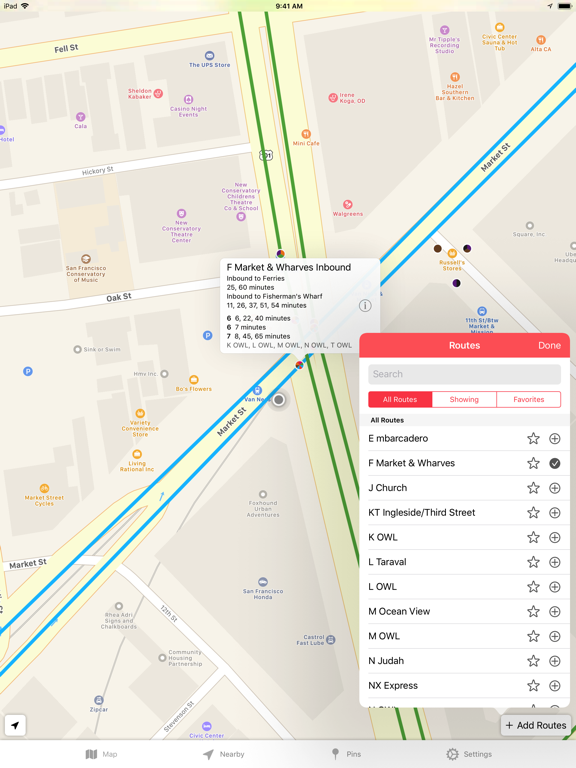
14 store screenshots


Pricing & paywalls
App Store
- Remove ads — $1.99
Ratings & reviews
App Store
-
2/5nearby stops default is annoying
I’m pretty sure some of the users already know which stops to track. You guys should include a setting to set pinned items all the way on the top row instead of last rows. Like me, the stop that I track is four blocks away from my house. It’s a good 10-minute walk. I have to scroll all the way down to see my stop. Overall, it’s a great app with more growth.
Irwin Val · 7 Aug 2026
-
5/5Excellent Ap
Does a nice job with routes and is fairly accurate with predicting bus or tram or car arrivals. Very helpful. Takes a little getting used to but effective and well done over all. Would like this combined with the ticketing app for easier toggling but small issue. Must have for our out towners trying to use the transportation system.
UroSmith · 7 Aug 2026
-
4/5Best App for Transit Times
This is the best app I’ve found for timing when your bus or muni is arriving. I have noticed a glitch when there is construction (like the 2 month Forrest Hill tunnel project) and times aren’t available. When the regular muni is back in service times still aren’t available on the app. Simply deleting and reinstalling the app fixes this.
BDavis19 · 7 Aug 2026
-
4/5Great! - but..
I’ve used this app almost as long as I’ve lived in the city and it’s been nothing but reliable (for the most part, ha!). But I’ve recently realized that all the underground muni have been removed from the map and made the commute super UNreliable. :( They’re part of the muni system so not sure what happened and wish they’d fix the issue, but there hasn’t been an update in so long it seems pretty far fetched..
silly jazz · 7 Aug 2026
-
1/5Has become less functional over time
When I first got this app, I thought it was great, given the number of Muni bus stops without information on upcoming bus arrivals. Then all of a sudden, one by one, each line that I most frequently used the app for stopped showing up on the map. No stops were showing up anywhere along the route. We are not talking about minor bus routes, but lines like the 24 Divisadero, the 22 Fillmore, and the Van Ness buses. So it is basically useless now. A shame, because I thought it was a great app initially.
jay.p.paul · 7 Aug 2026
Privacy & accessibility
App Store
Privacy
- Data Not Linked to You — Analytics — Diagnostics — Performance Data Developer declared
- Data Not Linked to You — Analytics — Identifiers — Device ID Developer declared
- Data Not Linked to You — Analytics — Location — Coarse Location Developer declared
- Data Not Linked to You — Analytics — Usage Data — Product Interaction Developer declared
- Data Not Linked to You — App Functionality — Diagnostics — Crash Data Developer declared
- Data Not Linked to You — Third-Party Advertising — Diagnostics — Performance Data Developer declared
- Data Not Linked to You — Third-Party Advertising — Identifiers — Device ID Developer declared
- Data Not Linked to You — Third-Party Advertising — Location — Coarse Location Developer declared
- Data Not Linked to You — Third-Party Advertising — Usage Data — Advertising Data Developer declared
- Data Not Linked to You — Third-Party Advertising — Usage Data — Product Interaction Developer declared
- Data Not Linked to You — Diagnostics Developer declared
- Data Not Linked to You — Identifiers Developer declared
- Data Not Linked to You — Location Developer declared
- Data Not Linked to You — Usage Data Developer declared
- Data Used to Track You — Diagnostics — Performance Data Developer declared
- Data Used to Track You — Diagnostics Developer declared
- Data Used to Track You — Identifiers — Device ID Developer declared
- Data Used to Track You — Identifiers Developer declared
- Data Used to Track You — Location — Coarse Location Developer declared
- Data Used to Track You — Location Developer declared
- Data Used to Track You — Usage Data — Advertising Data Developer declared
- Data Used to Track You — Usage Data — Product Interaction Developer declared
- Data Used to Track You — Usage Data Developer declared
Accessibility
No accessibility labels collected yet.
Versions
App Store
- 1.0
-
1.01
- Removed Muni worm logo as requested by SFMTA
-
1.2
* This update will reset favorites and pinned stops. I will try my best to avoid this in future updates. - Added a table to see all pinned stops at once along with their predictions - Can customize sorting so that the most frequently used route can be shown at the top - Added an option to switch to countdown format - Shows vehicle ID when a vehicle is tapped - Created a button to zoom to current location on the map - Will relocate to current location whenever app is opened - UI improvements * Please send me any suggestions for new features that you would like to see in MuniWatch.
-
1.3
- For performance, the app will only display stops in the current region. This speeds up app launch significantly. If you prefer to see all the stops for your routes, there is an option to show all the stops. - Fixed handling of predictions. - Bug fixes
-
1.4
- Bug fixes - Updated look - Added a menu item to restore "remove ads" purchase - Fixed tapping the status bar to scroll to top
-
1.4.1
iPhone 5 support
-
1.4.2
- Bug fixes - Added crash reporting feature
-
1.5.1
- Bug fixes - Move "locate me" button to the bottom as requested
-
2.0.0
Completely redesigned for iOS 7! Thank you for your patience. Several other improvements: - New "Nearby" section to see nearby stops at a glance - Countdown showing seconds - Pin several routes at a stop If you like MuniWatch, please leave a review on the App Store. Every positive review helps!
-
2.0.2
- Favorite routes are back! - Fixed a bug where the same vehicle can show up more than once on the map. - Fixed crashes 2.0.0 Release ------------ Completely redesigned for iOS 7! Thank you for your patience. Several other improvements: - New "Nearby" section to see nearby stops at a glance - Countdown showing seconds - Pin several routes at a stop If you like MuniWatch, please leave a review on the App Store. Every positive review helps!
-
2.1
- Optimized for iPhone 6 and iPhone 6 Plus - Bug and crash fixes
-
2.2
Now you can access your pinned stops in your notification tray! If you love MuniWatch, please leave a 5-star review. It really helps :)
-
2.2.1
Bug fixes and improvements
-
2.2.4
Updated Today Widget for iOS 10
-
2.2.5
Fixes a crash when route is updated. Sorry about that! Try out pinned stop widget on iOS 10 to quickly see arrival times on your favourite stops. If you like MuniWatch, please leave a good review on the App Store. It really helps!
-
3.0
A long overdue update! - Updated design for easier navigation - Design change on routes menu: tap on ⊕ to add it to the map, tap on star to save it under favorites - I know many of you thought the font size was too small. Now, the app will respect iOS setting for text size. (Available under Display & Brightness > Text Size, or Accessibility for even larger text sizes) - Stops on the map now show the colors of the routes instead of rainbow wheel. Apple Watch App Beta - Shows your pinned stops and also nearby stops. It will show pinned stops that are nearby first. Please email me if you notice any issue or have suggestions: [email protected] If you find MuniWatch useful, please leave a nice review on the App Store. It really helps!
-
3.0.2
A long overdue update! - Updated design for easier navigation - Design change on routes menu: tap on ⊕ to add it to the map, tap on star to save it under favorites - I know many of you thought the font size was too small. Now, the app will respect iOS setting for text size. (Available under Display & Brightness > Text Size, or Accessibility for even larger text sizes) - Stops on the map now show the colors of the routes instead of rainbow wheel. Apple Watch App Beta - Shows your pinned stops and also nearby stops. It will show pinned stops that are nearby first. Please email me if you notice any issue or have suggestions: [email protected] If you find MuniWatch useful, please leave a nice review on the App Store. It really helps! Version 3.0.2 - Show bus destination when it is tapped on - Bug fixes
-
3.0.3
This update from Apple will improve the functionality of this app. No new features are included. Fixed a bug that caused connection error to pop up frequently for some users. Version 3.0 - Updated design for easier navigation - Design change on routes menu: tap on ⊕ to add it to the map, tap on star to save it under favorites - I know many of you thought the font size was too small. Now, the app will respect iOS setting for text size. (Available under Display & Brightness > Text Size, or Accessibility for even larger text sizes) - Stops on the map now show the colors of the routes instead of rainbow wheel. Apple Watch App - Shows your pinned stops and also nearby stops. It will show pinned stops that are nearby first. Please email me if you notice any issue or have suggestions: [email protected] If you find MuniWatch useful, please leave a nice review on the App Store. It really helps!
-
3.2.3
Fix connection error issue Other updates: - New name and icon. More updates to follow on this change - Fixed issues with routes not being completely synced - Fixed layout issues on iPhone X - Apple Watch app launcher complications - Other minor bug fixes
-
3.2.4
Minor bug fixes
-
3.2.5
Fix bug with map buttons being hidden under ad.
-
4.0.2
Transit Watch for MUNI is back! - Restored functionality
-
4.0.3
- Minor bug fixes
-
4.1.0
· 18 Jun 2026
- Added an option for custom ordering of Pins
Alternatives
- SF Next Bus — Same category + similar ratings
- Muni Underground — Same category + similar ratings
- Busly - SF Muni, WMATA, MBTA — Same category + similar ratings
- SF Muni Buses — Same category + similar ratings
- Live BART — Same category + similar ratings
- Caltrain+ — Same category + similar ratings
Availability by market
- US
Data quality & evidence
- Page completeness
- Independent summary published
- Last verified
- 7 Aug 2026
- Sources
- App Store