
Quick verdict
- What it is
- Store information collected; independent summary not yet available.
- At a glance
-
- $1.99
Categories and search queries
Official categories
- Productivity
- Utilities
AppCorpus categories
Key functions
| Function | Availability | Access | Scope | Evidence |
|---|---|---|---|---|
| Family Sharing | Yes | Unknown | App Store | Store published |
Screens
App Store
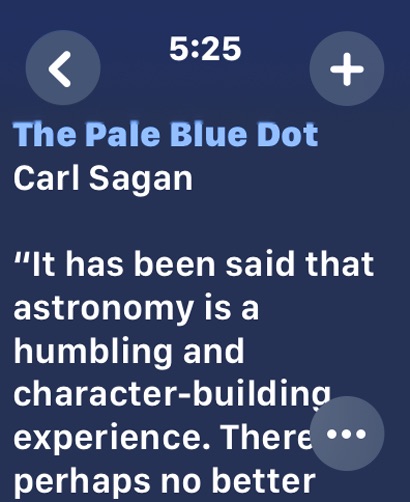
6 store screenshots


Pricing & paywalls
App Store
- Price: $1.99
Ratings & reviews
App Store
-
2/5Clear Dot Function Broken
Was working well in prior versions but now if you clear a dot on the watch it does not clear on iOS. Also the complication “jumps” whenever my wrist is raised.
Steve R42 · 6 Aug 2026
-
5/5Simple, powerful, well-designed
Fantastic suite of apps. The watch version lets you view and add to your different notes via type or dictation. I use Tot to keep “quick reference” notes easily accessible and synced across my devices. Love it!
_amoya · 6 Aug 2026
-
5/5Works great syncing Tot to the watch
I have used Tot on both Mac and iPhone for years. I finally added it to Apple Watch. The sync works. Deleting dots works. Beautiful and useful app.
ruMac · 6 Aug 2026
-
5/5Great app, works in conjunction with Tot on Mac and iOS
The intent of this app is the limited nature of it, which makes it limitless. I use it to better focus at important tasks
arind · 6 Aug 2026
-
1/5Needs work
Will not let me delete anything I type, So you can’t clear up space and make room for other notes. Also kinda feels like they want you to buy this app, then waste more money on the $20 version so you can edit properly, Which would make this a scam. But that’s only my opinion.
8BitPeril · 6 Aug 2026
Privacy & accessibility
App Store
Privacy
- Data Not Collected Developer declared
Accessibility
No accessibility labels collected yet.
Versions
App Store
- 1.0
-
1.0.1
All: • Fixed crashes caused by Windows CRLF line endings in plain text [Yay Tim!] watchOS: • The text input help is only shown once [Yay Vatsal!] iOS: • Fixed new “Dot” icons on iPad • Empty plain text dots are now initialized correctly [Yay Adrian!] macOS: • Added “Hotkey Window Follows Mouse” to Window menu: repositions window under mouse when Show Window hotkey is used [Yay Alex!]
-
1.1
watchOS: • Added ability to clear a dot using the text’s long-press menu • Added circular, rectangular, and corner watch face complications iOS: • Fixed scrolling stutter on iOS 16 • Share button is now shown while keyboard is hidden • Added rectangular and circular Lock Screen widgets
-
2.0
Tot 2 adds fun, customizable smart bullets, new text dividers, improved text handling, automatic iOS data backup, a re-designed UI, improved settings, bug fixes, and much more. App-Wide Improvements: • Custom Smart Bullets: - Assign symbols or standard emoji to act as Smart Bullets - Create up to five(?) custom smart bullets via Settings > Behavior - Assign Custom Smart Bullets to Quick Key slots for instant access • Text dividers: - Eight divider styles to choose from via the symbol picker - Assign text dividers to Quick Key slots for easy use - Keyboard shortcut: Ctrl-Minus to add a new divider - Dividers can be cut/copy/pasted at will - Uses Markdown horizontal rules - [Yay Funk_Shui & Stragen!] • Automatic indents: - Lines that begin with a bullet or Smart Bullet will automatically indent text that's wider than the window - The Cmd-[ and Cmd-] keyboard shortcuts can be used to indent any selection - Lines that begin with a space will use that for indentation, otherwise tabs are used - Works with plain text: great for writing in Markdown [Yay Gruber!] • Improved text handling & bug fixes: - Paste as Plain Text can now strip Markdown and works better with rich text - Fixed a bug where bold stuck around after creating newlines [Yay Nathan!] - Improved handling of styling information while using drag & drop - Fixed a styling bug when pasting Smart Bullets in plain text mode - Fixed a big bug when opening links beginning with “HTTP” - New "Selected Dot" action for Shortcuts [Yay pseudometa!] • Updated User Manual - Removed Twitter links because screw those guys - Updated for new features and settings - Added information and links for advanced users watchOS Improvements: • Simplified and more modern UI for viewing text - Colorful backgrounds • New "+" button: - Better UI & wording for adding text - New “After First Line” option [Yay Joey!] • Added “...” button: - Shows summary for characters/words/lines - New Share button - “Clear All Text” button • Updated iOS and macOS to match improvements above
-
2.1
· 17 Sep 2025
All: • Added the classic “Tot 1.0” app icon • Tab and Shift-Tab can now be used to indent or outdent selected text (on iOS this only works with hardware keyboard attached) • Fixed issues with typing attributes, like bold and italic, being set incorrectly • A number followed by a period is no longer recognized as a bullet • Clarified wording for premium features on purchase screens watchOS: • Added support for Liquid Glass • Tapping Clear All Text now syncs the dot’s text changes correctly iOS: • Added support for Liquid Glass • Settings > Advanced Settings > Reset Theme will clear custom dot colors set on Mac • Fixed issues with the iOS widgets when using colored/clear tints • The Done button in Settings is now more visually prominent macOS: • The Show Window keyboard shortcut control is accessible via VoiceOver • Improved VoiceOver accessibility of various Settings screens • Added support for incremental text search
Alternatives
- OmniOutliner 6 — Same category + similar ratings
- Simple Scan • Quick Scanner — Same category + similar ratings
- Calzy — Same category + similar ratings
- SideNotes Mobile — Same category + similar ratings
- DEVONthink To Go 4 — Same category + similar ratings
- Funnel - Quick Capture — Same category + similar ratings
Availability by market
- US
Data quality & evidence
- Page completeness
- Live store listing
- Last verified
- 6 Aug 2026
- Sources
- App Store
- Independent summary has not been published yet.