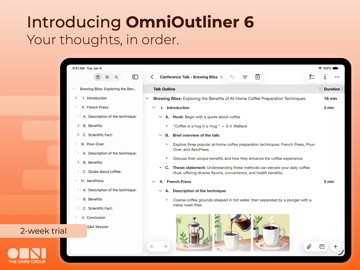
AppCorpus MCP gives your agent current app data, prices, screens, features and sources.
View JSON
GET /api/v3/apps/6474965689
{
  "app_id": 6474965689,
  "canonical_url": "https://appcorpus.com/apps/omnioutliner-6-6474965689",
  "identity": {
    "name": "OmniOutliner 6",
    "slug": "omnioutliner-6",
    "developer": {
      "name": "The Omni Group",
      "url": "https://appcorpus.com/developers/the-omni-group-developer_60844cea6d3b2dca021e1af693010ba4"
    },
    "icon_url": "https://is1-ssl.mzstatic.com/image/thumb/Purple211/v4/23/1d/79/231d792c-b4da-658a-80d3-8f9e3ee5e4b4/AppIcon-0-0-1x_U007epad-0-0-0-1-0-0-sRGB-0-85-220.png/512x512bb.jpg",
    "stores": [
      "apple"
    ],
    "platforms": [
      "iphone",
      "ipad"
    ],
    "status": {
      "state": "active",
      "label": "Active",
      "last_checked": "2026-08-06",
      "last_checked_label": "6 Aug 2026",
      "banner": null,
      "region_note": null
    }
  },
  "listings": [
    {
      "store": "apple",
      "status": "ACTIVE",
      "url": "https://apps.apple.com/us/app/omnioutliner-6/id6474965689?uo=4",
      "rating": 4.7,
      "rating_count": 14,
      "formatted_price": "Free",
      "is_free": true,
      "has_iap": true,
      "has_subscription": false,
      "version": "6.2.2",
      "updated": "2026-08-04",
      "currency": "USD"
    }
  ],
  "summary": {
    "one_liner": null,
    "summary": null,
    "best_for": [],
    "not_for": [],
    "status": "fallback",
    "at_a_glance": [
      "Free to download",
      "In-app purchases"
    ]
  },
  "categories": {
    "official": [
      "Productivity",
      "Business"
    ],
    "appcorpus": [
      {
        "category_id": "productivity",
        "label": "Productivity",
        "url": "https://appcorpus.com/categories/productivity"
      },
      {
        "category_id": "business",
        "label": "Business",
        "url": "https://appcorpus.com/categories/business"
      }
    ]
  },
  "use_cases": [],
  "features": [
    {
      "capability_id": "free_app",
      "label": "Free app",
      "availability": "yes",
      "access_level": "free",
      "scope": null,
      "evidence": "Store published"
    },
    {
      "capability_id": "in_app_purchases",
      "label": "In-app purchases",
      "availability": "yes",
      "access_level": "free_limited",
      "scope": null,
      "evidence": "Store published"
    },
    {
      "capability_id": "shareplay",
      "label": "SharePlay",
      "availability": "yes",
      "access_level": "unknown",
      "scope": "App Store",
      "evidence": "Store published"
    }
  ],
  "pricing": [
    {
      "store": "apple",
      "formatted_price": "Free",
      "is_free": true,
      "has_iap": true,
      "has_subscription": false,
      "currency": "USD",
      "market": "us",
      "last_verified": "2026-08-06",
      "rows": [
        "OmniOutliner Essentials — $24.99",
        "OmniOutliner Pro — $99.99",
        "Upgrade to v6 Essentials from v1-v5 — $12.49",
        "Upgrade to v6 Pro from Essentials — $37.49",
        "Upgrade to v6 Pro from Essentials — $74.99",
        "Upgrade to v6 Pro from v1-v5 — $49.99"
      ]
    }
  ],
  "screens": [
    {
      "url": "https://is1-ssl.mzstatic.com/image/thumb/PurpleSource221/v4/f6/d3/40/f6d34093-cfde-37ab-3a35-4d1cdfe5a615/01_ipadPro2ndGen.png/1600x1600bb.jpg",
      "store": "apple",
      "platform": "ipad",
      "alt": "OmniOutliner 6 ipad screenshot 1"
    },
    {
      "url": "https://is1-ssl.mzstatic.com/image/thumb/PurpleSource221/v4/f6/d3/40/f6d34093-cfde-37ab-3a35-4d1cdfe5a615/01_ipadPro2ndGen.png/360x480bb.jpg",
      "store": "apple",
      "platform": "ipad",
      "alt": "OmniOutliner 6 ipad screenshot 2"
    },
    {
      "url": "https://is1-ssl.mzstatic.com/image/thumb/PurpleSource211/v4/86/7c/6c/867c6c13-3b3e-2b03-2ce4-34c3f35e1e16/02_ipadPro2ndGen.png/1600x1600bb.jpg",
      "store": "apple",
      "platform": "ipad",
      "alt": "OmniOutliner 6 ipad screenshot 3"
    },
    {
      "url": "https://is1-ssl.mzstatic.com/image/thumb/PurpleSource211/v4/86/7c/6c/867c6c13-3b3e-2b03-2ce4-34c3f35e1e16/02_ipadPro2ndGen.png/360x480bb.jpg",
      "store": "apple",
      "platform": "ipad",
      "alt": "OmniOutliner 6 ipad screenshot 4"
    },
    {
      "url": "https://is1-ssl.mzstatic.com/image/thumb/PurpleSource221/v4/2d/c4/c1/2dc4c184-851e-ae7c-1d52-49cb3bff7b61/03_ipadPro2ndGen.png/1600x1600bb.jpg",
      "store": "apple",
      "platform": "ipad",
      "alt": "OmniOutliner 6 ipad screenshot 5"
    },
    {
      "url": "https://is1-ssl.mzstatic.com/image/thumb/PurpleSource221/v4/2d/c4/c1/2dc4c184-851e-ae7c-1d52-49cb3bff7b61/03_ipadPro2ndGen.png/360x480bb.jpg",
      "store": "apple",
      "platform": "ipad",
      "alt": "OmniOutliner 6 ipad screenshot 6"
    },
    {
      "url": "https://is1-ssl.mzstatic.com/image/thumb/PurpleSource221/v4/e5/6c/5b/e56c5b6d-b9af-c777-70c2-c6214d0b77bf/04_ipadPro2ndGen.png/1600x1600bb.jpg",
      "store": "apple",
      "platform": "ipad",
      "alt": "OmniOutliner 6 ipad screenshot 7"
    },
    {
      "url": "https://is1-ssl.mzstatic.com/image/thumb/PurpleSource221/v4/e5/6c/5b/e56c5b6d-b9af-c777-70c2-c6214d0b77bf/04_ipadPro2ndGen.png/360x480bb.jpg",
      "store": "apple",
      "platform": "ipad",
      "alt": "OmniOutliner 6 ipad screenshot 8"
    },
    {
      "url": "https://is1-ssl.mzstatic.com/image/thumb/PurpleSource221/v4/82/00/c3/8200c360-e82c-7560-4a4d-a7d407c5f5b6/05_ipadPro2ndGen.png/1600x1600bb.jpg",
      "store": "apple",
      "platform": "ipad",
      "alt": "OmniOutliner 6 ipad screenshot 9"
    },
    {
      "url": "https://is1-ssl.mzstatic.com/image/thumb/PurpleSource221/v4/82/00/c3/8200c360-e82c-7560-4a4d-a7d407c5f5b6/05_ipadPro2ndGen.png/360x480bb.jpg",
      "store": "apple",
      "platform": "ipad",
      "alt": "OmniOutliner 6 ipad screenshot 10"
    },
    {
      "url": "https://is1-ssl.mzstatic.com/image/thumb/PurpleSource221/v4/f3/19/56/f319564a-bfb8-b676-25c1-cf984943dd8a/06_ipadPro2ndGen.png/1600x1600bb.jpg",
      "store": "apple",
      "platform": "ipad",
      "alt": "OmniOutliner 6 ipad screenshot 11"
    },
    {
      "url": "https://is1-ssl.mzstatic.com/image/thumb/PurpleSource221/v4/f3/19/56/f319564a-bfb8-b676-25c1-cf984943dd8a/06_ipadPro2ndGen.png/360x480bb.jpg",
      "store": "apple",
      "platform": "ipad",
      "alt": "OmniOutliner 6 ipad screenshot 12"
    },
    {
      "url": "https://is1-ssl.mzstatic.com/image/thumb/PurpleSource221/v4/bc/aa/ac/bcaaac53-4752-8ad1-4e19-20798f032ebc/07_ipadPro2ndGen.png/1600x1600bb.jpg",
      "store": "apple",
      "platform": "ipad",
      "alt": "OmniOutliner 6 ipad screenshot 13"
    },
    {
      "url": "https://is1-ssl.mzstatic.com/image/thumb/PurpleSource221/v4/bc/aa/ac/bcaaac53-4752-8ad1-4e19-20798f032ebc/07_ipadPro2ndGen.png/360x480bb.jpg",
      "store": "apple",
      "platform": "ipad",
      "alt": "OmniOutliner 6 ipad screenshot 14"
    },
    {
      "url": "https://is1-ssl.mzstatic.com/image/thumb/PurpleSource221/v4/53/45/90/534590d0-71e0-9f34-677a-991be9c30854/08_ipadPro2ndGen.png/1600x1600bb.jpg",
      "store": "apple",
      "platform": "ipad",
      "alt": "OmniOutliner 6 ipad screenshot 15"
    },
    {
      "url": "https://is1-ssl.mzstatic.com/image/thumb/PurpleSource221/v4/53/45/90/534590d0-71e0-9f34-677a-991be9c30854/08_ipadPro2ndGen.png/360x480bb.jpg",
      "store": "apple",
      "platform": "ipad",
      "alt": "OmniOutliner 6 ipad screenshot 16"
    },
    {
      "url": "https://is1-ssl.mzstatic.com/image/thumb/PurpleSource211/v4/64/f2/d9/64f2d93d-2bad-dc81-ade2-6522eb49ec13/09_ipadPro2ndGen.png/1600x1600bb.jpg",
      "store": "apple",
      "platform": "ipad",
      "alt": "OmniOutliner 6 ipad screenshot 17"
    },
    {
      "url": "https://is1-ssl.mzstatic.com/image/thumb/PurpleSource211/v4/64/f2/d9/64f2d93d-2bad-dc81-ade2-6522eb49ec13/09_ipadPro2ndGen.png/360x480bb.jpg",
      "store": "apple",
      "platform": "ipad",
      "alt": "OmniOutliner 6 ipad screenshot 18"
    },
    {
      "url": "https://is1-ssl.mzstatic.com/image/thumb/PurpleSource221/v4/45/34/c1/4534c1cf-e715-0f7f-3d2b-6097c855d8ab/10_ipadPro2ndGen.png/1600x1600bb.jpg",
      "store": "apple",
      "platform": "ipad",
      "alt": "OmniOutliner 6 ipad screenshot 19"
    },
    {
      "url": "https://is1-ssl.mzstatic.com/image/thumb/PurpleSource221/v4/45/34/c1/4534c1cf-e715-0f7f-3d2b-6097c855d8ab/10_ipadPro2ndGen.png/360x480bb.jpg",
      "store": "apple",
      "platform": "ipad",
      "alt": "OmniOutliner 6 ipad screenshot 20"
    },
    {
      "url": "https://is1-ssl.mzstatic.com/image/thumb/PurpleSource211/v4/61/58/f7/6158f72d-26a3-e717-823d-7961e0d1900a/01_iphone69.png/1320x1600bb.jpg",
      "store": "apple",
      "platform": "iphone",
      "alt": "OmniOutliner 6 iphone screenshot 21"
    },
    {
      "url": "https://is1-ssl.mzstatic.com/image/thumb/PurpleSource211/v4/8c/96/ec/8c96ec0d-6a0f-f84d-a9f5-db4e24e3c1a2/02_iphone69.png/1320x1600bb.jpg",
      "store": "apple",
      "platform": "iphone",
      "alt": "OmniOutliner 6 iphone screenshot 22"
    },
    {
      "url": "https://is1-ssl.mzstatic.com/image/thumb/PurpleSource211/v4/7a/18/70/7a187053-23a1-63a1-efdb-81ee806735f2/03_iphone69.png/1320x1600bb.jpg",
      "store": "apple",
      "platform": "iphone",
      "alt": "OmniOutliner 6 iphone screenshot 23"
    },
    {
      "url": "https://is1-ssl.mzstatic.com/image/thumb/PurpleSource221/v4/d6/ff/07/d6ff0784-1da2-79b6-097f-ae374e46c01a/04_iphone69.png/1320x1600bb.jpg",
      "store": "apple",
      "platform": "iphone",
      "alt": "OmniOutliner 6 iphone screenshot 24"
    },
    {
      "url": "https://is1-ssl.mzstatic.com/image/thumb/PurpleSource211/v4/b4/fa/c6/b4fac614-e3b6-05e6-c0b5-8e9142c6f0e6/05_iphone69.png/1320x1600bb.jpg",
      "store": "apple",
      "platform": "iphone",
      "alt": "OmniOutliner 6 iphone screenshot 25"
    },
    {
      "url": "https://is1-ssl.mzstatic.com/image/thumb/PurpleSource211/v4/c4/92/91/c4929141-120a-e543-ba01-0c8b6a5daa92/06_iphone69.png/1320x1600bb.jpg",
      "store": "apple",
      "platform": "iphone",
      "alt": "OmniOutliner 6 iphone screenshot 26"
    },
    {
      "url": "https://is1-ssl.mzstatic.com/image/thumb/PurpleSource211/v4/cd/62/d0/cd62d028-9134-284c-543d-f16031400a43/07_iphone69.png/1320x1600bb.jpg",
      "store": "apple",
      "platform": "iphone",
      "alt": "OmniOutliner 6 iphone screenshot 27"
    },
    {
      "url": "https://is1-ssl.mzstatic.com/image/thumb/PurpleSource221/v4/0e/40/6d/0e406d56-7174-7971-966a-22818f3de88b/08_iphone69.png/1320x1600bb.jpg",
      "store": "apple",
      "platform": "iphone",
      "alt": "OmniOutliner 6 iphone screenshot 28"
    },
    {
      "url": "https://is1-ssl.mzstatic.com/image/thumb/PurpleSource211/v4/2e/9e/c9/2e9ec966-e1d6-08d6-8027-e42ccc5427fd/09_iphone69.png/1320x1600bb.jpg",
      "store": "apple",
      "platform": "iphone",
      "alt": "OmniOutliner 6 iphone screenshot 29"
    },
    {
      "url": "https://is1-ssl.mzstatic.com/image/thumb/PurpleSource211/v4/e5/54/1b/e5541b38-09e4-5b95-5bf1-ddbf09820b27/10_iphone69.png/1320x1600bb.jpg",
      "store": "apple",
      "platform": "iphone",
      "alt": "OmniOutliner 6 iphone screenshot 30"
    },
    {
      "url": "https://is1-ssl.mzstatic.com/image/thumb/PurpleSource221/v4/9b/c1/46/9bc146b0-c07a-66d6-03c0-0df1f2637dab/01_Mac.png/1600x1600bb.jpg",
      "store": "apple",
      "platform": "mac",
      "alt": "OmniOutliner 6 mac screenshot 31"
    },
    {
      "url": "https://is1-ssl.mzstatic.com/image/thumb/PurpleSource211/v4/9c/94/27/9c94274d-3f4e-3581-4552-7d2c3f3ebac2/02_Mac.png/1600x1600bb.jpg",
      "store": "apple",
      "platform": "mac",
      "alt": "OmniOutliner 6 mac screenshot 32"
    },
    {
      "url": "https://is1-ssl.mzstatic.com/image/thumb/PurpleSource221/v4/20/b0/07/20b007f4-cfa1-65f5-10b0-eef93bfd3da5/03_Mac.png/1600x1600bb.jpg",
      "store": "apple",
      "platform": "mac",
      "alt": "OmniOutliner 6 mac screenshot 33"
    },
    {
      "url": "https://is1-ssl.mzstatic.com/image/thumb/PurpleSource221/v4/aa/0c/2d/aa0c2d8f-401a-229f-de4f-2d0322b56c54/04_Mac.png/1600x1600bb.jpg",
      "store": "apple",
      "platform": "mac",
      "alt": "OmniOutliner 6 mac screenshot 34"
    },
    {
      "url": "https://is1-ssl.mzstatic.com/image/thumb/PurpleSource211/v4/18/d0/96/18d096d5-1ba5-81e7-cc03-1683073b3689/05_Mac.png/1600x1600bb.jpg",
      "store": "apple",
      "platform": "mac",
      "alt": "OmniOutliner 6 mac screenshot 35"
    },
    {
      "url": "https://is1-ssl.mzstatic.com/image/thumb/PurpleSource211/v4/2e/a5/c3/2ea5c3da-c78e-9283-1de1-15183b94c361/06_Mac.png/1600x1600bb.jpg",
      "store": "apple",
      "platform": "mac",
      "alt": "OmniOutliner 6 mac screenshot 36"
    },
    {
      "url": "https://is1-ssl.mzstatic.com/image/thumb/PurpleSource221/v4/bb/e6/b3/bbe6b3f1-88e0-bf4a-1853-d7f8ed57960d/07_Mac.png/1600x1600bb.jpg",
      "store": "apple",
      "platform": "mac",
      "alt": "OmniOutliner 6 mac screenshot 37"
    },
    {
      "url": "https://is1-ssl.mzstatic.com/image/thumb/PurpleSource211/v4/6d/ab/d4/6dabd4ec-1a28-17bc-ee1a-f7b416f38c9a/08_Mac.png/1600x1600bb.jpg",
      "store": "apple",
      "platform": "mac",
      "alt": "OmniOutliner 6 mac screenshot 38"
    },
    {
      "url": "https://is1-ssl.mzstatic.com/image/thumb/PurpleSource221/v4/a4/95/48/a49548ec-2af8-7d2e-89d9-d523c1abf4c4/09_Mac.png/1600x1600bb.jpg",
      "store": "apple",
      "platform": "mac",
      "alt": "OmniOutliner 6 mac screenshot 39"
    },
    {
      "url": "https://is1-ssl.mzstatic.com/image/thumb/PurpleSource211/v4/d5/4d/e7/d54de792-9003-c4c7-87fa-2b6969f3c8b5/10_Mac.png/1600x1600bb.jpg",
      "store": "apple",
      "platform": "mac",
      "alt": "OmniOutliner 6 mac screenshot 40"
    },
    {
      "url": "https://is1-ssl.mzstatic.com/image/thumb/PurpleSource211/v4/63/fd/3a/63fd3a1e-3ae1-c3f5-2d22-afead98ea0f8/01_AVP.png/1600x1600bb.jpg",
      "store": "apple",
      "platform": "vision",
      "alt": "OmniOutliner 6 vision screenshot 41"
    },
    {
      "url": "https://is1-ssl.mzstatic.com/image/thumb/PurpleSource211/v4/ef/65/83/ef658356-06ba-3766-59bd-68334a3da24c/02_AVP_dark.png/1600x1600bb.jpg",
      "store": "apple",
      "platform": "vision",
      "alt": "OmniOutliner 6 vision screenshot 42"
    },
    {
      "url": "https://is1-ssl.mzstatic.com/image/thumb/PurpleSource221/v4/01/c5/66/01c56612-67b0-99fc-ec62-4a288e37552f/03_AVP_dark.png/1600x1600bb.jpg",
      "store": "apple",
      "platform": "vision",
      "alt": "OmniOutliner 6 vision screenshot 43"
    },
    {
      "url": "https://is1-ssl.mzstatic.com/image/thumb/PurpleSource221/v4/fb/36/e0/fb36e0d1-3bbe-5903-343b-adeb522e0a5f/04_AVP.png/1600x1600bb.jpg",
      "store": "apple",
      "platform": "vision",
      "alt": "OmniOutliner 6 vision screenshot 44"
    },
    {
      "url": "https://is1-ssl.mzstatic.com/image/thumb/PurpleSource211/v4/6d/a0/2e/6da02e59-34ea-2d79-6e7e-c289215d0a81/05_AVP.png/1600x1600bb.jpg",
      "store": "apple",
      "platform": "vision",
      "alt": "OmniOutliner 6 vision screenshot 45"
    },
    {
      "url": "https://is1-ssl.mzstatic.com/image/thumb/PurpleSource211/v4/e5/36/d0/e536d065-3170-d69d-cbd4-3d164928da00/06_AVP.png/1600x1600bb.jpg",
      "store": "apple",
      "platform": "vision",
      "alt": "OmniOutliner 6 vision screenshot 46"
    },
    {
      "url": "https://is1-ssl.mzstatic.com/image/thumb/PurpleSource211/v4/b6/db/c2/b6dbc264-72f2-626a-19b1-3c88a694d573/07_AVP_dark.png/1600x1600bb.jpg",
      "store": "apple",
      "platform": "vision",
      "alt": "OmniOutliner 6 vision screenshot 47"
    },
    {
      "url": "https://is1-ssl.mzstatic.com/image/thumb/PurpleSource211/v4/1a/70/2e/1a702eb0-a81c-1541-a2eb-652c86cf4380/08_AVP.png/1600x1600bb.jpg",
      "store": "apple",
      "platform": "vision",
      "alt": "OmniOutliner 6 vision screenshot 48"
    }
  ],
  "ratings": [
    {
      "store": "apple",
      "average": 4.7,
      "count": 14,
      "market": "us",
      "observed_at": "2026-08-06",
      "reviews": [
        {
          "rating": 5,
          "title": "Great app, now universal!",
          "body": "I’ve used OmniOutliner for years to create outlines for public speaking. I always thought it was crazy to shell out again for the Mac version when I’ve already paid a pretty penny for the iOS version. Now I’m happy to pay the upgrade subscription price and have it available on both platforms. Best outlining app out there! (If they give the other apps the same treatment, I may look into them again also.)",
          "author": "Comfortably_nick",
          "date": "6 Aug 2026"
        },
        {
          "rating": 5,
          "title": "Very useful app",
          "body": "OmniOutliner 6 is a great app. Very useful and deceptively powerful. Highly recommended for anyone who would like to organize their thoughts. One concern with version 6 — iOS26/iPadOS26 is required. That’s a big disappointment for those of us who really don’t like the new OSs. I can’t use the new version on most of my devices, which I have not purposely “upgraded” to the latest OS.",
          "author": "cbarrick",
          "date": "6 Aug 2026"
        },
        {
          "rating": 5,
          "title": "So Good ! Upgrade I’ve wanted.",
          "body": "I’m a looong time user of OOutliner. Upgraded this week. Works great on all my devices. I’m so pleased!",
          "author": "JDB4",
          "date": "6 Aug 2026"
        },
        {
          "rating": 1,
          "title": "Caveat Emptor",
          "body": "What you see is here is OminiOutliner 6, not OnmiOutlines 2…which is essentially smoke ware. “Essentials” is a one column outline, no numbering and no other features except the ability move lines up and down and kick yourself for being an idiot. I have used OnmiOutliner for 20 years and this is it. For $24 I at least get to pay for seeing how bad a company can get.",
          "author": "Puzzled Customer",
          "date": "6 Aug 2026"
        },
        {
          "rating": 5,
          "title": "Worth it",
          "body": "Simple but powerful app. Worth every $",
          "author": "jesselperry",
          "date": "6 Aug 2026"
        }
      ]
    }
  ],
  "privacy": [
    {
      "store": "apple",
      "declarations": [
        {
          "title": "Data Linked to You",
          "detail": "App Functionality — Identifiers — User ID",
          "source": "Developer declared"
        },
        {
          "title": "Data Linked to You",
          "detail": "App Functionality — Purchases — Purchase History",
          "source": "Developer declared"
        },
        {
          "title": "Data Linked to You",
          "detail": "Identifiers",
          "source": "Developer declared"
        },
        {
          "title": "Data Linked to You",
          "detail": "Purchases",
          "source": "Developer declared"
        }
      ],
      "accessibility": []
    }
  ],
  "changes": [
    {
      "store": "apple",
      "version": "6.0",
      "released_at": null,
      "notes": ""
    },
    {
      "store": "apple",
      "version": "6.0.1",
      "released_at": null,
      "notes": "OmniOutliner 6.0.1 is a minor update focused on bug fixes. View full release notes in-app or on our website: www.omnigroup.com/releasenotes/omnioutliner. If you have any feedback or questions, we’d love to hear from you! The Omni Group offers free tech support; you can email [email protected] or call 1–206–523–4152. If OmniOutliner empowers you, we would appreciate an App Store review. Your review will help other people find OmniOutliner and make them more productive too."
    },
    {
      "store": "apple",
      "version": "6.0.2",
      "released_at": null,
      "notes": "OmniOutliner 6.0.2 is a minor update focused on bug fixes. View full release notes in-app or on our website: www.omnigroup.com/releasenotes/omnioutliner. If you have any feedback or questions, we’d love to hear from you! The Omni Group offers free tech support; you can email [email protected] or call 1–206–523–4152. If OmniOutliner empowers you, we would appreciate an App Store review. Your review will help other people find OmniOutliner and make them more productive too."
    },
    {
      "store": "apple",
      "version": "6.0.3",
      "released_at": null,
      "notes": "OmniOutliner 6.0.3 adds iCloud Drive sync conflict resolution, fixes licensing state while offline, and contains other bug fixes. View full release notes in-app or on our website: www.omnigroup.com/releasenotes/omnioutliner. If you have any feedback or questions, we’d love to hear from you! The Omni Group offers free tech support; you can email [email protected] or call 1–206–523–4152. If OmniOutliner empowers you, we would appreciate an App Store review. Your review will help other people find OmniOutliner and make them more productive too."
    },
    {
      "store": "apple",
      "version": "6.1",
      "released_at": null,
      "notes": "OmniOutliner 6.1 adds new Shortcuts actions on Mac, iPad, iPhone, and Apple Vision Pro! View full release notes in-app or on our website: www.omnigroup.com/releasenotes/omnioutliner. If you have any feedback or questions, we’d love to hear from you! The Omni Group offers free tech support; you can email [email protected] or call 1–206–523–4152. If OmniOutliner empowers you, we would appreciate an App Store review. Your review will help other people find OmniOutliner and make them more productive too."
    },
    {
      "store": "apple",
      "version": "6.2",
      "released_at": null,
      "notes": "OmniOutliner 6 has been updated for German, Spanish, French, Italian, Japanese, Korean, Dutch, Portuguese (Brazil), Russian, and Simplified Chinese. View full release notes in-app or on our website: www.omnigroup.com/releasenotes/omnioutliner. If you have any feedback or questions, we’d love to hear from you! The Omni Group offers free tech support; you can email [email protected] or call 1–206–523–4152. If OmniOutliner empowers you, we would appreciate an App Store review. Your review will help other people find OmniOutliner and make them more productive too."
    },
    {
      "store": "apple",
      "version": "6.2.1",
      "released_at": null,
      "notes": "OmniOutliner 6.2.1 is a minor update focused on bug fixes. View full release notes in-app or on our website: www.omnigroup.com/releasenotes/omnioutliner. If you have any feedback or questions, we’d love to hear from you! The Omni Group offers free tech support; you can email [email protected] or call 1–206–523–4152. If OmniOutliner empowers you, we would appreciate an App Store review. Your review will help other people find OmniOutliner and make them more productive too."
    },
    {
      "store": "apple",
      "version": "6.2.2",
      "released_at": "2026-08-04",
      "notes": "OmniOutliner 6.2.2 fixes a bug with language input methods that use an Input Method Kit such as Chinese and Japanese where the text would not display during editing. View full release notes in-app or on our website: www.omnigroup.com/releasenotes/omnioutliner. If you have any feedback or questions, we’d love to hear from you! The Omni Group offers free tech support; you can email [email protected] or call 1–206–523–4152. If OmniOutliner empowers you, we would appreciate an App Store review. Your review will help other people find OmniOutliner and make them more productive too."
    }
  ],
  "alternatives": [
    {
      "app_id": 6532619226,
      "name": "DEVONthink To Go 4",
      "url": "https://appcorpus.com/apps/devonthink-to-go-4-6532619226",
      "reason": "Same category + similar ratings"
    },
    {
      "app_id": 1546457750,
      "name": "Zavala",
      "url": "https://appcorpus.com/apps/zavala-1546457750",
      "reason": "Same category + similar ratings"
    },
    {
      "app_id": 1644609331,
      "name": "Tot Mini",
      "url": "https://appcorpus.com/apps/tot-mini-1644609331",
      "reason": "Same category + similar ratings"
    }
  ],
  "evidence_summary": {
    "index_state": "S1",
    "evidence_level": 1,
    "level_label": "Live store listing",
    "indexable": true,
    "last_verified_at": "2026-08-06",
    "unknown_fields": [
      "Independent summary has not been published yet."
    ],
    "sources": [
      "App Store"
    ]
  },
  "availability_markets": {
    "live": [
      "us"
    ],
    "selected": "us",
    "note": null
  },
  "feature_events": {
    "events": []
  },
  "features_slice": {
    "plans": [
      {
        "code": "essentials",
        "label": "OmniOutliner Essentials",
        "kind": "unknown",
        "status": "store_listed",
        "prices": [
          {
            "storefront": "us",
            "formatted": "$24.99",
            "billing_period": null
          }
        ],
        "trial": null
      },
      {
        "code": "pro",
        "label": "OmniOutliner Pro",
        "kind": "unknown",
        "status": "store_listed",
        "prices": [
          {
            "storefront": "us",
            "formatted": "$99.99",
            "billing_period": null
          }
        ],
        "trial": null
      },
      {
        "code": "upgrade-to-v6-essentials-from-v1-v5",
        "label": "Upgrade to v6 Essentials from v1-v5",
        "kind": "unknown",
        "status": "store_listed",
        "prices": [
          {
            "storefront": "us",
            "formatted": "$12.49",
            "billing_period": null
          }
        ],
        "trial": null
      },
      {
        "code": "upgrade-to-v6-pro-from-essentials",
        "label": "Upgrade to v6 Pro from Essentials",
        "kind": "unknown",
        "status": "store_listed",
        "prices": [
          {
            "storefront": "us",
            "formatted": "$37.49",
            "billing_period": null
          },
          {
            "storefront": "us",
            "formatted": "$74.99",
            "billing_period": null
          }
        ],
        "trial": null
      },
      {
        "code": "upgrade-to-v6-pro-from-v1-v5",
        "label": "Upgrade to v6 Pro from v1-v5",
        "kind": "unknown",
        "status": "store_listed",
        "prices": [
          {
            "storefront": "us",
            "formatted": "$49.99",
            "billing_period": null
          }
        ],
        "trial": null
      }
    ],
    "features": [],
    "unknown_features": [
      "shareplay"
    ],
    "data_cutoff": "6 Aug 2026"
  }
}