
Quick verdict
- What it is
- Store information collected; independent summary not yet available.
- At a glance
-
- Free to download
- In-app purchases
Categories and search queries
Official categories
- Business
- Productivity
AppCorpus categories
Key functions
| Function | Availability | Access | Scope | Evidence |
|---|---|---|---|---|
| Free app | Yes | Free | — | Store published |
| In-app purchases | Yes | Limited free | — | Store published |
Screens
App Store
21 store screenshots

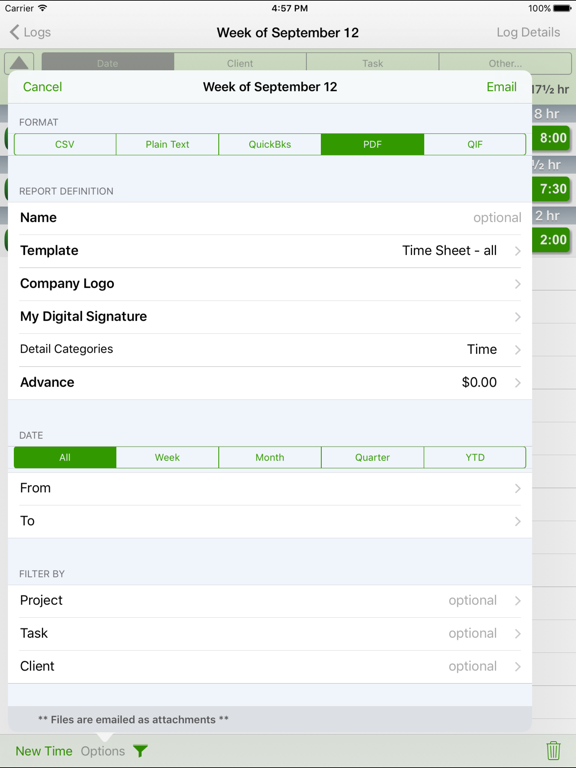

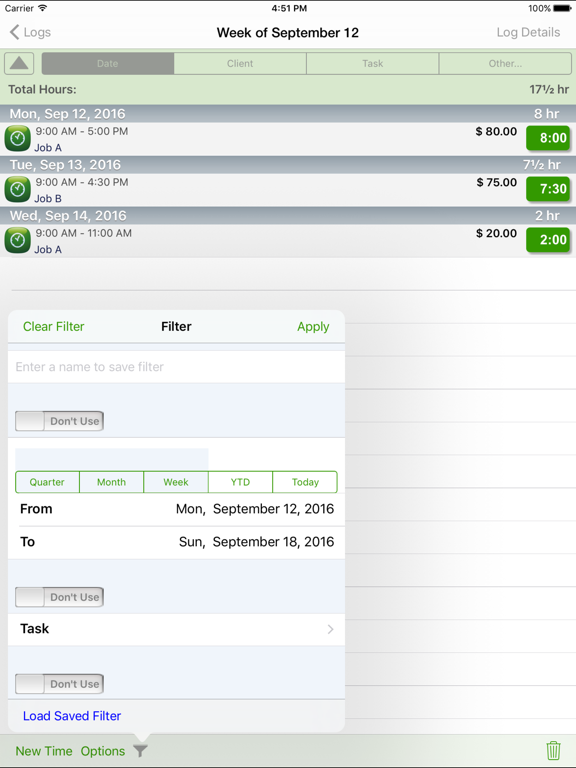
Pricing & paywalls
App Store
Shown for US
- Unlimited Usage — $1.49
- Unlimited Usage — $14.99
Ratings & reviews
App Store
Shown for US
-
5/55 stars but
I had the old app (not pro) and when I updated iOS it came up as blank. Without access to the old app I could not pull the hours off it for my current project to the new app. Luckily I had take. A screen shoot the day before. Consider providing for this situation. For context the old app is a separate to the pro app. Developers I suggest you make and update to the old app so that it can open in the iOS so people can cleanly pull old data out to the new app names pro.
MenteTwelve · 6 Aug 2026
-
1/5SUDDEN FAILURE!! No longer works to get an exported timesheet, so I can get paid!
SUDDEN FAILURE!! No longer works to get an exported timesheet, so I can get paid! UPDATE: I had tested the ability to print a timesheet shortly after entering my first week's data--and it worked and created a beautiful report with all my data, time and charges. I plunked down my money for the paid version, thinking that would assure that the developer could afford to maintain it. I went forward and used it all month--now I have over 120 hours, billed at $50 an hour and it will NOT EXPORT my data to any report now. TTP has a pretty unstandard way of creating the report in the first place, telling you to point your browser at their link to grab the zip files. I have thrown hours and hours of time into trying to troubleshoot it, AND sent 3 separate emails to the developer. NO answer, of course. Cleared my cache, restarted, tried every version of the report. Tried exporting to 3 different browsers, and also to my laptop. This is tragic for me!! If anyone has any idea how to get my data out--even as an export of any kind at this point, I will be eternally grateful. DEVELOPER--are you listening? OLD REVIEW: I got this to log my time on a large project. It doesnt come with any instructions and its not as obvious as the developer probably thought. My entries go smoothly, but the log keeps submitting, even though I am not doing anything to cause it, and then I cannot see my previous entries till I jump through a bunch of hoops to find the submitted logs and tell it to add my entries to the previously submitted log. Its a shame it isn't more obvious, or have a better explanation of the process, including preferences and settings--As such, it looks like it is only really suited to use as a timesheet. But it is such a convenient app to log my time on a legal project that I will keep struggling with it and PRAY it doesn't loose my valuable data!
KarynArt11 · 6 Aug 2026
-
5/5Reliable, Easy, Fast
I just upgraded to this Pro version after using the earlier classic for years. They keep making it more user friendly every update. It’s easy to track my work in the field to the quarter hour. I consider this paid version a reasonable business expense for all the convenience. Too bad Apple’s search doesn’t bring up this app if there’s a space between “time” and “tracker” lot’s of people don’t know what they’re missing.
winsome2 · 6 Aug 2026
-
5/5Perfect
Cost only 15 bucks a year and once learn the system makes everything easier. Would like to be able to put in a custom pay and it always stay that way I have to put it in myself everyday. But over all love it
Kk/25 · 6 Aug 2026
-
5/5Great tool for freelancers
I have been using for years lately there seems to be a bug in adding new times. I had to delete my whole string of times on my last show and we load before it would take. Please fix
Keeks826 · 6 Aug 2026
Privacy & accessibility
App Store
Privacy
- Data Not Collected Developer declared
Accessibility
No accessibility labels collected yet.
Versions
App Store
- 1.0
-
1.01
NEW in Version 1.01 * Fixes an issue with iCloud backup and sync * Some other minor bug fixes. IMPORTANT: If you do not have automatic backup to iCloud enabled and choose to initiate backups from within the app manually, then be sure to choose "Backup to iCloud" from the Options menu periodically.
-
1.02
* Adds the ability to enter time in hours and minutes (tap decimal point in keyboard to see how). * Sort Logs by Group when viewing all logs. * Fixes issue where TimeTracker Pro folder did not show in iCloud Drive. * Fixes bug where Cancel button for search in Files linking screen was not visible. * Other minor bug fixes.
-
1.3
*** Version 1.3 *** (end of February 2021) * Fixes an issue when tryng to subscribe after receiving a need to subscribe message. * Changes number scheme to match convention. Starting fresh with 1.3 (1.3.0). * Improves/fixes some error messages.
-
1.3.1
*** Version 1.3.1 *** Fixes a bug when using Dropbox to Sync multiple devices.
-
1.3.2
*** Version 1.3.2 *** Fixes a bug when trying to subscribe. We are always updating and improving TimeTracker Pro. If you have any comments, compliments or complaints please go into TimeTracker Pro's Preferences screen and tap the "Email the Author" link. We always respond in a timely manner.
-
1.3.3
*** Version 1.3.3 *** Fixes a bug which sometimes caused new subscribers to need to issue the Restore Subscription function. We are always updating and improving TimeTracker Pro. If you have any comments, compliments or complaints please go into TimeTracker Pro's Preferences screen and tap the "Email the Author" link. We always respond in a timely manner.
-
1.3.4
*** Version 1.34 *** * Fixed issue with listing all files when linking files from Dropbox * Can link more than one image from Photo Library at a time (iOS 14 and greater) * Fixed issue for default time rate that had a different currency * Fixed issue where app would sometimes not display an error message if it encountered one after issuing the Restore Subscription. We are always updating and improving TimeTracker Pro. If you have any comments, compliments or complaints please go into TimeTracker Pro's Preferences screen and tap the "Email the Author" link. We always respond in a timely manner.
-
1.3.5
*** Version 1.3.5 *** * This update ONLY addresses a needed update to our Dropbox support based on upcoming changes made by Dropbox. We are always updating and improving TimeTracker Pro. If you have any comments, compliments or complaints please go into TimeTracker Pro's Preferences screen and tap the "Email the Author" link. We always respond in a timely manner. *** Version 1.34 *** * Fixed issue with listing all files when linking files from Dropbox * Can link more than one image from Photo Library at a time (iOS 14 and greater) * Fixed issue for default time rate that had a different currency * Fixed issue where app would sometimes not display an error message if it encountered one after issuing the Restore Subscription.
-
1.3.6
*** Version 1.3.6 *** * Changes to Device Sync feature to resolve issues of some entries not syncing. * Fixes bug in linking files to an entry from Dropbox. * Other minor bug fixes. We are always updating and improving TimeTracker Pro. If you have any comments, compliments or complaints please go into TimeTracker Pro's Preferences screen and tap the "Email the Author" link. We always respond in a timely manner. *** Version 1.3.5 *** * This update ONLY addresses a needed update to our Dropbox support based on upcoming changes made by Dropbox. *** Version 1.34 *** * Fixed issue with listing all files when linking files from Dropbox * Can link more than one image from Photo Library at a time (iOS 14 and greater) * Fixed issue for default time rate that had a different currency * Fixed issue where app would sometimes not display an error message if it encountered one after issuing the Restore Subscription.
-
1.3.7
*** Version 1.3.7 *** * Fixes a bug that could cause a crash when entering an amount on an iPad. We are always updating and improving TimeTracker Pro. If you have any comments, compliments or complaints please go into TimeTracker Pro's Preferences screen and tap the "Email the Author" link. We always respond in a timely manner. *** Version 1.3.6 *** * Changes to Device Sync feature to resolve issues of some entries not syncing. * Fixes bug in linking files to an entry from Dropbox. * Other minor bug fixes. *** Version 1.3.5 *** * This update ONLY addresses a needed update to our Dropbox support based on upcoming changes made by Dropbox. *** Version 1.34 *** * Fixed issue with listing all files when linking files from Dropbox * Can link more than one image from Photo Library at a time (iOS 14 and greater) * Fixed issue for default time rate that had a different currency * Fixed issue where app would sometimes not display an error message if it encountered one after issuing the Restore Subscription.
-
1.4.0
*** Version 1.4.0 *** * Fixes an issue that might cause some entries to not be synced when using Device Sync feature. * Some user interface improvements. * Minor bug fixes. We are always updating and improving TimeTracker Pro. If you have any comments, compliments or complaints please go into TimeTracker Pro's Preferences screen and tap the "Email the Author" link. We always respond in a timely manner. *** Version 1.3.7 *** * Fixes a bug that could cause a crash when entering an amount on an iPad. *** Version 1.3.6 *** * Changes to Device Sync feature to resolve issues of some entries not syncing. * Fixes bug in linking files to an entry from Dropbox. * Other minor bug fixes. *** Version 1.3.5 *** * This update ONLY addresses a needed update to our Dropbox support based on upcoming changes made by Dropbox. *** Version 1.34 *** * Fixed issue with listing all files when linking files from Dropbox * Can link more than one image from Photo Library at a time (iOS 14 and greater) * Fixed issue for default time rate that had a different currency * Fixed issue where app would sometimes not display an error message if it encountered one after issuing the Restore Subscription.
-
1.4.1
*** Version 1.4.0 *** (late March 2024) * Some user interface improvements. * Minor bug fixes. We are always updating and improving TimeTracker Pro. If you have any comments, compliments or complaints please go into TimeTracker Pro's Preferences screen and tap the "Email the Author" link. We always respond in a timely manner. *** Version 1.4.0 *** * Fixes an issue that might cause some entries to not be synced when using Device Sync feature. * Some user interface improvements. * Minor bug fixes. *** Version 1.3.7 *** * Fixes a bug that could cause a crash when entering an amount on an iPad. *** Version 1.3.6 *** * Changes to Device Sync feature to resolve issues of some entries not syncing. * Fixes bug in linking files to an entry from Dropbox. * Other minor bug fixes. *** Version 1.3.5 *** * This update ONLY addresses a needed update to our Dropbox support based on upcoming changes made by Dropbox. *** Version 1.34 *** * Fixed issue with listing all files when linking files from Dropbox * Can link more than one image from Photo Library at a time (iOS 14 and greater) * Fixed issue for default time rate that had a different currency * Fixed issue where app would sometimes not display an error message if it encountered one after issuing the Restore Subscription.
-
1.4.2
*** Version 1.4.2 *** (late March 2024) * Fixed a bug when viewing the Time Entry List and tapping the header to toggle between amount and hours did not work. * Fixed a bug where 3rd line details in the Time Entry List screen did not appear correctly. We are always updating and improving TimeTracker Pro. If you have any comments, compliments or complaints please go into TimeTracker Pro's Preferences screen and tap the "Email the Author" link. We always respond in a timely manner. RECENT UPDATES *** Version 1.4.1 *** (late March 2024) * Some user interface improvements. * Minor bug fixes. *** Version 1.4.0 *** * Fixes an issue that might cause some entries to not be synced when using Device Sync feature. * Some user interface improvements. * Minor bug fixes. *** Version 1.3.7 *** * Fixes a bug that could cause a crash when entering an amount on an iPad. *** Version 1.3.6 *** * Changes to Device Sync feature to resolve issues of some entries not syncing. * Fixes bug in linking files to an entry from Dropbox. * Other minor bug fixes. *** Version 1.3.5 *** * This update ONLY addresses a needed update to our Dropbox support based on upcoming changes made by Dropbox. *** Version 1.34 *** * Fixed issue with listing all files when linking files from Dropbox * Can link more than one image from Photo Library at a time (iOS 14 and greater) * Fixed issue for default time rate that had a different currency * Fixed issue where app would sometimes not display an error message if it encountered one after issuing the Restore Subscription.
-
1.4.3
*** Version 1.4.3 *** (early October 2024) * The notes section in PDF reports now will grow to fit the full text of the notes (will also shrink if necessary only taking enough space in the report to show the note). * Added a preference to allow turning off automatic expanding of Notes field in PDF reports. (under new section named PDF Reports). * Toggling header and section header within the Entry List screen now remembers last state. * Fixed an issue when setting the start and stop time for a time entry did not display correct picker. * Fixed an issue where under iOS 18 and setting up Device Sync if app could not find necessary files the appropriate error message was not displayed. * Fixed some screens which were not laid out properly under iOS 18. * Removed "Today" view widget as everyone should be using our new Widget. * Fixed some screens that were not respecting "safe area" at the bottom of the screen used for swiping up. * Some performance improvements to Device Sync feature. * Improvements to some screens when running on an iPad. * Various improvements to several alerts and error messages. * Updates the Dropbox library used by the app with a newer version that resolves an issue when sometimes using Dropbox. * Some other bug fixes and several UI enhancements (some reported by users). We are always updating and improving TimeTracker Pro. If you have any comments, compliments or complaints please go into TimeTracker Pro's Preferences screen and tap the "Email the Author" link. We always respond in a timely manner. RECENT UPDATES *** Version 1.4.2 *** (late March 2024) * Fixed a bug when viewing the Time Entry List and tapping the header to toggle between amount and hours did not work. * Fixed a bug where 3rd line details in the Time Entry List screen did not appear correctly. *** Version 1.4.1 *** (late March 2024) * Some user interface improvements. * Minor bug fixes. *** Version 1.4.0 *** * Fixes an issue that might cause some entries to not be synced when using Device Sync feature. * Some user interface improvements. * Minor bug fixes. *** Version 1.3.7 *** * Fixes a bug that could cause a crash when entering an amount on an iPad. *** Version 1.3.6 *** * Changes to Device Sync feature to resolve issues of some entries not syncing. * Fixes bug in linking files to an entry from Dropbox. * Other minor bug fixes. *** Version 1.3.5 *** * This update ONLY addresses a needed update to our Dropbox support based on upcoming changes made by Dropbox. *** Version 1.34 *** * Fixed issue with listing all files when linking files from Dropbox * Can link more than one image from Photo Library at a time (iOS 14 and greater) * Fixed issue for default time rate that had a different currency * Fixed issue where app would sometimes not display an error message if it encountered one after issuing the Restore Subscription.
-
1.4.4
**** Version 1.4.4 (early November 2024) *** * New Device Sync setting that allows for those only syncing 2 devices to use minimal data space in iCloud. * Some other minor tweaks to Device Sync feature allowing for even better efficiency. We are always updating and improving TimeTracker Pro. If you have any comments, compliments or complaints please go into TimeTracker Pro's Preferences screen and tap the "Email the Author" link. We always respond in a timely manner. RECENT UPDATES *** Version 1.4.3 *** (early October 2024) * The notes section in PDF reports now will grow to fit the full text of the notes (will also shrink if necessary only taking enough space in the report to show the note). * Added a preference to allow turning off automatic expanding of Notes field in PDF reports. (under new section named PDF Reports). * Toggling header and section header within the Entry List screen now remembers last state. * Fixed an issue when setting the start and stop time for a time entry did not display correct picker. * Fixed an issue where under iOS 18 and setting up Device Sync if app could not find necessary files the appropriate error message was not displayed. * Fixed some screens which were not laid out properly under iOS 18. * Removed "Today" view widget as everyone should be using our new Widget. * Fixed some screens that were not respecting "safe area" at the bottom of the screen used for swiping up. * Some performance improvements to Device Sync feature. * Improvements to some screens when running on an iPad. * Various improvements to several alerts and error messages. * Updates the Dropbox library used by the app with a newer version that resolves an issue when sometimes using Dropbox. * Some other bug fixes and several UI enhancements (some reported by users). *** Version 1.4.2 *** (late March 2024) * Fixed a bug when viewing the Time Entry List and tapping the header to toggle between amount and hours did not work. * Fixed a bug where 3rd line details in the Time Entry List screen did not appear correctly. *** Version 1.4.1 *** (late March 2024) * Some user interface improvements. * Minor bug fixes. *** Version 1.4.0 *** * Fixes an issue that might cause some entries to not be synced when using Device Sync feature. * Some user interface improvements. * Minor bug fixes. *** Version 1.3.7 *** * Fixes a bug that could cause a crash when entering an amount on an iPad. *** Version 1.3.6 *** * Changes to Device Sync feature to resolve issues of some entries not syncing. * Fixes bug in linking files to an entry from Dropbox. * Other minor bug fixes. *** Version 1.3.5 *** * This update ONLY addresses a needed update to our Dropbox support based on upcoming changes made by Dropbox. *** Version 1.34 *** * Fixed issue with listing all files when linking files from Dropbox * Can link more than one image from Photo Library at a time (iOS 14 and greater) * Fixed issue for default time rate that had a different currency * Fixed issue where app would sometimes not display an error message if it encountered one after issuing the Restore Subscription.
-
1.5.0
**** Version 1.5.0 (mid December 2024) *** * Renamed some function to properly represent what they do. The app allows Archiving and Unarchiving logs. Archived logs can be permanently deleted. (previously named "Deleting" and "Permanently Deleting" * Adds a new preference to allow customization of the first line in the Entry List view. * Fixes a bug where duplicating a log with time entries that are before and after a DST change. * Added display in Prefs screen of when last backup was performed (either manually or automatically) We are always updating and improving TimeTracker Pro. If you have any comments, compliments or complaints please go into TimeTracker Pro's Preferences screen and tap the "Email the Author" link. We always respond in a timely manner. RECENT UPDATES **** Version 1.4.4 (early November 2024) *** * New Device Sync setting that allows for those only syncing 2 devices to use minimal data space in iCloud. * Some other minor tweaks to Device Sync feature allowing for even better efficiency. *** Version 1.4.3 *** (early October 2024) * The notes section in PDF reports now will grow to fit the full text of the notes (will also shrink if necessary only taking enough space in the report to show the note). * Added a preference to allow turning off automatic expanding of Notes field in PDF reports. (under new section named PDF Reports). * Toggling header and section header within the Entry List screen now remembers last state. * Fixed an issue when setting the start and stop time for a time entry did not display correct picker. * Fixed an issue where under iOS 18 and setting up Device Sync if app could not find necessary files the appropriate error message was not displayed. * Fixed some screens which were not laid out properly under iOS 18. * Removed "Today" view widget as everyone should be using our new Widget. * Fixed some screens that were not respecting "safe area" at the bottom of the screen used for swiping up. * Some performance improvements to Device Sync feature. * Improvements to some screens when running on an iPad. * Various improvements to several alerts and error messages. * Updates the Dropbox library used by the app with a newer version that resolves an issue when sometimes using Dropbox. * Some other bug fixes and several UI enhancements (some reported by users). *** Version 1.4.2 *** (late March 2024) * Fixed a bug when viewing the Time Entry List and tapping the header to toggle between amount and hours did not work. * Fixed a bug where 3rd line details in the Time Entry List screen did not appear correctly. *** Version 1.4.1 *** (late March 2024) * Some user interface improvements. * Minor bug fixes. *** Version 1.4.0 *** * Fixes an issue that might cause some entries to not be synced when using Device Sync feature. * Some user interface improvements. * Minor bug fixes. *** Version 1.3.7 *** * Fixes a bug that could cause a crash when entering an amount on an iPad. *** Version 1.3.6 *** * Changes to Device Sync feature to resolve issues of some entries not syncing. * Fixes bug in linking files to an entry from Dropbox. * Other minor bug fixes. *** Version 1.3.5 *** * This update ONLY addresses a needed update to our Dropbox support based on upcoming changes made by Dropbox. *** Version 1.34 *** * Fixed issue with listing all files when linking files from Dropbox * Can link more than one image from Photo Library at a time (iOS 14 and greater) * Fixed issue for default time rate that had a different currency * Fixed issue where app would sometimes not display an error message if it encountered one after issuing the Restore Subscription.
-
1.6.1
**** Version 1.6.1 (late May 2025) *** * In reports, Start Time and Stop Time for daily rate time entries will show start date and stop date * Some minor improvements to "Share" photo feature. * App now asks if you wish to alphabetically sort the client list after you add a new client * Fixes a bug where sometimes the Preferences screen does not refresh * Better organized items in Prefs screen. * Improved Subscription purchase screen to better inform user and add consistency whenever the purchase subscription screen is shown. * Better communicate current subscription and "other" options in subscription screen. * Some minor improvements when running on an iPad. * Other minor UI enhancements We are always updating and improving TimeTracker Pro. If you have any comments, compliments or complaints please go into TimeTracker Pro's Preferences screen and tap the "Email the Author" link. We always respond in a timely manner. RECENT UPDATES **** Version 1.5.0 (mid December 2024) *** * Renamed some function to properly represent what they do. The app allows Archiving and Unarchiving logs. Archived logs can be permanently deleted. (previously named "Deleting" and "Permanently Deleting" * Adds a new preference to allow customization of the first line in the Entry List view. * Fixes a bug where duplicating a log with time entries that are before and after a DST change. * Added display in Prefs screen of when last backup was performed (either manually or automatically) **** Version 1.4.4 (early November 2024) *** * New Device Sync setting that allows for those only syncing 2 devices to use minimal data space in iCloud. * Some other minor tweaks to Device Sync feature allowing for even better efficiency. *** Version 1.4.3 *** (early October 2024) * The notes section in PDF reports now will grow to fit the full text of the notes (will also shrink if necessary only taking enough space in the report to show the note). * Added a preference to allow turning off automatic expanding of Notes field in PDF reports. (under new section named PDF Reports). * Toggling header and section header within the Entry List screen now remembers last state. * Fixed an issue when setting the start and stop time for a time entry did not display correct picker. * Fixed an issue where under iOS 18 and setting up Device Sync if app could not find necessary files the appropriate error message was not displayed. * Fixed some screens which were not laid out properly under iOS 18. * Removed "Today" view widget as everyone should be using our new Widget. * Fixed some screens that were not respecting "safe area" at the bottom of the screen used for swiping up. * Some performance improvements to Device Sync feature. * Improvements to some screens when running on an iPad. * Various improvements to several alerts and error messages. * Updates the Dropbox library used by the app with a newer version that resolves an issue when sometimes using Dropbox. * Some other bug fixes and several UI enhancements (some reported by users). *** Version 1.4.2 *** (late March 2024) * Fixed a bug when viewing the Time Entry List and tapping the header to toggle between amount and hours did not work. * Fixed a bug where 3rd line details in the Time Entry List screen did not appear correctly. *** Version 1.4.1 *** (late March 2024) * Some user interface improvements. * Minor bug fixes. *** Version 1.4.0 *** * Fixes an issue that might cause some entries to not be synced when using Device Sync feature. * Some user interface improvements. * Minor bug fixes. *** Version 1.34 *** * Fixed issue with listing all files when linking files from Dropbox * Can link more than one image from Photo Library at a time (iOS 14 and greater) * Fixed issue for default time rate that had a different currency * Fixed issue where app would sometimes not display an error message if it encountered one after issuing the Restore Subscription.
-
1.8.4
· 6 Jan 2026
**** Version 1.8.4 (early Jan 2026) *** * added ability to show total time worked in days (rather than hours) in PDF reports. * Fixes an issue with Photo Sharing feature under iOS 26 * Minor bug fix when including Date/Time for a time entry in a CSV report * Fixes an issue where the custom keyboard displayed when entering amounts would sometimes have the last row of keys hidden when on an iPad in landscape mode * Fixes bug when restoring from Dropbox * Support for @WeekNumber in report title to add ISO 8601 week number of the year * Changes some alert screens to make them clearer * Behind the scenes improvements and enhancements * User interface improvements We are always updating and improving TimeTracker Pro. If you have any comments, compliments or complaints please go into TimeTracker Pro's Preferences screen and tap the "Email the Author" link. We always respond in a timely manner. RECENT UPDATES **** Version 1.6.1 (late May 2025) *** * In reports, Start Time and Stop Time for daily rate time entries will show start date and stop date * Some minor improvements to "Share" photo feature. * App now asks if you wish to alphabetically sort the client list after you add a new client * Fixes a bug where sometimes the Preferences screen does not refresh * Better organized items in Prefs screen. * Improved Subscription purchase screen to better inform user and add consistency whenever the purchase subscription screen is shown. * Better communicate current subscription and "other" options in subscription screen. * Some minor improvements when running on an iPad. * Other minor UI enhancements **** Version 1.5.0 (mid December 2024) *** * Renamed some function to properly represent what they do. The app allows Archiving and Unarchiving logs. Archived logs can be permanently deleted. (previously named "Deleting" and "Permanently Deleting" * Adds a new preference to allow customization of the first line in the Entry List view. * Fixes a bug where duplicating a log with time entries that are before and after a DST change. * Added display in Prefs screen of when last backup was performed (either manually or automatically) **** Version 1.4.4 (early November 2024) *** * New Device Sync setting that allows for those only syncing 2 devices to use minimal data space in iCloud. * Some other minor tweaks to Device Sync feature allowing for even better efficiency. *** Version 1.4.3 *** (early October 2024) * The notes section in PDF reports now will grow to fit the full text of the notes (will also shrink if necessary only taking enough space in the report to show the note). * Added a preference to allow turning off automatic expanding of Notes field in PDF reports. (under new section named PDF Reports). * Toggling header and section header within the Entry List screen now remembers last state. * Fixed an issue when setting the start and stop time for a time entry did not display correct picker. * Fixed an issue where under iOS 18 and setting up Device Sync if app could not find necessary files the appropriate error message was not displayed. * Fixed some screens which were not laid out properly under iOS 18. * Removed "Today" view widget as everyone should be using our new Widget. * Fixed some screens that were not respecting "safe area" at the bottom of the screen used for swiping up. * Some performance improvements to Device Sync feature. * Improvements to some screens when running on an iPad. * Various improvements to several alerts and error messages. * Updates the Dropbox library used by the app with a newer version that resolves an issue when sometimes using Dropbox. * Some other bug fixes and several UI enhancements (some reported by users). *** Version 1.4.2 *** (late March 2024) * Fixed a bug when viewing the Time Entry List and tapping the header to toggle between amount and hours did not work. * Fixed a bug where 3rd line details in the Time Entry List screen did not appear correctly.
Alternatives
- Project Hours Time Tracking — Same category + similar ratings
- OfficeTime Work & Time Tracker — Same category + similar ratings
- Tiny Hours Tracker, Time Clock — Same category + similar ratings
- Time Tracker by eBillity — Same category + similar ratings
- Hours Keeper: Time Tracker — Same category + similar ratings
Availability by market
- US
Data quality & evidence
- Page completeness
- Live store listing
- Last verified
- 6 Aug 2026
- Sources
- App Store
- Independent summary has not been published yet.