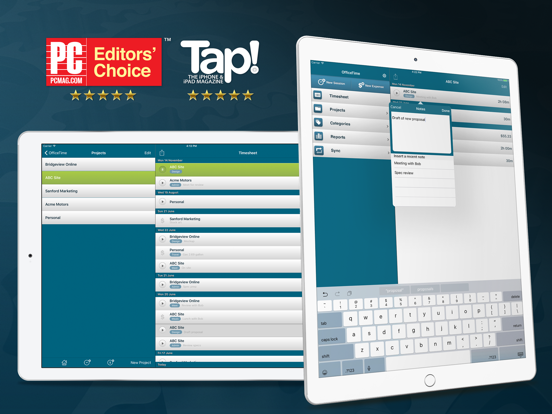
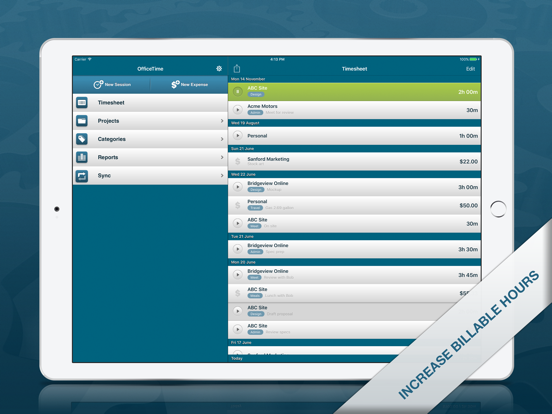
Apoku MCP provides app discovery, detailed cards, evidence, sources and screenshots where available. Unknown or conflicting prices stay explicit.
View JSON
GET /api/v3/apps/446200101
{
  "app_id": 446200101,
  "canonical_url": "https://appcorpus.com/apps/officetime-work-time-tracker-446200101",
  "identity": {
    "name": "OfficeTime Work & Time Tracker",
    "slug": "officetime-work-time-tracker",
    "developer": {
      "name": "Productive Monkey Ltd",
      "url": "https://appcorpus.com/developers/productive-monkey-ltd-developer_b676e045a7b2cfb368c52e26b8752970"
    },
    "icon_url": "https://is1-ssl.mzstatic.com/image/thumb/Purple221/v4/77/fd/82/77fd82cf-2218-6d3c-2da7-caf9b37c4418/AppIcon-Lite-0-0-1x_U007emarketing-0-9-0-85-220.png/512x512bb.jpg",
    "stores": [
      "apple"
    ],
    "platforms": [
      "iphone",
      "ipad"
    ],
    "status": {
      "state": "active",
      "label": "Active",
      "last_checked": "2026-08-06",
      "last_checked_label": "6 Aug 2026",
      "banner": null,
      "region_note": null,
      "data_state": "stale",
      "data_state_label": "Some store data may be out of date"
    }
  },
  "listings": [
    {
      "store": "apple",
      "status": "ACTIVE",
      "url": "https://apps.apple.com/us/app/officetime-work-time-tracker/id446200101?uo=4",
      "rating": 4.2,
      "rating_count": 33,
      "formatted_price": "Free",
      "is_free": true,
      "has_iap": false,
      "has_subscription": null,
      "version": "12.2",
      "updated": "2026-08-06",
      "currency": "USD"
    }
  ],
  "summary": {
    "one_liner": null,
    "summary": null,
    "best_for": [],
    "not_for": [],
    "status": "fallback",
    "at_a_glance": [
      "Free to download"
    ]
  },
  "categories": {
    "official": [
      "Productivity",
      "Business"
    ],
    "appcorpus": [
      {
        "category_id": "productivity",
        "label": "Productivity",
        "url": "https://appcorpus.com/categories/productivity"
      },
      {
        "category_id": "business",
        "label": "Business",
        "url": "https://appcorpus.com/categories/business"
      }
    ]
  },
  "use_cases": [],
  "features": [
    {
      "capability_id": "free_app",
      "label": "Free app",
      "availability": "yes",
      "access_level": "free",
      "scope": null,
      "evidence": "Store published"
    }
  ],
  "pricing": [
    {
      "store": "apple",
      "formatted_price": "Free",
      "is_free": true,
      "has_iap": false,
      "has_subscription": null,
      "currency": "USD",
      "market": "us",
      "last_verified": "2026-08-06",
      "rows": [
        "Free to download"
      ],
      "state": "current"
    }
  ],
  "screens": [
    {
      "url": "https://is1-ssl.mzstatic.com/image/thumb/Purple123/v4/e6/92/28/e69228e7-962a-0431-80bc-cde629a93559/pr_source.jpg/1600x1600bb.jpg",
      "store": "apple",
      "platform": "ipad",
      "alt": "OfficeTime Work & Time Tracker ipad screenshot 1"
    },
    {
      "url": "https://is1-ssl.mzstatic.com/image/thumb/Purple113/v4/a5/44/0a/a5440a72-459e-a2ee-2c24-5fa378f59506/pr_source.png/552x414bb.png",
      "store": "apple",
      "platform": "ipad",
      "alt": "OfficeTime Work & Time Tracker ipad screenshot 2"
    },
    {
      "url": "https://is1-ssl.mzstatic.com/image/thumb/Purple123/v4/8a/af/4d/8aaf4d19-0407-ccab-b67d-ad41774d767d/pr_source.jpg/1600x1600bb.jpg",
      "store": "apple",
      "platform": "ipad",
      "alt": "OfficeTime Work & Time Tracker ipad screenshot 3"
    },
    {
      "url": "https://is1-ssl.mzstatic.com/image/thumb/Purple123/v4/9f/69/df/9f69df9d-0306-2599-c255-d635704726e1/pr_source.png/552x414bb.png",
      "store": "apple",
      "platform": "ipad",
      "alt": "OfficeTime Work & Time Tracker ipad screenshot 4"
    },
    {
      "url": "https://is1-ssl.mzstatic.com/image/thumb/Purple113/v4/30/e0/31/30e031c1-664f-4c4c-9637-2e44b8401c37/pr_source.jpg/1600x1600bb.jpg",
      "store": "apple",
      "platform": "ipad",
      "alt": "OfficeTime Work & Time Tracker ipad screenshot 5"
    },
    {
      "url": "https://is1-ssl.mzstatic.com/image/thumb/Purple113/v4/6c/b2/25/6cb22508-8a13-aea8-b09a-ef99d457e2ef/pr_source.png/552x414bb.png",
      "store": "apple",
      "platform": "ipad",
      "alt": "OfficeTime Work & Time Tracker ipad screenshot 6"
    },
    {
      "url": "https://is1-ssl.mzstatic.com/image/thumb/Purple123/v4/61/75/cd/6175cd41-9d4b-2d67-a276-069e28078660/pr_source.jpg/1600x1600bb.jpg",
      "store": "apple",
      "platform": "ipad",
      "alt": "OfficeTime Work & Time Tracker ipad screenshot 7"
    },
    {
      "url": "https://is1-ssl.mzstatic.com/image/thumb/Purple123/v4/74/9d/d3/749dd3ec-b638-0e37-9611-5d3f12d1e0c9/pr_source.png/552x414bb.png",
      "store": "apple",
      "platform": "ipad",
      "alt": "OfficeTime Work & Time Tracker ipad screenshot 8"
    },
    {
      "url": "https://is1-ssl.mzstatic.com/image/thumb/Purple113/v4/1b/e1/4d/1be14d65-4ce2-c970-57e0-26e5de0d29ea/pr_source.jpg/1600x1600bb.jpg",
      "store": "apple",
      "platform": "ipad",
      "alt": "OfficeTime Work & Time Tracker ipad screenshot 9"
    },
    {
      "url": "https://is1-ssl.mzstatic.com/image/thumb/Purple123/v4/6a/f6/23/6af623a0-284b-aabd-eacf-4eb337c84892/pr_source.png/552x414bb.png",
      "store": "apple",
      "platform": "ipad",
      "alt": "OfficeTime Work & Time Tracker ipad screenshot 10"
    },
    {
      "url": "https://is1-ssl.mzstatic.com/image/thumb/Purple123/v4/3d/f6/a4/3df6a426-a33e-4b00-84a2-cbc15bd176f2/pr_source.jpg/1242x1600bb.jpg",
      "store": "apple",
      "platform": "iphone",
      "alt": "OfficeTime Work & Time Tracker iphone screenshot 11"
    },
    {
      "url": "https://is1-ssl.mzstatic.com/image/thumb/Purple113/v4/58/74/1f/58741f7b-9462-4f9c-1fc5-a51c346f401b/pr_source.jpg/1242x1600bb.jpg",
      "store": "apple",
      "platform": "iphone",
      "alt": "OfficeTime Work & Time Tracker iphone screenshot 12"
    },
    {
      "url": "https://is1-ssl.mzstatic.com/image/thumb/Purple113/v4/fb/fd/04/fbfd043d-937a-eb14-5a77-c3571268b600/pr_source.jpg/1242x1600bb.jpg",
      "store": "apple",
      "platform": "iphone",
      "alt": "OfficeTime Work & Time Tracker iphone screenshot 13"
    },
    {
      "url": "https://is1-ssl.mzstatic.com/image/thumb/Purple113/v4/47/ce/15/47ce150f-f494-3459-873c-aced78bb5675/pr_source.jpg/1242x1600bb.jpg",
      "store": "apple",
      "platform": "iphone",
      "alt": "OfficeTime Work & Time Tracker iphone screenshot 14"
    },
    {
      "url": "https://is1-ssl.mzstatic.com/image/thumb/Purple113/v4/02/56/b8/0256b81f-fb31-78b9-5ffc-c94de075592a/pr_source.jpg/1242x1600bb.jpg",
      "store": "apple",
      "platform": "iphone",
      "alt": "OfficeTime Work & Time Tracker iphone screenshot 15"
    }
  ],
  "data_states": {
    "screens": "current"
  },
  "ratings": [
    {
      "store": "apple",
      "average": 4.2,
      "count": 33,
      "market": "us",
      "observed_at": "2026-08-06",
      "state": "current",
      "reviews": [
        {
          "rating": 5,
          "title": "Great 😊",
          "body": "I have been using this app for over 10 years and I use it to time my job so I know how much to charge based on the hourly rate that I set for each client. it’s working very well on my Mac, iPhone, and iPad. I did purchase the subscription because I wanted to use the cloud sync which works very well. I emailed their support the other day and they were fairly quick to respond to the email and was very helpful. There also is a reporting feature so if you need to calculate for tax season all the jobs and how much you made, you can easily do that by filtering for the whole year or doing a custom filter for other years. Personally, I think it’s good to make a project for each client or at least that is is what I’m doing. When you’re in the projects, you can select a project tap the edit button and you can set a default hourly rate for that project. You set the hourly rates in the categories area. So basically when you’re in the settings for the projects, you can set a default category for that project so every time you add a new timer to that project it will use that hourly rate, but you can always change the hourly rate/category on the fly also.",
          "author": "DudemanLA",
          "date": "6 Aug 2026"
        },
        {
          "rating": 5,
          "title": "Great product",
          "body": "This is a great product! If you need to track billable time it does everything you need. I much prefer it to Timeslips. It isn’t high maintenance, doesn’t require lots of set up time, and it never crashes.",
          "author": "epa1309",
          "date": "6 Aug 2026"
        },
        {
          "rating": 5,
          "title": "Great way to track time on multiple projects",
          "body": "The free version is just Ok, but the paid version has the better options. Managing 2-3 projects at a time is quite easy.",
          "author": "Nigel@",
          "date": "6 Aug 2026"
        },
        {
          "rating": 5,
          "title": "Its Great",
          "body": "Really Great App helps out alot when They Try saying I Worked Less Hours Then I Really Did",
          "author": "neverknow1952",
          "date": "6 Aug 2026"
        },
        {
          "rating": 1,
          "title": "Buyer Beware - Scam NO sync",
          "body": "You need to buy the pro version to get it to sync. After purchasing the pro version I realized you have to buy the desktop version to actually get it to sync. Essentially all other time tracking apps have a sync function between iPad and iPhone. Those are much better solutions. This software is in beta and should be avoided.",
          "author": "Hanson24",
          "date": "6 Aug 2026"
        }
      ]
    }
  ],
  "privacy": [
    {
      "store": "apple",
      "declarations": [
        {
          "title": "Data Not Linked to You",
          "detail": "App Functionality — Diagnostics — Crash Data",
          "source": "Developer declared"
        },
        {
          "title": "Data Not Linked to You",
          "detail": "Diagnostics",
          "source": "Developer declared"
        }
      ],
      "accessibility": []
    }
  ],
  "changes": [
    {
      "store": "apple",
      "version": "10",
      "released_at": null,
      "notes": "A few stability improvements."
    },
    {
      "store": "apple",
      "version": "10.2",
      "released_at": null,
      "notes": "The sync friendly update. Lots of love and TLC has been given to ensure everything is consistent and ready across all your devices. - Syncs only when needed to enable faster syncing. - Categories with billable rates that used pennies (like $50.55) work better - Changing a categories rate now properly applies the new rate to other devices - Now consistently updates to show incoming changes - Eliminates a crash that could cause it to not update in the background - Starting a timer on another device will now update OfficeTime's badge icon to show that a timer is running even if you don't open the app."
    },
    {
      "store": "apple",
      "version": "10.3",
      "released_at": null,
      "notes": "A quick little update to fix a bug that could prevent the stop button from, well, stopping."
    },
    {
      "store": "apple",
      "version": "10.4",
      "released_at": null,
      "notes": "Improved export plus we added a handy button to delete a session right on the editing screen."
    },
    {
      "store": "apple",
      "version": "10.5",
      "released_at": null,
      "notes": "The last update didn't get export working right for everyone. This one does! :)"
    },
    {
      "store": "apple",
      "version": "10.6",
      "released_at": null,
      "notes": "Just a quick hot fix to visually align some session durations properly."
    },
    {
      "store": "apple",
      "version": "10.7",
      "released_at": null,
      "notes": "The Spring Tidy Up. We like to keep things clean. Improvements to cloud sync and general stability."
    },
    {
      "store": "apple",
      "version": "10.9",
      "released_at": null,
      "notes": "Making things happy for iOS 18 plus cloud sync improvements"
    },
    {
      "store": "apple",
      "version": "11.0",
      "released_at": null,
      "notes": "A little update to make things better. Hourly rates that include pennies (like $39.99) now properly cloud sync out to desktop devices."
    },
    {
      "store": "apple",
      "version": "11.1",
      "released_at": null,
      "notes": "A few little updates to improve cloud sync and stability."
    },
    {
      "store": "apple",
      "version": "11.2",
      "released_at": null,
      "notes": "Always improving. Fixes and improvements plus support for category archiving and team rates available in coming desktop editions."
    },
    {
      "store": "apple",
      "version": "11.3",
      "released_at": null,
      "notes": "A little update to improve (optional) cloud sync."
    },
    {
      "store": "apple",
      "version": "11.4",
      "released_at": null,
      "notes": "We've been hard at work making sync work better. * Cloud sync: No longer sometimes appears frozen after syncing with OfficeTime closed * Cloud sync: Much improved sync when OfficeTime is closed * Cloud sync: Fixed sometimes falsely complaining your trial is over * Solved rare crash. * iOS 26 compatible"
    },
    {
      "store": "apple",
      "version": "11.5",
      "released_at": null,
      "notes": "Some little visual fixes to make things work better on the iPad under iOS 26."
    },
    {
      "store": "apple",
      "version": "11.8",
      "released_at": null,
      "notes": "A little update to improve syncing for teams."
    },
    {
      "store": "apple",
      "version": "11.9",
      "released_at": null,
      "notes": "Always improving. A little update to support team project archiving, and improve iPad display."
    },
    {
      "store": "apple",
      "version": "12.0",
      "released_at": null,
      "notes": "Just a handy update to help with cloud sync."
    },
    {
      "store": "apple",
      "version": "12.1",
      "released_at": null,
      "notes": "A little update to make cloud sync work better."
    },
    {
      "store": "apple",
      "version": "12.2",
      "released_at": "2026-07-24",
      "notes": "Always improving. Stability improvements and better sync."
    },
    {
      "store": "apple",
      "version": "9.1",
      "released_at": null,
      "notes": "Always improving. This update stops the edit session screen from closing prematurely, improves background sync and tidies some things up!"
    }
  ],
  "alternatives": [
    {
      "app_id": 1404035216,
      "name": "WorkingHours • Time Tracker",
      "url": "https://appcorpus.com/apps/workinghours-time-tracker-1404035216",
      "reason": "Same category + similar ratings"
    }
  ],
  "evidence_summary": {
    "index_state": "S1",
    "evidence_level": 1,
    "level_label": "Live store listing",
    "indexable": true,
    "last_verified_at": "2026-08-06",
    "unknown_fields": [
      "Apoku editorial summary has not been published yet."
    ],
    "sources": [
      "App Store"
    ]
  },
  "availability_markets": {
    "live": [
      "us"
    ],
    "selected": "us",
    "note": null
  },
  "feature_events": {
    "events": []
  },
  "features_slice": {
    "plans": [],
    "features": [],
    "unknown_features": [],
    "data_cutoff": "6 Aug 2026"
  }
}