AppCorpus MCP gives your agent current app data, prices, screens, features and sources.
View JSON
GET /api/v3/apps/332520417
{
  "app_id": 332520417,
  "canonical_url": "https://appcorpus.com/apps/time-timer-332520417",
  "identity": {
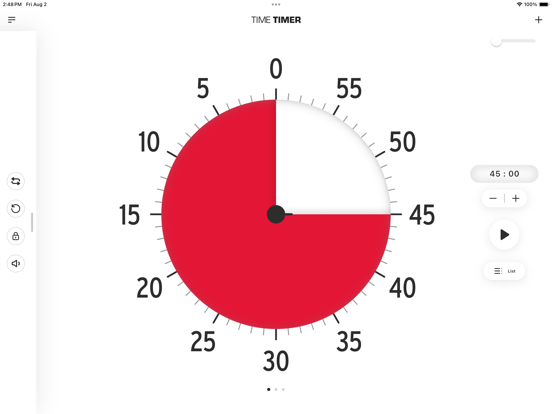
    "name": "Time Timer",
    "slug": "time-timer",
    "developer": {
      "name": "Time Timer LLC",
      "url": "https://appcorpus.com/developers/time-timer-llc-developer_74bd7621ebb4a9f3bfa48f33c4be3f50"
    },
    "icon_url": "https://is1-ssl.mzstatic.com/image/thumb/Purple221/v4/d7/81/b4/d781b4fb-d88c-a6ad-eac4-2522af271cf8/AppIcon-0-0-1x_U007epad-0-1-85-220.png/512x512bb.jpg",
    "stores": [
      "apple"
    ],
    "platforms": [
      "iphone",
      "ipad"
    ],
    "status": {
      "state": "active",
      "label": "Active",
      "last_checked": "2026-09-05",
      "last_checked_label": "5 Sep 2026",
      "banner": null,
      "region_note": null
    }
  },
  "listings": [
    {
      "store": "apple",
      "status": "ACTIVE",
      "url": "https://apps.apple.com/us/app/time-timer/id332520417?uo=4",
      "rating": 4.6,
      "rating_count": 14517,
      "formatted_price": "Free",
      "is_free": true,
      "has_iap": true,
      "has_subscription": false,
      "version": "4.3.4",
      "updated": "2026-03-20",
      "currency": "USD"
    }
  ],
  "summary": {
    "one_liner": "A visual time management tool to help users stay on track and manage their time moreeffect",
    "summary": "Time Timer is a customizable app that helps users manage their time and stay focused. It can be used for daily routines, homework, study blocks, and work sprints.",
    "best_for": [
      "someone who needs help with time management",
      "individuals with ADHD or Autism"
    ],
    "not_for": [],
    "status": "published",
    "at_a_glance": [
      "Free to download",
      "In-app purchases"
    ]
  },
  "categories": {
    "official": [
      "Education",
      "Productivity"
    ],
    "appcorpus": [
      {
        "category_id": "education",
        "label": "Education",
        "url": "https://appcorpus.com/categories/education"
      },
      {
        "category_id": "productivity",
        "label": "Productivity",
        "url": "https://appcorpus.com/categories/productivity"
      }
    ]
  },
  "use_cases": [],
  "features": [
    {
      "capability_id": "free_app",
      "label": "Free app",
      "availability": "yes",
      "access_level": "free",
      "scope": null,
      "evidence": "Store published"
    },
    {
      "capability_id": "in_app_purchases",
      "label": "In-app purchases",
      "availability": "yes",
      "access_level": "free_limited",
      "scope": null,
      "evidence": "Store published"
    }
  ],
  "pricing": [
    {
      "store": "apple",
      "formatted_price": "Free",
      "is_free": true,
      "has_iap": true,
      "has_subscription": false,
      "currency": "USD",
      "market": "us",
      "last_verified": "2026-09-05",
      "rows": [
        "Unlock all Time Timer features — $9.95"
      ]
    }
  ],
  "screens": [
    {
      "url": "https://is1-ssl.mzstatic.com/image/thumb/PurpleSource221/v4/d3/ce/6b/d3ce6bd0-e040-0a83-497a-f89f34dcbdb0/ipad_1.png/1600x1600bb.jpg",
      "store": "apple",
      "platform": "ipad",
      "alt": "Time Timer ipad screenshot 1"
    },
    {
      "url": "https://is1-ssl.mzstatic.com/image/thumb/PurpleSource211/v4/aa/7d/cb/aa7dcb5c-bd23-9a51-f203-f67d4856f349/ipad_5.png/1600x1600bb.jpg",
      "store": "apple",
      "platform": "ipad",
      "alt": "Time Timer ipad screenshot 2"
    },
    {
      "url": "https://is1-ssl.mzstatic.com/image/thumb/PurpleSource221/v4/ed/26/b1/ed26b178-a060-d0bb-6a46-042b1e5ef3ab/b97fc875-e4d3-4034-96cc-5329b04012f9_2nd-01.png/552x414bb.png",
      "store": "apple",
      "platform": "ipad",
      "alt": "Time Timer ipad screenshot 3"
    },
    {
      "url": "https://is1-ssl.mzstatic.com/image/thumb/PurpleSource221/v4/7d/33/55/7d3355f9-281b-e061-89e6-933807a05e5e/ipad_3.png/1600x1600bb.jpg",
      "store": "apple",
      "platform": "ipad",
      "alt": "Time Timer ipad screenshot 4"
    },
    {
      "url": "https://is1-ssl.mzstatic.com/image/thumb/PurpleSource221/v4/cb/57/08/cb570847-17e4-2aa8-7220-5aac1ea38e0d/665a3cef-9b92-4400-8f08-bfc7ab0d0554_2nd-02.png/552x414bb.png",
      "store": "apple",
      "platform": "ipad",
      "alt": "Time Timer ipad screenshot 5"
    },
    {
      "url": "https://is1-ssl.mzstatic.com/image/thumb/PurpleSource211/v4/42/4a/e4/424ae433-2877-b317-5c08-7e488280a26e/ipad_4.png/1600x1600bb.jpg",
      "store": "apple",
      "platform": "ipad",
      "alt": "Time Timer ipad screenshot 6"
    },
    {
      "url": "https://is1-ssl.mzstatic.com/image/thumb/PurpleSource211/v4/6f/74/68/6f746872-2c93-1b8d-54be-f589262b9c97/d4c8a332-c7e7-47d7-a805-517e6708fec1_2nd-03.png/552x414bb.png",
      "store": "apple",
      "platform": "ipad",
      "alt": "Time Timer ipad screenshot 7"
    },
    {
      "url": "https://is1-ssl.mzstatic.com/image/thumb/PurpleSource221/v4/19/14/a1/1914a17e-4e4d-3ef0-4c3b-21dc73e9cb9c/ipad_2.png/1600x1600bb.jpg",
      "store": "apple",
      "platform": "ipad",
      "alt": "Time Timer ipad screenshot 8"
    },
    {
      "url": "https://is1-ssl.mzstatic.com/image/thumb/PurpleSource221/v4/ac/f6/20/acf62035-23c6-edaa-ed8c-5466319ce99b/cafe573c-4f44-4f3d-8ce0-502df395fa73_2nd-04.png/552x414bb.png",
      "store": "apple",
      "platform": "ipad",
      "alt": "Time Timer ipad screenshot 9"
    },
    {
      "url": "https://is1-ssl.mzstatic.com/image/thumb/PurpleSource221/v4/45/1e/73/451e73ec-6d2c-99c0-ac42-a5561a293f85/a185d177-2ee4-4063-88e0-de2fea8f5936_2nd-05.png/552x414bb.png",
      "store": "apple",
      "platform": "ipad",
      "alt": "Time Timer ipad screenshot 10"
    },
    {
      "url": "https://is1-ssl.mzstatic.com/image/thumb/PurpleSource221/v4/bf/c7/54/bfc75405-b03c-0fa9-0214-3fb2a73d93a0/ipad_6.png/1600x1600bb.jpg",
      "store": "apple",
      "platform": "ipad",
      "alt": "Time Timer ipad screenshot 11"
    },
    {
      "url": "https://is1-ssl.mzstatic.com/image/thumb/PurpleSource221/v4/66/3e/91/663e91b6-0512-11a8-bab0-e4aead47062e/ad5764dc-a758-4271-ab23-31d03ab77001_2nd-06.png/552x414bb.png",
      "store": "apple",
      "platform": "ipad",
      "alt": "Time Timer ipad screenshot 12"
    },
    {
      "url": "https://is1-ssl.mzstatic.com/image/thumb/PurpleSource221/v4/14/ad/6e/14ad6e1f-74ba-b98f-39a3-6f1645f397d3/cbd363ac-c5ec-4a9c-b672-54a1c0c2eb6c_2nd-07.png/552x414bb.png",
      "store": "apple",
      "platform": "ipad",
      "alt": "Time Timer ipad screenshot 13"
    },
    {
      "url": "https://is1-ssl.mzstatic.com/image/thumb/PurpleSource211/v4/68/57/b7/6857b776-9ebb-5e6d-3119-4e7ca81c13fb/6e556d9c-7320-495b-96ff-cf3cbe9b26d1_2nd-08.png/552x414bb.png",
      "store": "apple",
      "platform": "ipad",
      "alt": "Time Timer ipad screenshot 14"
    },
    {
      "url": "https://is1-ssl.mzstatic.com/image/thumb/PurpleSource211/v4/66/c0/56/66c056c6-5dc6-66ad-f672-7688eaba442c/805b773d-5304-42e3-8583-b36a6258c82d_2nd-09.png/552x414bb.png",
      "store": "apple",
      "platform": "ipad",
      "alt": "Time Timer ipad screenshot 15"
    },
    {
      "url": "https://is1-ssl.mzstatic.com/image/thumb/PurpleSource211/v4/0b/2d/cd/0b2dcd2d-095e-fb0b-b442-4064900e9ebe/Iphone_1.png/1290x1600bb.jpg",
      "store": "apple",
      "platform": "iphone",
      "alt": "Time Timer iphone screenshot 16"
    },
    {
      "url": "https://is1-ssl.mzstatic.com/image/thumb/PurpleSource211/v4/1a/b9/6c/1ab96cbe-33ed-ea46-50a2-e887c38f9d6c/iphone_4.png/1290x1600bb.jpg",
      "store": "apple",
      "platform": "iphone",
      "alt": "Time Timer iphone screenshot 17"
    },
    {
      "url": "https://is1-ssl.mzstatic.com/image/thumb/PurpleSource221/v4/a5/54/cd/a554cdc9-d3ec-0b0d-281e-95afad8728db/iphone_2.png/1290x1600bb.jpg",
      "store": "apple",
      "platform": "iphone",
      "alt": "Time Timer iphone screenshot 18"
    },
    {
      "url": "https://is1-ssl.mzstatic.com/image/thumb/PurpleSource211/v4/a7/84/bf/a784bfb6-9e73-8156-34c4-fa6aa3984a2e/iphone_3.png/1290x1600bb.jpg",
      "store": "apple",
      "platform": "iphone",
      "alt": "Time Timer iphone screenshot 19"
    },
    {
      "url": "https://is1-ssl.mzstatic.com/image/thumb/PurpleSource211/v4/98/84/e2/9884e27d-0f41-0034-0323-94d2fbf3bba3/iphone_5.png/1290x1600bb.jpg",
      "store": "apple",
      "platform": "iphone",
      "alt": "Time Timer iphone screenshot 20"
    },
    {
      "url": "https://is1-ssl.mzstatic.com/image/thumb/PurpleSource221/v4/78/81/eb/7881eb0a-1efe-0f76-2474-6ce383d10fd5/iphone_6.png/1290x1600bb.jpg",
      "store": "apple",
      "platform": "iphone",
      "alt": "Time Timer iphone screenshot 21"
    },
    {
      "url": "https://is1-ssl.mzstatic.com/image/thumb/PurpleSource221/v4/35/a7/e8/35a7e835-bf33-2d50-c8fd-133189572354/Desktop_1.png/1600x1600bb.jpg",
      "store": "apple",
      "platform": "mac",
      "alt": "Time Timer mac screenshot 22"
    },
    {
      "url": "https://is1-ssl.mzstatic.com/image/thumb/PurpleSource221/v4/07/19/31/0719310b-68a0-dfec-eba6-dceb0918e326/Desktop_2_2.png/1600x1600bb.jpg",
      "store": "apple",
      "platform": "mac",
      "alt": "Time Timer mac screenshot 23"
    },
    {
      "url": "https://is1-ssl.mzstatic.com/image/thumb/PurpleSource211/v4/cf/e7/89/cfe78951-977e-e0a1-6c3c-885fbd851eb4/Desktop_3.png/1600x1600bb.jpg",
      "store": "apple",
      "platform": "mac",
      "alt": "Time Timer mac screenshot 24"
    },
    {
      "url": "https://is1-ssl.mzstatic.com/image/thumb/PurpleSource211/v4/00/eb/45/00eb453b-baec-412b-cb94-da3c22496635/Desktop_4.png/1600x1600bb.jpg",
      "store": "apple",
      "platform": "mac",
      "alt": "Time Timer mac screenshot 25"
    },
    {
      "url": "https://is1-ssl.mzstatic.com/image/thumb/PurpleSource221/v4/b6/78/aa/b678aa35-f75b-5417-0dbd-bc2c08643390/Desktop_5.png/1600x1600bb.jpg",
      "store": "apple",
      "platform": "mac",
      "alt": "Time Timer mac screenshot 26"
    },
    {
      "url": "https://is1-ssl.mzstatic.com/image/thumb/PurpleSource211/v4/cf/18/63/cf186337-3425-abb8-e545-89400588fdf3/Desktop_6_2.png/1600x1600bb.jpg",
      "store": "apple",
      "platform": "mac",
      "alt": "Time Timer mac screenshot 27"
    },
    {
      "url": "https://is1-ssl.mzstatic.com/image/thumb/PurpleSource211/v4/cf/8d/4c/cf8d4cf3-59df-3bd6-4c94-0b8bd9916ec8/Desktop_7.png/1600x1600bb.jpg",
      "store": "apple",
      "platform": "mac",
      "alt": "Time Timer mac screenshot 28"
    },
    {
      "url": "https://is1-ssl.mzstatic.com/image/thumb/PurpleSource221/v4/1f/58/4e/1f584eba-501b-413b-6a14-e3b5852c1810/acdd97ad-a06f-4fb4-a3a8-abeaa29fa288_01_45min_watch.png/396x484bb.jpg",
      "store": "apple",
      "platform": "watch",
      "alt": "Time Timer watch screenshot 29"
    },
    {
      "url": "https://is1-ssl.mzstatic.com/image/thumb/PurpleSource221/v4/7d/80/11/7d8011d1-2124-845b-4cf5-9992c3b86902/d8bec03c-dd21-4910-9210-5e2c751da5fb_02_interval_training_watch.png/396x484bb.jpg",
      "store": "apple",
      "platform": "watch",
      "alt": "Time Timer watch screenshot 30"
    },
    {
      "url": "https://is1-ssl.mzstatic.com/image/thumb/PurpleSource211/v4/0d/3f/f2/0d3ff299-2e47-ec98-32da-669ed61713de/2cfc51db-b441-4d31-a484-05836d1dd530_03_timer_expired_watch.png/396x484bb.jpg",
      "store": "apple",
      "platform": "watch",
      "alt": "Time Timer watch screenshot 31"
    },
    {
      "url": "https://is1-ssl.mzstatic.com/image/thumb/PurpleSource211/v4/54/1b/cf/541bcf68-d0ed-5505-b856-f83dcb3bc1ea/753727a6-6d1f-4566-9458-4de9d9539ed8_04_list_watch.png/396x484bb.jpg",
      "store": "apple",
      "platform": "watch",
      "alt": "Time Timer watch screenshot 32"
    },
    {
      "url": "https://is1-ssl.mzstatic.com/image/thumb/PurpleSource211/v4/82/3b/c8/823bc843-24ae-bf9a-26a0-a2867fa7e374/61af070c-35d3-48bd-be0d-e42c480640d1_05_long_press_watch.png/396x484bb.jpg",
      "store": "apple",
      "platform": "watch",
      "alt": "Time Timer watch screenshot 33"
    },
    {
      "url": "https://is1-ssl.mzstatic.com/image/thumb/PurpleSource221/v4/88/7d/57/887d578a-9f3d-b8c7-5d3b-2730b5a9187e/53d6745a-53f2-4873-a27d-9e9d6ac4e008_06_customize_60_watch.png/396x484bb.jpg",
      "store": "apple",
      "platform": "watch",
      "alt": "Time Timer watch screenshot 34"
    },
    {
      "url": "https://is1-ssl.mzstatic.com/image/thumb/PurpleSource211/v4/0d/30/3b/0d303b8c-e64b-a8f9-ab70-58701eb388b5/929e72e1-156e-449f-83f8-b2a18bc573ef_07_customize_hms_watch.png/396x484bb.jpg",
      "store": "apple",
      "platform": "watch",
      "alt": "Time Timer watch screenshot 35"
    }
  ],
  "ratings": [
    {
      "store": "apple",
      "average": 4.6,
      "count": 14517,
      "market": "us",
      "observed_at": "2026-09-05",
      "reviews": [
        {
          "rating": 2,
          "title": "Yet Another Subscription Requirement App…🙄",
          "body": "This app used to be a great, full-featured, free resource for the neurodivergent community. Unfortunately, some features are now locked behind a subscription-based paywall. Since this subscription model was recently introduced, I feel it might be time to find an alternative, as I can't justify paying for yet another subscription. Subscriptions make sense for apps that are multi-functional and vital for managing various aspects of life. However, for apps that perform only one or two functions at most, a one-time lifetime payment would be more reasonable, provided that the pricing is competitive and not based on the developers' unrealistic expectations. Let's be honest, \"lifetime\" in technology nowadays usually means the duration of the software's support, depending on how long developers choose to maintain it or whether the company closes down, as seen with many SaaS companies. Additionally, I feel like a key feature for widgets is missing, which is essential for visualizing time. So please consider either providing more features and functions to justify a subscription or introducing a realistically priced lifetime license.",
          "author": "SimplyInquiring",
          "date": "5 Sep 2026"
        },
        {
          "rating": 5,
          "title": "Miracle Morning lovers will enjoy this timer!",
          "body": "I love this timer!! I use it every morning with my Miracle Morning routine. Many of the tasks I do, I use a 2 minute timer. I read a book of interest, I recite affirmations, I look at my vision board, I meditate, and I write three things I’m grateful for in a journal. If I spill over a bit, more than 2 minutes, also fine, but 2 minutes means I can stick to a habit. This free timer is easy to reset or store any length of times you want to program. I like the visual design too, bold red. It’s on my Home Screen, where I keep my most used apps. Also great for timing quick cleanups! Use for your children to motivate too. Time is our friend, use it with care. PS The developer thanked me for my stellar review saying “Let us know if you need anything in the future.” Well…How about a Time Travel App? If you get started now I will be using it in about, three….two…one…",
          "author": "Shay2Renee",
          "date": "5 Sep 2026"
        },
        {
          "rating": 4,
          "title": "Like it, one more thing to love it",
          "body": "I really like the simplicity of this timer. I actually had a physical timer that they have for sale before so when I found this application, I appreciated the fact they made an app just like their timer. The only thing I would suggest for the makers of this app is to have trackable progress. I use a lot of different apps and so one thing I like about other apps that this one doesn’t have is that if you get so many timers done in a day it’s tracking that. It’s just a good way to be able to reflect on all the work you got done just like a checklist. I did notice that when you were done with a timer, it is zeroed out so if you were to use all your timers in one day, you can zero them out and then refresh them, which is kind of cool too, but if you are using one time or multiple times, there’s no railway to track it. It’s just a suggestion.",
          "author": "Paperblanx",
          "date": "5 Sep 2026"
        },
        {
          "rating": 5,
          "title": "Adult ADHD User: Love this app!! Used on iPhone and Mac for years now to help with my ADHD.",
          "body": "I’ve been using this app on my MacBook Pro and iPhone for years, little more than 3, and this is an incredible app!!! AND NOW it runs, not just alerts, on the Apple Watch. Awesome. Am looking forward to future updates that will allow graphical updates of remaining time and/or disk on the watch complication. I’d be more interested in a disk complication update more than a countdown, that would be pretty much the same as the native watchOS timer. In the meantime I’ll make sure with double pressing the crown to see the disk status. Funny how that little disappearing disk has helped me so much over the years. If you’re an adult with adhd it’s worth a shot to see how you like it. I’ve also liked that the app has the ability to keep from locking the screen while I’m working on a project with the phone out on my desk. But the watch addition has made this even more useful to me. The entire reason I got the Apple Watch was to help speed up AND limit the number of alerts I get in a day to the most important- if you have adhd you’ll completely understand. Best of luck with this 5-star “As is” app! And I do look forward to the updates mentioned.",
          "author": "shanebailey",
          "date": "5 Sep 2026"
        },
        {
          "rating": 2,
          "title": "Aarrgghh! Latest update!",
          "body": "I’ve come to rely on this app for a number of things, but especially doing laundry in my apartment building. (I was so dependent on it, despite wishing I could see time left on the lock screen, I even bought one of their hardware clocks for guest speakers in a group I belong to.) I could have “4th Flr Washer,” “8th Flr Dryer” etc saved as clocks, each running concurrently. When I opened the app after the last update, all my saved clocks had been renamed with generic names. Okay, annoying, but easy to rename back. But I couldn’t get one clock off “paused” so I closed the app and reopened. ALL my pre-set clocks were gone (not even just generically renamed) except for the one running when I’d closed the app! Will keep trying to figure out how to work around these bugs for awhile, this is a plea to the developers to restore the quick set option (go one better and make it possible on *any* clock; that’s most satisfying UX of any such utility app!) and restore the stability and former simplicity of using the app with multiple clocks stored. (I highly recommend their hardware products, however. That’s sincere, not a bribe to get the app fixed!)",
          "author": "Yonkers-Man",
          "date": "5 Sep 2026"
        }
      ]
    }
  ],
  "privacy": [
    {
      "store": "apple",
      "declarations": [
        {
          "title": "Data Linked to You",
          "detail": "App Functionality — Contact Info — Email Address",
          "source": "Developer declared"
        },
        {
          "title": "Data Linked to You",
          "detail": "App Functionality — Contact Info — Name",
          "source": "Developer declared"
        },
        {
          "title": "Data Linked to You",
          "detail": "Contact Info",
          "source": "Developer declared"
        },
        {
          "title": "Data Not Linked to You",
          "detail": "Analytics — Usage Data — Product Interaction",
          "source": "Developer declared"
        },
        {
          "title": "Data Not Linked to You",
          "detail": "App Functionality — Diagnostics — Crash Data",
          "source": "Developer declared"
        },
        {
          "title": "Data Not Linked to You",
          "detail": "Diagnostics",
          "source": "Developer declared"
        },
        {
          "title": "Data Not Linked to You",
          "detail": "Usage Data",
          "source": "Developer declared"
        }
      ],
      "accessibility": []
    }
  ],
  "changes": [
    {
      "store": "apple",
      "version": "4.0.2",
      "released_at": null,
      "notes": "Bug Fixes and Improvements"
    },
    {
      "store": "apple",
      "version": "4.0.3",
      "released_at": null,
      "notes": "Bug fixes and improvements"
    },
    {
      "store": "apple",
      "version": "4.0.5",
      "released_at": null,
      "notes": "Thank you for your feedback! We have made improvements to enhance your app experience. Here’s what’s new in 4.0.5: -New landscape user interface on mobile devices. -Bug fixes and improvements. We look forward to hearing your feedback and ideas for upcoming updates."
    },
    {
      "store": "apple",
      "version": "4.0.6",
      "released_at": null,
      "notes": "Bug fixes and improvements"
    },
    {
      "store": "apple",
      "version": "4.0.7",
      "released_at": null,
      "notes": "Bug fixes and improvements"
    },
    {
      "store": "apple",
      "version": "4.0.8",
      "released_at": null,
      "notes": "Bug fixes and improvements"
    },
    {
      "store": "apple",
      "version": "4.1.1",
      "released_at": null,
      "notes": "Quick Set +/- buttons to quickly add and subtract time from your timer, customization slider to adjust size of disk and detail level, keep your timers organized by creating groups and rearrange timers in custom order, sequence timers to create daily routines, data sync across devices, both mobile and desktop, and more!"
    },
    {
      "store": "apple",
      "version": "4.1.2",
      "released_at": null,
      "notes": "New ways to manage your time!"
    },
    {
      "store": "apple",
      "version": "4.1.4",
      "released_at": null,
      "notes": "Bug fixes and improvements"
    },
    {
      "store": "apple",
      "version": "4.1.5",
      "released_at": null,
      "notes": "Bug fixes and improvements"
    },
    {
      "store": "apple",
      "version": "4.1.6",
      "released_at": null,
      "notes": "Bug fixes and improvements"
    },
    {
      "store": "apple",
      "version": "4.1.7",
      "released_at": null,
      "notes": "Bug fixes and improvements"
    },
    {
      "store": "apple",
      "version": "4.1.8",
      "released_at": null,
      "notes": "Bug fixes and improvements"
    },
    {
      "store": "apple",
      "version": "4.1.9",
      "released_at": null,
      "notes": "Bug fixes and improvements"
    },
    {
      "store": "apple",
      "version": "4.2.0",
      "released_at": null,
      "notes": "Bug Fixes + Improvements"
    },
    {
      "store": "apple",
      "version": "4.2.1",
      "released_at": null,
      "notes": "Bug fixes and improvements"
    },
    {
      "store": "apple",
      "version": "4.2.10",
      "released_at": null,
      "notes": "Bug fixes."
    },
    {
      "store": "apple",
      "version": "4.2.2",
      "released_at": null,
      "notes": "Bug fixes and improvements"
    },
    {
      "store": "apple",
      "version": "4.2.4",
      "released_at": null,
      "notes": "Small bug fixes and improvements."
    },
    {
      "store": "apple",
      "version": "4.2.5",
      "released_at": null,
      "notes": "Bug fixes."
    }
  ],
  "alternatives": [
    {
      "app_id": 1521978238,
      "name": "Proloquo",
      "url": "https://appcorpus.com/apps/proloquo-1521978238",
      "reason": "Same category + similar ratings"
    },
    {
      "app_id": 1072799231,
      "name": "TD Snap®",
      "url": "https://appcorpus.com/apps/td-snap-1072799231",
      "reason": "Same category + similar ratings"
    },
    {
      "app_id": 6463803046,
      "name": "Good Inside: Parenting",
      "url": "https://appcorpus.com/apps/good-inside-parenting-6463803046",
      "reason": "Same category + similar ratings"
    }
  ],
  "evidence_summary": {
    "index_state": "S2",
    "evidence_level": 2,
    "level_label": "Independent summary published",
    "indexable": true,
    "last_verified_at": "2026-09-05",
    "unknown_fields": [],
    "sources": [
      "App Store"
    ]
  },
  "availability_markets": {
    "live": [
      "us"
    ],
    "selected": "us",
    "note": null
  },
  "feature_events": {
    "events": []
  },
  "features_slice": {
    "plans": [
      {
        "code": "unlock-all-time-timer-features",
        "label": "Unlock all Time Timer features",
        "kind": "unknown",
        "status": "store_listed",
        "prices": [
          {
            "storefront": "us",
            "formatted": "$9.95",
            "billing_period": null
          }
        ],
        "trial": null
      }
    ],
    "features": [],
    "unknown_features": [],
    "data_cutoff": "5 Sep 2026"
  }
}