
Quick verdict
- What it is
- Store information collected; independent summary not yet available.
- At a glance
-
- Free to download
Categories and search queries
Official categories
- Finance
- Business
AppCorpus categories
Key functions
| Function | Availability | Access | Scope | Evidence |
|---|---|---|---|---|
| Free app | Yes | Free | — | Store published |
Screens
App Store
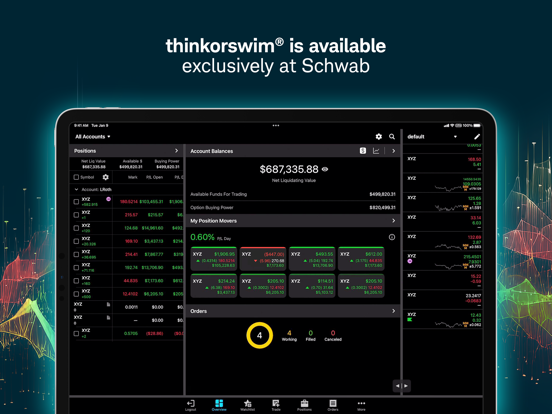
27 store screenshots



Pricing & paywalls
App Store
- Free
Ratings & reviews
App Store
-
5/5Great trading app
UPDATE: The workaround mentioned in the Developer’s Response works great, so no complaints from me. Although the tab bar navigation has also changed, it can still be configured to replicate the old layout. My only suggestion would be to add a tooltip for the Buy/Sell buttons, which would be displayed the first time that a user views this screen since updating - I think this new functionality is great, but it was not clear to me that those were buttons so it is somewhat unintuitive. Regardless, thanks for the help! Original review: This new update, however, is terrible. It’s not as intuitive overall. So far, the biggest friction that I feel as a user (on both iPad and iPhone) is the inability to create an order directly from a symbol’s screen. I have no idea why that was removed as a feature, but you’ve just made one of the primary user actions incredibly more cumbersome - I now have to tap on Orders, the new order button, type the symbol name, and tap the appropriate row. The worst part is that by the time I’ve performed these additional 5+ taps, I have lost the context of what the trade was that I wanted to perform in the first place. Don’t fix what’s not broken - please restore the former (read as: better, in terms of intuitiveness and navigational ease) user interface. I'm usually not opposed to updated app experiences, but this one is notably worse, and aside from reorganizing the functionality, the only new feature I’ve even noticed is the different view/display options for Watchlists.
jeeves78 · 30 Aug 2026
-
5/5Issues
Love the platform and what it offers but am extremely frustrated with all the technical problems. There’s been countless instances where I’ve placed buy or sell orders that do not go thru. When you check it the color is lighter, it does not allow you to cancel it or make any changes, the order is not acknowledged resulting in enormous losses as you end up having to resubmit orders for a higher price or take a loss on the sales price. When the frozen order doesn’t allow you to cancel or change it, you have to submit a new order for a different price, suddenly the old order (which can sometimes take minutes at a time) suddenly activates and you end up with duplicate orders resulting at even further losses. Another costly problem is when you set trailing stops or stop limits and the stock breezes through it without selling. There’s been numerous other issues but those are the most predominant and costly issues. Of course It’s never Ameritrade the takes the loss, it is the user. If there weren’t so many technical problems I would really enjoy the program and frankly I’m shocked that there hasn’t been lawsuits from all the customers that have incurred monumental losses because of these problems.
WillowsSong · 30 Aug 2026
-
3/5Webull > thinkorswim
When doing a price levels on Webull, they have a feature where the line will automatically straighten for you infinitely from left to right with just one easy, single tap or click. It’s super convenient, when trying to identify support & resistance from previous days, months, even years. Especially on the go where everything is only accessible through the palm of your hands within a small screen. It’s super annoying getting crossed-eyed on trying to see if the price level line is straightened, & it gets even trickier when you want the line longer than what the screen— cellphone or laptop shows, because sometimes when being forced to extend the line manually, you’ll also have to make sure it keeps straight. Also, I hate how when drawing head & shoulder trends, for example, that you literally have to go in & manually add in lines for both heads & shoulders. Can’t there be a feature where you’re able to draw one line, then tap on your the next for the lines to automatically connect, instead of having to create new lines, manuscripts then to make sure the points touch, etc? I have yet transferred my account, because Webulls features when it comes to analytical notation tools are much more convenient, than thinkorswim. Also, is there not a way up preserve my settings when it comes to removing, example, RSI or MACD temporarily? I feel like I always have to keep these in my screen when I don’t always want to see them, but having to change them to my colors of my lines to my preference for easy differentiation is so annoying.
안녕하세요 👋🏼 · 30 Aug 2026
-
4/5Needs “turbo trader” share size buttons w/ “Buy Bid” “Sell ask” buttons
The app is usable to trade and pretty decent especially with charting and indicators. Or bc of the free level 2 and the PFOF model that allows for commission free trading. But they could take a page out WeBull’s book in how they designed their mobile app and mobile trading software with “Turbo Trader”. If you’re an active trader that needs to get in and out of the market quickly, it’s essential to have share size buttons and “Buy Bid”, “Sell ask”, “Buy Market”, “Sell Market”, “Flatten” & “Reverse” buttons. The desktop application has those features as well as the web trader. But unfortunately not the mobile app. It’s still pretty good compared to everybody else’s mobile trading software though. Another problem is that there are some bugs like sometimes on the 1 day, 1 minute I’ve seen the chart not be able to scroll to the right but it’s easily fixed by just reloading the chart in a different time period like “5 days, 1 minute” as opposed to the default “1 day, 1 minute”. And there’s also this pretty terrifying glitch where I’ll be trying to put in an order but for some reason it will keep saying “this order cannot be edited bc blah blah” and I have to close the app and reopen it in order to successfully close my position which can be terrifying sometimes. Especially if you need to get out immediately and things are moving fast. That can be really dangerous. Every one of these apps has some bugs though afai can tell. So in summary, pretty good in most ways, especially compared to most others but some serious drawbacks and a bit buggy. Pretty good for charting and technical analysis
curiousgeorge04 · 30 Aug 2026
-
2/5App frequently closes on me during trades
The app over all is great. It has a lot too offer. But there is one issue that happens frequently enough the that it has caused me to one star. The app repeatedly logs me out staying “the session has ended, please log in to continue” the log in screen comes up and I have to type in my password etc and get logged in. This has cost me money in more than one occasion and it always seems to happen right as I’m about to exit a position that is going against me. I be been luck that the moves weren’t more violent and didn’t go further against me while I was getting logged back in. Very irritating. I’ve also had times where I sent and order and it just did t go anywhere. It was like the order never existed after I hit the send button. So I missed a lot of good entries and exits due to this. But besides those too issues I do really like the app. I do wish the would add a few quick execution button on the same screen as the chart…. So you do t have to toggle over to the order tab and hit “send” are you sure “yes”. That’s a 3 step process and a lot can happen in those 3 steps that can cost u money. I suggest 3 execution buttons buttons be added somewhere on the chart tab that can be customized to what type of orders the execute. Similar to the way you can assign hot keys on the active trader tab of the desktop version.
4355578998?,;,?$ · 30 Aug 2026
Privacy & accessibility
App Store
Privacy
- Data Linked to You — Analytics — Usage Data — Product Interaction Developer declared
- Data Linked to You — App Functionality — Identifiers — User ID Developer declared
- Data Linked to You — App Functionality — Usage Data — Other Usage Data Developer declared
- Data Linked to You — App Functionality — User Content — Customer Support Developer declared
- Data Linked to You — App Functionality — User Content — Photos or Videos Developer declared
- Data Linked to You — Identifiers Developer declared
- Data Linked to You — Usage Data Developer declared
- Data Linked to You — User Content Developer declared
- Data Not Linked to You — Analytics — Diagnostics — Crash Data Developer declared
- Data Not Linked to You — Analytics — Diagnostics — Performance Data Developer declared
- Data Not Linked to You — Diagnostics Developer declared
Accessibility
No accessibility labels collected yet.
Versions
App Store
-
209.4
Optimizations for a better, faster, stronger mobile experience. More to come. Peace, love, and happy trading.
-
209.7
Optimizations for a better, faster, stronger mobile experience. Peace, love, and happy trading.
-
212.0.1
Changes for a better faster stronger mobile experience. Peace, Love, & Happy Trading
-
214
Get outside and enjoy the warmer weather with these new thinkorswim mobile features. Sunscreen not included. • In our Account Selector we’ve added Net Liquidation and P/L Day to get a consolidated snapshot of how things are moving. • Analyst Ratings are now available for your positions. Choose a position to see their ratings. • We’ve added the 52-Week High/Low range to your Position Details screen. See where your trade and the current market lies within the range. • You now can customize your chart volume bars like you do with our desktop app. Volume can be seen as an overlay in the chart or moved as a subgraph. • Remote check deposit is now available under the Transfers menu. Chose ACH or check deposit to add funds to your accounts. • Optimizations for a better, faster, stronger mobile experience. More to come. Peace, love, and happy trading.
-
214.1
Optimizations for a better, faster, stronger mobile experience. More to come. Peace, love, and happy trading.
-
214.2
Optimizations for a better, faster, stronger mobile experience. More to come. Peace, love, and happy trading.
-
216
Throw on your favorite jacket and head outside before it gets too chilly. We’ve got some new mobile updates we believe you will “fall” for. See what we did there? On our Overview screen, you can view your individual account balances to see how each is performing We tweaked our chart crosshair to make chart trading more intuitive Introducing the Trail Stop Limit order You can now transfer funds in or out of your IRA accounts Adding Total Cost column and Margin Futures requirement to Watch List values Optimizations for a better, faster, stronger mobile experience Peace, love, and happy trading.
-
216.1
Optimizations for a better, faster, stronger mobile experience. More to come. Peace, love, and happy trading.
-
217
Optimizations for a better, faster, stronger, and more festive mobile experience. Much more to come in 2025! Peace, love, and happy holiday trading.
-
217.1
Optimizations for a better, faster, stronger mobile experience. More to come. Peace, love, and happy trading.
-
217.2
Optimizations for a better, faster, stronger mobile experience. More to come. Peace, love, and happy trading.
-
218
March is upon us and we're crazy about these new mobile features. So, ball out on the markets with thinkorswim mobile for the win! Post up and get your option trades grouped by their Spread type. On your Positions screen tap on Settings and enable Show Spread Grouping. As easy as a layup you can view a breakdown of your unrealized trade cost when viewing a position. Crash the boards while you edit your tax lot method for your individual trades. Hop into Settings on your trade ticket to customize. Hit a deep three and enjoy these new Watchlist columns that track Last, Net Change, and % Change, for the Extended sessions. Peace, love, and happy trading.
-
219
Don't sweat the heat, these new features are cool! • In the Account Selector, tap the gear icon to sort your accounts on the Customize Accounts screen. These choices sync with other devices, thinkorswim Desktop, and thinkorswim Web. • Analyst Reports (from third parties) are now available in Quote Details under the newly designed Research tab. • In Position Details, tap View Lot Details to see the trade lots that built your position. And, as always, we are focused on improving performance and stability. Peace, Love, and Happy Trading!
-
219.1
Don't sweat the heat, these new features are cool! • In the Account Selector, tap the gear icon to sort your accounts on the Customize Accounts screen. These choices sync with other devices, thinkorswim Desktop, and thinkorswim Web. • Analyst Reports (from third parties) are now available in Quote Details under the newly designed Research tab. • In Position Details, tap View Lot Details to see the trade lots that built your position. And, as always, we are focused on improving performance and stability. Peace, Love, and Happy Trading!
-
219.2
Optimizations for a better, faster, stronger mobile experience. Peace, love, and happy, trading.
-
220
Football training camp is upon us, check out our new features that made the cut! • % Change Since Watchlist columns: We added the 5 Day, 20 Day, 1 Month, 6 Month, and Year To Date % change since columns to better track positional movement overtime. • Create orders for Specific Tax Lots: It’s here, the highly anticipated ability to close specific tax lots for positions. • Analyst Report bug fix: Under Research tab you can now open and view full Analyst Report PDF’s. And, as always, we remain focused on improving performance and stability. Peace, Love, and Happy Trading!
-
222
Optimizations for a better, faster, stronger mobile experience. Peace, love, and happy, trading.
-
223
Fall into our newest release. You see what we did there? • Account History!!! Ditch your desktop and get outside for full details on your account moves while on the move. Click on History from the navigation menu. • Optimizations for a better, faster, stronger mobile experience. Peace, love, and happy trading.
-
224
A new year and a new thinkorswim mobile update. We've got performance enhancements and bug fixes to help get the new year started right! Here's to a great 2026 for all! Peace, love, and happy trading.
-
225
Optimizations for a better, faster, stronger, mobile experience. Much more to come! Peace, love, and happy trading.
-
225.1
Optimizations for a better, faster, stronger mobile experience. Much more to come! Peace, love, and happy trading.
-
226
Optimizations for a smarter, faster, and more epic mobile trading experience. Peace, love, and happy trading.
-
226.1
Optimizations for a smarter, faster, and more epic mobile trading experience. Peace, love, and happy trading.
-
226.2
Optimizations for a smarter, faster, and more epic mobile trading experience. Peace, love, and happy trading.
-
227
· 20 Jul 2026
Summer is in full swing, and thinkorswim mobile is turning up the heat with a few new features. Full Screen Charts- You asked, and we listened. Chart expansion to full screen is now available on phones, not just tablets, in both portrait and landscape mode! Performance Improvements - helping you get tapped into the market even faster! Peace, love, happy trading.
-
227.1
Optimizations for a smarter, faster, and more epic mobile trading experience. Peace, love, and happy trading.
-
227.2
· 19 Aug 2026
Optimizations for a better, faster, stronger mobile experience. Peace, love, and happy trading.
Alternatives
- tastytrade: Invest & Trade — Same category + similar ratings
- TradeStation - Trade & Invest — Same category + similar ratings
- Seeking Alpha: News & Analysis — Same category + similar ratings
- Webull: Investing & Trading — Same category + similar ratings
- NinjaTrader | Futures Trading — Same category + similar ratings
- MarketSim — Same category + similar ratings
Availability by market
- US
Data quality & evidence
- Page completeness
- Live store listing
- Last verified
- 30 Aug 2026
- Sources
- App Store
- Independent summary has not been published yet.