
Quick verdict
- What it is
- Store information collected; independent summary not yet available.
- At a glance
-
- From $17.99/mo
- Free to download
- In-app purchases
Categories and search queries
Official categories
- Productivity
- Business
AppCorpus categories
Key functions
| Function | Availability | Access | Scope | Evidence |
|---|---|---|---|---|
| Free app | Yes | Free | — | Store published |
| In-app purchases | Yes | Limited free | — | Store published |
Screens
App Store
19 store screenshots


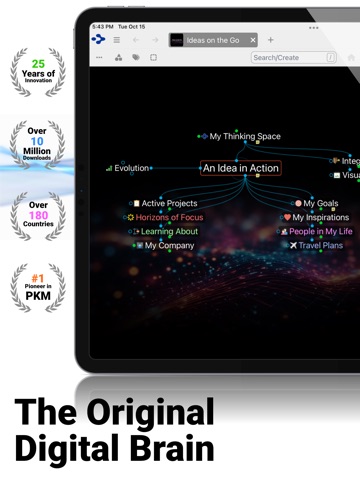

Pricing & paywalls
App Store
- TheBrain Pro Monthly — $17.99/month
- TheBrain Pro Monthly — $189.99/year ($15.83/mo)
Ratings & reviews
App Store
-
5/5Excellent upgrade
Great job Harlan and Brain Team. Started using the Brain to replace Goldmine, Ecco Pro personal information managers about 20 years ago. Used the Brain at Verizon/GTE and during my call up to active US Army for 8 years. Now retired I use The Brain to hold information for building hot rods, family, pets, and Jesus Christ my Savior.
Blanktoday · 7 Aug 2026
-
5/5Great work!
TheBrain developer did great job of updating the IOS version! Nice work! Lots of new features.
JohnF9 · 7 Aug 2026
-
5/5My daily driver
I use TheBrain app on a daily basis. In fact, it’s the only app on my iPhone that stands alone - not grouped in a folder. Quick notes on any topic. Sending web pages and images through BrainBox. Staying in sync with my laptop. Amazing! I couldn’t function without it!!
Augie Mill · 7 Aug 2026
-
5/525 years and still better
I've used TheBrain on my PC for 25 years, and the mobile app many years too. It's my main web clipper and PKM; there's nothing better!
PaddyTC · 7 Aug 2026
-
5/510 years later
Life without the Brain
Taz brain · 7 Aug 2026
Privacy & accessibility
App Store
Privacy
- Data Not Collected Developer declared
Accessibility
No accessibility labels collected yet.
Versions
App Store
-
11.0.10
* Various fixes and enhancements including updated sync framework
-
11.0.4
* Create thoughts from URLs and images in the clipboard * Paste URLs from the clipboard as attachments * Notes: Change text size via pinch-to-zoom * Various fixes and attachments
-
11.0.5
* Swipe left/right from edge of view to navigate forward/back * iPad: Preliminary trackpad and mouse pointer support * iPad: Support for keyboard navigation in the plex * Various fixes and enhancements
-
11.0.6
New features * Outline and mind map view on iPad * Notes: Toolbar buttons to insert image, URL, link to thought * Notes: Keyboard shortcuts to move cursor and select text, Shift+Enter to add inline breaks * Thought properties button to swap name and label Fixes * Notes: Dictation does not work * Various other fixes and enhancements
-
11.0.7
New Features * Navigation on iPad using an external keyboard: Highlight a thought using the arrow keys. Cmd + Enter activates a thought. Option + Space toggles expand/collapse in mind map and outline layouts. Fixes * Thought properties should not allow empty thought name * iPad notes editor input problems with auto suggest * iPhone notes status bar is hard to read when colored white on a light page
-
11.0.9
* Improved sync stability * Various fixes and enhancements
-
13.0.1
There are many improvements and fixes included in this update. Major features and improvements include: * WYSIWYG editing of notes * The size of the plex/notes area can be adjusted (iPad only) * Powerful tables in notes * To do list support * Tap the icon in the toolbar to open the to do list * To do items are displayed and can be checked, unchecked, edited, etc. * Thoughts in the to do list can be activated * The to do list is updated automatically as notes are edited * Improved spellchecking * Better keyboard shortcuts * All new settings to customize editor behavior * Toggle the display of markdown and many other options * Navigate thoughts without leaving notes via mapped links * Back/forward within notes using swipe from left/right edge * Mentions of thoughts are displayed in note text with a dotted underline * Long press on a mention to navigate or turn into an explicit link * Collapse expand controls for titles, headings, etc. appear in the left margin of notes * Phone numbers are recognized and can be tapped to initiate a call * Thought title is editable within note * Attachments are displayed at the top of the note content * Long press on attachment to delete/rename * Add button in notes toolbar enables insert of attachments, links, table, clipboard * Notes supports capturing text from the camera
-
13.0.2
Various fixes and enhancements. * Added ability to connect to a TeamBrain enterprise server * Fixed: Crash when following link to thought from notes * Fixed: Crash on cut/copy of image in notes * Removed FPS indicator * Fixed: Copying from notes and pasting to Apple Notes pastes an HTML attachment
-
13.0.3
Various fixes and enhancements.
-
13.0.4
Various fixes.
-
14.9
A complete reimagining of TheBrain experience on phones and tablets. We’ve introduced a host of new features, an exclusively redesigned UI, and many capabilities that were once limited to the desktop. Here are some key new features the have been added: • Redesigned Modern User Interface • Integrated AI • Enhanced Performance • More Powerful Notes Editor with Backlinks and Unlinked Mentions • Type and Tag Management • Desktop-Grade Search • Faster, Parallel Syncs of Brains • Multi-Thought Actions • Search Filtering and Reports • Multitasking on iPad • Customizable Brain Themes, Wallpapers, Thought Icons • No-Plex Navigation • Cross-Brain Search
-
14.9.1
New Features and Enhancements • Long press on a thought to show the radial menu for creating and linking thoughts • Long press expands thought to show its entire name if truncated • Improved performance • Better mind map layout, including parents and jumps • Thoughts in mind map and outline layout are easier to expand and collapse • Plex splitter is easier to drag • Auto-focus thought name when tapping on the active thought to edit • New buttons on tablet toolbar for reports and to do list • Tap on unlinked mention for link/activate options Fixes • Some URLs fail to share to BrainBox • Duplicate items appear in BrainBox • Improved UI when there are no search results • Localization improvements • Saving reports does not work • Can't link to recent thoughts without searching • Full thought name should always be visible in edit mode • Creating thoughts via AI not working due to API change • Tapping on links and unlinked mentions does not work properly • Long attachment names are not handled correctly • Moving a dialog can dismiss it unintentionally • Various other fixes
-
14.9.2
New Features and Enhancements • Improved mind map and outline layouts • Performance improvements for search, navigation, and server connectivity • Keyboard shortcuts when creating and searching • Compact attachments option • Deep linking support • Apple Pencil support for dragging from gates to create and link thoughts and more • To do list and reports panel on iPad • In-app purchasing Fixes • Inaccurate error detection and stability improvements • Hover of thought does not show multiple lines of text • AI fixes and UI improvements • Logging out does not always work • Attachments list is truncated in edit mode • Improved context menus • App tries to open remote brain as if it’s local • Some brains from early versions can cause app to not load • Thoughts do not display in the pins and past thoughts list • BrainBox: Item fails to be added if it already exists in a brain • BrainBox: Problem items prevent future shares from being processed • Various other fixes and improvements
-
14.9.3
New Features and Enhancements • All-new notes editor with improved performance and interface • Seamless fullscreen editing of notes • Supports UI scaling—adjust in Settings > Display & Brightness for better readability • Smoother animation and better performance • Faster startup Fixes • Enhanced stability and reliability
-
14.9.4
New Features and Enhancements • All-new notes editor with improved performance and interface • Seamless fullscreen editing of notes • Supports UI scaling—adjust in Settings > Display & Brightness for better readability • Smoother animation and better performance • Faster startup Fixes • Enhanced stability and reliability
-
14.9.5
New Features and Enhancements • All-new notes editor with improved performance and interface • Seamless fullscreen editing of notes • Supports UI scaling—adjust in Settings > Display & Brightness for better readability • Smoother animation and better performance • Faster startup Fixes • Enhanced stability and reliability • Fixed: Tapping to edit the thought name exits edit mode
-
14.9.6
Various fixes and enhancements.
-
14.9.7
Various fixes and enhancements, including improved stability and better support for receiving shares from other apps via the share sheet.
-
14.9.8
Smoother animation and various fixes
-
14.9.9
Fixes for creating brain archives and compatibility with TheBrain 15 Desktop.
-
15.0.555
TheBrain 15 has arrived — and for the first time, your iPhone and iPad have virtually every feature of the desktop version. With agentic AI, blazing speed, and over 150 new features, this is the most powerful TheBrain mobile experience ever. DESKTOP POWER ON IPHONE AND IPAD For the first time, the mobile app delivers the full scope of TheBrain — every feature, every workflow — in an interface purpose-built for phones and tablets. • The complete desktop feature set, optimized for touch • Familiar layouts and tools across all your devices, tuned to each screen • Create, edit, link, and explore your brain anywhere with no compromises • Move between iPhone, iPad, Mac, Windows, web, and other mobile clients without missing a beat INTRODUCING CEREBRO — AGENTIC AI FOR YOUR BRAIN Talk to your brain in plain language. Cerebro can do anything you can do — only faster. • Create new thoughts, notes, and structures on demand • Search and surface exactly what you need • Summarize long notes and attachments into clear overviews • Suggest links to strengthen your knowledge graph • Hold real conversations about what you know LIGHTNING-FAST PERFORMANCE A rebuilt engine delivers a fundamentally faster experience. • Startup and brain opening in a fraction of the time • Immediate response for navigation and content creation • Reduced CPU, memory, and energy usage • Rock-solid stability for long-running sessions A BEAUTIFUL, MODERN INTERFACE A redesigned UI that puts your thoughts center stage. • Immersive design — your content always comes first • Adaptive colors follow your brain's theme • Refined visuals make large brains easier to scan • Crisp, modern look on every screen size NEW NOTES EDITOR A more powerful editor that combines visual comfort with markdown rigor. • Hybrid WYSIWYG + Markdown — write visually, store as clean markdown • Folding for headings and lists to focus on what matters • Multi-language spellchecking in nearly 100 languages • Smart paste converts web content to clean markdown • Improved math, powerful tables, and faster PDF export • Popover editing without changing context VISUAL THINKING UPGRADED The plex you love, faster and richer than ever. • Smoother animations using fewer resources • Link icons reveal which thoughts have notes or attachments • Visual drag-and-drop indicators show relationships before you release • Theme editors with real-time previews, synced across devices MULTIPLE WAYS TO SEE YOUR THOUGHTS TheBrain 15 introduces and refines four powerful layouts you can switch between at any time. • New Card View — browse and triage thoughts in a clean visual grid • Tree View — a traditional hierarchical interface that feels instantly familiar, ideal for keyboard-driven navigation, classic folder-style organization, and managing large structured projects • Redesigned Mind Map — more intuitive and performant for radial brainstorming • Redesigned Outline — focused reading and faster editing SMARTER SEARCH AND REPORTS Find what you need, faster. • Redesigned search with recent searches and visited thoughts • Tabbed results organized by brain • Smarter childward search with clear feedback • Redesigned reports with simple and advanced modes AND MUCH MORE Refinements abound throughout the app — from the precise rendering of toolbar icons to the seamless UX of syncing. Every detail has been carefully crafted.
-
15.0.561
- PDF export from notes - Improved localizations - UI improvements - More support for typed markdown syntax - Reports now support sorting and navigating thousands of results - Various fixes and enhancements
-
15.0.571
• Increased capabilities of the free plan • Better search • Redesigned brain theme chooser • Two finder drag to reposition plex • Pinch to resize plex text • Content area icon indicates when a thought has any notes or attachments
-
15.0.572
• Better PDF export • Global find and replace • Evernote import • Fixed problems selecting text on iPhone • Various fixes and enhancements
-
15.0.587
· 1 Aug 2026
• Zoomable timeline interface • Callouts in notes • New brain themes UI • Redesigned brains list • Cerebro AI is now your expert tutor on TheBrain • Import from more apps • Faster notes edit and loading • and more...
Alternatives
- Inclr: Mindmap Notes Organizer — Same category + similar ratings
- Escape - Mind Map & Outline — Same category + similar ratings
- AYOA - Mind Mapping — Same category + similar ratings
- mindlib (Mind Map, Notes) — Same category + similar ratings
- Funnel - Quick Capture — Same category + similar ratings
- Supernotes – Notes & Journal — Same category + similar ratings
Availability by market
- US
Data quality & evidence
- Page completeness
- Live store listing
- Last verified
- 7 Aug 2026
- Sources
- App Store
- Independent summary has not been published yet.