
Quick verdict
- What it is
- Store information collected; an Apoku editorial summary is not yet published.
- At a glance
-
- Free to download
Categories and search queries
Official categories
- Business
Apoku categories
Key functions
| Function | Availability | Access | Scope | Evidence |
|---|---|---|---|---|
| Free app | Yes | Free | Context-specific | Store published |
Screens
App Store
22 store screenshots

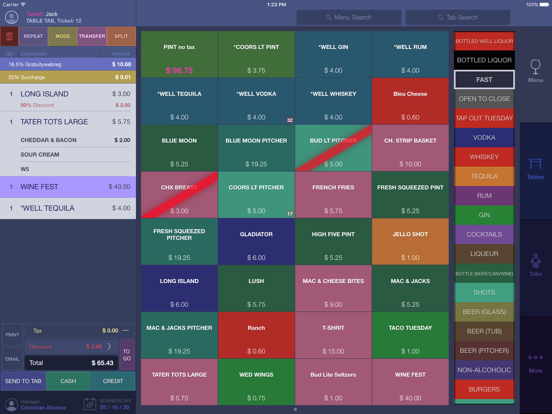

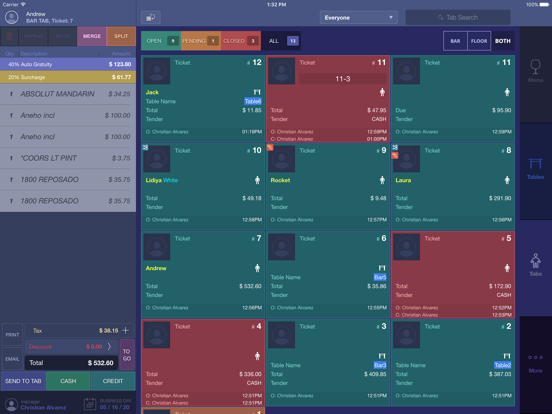
Pricing & paywalls
App Store
- Free to download
Ratings & reviews
App Store
-
5/5Great Point of Sale app!
This app works perfectly with Smarttab Point of Sale!
DarrenK17 · 7 Aug 2026
Privacy & accessibility
App Store
Privacy
- Data Not Linked to You — App Functionality — Diagnostics — Crash Data Developer declared
- Data Not Linked to You — Diagnostics Developer declared
Accessibility
No accessibility labels collected yet.
Versions
App Store
-
3.5.49
Updated logic to apply flat dollar discount and added the possibility to view and delete Gift Local Voucher on tabs from iPad and iPhone.
-
3.5.50
Includes: - "Midway Rewards" functionality; - the logic to reflect on a check-out receipt the number of hours employee worked this business week; - customer facing display UI improvements.
-
3.5.51
Includes: - "Midway Rewards" functionality; - the logic to reflect on a check-out receipt the number of hours employee worked this business week; - customer facing display UI improvements.
-
3.5.52
Added logic to support Auto-Grat custom tax rate.
-
3.5.53
Fixed the issue: popup to pair Bluetooth device didn't appear until leaving connected devices page.
-
3.5.54
Fixed: product added to existing tab is hard selected, but must be soft selected.
-
3.5.55
Updated look and feel for Midway Rewards program.
-
3.5.56
Fixed: item quantity button doesn't trigger keypad if using latest iOS 26.
-
3.5.57
Introduced Coursing for iPad and printing of discount reasons on receipts. Cleaned UI by aligning data to a single format. Implemented minor bugfix and polishing.
-
3.5.58
Free custom mods can now be printed on itemized receipts if the corresponding setting is enabled on BOH.
-
3.5.59
Added the possibility to add and track expiration date for “SOB License” for employees. HausVue MVP functionality is available when the corresponding setting is enabled on BOH.
-
3.5.60
Introduced native numeric keyboard (numpad): it is now used for the fields with only number values. Changed the way to enter money amount in cents: start from dot in order to do it. Updated customer image in a tab to be a square not a circle.
-
3.5.61
Major updates: 1). Updated on-screen checkout flow to look like customer facing display. 2). Made it possible to check customer profile on mPOS. 3). Added the logic to display employee nickname if it's set on BOH. 4). Got rid of the words "Credit" and "CC", replaced with "Card". 5). Made sure the # of visits reflected on customer photo in a tab equals # of visits on a customer profile page. 6). Stopped reflecting entry method on customer's photo.
-
3.5.62
Applied the fix to ensure no auto logout happens after credit card payment is complete unless the setting "Auto-Logout after Checkout" is ON. Added the following changes into HausVue functionality: - Implemented Document Expiration Logic - Added Business Day closing - Added the ability to Print Receipts - Implemented Contractor Activity Log - Updated Floor to show map view centered
-
3.5.63
Applied the fix to ensure no auto logout happens after credit card payment is complete unless the setting "Auto-Logout after Checkout" is ON. Added the following changes into HausVue functionality: - Implemented Document Expiration Logic - Added Business Day closing - Added the ability to Print Receipts - Implemented Contractor Activity Log - Updated Floor to show map view centered
-
3.5.64
1. Made it possible to enter cash tip at clock-out if the corresponding setting is enabled on BOH. 2. Added "Done" button to payment complete screen in on-screen checkout/printed receipt checkout flows. 3. Made sure forced tip selection and default tip selection setting are applied to on-screen checkout tip selection screen. 4. Made it possible to reflect only card price in customer-facing mode if the corresponding setting is enabled on BOH. 5. Changed "total" to "subtotal" on itemized receipt with applied discounts.
-
3.5.65
Fields to enter card and cash tips are displayed on timekeeping popup even when employee has no sales. Works when the corresponding BOH setting is enabled. Added animation to tip buttons for on-screen checkout flow when forced tip enabled and default tip disabled. Fixed the issue with text "jumping" when "payment in progress" screen is replaced with "payment complete" screen on-screen checkout flow. Made it the way receipt selection buttons appear before "payment completed" animation is over. Update "no receipt" button behavior to pressed state and no further navigational action on on-screen checkout flow & printed receipt checkout flow.
-
3.5.66
BOH settings to not show signature now influence on-screen checkout flow. Payment Error popup is redesigned the way it clearly states charge info and tip are saved and shows the amount of unsuccessful retries to charge the same card. Break Acknowledgement popup now appears at clock-out if the corresponding BOH setting is enabled. The amount to pay is reflected on "card" button same as on "cash" button for created ticket.
-
3.5.67
iPhone. Added current tab product drawer when working with menu for better UX iPhone. Ability to add/remove products and mods from the drawer, including forced mods logic Additional failsafe layer for forced mods with custom pricing
-
3.5.68
Bug fixes: - gratuity is incorrectly displayed on receipts for items where it should be excluded; - the percentage equivalent of tip amounts shown on the buttons does not match the total on the on-screen checkout.
-
3.5.69
Bug fixes: - multiplier isn't displayed in italic font when a product is sent to tab - void screen doesn't open each time for product deletion if deleting it from drawer - zero price is shown instead of welcome screen when dark mode is switched to light and vice versa
-
3.5.70
Now it's possible to configure dollar amount display on percentage tip buttons on Customer Facing display.
-
3.5.71
1. Semi-Offline Mode for payments is now supported (the idea is to not send requests to payment provider before someone verifies and confirms it’s up). 2. The amount to pay is reflected on both “card” and “cash” buttons in a not created ticket. 3. Added “cash” and “card” tip breakdown to printed employee report. 4. Updated “Discount groups” tile in daily sales report: now also reported the number of discount actions, the number of items discounted and comp is separated. 5. Made the setting for auto-logout after transaction complete be OFF by default for new iOS build installs.
-
3.5.72
General updates: - Redesigned Status filter for Contractors - Updated shortcuts panel with new Navigation Structure - Inserted layout updates - Added Data file signing flow Added Reports: - Business Day Overview - Chip Purchase Report - Chip Redemption Report - Entry fee Report - VIP room Report - Transaction History Report
-
3.5.73
· 5 Aug 2026
Now "Transaction History" is only available if corresponding privilege is granted on BOH.
Alternatives
- Rezku Restaurant POS System — Same category + similar ratings
- Figure POS — Same category + similar ratings
- SalesVu POS for iPad — Same category + similar ratings
- Modisoft Point of Sale (POS) — Same category + similar ratings
Availability by market
- US
Data quality & evidence
- Page completeness
- Live store listing
- Last verified
- 7 Aug 2026
- Sources
- App Store
- Apoku editorial summary has not been published yet.