
Quick verdict
- What it is
- Store information collected; an Apoku editorial summary is not yet published.
- At a glance
-
- Free to download
Categories and search queries
Official categories
- Business
- Finance
Apoku categories
Key functions
| Function | Availability | Access | Scope | Evidence |
|---|---|---|---|---|
| Free app | Yes | Free | Context-specific | Store published |
Screens
App Store
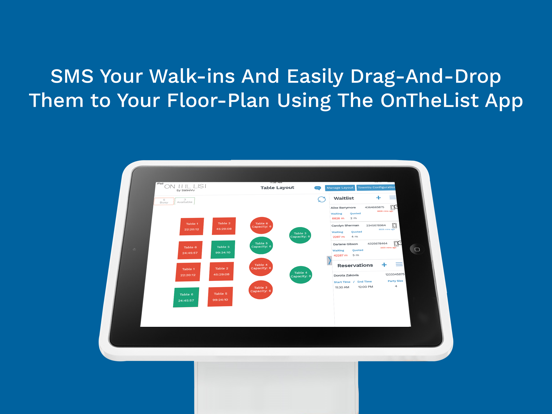
8 store screenshots


Pricing & paywalls
App Store
- Free to download
Ratings & reviews
App Store
-
5/5Great app
I’ve been using SalesVu for years. The customer service is great! The app allows me to run and see two stores simultaneously or individually. I’ve looked at other register apps and SalesVu is by far the best. They keep on adding on features to allow me to serve the customer better and faster. Thank you! 👍
Cafe Jed · 7 Aug 2026
-
5/5Great
Great. App. To. Many. Updates
Ryan. Gitto · 7 Aug 2026
-
5/5A Business MUST Have
This entire system is so well thought out, this is the best POS system available for mobile devices. You can manage all inventory, prices, coupons etc from one website and all your mobile devices sync and act as one terminal. Aggregated reports make multiple locations or cashiers easy to manage with fully consolidated reporting, not just a one station shop like the competitors. Thought I would have to pay more for the features, but rates are better then the rest with more functionality! Love the larger reader on the iPad, feels so much more sturdy then Square or SailPay. Well designed for a business, not like the others that feel more designed to be compact for a non-commercial user. Single point of management of all our terminals now makes managing price or inventory changes a breeze, when before we had to update everyone's device then manually consolidate separate reports at the end of the day, SalesVu does it all for us exactly what a good software provider should do.
JRfungaming · 7 Aug 2026
-
5/5Well done!
I got this for my iphone and it rocked. I got it for the ipad as well and I love how well the developers have used the extra screen real estate. I love having this on both my devices. The app is usefulness in a fantastic package. If you are looking for a point-of-sale and mobile payment app for iPad and iPhone then you need look no further. You also get a free credit card reader to swipe credit cards directly from your device. Syncing is via the cloud with a fantastic interface where you can view and track reports, inventory and more. It syncs with your device every few minutes so everything is perfectly up-to-date. I've used square but found this so much better. What I like with SalesVu is the absolute transparency in their dealings. Their rates are fixed and there are no surprises. I like the sturdiness of the reader provided and the app interface is functional and easy to use. 5 stars from a very happy customer.
Rainlady007 · 7 Aug 2026
-
5/5A must have for small businesses..
I'm the manager for a small business that uses this software, and we love it! We switched to SalesVu after trying both square & go payment, because neither one had the functionality we needed. Keeping up with inventory is crucial in my business and neither of the other systems offered any solution. The amount of time I was wasting manually adjusting & accounting for our inventory seemed endless! SalesVu not only has the ability to track inventory, but also give you reports in real time on products, sales, orders, and more. The support team is wonderful. Although the software is super easy to use, there were still a few questions I had. The support team was very nice and walked me through everything I needed to know! I recommend SalesVu to EVERYONE, especially a small business!
KayGriff88 · 7 Aug 2026
Privacy & accessibility
App Store
Privacy
- Data Not Collected Developer declared
Accessibility
No accessibility labels collected yet.
Versions
App Store
-
9.956
"Tax Exempt" for customers Bug fixes
-
9.957
- Bug fixes
-
9.958
- Bug fixes
-
9.959
- Bug fixes
-
9.960
- Tessitura Integration: we added the ability to see the membership status of a guest from the main screen of the POS app. - Product Search: we added the ability to search products by manually entering their UPC/barcode number instead. - Restaurant Use Case / Schedule Fire: we made this feature more intuitive by unselecting items that are already scheduled to be fired to the kitchen when firing new items. - Minor bug fixes.
-
9.961
- Unit Sales: we added the number of units sold that day for each product on the screen that pops up when a user holds the touch on a product. - Seat Management: we added a setting to increase the speed of tagging seats to products when taking orders at a table. - Table Management: we added a setting to prevent wait staff members from opening other wait staff members' tables. - Minor bug fixes.
-
9.962
- Bug fixes
-
9.963
- Bug fixes
-
9.964
- Bug fixes
-
9.965
- SquareSDK Update
-
9.966
- Minimum iOS 16
-
9.967
- Invoice Option:On the payment screen, you can now choose to send an invoice to customers instead of capturing payment immediately. - General: Minor bug fixes.
-
9.968
- Bug fixes
-
9.969
- Bug fixes
-
9.970
- Permissions: we added a permission for merging orders and started tracking that action in the activity log. - Other minor bug fixes.
-
9.971
- Customer Management: we added the ability to scan a US Driver's license to add a customer to an order. This action also lets the cashier know if this person meets the local legal age to purchase alcoholic products. - Selling Items "At Cost": this feature now also works for retail items created via our merged modifier feature (i.e.: sizes, colors) - Employee Theft Monitoring: managers will now receive an email notification when their PINs are used to delete an order, delete a product from an order, and apply a discount. - Table Management: we made the "manage table layout" feature permission-based and added a setting to block the ability to create an order without first selecting a table. - Kitchen Management: we added the ability to fire items to the kitchen based on the category of the items. - Printing Bug Fix: we fixed an issue that was preventing orders from printing when the order name exceeded the printer's character limit. - Other minor bug fixes and usability improvements.
-
9.973
General improvement and Bug fixing
-
9.974
General improvement and Bug fixing
-
9.975
Minor improvements
-
9.976
General improvements and Minor bug fixes
-
9.977
- General improvement - Minor Bug Fixes
-
9.978
- General improvement - Minor Bug Fixes
-
v9.972
- House Accounts: we're now displaying the house account (if any) that is attached to the selected customer, and only allowing POS users to select that specific house account when ringing up transactions for that customer. - Table Management: we implemented new permissions to specify which users can assign, transfer, and release tables. We also added checks to prevent two employees from accessing/editing the same table at the same time. - Seat Management: we added the seat number information to the guest icon when users are adding items to a specific seat. - Bug fixes and usability improvements.
-
v9.979
What's new: - Blind Shift Closeout Improvements - Internet Outage Banner - Minor Bug Fixes
-
v9.980
· 5 Jun 2026
Crash fixed
Alternatives
- Rezku Restaurant POS System — Same category + similar ratings
- Figure POS — Same category + similar ratings
- Alto’s POS & Inventory System — Same category + similar ratings
Availability by market
- US
Data quality & evidence
- Page completeness
- Live store listing
- Last verified
- 7 Aug 2026
- Sources
- App Store
- Apoku editorial summary has not been published yet.