
Quick verdict
- What it is
- Store information collected; an Apoku editorial summary is not yet published.
- At a glance
-
- Free to download
Categories and search queries
Official categories
- Music & Audio
- News
- Social Networking
Apoku categories
Key functions
| Function | Availability | Access | Scope | Evidence |
|---|---|---|---|---|
| Free app | Yes | Free | Context-specific | Store published |
Screens
22 store screenshots

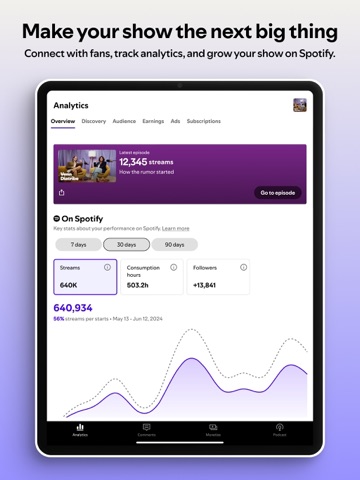

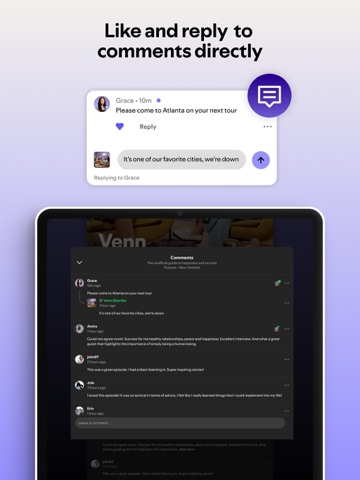
22 store screenshots


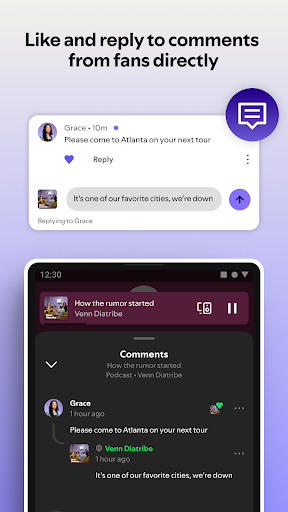

Pricing & paywalls
- Free to download
- Free to download
Ratings & reviews
-
5/5A great way to manage your podcast on the go
Ever since I started using the creators app, I noticed that it is a great way to manage your podcast on the go. My favorite feature is being able to check out the analytics and Number of plays per episode. I also like being able to share each episode individually on various social media platforms to promote and distribute my show. my favorite feature overall however, is this app is 100% voiceover accessible. As a user who is blind, I like how I can do everything I need to such as promote my shows and check out my analytics without having to worry about any lack of voice over accessibility. The fact that they considered voice over accessibility is a huge plus in my opinion. the one suggestion I would like to make is I think that the ability to record directly from the creators platform should be an option. I feel about removing that feature that took away a lot of creative freedom for those who do not want to show out money for the Riverside app. I do realize Riverside is free, however, heavily ability to record edit and distribute all in one place would be a huge convenience and it would be a huge plus for those who do not want to have multiple apps on their phone.
blindmetalgamer · 29 Sep 2026
-
2/5From Favorite to Frustrating: A Once-Simple Podcast App Gone Wrong
I used to absolutely love this podcast app. It was my reliable workhorse for everything from recording to editing and even lining up guests. The beauty of it was its simplicity. Launching my podcast and growing its audience felt genuinely accessible thanks to its intuitive design and all-in-one functionality. However, recent updates have completely stripped away the ease of use that I once cherished. What was once a streamlined process for getting guests on my show now requires downloading a separate, clunky application. This adds an unnecessary layer of complexity, which is incredibly frustrating when you're trying to gain momentum and connect with new voices for your podcast. Furthermore, the once straightforward editing features, which allowed me to quickly polish episodes directly on my phone, have been significantly complicated. The mobile editing experience is no longer the smooth and efficient process it once was. It's disheartening when an app that was once such a valuable tool undergoes changes that actively hinder its core functionality. What was once a simple and effective solution for podcasters has become an exercise in navigating unnecessary hurdles. While I have fond memories of the app's previous iteration, the current version has unfortunately lost the very qualities that made it a standout choice. If you value simplicity and an all-in-one podcasting workflow, you might want to explore other options.
TD3OOO · 29 Sep 2026
-
5/5Feedback
I am impressed with this kind of instruction! I first heard about podcasts through my church for sermon’s etc. —- but I never caught on to the practical personal aspect of producing one’s own podcast. Then I started listening to a tv program and still do, called “God Friended Me”. (All about an individual starting his own podcast and helping people that God or someone doing it in His name brought to his attention) Love the TV program and the idea of Podcasting, but still did not connect the concept to a possibility for me until recently while doing FaceTime video with my Son and two grandsons who are stationed in Daegu, South Korea with the US Army. During FaceTime on my IPad with them last night my Son asked me if I would like to hear the boy’s podcast they were doing with their father on their favorite subject “Starwars movies”. I was surprised, impressed and specifically enjoyed watching it “with them” because how proud the boys were about their first Podcast production. I was impressed by what they had done. This morning I saw the invite to download the app “Anchor” to continue keeping updated on my Grandson’s podcast. “A & A”, which are the initials of their first names, Andrew & Alexander. While I am not sure what kind of podcast I could personally do or would want to, I am intrigued with the possibilities since I am interested in e-bike riding, music like Jazz and blues harmonica, making videos of my bike rides, Biblical Theology etc etc. I am age 79 and a retired Army Bandmaster. Even if I never do a podcast for myself I will be at this time interested in my Grandson’s podcast for sure. Thank you for your introduction to podcasting and would be interested in you advice or help. Leon R Wyatt
Toujour · 29 Sep 2026
-
4/5Great app but..
It’s a great app and it is EXTREMELY EASY to navigate and utilize on the go, and to basically publish an entire podcast with NO ISSUES, but I am currently running into one BIG ISSUE right now. If you record on a tablet, or attempt to migrate from one device to the next, the system glitches and thinks you’re making a brand new podcast for the first time, this is VERY FRUSTRATING as it does NOT make it seem less between on the go recording with a mobile device, and at home recording on a pc. I have an account already set up with active episodes, but I was not home so I decided to record on my iPad, but when I finished recording my episode, Anchor believed that this was my VERY FIRST podcast and episode simply because I am using a new device, even though I am using the SAME LOGIN information. Because I had to setup a brand new account (since they app thinks it’s a new account because of the new device) it made me delay my second episode release, as I did not think logging into a new device with the SAME LOGIN INFO FOR THE EXACT PODCAST I AM ALREADY DOING ON THE PC AT HOME, was going to need to be setup again like a brand new podcast. What’s worse is I don’t even know if the information will cross over to all the devices I am logged in under; I might have just recorded an episode that I have no way of monetizing because again the app thinks I am a brand new user, when I already have an account setup and adds on, but this episode I made I guess falls in limbo somewhere and is not appearing on my other devices, only on my iPad. This issue is a big issue and needs to be fixed, right now I am at the mercy of HOPING it will all sync up and have the drafts available for editing on the pc and my other devices.
doube-A-Ron · 29 Sep 2026
-
3/5It would be perfect for me if it worked consistently
I have gone through the list of troubleshooting; updated browsers, tried multiple browsers, used the app on my phone and iPad, made sure that was updated, emptied the cache, uninstalled and reinstalled...and I still am having such a struggle to just get my first episode live. First problem I faced was when I recorded for the hour limit it failed to process. Ok, I’ll cut the audio in half and edit each half...minor annoyance. But then I spent 6 hours precisely splicing and trimming one half of the recording and when I went to review it before continuing, it was all chopped up and jumbled up. I assumed I someone hit something wrong so I did it again....I have attempted to edit parts of it even, and it still gets all jumbled and edits out pieces I didn’t splice and remove and even swapped parts of the audio that were in the same segment that couldn’t have gotten swapped. After 9 hours of working on this I finally decided it isn’t user error and it’s just a buggy system. I love everything about the app concept and I just hope they fix their editing software to make it truly user-friendly so I can finally start getting my content out there.
Acercase · 29 Sep 2026
-
2/5
it couldn't work properly
Ruksana Mubarak · 1 Aug 2026
-
5/5
something that we creators need and is great and easy to use and explore about all different features
Alex Tabata · 1 Aug 2026
-
5/5
Great experience I still don't get the meaning of the charts but is easy to use.
Elijah Lopez Moreno · 1 Aug 2026
-
5/5
good 👍
Zwilakhe Rengo2.4 · 1 Aug 2026
-
5/5
easy to use app. Just need to research how to post video podcasts
Norman Fisher · 1 Aug 2026
Privacy & accessibility
Privacy
- Data Linked to You — Analytics — Diagnostics — Performance Data Developer declared
- Data Linked to You — Analytics — Identifiers — Device ID Developer declared
- Data Linked to You — Analytics — Identifiers — User ID Developer declared
- Data Linked to You — Analytics — Usage Data — Product Interaction Developer declared
- Data Linked to You — App Functionality — Contact Info — Email Address Developer declared
- Data Linked to You — App Functionality — Contact Info — Name Developer declared
- Data Linked to You — App Functionality — Diagnostics — Crash Data Developer declared
- Data Linked to You — App Functionality — Diagnostics — Performance Data Developer declared
- Data Linked to You — App Functionality — Identifiers — Device ID Developer declared
- Data Linked to You — App Functionality — Identifiers — User ID Developer declared
- Data Linked to You — App Functionality — Location — Coarse Location Developer declared
- Data Linked to You — App Functionality — Search History Developer declared
- Data Linked to You — App Functionality — Usage Data — Product Interaction Developer declared
- Data Linked to You — App Functionality — User Content — Audio Data Developer declared
- Data Linked to You — App Functionality — User Content — Photos or Videos Developer declared
- Data Linked to You — Developer’s Advertising or Marketing — Contact Info — Email Address Developer declared
- Data Linked to You — Developer’s Advertising or Marketing — Identifiers — Device ID Developer declared
- Data Linked to You — Product Personalization — Identifiers — Device ID Developer declared
- Data Linked to You — Product Personalization — Identifiers — User ID Developer declared
- Data Linked to You — Product Personalization — Usage Data — Product Interaction Developer declared
- Data Linked to You — Third-Party Advertising — Contact Info — Email Address Developer declared
- Data Linked to You — Third-Party Advertising — Identifiers — Device ID Developer declared
- Data Linked to You — Contact Info Developer declared
- Data Linked to You — Diagnostics Developer declared
- Data Linked to You — Identifiers Developer declared
- Data Linked to You — Location Developer declared
- Data Linked to You — Search History Developer declared
- Data Linked to You — Usage Data Developer declared
- Data Linked to You — User Content Developer declared
- Data Used to Track You — Contact Info — Email Address Developer declared
- Data Used to Track You — Contact Info Developer declared
- Data Used to Track You — Identifiers — Device ID Developer declared
- Data Used to Track You — Identifiers — User ID Developer declared
- Data Used to Track You — Identifiers Developer declared
Accessibility
No accessibility labels collected yet.
Privacy
- Data collected — Analytics, Fraud prevention, security, and compliance — App info and performance — Diagnostics Developer declared
- Data collected — Analytics, Fraud prevention, security, and compliance — App info and performance — Other app performance data Developer declared
- Data collected — App functionality — App activity — Other user-generated content Developer declared
- Data collected — App functionality — Personal info — Name Developer declared
- Data collected — App functionality, Analytics, Advertising or marketing, Fraud prevention, security, and compliance, Account management — Financial info — Purchase history Developer declared
- Data collected — App functionality, Analytics, Developer communications, Advertising or marketing, Fraud prevention, security, and compliance, Personalization — Device or other IDs Developer declared
- Data collected — App functionality, Analytics, Developer communications, Advertising or marketing, Personalization — App activity — App interactions Developer declared
- Data collected — App functionality, Analytics, Fraud prevention, security, and compliance — App info and performance — Crash logs Developer declared
- Data collected — App functionality, Analytics, Fraud prevention, security, and compliance, Personalization — Audio — Voice or sound recordings Developer declared
- Data collected — App functionality, Analytics, Fraud prevention, security, and compliance, Personalization — Location — Approximate location Developer declared
- Data collected — App functionality, Analytics, Fraud prevention, security, and compliance, Personalization, Account management — Personal info — Other info Developer declared
- Data collected — App functionality, Analytics, Personalization — App activity — In-app search history Developer declared
- Data collected — App functionality, Developer communications, Advertising or marketing, Fraud prevention, security, and compliance, Account management — Personal info — Email address Developer declared
- Data collected — App functionality, Fraud prevention, security, and compliance — Audio — Music files Developer declared
- Data collected — App functionality, Fraud prevention, security, and compliance — Photos and videos — Photos Developer declared
- Data collected — App functionality, Fraud prevention, security, and compliance — Photos and videos — Videos Developer declared
- Data collected — App functionality, Fraud prevention, security, and compliance, Account management — Personal info — User IDs Developer declared
- Security practices — Your data is transferred over a secure connection — Data is encrypted in transit Developer declared
- Security practices — The developer provides a way for you to request that your data be deleted — You can request that data be deleted Developer declared
Accessibility
No accessibility labels collected yet.
Versions
-
7.100.0
You can use the Spotify for Creators (formerly Spotify for Podcasters) app for both audio and video podcasts, and no matter where your show is hosted. Our platform gives creators the features and flexibility to grow, earn, and manage their show from anywhere. Find out how you can: - Like and reply to comments directly - Track your latest episode’s performance - Manage your podcast RSS feed and ensure your podcast audio content is distributed to Spotify as well as all major listening platforms - Get key notifications to stay on top of your Spotify activity - Manage multiple shows (video and audio) in one place
-
7.101.0
You can use the Spotify for Creators (formerly Spotify for Podcasters) app for both audio and video podcasts, and no matter where your show is hosted. Our platform gives creators the features and flexibility to grow, earn, and manage their show from anywhere. Find out how you can: - Like and reply to comments directly - Track your latest episode’s performance - Manage your podcast RSS feed and ensure your podcast audio content is distributed to Spotify as well as all major listening platforms - Get key notifications to stay on top of your Spotify activity - Manage multiple shows (video and audio) in one place
-
7.103.0
You can use the Spotify for Creators (formerly Spotify for Podcasters) app for both audio and video podcasts, and no matter where your show is hosted. Our platform gives creators the features and flexibility to grow, earn, and manage their show from anywhere. Find out how you can: - Like and reply to comments directly - Track your latest episode’s performance - Manage your podcast RSS feed and ensure your podcast audio content is distributed to Spotify as well as all major listening platforms - Get key notifications to stay on top of your Spotify activity - Manage multiple shows (video and audio) in one place
-
7.104.0
You can use the Spotify for Creators (formerly Spotify for Podcasters) app for both audio and video podcasts, and no matter where your show is hosted. Our platform gives creators the features and flexibility to grow, earn, and manage their show from anywhere. Find out how you can: - Like and reply to comments directly - Track your latest episode’s performance - Manage your podcast RSS feed and ensure your podcast audio content is distributed to Spotify as well as all major listening platforms - Get key notifications to stay on top of your Spotify activity - Manage multiple shows (video and audio) in one place
-
7.105.0
You can use the Spotify for Creators (formerly Spotify for Podcasters) app for both audio and video podcasts, and no matter where your show is hosted. Our platform gives creators the features and flexibility to grow, earn, and manage their show from anywhere. Find out how you can: - Like and reply to comments directly - Track your latest episode’s performance - Manage your podcast RSS feed and ensure your podcast audio content is distributed to Spotify as well as all major listening platforms - Get key notifications to stay on top of your Spotify activity - Manage multiple shows (video and audio) in one place
-
7.106.0
You can use the Spotify for Creators (formerly Spotify for Podcasters) app for both audio and video podcasts, and no matter where your show is hosted. Our platform gives creators the features and flexibility to grow, earn, and manage their show from anywhere. Find out how you can: - Like and reply to comments directly - Track your latest episode’s performance - Manage your podcast RSS feed and ensure your podcast audio content is distributed to Spotify as well as all major listening platforms - Get key notifications to stay on top of your Spotify activity - Manage multiple shows (video and audio) in one place
-
7.107.0
You can use the Spotify for Creators (formerly Spotify for Podcasters) app for both audio and video podcasts, and no matter where your show is hosted. Our platform gives creators the features and flexibility to grow, earn, and manage their show from anywhere. Find out how you can: - Like and reply to comments directly - Track your latest episode’s performance - Manage your podcast RSS feed and ensure your podcast audio content is distributed to Spotify as well as all major listening platforms - Get key notifications to stay on top of your Spotify activity - Manage multiple shows (video and audio) in one place
-
7.107.1
You can use the Spotify for Creators (formerly Spotify for Podcasters) app for both audio and video podcasts, and no matter where your show is hosted. Our platform gives creators the features and flexibility to grow, earn, and manage their show from anywhere. Find out how you can: - Like and reply to comments directly - Track your latest episode’s performance - Manage your podcast RSS feed and ensure your podcast audio content is distributed to Spotify as well as all major listening platforms - Get key notifications to stay on top of your Spotify activity - Manage multiple shows (video and audio) in one place
-
7.108.1
You can use the Spotify for Creators (formerly Spotify for Podcasters) app for both audio and video podcasts, and no matter where your show is hosted. Our platform gives creators the features and flexibility to grow, earn, and manage their show from anywhere. Find out how you can: - Like and reply to comments directly - Track your latest episode’s performance - Manage your podcast RSS feed and ensure your podcast audio content is distributed to Spotify as well as all major listening platforms - Get key notifications to stay on top of your Spotify activity - Manage multiple shows (video and audio) in one place
-
7.109.0
You can use the Spotify for Creators (formerly Spotify for Podcasters) app for both audio and video podcasts, and no matter where your show is hosted. Our platform gives creators the features and flexibility to grow, earn, and manage their show from anywhere. Find out how you can: - Like and reply to comments directly - Track your latest episode’s performance - Manage your podcast RSS feed and ensure your podcast audio content is distributed to Spotify as well as all major listening platforms - Get key notifications to stay on top of your Spotify activity - Manage multiple shows (video and audio) in one place
-
7.110.0
· 28 Jul 2026
You can use the Spotify for Creators (formerly Spotify for Podcasters) app for both audio and video podcasts, and no matter where your show is hosted. Our platform gives creators the features and flexibility to grow, earn, and manage their show from anywhere. Find out how you can: - Like and reply to comments directly - Track your latest episode’s performance - Manage your podcast RSS feed and ensure your podcast audio content is distributed to Spotify as well as all major listening platforms - Get key notifications to stay on top of your Spotify activity - Manage multiple shows (video and audio) in one place
-
7.111.0
You can use the Spotify for Creators (formerly Spotify for Podcasters) app for both audio and video podcasts, and no matter where your show is hosted. Our platform gives creators the features and flexibility to grow, earn, and manage their show from anywhere. Find out how you can: - Like and reply to comments directly - Track your latest episode’s performance - Manage your podcast RSS feed and ensure your podcast audio content is distributed to Spotify as well as all major listening platforms - Get key notifications to stay on top of your Spotify activity - Manage multiple shows (video and audio) in one place
-
7.112.0
You can use the Spotify for Creators (formerly Spotify for Podcasters) app for both audio and video podcasts, and no matter where your show is hosted. Our platform gives creators the features and flexibility to grow, earn, and manage their show from anywhere. Find out how you can: - Like and reply to comments directly - Track your latest episode’s performance - Manage your podcast RSS feed and ensure your podcast audio content is distributed to Spotify as well as all major listening platforms - Get key notifications to stay on top of your Spotify activity - Manage multiple shows (video and audio) in one place
-
7.113.0
You can use the Spotify for Creators (formerly Spotify for Podcasters) app for both audio and video podcasts, and no matter where your show is hosted. Our platform gives creators the features and flexibility to grow, earn, and manage their show from anywhere. Find out how you can: - Like and reply to comments directly - Track your latest episode’s performance - Manage your podcast RSS feed and ensure your podcast audio content is distributed to Spotify as well as all major listening platforms - Get key notifications to stay on top of your Spotify activity - Manage multiple shows (video and audio) in one place
-
7.114.0
· 24 Aug 2026
You can use the Spotify for Creators (formerly Spotify for Podcasters) app for both audio and video podcasts, and no matter where your show is hosted. Our platform gives creators the features and flexibility to grow, earn, and manage their show from anywhere. Find out how you can: - Like and reply to comments directly - Track your latest episode’s performance - Manage your podcast RSS feed and ensure your podcast audio content is distributed to Spotify as well as all major listening platforms - Get key notifications to stay on top of your Spotify activity - Manage multiple shows (video and audio) in one place
-
7.115.0
You can use the Spotify for Creators (formerly Spotify for Podcasters) app for both audio and video podcasts, and no matter where your show is hosted. Our platform gives creators the features and flexibility to grow, earn, and manage their show from anywhere. Find out how you can: - Like and reply to comments directly - Track your latest episode’s performance - Manage your podcast RSS feed and ensure your podcast audio content is distributed to Spotify as well as all major listening platforms - Get key notifications to stay on top of your Spotify activity - Manage multiple shows (video and audio) in one place
-
7.116.0
You can use the Spotify for Creators (formerly Spotify for Podcasters) app for both audio and video podcasts, and no matter where your show is hosted. Our platform gives creators the features and flexibility to grow, earn, and manage their show from anywhere. Find out how you can: - Like and reply to comments directly - Track your latest episode’s performance - Manage your podcast RSS feed and ensure your podcast audio content is distributed to Spotify as well as all major listening platforms - Get key notifications to stay on top of your Spotify activity - Manage multiple shows (video and audio) in one place
-
7.117.0
You can use the Spotify for Creators (formerly Spotify for Podcasters) app for both audio and video podcasts, and no matter where your show is hosted. Our platform gives creators the features and flexibility to grow, earn, and manage their show from anywhere. Find out how you can: - Like and reply to comments directly - Track your latest episode’s performance - Manage your podcast RSS feed and ensure your podcast audio content is distributed to Spotify as well as all major listening platforms - Get key notifications to stay on top of your Spotify activity - Manage multiple shows (video and audio) in one place
-
7.118.0
· 22 Sep 2026
You can use the Spotify for Creators (formerly Spotify for Podcasters) app for both audio and video podcasts, and no matter where your show is hosted. Our platform gives creators the features and flexibility to grow, earn, and manage their show from anywhere. Find out how you can: - Like and reply to comments directly - Track your latest episode’s performance - Manage your podcast RSS feed and ensure your podcast audio content is distributed to Spotify as well as all major listening platforms - Get key notifications to stay on top of your Spotify activity - Manage multiple shows (video and audio) in one place
-
7.119.0
· 29 Sep 2026
You can use the Spotify for Creators (formerly Spotify for Podcasters) app for both audio and video podcasts, and no matter where your show is hosted. Our platform gives creators the features and flexibility to grow, earn, and manage their show from anywhere. Find out how you can: - Like and reply to comments directly - Track your latest episode’s performance - Manage your podcast RSS feed and ensure your podcast audio content is distributed to Spotify as well as all major listening platforms - Get key notifications to stay on top of your Spotify activity - Manage multiple shows (video and audio) in one place
-
7.86.0
You can use the Spotify for Creators (formerly Spotify for Podcasters) app for both audio and video podcasts, and no matter where your show is hosted. Our platform gives creators the features and flexibility to grow, earn, and manage their show from anywhere. Find out how you can: - Like and reply to comments directly - Track your latest episode’s performance - Manage your podcast RSS feed and ensure your podcast audio content is distributed to Spotify as well as all major listening platforms - Get key notifications to stay on top of your Spotify activity - Manage multiple shows (video and audio) in one place
-
7.86.1
You can use the Spotify for Creators (formerly Spotify for Podcasters) app for both audio and video podcasts, and no matter where your show is hosted. Our platform gives creators the features and flexibility to grow, earn, and manage their show from anywhere. Find out how you can: - Like and reply to comments directly - Track your latest episode’s performance - Manage your podcast RSS feed and ensure your podcast audio content is distributed to Spotify as well as all major listening platforms - Get key notifications to stay on top of your Spotify activity - Manage multiple shows (video and audio) in one place
-
7.87.0
You can use the Spotify for Creators (formerly Spotify for Podcasters) app for both audio and video podcasts, and no matter where your show is hosted. Our platform gives creators the features and flexibility to grow, earn, and manage their show from anywhere. Find out how you can: - Like and reply to comments directly - Track your latest episode’s performance - Manage your podcast RSS feed and ensure your podcast audio content is distributed to Spotify as well as all major listening platforms - Get key notifications to stay on top of your Spotify activity - Manage multiple shows (video and audio) in one place
-
7.88.0
You can use the Spotify for Creators (formerly Spotify for Podcasters) app for both audio and video podcasts, and no matter where your show is hosted. Our platform gives creators the features and flexibility to grow, earn, and manage their show from anywhere. Find out how you can: - Like and reply to comments directly - Track your latest episode’s performance - Manage your podcast RSS feed and ensure your podcast audio content is distributed to Spotify as well as all major listening platforms - Get key notifications to stay on top of your Spotify activity - Manage multiple shows (video and audio) in one place
-
7.89.0
You can use the Spotify for Creators (formerly Spotify for Podcasters) app for both audio and video podcasts, and no matter where your show is hosted. Our platform gives creators the features and flexibility to grow, earn, and manage their show from anywhere. Find out how you can: - Like and reply to comments directly - Track your latest episode’s performance - Manage your podcast RSS feed and ensure your podcast audio content is distributed to Spotify as well as all major listening platforms - Get key notifications to stay on top of your Spotify activity - Manage multiple shows (video and audio) in one place
-
7.90.0
You can use the Spotify for Creators (formerly Spotify for Podcasters) app for both audio and video podcasts, and no matter where your show is hosted. Our platform gives creators the features and flexibility to grow, earn, and manage their show from anywhere. Find out how you can: - Like and reply to comments directly - Track your latest episode’s performance - Manage your podcast RSS feed and ensure your podcast audio content is distributed to Spotify as well as all major listening platforms - Get key notifications to stay on top of your Spotify activity - Manage multiple shows (video and audio) in one place
-
7.91.0
You can use the Spotify for Creators (formerly Spotify for Podcasters) app for both audio and video podcasts, and no matter where your show is hosted. Our platform gives creators the features and flexibility to grow, earn, and manage their show from anywhere. Find out how you can: - Like and reply to comments directly - Track your latest episode’s performance - Manage your podcast RSS feed and ensure your podcast audio content is distributed to Spotify as well as all major listening platforms - Get key notifications to stay on top of your Spotify activity - Manage multiple shows (video and audio) in one place
-
7.92.0
You can use the Spotify for Creators (formerly Spotify for Podcasters) app for both audio and video podcasts, and no matter where your show is hosted. Our platform gives creators the features and flexibility to grow, earn, and manage their show from anywhere. Find out how you can: - Like and reply to comments directly - Track your latest episode’s performance - Manage your podcast RSS feed and ensure your podcast audio content is distributed to Spotify as well as all major listening platforms - Get key notifications to stay on top of your Spotify activity - Manage multiple shows (video and audio) in one place
-
7.93.0
You can use the Spotify for Creators (formerly Spotify for Podcasters) app for both audio and video podcasts, and no matter where your show is hosted. Our platform gives creators the features and flexibility to grow, earn, and manage their show from anywhere. Find out how you can: - Like and reply to comments directly - Track your latest episode’s performance - Manage your podcast RSS feed and ensure your podcast audio content is distributed to Spotify as well as all major listening platforms - Get key notifications to stay on top of your Spotify activity - Manage multiple shows (video and audio) in one place
-
7.94.0
You can use the Spotify for Creators (formerly Spotify for Podcasters) app for both audio and video podcasts, and no matter where your show is hosted. Our platform gives creators the features and flexibility to grow, earn, and manage their show from anywhere. Find out how you can: - Like and reply to comments directly - Track your latest episode’s performance - Manage your podcast RSS feed and ensure your podcast audio content is distributed to Spotify as well as all major listening platforms - Get key notifications to stay on top of your Spotify activity - Manage multiple shows (video and audio) in one place
-
7.96.0
You can use the Spotify for Creators (formerly Spotify for Podcasters) app for both audio and video podcasts, and no matter where your show is hosted. Our platform gives creators the features and flexibility to grow, earn, and manage their show from anywhere. Find out how you can: - Like and reply to comments directly - Track your latest episode’s performance - Manage your podcast RSS feed and ensure your podcast audio content is distributed to Spotify as well as all major listening platforms - Get key notifications to stay on top of your Spotify activity - Manage multiple shows (video and audio) in one place
-
7.97.0
You can use the Spotify for Creators (formerly Spotify for Podcasters) app for both audio and video podcasts, and no matter where your show is hosted. Our platform gives creators the features and flexibility to grow, earn, and manage their show from anywhere. Find out how you can: - Like and reply to comments directly - Track your latest episode’s performance - Manage your podcast RSS feed and ensure your podcast audio content is distributed to Spotify as well as all major listening platforms - Get key notifications to stay on top of your Spotify activity - Manage multiple shows (video and audio) in one place
-
7.98.0
You can use the Spotify for Creators (formerly Spotify for Podcasters) app for both audio and video podcasts, and no matter where your show is hosted. Our platform gives creators the features and flexibility to grow, earn, and manage their show from anywhere. Find out how you can: - Like and reply to comments directly - Track your latest episode’s performance - Manage your podcast RSS feed and ensure your podcast audio content is distributed to Spotify as well as all major listening platforms - Get key notifications to stay on top of your Spotify activity - Manage multiple shows (video and audio) in one place
-
7.99.0
You can use the Spotify for Creators (formerly Spotify for Podcasters) app for both audio and video podcasts, and no matter where your show is hosted. Our platform gives creators the features and flexibility to grow, earn, and manage their show from anywhere. Find out how you can: - Like and reply to comments directly - Track your latest episode’s performance - Manage your podcast RSS feed and ensure your podcast audio content is distributed to Spotify as well as all major listening platforms - Get key notifications to stay on top of your Spotify activity - Manage multiple shows (video and audio) in one place
- 7.110.0.1900 · 27 Jul 2026
- 7.114.2.1 · 26 Aug 2026
- 7.118.0.2425 · 28 Sep 2026
Alternatives
- Podbean Podcast App & Player — Same category + similar ratings
- Feedly - Smart News Reader — Same category + similar ratings
- Flipboard: The Social Magazine — Same category + similar ratings
- Overcast Podcast App — Same category + similar ratings
- Pocket Casts: Podcast Player — Same category + similar ratings
- Spreaker Podcasts — Same category + similar ratings
Availability by market
- US
Data quality & evidence
- Page completeness
- Live store listing
- Last verified
- 30 Sep 2026
- Sources
- App Store, Google Play
- Apoku editorial summary has not been published yet.