
Quick verdict
- What it is
- Store information collected; independent summary not yet available.
- At a glance
-
- From $9.99/mo
- Free to download
- In-app purchases
Categories and search queries
Official categories
- Photo & Video
- Music
AppCorpus categories
Key functions
| Function | Availability | Access | Scope | Evidence |
|---|---|---|---|---|
| Free app | Yes | Free | — | Store published |
| In-app purchases | Yes | Limited free | — | Store published |
Screens
App Store
26 store screenshots

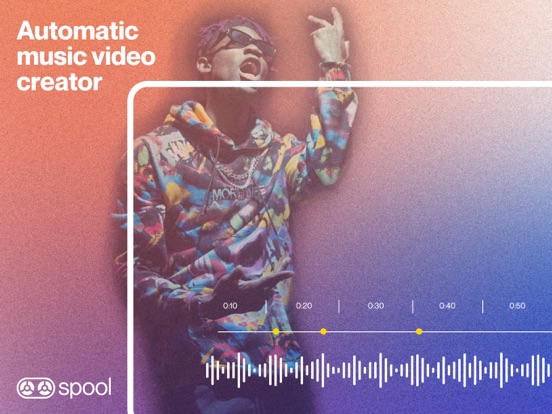

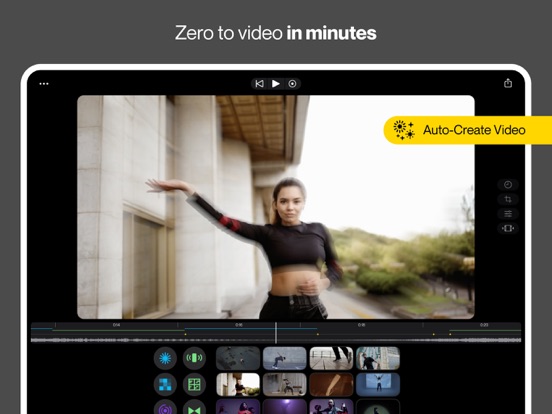
Pricing & paywalls
App Store
- Spool Pro - Monthly — $3.99/week
- Spool Pro - Monthly — $9.99/month
- Spool Pro - Monthly — $39.99/year ($3.33/mo)
Ratings & reviews
App Store
-
5/5Rename with lifetime subscription option? YES.
You could call the app video DJ? Or you could call video sampler I don’t know yet or you can call “GarageBand music video overlay messenger service.” I’ll probably remember your name now as I wait for you to have more clip shots rather than whatever it is now 12? … as for effects all I need is dissolve where I can set the length of the dissolve to any length ………. it would be if the clips could be adjusted to be sound reactive. For instance, whenever the bass drum goes, it would show the face clip, and then if it does treble violin then it does the landscape video something like that a video clip equalizer???……… In exchange for the title advice of making your name, more memorable or paying for your name to pop up easier I would like a lifetime subscription. If you don’t mind ha ha I’m sort of serious. I bet a lot of people are looking for you can’t you because your name or description doesn’t pop up., get to work ha ha and like the other review, please allow me to include as many clips as my memory can handle and allow me to switch music and audio clips as well//???…. I don’t gave you four stars cause I haven’t really put you to my music video test yet….. and I’m on a check. I can’t afford 40 a year even come on with all the apps in the world. Give me a break….. Give me a discount, pity me the sort of handicapped, but I ain’t made out of it…..lol, good luck in your adventure I’m serious about earning a lifetime subscription~ I could do maybe some cool kaleidoscope generic clips you could offer or animation clips that all subscribers could use it would be worth it! I really want to get going with your program
AlanLaBudde · 7 Aug 2026
-
5/5Excellent customer service and a one of a kind app
Haven’t found another app with this much baked into it and none of the others allow you to actually export your video like Spool does, you have to screen record which degrades audio and is 1:1 time. Spool quickly exports and doesn’t charge you piecemeal for additional features like the other apps do. When you subscribe, you get it all. And then there’s the customer service. Ben went above and beyond to troubleshoot my extremely niche issue and quickly found a solution. There are humble, passionate people behind this app and it’s worth the subscription. 10/10
Noah Robbins 13 · 7 Aug 2026
-
3/5Wrong Images Exported
UPDATE FROM 1 STAR REVIEW Was unable to export the movie I had created with 1 of the decks I had chosen. Tried many different ways to determine if fault was on my end; restarting app, deleting all video and starting again, etc..the problem-a specific clip of the movie wouldn’t export and instead included a clip I hadn’t picked which ruined the movie altogether (if 1% of the video is incorrect, it throws the intended experience). I finally found a workaround to make a video to my liking. It involves exporting many different versions of different decks/videos and assembling a movie in my personal video program. I have found that this way I am able to create a much more robust video instead of just using 12 videos from a single deck, now I am creating with spool’s full library. Admittedly it is a LOT more work than just creating in the app and exporting a whole video in 1 go, and I am losing some fidelity of image in compressing a second time after a second export from my personal editing program, but I am finding MANY more clips to use and am now happy with the results. Just a heads up though, some clips don’t export properly. But overall the app is pretty cool with many options. You may need to be willing to dedicate some time for a desired result
Mike Stance · 7 Aug 2026
-
3/5Could be really great.
I think this app has a ton of potential but as it is it’s purely amateur. The primary missing piece is bigger decks. As it is currently, you can create a “deck” out of up to 12 video clips. You press record, and it plays your song and then you can tap each of your 12 pads in rhythm to the song (like a drum machine except triggering video clips instead of sounds). It’s a very fun concept and a super intuitive way to make a video. Rather than slaving away in front of a video editor for hours you could make a music video intuitively in the time it takes to listen to the song. The effects are decent. The only problem is you run out of clips very quickly. Instead of 12 pads you need more like 64 or 128 or something like that (more even!!!) Otherwise you just keep repeating your twelve clips, which when you think about the fact that most music videos cut every second or so, you run out of stuff to cut to way too quickly and so it gets boring before the song is over.
IanTurner · 7 Aug 2026
-
3/5Pretty cool so far!
Some obvious issues.. like the inability to purchase Pro due to broken links, no undo button, no timeline, no transition effects or overlay options, no addable assets and speed adjustment to the clips, and no text option. Had this app preordered though because I have faith in it just needs some tweaks! Made my first video with it and liked it enough I wanted to go ahead and purchase annually but it doesn’t do anything when you click continue or take me to somewhere to pay. My only reason for purchasing though was I like the pad concept and overall functionality of the app but I DONT LIKE WATERMARKS. However, I do think it’s important to show users what all comes with a pro membership as well and I’ve yet to see anything like that in the app. First few hours using it but so far so good. Definitely will need to be adjusted on updates moving forward.
QuestTheJourney7861 · 7 Aug 2026
Privacy & accessibility
App Store
Privacy
- Data Linked to You — Analytics — Diagnostics — Crash Data Developer declared
- Data Linked to You — Analytics — Diagnostics — Other Diagnostic Data Developer declared
- Data Linked to You — Analytics — Diagnostics — Performance Data Developer declared
- Data Linked to You — Analytics — Purchases — Purchase History Developer declared
- Data Linked to You — Analytics — Usage Data — Other Usage Data Developer declared
- Data Linked to You — Analytics — Usage Data — Product Interaction Developer declared
- Data Linked to You — App Functionality — Diagnostics — Crash Data Developer declared
- Data Linked to You — App Functionality — Diagnostics — Other Diagnostic Data Developer declared
- Data Linked to You — App Functionality — Diagnostics — Performance Data Developer declared
- Data Linked to You — App Functionality — Purchases — Purchase History Developer declared
- Data Linked to You — App Functionality — Usage Data — Other Usage Data Developer declared
- Data Linked to You — App Functionality — Usage Data — Product Interaction Developer declared
- Data Linked to You — Developer’s Advertising or Marketing — Diagnostics — Other Diagnostic Data Developer declared
- Data Linked to You — Developer’s Advertising or Marketing — Purchases — Purchase History Developer declared
- Data Linked to You — Developer’s Advertising or Marketing — Usage Data — Other Usage Data Developer declared
- Data Linked to You — Developer’s Advertising or Marketing — Usage Data — Product Interaction Developer declared
- Data Linked to You — Product Personalization — Diagnostics — Other Diagnostic Data Developer declared
- Data Linked to You — Product Personalization — Purchases — Purchase History Developer declared
- Data Linked to You — Product Personalization — Usage Data — Other Usage Data Developer declared
- Data Linked to You — Product Personalization — Usage Data — Product Interaction Developer declared
- Data Linked to You — Diagnostics Developer declared
- Data Linked to You — Purchases Developer declared
- Data Linked to You — Usage Data Developer declared
- Data Not Linked to You — Analytics — Identifiers — Device ID Developer declared
- Data Not Linked to You — Analytics — Usage Data — Advertising Data Developer declared
- Data Not Linked to You — Developer’s Advertising or Marketing — Identifiers — Device ID Developer declared
- Data Not Linked to You — Developer’s Advertising or Marketing — Usage Data — Advertising Data Developer declared
- Data Not Linked to You — Identifiers Developer declared
- Data Not Linked to You — Usage Data Developer declared
- Data Used to Track You — Identifiers — Device ID Developer declared
- Data Used to Track You — Identifiers Developer declared
- Data Used to Track You — Usage Data — Advertising Data Developer declared
- Data Used to Track You — Usage Data Developer declared
Accessibility
No accessibility labels collected yet.
Versions
App Store
- 1.0
-
1.0.1
Version 1.0.1 Includes bug fixes and peformance updates to get everything perfect for your first experience in Spool. Enjoy! Spool is a music video maker with a pro-quality visual library that makes editing feel like jamming on a drum machine.
-
1.0.2
Version 1.0.2 Includes some minor bug fixes Enjoy! Spool is a music video maker with a pro-quality visual library that makes editing feel like jamming on a drum machine.
-
1.1
Spool 1.1 has some BIG updates. * New Video Importer Workflow. You can now easily import your own videos directly from the library. * Multiple projects. You can now save your projects in Spool's files for future edits. This means you can work on multiple projects at a time. * A variety of under-the-hood tweaks and bug fixes to make your Spool experience smoother and more intuitive. Create your vision today.
-
1.10
Spool 1.10 has a huge new feature – auto-generated videos! – and some other awesome updates. * Auto-Create. Not sure where to start, or not up for creating a video from scratch? Go to the settings icon (three dots, upper left) and tap "Auto-Create Video." Spool will use your pre-selected song and visual pack to generate a video for you – complete with edits and effects. You can use the video as a base to adjust to your vision, or use as-is! * iPhone Shortcuts. We've added shortcuts for editing clips and FX on the iPhone. It's now easier than ever to navigate to the content you want and get your edits done fast. * A variety of bug fixes. Spool is young and growing, and we'll continue tackling bugs as they show up.
-
1.10.1
Spool 1.10 has a huge new feature – auto-generated videos! – and some other awesome updates. * Auto-Create. Not sure where to start, or not up for creating a video from scratch? Go to the settings icon (three dots, upper left) and tap "Auto-Create Video." Spool will use your pre-selected song and visual pack to generate a video for you – complete with edits and effects. You can use the video as a base to adjust to your vision, or use as-is! * iPhone Shortcuts. We've added shortcuts for editing clips and FX on the iPhone. It's now easier than ever to navigate to the content you want and get your edits done fast. * A variety of bug fixes. Spool is young and growing, and we'll continue tackling bugs as they show up.
-
1.11
Spool 1.11 has an update that revamps the entire FX browsing experience, making editing videos and FX so. much. simpler. You can now expand settings to see all of your options at once, allowing for quicker adjustments and lightening-fast swapping. This update also includes our new Auto-Create feature. Not sure where to start, or not up for creating a video from scratch? Go to the settings icon (three dots, upper left) and tap "Auto-Create Video." Spool will use your pre-selected song and visual pack to generate a video for you – complete with edits and effects. You can use the video as a base to adjust to your vision, or use as-is! We've also included a variety of bug fixes. Spool is young and growing, and we'll continue tackling bugs as they show up.
-
1.12
Spool 1.12 is all about performance improvements and bug fixes, to give you the most stable and polished version of Spool just in time for the holidays. Version 1.12 also includes new features announced in the last update: - Our brand new "Auto Create" feature, to generate a slick edit for you in a single tap - Revamped FX browsing experience
-
1.13
Spool 1.13 has two exciting updates: - Enhanced Auto-Create capabilities. Auto-Create edits are even more unique and accurate, giving you an awesome custom edit every time. - Randomize. Located in "Pad Settings," Randomize allows you to start the clip from a different spot each time it's tapped.
-
1.14
This update includes a variety of bug fixes and performance improvements.
-
1.15
· 16 Aug 2024
Spool 1.15 includes an update to our music library with all new tracks. It also includes a variety of bug fixes and performance improvements.
-
1.2
Spool 1.2 has some updates that make it even easier to navigate Spool, and a new canvas option that makes creating extra awesome. - Shortcuts to editor features in the performer. When the performer is paused, you can now quickly adjust the length of the sequence and song or change the canvas settings. - Editor button is more easily accessible. It's now highlighted in yellow to call more attention to the Editor and located with the shortcut icons. - Fullscreen canvas option. There's a fourth fullscreen option that extends the video preview to full height positioned behind the interface. - A variety of under-the-hood tweaks and bug fixes to make your Spool experience smoother and more intuitive. Create your vision today!
-
1.3
Spool 1.3 is making everything smoother. - New shortcuts allow you to easily edit videos and effects while paused. An edit button now appears on video and effect pads, and you can also double tap a video to edit it. - Add automatic Spool hashtags to your exports so we can support your work by sharing it on IG and TikTok. - Under-the-hood improvements, including bug fixes and other performance boosts.
-
1.4
Enjoy high resolution exports with Spool 1.4! Create pro-quality videos that showcase your work with powerful detail. Choose between 1080p, 720p, and 480p resolutions when exporting your video. We've also added some under-the-hood improvements, including bug fixes and other performance boosts.
-
1.5
Get excited – Spool 1.5 has some seriously huge new features. Enjoy the following: * Timeline. Edit with ease using Spool's new timeline. Easily see where you've dropped visuals and effects, and scroll through the timeline for a visual view into your edit. * Live scrubbing. Tap on any point in your timeline and edit with precision. * Waveform visualizer. Add energy to your videos with Spool's new waveform visualizer! Overlay dynamic sound waves on your videos – and watch them dance to the beat. This audio-reactive waveform is customizable in style and intensity. You can set Waveform as both a video AND an effect - so many ways to play. * High resolution playback. See what your imported videos look like in all their high res glory *before* you export your final edit. * Improvements to export performance. Exporting is now smoother & faster. * Tons of bug fixes. Spool is young and growing, with some really cool new features. Along the way some bugs show up, which we've tackled. (You're welcome.)
-
1.5.1
Get excited – Spool 1.5.1 has some seriously huge new features. Enjoy the following: * Timeline. Edit with ease using Spool's new timeline. Easily see where you've dropped visuals and effects, and scroll through the timeline for a visual view into your edit. * Live scrubbing. Scrub to any point in your timeline and see a live update as you go. * Waveform visualizer. Add energy to your videos with Spool's new waveform visualizer! Overlay dynamic sound waves on your videos – and watch them dance to the beat. This audio-reactive waveform is customizable in style and intensity. You can set Waveform as both a video AND an effect - so many ways to play. * High resolution playback. See what your imported videos look like in all their high res glory *before* you export your final edit. * Improvements to export performance. Exporting is now smoother & faster. * Tons of bug fixes. Spool is young and growing, with some really cool new features. Along the way some bugs show up, which we've tackled. (You're welcome.)
-
1.5.2
Get excited – Spool 1.5.2 has some seriously huge new features. Enjoy the following: * Timeline. Edit with ease using Spool's new timeline. Easily see where you've dropped visuals and effects, and scroll through the timeline for a visual view into your edit. * Live scrubbing. Scrub to any point in your timeline and see a live update as you go. * Waveform visualizer. Add energy to your videos with Spool's new waveform visualizer! Overlay dynamic sound waves on your videos – and watch them dance to the beat. This audio-reactive waveform is customizable in style and intensity. You can set Waveform as both a video AND an effect - so many ways to play. * High resolution playback. See what your imported videos look like in all their high res glory *before* you export your final edit. * Improvements to export performance. Exporting is now smoother & faster. * Tons of bug fixes. Spool is young and growing, with some really cool new features. Along the way some bugs show up, which we've tackled. (You're welcome.)
-
1.6
Spool 1.6 is full of new features you requested. Enjoy the following: * Sync Mode. When setting a pad to Sync Mode, the video clip will play all the way through and will not start over if you tap the pad again (or any other pad). It stays in sync with the global time of your music, regardless of how many other videos or effects you perform. This setting works wonders with our new self-recording feature. * Self-Recording. You can now use your device's camera to record a video directly into the app. Tap "Edit" on any pad > Swap Video > Record into Spool. Pro tip: try recording yourself lip syncing, playing an instrument, or dancing to your song. With Sync Mode enabled, each time you tap the pad of your performance, it will already be perfectly timed to match your song. * Fade transitions. You can now tweak each pad so it smoothly fades into the next clip, making your edits *much* more interesting and polished. * TikTok & Instagram Sharing. Our new integration with TikTok and Instagram allows you to easily export and share your videos with your followers. * We've added a smoothness setting to the waveform generator, for even more control and customization of this new effect. It's so cool, definitely check it out. * Variety of bug fixes. Spool is young and growing, and we'll continue tackling bugs as they show up.
-
1.6.1
Spool 1.6.1 is full of new features you requested. Enjoy the following: * Sync Mode. When setting a pad to Sync Mode, the video clip will play all the way through and will not start over if you tap the pad again (or any other pad). It stays in sync with the global time of your music, regardless of how many other videos or effects you perform. This setting works wonders with our new self-recording feature. * Self-Recording. You can now use your device's camera to record a video directly into the app. Tap "Edit" on any pad > Swap Video > Record into Spool. Pro tip: try recording yourself lip syncing, playing an instrument, or dancing to your song. With Sync Mode enabled, each time you tap the pad of your performance, it will already be perfectly timed to match your song. * Fade transitions. You can now tweak each pad so it smoothly fades into the next clip, making your edits *much* more interesting and polished. * TikTok & Instagram Sharing. Our new integration with TikTok and Instagram allows you to easily export and share your videos with your followers. * We've added a smoothness setting to the waveform generator, for even more control and customization of this new effect. It's so cool, definitely check it out. * Variety of bug fixes. Spool is young and growing, and we'll continue tackling bugs as they show up.
-
1.7
Get excited: Spool 1.7 has some seriously big new features including a game-changer: Timeline Editor! Enjoy the following: * Timeline Editor. From the performer screen, tap the timeline icon – or the timeline itself – to open up our new editor. It's a powerful editor that responds intuitively to your touch: Scroll to different places on the timeline or to zoom in and out for easier visualization. Make adjustments and fix mistakes by using the editor to move or delete clips and effects from the timeline. * New FX: RGB Shift. An awesome effect that splits the color channels in a video. * New FX: Chroma Zoom. A super sweet color blur - reminiscent of cheap cameras - that gives a blurry, halo-like effect. * 100 new songs added to our music library. * A variety of bug fixes. Spool is young and growing, and we'll continue tackling bugs as they show up.
-
1.8
Spool 1.8 has some *unreal* new features, and an amazing new platform for creating: * iPad version. This is a game changer – Spool is now available on the iPad. Experience the full impact of your visuals while you edit. Make adjustments and easily view details with the ease of a bigger interface. * Tool tips. Our new "tool tips" help you navigate Spool. They describe features, explain icons and buttons, and make everything easy to understand. * Feedback FX. A crazy new effect used heavily by VJs for simple yet mind-blowing visuals. Feedback blends the previous video frame with the current one. You can create motion by rotating or translating the feedback over time. When used lightly, a subtle softness or ghost-like look is created. * Warped Visions FX. This FX is similar to Spool's oscilloscope effects but has softer transitions and the ability to bend the video clockwise or counter-clockwise. * A variety of bug fixes. Spool is young and growing, and we'll continue tackling bugs as they show up.
-
1.9
Spool 1.9 is here with some exciting new features: BEAT GRID * Introducing our new Beat Grid! Take control of your beats with quantizing options, snap-to-grid, and BPM/downbeat adjustment EFFECTS * Lines. Animate lines as a standalone generator layer, or take them further by overlaying on content and using blend modes * Shapes. Choose from a variety of shapes and adjust for glow, thickness, scale and more * Gradient Map. Create smooth and simple color gradients or dial up the settings to produce chaotic silk patterns. All parameters can be audio-reactive, making this an abstract audio visualizer ...AND MORE * Greater audio-reactive options for effects. Adjust by frequency, audio, and BPM * A variety of bug fixes. Spool is young and growing, and we'll continue tackling bugs as they show up.
-
1.9.1
Spool 1.9 is here with some exciting new features: BEAT GRID * Introducing our new Beat Grid! Take control of your beats with quantizing options, snap-to-grid, and BPM/downbeat adjustment EFFECTS * Lines. Animate lines as a standalone generator layer, or take them further by overlaying on content and using blend modes * Shapes. Choose from a variety of shapes and adjust for glow, thickness, scale and more * Gradient Map. Create smooth and simple color gradients or dial up the settings to produce chaotic silk patterns. All parameters can be audio-reactive, making this an abstract audio visualizer ...AND MORE * Greater audio-reactive options for effects. Adjust by frequency, audio, and BPM * A variety of bug fixes. Spool is young and growing, and we'll continue tackling bugs as they show up.
-
1.9.2
Spool 1.9 is here with some exciting new features: BEAT GRID * Introducing our new Beat Grid! Take control of your beats with quantizing options, snap-to-grid, and BPM/downbeat adjustment EFFECTS * Lines. Animate lines as a standalone generator layer, or take them further by overlaying on content and using blend modes * Shapes. Choose from a variety of shapes and adjust for glow, thickness, scale and more * Gradient Map. Create smooth and simple color gradients or dial up the settings to produce chaotic silk patterns. All parameters can be audio-reactive, making this an abstract audio visualizer ...AND MORE * Greater audio-reactive options for effects. Adjust by frequency, audio, and BPM * A variety of bug fixes. Spool is young and growing, and we'll continue tackling bugs as they show up.
Alternatives
- Tempo - Music Video Maker — Same category + similar ratings
- Glitch Art Studio: Cam Effects — Same category + similar ratings
- Video Maker & Editor: Dizzi AI — Same category + similar ratings
- EFEKT Video Effects & Filters — Same category + similar ratings
- Spatial Media Toolkit — Same category + similar ratings
Availability by market
- US
Data quality & evidence
- Page completeness
- Live store listing
- Last verified
- 7 Aug 2026
- Sources
- App Store
- Independent summary has not been published yet.