
Quick verdict
- What it is
- Store information collected; independent summary not yet available.
- At a glance
-
- Free to download
Categories and search queries
Official categories
- Music
- Utilities
AppCorpus categories
Key functions
| Function | Availability | Access | Scope | Evidence |
|---|---|---|---|---|
| Free app | Yes | Free | — | Store published |
Screens
App Store
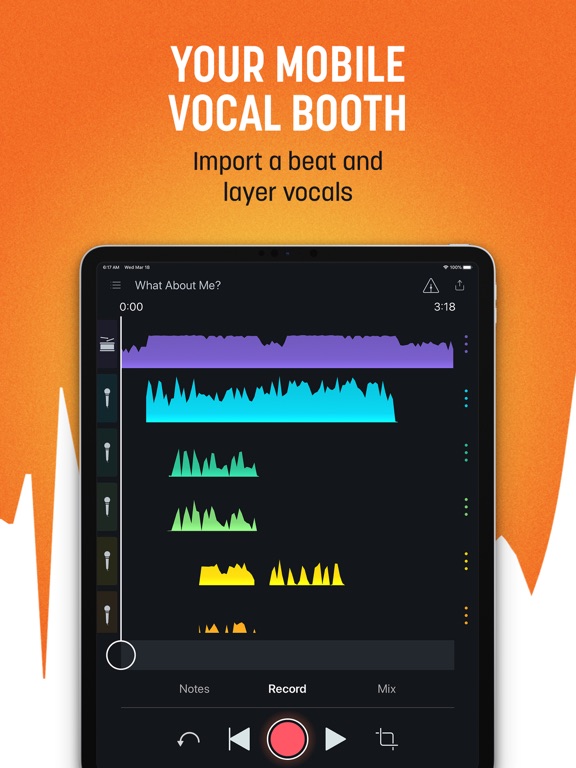
24 store screenshots



Pricing & paywalls
App Store
- Free
Ratings & reviews
App Store
-
5/5Magic demo machine!
As a songwriter, I’ve always wanted a quick and easy way to demo a new song. Most of the time, I’ve just used my iPad to capture it. And if I had the time— I’d fire up Garage Band. If I really wanted to share to a wider audience, I’d work through it on my Protools setup. But now, Spire helps me make a quick and easy demo in my living room that sounds darned close to a studio version. The more I use it, the better I get and the better I sound. It does feel like a magic little box. The mic check dials in the levels, the effects sound nice and clean and above all it takes me minutes— not hours! My biggest wish would be to improve the ability to punch in to fix a guitar clam. It’s close to impossible so I usually try to get a complete and acceptable take before moving on to vocals. Punching in a vocal isn’t hard because there’s usually a dead space that I can come in on. I hope iZotope is still working on this little gem because it would be great to be able to at least add an easy dissolve to smooth a punch in. But hey, I actually couldn’t be happier with this thing.
Steef S · 30 Aug 2026
-
1/5Make legal agreement simple, it’s conflicting!
I came across the App, and it looked awesome, I down loaded it, and was excited to use. But...when I clicked to use on my phone, the Legal came up. I started reading, and found it to be very legalizing, with one section talking about intellectual rights of the creative person, infringement of other established music, (heck there’s only a combination of three type cords in Rock), and other Legal wording that seemed to be for you, yet, the next word combinations down through out agreement seemed to contradict what was said above, it became very troubling to sign the Agree button! Yes I know, well if you don’t agree, don’t sign, but what I’m trying to say is, on the surface it’ looks great, and I’m totally interested, but the legal wording is confusing , and I’d like to see a very straight forward simple agreement, and not what feels like a Bad Tom Petty recording contract that has conflicting sections, that with just three word combinations, changes what you thought you were signing! I’ll have to hold up, and read over it more, look around see what info is available on the legal wording of the agreement! I hope this posts, and helps draw peoples attention, to really look harder at accepting confusing language on Tech, App, or other agreements... we want to be part of it all, but most can’t afford Attorneys to look over what where agreeing to, and I’d say majority of all do not understand the legal languages on accepting the use of products, at least I’m confused! Thank you...
Richard Sticks · 30 Aug 2026
-
5/5Really Unreal Recorder - Spire is Fire
This is absolutely hands-down one of the best apps I’ve ever used on my phone it’s incredibly powerful for an iPhone app or anything really. The app itself and Spire have made an unreal amount of progress over the past few months, it seems like every time I open it they’ve added some new tweak, improvement or update and it continues to get better. I’ve been pro since the beginning and well worth the subscription price and more... really good developer team. Couple super nit-picky wishes / ideas: -in same way you can import a base sound I wish you could import just like a short (ten second) clip into a channel... like for example a producer tag or a sound effect. -I like the the ‘inspire me’ effects; but I wish you could either (a) delete and/or hide the ones you don’t want or (b) favorite the ones you do so you can find them more easily, they are very cool but so many to sort through that I forget the name or want to compare fewer against each other to find the best one. - Canyou not do the effects and inspire me together on the same track? Seems like right now if I add one it removes the other effect (which is fine just curious) Thanks you guys for all that you do, fantastic job and always improving! Rating 10 / 10. HIGHLY RECOMMEND!
BlackDonaldTrump · 30 Aug 2026
-
1/5Terrible execution
It is so surprising to me that this has been out for so long and they still haven't improved basic obvious things. Like, for example, who could think that it's a good idea to have the Spire completely disconnect every time you change apps? And then when it reconnects, it opens a new project instead of going back to the one you were on? And how you can't change effects after recording, or change the volume of certain sections? And how the "crop" function is extremely tedious and limited in its usage? I know the goal is for this program to be super simple, but there's no reason not to also include extra tools that you can use (or not use). If iPhone Garageband could easily connect to the Spire as an interface, I would always use that app instead and would never open this one again. I'm surprised that iZotope, a great company, hasn't improved this app. Also, I hate that they want you to pay for Spire premium. I already paid a ton of money for the Spire, don't ask me to then pay a monthly fee to have your frustrating app be slightly less frustrating. Ridiculous.
elijah4444 · 30 Aug 2026
-
5/5Amazing.
I do best when recording solo. This app has allowed me to do so with exceptional quality and it’s so user friendly. The things I would love to see in the future would be: basic effects. I would love to be able to add some basic reverb or chorus effects to eliminate the need to take up precious track space with multiple vocals. Maybe like 3 effects? That’s all you really need. Also, I’ve seen in other recording software a “solo” option meaning I can isolate one track to listen to to find that one later I want to delete without having to individually muting a bunch of tracks to find the one I want to delete. I see you’ve put the option to add an icon to tracks to help distinguish what instrument is featured on each track but that’s not enough when it comes to layering vocals etc. soloing a track would be much quicker. Anyways, great app and great quality! Thanks!
MutualMachines · 30 Aug 2026
Privacy & accessibility
App Store
Privacy
- Data Linked to You — Analytics — Contact Info — Email Address Developer declared
- Data Linked to You — Analytics — Contact Info — Name Developer declared
- Data Linked to You — Analytics — Identifiers — User ID Developer declared
- Data Linked to You — Analytics — Usage Data — Product Interaction Developer declared
- Data Linked to You — Analytics — User Content — Audio Data Developer declared
- Data Linked to You — Analytics — User Content — Other User Content Developer declared
- Data Linked to You — App Functionality — Contact Info — Email Address Developer declared
- Data Linked to You — App Functionality — Contact Info — Name Developer declared
- Data Linked to You — App Functionality — Diagnostics — Other Diagnostic Data Developer declared
- Data Linked to You — App Functionality — Identifiers — User ID Developer declared
- Data Linked to You — App Functionality — User Content — Customer Support Developer declared
- Data Linked to You — App Functionality — User Content — Other User Content Developer declared
- Data Linked to You — Developer’s Advertising or Marketing — Contact Info — Email Address Developer declared
- Data Linked to You — Developer’s Advertising or Marketing — Contact Info — Name Developer declared
- Data Linked to You — Other Purposes — User Content — Audio Data Developer declared
- Data Linked to You — Contact Info Developer declared
- Data Linked to You — Diagnostics Developer declared
- Data Linked to You — Identifiers Developer declared
- Data Linked to You — Usage Data Developer declared
- Data Linked to You — User Content Developer declared
- Data Not Linked to You — App Functionality — Diagnostics — Crash Data Developer declared
- Data Not Linked to You — Diagnostics Developer declared
Accessibility
No accessibility labels collected yet.
Versions
App Store
-
2.41.0
• Miscellaneous bug fixes and improvements
-
2.41.1
• Miscellaneous bug fixes and improvements
-
2.42.0
• We’ve updated the home screen icon for better visibility on a wider range of background images so you can find your way to making music even faster. • Miscellaneous bug fixes and improvements
-
2.43.0
• Introducing Tune, a new, exclusive Spire Pro mix effect! Automatically tune your vocals from natural to robotic from the Mix view after you record. A Spire Pro subscription is required to unlock Tune. • Miscellaneous bug fixes and improvements
-
2.44.0
• We’ve added a 3-day free trial to Spire Pro! • Miscellaneous bug fixes and improvements Subscribing to Spire Pro gets you full access to exclusive features like Tune, which automatically tunes your vocal tracks, upgraded Soundcheck that adds personalized processing for even more vocal clarity, and instant access to more features as soon as they're released. Tap Upgrade to Spire Pro in the settings to start your free trial or visit izotope.com/spirepro for more info.
-
2.45.0
• SPIRE PRO EXCLUSIVE: Automatically reduce background noise from your recordings and unwanted reverb, pops, and plosives from your vocal tracks* with Spire Pro. Featuring iZotope RX's award-winning audio repair technology—the same tech used on your favorite albums, movies, and TV shows—you can record release-ready tracks with Spire easier than ever. • SPIRE PRO EXCLUSIVE: Tap Inspire Me on the Mix screen to add unique, randomized effects to your tracks and jump-start your creativity! This mix effect generator randomly combines effects like static EQ, plate reverb, iZotope Trash distortion, echo, chorus, tremolo, phaser, and more with a roll of the dice! • Tap PRO in the top right of your projects to open a hub where you can access and learn more about all the exclusive features and content available when you join Spire Pro. • Miscellaneous bug fixes and improvements *WiFi connection with internet required for Spire Pro to render audio cleanup Subscribing to Spire Pro unlocks full access to exclusive features and content as soon as they're released. Tap Upgrade to Spire Pro in the settings to start your free trial or visit izotope.com/spirepro for more info.
-
2.46.0
• Exclusive beats: Record vocals over 50 royalty-free hip-hop beats when you subscribe to Spire Pro*. Head to the Settings menu to try five for free! • Project list search bar: Find your favorite projects in seconds by searching for project names or lyrics and notes you’ve added to a project. • Various bug fixes and improvements. *Subscribing to Spire Pro unlocks full access to exclusive features and content as soon as they're released. Tap the PRO icon when you’re in a project to learn more and start your free trial.
-
2.46.1
• Various bug fixes and improvements
-
2.47.0
• Shift the formant of your vocals without altering their pitch with Lo-Shift and Hi-Shift, powered by tech from iZotope Nectar. Exclusively for Spire Pro* members, these new mix effects dramatically transform your vocals to add a new flavor to the mix. • Spire Pro’s vocal mix effects like Tune, Lo-Shift, and Hi-Shift live in one convenient place within the new Effects menu on the Mix screen so you can audition and apply them to your tracks faster. • Miscellaneous bug fixes and improvements *Subscribing to Spire Pro unlocks full access to exclusive features and content as soon as they’re released. Tap the PRO icon within the Spire app to learn more and start your free trial.
-
2.47.1
• Shift the formant of your vocals without altering their pitch with Lo-Shift and Hi-Shift, powered by tech from iZotope Nectar. Exclusively for Spire Pro* members, these new mix effects dramatically transform your vocals to add a new flavor to the mix. • Spire Pro’s vocal mix effects like Tune, Lo-Shift, and Hi-Shift live in one convenient place within the new Effects menu on the Mix screen so you can audition and apply them to your tracks faster. • Miscellaneous bug fixes and improvements *Subscribing to Spire Pro unlocks full access to exclusive features and content as soon as they’re released. Tap the PRO icon within the Spire app to learn more and start your free trial.
-
2.48.0
• Add a vibe to your vocals with Chill, a new vocal mix effect with phaser and reverb, powered by iZotope Nectar. Exclusively for Spire Pro* members. • We’ve added a bitcrusher and ring modulator to the Inspire Me random effects generator in Spire Pro. These new effects are powered by tech from iZotope VocalSynth and Nectar • Miscellaneous bug fixes and improvements *Subscribing to Spire Pro unlocks full access to exclusive features and content as soon as they’re released. Tap the PRO icon within the Spire app to learn more and start your free trial.
-
2.49.0
• Miscellaneous bug fixes and improvements Subscribing to Spire Pro unlocks full access to exclusive features and content as soon as they’re released. Tap the PRO icon within the Spire app to learn more and start your free trial.
-
2.50.0
• Miscellaneous bug fixes and improvements Subscribing to Spire Pro unlocks full access to exclusive features and content as soon as they’re released. Tap the PRO icon within the Spire app to learn more and start your free trial.
-
2.51.0
• Miscellaneous bug fixes and improvements Subscribing to Spire Pro unlocks full access to exclusive features and content as soon as they’re released. Tap the PRO icon within the Spire app to learn more and start your free trial.
-
2.52.0
• Introducing Lo-fi, an exclusive effect for Spire Pro members. Add a nostalgic grit to your vocals with this old-school effect powered by iZotope Trash distortion and EQ. • Duplicate projects from your project list in seconds by simply swiping left on a song and tapping Clone. • Miscellaneous bug fixes and improvements Subscribing to Spire Pro unlocks full access to exclusive features and content as soon as they’re released. Tap the PRO icon within the Spire app to learn more and start your free trial.
-
2.53.0
• Acoustic Shaper, our most popular Spire Studio recording effect, is now available as a mix effect with Spire Pro! Add it to your vocal tracks after you record them to transform the acoustics of your room with reverb, compression, and a limiter under the hood. All you need is your iPhone and a Spire Pro membership to get lush vocals. • Now you can share the Spire iOS app with any of your friends with a new Invite a Friend button in the Settings. This sends a link to download the app to anyone you know who wants to start recording pro-quality vocals with their iPhone. • Miscellaneous bug fixes and improvements Subscribing to Spire Pro unlocks full access to exclusive features and content as soon as they’re released. Tap the PRO icon within the Spire app to learn more and start your free trial.
-
2.54.0
• Spire Pro members get early access to Spire’s new cloud project sync and backup. Access projects from any of your devices and rest assured that your project is backed up in the cloud in case something happens to your mobile device. • Miscellaneous bug fixes and improvements Subscribing to Spire Pro unlocks full access to exclusive features and content as soon as they’re released. Tap the PRO icon within the Spire app to learn more and start your free trial.
-
2.55.0
We’ve updated our sharing menu! • To share your song and collaborate, simply tap Share to create a cloud project link and send to anyone. They can listen to a mixdown, open the project in their Spire app to add tracks, download stems to work with in a DAW, save an MP3 or WAV, or leave Mix Notes. • Tap Post to create a video file to post to social media or upload your song to SoundCloud. • Tap Download to save files directly to your phone. • Miscellaneous bug fixes and improvements Subscribing to Spire Pro unlocks full access to exclusive features and content as soon as they’re released. Tap the PRO icon within the Spire app to learn more and start your free trial.
-
2.56.0
• Introducing Track Groups—a beta feature that gives you as many tracks as you need by organizing your recordings into unlimited 8-track groups. Spire Pro members get early access to this new, heavily requested feature! While in beta, Track Groups currently does not work with: cloud sync or backup, Noise Removal and Pop Filter, cloud sharing, and with Spire Studio connected. • All users now have access to Spire's new cloud project sync and backup. Access projects from any of your iOS devices and rest assured that your project is backed up in the cloud in case something happens to your mobile device. • Miscellaneous bug fixes and improvements Subscribing to Spire Pro unlocks full access to exclusive features and content as soon as they’re released. Tap the PRO icon within the Spire app to learn more and start your free trial.
-
2.57.0
• Miscellaneous bug fixes and improvements Subscribing to Spire Pro unlocks full access to exclusive features and content as soon as they’re released. Tap the PRO icon within the Spire app to learn more and start your free trial.
-
2.58.0
• Spire Pro members, send your favorite Inspire Me effects to a friend so you can inspire new song ideas! Any of your saved Inspire Me effects can be texted or emailed so others can tap into your favorite sounds. When you receive a shared effect, save it to your device. Then tap the Share icon for that file and select the Spire app. Your new effect will show up in the Effects menu under Imported! • Check out our new and improved What’s New in Spire page by tapping What’s New in the Settings menu. • Invite a friend to use Spire from your project list. Tap the banner to send a link to anyone to download the iOS app. • Miscellaneous bug fixes and improvements Subscribing to Spire Pro unlocks full access to exclusive features and content as soon as they’re released. Tap the PRO icon within the Spire app to learn more and start your free trial.
-
2.59.0
• Hear Spire Pro effects while you record, letting you listen to what they'll sound like on your track in real time. Spire Pro members can now choose to record with effects engaged, then remove or change them after you record from the Mix tab. • Track Groups Beta is now compatible when paired with Spire Studio hardware for Spire Pro members. Record unlimited tracks organized in groups of eight to make it easier to build songs. While in Beta, projects with Track Groups currently do not work with: cloud sync or backup, Noise Removal and Pop Filter, cloud sharing via link, or Enhance. • Miscellaneous bug fixes and improvements Subscribing to Spire Pro unlocks full access to exclusive features and content as soon as they’re released. Tap the PRO icon within the Spire app to learn more and start your free trial.
-
2.60.0
• Miscellaneous bug fixes and improvements Subscribing to Spire Pro unlocks full access to exclusive features and content as soon as they’re released. Tap the PRO icon within the Spire app to learn more and start your free trial.
-
2.61.0
• When signed into your Spire account, your projects are backed up in the cloud and synced while on Wi-Fi so that you can access the most up-to-date version from any iOS device or desktop via the web at share.izotope.com. • With unlimited cloud backup and real-time syncing, there’s no need to send new files to your collaborators after a change. They can open the project via the link shared to bounce new mixdowns or individual stems to import into a DAW after you’ve made edits. This feature is great if you are recording vocals and want to quickly download the latest takes to produce with. • Create Spire Projects from files on your desktop when signed into your Spire account at share.izotope.com by simply dragging and dropping the files into “Start Something New.” Add an instrumental or some vocal takes, and you’ll be able to see the project across all your iOS devices in the Spire app or share a link to another artist to collab. • Sharing a project via the cloud is even faster now that projects sync in real-time, no need to wait for long upload times when you’re logged into your Spire account and your projects are synced. • Miscellaneous bug fixes and improvements Subscribing to Spire Pro unlocks full access to exclusive features and content as soon as they’re released. Tap the PRO icon within the Spire app to learn more and start your free trial.
-
2.64.0
· 26 Aug 2021
• Spire Pro is now a free upgrade giving you access to pro mic clarity in Soundcheck, creative vocal effects, vocal tuning, and the random effects generator Inspire Me • Spire Pro beats, automatic noise reduction, and link sharing have been removed. You can still share .spire project files, individual tracks, and mixdowns through Airdrop, file sharing apps, and more. You can also still import your own beats and tracks. • Various bug fixes and improvements
Alternatives
- Pro Microphone: Voice Record — Same category + similar ratings
- Medly — Same category + similar ratings
Availability by market
- US
Data quality & evidence
- Page completeness
- Live store listing
- Last verified
- 30 Aug 2026
- Sources
- App Store
- Independent summary has not been published yet.