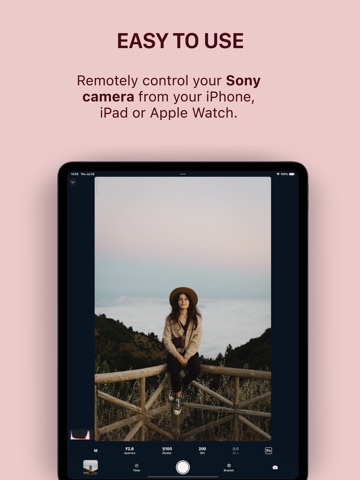
AppCorpus MCP gives your agent current app data, prices, screens, features and sources.
View JSON
GET /api/v3/apps/6478856044
{
  "app_id": 6478856044,
  "canonical_url": "https://appcorpus.com/apps/shutter-camera-remote-fujifi-6478856044",
  "identity": {
    "name": "Shutter+ Camera Remote Fujifi…",
    "slug": "shutter-camera-remote-fujifi",
    "developer": {
      "name": "Camera Control Apps sp. z o.o.",
      "url": "https://appcorpus.com/developers/camera-control-apps-sp-z-o-o-developer_1e2b7f6af803ded9727f8af56320267c"
    },
    "icon_url": "https://is1-ssl.mzstatic.com/image/thumb/Purple211/v4/9e/e5/01/9ee501ac-a018-9a5b-bb9b-64c284ab0b2b/AppIcon14-Rangefinder-0-0-1x_U007epad-0-0-0-1-0-0-85-220.png/512x512bb.jpg",
    "stores": [
      "apple"
    ],
    "platforms": [
      "iphone",
      "ipad"
    ],
    "status": {
      "state": "active",
      "label": "Active",
      "last_checked": "2026-08-06",
      "last_checked_label": "6 Aug 2026",
      "banner": null,
      "region_note": null
    }
  },
  "listings": [
    {
      "store": "apple",
      "status": "ACTIVE",
      "url": "https://apps.apple.com/us/app/shutter-camera-remote-fujifi/id6478856044?uo=4",
      "rating": 4.6,
      "rating_count": 18,
      "formatted_price": "Free",
      "is_free": true,
      "has_iap": true,
      "has_subscription": false,
      "version": "5.06",
      "updated": "2026-07-21",
      "currency": "USD"
    }
  ],
  "summary": {
    "one_liner": null,
    "summary": null,
    "best_for": [],
    "not_for": [],
    "status": "fallback",
    "at_a_glance": [
      "From $3.49/mo",
      "Free to download",
      "In-app purchases"
    ]
  },
  "categories": {
    "official": [
      "Photo & Video",
      "Travel"
    ],
    "appcorpus": [
      {
        "category_id": "photo-video",
        "label": "Photo & video",
        "url": "https://appcorpus.com/categories/photo-video"
      },
      {
        "category_id": "travel",
        "label": "Travel",
        "url": "https://appcorpus.com/categories/travel"
      }
    ]
  },
  "use_cases": [],
  "features": [
    {
      "capability_id": "family_sharing",
      "label": "Family Sharing",
      "availability": "yes",
      "access_level": "unknown",
      "scope": "App Store",
      "evidence": "Store published"
    },
    {
      "capability_id": "free_app",
      "label": "Free app",
      "availability": "yes",
      "access_level": "free",
      "scope": null,
      "evidence": "Store published"
    },
    {
      "capability_id": "in_app_purchases",
      "label": "In-app purchases",
      "availability": "yes",
      "access_level": "free_limited",
      "scope": null,
      "evidence": "Store published"
    }
  ],
  "pricing": [
    {
      "store": "apple",
      "formatted_price": "Free",
      "is_free": true,
      "has_iap": true,
      "has_subscription": false,
      "currency": "USD",
      "market": "us",
      "last_verified": "2026-08-06",
      "rows": [
        "Monthly — $3.49/month",
        "Monthly — $24.99/year ($2.08/mo)",
        "Lifetime — $65.00"
      ]
    }
  ],
  "screens": [
    {
      "url": "https://is1-ssl.mzstatic.com/image/thumb/PurpleSource211/v4/0a/17/81/0a178112-e241-f7df-4624-8313705cde14/ipadPro_3gen_01_fujifilm.png/1600x1600bb.jpg",
      "store": "apple",
      "platform": "ipad",
      "alt": "Shutter+ Camera Remote Fujifi… ipad screenshot 1"
    },
    {
      "url": "https://is1-ssl.mzstatic.com/image/thumb/PurpleSource211/v4/0a/17/81/0a178112-e241-f7df-4624-8313705cde14/ipadPro_3gen_01_fujifilm.png/360x480bb.jpg",
      "store": "apple",
      "platform": "ipad",
      "alt": "Shutter+ Camera Remote Fujifi… ipad screenshot 2"
    },
    {
      "url": "https://is1-ssl.mzstatic.com/image/thumb/PurpleSource211/v4/c5/40/7e/c5407ef8-decd-c548-468d-14149bd79b64/ipadPro_3gen_02_easy.png/1600x1600bb.jpg",
      "store": "apple",
      "platform": "ipad",
      "alt": "Shutter+ Camera Remote Fujifi… ipad screenshot 3"
    },
    {
      "url": "https://is1-ssl.mzstatic.com/image/thumb/PurpleSource211/v4/c5/40/7e/c5407ef8-decd-c548-468d-14149bd79b64/ipadPro_3gen_02_easy.png/360x480bb.jpg",
      "store": "apple",
      "platform": "ipad",
      "alt": "Shutter+ Camera Remote Fujifi… ipad screenshot 4"
    },
    {
      "url": "https://is1-ssl.mzstatic.com/image/thumb/PurpleSource211/v4/ed/2e/40/ed2e40cf-3a58-3630-a54b-a48fed7c8ff1/ipadPro_3gen_04_video.png/1600x1600bb.jpg",
      "store": "apple",
      "platform": "ipad",
      "alt": "Shutter+ Camera Remote Fujifi… ipad screenshot 5"
    },
    {
      "url": "https://is1-ssl.mzstatic.com/image/thumb/PurpleSource211/v4/ed/2e/40/ed2e40cf-3a58-3630-a54b-a48fed7c8ff1/ipadPro_3gen_04_video.png/360x480bb.jpg",
      "store": "apple",
      "platform": "ipad",
      "alt": "Shutter+ Camera Remote Fujifi… ipad screenshot 6"
    },
    {
      "url": "https://is1-ssl.mzstatic.com/image/thumb/PurpleSource221/v4/83/d7/c8/83d7c84a-c96b-26a5-32f9-7c0c1d68562f/ipadPro_3gen_05_selfie.png/1600x1600bb.jpg",
      "store": "apple",
      "platform": "ipad",
      "alt": "Shutter+ Camera Remote Fujifi… ipad screenshot 7"
    },
    {
      "url": "https://is1-ssl.mzstatic.com/image/thumb/PurpleSource221/v4/83/d7/c8/83d7c84a-c96b-26a5-32f9-7c0c1d68562f/ipadPro_3gen_05_selfie.png/360x480bb.jpg",
      "store": "apple",
      "platform": "ipad",
      "alt": "Shutter+ Camera Remote Fujifi… ipad screenshot 8"
    },
    {
      "url": "https://is1-ssl.mzstatic.com/image/thumb/PurpleSource221/v4/ed/f1/05/edf105ab-e2b1-a8b4-2eb7-fce2a038f0ff/ipadPro_3gen_08_pro.png/1600x1600bb.jpg",
      "store": "apple",
      "platform": "ipad",
      "alt": "Shutter+ Camera Remote Fujifi… ipad screenshot 9"
    },
    {
      "url": "https://is1-ssl.mzstatic.com/image/thumb/PurpleSource221/v4/ed/f1/05/edf105ab-e2b1-a8b4-2eb7-fce2a038f0ff/ipadPro_3gen_08_pro.png/360x480bb.jpg",
      "store": "apple",
      "platform": "ipad",
      "alt": "Shutter+ Camera Remote Fujifi… ipad screenshot 10"
    },
    {
      "url": "https://is1-ssl.mzstatic.com/image/thumb/PurpleSource221/v4/f5/8e/07/f58e0720-efdd-6260-be2e-95195a0726dc/ipadPro_3gen_09_bracket_hdr.png/1600x1600bb.jpg",
      "store": "apple",
      "platform": "ipad",
      "alt": "Shutter+ Camera Remote Fujifi… ipad screenshot 11"
    },
    {
      "url": "https://is1-ssl.mzstatic.com/image/thumb/PurpleSource221/v4/f5/8e/07/f58e0720-efdd-6260-be2e-95195a0726dc/ipadPro_3gen_09_bracket_hdr.png/360x480bb.jpg",
      "store": "apple",
      "platform": "ipad",
      "alt": "Shutter+ Camera Remote Fujifi… ipad screenshot 12"
    },
    {
      "url": "https://is1-ssl.mzstatic.com/image/thumb/PurpleSource221/v4/0d/fc/e5/0dfce549-a83d-e0a4-02cf-a1d8adbc16b6/ipadPro_3gen_10_fujifilm.png/1600x1600bb.jpg",
      "store": "apple",
      "platform": "ipad",
      "alt": "Shutter+ Camera Remote Fujifi… ipad screenshot 13"
    },
    {
      "url": "https://is1-ssl.mzstatic.com/image/thumb/PurpleSource221/v4/0d/fc/e5/0dfce549-a83d-e0a4-02cf-a1d8adbc16b6/ipadPro_3gen_10_fujifilm.png/360x480bb.jpg",
      "store": "apple",
      "platform": "ipad",
      "alt": "Shutter+ Camera Remote Fujifi… ipad screenshot 14"
    },
    {
      "url": "https://is1-ssl.mzstatic.com/image/thumb/PurpleSource221/v4/5a/34/be/5a34be0c-cd07-4676-aff0-cef47e4c4089/iphone_6_5_01_fujifilm.png/1242x1600bb.jpg",
      "store": "apple",
      "platform": "iphone",
      "alt": "Shutter+ Camera Remote Fujifi… iphone screenshot 15"
    },
    {
      "url": "https://is1-ssl.mzstatic.com/image/thumb/PurpleSource211/v4/a4/26/af/a426affd-9791-7b16-5d5e-ad86bb544503/iphone_6_5_02_remote.png/1242x1600bb.jpg",
      "store": "apple",
      "platform": "iphone",
      "alt": "Shutter+ Camera Remote Fujifi… iphone screenshot 16"
    },
    {
      "url": "https://is1-ssl.mzstatic.com/image/thumb/PurpleSource211/v4/0c/06/7b/0c067b5f-c583-afa3-3bc3-1ec21e78046e/iphone_6_5_03_import.png/1242x1600bb.jpg",
      "store": "apple",
      "platform": "iphone",
      "alt": "Shutter+ Camera Remote Fujifi… iphone screenshot 17"
    },
    {
      "url": "https://is1-ssl.mzstatic.com/image/thumb/PurpleSource211/v4/4a/b7/a6/4ab7a6ee-d43d-2546-8f9f-14704eb1c54b/iphone_6_5_04_video.png/1242x1600bb.jpg",
      "store": "apple",
      "platform": "iphone",
      "alt": "Shutter+ Camera Remote Fujifi… iphone screenshot 18"
    },
    {
      "url": "https://is1-ssl.mzstatic.com/image/thumb/PurpleSource221/v4/3c/51/65/3c516563-7439-f8d4-5cf9-5db6d5783934/iphone_6_5_05_selfie.png/1242x1600bb.jpg",
      "store": "apple",
      "platform": "iphone",
      "alt": "Shutter+ Camera Remote Fujifi… iphone screenshot 19"
    },
    {
      "url": "https://is1-ssl.mzstatic.com/image/thumb/PurpleSource221/v4/af/af/be/afafbe21-3e7b-3174-0a77-cd7909aa1bac/iphone_6_5_06_overlay.png/1242x1600bb.jpg",
      "store": "apple",
      "platform": "iphone",
      "alt": "Shutter+ Camera Remote Fujifi… iphone screenshot 20"
    },
    {
      "url": "https://is1-ssl.mzstatic.com/image/thumb/PurpleSource221/v4/25/05/02/25050262-7f5e-73cf-20ca-c193a167aa05/iphone_6_5_07_watch.png/1242x1600bb.jpg",
      "store": "apple",
      "platform": "iphone",
      "alt": "Shutter+ Camera Remote Fujifi… iphone screenshot 21"
    },
    {
      "url": "https://is1-ssl.mzstatic.com/image/thumb/PurpleSource221/v4/82/0d/b6/820db6b1-9985-d1a0-22e3-a3e1ebed55d2/iphone_6_5_08_pro.png/1242x1600bb.jpg",
      "store": "apple",
      "platform": "iphone",
      "alt": "Shutter+ Camera Remote Fujifi… iphone screenshot 22"
    },
    {
      "url": "https://is1-ssl.mzstatic.com/image/thumb/PurpleSource221/v4/7f/55/4f/7f554fd5-49b2-02c3-fba7-0f31c59de9df/iphone_6_5_09_bracket_hdr.png/1242x1600bb.jpg",
      "store": "apple",
      "platform": "iphone",
      "alt": "Shutter+ Camera Remote Fujifi… iphone screenshot 23"
    },
    {
      "url": "https://is1-ssl.mzstatic.com/image/thumb/PurpleSource211/v4/e4/6f/01/e46f012a-3486-5485-6d4a-a612f4f0a57e/iphone_6_5_10_fujifilm.png/1242x1600bb.jpg",
      "store": "apple",
      "platform": "iphone",
      "alt": "Shutter+ Camera Remote Fujifi… iphone screenshot 24"
    },
    {
      "url": "https://is1-ssl.mzstatic.com/image/thumb/PurpleSource211/v4/f5/02/8a/f5028ab9-b979-4bc0-2ad7-4c76ed02b126/0_APP_WATCH_SERIES_4_0.png/368x448bb.jpg",
      "store": "apple",
      "platform": "watch",
      "alt": "Shutter+ Camera Remote Fujifi… watch screenshot 25"
    },
    {
      "url": "https://is1-ssl.mzstatic.com/image/thumb/PurpleSource211/v4/0c/1a/a2/0c1aa299-2892-1802-34cd-3c2555a32909/1_APP_WATCH_SERIES_4_1.png/368x448bb.jpg",
      "store": "apple",
      "platform": "watch",
      "alt": "Shutter+ Camera Remote Fujifi… watch screenshot 26"
    },
    {
      "url": "https://is1-ssl.mzstatic.com/image/thumb/PurpleSource211/v4/3f/70/d6/3f70d6ec-5ff4-c22e-e1fc-3fead3ba1d98/2_APP_WATCH_SERIES_4_2.png/368x448bb.jpg",
      "store": "apple",
      "platform": "watch",
      "alt": "Shutter+ Camera Remote Fujifi… watch screenshot 27"
    },
    {
      "url": "https://is1-ssl.mzstatic.com/image/thumb/PurpleSource211/v4/8f/c4/f5/8fc4f531-6d16-4226-8e56-4df174933818/3_APP_WATCH_SERIES_4_3.png/368x448bb.jpg",
      "store": "apple",
      "platform": "watch",
      "alt": "Shutter+ Camera Remote Fujifi… watch screenshot 28"
    },
    {
      "url": "https://is1-ssl.mzstatic.com/image/thumb/PurpleSource211/v4/4e/04/d8/4e04d821-3299-8d97-671d-5e03e26c26d2/4_APP_WATCH_SERIES_4_4.png/368x448bb.jpg",
      "store": "apple",
      "platform": "watch",
      "alt": "Shutter+ Camera Remote Fujifi… watch screenshot 29"
    }
  ],
  "ratings": [
    {
      "store": "apple",
      "average": 4.6,
      "count": 18,
      "market": "us",
      "observed_at": "2026-08-06",
      "reviews": [
        {
          "rating": 5,
          "title": "Amazing product and support",
          "body": "I had a problem connecting to my Fuji XT-2 initially I could not connect to its Wi-Fi independent of the Shutter app. The Shutter support team was very helpful in giving me avenues to look ultimately though the problem was I was one version back on the firmware for the camera so if you have an X-T2 you need to have version 4.41 of the cameras firmware if you have certain iOS devices like the iPad Pro M4. I love being able to control the camera fully from the iPad or iPhone . I like being able to touch the screen to select focus, which is something you can’t even do on the camera since it doesn’t have a touchscreen.",
          "author": "MacJohnMcC",
          "date": "6 Aug 2026"
        },
        {
          "rating": 4,
          "title": "Solid alternative to the crappy FUJI X app.",
          "body": "This is a solid alternative to the Fuji X app. Features are a bit limited but it is reliable and does not randomly disconnect like the FujiX app. Also the capability to use the Apple Watch as a remote shutter is awesome. Support seems responsive.",
          "author": "Oneguyindc",
          "date": "6 Aug 2026"
        },
        {
          "rating": 3,
          "title": "X App is too frustrating",
          "body": "This app connects without any issue most of the time but I wish it allowed me to sort photos by date because scrolling down to the newest photos is a poor experience. Also if you could preview the entire file like on X App it would be amazing. I would also like to have the ability to connect more than one camera at the same time like X App allows you to do. The interface doesn’t make clear that you can only have one camera connected to the app.",
          "author": "MelvinGarcia85",
          "date": "6 Aug 2026"
        },
        {
          "rating": 4,
          "title": "Feels more responsive",
          "body": "I had problems at first getting connected, but after that smooth sailing!",
          "author": "JBristl",
          "date": "6 Aug 2026"
        }
      ]
    }
  ],
  "privacy": [
    {
      "store": "apple",
      "declarations": [
        {
          "title": "Data Not Linked to You",
          "detail": "Analytics — Usage Data — Product Interaction",
          "source": "Developer declared"
        },
        {
          "title": "Data Not Linked to You",
          "detail": "App Functionality — Diagnostics — Crash Data",
          "source": "Developer declared"
        },
        {
          "title": "Data Not Linked to You",
          "detail": "App Functionality — Diagnostics — Other Diagnostic Data",
          "source": "Developer declared"
        },
        {
          "title": "Data Not Linked to You",
          "detail": "App Functionality — Diagnostics — Performance Data",
          "source": "Developer declared"
        },
        {
          "title": "Data Not Linked to You",
          "detail": "App Functionality — Usage Data — Product Interaction",
          "source": "Developer declared"
        },
        {
          "title": "Data Not Linked to You",
          "detail": "Diagnostics",
          "source": "Developer declared"
        },
        {
          "title": "Data Not Linked to You",
          "detail": "Usage Data",
          "source": "Developer declared"
        }
      ],
      "accessibility": [
        {
          "title": "Dark Interface",
          "detail": "SUPPORTED",
          "source": "Store published"
        },
        {
          "title": "Differentiate Without Color Alone",
          "detail": "SUPPORTED",
          "source": "Store published"
        },
        {
          "title": "Larger Text",
          "detail": "SUPPORTED",
          "source": "Store published"
        },
        {
          "title": "Reduced Motion",
          "detail": "SUPPORTED",
          "source": "Store published"
        },
        {
          "title": "Sufficient Contrast",
          "detail": "SUPPORTED",
          "source": "Store published"
        }
      ]
    }
  ],
  "changes": [
    {
      "store": "apple",
      "version": "1.0",
      "released_at": null,
      "notes": ""
    },
    {
      "store": "apple",
      "version": "1.1",
      "released_at": null,
      "notes": "- Better white balance description - Bug fixes"
    },
    {
      "store": "apple",
      "version": "1.10",
      "released_at": null,
      "notes": "- Bug fixes"
    },
    {
      "store": "apple",
      "version": "1.11",
      "released_at": null,
      "notes": "- Updated camera compatibility - Added an option to save files to other destinations - Preview downloaded photos directly in Shutter - Added XPAN aspect overlay"
    },
    {
      "store": "apple",
      "version": "1.12",
      "released_at": null,
      "notes": "- 4:3 aspect ratio overlay - Download photos directly to custom albums in Photos, or to the Files app - Preview photos right in the downloads view - Made it easier to upgrade to a lifetime license."
    },
    {
      "store": "apple",
      "version": "1.13",
      "released_at": null,
      "notes": "This update contains only minor bug fixes."
    },
    {
      "store": "apple",
      "version": "1.14",
      "released_at": null,
      "notes": "- Minor bug fixes"
    },
    {
      "store": "apple",
      "version": "1.15",
      "released_at": null,
      "notes": "- Customizable zebra thresholds - Support for custom LUTs - Added golden ratio composition overlay - Added an indicator that a color effect is active (zebra, false color, LUT) - Camera search in \"Add camera\" view - Design tweaks"
    },
    {
      "store": "apple",
      "version": "1.16",
      "released_at": null,
      "notes": "- Added support for latest releases of Fujifilm firmware - Added support for GFX100RF, X-E5 - Language translations - Golden spiral overlay"
    },
    {
      "store": "apple",
      "version": "1.17",
      "released_at": null,
      "notes": "- Refreshed UI for iOS 26 - False color and LUTs - Custom photo overlays - Full-screen mode - Resizable histogram - Double-tap gesture on Apple Watch - Fixed manual focus crash"
    },
    {
      "store": "apple",
      "version": "1.18",
      "released_at": null,
      "notes": "- Bug fixes"
    },
    {
      "store": "apple",
      "version": "1.2",
      "released_at": null,
      "notes": "- Fix crash with some Fujifilm cameras"
    },
    {
      "store": "apple",
      "version": "1.3",
      "released_at": null,
      "notes": "- Added support for X-E3, X-T2, X-T20, X100F, X-H1, X-Pro2"
    },
    {
      "store": "apple",
      "version": "1.4",
      "released_at": null,
      "notes": "- Brand new Apple Watch app. - Improved video recording indicator (telltale ring)."
    },
    {
      "store": "apple",
      "version": "1.5",
      "released_at": null,
      "notes": "- iPad UI improvements"
    },
    {
      "store": "apple",
      "version": "1.6",
      "released_at": null,
      "notes": "- Support for GFX cameras - Exposure assist tools for video - Added missing translations"
    },
    {
      "store": "apple",
      "version": "1.7",
      "released_at": null,
      "notes": "- Gallery and \"Import Photos\" improvements"
    },
    {
      "store": "apple",
      "version": "1.8",
      "released_at": null,
      "notes": "- Larger gallery thumbnails - Display photo EXIF data - More controls in the Apple Watch app - Always visible histogram - Separate highlight and shadow colors in zebra overlays - Improved app icon selector"
    },
    {
      "store": "apple",
      "version": "1.9",
      "released_at": null,
      "notes": "- Faster reconnection"
    },
    {
      "store": "apple",
      "version": "5.00",
      "released_at": null,
      "notes": "- Added support for Canon and Sony cameras"
    }
  ],
  "alternatives": [
    {
      "app_id": 6504739559,
      "name": "FujiStyle - Film Recipes Frame",
      "url": "https://appcorpus.com/apps/fujistyle-film-recipes-frame-6504739559",
      "reason": "Same category + similar ratings"
    },
    {
      "app_id": 1608114316,
      "name": "RitchieCam — Filter Camera",
      "url": "https://appcorpus.com/apps/ritchiecam-filter-camera-1608114316",
      "reason": "Same category + similar ratings"
    },
    {
      "app_id": 1473608851,
      "name": "CamRanger 2 - Camera Control",
      "url": "https://appcorpus.com/apps/camranger-2-camera-control-1473608851",
      "reason": "Same category + similar ratings"
    },
    {
      "app_id": 1586089681,
      "name": "FUJIFILM XApp",
      "url": "https://appcorpus.com/apps/fujifilm-xapp-1586089681",
      "reason": "Same category + similar ratings"
    },
    {
      "app_id": 6477783991,
      "name": "Pearla - Pro Filmic Camera",
      "url": "https://appcorpus.com/apps/pearla-pro-filmic-camera-6477783991",
      "reason": "Same category + similar ratings"
    }
  ],
  "evidence_summary": {
    "index_state": "S1",
    "evidence_level": 1,
    "level_label": "Live store listing",
    "indexable": true,
    "last_verified_at": "2026-08-06",
    "unknown_fields": [
      "Independent summary has not been published yet."
    ],
    "sources": [
      "App Store"
    ]
  },
  "availability_markets": {
    "live": [
      "us"
    ],
    "selected": "us",
    "note": null
  },
  "feature_events": {
    "events": []
  },
  "features_slice": {
    "plans": [
      {
        "code": "plan",
        "label": "Monthly",
        "kind": "subscription",
        "status": "store_listed",
        "prices": [
          {
            "storefront": "us",
            "formatted": "$3.49",
            "billing_period": "monthly"
          },
          {
            "storefront": "us",
            "formatted": "$24.99",
            "billing_period": "yearly"
          }
        ],
        "trial": null
      },
      {
        "code": "lifetime",
        "label": "Lifetime",
        "kind": "unknown",
        "status": "store_listed",
        "prices": [
          {
            "storefront": "us",
            "formatted": "$65.00",
            "billing_period": "one_time"
          }
        ],
        "trial": null
      }
    ],
    "features": [],
    "unknown_features": [
      "family_sharing"
    ],
    "data_cutoff": "6 Aug 2026"
  }
}