
Quick verdict
- What it is
- Store information collected; an Apoku editorial summary is not yet published.
- At a glance
-
- From $4.16/mo
- Free download · core features require a paid plan
- In-app purchases
Categories and search queries
Official categories
- Graphics & Design
- Education
Apoku categories
Key functions
| Function | Availability | Access | Scope | Evidence |
|---|---|---|---|---|
| Free app | Yes | Free | Context-specific | Store published |
| In-app purchases | Yes | Limited free | Context-specific | Store published |
| Subscription | Yes | Paid | Context-specific | Store published |
| Family Sharing | Unknown | Unknown | Scope unknown | Store published |
Screens
App Store
10 store screenshots

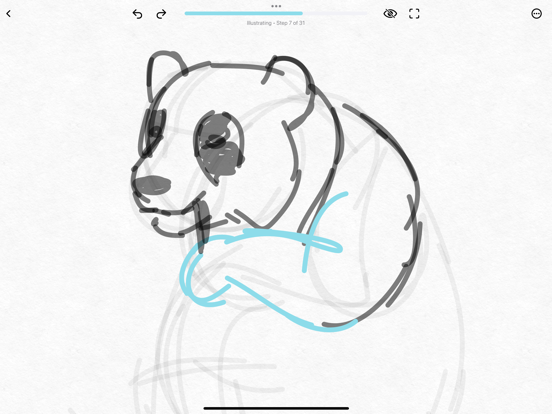
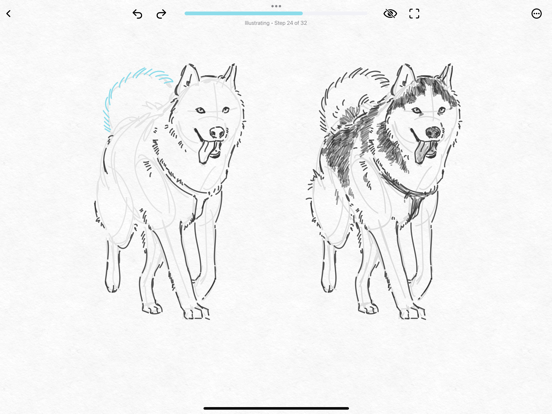

Pricing & paywalls
App Store
- ShadowDraw: Plan — $7.99/month (derived from the IAP title)
- ShadowDraw: Plan — $49.99/year ($4.16/mo) (derived from the IAP title)
Ratings & reviews
App Store
-
4/5Amazing app!
This is an amazing app, and I really enjoy it, but I was kind of disappointed when I hopped on ready to draw, and then it said I had to pay to draw, and don’t get me wrong. I know this probably was gonna happen because you guys work hard on this app and you don’t deserve to not get paid, but I enjoy drawing animals and the free daily drawing helps a lot but I would appreciate it if you get like gems every time you complete a a drawing based on its difficulty so like two gems if it’s easy five gems if it’s medium and eight gems if it’s hard and like it could cost 10 gems 20 gems to buy a medium drawing and 30 gems to buy a hard drawing or like 100 to buy one set or 200 to buy a medium one and 300 to buy a heart set and I’m not saying the gems have to be easy. They should be kind of hard because you guys work pretty hard on this app I bet, and you could have a gem shop whenever somebody wants to buy a few gems it costs money, and then you could keep your plans to get access to every single plan is just remove gems for the people that have the premium plan or the monthly plan. Anyways, I think this app is really great. I enjoy the free daily drawings that you get my favorite is the owl, the wolf and the dragon queen, I was also wondering if there was a way to post your own drawings make your own tutorials?
DJ Egerchanp · 7 Aug 2026
-
4/5Ambitious, and one of a kind.
This app offers some very cool exercises, but sadly just a couple of months into a 1 year subscription, I’m waiting for the next great thing, and it’s been quite a while since I’ve seen anything new that’s as great as the Van Gogh or similar paintings. They offer “minimalist” versions instead of full versions of a few other famous paintings, but they really do disappoint in comparison. Also, one of the paintings disappeared at the moment I finished it after over 4000 steps of applying colorful strokes, and they didn’t respond to my email when that happened. More accurately described, this is a digital coloring book, for people who are happy tracing drawings, because it doesn’t provide much in the way of theory, even in concepts as simple and foundational as cross-hatching. They don’t give any info on what brushes the “ teacher” has chosen, or why, and sometimes, it’s clear that the brush they do choose doesn’t match the reference drawing. This app feels like a work in progress from a great development team.
Rabbitsears311 · 7 Aug 2026
-
5/5THE BEST APP TO LEARN HOW TO DRAW PERIOD!!!
Stop looking for other drawing apps because you just found the best drawing app there is PERIOD. This is by FAR the definitive, must have, absolute winner of the drawing apps. Not only is there so, SO much content to learn how to draw, the way in which the tutorials work are intuitive. If I can draw using this app, trust me you can too! Step by step tracing instructions, abilities to alter the canvas and zoom in and out to better see the strokes and the endless amount of subjects to draw! You want to learn how to draw faces better? They got it, Male and female faces. You wanna draw horses better? They got it! You wanna learn how to draw mountains, trees, bushes, landscapes, portraits, THEY GOT IT! If they don’t have it, message their team. I have never had customer support like this. These people actually do care, I know that makes you uncomfortable thinking that they actually do care. But they do so get over it! I love this app. It will never get old. Even when I become a professional artist! I’ll know where to hone my skills. Man I am thirsty. Gotta go! Download this app now! You won’t regret it!
Darius - the IPad Pro Rookie · 7 Aug 2026
-
2/5Its ok but theres some things that need improvement
I would love the game if you could draw more pictures without it asking you for a trial. The only thing i can draw is the starters drawing which is only one picture. I wanted to draw a horse and a dog but it asked me for a trial. If you can, please make more things free, it wont only help me but it will you and your game to get more people to play on it. If you don’t want to that’s totally ok 👍. But it would make me and a lot other people happy. Anyways, what i like about it is that it helps you draw and trace the lines. Unlike other games like this, if you don't go across the lines perfectly then they will restart you, but! You guys made it so if we made a mistake that its ok and we can always fix it or learn from your mistakes. Thank you for making this game even though it needs some improvements. I looked at the other reviews and it seems like this is a good game. Does everyone else pay for the trial or is that just me? Because everyone else seems to be drawing a lot of pictures. Anyways, thats the end of my review for this game. If i hurt you feelings at all i am sorry. Please change it to free for the games
ParkerPlays124 · 7 Aug 2026
-
5/5I would give this a 10 out of 10
I love when you finish drawing there’s an option like add a few of the finishing touches I don’t know sign yeah and when you go to your sketches there is the thing that you didn’t do anything to it and you finished it in days that you did something I don’t know how to explain there is something about this game that I love do you know why don’t I know how to explain I’m a kid I’m nice also I don’t have an iPad Apple Pencil iPad pencil I don’t know what to call it so I’m just playing with my fingers and just makes it so hard but you can just add the finishing touches that you know this when you finish button yeah when you touch The button you can like color and add your own little touches and I love it I love to draw, and I’m just thinking if I keep practicing on the iPad on this I might actually learn how to draw on paper yeah actually I know how to draw a paper. It’s just easier when they do that I just do that on the paper is the on your device
Arty828 · 7 Aug 2026
Privacy & accessibility
App Store
Privacy
- Data Not Linked to You — Analytics — Diagnostics — Crash Data Developer declared
- Data Not Linked to You — Analytics — Diagnostics — Performance Data Developer declared
- Data Not Linked to You — Analytics — Usage Data — Product Interaction Developer declared
- Data Not Linked to You — Analytics — User Content — Customer Support Developer declared
- Data Not Linked to You — App Functionality — Diagnostics — Crash Data Developer declared
- Data Not Linked to You — App Functionality — Diagnostics — Other Diagnostic Data Developer declared
- Data Not Linked to You — App Functionality — Diagnostics — Performance Data Developer declared
- Data Not Linked to You — App Functionality — Identifiers — Device ID Developer declared
- Data Not Linked to You — App Functionality — Identifiers — User ID Developer declared
- Data Not Linked to You — App Functionality — Usage Data — Product Interaction Developer declared
- Data Not Linked to You — App Functionality — User Content — Customer Support Developer declared
- Data Not Linked to You — Developer’s Advertising or Marketing — Diagnostics — Other Diagnostic Data Developer declared
- Data Not Linked to You — Diagnostics Developer declared
- Data Not Linked to You — Identifiers Developer declared
- Data Not Linked to You — Usage Data Developer declared
- Data Not Linked to You — User Content Developer declared
Accessibility
No accessibility labels collected yet.
Versions
App Store
-
2023.5
Thank you for using ShadowDraw! We've added a bug fix to improve your drawing experience. This update fixes an issue with editing artwork in Saved Drawings. Simply tap on the pen tool to continue making your changes. What do you think? Leave us an app review and reach out to us at [email protected] with any issues!
-
2023.6
Hello beginner artists! We're working hard behind the scenes to bring you a major update, but in the meantime, here’s a quick update for you: • New courses! Learn how to sketch wolves from scratch like a pro in December and illustrate an amazing fantasy dragon step-by-step! • Winter Art. 'Tis the season to draw winter art! Celebrate the holidays with lessons on gingerbread houses, polar bears, winter villages and an Advent Calendar that unlocks a new lesson every day until Dec. 25. • Zoom out. Now you can zoom out during drawing lessons. • Drawing reference improvements. Now the reference can be moved and resized. This is especially useful for left-handed beginner artists who can now place the reference on the left and draw on the right. Simply press and hold the reference to minimize or restore to the original size. • More Art Tools! Now you can enjoy more art tools when you choose Sketch My Way, including a watercolor brush. An update to iPadOS 17 is required to access the new art tools. • Want to go premium but don't know how? We've made it easier than ever to join ShadowDraw+ from the course page. • Stay tuned for exciting new courses and app features coming this winter! What do you think of this update? Let us know by writing an app review or reaching out to us at [email protected]!
-
2023.7
Hello beginner artists! We’re working behind the scenes to bring you new courses and features. In the meantime, here’s a quick update: • Bug fixes to Advent Calendar • Updates to drawing references Love ShadowDraw? Let us know by writing an app review or reaching out to us at [email protected]!
-
2023.8
Hello beginner artists! We’re working behind the scenes to bring you new features. In the meantime, here’s a quick update: • Bug fixes to drawing references. • More warm ups added. • New courses on manga, cats, baked goods, dragons and structures! Love ShadowDraw? Let us know by writing an app review or reaching out to us at [email protected]!
-
2023.9
Hello beginner artists! We’re working behind the scenes to bring you new features. In the meantime, here’s a quick update: • Bug fixes and performance improvements Love ShadowDraw? Let us know by writing an app review or reaching out to us at [email protected]!
-
2024.1
Thanks for creating beautiful art with ShadowDraw! We’ve updated the app with bug fixes and changes to improve your drawing experience: - New courses! Learn how to sketch dragons in a cartoon style, how to draw the Taj Mahal like an architect, and more step-by-step! - Warm Ups. We've added more warm up lessons to help you stretch your drawing muscles before you jump into a drawing course. You can find the new lessons in the Warm Ups category at the top of the main page. - Bug fixes and performance improvements. What do you think of this update? Let us know by writing an app review or reaching out to us at [email protected]!
-
2024.10
Thanks for creating beautiful art with ShadowDraw! We’re working behind the scenes to bring you new courses and features. In the meantime, here’s a quick update: • Dive into creativity with three brand-new collections: explore the elegance of the Art Deco collection, the timeless beauty of Hokusai's sketches, and the vibrant world of post-impressionist art. Plus, enjoy a delightful course on sketching colorful butterflies with a watercolor brush. • Celebrate the season with winter-themed lessons and an advent calendar that brings the holiday spirit to life. • Enjoy an enhanced drawing experience with smoother navigation, cloud syncing, and thoughtful updates designed to make your artistic journey even more seamless. • Bug fixes and performance improvements. What do you think of this update? Let us know by writing an app review or reaching out to us at [email protected]!
-
2024.2
Thanks for creating beautiful art with ShadowDraw! We’ve updated the app with bug fixes and changes to improve your drawing experience: - New courses! Learn how to draw foxes in a sketchy style, how to draw household pets from scratch, and more step-by-step! - Love ShadowDraw? We've made it easier than ever for subscribers to rate the app. Simply tap on Rate and Review in the Menu to share how ShadowDraw has helped you on your creative journey! - Bug fixes and performance improvements. What do you think of this update? Let us know by writing an app review or reaching out to us at [email protected]!
-
2024.3
Thanks for creating beautiful art with ShadowDraw! We’ve updated the app with bug fixes and changes to improve your drawing experience: - Celebrate Vincent van Gogh's birthday with two new drawing courses! Step into Van Gogh's world as you recreate sketches from his personal letters with step-by-step guidance. From expressive portraits to charming landscapes, unlock the secrets behind Van Gogh's unique style and bring his timeless artwork to life. - Enjoy updated lessons in the Bunny Sketchbook and Colorful Birds Sketchbook, now with drawing references that can be moved and resized! - Bug fixes and performance improvements. - Stay tuned for more drawing courses coming soon, including lessons on sketching farm animals from scratch, colorful butterflies, Manga, and more! What do you think of this update? Let us know by writing an app review or reaching out to us at [email protected]!
-
2024.4
Thanks for creating beautiful art with ShadowDraw! We’ve updated the app with bug fixes and changes to improve your drawing experience: • Introducing the new toolbar. We updated the canvas to give you more customization and focus when drawing. Now you can rearrange, select and hide the Skip Step, Pause Step, Find the Next Line, Restart and Peek tools as needed. Simply tap the Customize Toolbar icon to access a new menu of art tools that you can drag and drop onto your screen. Miss the progress bar? Don't worry, it will be back soon! • Switch Drawing Modes anytime! Now you can switch drawing modes anytime without having to restart the lesson! Select Sketch My Way or Art Teacher Mode under the drop down next to the Lesson Name at the top of the canvas as needed. • Improvements to pausing. Now when you pause a step, the app will remember what you drew and proceed to the next step in the lesson when you unpause. • Updates to How to Draw Kittens, Sketching Horses from Scratch, Archer, Panda Cub, Baby Elephant, and Rose from Scratch lessons. • Stay tuned for more drawing courses coming soon, including lessons on sketching African elephants from scratch, Manga cats, even more Manga couples, muscular human figures and much more! • Bug fixes and performance improvements. What do you think of this update? Let us know by writing an app review or reaching out to us at [email protected]!
-
2024.5
Hello beginner artists! We’re working behind the scenes to bring you new courses and features. In the meantime, here’s a quick update: • Free for a Limited Time: Manga Mastery Month. Ready to draw manga like a pro? Improve your manga drawing skills this July with lessons on heads, hands, poses & more. • Track your progress. We've added a new art tool that displays your progress as you draw. Simply tap the Customize Toolbar icon (the three dots in the top right) to drag and drop the Lesson Progress tool onto your canvas. The circle will fill as you draw your way through the lesson. • Bug fixes and performance improvements • Updates to drawing references Love ShadowDraw? Let us know by writing an app review or reaching out to us at [email protected]!
-
2024.6
Hello beginner artists! We’re working behind the scenes to bring you new courses and features. In the meantime, here’s a quick update: • Introducing Favorites! We've added an exciting new feature for you: the ability to favorite courses. Now, you can easily save any course you love by tapping the heart icon. All your favorite courses will be waiting for you in the "My Favorites" section of the menu. Happy drawing! • New course for anime fans! Ready to master manga hairstyles like a pro? Enhance your drawing skills with our lessons on short, medium, and long hairstyles, including braids, twintails, ponytails, and more. • Bug fixes and performance improvements Love ShadowDraw? Let us know by writing an app review or reaching out to us at [email protected]!
-
2024.7
Hey Left-Handed Artists! In honor of International Left-Handers Day on August 13, we've added some new features to enhance the overall drawing experience just for you: • References on Right Side. Now you can set the text instructions and the reference image to show on the right side of the canvas for a more comfortable and practical drawing experience. Simply visit the Settings page, and under the Left Handed Preferences section, tap to turn on References on Right Side. • Mirror Drawing Steps. Left-handed artists might prefer working from right to left. Now you can easily mirror drawing steps, allowing you to follow along more naturally, and make your drawing process smoother and more intuitive. Simply visit the Settings page, and under the Left Handed Preferences section, tap to turn on Mirror Drawing Steps. We hope these new features make your creative process smoother and more enjoyable. Happy drawing! Love ShadowDraw? We've made it easier than ever to rate the app. Simply tap on "Rate and Review" in the Menu to share how ShadowDraw has helped you on your creative journey!
-
2024.8
Thanks for creating beautiful art with ShadowDraw! We’re working behind the scenes to bring you new courses and features. In the meantime, here’s a quick update: • Bug fixes and performance improvements. What do you think of this update? Let us know by writing an app review or reaching out to us at [email protected]!
-
2024.9
Thanks for creating beautiful art with ShadowDraw! We’re working behind the scenes to bring you new courses and features. In the meantime, here’s a quick update: • Bug fixes and performance improvements. What do you think of this update? Let us know by writing an app review or reaching out to us at [email protected]!
-
2025.1
We've been busy making your drawing experience even better! Here's what's new in this update: New Courses Added! • Mastering 3D Shapes by Hand – Learn how to create depth and volume with intuitive techniques. • Drawing Flexible Tubes in 3D – Master the art of sketching smooth, flowing forms with accurate depth. • Simplified Skeletal Figures – Learn to sketch expressive skeleton models to improve your figure drawing skills. • Women in Motion: Line Art Warm-Ups – Develop your skills with elegant, minimalist line art of female figures. Lesson Update! • Medusa Drawing Lesson Refreshed – Improved guidance and details to make your Medusa drawing even more stunning! Bug Fixes & Improvements! • Smoother navigation and performance enhancements. • General fixes to improve your drawing experience. Keep creating amazing art!
-
2025.2
We've been busy making your drawing experience even better! Here's what's new in this update: Celebrate National Manga Day with Free Courses! In honor of National Manga Day on March 15, we're making all our manga courses free for a limited time! Whether you're a beginner or a seasoned artist, now is the perfect time to explore our step-by-step guides on drawing dynamic manga characters, expressive faces, and action-packed scenes. Don't miss this opportunity to level up your skills! Spotlight on Van Gogh: A Birthday Celebration March also marks the birthday of the legendary Vincent van Gogh! To celebrate his incredible artistry, we've curated a special collection of lessons inspired by his iconic works. Dive into: • Sketching Like Van Gogh - Learn to recreate his personal sketches, full of raw emotion and energy. • Bedroom in Arles - Capture the charm and perspective of one of his most famous interiors. • Self-Portrait - Study his brushwork and expressive use of color as you recreate his likeness. • Head of a Skeleton with a Burning Cigarette - Explore this striking and unusual piece with guided painting techniques. • Cafe Terrace at Night - Master Van Gogh's bold colors in this timeless masterpiece. Join us in celebrating art and creativity this month. Start drawing today!
-
2025.3
Draw More, Explore More - Summer Surprises Are Here! New onboarding lessons, a monthly challenge, and some celebratory confetti are waiting for you inside: - Try our 3 brand-new onboarding lessons! Learn to draw a manga head, the Eiffel Tower, and a beautiful Blue Flycatcher - free for new users. - New summer content on the home page: sharks, dolphins, colorful birds, travel sketching, and more! - A new Top 10 Lessons row shows what everyone's loving right now. - Enjoy new monthly challenges starting with Stonehenge! - We've added to the 3D head course - now with a beginner-friendly lesson on blocking in the head. - Celebrate lesson wins with confetti and enjoy a smoother canvas experience + polished pop-up styling. - In honor of Comic Con this July, we're rolling out a fresh manga course! Love ShadowDraw? We've made it easier than ever for subscribers to rate the app. Simply tap on Rate and Review in the Menu to share how ShadowDraw has helped you on your creative journey!
-
2025.4
Fall is here—and so are new ways to get cozy and creative with ShadowDraw! • Seasonal Collections – Celebrate the season with new fall and Halloween-themed art. Draw cozy hygge sketches like baked goods, autumn scenes, and enchanting figures inspired by the warmth of the season. • October Challenges – This month’s featured challenges include Frankenstein’s Monster and Medusa—perfect for spooky season! • Art Celebrations – Join us in honoring two legendary artists, Vermeer and Hokusai, who share an October 31 birthday. • World Architecture Day – Explore 30 iconic buildings and architectural forms from around the globe. • New Hokusai Master Courses – All Hokusai lessons are now beautifully organized into two complete drawing series for smoother navigation. • Improved Experience – Fixed a design bug that made the subscription button hard to tap. Thank you for drawing with us! We love seeing your creations—share your progress, join the challenges, and keep sketching through the season.
-
2025.5
This update brings beginner-friendly winter drawing lessons for iPad and Apple Pencil. • Draw through a festive Advent Calendar: unlock a daily step-by-step lesson every day through December 25 — your cozy drawing companion for the holidays. • Explore the new Hygge Collection, filled with warm indoor scenes and the simple joy of slowing down to draw. • Revisit a hand-picked mix of favorite winter lessons: sketch wolves, bears, foxes, reindeer, cheerful snowmen, winter villages, and sweet baked goods fresh from the oven. We love seeing what you create. If ShadowDraw inspires you, please consider leaving a review — your feedback helps us keep improving and adding more art for you to enjoy.
-
2025.6
Support for the SonarPen 2 stylus is now available.
-
2026.1
This update adds new manga lessons and features romantic-themed artwork: • Two new Manga Basics courses: Male Hairstyles and Drawing the Head in 3D • New manga male head studies added for extra practice • A Valentine's Day Collection, including manga couple poses, an Eiffel Tower lesson by a professional architect, and Art Deco–style dancing couples • Romantic Monthly Challenges featuring the Taj Mahal and Neuschwanstein Castle Enjoying ShadowDraw? Leave a review and help shape future updates.
-
2026.2
This update brings ShadowDraw up to date with the latest iOS design system. • Updated to support the newest iOS visual interface • Improved compatibility with the latest iPad system updates • Behind-the-scenes improvements to keep drawing smooth Enjoying ShadowDraw? Your review helps other beginners discover the app.
-
2026.3
This update brings ShadowDraw up to date with the latest iOS design system and introduces a new way to track your lesson progress. • New progress bar that fills as you complete each step of a lesson • Full-width design for clear, continuous feedback as you draw • Improved compatibility with the latest iPad system updates Enjoying ShadowDraw? Your review helps our team keep improving and helps other beginners discover the app.
-
2026.4
· 20 Apr 2026
This update includes bug fixes and performance improvements. • Fixed an issue with saved drawings • Updated Spanish and Swedish localizations Enjoying ShadowDraw? Your review helps us keep improving and helps other beginners discover the app. Simply tap on Rate and Review in the Menu to share your feedback!
Alternatives
- Drawing Pad - — Same category + similar ratings
- Tayasui Sketches — Same category + similar ratings
- Art Set 4 — Same category + similar ratings
- MediBang Paint – Drawing & Art — Same category + similar ratings
- Clip Studio Paint — Same category + similar ratings
- Sketch Pro: Draw & Create Art — Same category + similar ratings
Availability by market
- US
Data quality & evidence
- Page completeness
- Live store listing
- Last verified
- 7 Aug 2026
- Sources
- App Store
- Apoku editorial summary has not been published yet.