
Quick verdict
- What it is
- Store information collected; independent summary not yet available.
- At a glance
-
- Free to download
Categories and search queries
Official categories
- Business
- Shopping
AppCorpus categories
Key functions
| Function | Availability | Access | Scope | Evidence |
|---|---|---|---|---|
| Apple Wallet | Yes | Free | App Store | Store published |
| Free app | Yes | Free | — | Store published |
Screens
App Store
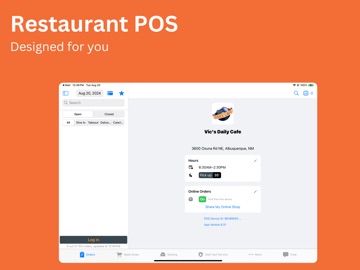
17 store screenshots



Pricing & paywalls
App Store
- Free
Ratings & reviews
App Store
No store reviews collected for App Store · US
Privacy & accessibility
App Store
Privacy
- Data Linked to You — App Functionality — Contact Info — Email Address Developer declared
- Data Linked to You — App Functionality — Contact Info — Name Developer declared
- Data Linked to You — App Functionality — Contact Info — Phone Number Developer declared
- Data Linked to You — App Functionality — Contact Info — Physical Address Developer declared
- Data Linked to You — App Functionality — Financial Info — Payment Info Developer declared
- Data Linked to You — App Functionality — Location — Precise Location Developer declared
- Data Linked to You — Contact Info Developer declared
- Data Linked to You — Financial Info Developer declared
- Data Linked to You — Location Developer declared
- Data Not Linked to You — Analytics — Diagnostics — Crash Data Developer declared
- Data Not Linked to You — Analytics — Diagnostics — Other Diagnostic Data Developer declared
- Data Not Linked to You — Analytics — Diagnostics — Performance Data Developer declared
- Data Not Linked to You — Analytics — Usage Data — Product Interaction Developer declared
- Data Not Linked to You — Diagnostics Developer declared
- Data Not Linked to You — Usage Data Developer declared
Accessibility
No accessibility labels collected yet.
Versions
App Store
-
7.3.0
- New Feature: Added MagTek terminal support for card-present payments. - New Feature: Added MagTek open tab (preauthorization) and tab apply workflows. - New Feature: Added MagTek support for void, refund, and tip adjustment on supported transactions.
-
7.4.0
- Improvement: Added analytics tracking for key POS flows, including login, business selection, cart actions, checkout, and payment results. - Improvement: Added Front Display analytics to trace order send, receive, render, and control-message flows. - Improvement: Added monitoring for unusually large Front Display orders to help investigate abnormal order data. - Bug Fix: Improved Front Display reliability by limiting peer connections to the same business, ignoring invalid order payloads, and blocking stale unpaid orders from being sent automatically.
-
7.4.1
- **Bug Fix:** Raised the maximum manual tip adjustment amount.
-
7.4.10
- New Feature: Added tap-to-pay surcharge support to Stripe Terminal charges. - Improvement: Improved order reliability by migrating to updated server endpoints. - Improvement: Improved split check reliability by removing local-only deletion handling. - Bug Fix: Fixed an issue where Stripe Terminal connection errors showed a generic failure message instead of the actual error.
-
7.4.11
- New Feature: Added a custom tab amount prompt before opening a tab, so staff can authorize the right amount upfront instead of relying on a default. - New Feature: Added an order total hint and a quick Accept button to the tab amount sheet so staff can confirm amounts faster. - Improvement: Updated staff management to use the latest server endpoints for improved reliability.
-
7.4.12
Improved performance by reducing redundant data refresh cycles across multiple screens. Bug Fixes: • Fixed a crash in the cart when loading member information during checkout. • Fixed a crash in the Tables view when the seat sidebar refreshed. • Fixed an issue where the Front Display cooldown could be bypassed and the display channel setting was not saved. • Fixed seated time in the reservation view not updating in real time. • Fixed table and reservation counts not refreshing after switching businesses, and the active tab not being preserved on refresh. • Fixed a printer lock issue and improved Epson printer error detection. • Fixed the Kitchen Display stopping live updates after midnight or when switching businesses. • Fixed a crash when printing if the underlying order data changed before the print job completed.
-
7.4.13
Fixed a crash that could happen when printing two receipts in a row on the same Epson printer.
-
7.4.14
• Improved stability on iOS 16.1 when adding or modifying dishes in the order list on certain iPad models. • Improved app stability monitoring so performance issues can be addressed more quickly without requiring an app update. • Improved Epson printer reliability: if a print result is unclear or the app restarts during printing, the retried ticket now shows a "POSSIBLE DUPLICATE" warning so kitchen staff can verify before preparing. • Improved phone number field responsiveness on older devices, eliminating the delay that could occur on the first tap after a cold app launch. • Fixed a crash that could occur on iOS 16.1 when adding or modifying dishes in the order list on certain iPad models. Thanks for using Selflane! Feedback and suggestions are always welcome.
-
7.4.15
What's New • Hold and Fire timing in the dish editor now supports 5-minute increments. • Opening the menu now requires a table selection and guest count, so no order starts incomplete. Improvements • Faster cart updates with less redundant processing when adding items. • Smoother cart behavior with fewer conflicts during concurrent updates. • More reliable member sync — editing a loyalty member now updates their profile in the active cart immediately. • Improved stability when accessing member data after a save. • Custom item quantities are now preserved when adding to the cart. • Improved stability when scrolling the seat sidebar on iOS 16. Thank you for your continued feedback — keep it coming!
-
7.4.16
New Features • Waitlist now refreshes automatically when a customer joins, so new entries appear without a manual refresh. • Added a device heartbeat that keeps each device's last-seen status current for more accurate activity in business reports. Improvements & Fixes • Stripe Terminal now shows the real error reason when a connection fails, making issues faster to diagnose and resolve. • Restored the reset split-check button on the payment screen. • Businesses with table assignment turned off can now open the menu without selecting a table or entering a guest count. • Epson receipts and reports no longer show "?" in place of the AM/PM separator in timestamps. • A printer with a malfunctioning cutter no longer reprints the same ticket continuously; printing stops after two failed attempts. • The "Use Caller ID" setting is now saved and kept after restarting the app. • The expo print station now respects its configured order-type filter and no longer prints orders outside it.
-
7.4.17
Improvements • Updated the Epson printer integration to the latest version for better compatibility and reliability with Epson receipt printers. • Print logs now flag failed jobs and show why they failed — and keep that reason when you resend — so printer issues are easier to track down. • Fixed an issue where items from off-hours menus could be added to an order without manager approval. A manager code is now required before the item is added, while manager accounts are approved automatically without interruption. Thank you for using Selflane. We keep shipping improvements based on your feedback.
-
7.4.18
Locked the Epson receipt printer SDK at a stable version to maintain compatibility with older Epson printer models.
-
7.4.2
- Bug Fix: Fixed Front Display crashes that could occur after peer disconnects, channel switches, or synced order refreshes. - Improvement: Improved Front Display order resync and added better diagnostics for abnormal or invalid order payloads. - Improvement: Improved Order List stability by keeping row identities and group sorting consistent during refreshes.
-
7.4.4
- Improvement: Improved order loading reliability so orders refresh more consistently. - Bug Fix: Fixed an issue where the Front Display or printing could become unresponsive during busy workflows. - Bug Fix: Improved kitchen printing stability to help prevent duplicate tickets or stuck print jobs.
-
7.4.5
Improvement: Split evenly orders now also support merge workflows. Improvement: Updated receipt wording for dual-payment orders so card and cash amounts are labeled more clearly.
-
7.4.6
- New Feature: Added an optional pre-charge tip editor so staff can review or change the tip amount before charging. - Improvement: Raised the maximum custom gratuity amount to $5,000 so larger custom tip entries are accepted in the tip editor. - Improvement: Added a Mute Order Up option so staff can turn off order-up announcements. - Bug Fix: Fixed a Front Display issue that could cause the app to hang and become fully unresponsive.
-
7.4.7
Bug Fix: Fixed a race condition that could cause receipts and kitchen tickets to print twice while the print log only recorded one print.
-
7.4.8
Bug Fix: Fixed a rare crash that could occur when the Front Display reconnected after the app returned from background. Improvement: Reduced duplicate order retrievals when multiple parts of the app request the same order at the same time.
-
7.4.9
- Bug Fix: Fixed an issue where Star printers could produce duplicate dine-in kitchen tickets. When the printer reports an ambiguous result, the retry ticket now shows a visible "POSSIBLE DUPLICATE" warning so kitchen staff can verify before preparing. Both the initial uncertain print and the retry are now recorded in the print log.
-
7.5.0
New Features • Gift Card by Number: Look up and apply a gift card by entering or scanning its 16-digit card number, right from the payment screen. • MagTek Battery Indicator: See the battery level of your connected MagTek card reader on the payment screen, so you know when it needs charging. • Recipe View: Tap the new Recipe button on any menu item to view its recipe and ingredients without leaving the order screen. • Split by Amount: Divide a check into specific custom dollar amounts. Improvements • More reliable Epson and Star printing — force-quitting the app mid-print no longer causes tickets to reprint on the next launch. • Streamlined Epson kitchen tickets — duplicate prevention now works automatically, without the "POSSIBLE DUPLICATE" notice on the ticket. • Better Epson printer detection, including TM-U220 and other variant models.
-
7.5.1
Added support for Selflane gift cards. You can now sell and activate Selflane gift cards directly in-store — enter or scan card numbers, set each card's value, and the cards activate automatically once the order is paid. The customer receipt shows each card's number and balance.
-
7.5.2
Improvements • Fixed a case where a deposit wasn't subtracted from the printed Balance Due when automatic gratuity was added. • Improved Epson printer detection so TM-L90 printers are recognized correctly.
-
7.5.3
New Features • Room floor-plan layouts — walls, entrances, restrooms, labels, and other elements designed in the admin backend now appear on the seating canvas alongside your tables. • Grouped sales report view for a clearer breakdown of your numbers. • Tap discount and tip rows in the sales report to jump straight to the related order. Improvements • Sales report totals are now calculated on the server for more consistent, accurate figures. • The Product Mix report is now generated on the server for more accurate quantities, shows a clear message if it can't load, and no longer displays unnecessary decimals on whole numbers. • Fixed MagTek card readers not reconnecting automatically after a Bluetooth disconnection. • Fixed MagTek card readers connected over USB not reconnecting after being unplugged and reattached. • Fixed TM-L90 Epson printers that could fail to connect due to incorrect model detection.
-
7.5.4
New Features • Check the balance of a Selflane gift card, now with a clearer balance display. • Apply a gift-card discount when creating an order. • Charge tips that exceed the pre-authorized card amount on Stripe Terminal for dine-in orders — no separate transaction needed. • Choose which camera your scanners use by default, per device. Improvements • Increased the maximum pay-in and pay-out amount from $1,000 to $10,000. • Reduced repeated background reloading of room layouts on the seating screen, which had been causing heavy network use on some devices. • Fixed an issue where scanning certain gift cards could reference the wrong card. • Fixed Order Detail so all modifier lines on an item now appear.
-
7.5.5
· 4 Aug 2026
New Features: • Gift card balance — look up the balance on any Selflane gift card, now with a clearer display. • Gift card discounts — apply a gift card as a discount while building an order. • Bigger tips, no second charge — tips above the pre-authorized amount now go through on Stripe Terminal for every order type, not just dine-in. • Camera choice — pick which camera the scanner uses, per device. • Higher limits — pay-in and pay-out raised from $1,000 to $10,000. Improvement: • MagTek card reader is far more dependable: switching between USB and Bluetooth, unplugging the cable mid-transaction, and a reader waiting on a card no longer leave it stuck or end the sale early. • MagTek Card reader messages are clearer, including what to do next when a card is declined.
Alternatives
- Alto’s POS & Inventory System — Same category + similar ratings
- ST POS — Same category + similar ratings
- aSeller POS - Point Of Sale — Same category + similar ratings
- Rezku Restaurant POS System — Same category + similar ratings
- PHP Point Of Sale — Same category + similar ratings
Availability by market
- US
Data quality & evidence
- Page completeness
- Live store listing
- Last verified
- 6 Aug 2026
- Sources
- App Store
- Independent summary has not been published yet.