
SecureSafe Password Manager
Securely store and manage sensitive information
by DSwiss Ltd.
iPhone · iPad
Quick verdict
- What it is
- SecureSafe is a password manager and cloud storage solution that provides strong encryption and secure data storage. It allows users to store passwords, credit card details, and other sensitive information, and also offers features such as password generation and file storage.
- Best for
-
- someone who needs to store sensitive information
- users who want to generate strong passwords
- At a glance
-
- Free to download
Categories and search queries
Official categories
- Productivity
- Utilities
AppCorpus categories
Key functions
| Function | Availability | Access | Scope | Evidence |
|---|---|---|---|---|
| Free app | Yes | Free | — | Store published |
Screens
App Store
15 store screenshots

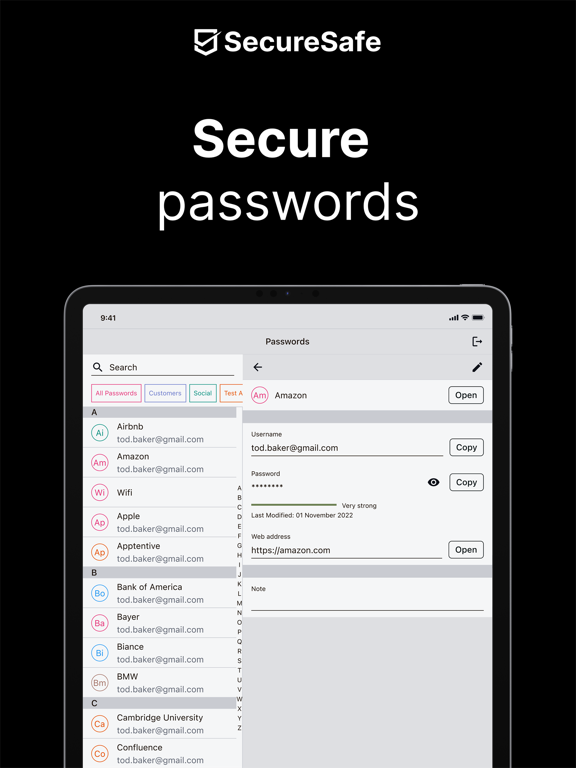


Pricing & paywalls
App Store
Shown for US
- Free
Ratings & reviews
App Store
Shown for US
-
5/5Just one tiny thing.
By far the best password storage app that I have tried but I only have one complaint. I’ve been using the free version for years but it is limited to 50 passwords. Everyone by now should have more than that and probably does but if you want more then you have to buy the whole kit and caboodle. Seems to me that they are leaving money on the table because rather than going through and maybe deleting an old one to put in something new or creating duplicate passwords I would gladly pay an additional one time fee of a buck or two, or even five, in order to get an extra password or an additional expansion of 5 passwords or even just a single expansion. Just seems like there is money being left on the table. Other than that, is great.
Rodzilla5332 · 5 Sep 2026
-
1/5Don’t believe it’s 4.5 Star rating!
I bought the Pro unlimited version because I exceeded the number of stored passwords allowed on the free version. I felt safe buying it because of all the rave reviews and the free version seemed to work okay for my needs. But after upgrading to the Pro version I’ve had nothing but trouble. While using the app it will log me out for inactivity. It crashes over and over, and gives me multiple error messages. While creating a new password storage file it gave me a message of “error try again” ten times. I kept retrying only to discover the file was actually created each time of the “error try again” message so now I have 10 files for the same thing and I’m unable to find any means to delete the duplicates. I also came to realize I’ve been charged TWICE for this app that’s only been frustrating and proven worthless. If you’re looking for a simple way to just store some passwords, this app definitely is NOT it! I’m surprised and can’t believe the 4.5 Star rating because my experience with it has been totally disappointing. Plus I don’t appreciate being charged double especially for something that doesn’t work!
Bridgebldr4Him · 5 Sep 2026
-
1/5I don’t trust these people
They didn’t include the “in app purchases” in the description page in the App Store, then I discover there’s a subscription, that they won’t tell you about until after you go through all the trouble of signing up (but it is mentioned in the FAQ, even though they still refuse to include the cost). Do they think we’re going to go through all the trouble of signing up, then think, “oh, what the heck; I went through all the trouble! I’ll just pay the enormous costs every week! Saves me from going out and buying a 98 cent notebook!” If they are going to be that sneaky about the in-app purchase costs, I wouldn’t doubt for a second that they could access your information once you write it in. No thank you. The 98 cent notebook would be much better, I don’t have to pay a monthly, and nobody can access it. Read the FAQ. There are no Qs or As about security. Shouldn’t there be one that asks, “How do I know you aren’t sneaking into our apps and accessing our passwords to get into our important accounts?” Or “How can I be sure my information is secure?” Nope. I don’t trust them.
mynicknamewasstolen!!! · 5 Sep 2026
-
1/5App Constantly Crashes😡
UPDATE-App STILL CRASHES!!! ONE MONTH AND STILL NO SOLUTION!!! As of April 25, 2018 THERE IS STILL NO FURTHER RESPONSE OR SOLUTION FROM SECURE SAFE! See below for details: Starting March 30, 2018 my app would crash EVERY TIME I tried to open it. It doesn’t matter if I use fingerprint id or type in my user name and password; either way I never get past two factor identification. I immediately emailed customer support and waited two days for a reply. I have since been in communication with them via email with over 10 communications in all. As of today, April 11, the problem is still unresolved! This may not sound like a big deal as I can access my account on my laptop. However, I rely on the app to access my passwords when I am away from home and using my smart phone. Given that I pay for a gold plan with SecureSafe I feel that they should be able to respond and resolve my problem in a more expeditious manner. I am very disappointed at this point with their application and customer service. This is not what I would expect from a company that sells a fairly expensive service.
cougar2010 · 5 Sep 2026
-
5/5Convenient
I was very leery about putting passwords on my phone. With all the hacking going on it didn't seem wise. But I couldn't remember all my passwords and couldn't carry a little book around, and I definitely don't trust other security keychains. A friend told me about Secure Safe. He is a businessman who owns his own business. I trust he knows what he's talking about. Still it took me a couple years for me to get the courage to try it. So far it's been great. But I still worry that someday I may get an email with bad news. I'm much more confident than I've ever been with other keychains. I like having Secure Safe at my fingertips, even if my fingers are crossed. I use it a lot.
Spinuzzis · 5 Sep 2026
Privacy & accessibility
App Store
Privacy
- Data Not Linked to You — Analytics — Usage Data — Product Interaction Developer declared
- Data Not Linked to You — App Functionality — Usage Data — Product Interaction Developer declared
- Data Not Linked to You — Usage Data Developer declared
Accessibility
No accessibility labels collected yet.
Versions
App Store
-
5.12.2
•Bug fixes •Security enhancements
-
5.13.0
• Performance improvements • Bug fixes
-
5.14.0
IMPROVED • Faster password searching when a user has a lot of passwords • Improved text for Upload-Instruction • Changed the logo in the mobile app • Improved layout on the “generate password” page • Minor update on SecureViewer Plus to latest version • Improved display of buttons in dark mode FIXED • Fixed an issue when scanning a document • Fixed an issue where some buttons on iPad where cropped • Fixed a layout issue on files list where no action was possible on last item of the list because of the plus button • Fixed an issue in Mail-in where the folder disappeared if it is marked as read and the user re-enters the sent folder • Fixed an incorrect error message when cancelling upload a file • Fixed an issue where "open in" didn’t work for SecureSafe app • Fixed an issue where the App stopped working after clicking on "Send securely" button • Fixed an issue with missing Date and time information for the Mail-in folders • Fixed an layout issue in login-screen landscape mode • Fixed an issue where Autofill function didn’t work if user had two identical passwords • Fixed an issue with rendering of pages, where the page reloaded only once • Fixed an issue where iOS Username was cleared after copy • Fixed an issue where copy or move files to another Safe was not possible
-
5.14.1
FIXED • Fixed an issue with FaceID
-
5.14.2
NEW • Scan and save a vaccination certificate • Shortcut on the home screen to a vaccination certificate, if vaccination certificate has been scanned • Delete a vaccination certificate • Display a vaccination certificate • Display a hint if the SecureSend Limit is reached IMPROVED • iOS extensions should take into account the user language • Error message displayed when the 2FA code is wrong FIXED • Issue fixed whereby a folder could not be opened when the folder had the same child and parent name • Issue fixed whereby the login with fingerprint dialog was not shown when the login failed • Issue fixed whereby the login button was inactive after scanning from the home screen • Issue fixed whereby a translation was missing in Italian • Issue fixed whereby the autofill was not working
-
5.14.3
IMPROVED • Improved the Pop-Up where the user has to grant access in order to use the scanner. FIXED • Fixed an issue where the scanner froze while scanning. • Fixed an issue where logging in with Touch ID overrode the vaccination certificate button.
-
5.15.0
NEW • Introduced Deep Links for Mobile (Generation and resolution) • Setting to show/hide vaccination certificate button on the login page IMPROVED • Text on vaccination certificate button did not change after a scan • Improved the layout for "what's new wizard" in landscape mode • Improved the text for the Vaccination Certificate section of the “what’s new” wizard • Improved the behaviour of the edit password field FIXED • Fixed an issue in SecureSend where when switching from the contact page an unnecessary interface element appeared • Fixed an issue where the page did not refresh after deleting all files in the Mail-In Folder • Fixed an issue where the information icon did not work on the SecureSend form • Fixed an issue where an error appeared when using a Team Safe with an expiry date as today. • Fixed an issue where items were not active when the user shared files to the app during view file • Fixed an issue where the links to the FAQ, Data Protection, and Terms did not work • Fixed an issue where an error occurred when a FREE user tried to send a file to a recipient by selecting their email and phone from contacts • Fixed an issue when the user tried to save a password with a category name that already existed but with opposite upper or lower case • Fixed an issue where the Autofill was not working • Fixed an issue where a crash occurred when importing two videos • Fixed an issue where the app crashed in landscape mode when logging in and creating a new account • Fixed an issue where, if the vaccination folder existed, but was empty, the vaccination certificate was not displayed on the login screen. • Fixed an issue with the position of the vaccination certificate • Fixed network related issues for a vaccination certificate • Fixed an incorrect error message when refreshing the files page without an internet connection • Fixed an issue in Settings->security->login where the page scrolled to the top • Fixed an issue where it was not possible to delete a file/folder from the "trash" • Fixed an issue where the greeting message in German didn’t fit on the screen
-
5.16.0
NEW • SecureSafe now suggests your most frequently used usernames when you create a new password. IMPROVED • Adjustments have been made to the File Provider API updated by Apple. This means that in future you will still be able to save or open documents directly in SecureSafe via third-party applications such as Word, PowerPoint, Excel, Apple Files App, etc. • Minor layout improvements have been made FIXED • Please note that as of this release we only support iOS 13 or higher. If there are problems, for example, when you want to save documents directly in SecureSafe in Word, please update to iOS 13. • An error has been fixed where, in certain cases, a loading process occurred that could not be terminated when importing documents via "Share". • Fixed an error when uploading in-app photos. • Fixed an issue where the "+" button in the safe overview overlapped a safe when there were many of them. • Improved error messages when using Deep Links. • Fixed an issue where the changes were saved with a slight time delay when annotating a vaccination certificate.
-
5.17.0
NEW • The data and folders can now be sorted in the safes according to various criteria. IMPROVED • Graphic improvements to the Deep links function. • Improved error message during the login/password process. • Improved colour graduation for the password categories. FIXED • Fixed an issue where the list of suggested usernames was not displayed correctly in landscape view. • When exiting the password screen, a save or cancel request now always appears. • Fixed an issue when uploading multiple files. • Fixed an issue where document information was not displayed correctly after saving. • Fixed an issue where scanning a document from the home screen did not work correctly. • Fixed an incorrect error message when cancelling the multi-import function in a safe. • Fixed an issue where the Recycle Bin was not displayed correctly everywhere on the iPad.
-
5.18.0
NEW • New iOS scanner with better response time and higher quality document recognition. • SmartFind now recognises people's names, companies, places and dates in your text files and provides them as filter options to match your search terms. • A started inheritance process can now be stopped via mobile. IMPROVED • The button to rapidly access the vaccination certificate is no longer active by default. FIXED • iPad: fixed an issue where a left menu tab was incorrectly displayed in the footer. • Corrected the display of the password manager and file manager list. • Fixed an issue that occurred when scanning a document (from the home screen). • Fixed a storage problem with MDNotes files. • Fixed an issue within the active context menu in the file manager when an automatic logout occurred. • Fixed an issue where a delete icon was missing on any text input in dark mode.
-
5.19.0
NEW • The automatic entry of login data (autofill) for apps and websites has been expanded. Passwords can now also be created and saved directly during registration. IMPROVED • The behaviour of the search field has been improved. FIXED • Fixed a problem with the swipe function under iPad. • Fixed an issue where the logout icon was not visible in the settings on iPad. • Fixed an issue while scanning the same QR code multiple times in the Medical Safe. • Fixed an issue where the video length was not displayed correctly in certain videos.
-
5.20.0
NEW • With the Autofill Function, usernames and passwords can now be inserted even if they are split between two login pages. • An account can now also be deleted via the mobile app. IMPROVED • The management of the status bar has been revised. • The search filter of the password Autofill Function has been improved. FIXED • Fixed an issue where the password list was not displayed correctly when the 50-password limit for Free users was exceeded. • Fixed an issue where the icon for deleting search terms was missing from the password Autofill Function. • Fixed an issue where SecureSafe could not be launched from the local file folder. • Fixed an issue where the search box was not displayed in the FAQs. • Fixed an issue where the file name was not created correctly when multiple photos were taken in succession.
-
5.20.10
IMPROVED • Adaptation of the registration process
-
5.20.11
IMPROVED • General technical improvements
-
5.20.3
IMPROVED • Improved user-friendliness
-
5.20.4
IMPROVED • The registration process has been revised.
-
5.20.5
NEW • Users who haven’t configured the password autofill function yet are newly shown how to simply activate it. • Our value proposition is newly displayed on the home page during registration. IMPROVED • Instructions for the registration process in order to create memorable and strong passwords.
-
5.20.6
IMPROVED • Improvements of the advertising banner for the autofill function • Text adjustments in the registration pages FIXED • Fixed an issue that made explanatory texts in the password autofill settings disappear.
-
5.20.8
IMPROVED • Text adjustments for onboarding • Improved error message when deactivating 2-factor authentication in connection with the Medical Safe
-
5.20.9
NEW • There is now help with suggestions when creating new passwords after registration. • A new screen is displayed if no passwords have yet been created and guides the user in creating a first entry. IMPROVED • The shortcut to access the vaccination certificate on the login page has been removed. FIXED • Fixed an issue in the registration process that occurred when an incorrect password was entered during password confirmation. • iPad: Fixed an issue that occurred with the autofill function in the "Comment" field. • Fixed an issue that occurred when a user had "Login without internet connection" enabled and changed the password via the web app.
-
5.21.0
NEW • SecureSafe has a new design and logo. IMPROVED • General technical improvements
-
5.22.0
NEW • Users can decide whether they want to receive newsletters when they register. • An update of the mobile app can now be forced in order to guarantee a specific version. IMPROVED • General technical improvements • Minor design adjustments
-
5.22.1
Fixed an issue with the login process.
-
5.22.2
Added feedback for extra security measure for blocked logins
-
5.23.0
· 14 Nov 2024
Password for Teams is now available for mobile phones and tablets.
Alternatives
- iPassworder Password Manager — Same category + similar ratings
- mSecure: Password Manager — Same category + similar ratings
- Password Safe Manager & Vault — Same category + similar ratings
- Enpass Password Manager — Same category + similar ratings
- Password Manager: Safe — Same category + similar ratings
- Password Manager' — Same category + similar ratings
Availability by market
- US
Data quality & evidence
- Page completeness
- Independent summary published
- Last verified
- 5 Sep 2026
- Sources
- App Store