
Quick verdict
- What it is
- Store information collected; independent summary not yet available.
- At a glance
-
- Free to download
Categories and search queries
Official categories
- Business
- Utilities
AppCorpus categories
Key functions
| Function | Availability | Access | Scope | Evidence |
|---|---|---|---|---|
| Free app | Yes | Free | — | Store published |
Screens
Google Play
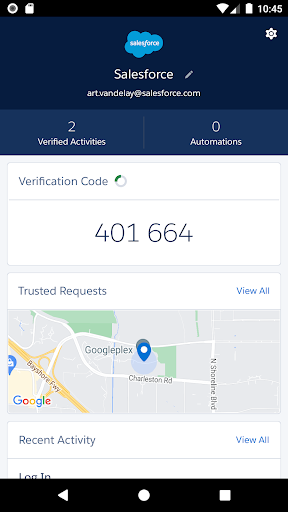
6 store screenshots


Pricing & paywalls
- Free
- Free to download
Ratings & reviews
-
5/5FREE CLOUD STORAGE OF YOUR 2FA Accounts
I usually don’t write reviews by putting my time but this app deserves this review. I previously trusted Microsoft authenticator and loaded all my accounts but after resetting my phone, I got Fkd because I don’t pay for my icloud backup and it microsoft authenticator is not backed up. Salesforce Authenticator automatically backsup all your accounts with your phone number as a login id. even though you buy a new phone or reset your phone, if u have your phone number and passcode, your 2FA accounts are all safe.
SrinivasSurya · 31 Jul 2026
-
1/5Frustrating experience if pairing this with SF Chrome extension for Gmail
The Authenticator functions but might require a heavy lift to get it there and it doesn’t play well with all SF access points. If you’re logging in to SF via a browser, the Authenticator is straightforward. If you’re trying to use SF extension for Gmail it’s amateur. Sometimes you have to uninstall and reinstall the extension entirely because even after you click Approve on the app, it won’t let you in on the Extension. Have had to reinstall twice within first three weeks. If you have already authenticated your device and logged in to SF in a browser, you still have to do it again on the same device to get into the Extension. The functional but amateur fix is to authenticate on the browser experience first, then on the extension, otherwise you’ll click approve on the app again and again, but you won’t be able to get in.
TechBek · 31 Jul 2026
-
1/5Unacceptable trusted device handling
This app is horribly intrusive and inconvenient. The only way it will remember a trusted device is if location tracking is set to “Always allow.” This is due to the way the authenticator handles registered devices: it is based on geographic location, so I see the street address of the sign-in attempt. I never permit any apps to “always track” my location and it seems outrageous that this would be necessary in order for Salesforce Authenticator to do something as simple as remember a trusted computer. I’ve never encountered another authenticator app with this behavior. Users are left with the poor choice of either permitting the app to track them at all times (as an aside, this is poor handling because the location icon is always visible in the iOS status bar, which is its own annoyance), or to manually approve the sign-in attempt every single time. Truly noxious app behavior.
DirtyDan404 · 31 Jul 2026
-
1/5Slow and annoying for a system used daily from same location and devices
I hate authenticating to enter Salesforce. I do not always have my phone on me when I need to enter Salesforce and even when I do the app is slow. It doesn’t pop up immediately when I try to login every time and it never remembers my device even though it asks me every single time with another annoying pop up if the location is trusted. I don’t understand why this extra step is so necessary and if it is why it has to be so inconvenient. If I could just say that this location was always trusted as the app implies it might be easier but that is not the case and seeing it as a false option is even more annoying. Having to authenticate every single time I log into something I use every single day from the same location and the same devices is kind of ridiculous.
annoyeduserLB22 · 31 Jul 2026
-
1/5Unnecessary and Frustrating
The Authenticator doesn’t always automatically connect, even when I tell it to always recognize my location. I never get into Salesforce on my phone, only on my computer that stays in my office, so it will always be the same location. It’s just inconvenient, especially when I’m trying to get into SalesForce for a customer and I have to stop and get into my phone to say it’s still me at the same location. I’m also not sure why I even have to have it. As far as I know, no one with my company puts any sensitive info into SalesForce. We just put name, phone number, and address info. Which anyone can find on the internet very easily, so we’re not saving anyone from having their identity stolen with this Authenticator. Maybe there is a good reason for some people/businesses to have this, but it’s pointless and inconvenient for me personally.
PrincessNessy · 31 Jul 2026
-
5/5
good
Raja .j · 31 Jul 2026
-
5/5
excellent
Santosh Patro · 31 Jul 2026
-
5/5
It works perfectly
Maria Jose Gomez Leiva · 31 Jul 2026
-
4/5
good
Rupayan Sett · 31 Jul 2026
-
5/5
working well and fast
Nesreen Ashraf · 31 Jul 2026
Privacy & accessibility
Privacy
- Data Not Linked to You — Analytics — Diagnostics — Crash Data Developer declared
- Data Not Linked to You — App Functionality — Contact Info — Phone Number Developer declared
- Data Not Linked to You — App Functionality — Identifiers — User ID Developer declared
- Data Not Linked to You — App Functionality — User Content — Customer Support Developer declared
- Data Not Linked to You — Contact Info Developer declared
- Data Not Linked to You — Diagnostics Developer declared
- Data Not Linked to You — Identifiers Developer declared
- Data Not Linked to You — User Content Developer declared
Accessibility
No accessibility labels collected yet.
Privacy
- Data collected — App functionality — Personal info — Email address Developer declared
- Data collected — App functionality, Analytics, Developer communications, Account management — Personal info — User IDs Developer declared
- Data collected — App functionality, Fraud prevention, security, and compliance, Account management — Personal info — Phone number Developer declared
- Data shared — Analytics — App activity — App interactions Developer declared
- Data shared — Analytics — App activity — Other actions Developer declared
- Data shared — Analytics — App info and performance — Crash logs Developer declared
- Data shared — Analytics — App info and performance — Diagnostics Developer declared
- Data shared — Analytics — App info and performance — Other app performance data Developer declared
- Data shared — App functionality — Personal info — Email address Developer declared
- Data shared — App functionality, Analytics — Device or other IDs Developer declared
- Data shared — App functionality, Analytics — Personal info — User IDs Developer declared
- Security practices — The developer doesn’t provide a way for you to request that your data be deleted — Data can’t be deleted Developer declared
- Security practices — Your data is transferred over a secure connection — Data is encrypted in transit Developer declared
Accessibility
No accessibility labels collected yet.
Versions
-
3.10.0
- Automation feature enhancements - Manual refresh for notifications - Bug fixes
-
3.10.1
- Bug fixes
-
3.11.0
- Backup and restore feature will now be available to users with at least one Salesforce account pairing only - Improved backup and restore experience - Bug fixes and improvements
-
3.11.1
-Limit B&R for customers only -Improve B&R screen texts -Improve data collection for analytics -Bug fixes
-
3.12.0
- Accessibility improvements - Dependency upgrades - Bug fixes
-
3.13.0
- Improved Automation Experience - Bug fixes
-
3.13.2
Bug fixes
-
3.14.0
- Dependency upgrades - Performance improvements
-
3.14.1
bug fixes
-
3.14.2
bug fixes
-
3.14.3
- bug fixes
-
3.7
Various bugfixes and efficiency improvements.
-
3.7.1
3.7.1: + Fixes bugs + Efficiency Improvements
-
3.7.2
* bugfixes * added purpose to the user consent request to access the camera
-
3.9.0
Localized privacy statement link Bug fixes and minor enhancements
-
4.0.0
- Email verification flow. - Trusted request expiration after 90 days. - Bug fixes.
-
4.0.1
bugfixes
-
4.0.2
bug fixes
-
4.1.0
- We added clarifications about how the Salesforce Authenticator app uses your location data and protects your privacy. - We added a setting to log app activity, which we use to resolve issues faster. The activity logs are shared only when you send us feedback via the app. The logs don’t include any personal information. - We made some bug fixes and performance improvements.
-
4.2.0
- Get Notifications When You’re in Focus Mode: To make sure you don’t miss push notifications, they’re now time-sensitive so that you can see them even when you’re in Focus mode. To use this feature, enable push notifications and turn on time-sensitive notifications. - Search Across Connected Accounts: Too many connected accounts to keep track of? To find accounts more easily, search across your connected accounts based on the username or the service you’re trying to access. For example, search for all of your accounts connected to MuleSoft. This feature is available when you have more than one connected account. - We improved the experience for submitting app feedback and fixed some bugs.
-
4.3.0
- We fine-tuned in-app notifications to clarify the criteria for activating backups. To enable backups, you must have at least one connected account that’s associated with Salesforce, such as Salesforce.com, Heroku, MuleSoft, Marketing Cloud (including Intelligence), Commerce Cloud, Quip, and Tableau. But if you’re using third-party accounts that require a 6-digit time-based one-time password (TOTP) for login, you can’t enable backups. - We fixed some bugs.
-
4.3.1
We fixed some bugs.
-
4.4.0
We don’t want identity verification to block you from getting work done. In this version, we’re all about making Salesforce Authenticator easier to use. - Our app icon has a fresh new look. To stand out from other authenticator apps, our new icon features the Salesforce logo. - Disruptions happen. Our revamped account transfer experience is here to help. Whether you change your device or delete and reinstall the app, it’s easier than ever to get back on track. To successfully transfer accounts, ensure that you back them up.
-
4.5.2
We keep you informed when a new version arrives. -A banner lets you know when there’s a new release. A weekly check makes sure that you stay up to date on the latest version. -We improved the user experience when backup for your account isn’t available. -We fixed some bugs.
-
4.7.0
· 14 Apr 2025
We made automation easier than ever. - Automation is now enabled by default to approve requests that you trust when certain conditions are met. - We added Einstein icons for automation to Salesforce ecosystem accounts the home screen. The automation toggle includes an Einstein icon that is blue when automation is on and gray when automation is off. Accounts include a blue Einstein icon with a check mark if automation is enabled, a gray icon with an X if it’s disabled, and if automation isn’t an option, the Einstein icon doesn’t show up. - We fixed some bugs.
- 4.8.0 · 24 Aug 2026
Alternatives
- LinkedIn Sales Navigator — Same category + similar ratings
- Brex — Same category + similar ratings
Availability by market
- US
Data quality & evidence
- Page completeness
- Live store listing
- Last verified
- 30 Aug 2026
- Sources
- App Store, Google Play
- Independent summary has not been published yet.