Quick verdict
- What it is
- Store information collected; an Apoku editorial summary is not yet published.
- At a glance
-
- $3.99
Categories and search queries
Official categories
- Travel
- Navigation
Apoku categories
Key functions
| Function | Availability | Access | Scope | Evidence |
|---|---|---|---|---|
| Family Sharing | Unknown | Unknown | Scope unknown | Store published |
Screens
App Store
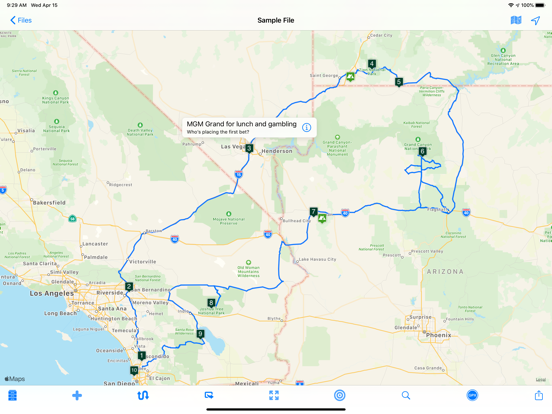
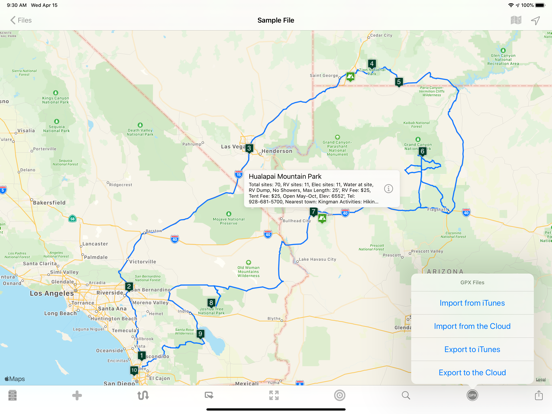
30 store screenshots


Pricing & paywalls
App Store
- Price: $3.99
Ratings & reviews
App Store
-
4/5Really Good but Not As Easy As Advertised
This app can do far more than I have yet discovered & it’s ability to share information with other travel planning apps is terrific. However, many functions, like changing the order of waypoints or adding waypoints in the middle of the route or several other functions are not intuitive or all that easy to use. Buy the tool - it does a lot. But be prepared to stumble & get frustrated along the way. The developer says they follow common iOS procedures, but that assumes the average user knows those procedures. The developer has responded to me telling me about several support tools & tutorials that can be accessed by users. While I appreciate the fact that there is help available, I just wish it’s were not so difficult to find. I oversee software development projects, so I am not a novice. Yet I hate having to play with something I pay for & hope I can figure it out or stumble over help functions. Hence the 4-star rating.
Keltic Dog · 1 Nov 2026
-
5/5Forever now our road trip companion
An old friend and I started a Holiday road trip tradition this past year that honestly changed our lives. A major factor in its success we realized was the seamless nature in which we were able to use technology to help guide us toward the things we wanted to see, yet leave the ability jump around based on how we felt at any given moment. This app was a key factor in allowing us to check off the must sees, move around the stuff we realized we didn’t have time for, and keep moving forward without any feeling of being stuck or wondering what to do next. This app will be the third wheel in all of our road trips (for which we have 3 files already in the works) to come! A very special thanks to the creators for making such a relevant platform for people who like to wing it with at least some idea of what to see along the way. This app still gives you the feeling of rolling out that paper map and pointing at spots of interest, then just does all of the hard annoying work of discovering the route. My only suggestion would be to include a real time Navi section at which point we’d never have to switch between this and waze, and if possible nudge us to check the gas tank after that feeling of relief to finally see the light of dawn after pulling out of an 8 hour overnight winter rainstorm through the hills of West Virginia, thank god for AAA. Oh, and make it compatible with the new IPad keyboard.
CosmicCharlie88 · 1 Nov 2026
-
5/5Does what I want it to do
I wanted a route planner for my car club. I wanted to create nice driving roads and put them in order of the best route. After finding RTP I built a nice route and opened the POI up in Google maps and was able to get guided directions. Great job. The fact that I can get estimated times of each route makes deciding so much better. I can decide if I want the 2 hour tour or the 3 hour tour. One drawback is that GoogleMaps will only allow me to make routes with 25 or less POIs. But after thinking about it I think that’s ok, meaning that all I need to do is create another route where the other left off at 25. This way I can divide routes up or start on a different route anytime. I know there’s a ton more that this app can do, I’ve only scratched the surface. Adding pictures or saving as a GPX file to open in a standalone GPS unit. (Not sure why unless my phone loses signal or whatever). But there looks like a lot more that this can do. I’ll eventually experiment and see. Someone mentioned the lack of ease when exporting from the iOS app to Mac app. Maybe the developer can add an option that when you save to iCloud that it auto saves it for all apps. But I really don’t want that.i want to know what version I’m loading or saving, I’ll just rename different versions. That’s all I got now
G60mann · 1 Nov 2026
-
5/5Love it!
My family took a road trip from Minnesota to Oregon last summer. We were able to plan every amazing stop, estimate how long it would take and were able to enjoy much more than if we hadn’t planned (Yellowstone, Mount Rushmore, etc!) Robust options are available. The desired location can be “pinned” and then edited to change the name, the pin image (e.g. forest, food, scenery) among other things. You can add images, activities, costs etc. Adding pictures was a great way to get the kids excited! The route can be adjusted, however, not always to the way you would like to go, although rare (same with every other map app). The directions were great. It estimates your time to the location (which is adjustable by driving speed!) and then allows you to input the length of time at that location. This feature was great as we adjusted our trip because of bad calculations on my part! There are also “POI” which are places you might want to check out, but don’t want it calculated into your itinerary. This helped me narrow down what we could actually do, and keep ideas in my back pocket if we found the time. The only gripe I have is that it isn’t the most intuitive layout. There is a learning curve, but once you get it, it’s amazing. Worth every penny.
It's Not My Forte · 1 Nov 2026
-
5/5This app is perfect for my needs
I love this app. It is very intuitive. I can map out all of my vacations, see optional routes, include points of interests that don’t need to be on the route itself. I can change all the icons on the map just for fun. It computes not just the time to go someplace but also the gas cost. I can add notes of my own. The neat thing is that this app doesn't just sync on the cloud - I can send my maps to others. Or just save your completed map routes to Dropbox or cloud drive to download later. Or I can upload my routes to Google Maps for step by step directions. I have tried other routing maps - and most require really weird subscriptions. This one does not. It is a straight forward app that lets you try it for free with all options except saving changes you make. The price for this app is well worth it for being able to save new routes - and not worry about future surprises. I corresponded with the app’s creator about a relatively minor issue and now just a few days later he fixed it with an update.
Jokoco · 1 Nov 2026
Privacy & accessibility
App Store
Privacy
- Data Not Collected Developer declared
Accessibility
No accessibility labels collected yet.
Versions
App Store
-
4.7
- Can now send all map pins to Google maps for navigation purposes. - Time zone bug fixes. - Added the ability to send pin locations to Waze. - Bug fixes and performance enhancements.
-
4.7.1
Improved the "copy pin coordinates" functionality. Enhanced method of adding a new map pin. Other bug fixes and improvements.
-
4.7.2
More accurate address displayed when adding a new pin with an address. Better error control when exporting to iCloud. Other bug fixes and enhancements.
-
4.7.3
Fixed a bug that sometimes caused a selected map pin to be relocated when creating a new map pin. Upgraded the tutorial. Other bug fixes and improvements.
-
4.7.31
Fixed a bug that caused a crash when accessing the camera.
-
4.7.40
• Updates for iOS 13. • Bug fixes and performance enhancements.
-
4.7.41
Pin reference address now displays the coordinates. Other bug fixes and app enhancements.
-
4.7.42
Fixes an issue when optimizing the route pins. Other app bug fixes and enhancements.
-
4.7.50
Tutorial now is easier to use. Various bug fixes and app enhancements.
-
4.7.60
- Updated all views that display web content. - Fixed a bug that sometimes gave an error when selecting a location from your Contacts. - Many other bug fixes and app enhancements.
-
4.7.61
A few minor adjustments and enhancements to make planning your road trip even easier.
-
4.7.70
• Removed Dark Sky weather widget (expiring soon). • Added link to OpenWeatherMap. • Added ability to create a new Activity based on the Places tab view list. • Various bug fixes and app enhancements.
-
4.7.71
- Added windy.com as a weather source. - Minor bug fixes and app enhancements.
-
4.7.72
Few minor tweaks and fixes for iOS 14.
-
4.7.73
Fixes an occasional crash when opening older files.
-
4.7.80
• Minor bug fixes for the Silicon Mac. • Other misc bug fixes and app enhancements.
-
4.7.81
- Improved the Settings view. - Added a “Enable long map taps” to the settings. - For devices with a keyboard (such as the iPad and M1 Mac), press + to zoom in, press - to zoom out from the map. - Fixed a bug when importing a GPX file. - Various bug fixes and app enhancements.
-
4.7.82
- Added a new settings: GPX Export - GPX Export can now export your data as tracks, routes, combined routes and more. - Bug fixes and other app enhancements.
-
4.7.83
- Added more flexibility and accuracy when opening an external URL. - Other minor bug fixes and app improvements.
-
4.7.84
- Improved and added more options to the "export as a GPX file" functionality. - Other bug fixes and app enhancements.
-
4.8
- Chart View: added Cancel button along with other chart view enhancements. - Look Around: For iOS 16 and above, Apple's Look Around view is available (in the Web tab). - Miscellaneous bug fixes and other app enhancements.
-
4.8.1
- Now easier to rename a map pin. - New setting in Routes tab: append coordinates to address (default is NO). - Removed optimize pins function as it was problematic. - Other bug fixes and app enhancements..
-
4.8.2
- Few grammar errors corrected. - Can now share a pin's address. To do so, tap on a map pin, then tap on the resulting small window to see the address. To share the address, tap the top right button, second from right. - Other minor bug fixes and app enhancements.
-
4.8.3
Bug fixes and interface enhancements.
-
4.8.4
· 18 Feb 2025
- Added enhancement so that when adding a map pin, its name appears not just the address. - Enhanced "Send all route pins to Apple Maps" so that the route pins are in correct order. - Bug fixes and interface enhancements.
Alternatives
- Boondocking — Same category + similar ratings
- Roadie: Road Trip Planner & RV — Same category + similar ratings
- BLM Public Lands Map Guide USA — Same category + similar ratings
- US Public Lands — Same category + similar ratings
- Fotospot Road Trip Community — Same category + similar ratings
- RV Campgrounds: Camping & Park — Same category + similar ratings
Availability by market
- US
- ES
- DE
- GB
Data quality & evidence
- Page completeness
- Live store listing
- Last verified
- 30 Oct 2026
- Sources
- App Store
- Apoku editorial summary has not been published yet.