
Quick verdict
- What it is
- Store information collected; independent summary not yet available.
- At a glance
-
- $4.99
- In-app purchases
Categories and search queries
Official categories
- Finance
- Lifestyle
AppCorpus categories
Key functions
| Function | Availability | Access | Scope | Evidence |
|---|---|---|---|---|
| Family Sharing | Yes | Unknown | App Store | Store published |
| In-app purchases | Yes | Limited free | — | Store published |
Screens
App Store
19 store screenshots

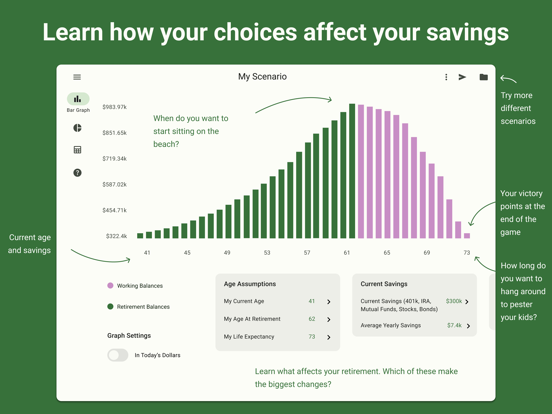

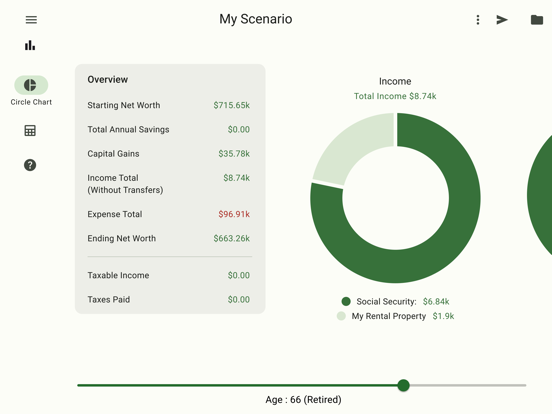
Pricing & paywalls
App Store
- Price: $4.99
- 5 additional scenarios — $1.99
- 5 Scenarios — $1.99
- save 5 more scenarios — $1.99
Ratings & reviews
App Store
-
4/5Welcome improvement - excellent customer service!
After using this app and loving it for several years, the visual layout and functionality was totally redesigned last year. At that time, the app took 10 steps backward, IMO, and I gave it a one star review and began looking for another retirement app. >>> UPDATE: I also sent an email to the developer stating my complaint. To his credit, he responded quickly and communicated the reasoning behind the update AND addressed some of the issues that I had. The most recent update is a much improved version, I am updating my review to four stars. I still like the previous version (prior to the redesign) better, but for now, this is a very good app.
Zabubabobby · 6 Aug 2026
-
5/5Nice, Simple App
Read some of the reviews and felt compelled to add my own. Firstly, you should ignore most of the reviews that are years old, as they include complaints that have long since been addressed. More recent complaints seem to be the app lacking the ability to address RMD’s or different retirement dates for spouses. This appears to be true, however, I would counter that this is well beyond the intended scope of this app. This is a great tool for simple “what if’s?” to assess the feasibility of various saving or spending scenarios. Simply put, it can get you in the ballpark. Expecting a $5 iPad app to calculate a comprehensive retirement plan is simply unreasonable - the real world is far too complex. If you want to have some fun and noodle around with savings levels, retirement dates and the like, have at it, you won’t be disappointed. I have been using it for years in this way. Poke around the drop down list when you select “+” and you be able to concoct some workarounds to help with your specific situation. ****Jan 2024 Update**** Late 2023 provided a clunky update that moved all input to tiles along the bottom of the screen. Another update in Jan 2024 has already addressed this, moving the inputs back to the left side of the screen where they started. Note that at some point (not sure when), RMD’s were added, but it is still not possible to designate different retirement dates for spouses. Still the best five bucks I ever spent.
b'way=love · 6 Aug 2026
-
5/5Love This App!
I was really happy to see the latest update. I am always worried that Apple might make some iOS change that breaks something and I really don't want to use anything else. My only request is if you might be able to either come up with some sort of web based application or native Mac OS app to run on my Macbook? I know I can run the iPad app on MacOS now but it still has sizing issues and artifacts. I would love a web app to be able to have the same functionality from the iPad app in the browser. I know this is not a minor undertaking and would require some sort of subscription to pay for the hosting and data storage. Anyway, thanks again for your great application!
MeeseintheSprings · 6 Aug 2026
-
5/5Quick, easy, clear -- answers the question "Am I saving enough?"
RetirePlan rocks! This app let me get a meaningful picture of our retirement savings situation in just a few minutes. I then added more of the "what if" events to see their impact -- everything from changing how much we expect to spend later in retirement to simulated market crashes. Having played with this app, I can be confident we will be able to adjust should the unexpected occur. Since that was so fast, I next created a "retirement plan" for our college savings, using the kids college start dates as "retirement." FTW!
familybrosnahan · 6 Aug 2026
-
3/5Great for planning retirement but lacking while in retirement.
I purchased this app approximately 4 years ago and utilized it quite a bit especially in the 2 years leading up to my retirement. I’ve been retired now for 2 1/2 years and only look at it maybe once or twice a year. The problem with the app once in retirement is that it forces the distribution of your non tax deferred investments down to zero before allowing distributions from tax deferred accounts such as IRA’s or 401k’s. Nobody in retirement withdraws this way in real life. It is much more common in retirement to maintain a sum in non tax deferred accounts for emergency and/or for planned major expenses while beginning distributions from IRA’s and/or 401k’s. The app does not allow this.
Rtcfiddle · 6 Aug 2026
Privacy & accessibility
App Store
Privacy
- Data Not Collected Developer declared
Accessibility
No accessibility labels collected yet.
Versions
App Store
-
1.10
Fix some cosmetic bugs for 6.0 users Fixed bug with recurring Expenses and other minor but fixes
-
1.11
Now see each year as a set of pie graphs. I've added a new way to visualize your retirement picture as well as more information about your balances. minor bug fixes also included.
-
1.12
iOS8 fixes New Market Crash Simulation event allows you to add a market crash event at different ages to more accurately forecast future returns
-
1.13
ios8 bug fixes, spreadsheet display fix. Thanks to Bob for pointing it out.
-
1.14
fixed a bug in ios7 with adding new events. Thanks to Larry for letting me know!
-
1.15
Fixes issue with emailing in ios9. Thanks to all who emailed me about this issue! Adds scenario name to default subject when there are more than one scenarios
-
1.16
Fix bugs with emailing and income pie chart double counting SS and Spouse SS.
-
1.17
updates for latest os. Fix hanging bug. Thanks to Julian for alerting me to this bug!
-
1.18
Fix for incorrect Social Security taxes. Under certain conditions Social Security income wasn't properly taxed. Thanks to Garry for giving me the heads up on this issue!
-
1.19
Updated iOS version and libraries, and corrected support URL.
-
1.19.1
Fixed Dark Mode so that text is visible
-
1.19.2
Fixed an issue where the app launches and appears to be blank. In Portrait mode you can always use your finger to "slide in" from the left, and it will pull the details back. Improved support for dark mode and larger font sizes (it's not perfect, but you can now *see* everything!).
-
1.9
Set a passcode to protect your data with a lock screen Name and Save up to 3 different scenarios - in app purchase for more Unlimited recurring Income and Expenses Support for Retirement Income (part time jobs etc)
-
2.0.0
This is both a redesign and a reimplementation of the entire app! It looks way better, it still does all the same great things, and now you can use it across multiple devices!
-
2.0.1
- Added a breakdown in the Spreadsheet view for Taxable Income, so you can see how we got to this number. - Fixed a problem for users upgrading from the older version of this app. - Various bug fixes and tweaks around the product
-
2.0.10
- Added option under the Share menu to Email both the PDF and the CSV exports together. - Fixed the clipped graph image that was being Shared. - Various minor bug fixes. - Upgrades to support iOS 18.
-
2.0.11
· 26 Nov 2025
Major new features have been added! Monte Carlo Simulation Cost Basis Support ROTH Conversion Event Drag and Drop ordering of Events Performance improvements and bug fixes
-
2.0.2
- Created a Landscape Layout that is much more like the original version of RetirePlan. This has all of the options in a list on the left side of the screen, super easy to scroll through, and you can click to edit right there. We loved this layout in the old version, so we've done our best to bring it back in the new version. The Portrait Layout still has the bottom section scrolling horizontally, which works much better on smaller screens and especially phones. - Changed text description from "Show Inflation" to "Show Market Rates" in the Options dialog, and added a more detailed description to reflect that this option also enables you to edit your Rate of Return. - Added Cost of Living Adjustment to Pensions.
-
2.0.3
- Fixed year summary being cut off in Landscape mode on smaller/older iPads - Added an FAQ question on why Required Distribution shows up twice on the Spreadsheet View
-
2.0.4
Fixed two issues: - If you try to Duplicate a Scenario when you have used up all your Scenarios, you will now receive an error message, rather than an infinite spinner. - Sharing a Scenario will now use your customized name for each Event (e.g. "My Favorite Pension" instead of just "Receive Pension").
-
2.0.5
- Minor bug fixes - Migrated to new AppStore account to prepare for new updates
-
2.0.6
Greatly improved scrolling for phone users. Buttons should not longer fall off the bottom of the screen on smaller phones, and scrolling around to view everything should be much more natural.
-
2.0.7
In this version we have improved how the text fields work, as there were several number formatting and error handling things going on that were confusing to users (well, and us too!). We also made some minor login improvements and removed Google Analytics from the App (it wasn't really telling us anything interesting anyway).
-
2.0.8
This release has two quick fixes in it. The first is a fix for the messed up Pie Charts in the last release. The second helps make sure that that Events always have valid values.
-
2.0.9
Fixed an issue with the help screen crashing.
Alternatives
- The Retirement Planner — Same category + similar ratings
- Retirement Advisor — Same category + similar ratings
- PlanMode: Retirement Planner — Same category + similar ratings
Availability by market
- US
Data quality & evidence
- Page completeness
- Live store listing
- Last verified
- 6 Aug 2026
- Sources
- App Store
- Independent summary has not been published yet.