
Remind: School Communication
Remind is a school communication platform that helps students, parents, and educators stay
by ParentSquare
iPhone · iPad
Quick verdict
- What it is
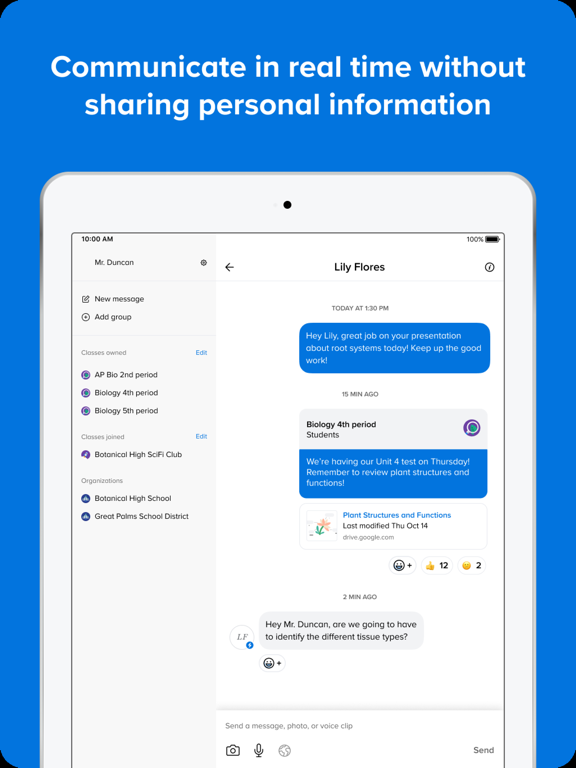
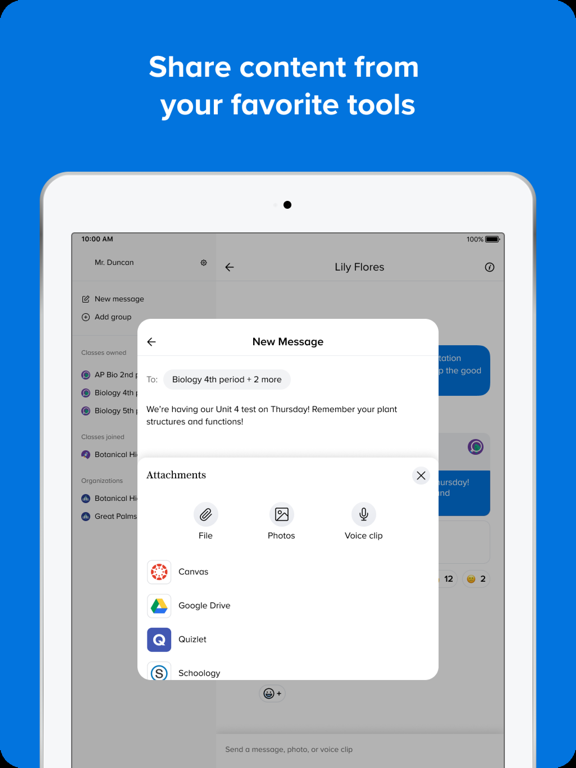
- Remind is a communication platform that helps every student succeed by providing real-time messaging, file sharing, and translation capabilities.
- Best for
-
- students
- parents
- educators
- At a glance
-
- Free to download
Categories and search queries
Official categories
- Education
- Social Networking
Apoku categories
Key functions
| Function | Availability | Access | Scope | Evidence |
|---|---|---|---|---|
| Free app | Yes | Free | Context-specific | Store published |
Screens
App Store
10 store screenshots


Pricing & paywalls
App Store
- Free to download
Ratings & reviews
App Store
-
5/5The act of Remind and now you know… By Naomi illustrated by Naomi
It good for children and it makes them remember when their teacher text them or send them something on Remind because Remind kind of remind somebody when they’re supposed to get a text message from like their teacher and their parent or them that have a phone can just go on it and scroll and see if they see a teacher and then they go and look at what they’re supposed to do and that’s why I love Remind also because my teacher sees a lot and if my mom didn’t have her mind, I would not know what to do cause well my mom she forgets stuff a lot, so Remind is good for me and my mom bye and that’s why I love my remind I also tell you when your teacher said something because your teacher in class might like I’m gonna send something off remind see this so that you can see this too and it might be like a dress up thing you like something for what y’all doing for like you never know and that’s why mine is good because I remind you of something when you don’t know when it’s coming and then your teacher can just type it or say it like I am doing on the micro other than that, she can do a lot teacher. She can do a lot because she can make sure you see it and you can text her right back and like OK I my child saw it so that’s why Remind is called Remind because it’s supposed to remind you. Well that’s what I I wonder what you think in your opinion, but that’s why I like remind
z.kallye · 29 Sep 2026
-
5/5Awesome for texting but lacks features for educators
Being able to text people in a class or small groups is amazing and very helpful. However finding individual texts is very difficult to do...there’s no way to sort or organize msgs and if you receive images or attachments from members (students) they are also extremely difficult to find after several threads. You’d have to download or copy the attached picture right away because if you miss it or if you don’t do it immediately then you might as well forget it. The new features to attach files from different platforms is amazing but if you can’t receive msgs in a way that’s easy to organize, you might as well stick to email for more classroom related tasks like assignments and schoolwork communication. If it’s being presented as a tool for constant communication in an educational context it would be most helpful to sort msgs or find attachments somehow in a way that’s efficient and organized. It’s also difficult to find contacts when parents and students are not separated or filed easily, especially using it in the primary grades where the main contact or only contact is with a parent (you still need to know who’s parent they are) and adding that to the “notes” is not the best option.
World23mn · 29 Sep 2026
-
2/5Not Pleased
So, I’d like the ability to remove a class owner. We have teachers that come and go. Also, when we reopened, we got put in new classrooms, so I need to remove teachers from old classrooms. Or be able to remove a teacher that got let go from our school. One of my former teachers in my old room, deleted that classroom. I am still very upset about that. Just because you’re a class owner, should not mean that any class owner can delete a whole class. I lost all my past conversations from parents that I had yet to put into the Family Contact Logs. Can there be a way to make a Lead Class Owner type of feature so that only the Lead Class Owner can delete a class? Or make it more clear how a teacher can remove themselves from a class or take that class off their account without them accidentally deleting the whole thing for everyone?? I have 5 teachers in my current class. When they send parents updates, I don’t get to see those on my personal account. Why?? I’d like to be in the loop of what is happening at school when I have to be at home “on-call”. If I could see what the other teachers send the parents, I could help keep up with the Family Contact Logs from home. I wish I could send multiple photos at the same time in one message, not blow up the conversation with 4 or more individual photos of the child. If we had the ability to send videos on Remind as well, that would be amazing!! If I could add a parent to an already existing message thread, that would be great too.
Mad Mia 😡😤 · 29 Sep 2026
-
5/5A great teacher-to-student ap and vice versa
When I returned to teaching in the fall of 2018, I knew some teachers were using Remind but I did not see what the big deal was. Mr. Covid has made it very clear to me what the big deal with Remind is. Remind gives a teacher the convenient, easy, and quick way to communicate with his/her students, either individually or as a class. Remind also gives each student the same option to communicate with his/her teacher. If a student has a problem or issue that s/he does not want to share in front of the entire class, Remind is the perfect vehicle for that student-teacher communication, especially if the teacher has his/her phone out and available while teaching - as I now do. Why not just use the school's email system? Simply because many students now do not check their emails frequently. They use phone aps to send and receive messages. I know now that Remind is a terrific phone ap for useful and needed teacher-student conversations. I am now a true believer in the power of Remind and will be making extensive use of this ap in the fall when my school district returns to in-person instruction. I strongly recommend all other teachers do likewise.
LeesburgMichael · 29 Sep 2026
-
3/5Some inconveniences
It’s fine to receive basic reminders. We use for school admin to parent or teacher to parent and Vice versa communication. The free version has very low character limit (140) so it’s hard to fit even basic info-so then it’s a reminder and see attachment. Which you can only attach one picture or file. So that means sending several messages which leads to over notifications, which then parents are bothered. (There are plans available for higher character around 500 is the one my school finally switched to. This is very helpful. Idk the cost on the administration side, but I appreciate it both as a teacher and parent.) On the parent side if you have receive notifications turned on then it’s really like two notifications because you get the notification and view it. But then you still have to open the app and view in the app for it to be marked read, otherwise it still looks like you have a new message. Also if several attachments were sent in a row you have to open each one separately. So it’s small inconvenience but adds up. I do like how you can individual message within groups so it’s a way for parents to connect without sharing numbers. And you can individual connect with a teacher. But each teacher had to make their own group. Overall it functions for its basic purpose to send a brief reminder to a group of people who have signed up-but that’s the key-very basic.
frugalfotoMama · 29 Sep 2026
Privacy & accessibility
App Store
Privacy
- Data Linked to You — App Functionality — Contact Info — Email Address Developer declared
- Data Linked to You — App Functionality — Contact Info — Name Developer declared
- Data Linked to You — App Functionality — Contact Info — Phone Number Developer declared
- Data Linked to You — App Functionality — Diagnostics — Crash Data Developer declared
- Data Linked to You — App Functionality — Diagnostics — Other Diagnostic Data Developer declared
- Data Linked to You — App Functionality — Diagnostics — Performance Data Developer declared
- Data Linked to You — App Functionality — Identifiers — Device ID Developer declared
- Data Linked to You — App Functionality — Identifiers — User ID Developer declared
- Data Linked to You — App Functionality — Other Data — Other Data Types Developer declared
- Data Linked to You — App Functionality — User Content — Other User Content Developer declared
- Data Linked to You — Other Purposes — Search History Developer declared
- Data Linked to You — Other Purposes — Usage Data — Other Usage Data Developer declared
- Data Linked to You — Other Purposes — Usage Data — Product Interaction Developer declared
- Data Linked to You — Contact Info Developer declared
- Data Linked to You — Diagnostics Developer declared
- Data Linked to You — Identifiers Developer declared
- Data Linked to You — Other Data Developer declared
- Data Linked to You — Search History Developer declared
- Data Linked to You — Usage Data Developer declared
- Data Linked to You — User Content Developer declared
Accessibility
No accessibility labels collected yet.
Versions
App Store
-
14.25
We're hard at work on new features and updates to improve speed and performance. To make sure you always have the latest version of the app, just go to Settings and turn on automatic updates.
-
14.25.1
We're hard at work on new features and updates to improve speed and performance. To make sure you always have the latest version of the app, just go to Settings and turn on automatic updates.
-
14.25.2
We're hard at work on new features and updates to improve speed and performance. To make sure you always have the latest version of the app, just go to Settings and turn on automatic updates.
-
15.0
We're hard at work on new features and updates to improve speed and performance. To make sure you always have the latest version of the app, just go to Settings and turn on automatic updates.
-
15.0.1
We're hard at work on new features and updates to improve speed and performance. To make sure you always have the latest version of the app, just go to Settings and turn on automatic updates.
-
15.0.2
We're hard at work on new features and updates to improve speed and performance. To make sure you always have the latest version of the app, just go to Settings and turn on automatic updates.
-
15.0.3
We're hard at work on new features and updates to improve speed and performance. To make sure you always have the latest version of the app, just go to Settings and turn on automatic updates.
-
15.0.4
We're hard at work on new features and updates to improve speed and performance. To make sure you always have the latest version of the app, just go to Settings and turn on automatic updates.
-
15.0.5
We're hard at work on new features and updates to improve speed and performance. To make sure you always have the latest version of the app, just go to Settings and turn on automatic updates.
-
15.0.6
We're hard at work on new features and updates to improve speed and performance. To make sure you always have the latest version of the app, just go to Settings and turn on automatic updates.
-
15.0.7
We're hard at work on new features and updates to improve speed and performance. To make sure you always have the latest version of the app, just go to Settings and turn on automatic updates.
-
15.1
We're hard at work on new features and updates to improve speed and performance. To make sure you always have the latest version of the app, just go to Settings and turn on automatic updates.
-
15.10
· 6 Apr 2026
We're hard at work on new features and updates to improve speed and performance. To make sure you always have the latest version of the app, just go to Settings and turn on automatic updates.
-
15.1.2
We're hard at work on new features and updates to improve speed and performance. To make sure you always have the latest version of the app, just go to Settings and turn on automatic updates.
-
15.1.3
We're hard at work on new features and updates to improve speed and performance. To make sure you always have the latest version of the app, just go to Settings and turn on automatic updates.
-
15.1.4
We're hard at work on new features and updates to improve speed and performance. To make sure you always have the latest version of the app, just go to Settings and turn on automatic updates.
-
15.1.6
We're hard at work on new features and updates to improve speed and performance. To make sure you always have the latest version of the app, just go to Settings and turn on automatic updates.
-
15.2
We're hard at work on new features and updates to improve speed and performance. To make sure you always have the latest version of the app, just go to Settings and turn on automatic updates.
-
15.3
We're hard at work on new features and updates to improve speed and performance. To make sure you always have the latest version of the app, just go to Settings and turn on automatic updates.
-
15.4
We're hard at work on new features and updates to improve speed and performance. To make sure you always have the latest version of the app, just go to Settings and turn on automatic updates.
-
15.5
We're hard at work on new features and updates to improve speed and performance. To make sure you always have the latest version of the app, just go to Settings and turn on automatic updates.
-
15.6
We're hard at work on new features and updates to improve speed and performance. To make sure you always have the latest version of the app, just go to Settings and turn on automatic updates.
-
15.7
We're hard at work on new features and updates to improve speed and performance. To make sure you always have the latest version of the app, just go to Settings and turn on automatic updates.
-
15.8
We're hard at work on new features and updates to improve speed and performance. To make sure you always have the latest version of the app, just go to Settings and turn on automatic updates.
-
15.9
We're hard at work on new features and updates to improve speed and performance. To make sure you always have the latest version of the app, just go to Settings and turn on automatic updates.
-
17.0
· 18 Aug 2026
We're hard at work on new features and updates to improve speed and performance. To make sure you always have the latest version of the app, just go to Settings and turn on automatic updates.
-
17.0.1
· 18 Sep 2026
We're hard at work on new features and updates to improve speed and performance. To make sure you always have the latest version of the app, just go to Settings and turn on automatic updates.
Alternatives
- 5-Star Students — Same category + similar ratings
- Minga — Same category + similar ratings
- Campus Student — Same category + similar ratings
- Schoology — Same category + similar ratings
- PowerSchool Mobile — Same category + similar ratings
- BigFuture School — Same category + similar ratings
Availability by market
- US
Data quality & evidence
- Page completeness
- Apoku summary published
- Last verified
- 29 Sep 2026
- Sources
- App Store